 Destinations
 Data sources
 AI insights
 About us
 Careers
 Security
 Customer reviews
 Contact us
 Affiliate program
 Solution partners
 Template gallery
 Looker Studio templates
 Power BI templates
 Excel templates
 Google Sheets templates
 Tableau templates
 Facebook Ads templates
 Google Ads templates
 Data fields & Metrics
 AI prompt library & Guides
 Product documentation
 API documentation
 Case studies
 Blog
Blog Data models
 Windsor vs Supermetrics
 Windsor vs Funnel.io
 Windsor vs Fivetran
 Windsor vs Rivery
 Windsor vs Portermetrics
 Windsor vs Coupler.io
Connect SurveyMonkey to ChatGPT
Automatically sync your SurveyMonkey survey, response, and collector data to ChatGPT using the Windsor.ai connector.
Chat with your SurveyMonkey data in plain language to compare collector performance, find where respondents drop off, and see which surveys need a refresh, without exporting a single CSV.
Forget CSVs. Stop copy/paste. Connect in minutes. No code required.
 Sign up with Google
 Free forever plan
No credit card needed
Free forever plan
No credit card needed










Get instant survey insights from your SurveyMonkey data in ChatGPT
Windsor MCP streams your surveys, collectors, and responses directly into ChatGPT, so you can go from a question to an answer without exporting anything. A few ways teams use it:

Find where respondents abandon your survey
Ask ChatGPT to cross-reference page paths and response status to see which survey page respondents most often stop on before finishing.

Compare distribution-channel performance
Break down completed versus partial responses by collector to see whether email invitations, weblinks, or embedded collectors actually drive better completion.

Audit how long surveys take to complete
Correlate total response time against how many required questions a survey has, to flag surveys that are likely too long for respondents.

Segment responses with custom variables
Pull the custom variables passed through your collector links to group completion rates and response time by customer segment.

Track survey health across your workspace
Spot surveys that haven’t been modified in months but still have an active collector attached, so a stale feedback program doesn’t keep quietly collecting responses.
Using Windsor.ai to connect data from SurveyMonkey to ChatGPT
Shipping SurveyMonkey data into ChatGPT usually means manual exports, data cleanup, or costly survey-analytics add-ons, especially when cross-referencing page paths to see where respondents actually drop off. Windsor.ai removes that friction with an MCP connector that automatically collects, structures, and streams your SurveyMonkey data directly into ChatGPT.
Connect in minutes and start asking natural-language questions about drop-off, collector performance, and completion time.
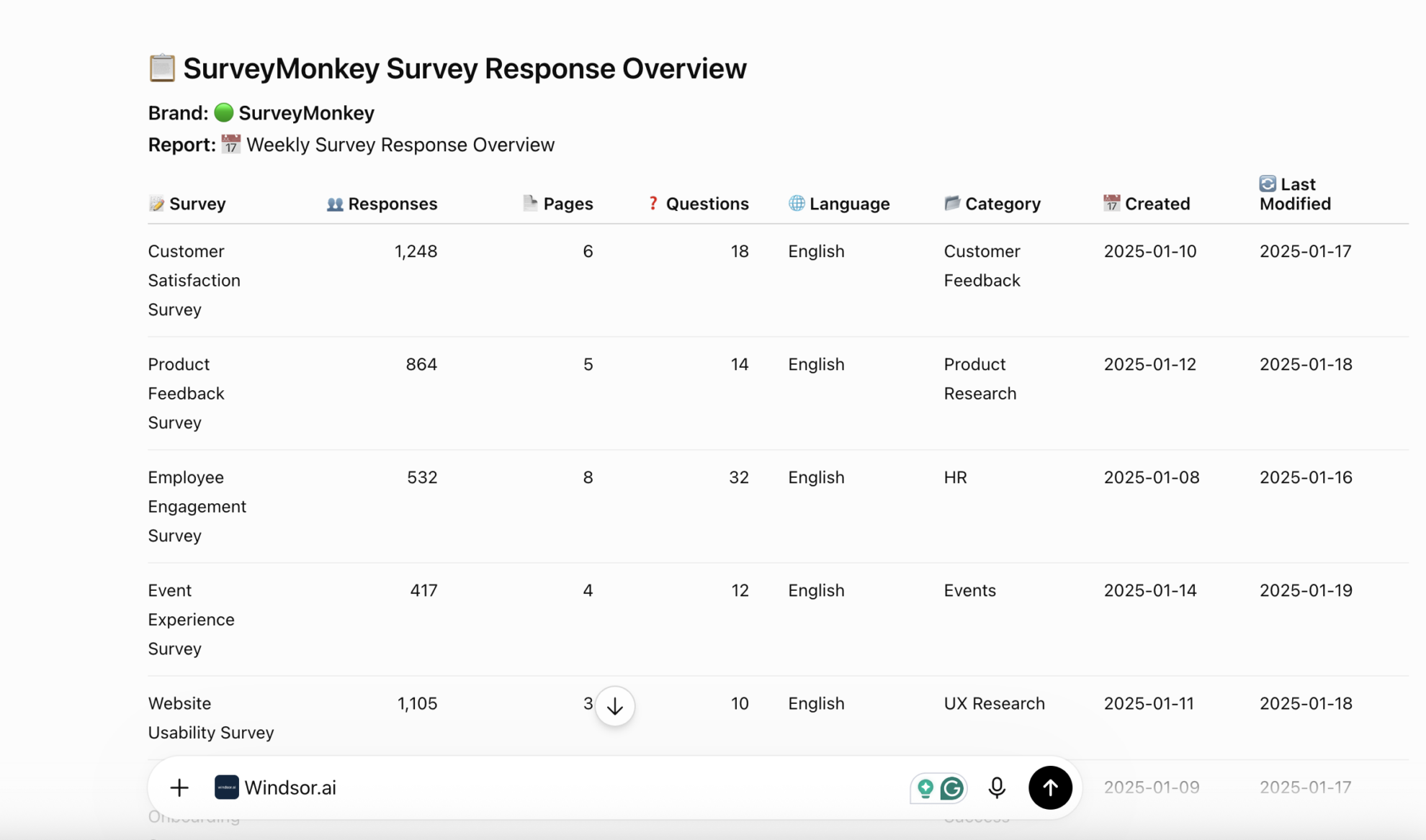














How to connect SurveyMonkey to ChatGPT with Windsor.ai
Follow the step-by-step guide to integrate your SurveyMonkey data into ChatGPT with the Windsor.ai connector.
Connect SurveyMonkey in the Windsor.ai dashboard
In your Windsor.ai dashboard, choose SurveyMonkey as a data source, select the account, and grant access.

Install the Windsor.ai connector
Log in to your ChatGPT account and open this Windsor.ai connector page.
Click Connect, then authorize access.

Query your SurveyMonkey data in ChatGPT
Open a new chat and start asking questions about your connected SurveyMonkey data using natural language.
Make sure that the Windsor.ai connector is enabled (click the + sign → More → Windsor.ai).
FAQs
What SurveyMonkey data can I analyze in ChatGPT?
Windsor.ai gives ChatGPT access to all 97 SurveyMonkey fields (8 metrics, 89 dimensions), organized into groups such as:
- Surveys and structure (42 fields): title, category, response count, question count, page count, question family, subtype, required.
- Collectors (27 fields): collector type, status, response limit, close date, redirect URL, password enabled.
- Responses and respondents (23 fields): response status, total time, collection mode, logic path, page path, email address, IP address.
- Universal fields (5 fields): data source, data fetched at, and similar metadata fields Windsor adds to every connector.
Can ChatGPT tell me which survey page is causing the most drop-off?
Yes. Windsor streams each response’s page path alongside its response status, so ChatGPT can see exactly which page a partial response stopped on and compare that against how many questions each page has.
Can ChatGPT compare how different collectors perform?
Yes. Every response carries a collector ID and response status, so ChatGPT can group completed versus partial responses by collector ID and collector type (email invitation, weblink, and so on) to show which distribution method actually converts.
Can ChatGPT flag surveys that are going stale but still collecting responses?
Yes. Surveys carry a date-modified field, and collectors carry their own status. ChatGPT can find surveys that haven’t been touched in months but still have an open collector attached, so a stale program doesn’t keep quietly collecting responses.
What prompts can I use to analyze SurveyMonkey data in ChatGPT?
-
Which survey pages contain open-ended questions, and do those pages show lower page-level completion than pages with only closed-question types?
-
Compare page count and question count across surveys grouped by language - are non-English surveys shorter on average?
-
Compare completion rates between responses that have a recipient ID (known invitees) and anonymous responses collected through a weblink collector.
-
List collectors with a close date in the next 30 days that still have a response limit far above their current response count.
How much does it cost to integrate SurveyMonkey into ChatGPT using Windsor.ai?
Windsor.ai is free to start, no credit card required. Paid plans start at $19/month and scale by the number of sources and accounts. See the pricing page.
Do you have helpful links to get started with integrating SurveyMonkey and ChatGPT using Windsor.ai?
Yes, we have helpful resources to help you get started. You can explore our official documentation for seamless SurveyMonkey to ChatGPT integration with Windsor.ai:
Tired of manual SurveyMonkey data exports? Try Windsor.ai today to automate your reporting


