 Destinations
 Data sources
 AI insights
 About us
 Careers
 Security
 Customer reviews
 Contact us
 Affiliate program
 Solution partners
 Template gallery
 Looker Studio templates
 Power BI templates
 Excel templates
 Google Sheets templates
 Tableau templates
 Facebook Ads templates
 Google Ads templates
 Data fields & Metrics
 AI prompt library & Guides
 Product documentation
 API documentation
 Case studies
 Blog
 Data models
 Windsor vs Supermetrics
 Windsor vs Funnel.io
 Windsor vs Fivetran
 Windsor vs Rivery
 Windsor vs Portermetrics
 Windsor vs Coupler.io
Connect TikTok Shop to ChatGPT
Automatically sync your TikTok Shop data to ChatGPT using the Windsor.ai connector.
Increase GMV, protect your margins, and reduce profit leaks by analyzing your TikTok Shop data in ChatGPT. You can also ask ChatGPT to make changes to your TikTok Shop products.
Forget CSVs. Stop copy/paste. Connect data in minutes. No code required.
 Sign up with Google
 Free forever plan








Optimize product performance with TikTok Shop to ChatGPT integration
Use ChatGPT to instantly analyze your TikTok Shop data without building complex dashboards or interpreting metrics manually. Explore key use cases:

Find top-performing content formats
Ask ChatGPT to evaluate whether your Live sessions, short-form videos, or product cards are driving the highest Gross Merchandise Value (GMV). Double down on the content formats that actually convert viewers into buyers.

Measure promotion efficiency
Analyze the impact of platform-funded discounts versus seller-funded discounts on your total sales volume. This ensures you aren’t over-discounting products that would have sold at full price.

Audit shipping subsidy costs
Compare the original shipping fees against the actual amounts paid by buyers to calculate your total monthly shipping spend. ChatGPT can highlight how much your ‘Free Shipping’ or discounted delivery promotions are impacting your net profit margins.

Link ad spend to revenue
Blend your TikTok Shop revenue with Google Ads spend to see whether your search campaigns are driving sales on TikTok. Get a clear view of your total marketing ROI and shift budget toward the channels that generate real revenue.
Using Windsor.ai to connect data from TikTok Shop to ChatGPT
Connecting your TikTok Shop to ChatGPT often involves manual exports, data formatting, or expensive middleware. Windsor.ai’s connector automates the entire process by pulling, organizing, and delivering TikTok Shop data directly to ChatGPT.
Set up in minutes and start analysing your product performance, profitability, and operational efficiency using simple prompts.

Available actions
Update Product
Update the title, description or key product features of an existing TikTok Shop product, identified by product_id (field product_id of the Product table). Provide only the fields to change; at least one is required. description is HTML. key_product_features replaces the ENTIRE list (at most 5 items, 1,500 characters in total): pass every feature to keep. TikTok audits the edit before it is live: the current version stays live until the audit passes. Use update_price to change prices.
Update Price
Set the price shown on the product page for one or more SKUs of an active TikTok Shop product, identified by product_id and sku_id (fields product_id and product_sku_id of the Product table). All SKUs must belong to the product. The price is in the currency of the shop. The new prices are live immediately; TikTok rejects the change while the product is in a promotion. Reversible by calling update_price with the previous prices, which the result lists.
Activate Products
Activate up to 20 deactivated TikTok Shop products, identified by product_ids (field product_id of the Product table). TikTok audits each product (status Pending) before it is live again. Reversible via deactivate_products.
Deactivate Products
Deactivate up to 20 live TikTok Shop products, identified by product_ids (field product_id of the Product table), so that buyers cannot see or buy them. Reversible via activate_products, after which TikTok audits the products again.


How to connect TikTok Shop to ChatGPT data with Windsor.ai
Explore our video tutorial and a step-by-step guide to seamlessly integrate your data from any source into ChatGPT with the Windsor.ai connector.
Select your data source
Choose TikTok Shop as your data source and grant access to Windsor.ai.

Install the Windsor.ai plugin
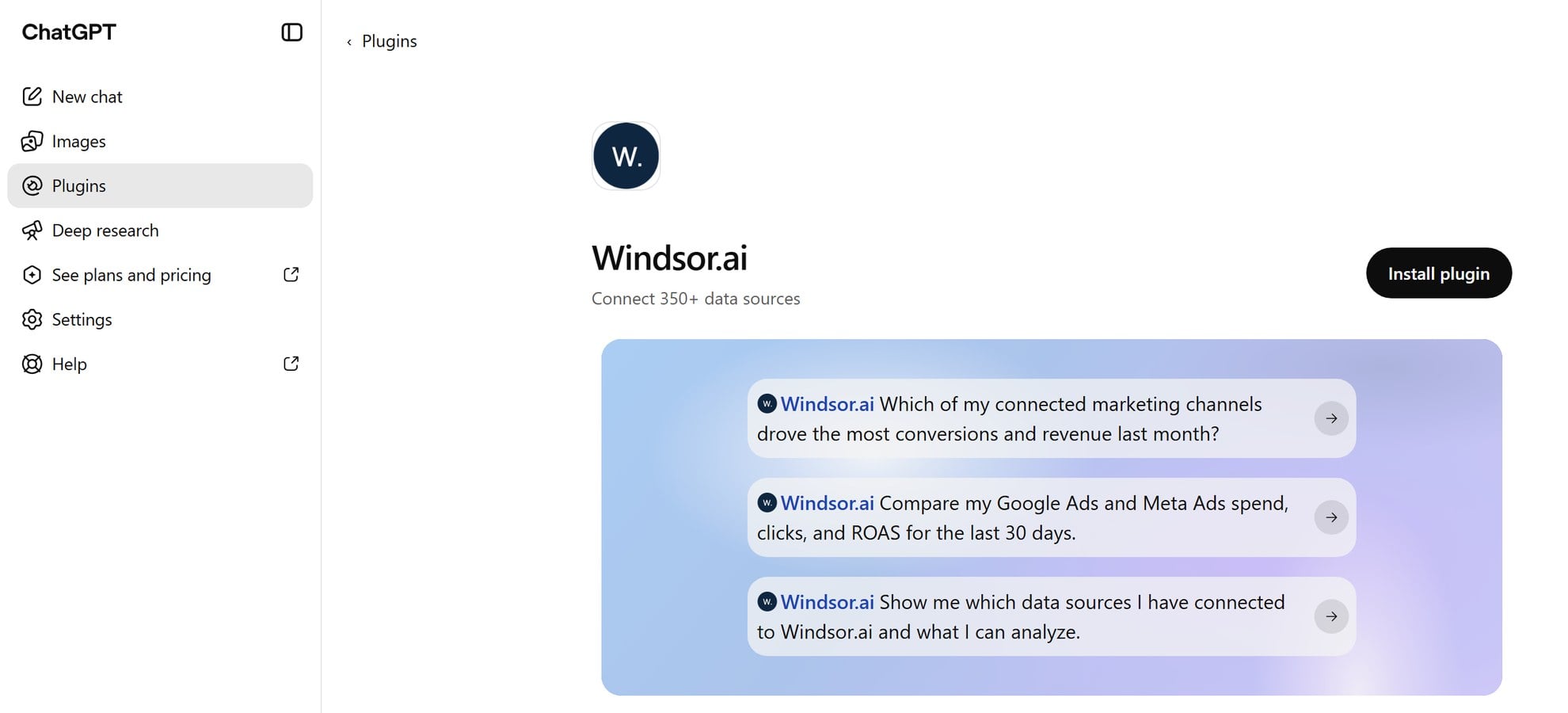
In ChatGPT, select Plugins in the sidebar and search for Windsor.ai, or open the Windsor.ai plugin page.
Select Install plugin, then sign in to Windsor.ai and authorize access.
Query your TikTok Shop data in ChatGPT
Open a new chat and start asking questions about your connected TikTok Shop data using natural language.
To make sure ChatGPT uses Windsor.ai, click the + sign and pick Windsor.ai, or type @Windsor.ai.
FAQs
What can I do with my Tiktok Shop data in ChatGPT?
Once you feed your TikTok Shop data into ChatGPT, you can:
- Product performance analysis: Rank your products by revenue, conversion rate, and return rate to identify top performers and low-converting items.
- Product updates: Ask ChatGPT to change SKU prices, rewrite a product title or switch products on or off in your shop through Windsor.ai’s write actions.
- Content attribution analysis: Distribute your revenue across Live streams, short-form videos, and product cards to identify which content format is your primary profit driver.
- Logistics and SLA monitoring: Proactively identify orders approaching their shipping deadlines to prevent late-delivery penalties and protect your seller rating.
- Promotion and discount auditing: Evaluate the impact of platform-funded vs. seller-funded discounts on your final margins to ensure your sales events are actually profitable.
- Fulfillment efficiency tracking: Monitor ‘in-transit’ durations and cancellation reasons to pinpoint bottlenecks in your warehouse operations or carrier performance.
- Cross-channel insights: Blend your shop’s organic sales data with TikTok Ads spend to calculate your total true ROAS.
Can I correlate sales spikes with specific Live sessions?
Yes. By matching ‘Order Create Time’ with your Live stream schedule, you can see which sessions generated the highest conversion rates.
How do I calculate my TikTok Shop profit leaks?
Compare your total GMV against platform fees, shipping costs, discounts, and return rates. ChatGPT can show where you’re losing margin across your orders.
What prompts can I use to analyze TikTok Shop data in ChatGPT?
Beyond simple questions about daily/weekly performance, you can use more advanced prompts in ChatGPT to uncover deeper insights from your TikTok Shop data. For example:
-
Analyze the GMV breakdowns for Live vs. Video vs. Product Card. Based on these trends, if I have an extra $1,000 in production budget, which content format demonstrates the highest 'Buyer-to-Visitor' efficiency for a reinvestment?
-
Check the reasons for order cancellations across my high-value products. Identify any recurring patterns and tell me if these cancellations are primarily being triggered by customers, my shop, or the platform’s automated system.
-
Cross-reference the original shipping costs against what customers actually paid at checkout. Calculate the total amount I've spent on shipping subsidies this month and explain how this has impacted my overall net profit margins
-
Compare the performance of [Shop Account A] and [Shop Account B]. Analyze the 'Shop Performance Average Product Page Visitors' vs. GMV for both to determine which store is more efficient at converting organic traffic and where the profit leaks are most significant.
How much does it cost to integrate TikTok Shop into ChatGPT using Windsor.ai?
Windsor.ai is free to start, no credit card required. Paid plans start at $19/month and scale by the number of sources and accounts. See the pricing page.
How long does it take to connect TikTok Shop to ChatGPT?
With Windsor.ai’s intuitive connector, the integration process takes just a few minutes. No technical expertise is required; connecting TikTok Shop to ChatGPT is simple, straightforward, and completely code-free.
Do you have helpful links to get started with integrating TikTok Shop and ChatGPT using Windsor.ai?
Yes, we have helpful resources to help you get started. You can explore our official documentation and tutorials for seamless TikTok Shop to ChatGPT integration with Windsor.ai:
Tired of manual TikTok Shop data exports? Try Windsor.ai today to automate your reporting


