 Destinations
 Data sources
 AI insights
 About us
 Careers
 Security
 Customer reviews
 Contact us
 Affiliate program
 Solution partners
 Template gallery
 Looker Studio templates
 Power BI templates
 Excel templates
 Google Sheets templates
 Tableau templates
 Facebook Ads templates
 Google Ads templates
 Data fields & Metrics
 AI prompt library & Guides
 Product documentation
 API documentation
 Case studies
 Blog
Blog Data models
 Windsor vs Supermetrics
 Windsor vs Funnel.io
 Windsor vs Fivetran
 Windsor vs Rivery
 Windsor vs Portermetrics
 Windsor vs Coupler.io
Connect Trello to ChatGPT
Automatically sync your Trello data to ChatGPT using the Windsor.ai connector.
Stream Trello data into ChatGPT to spot overdue tasks, uncover team bottlenecks, and get instant project updates.
Forget CSVs. Stop copy/paste. Connect data in 2 minutes. No code required.
 Sign up with Google
 Free forever plan
No credit card needed
Free forever plan
No credit card needed










Keep every project on track with Trello to ChatGPT integration
With Windsor MCP, your entire Trello workspace is instantly available in ChatGPT, giving your team fast, accurate answers about every project, task, and deadline. Explore key use cases:

Identify stalled tasks
ChatGPT analyzes card activity logs to surface tasks that haven’t moved or been updated in over a week. You get a prioritized list of stuck cards with the last known action, so you can intervene before delays impact downstream tasks.

Audit board activity
Using the action and activity log data, ChatGPT shows how card movements, comments, and updates have trended week over week for each team member. Spot disengagement early or recognize contributors who are quietly carrying a heavy load.

Monitor work across labels
ChatGPT counts the volume of cards per label, such as Bug, Feature, or Admin, across your boards and shows whether your team is spending more time on reactive work than planned delivery. This helps managers rebalance priorities and protect roadmap progress.
Using Windsor.ai to connect data from Trello to ChatGPT
Getting your Trello data into ChatGPT typically requires manual file exports, data prep, or costly tools. Windsor.ai removes that friction with a connector that automatically collects, organizes, and streams your Trello metrics directly into ChatGPT.
Connect in minutes and get AI-driven insights into your project progress, team workload, and delivery timelines, all through a simple conversation.














How to connect Trello to ChatGPT data with Windsor.ai
Explore our video tutorial and a step-by-step guide to seamlessly integrate your data from any source into ChatGPT with the Windsor.ai connector.
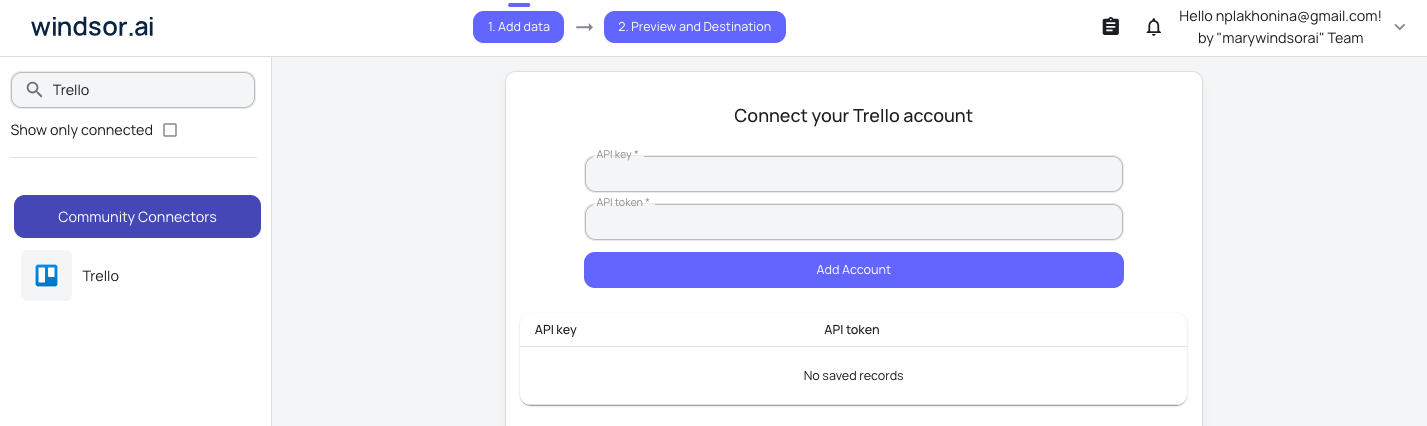
Select your data source
Choose Trello as your data source and grant access to Windsor.ai.
Install the Windsor.ai connector
Log in to your ChatGPT account and open this Windsor.ai connector page.
Click Connect, then authorize access.

Query your Trello data in ChatGPT
Open a new chat and start asking questions about your connected Trello data using natural language.
Make sure that the Windsor.ai connector is enabled (click the + sign → More → Windsor.ai.)
FAQs
How long does the setup take?
The entire setup takes just one minute. You connect Trello as a data source in your Windsor.ai account, enable the Windsor connector inside ChatGPT, and you’re ready to start asking questions about your project data.
What can I do with Trello data in ChatGPT?
Once your Trello workspace is connected via Windsor MCP, ChatGPT can analyze every layer of your project activity. Here’s what you can explore:
- Board overview: Get a high-level summary of what’s happening across all your boards: which projects are active, where progress has stalled, and how board activity has changed over time.
- Task and list analysis: Ask ChatGPT to show which cards are overdue, which ones have been sitting in the same stage too long, and how tasks are distributed across your workflow from backlog to done.
- Checklist progress: Understand how close each task actually is to completion by analyzing checklist items, useful for spotting tasks that look ‘in progress’ but are barely started.
- Team workload: See how work is distributed across team members, flag anyone who is overloaded, and get suggestions on where to redistribute tasks before deadlines are missed.
- Activity and timeline tracking: Review the full history of card movements and updates to understand how your team works over time, identify recurring bottlenecks, and predict whether a project will hit its deadline based on recent pace.
Can I connect multiple Trello boards or workspaces?
Yes. You can connect multiple boards and workspaces through Windsor.ai and query them all in a single ChatGPT conversation. This is particularly useful for managers overseeing several teams or projects at once.
Can ChatGPT generate status reports and meeting agendas from my Trello data?
You can ask ChatGPT to draft a weekly sync agenda based on your board activity, summarize what was completed last week, or write an update for stakeholders, all from the actual data in your Trello boards.
What prompts can I use when analyzing Trello data in ChatGPT?
Go beyond basic reporting and extract deeper insights from your Trello data with specific prompts. For example:
-
Based on the number of cards we moved to 'Done' over the last 3 weeks and the current number of cards remaining in the backlog, estimate whether we're on track to complete the current sprint by its target date. Identify the top 3 cards most likely to cause a delay.
-
Analyze how long cards typically stay in each list before moving to the next stage. Identify which stage has the longest average time and flag any individual cards that have been in that stage more than twice the average. Suggest what might be causing the slowdown.
-
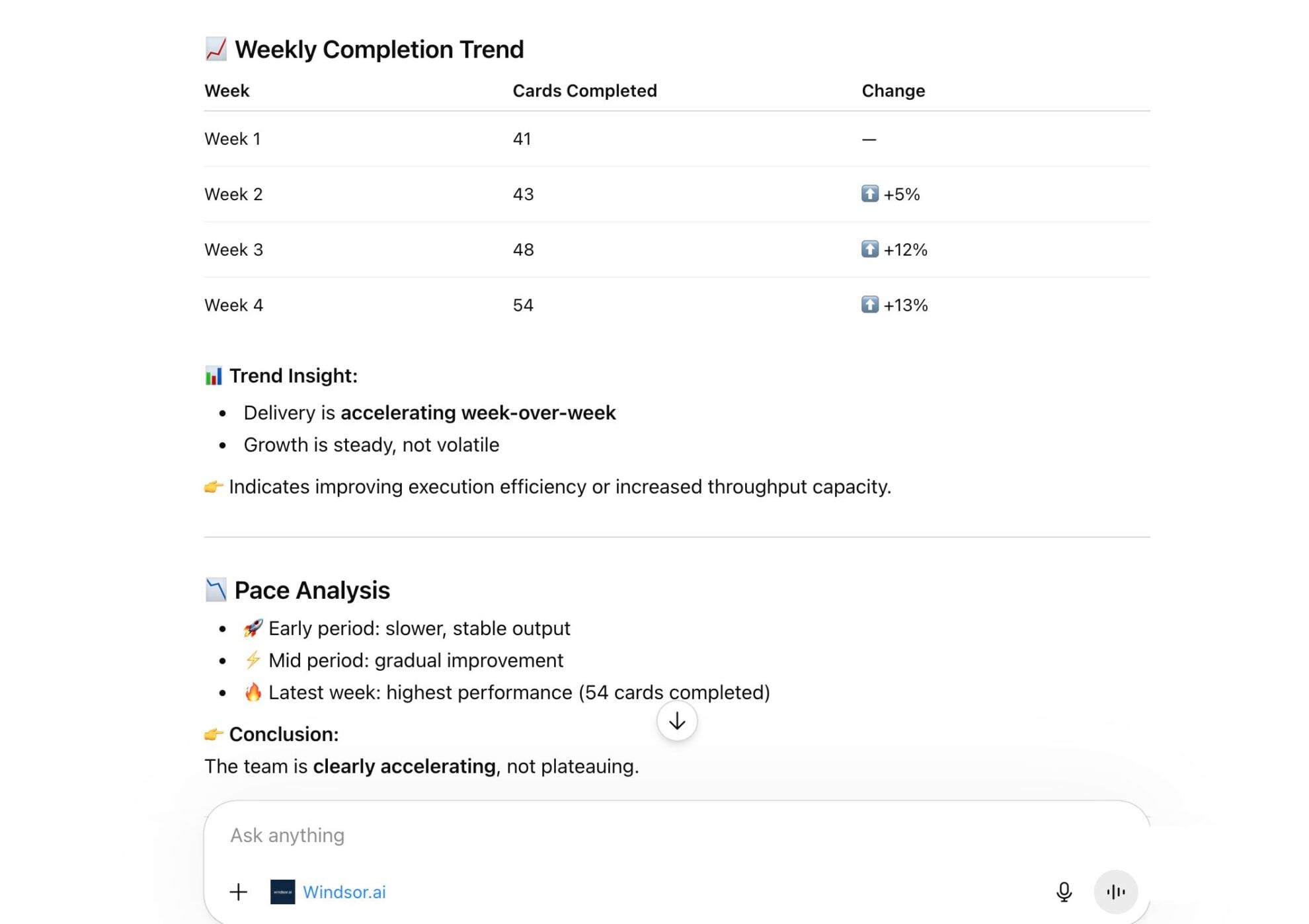
Look at the activity log across all boards for the past 30 days. Show me how many cards were completed per week, whether the pace is accelerating or slowing down, and which team members have been the most and least active based on card movements and updates. Highlight any weeks that look like outliers.
-
Review card names, descriptions, and comments across the 'Product' and 'Engineering' boards. Identify any cards that appear to reference the same task or feature but are not linked to each other. Flag potential duplicated efforts or untracked dependencies that could cause coordination issues.
Can I use ChatGPT to predict whether a project will hit its deadline?
Yes. By looking at the pace of cards moving to ‘Done’ compared to the remaining backlog, ChatGPT can estimate whether your team is on track and flag cards most at risk of causing a delay.
How much does it cost to integrate Trello into ChatGPT using Windsor.ai?
Windsor.ai’s pricing for ChatGPT data integration varies depending on the number of connected accounts and data sources. We offer absolutely transparent pricing plans for diversified business needs and budgets.
Do you have helpful links to get started with integrating Trello and ChatGPT using Windsor.ai?
Yes, we have helpful resources to help you get started. You can explore our official documentation and tutorials for seamless Trello to ChatGPT integration with Windsor.ai:
Tired of manual Trello data exports? Try Windsor.ai today to automate your reporting


