 Destinations
 Data sources
 AI insights
 About us
 Careers
 Security
 Customer reviews
 Contact us
 Affiliate program
 Solution partners
 Template gallery
 Looker Studio templates
 Power BI templates
 Excel templates
 Google Sheets templates
 Tableau templates
 Facebook Ads templates
 Google Ads templates
 Data fields & Metrics
 AI prompt library & Guides
 Product documentation
 API documentation
 Case studies
 Blog
Blog Data models
 Windsor vs Supermetrics
 Windsor vs Funnel.io
 Windsor vs Fivetran
 Windsor vs Rivery
 Windsor vs Portermetrics
 Windsor vs Coupler.io
Connect Twitter (X) Organic to ChatGPT
Automatically sync your X Organic data to ChatGPT using the Windsor.ai connector.
Stream your organic performance metrics into ChatGPT to analyze engagement patterns and create posts that drive more shares, replies, and reach.
Forget CSVs. Stop copy/paste. Connect data in minutes. No code required.
 Sign up with Google
 Free forever plan
No credit card needed
Free forever plan
No credit card needed










Optimize your messaging with X Organic to ChatGPT integration
Connect your X Organic data to ChatGPT and start analyzing your social media performance using natural language. Explore key use cases:

Find your top posts
Ask ChatGPT to scan your most-shared posts from the last six months to find the common themes. It can tell you if your audience prefers bold opinions, educational threads, or industry news, so you can replicate that success.

Find your golden hour for posting
Have the AI analyze your engagement patterns to pinpoint the exact days and times your specific followers are most active. This ensures your most important announcements don’t get buried in a quiet timeline.

Audit your link-click quality
Compare your total reach against the number of people actually clicking your links. ChatGPT can help you rewrite your call-to-action hooks to ensure more people leave X to visit your website.

Compare thread vs. single post
ChatGPT can determine if long-form threads or short, punchy updates get more traction for your brand. You can then stop wasting time on formats that your audience isn’t engaging with.
Using Windsor.ai to connect data from Twitter Organic to ChatGPT
Skip the manual exports and data cleanup. Windsor.ai’s connector automates the flow of your X Organic metrics directly into ChatGPT.
Connect your account in minutes to get instant, AI-driven insights into your engagement trends, content performance, and audience growth.
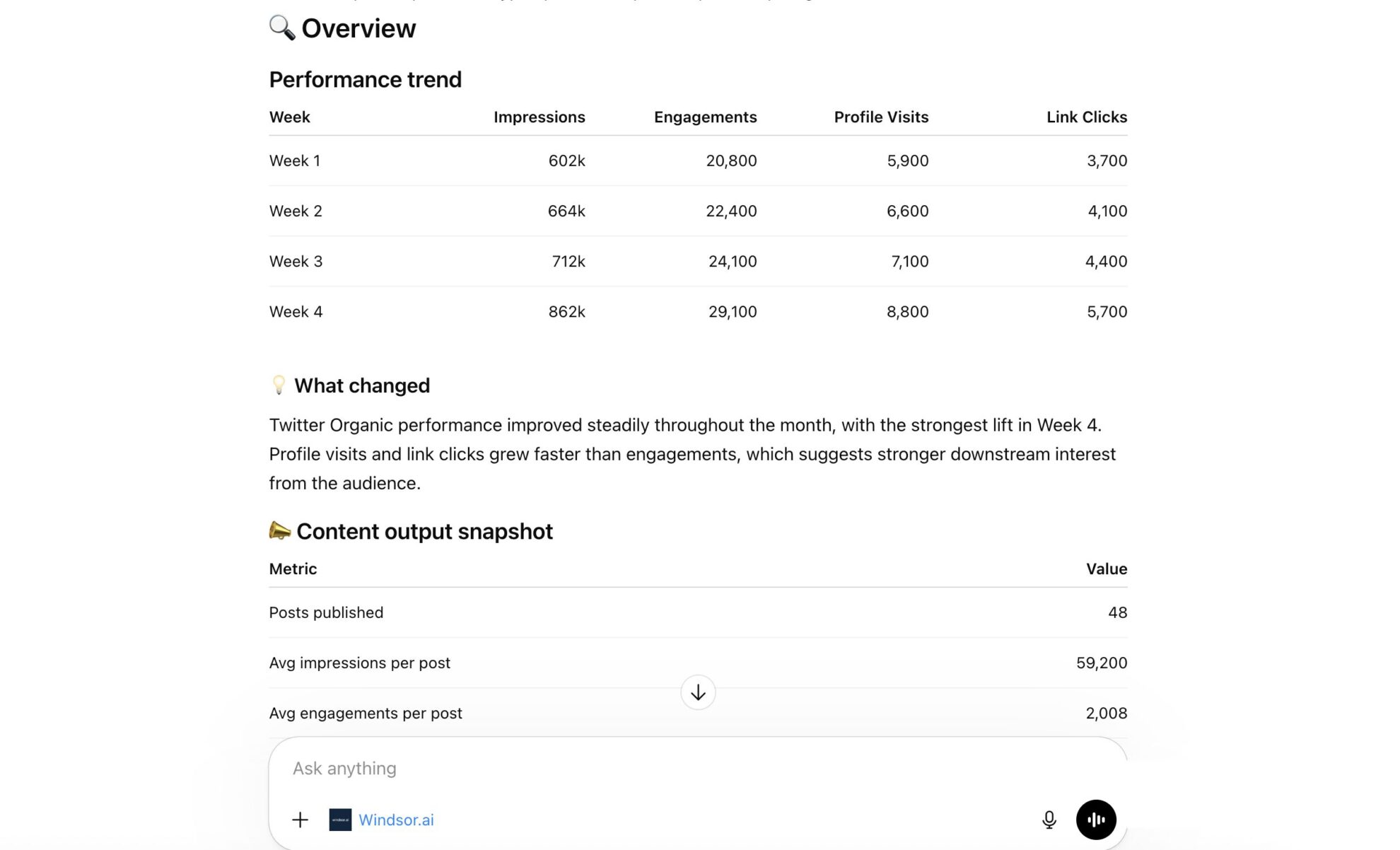














How to connect X Organic to ChatGPT data with Windsor.ai
Explore our video tutorial and a step-by-step guide to seamlessly integrate your data from any source into ChatGPT with the Windsor.ai connector.
Select your data source
Choose Twitter Organic as your data source and grant access to Windsor.ai.

Install the Windsor.ai connector
Log in to your ChatGPT account and open this Windsor.ai connector page.
Click Connect, then authorize access.

Query your Twitter Organic data in ChatGPT
Open a new chat and start asking questions about your connected Twitter Organic data using natural language.
Make sure that the Windsor.ai connector is enabled (click the + sign → More → Windsor.ai.)
FAQs
What can I do with Twitter Organic data in ChatGPT?
Once X Organic data is in ChatGPT, you can:
- Summarize top content: Ask ChatGPT to summarize the text of your top-performing tweets to find common themes, keywords, or tone of voice.
- Audit engagement metrics: Break down your engagement by looking at reply counts and quote tweets to see how effectively you are sparking conversations.
- Optimize posting times: Use historical data to find which days of the week or times of day consistently generate the highest reach for your account.
- Evaluate video resonance: If you share video content, analyze quartile video views (25%, 50%, 75%, 100%) to understand how viewer engagement drops off across your content.
- Measure growth trends: Compare your organic reach and interaction levels over different months to evaluate the long-term health of your X presence.
Does this include data from Twitter Ads?
No, this specific connector is for Organic data (unpaid tweets); however, Windsor.ai offers a separate connector for Twitter Ads if you need to analyze paid performance.
How often does the data refresh in ChatGPT?
Each time you query ChatGPT, Windsor.ai fetches the latest available data from the X Organic API, ensuring your insights reflect your most recent tweet performance.
What prompts can I use to analyze Twitter Organic data in ChatGPT?
Use more specific prompts in ChatGPT to uncover deeper insights from your Twitter Organic data. For example:
-
For all tweets containing video, analyze the playback quartiles. At what percentage (25%, 50%, or 75%) are users dropping off most frequently? Suggest how I can change my video hooks to improve completion rates.
-
Scan my top 20 most-retweeted tweets of all time. Identify common themes, keywords, or tones of voice they share. Create a 'viral template' based on these patterns that I can use for my next major announcement.
-
Examine the tweets with the highest number of replies. Based on the tweet text and the volume of engagement, determine if the sentiment was generally inquisitive, supportive, or critical, and suggest a strategy for better community management
-
Track the 'impression count' of my top 5 tweets from last month over their first 48 hours vs. their first 7 days. How long does my average tweet stay 'active' before engagement drops off, and when should I consider reposting high-value content?
How much does it cost to integrate Twitter Organic into ChatGPT using Windsor.ai?
Windsor.ai is free to start, no credit card required. Paid plans start at $19/month and scale by the number of sources and accounts. See the pricing page.
How long does it take to connect Twitter Organic to ChatGPT?
With Windsor.ai’s intuitive connector, the integration process takes just a few minutes. No technical expertise is required; connecting Twitter Organic to ChatGPT is simple, straightforward, and completely code-free.
Do you have helpful links to get started with integrating Twitter Organic and ChatGPT using Windsor.ai?
Yes, we have helpful resources to help you get started. You can explore our official documentation and tutorials for seamless Twitter Organic to ChatGPT integration with Windsor.ai:
Tired of manual Twitter Organic data exports? Try Windsor.ai today to automate your reporting


