 Destinations
 Data sources
 AI insights
 About us
 Careers
 Security
 Customer reviews
 Contact us
 Affiliate program
 Solution partners
 Template gallery
 Looker Studio templates
 Power BI templates
 Excel templates
 Google Sheets templates
 Tableau templates
 Facebook Ads templates
 Google Ads templates
 Data fields & Metrics
 AI prompt library & Guides
 Product documentation
 API documentation
 Case studies
 Blog
Blog Data models
 Windsor vs Supermetrics
 Windsor vs Funnel.io
 Windsor vs Fivetran
 Windsor vs Rivery
 Windsor vs Portermetrics
 Windsor vs Coupler.io
Connect Visma e-conomic to ChatGPT
Automatically sync your Visma e-conomic accounting data to ChatGPT using the Windsor.ai connector.
Ask ChatGPT plain-English questions about outstanding invoices, customer balances, and account activity, and get instant AI-driven insights without exporting reports from Visma e-conomic.
Forget CSVs. Stop copy/paste. Connect in minutes. No code required.
 Sign up with Google
 Free forever plan
No credit card needed
Free forever plan
No credit card needed










Turn Visma e-conomic bookkeeping into cash flow answers in ChatGPT
Windsor MCP streams your live Visma e-conomic accounting data into ChatGPT, so you skip the manual exports and go straight to what needs your attention today. Explore key use cases:

Chase down overdue invoices
Ask ChatGPT to compare Due Date against Sent Status across your booked invoices, then rank overdue customers by Remainder so your next collections call goes to the right account first.

Flag customers near their credit limit
Query Due Amount against Credit Limit by customer to catch accounts approaching their ceiling before you extend more payment terms.

Reconcile VAT before you file
Net VAT Amount collected on booked invoices against Amount posted to VAT-related accounts, so tax filing starts from numbers that are already reconciled.

Blend with your other business data
Combine Visma e-conomic with GA4 or Shopify in Windsor.ai to compare marketing spend against realized revenue and outstanding receivables in one chat.
Using Windsor.ai to connect data from Visma e-conomic to ChatGPT
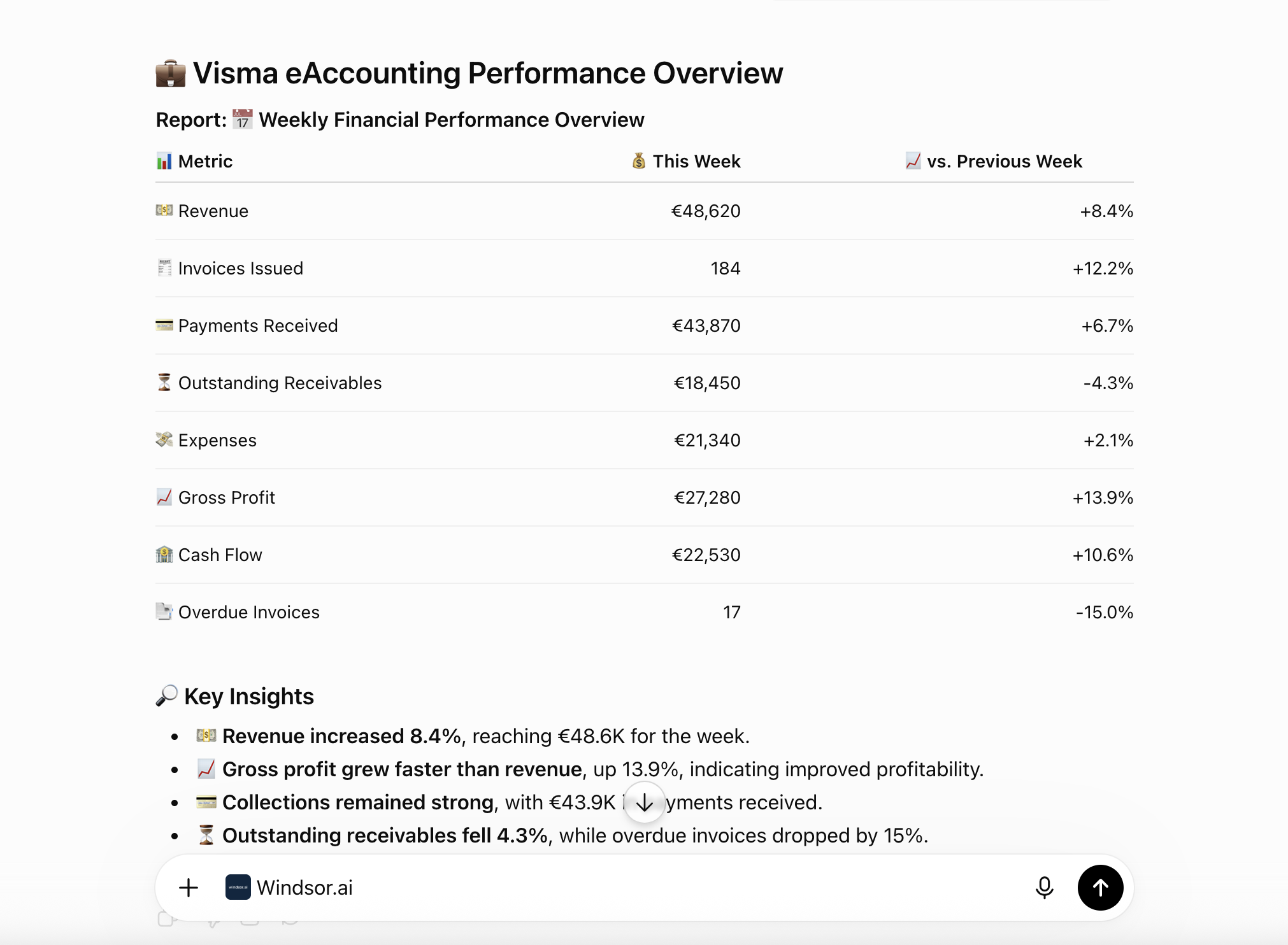
Bringing Visma e-conomic data into ChatGPT usually means manual exports, data cleanup, or costly accounting add-ons, especially when cross-referencing due dates and balances to chase overdue invoices. Windsor.ai removes that friction with an MCP connector that automatically collects, structures, and streams your Visma e-conomic data directly into ChatGPT.
Connect in minutes and start asking natural-language questions about overdue invoices, customer balances, and VAT.














How to connect Visma e-conomic to ChatGPT with Windsor.ai
Explore our video tutorial and a step-by-step guide to integrate your Visma e-conomic data into ChatGPT with the Windsor.ai connector.
Connect Visma e-conomic in the Windsor.ai dashboard
Choose Visma e-conomic as your data source and grant access to Windsor.ai.

Install the Windsor.ai connector
Log in to your ChatGPT account and open this Windsor.ai connector page.
Click Connect, then authorize access.

Query your Visma e-conomic data in ChatGPT
Open a new chat and start asking questions about your connected Visma e-conomic data using natural language.
Make sure that the Windsor.ai connector is enabled (click the + sign → More → Windsor.ai).
FAQs
What Visma e-conomic data can I analyze in ChatGPT?
Windsor.ai gives ChatGPT access to all 170 Visma e-conomic fields, organized into groups such as:
- Invoices booked and paid: Gross Amount, Net Amount, Remainder, Due Date, Sent Status.
- Customers: Balance, Due Amount, Credit Limit, VAT Number, Country.
- Accounts: Account Type, Balance, Draft Balance, Contra Account.
- Accounting entries: Amount, Amount In Base Currency, Entry Type, Voucher Number.
- Products: Cost Price, Sales Price, Recommended Price, Minimum Stock.
Can ChatGPT compare how long invoices take to move from booked to paid?
Yes. Windsor.ai streams both Invoices Booked and Invoices Paid records with matching Booked Invoice Number and Date fields, so ChatGPT can calculate the average time between invoicing and payment, by customer or across your whole book.
Can ChatGPT analyze my product pricing and stock levels?
Yes. The connector includes Cost Price, Sales Price, Recommended Price, and Minimum Stock for every product, so ChatGPT can flag items priced below cost, spot pricing gaps, or check which products are close to running out.
Is my financial data secure when using ChatGPT?
Yes. Windsor.ai uses encrypted, authenticated connections and read-only permissions to bring your Visma e-conomic data into ChatGPT. Your data in Visma e-conomic remains unchanged and is only processed in response to your queries.
Can ChatGPT generate a profit and loss style summary from my accounts?
Yes. By grouping Accounting Entries and Account balances by Account Type, ChatGPT can summarize income and expense accounts for any date range and highlight where your margin is moving.
Does this integration support multiple currencies?
Yes. Currency and Amount In Base Currency are included on invoices and accounting entries, so ChatGPT can convert and compare activity across every currency you invoice or post entries in.
What prompts can I use to analyze Visma e-conomic data in ChatGPT?
Use more advanced prompts in ChatGPT to uncover deeper insights from your Visma e-conomic data. For example:
-
Compare average days between invoice date and payment date for my top 10 customers by revenue. Which ones consistently pay fastest?
-
List products where the gap between recommended price and sales price is more than 20%, alongside their cost price and current inventory.
-
Group accounting entries by account type for the last quarter and flag any account whose total posted amount is unusually high compared to prior quarters.
-
Show me invoices booked but not yet paid, broken out by currency, so I can see my outstanding receivables in each currency I invoice in.
How much does it cost to integrate Visma e-conomic into ChatGPT using Windsor.ai?
Windsor.ai is free to start, no credit card required. Paid plans start at $19/month and scale by the number of sources and accounts. See the pricing page.
Can I combine Visma e-conomic data with other channels in ChatGPT?
Yes. Windsor.ai supports 350+ data sources, so you can connect Visma e-conomic alongside GA4, Shopify, or your ad platforms to compare marketing spend against realized revenue and outstanding receivables.
Do you have helpful links to get started with integrating Visma e-conomic and ChatGPT using Windsor.ai?
Yes, we have helpful resources to help you get started. You can explore our official documentation for seamless Visma e-conomic to ChatGPT integration with Windsor.ai:
Tired of manual Visma e-conomic data exports? Try Windsor.ai today to automate your reporting


