 Destinations
 Data sources
 AI insights
 About us
 Careers
 Security
 Customer reviews
 Contact us
 Affiliate program
 Solution partners
 Template gallery
 Looker Studio templates
 Power BI templates
 Excel templates
 Google Sheets templates
 Tableau templates
 Facebook Ads templates
 Google Ads templates
 Data fields & Metrics
 AI prompt library & Guides
 Product documentation
 API documentation
 Case studies
 Blog
Blog Data models
 Windsor vs Supermetrics
 Windsor vs Funnel.io
 Windsor vs Fivetran
 Windsor vs Rivery
 Windsor vs Portermetrics
 Windsor vs Coupler.io
Audit WordPress content in ChatGPT with Windsor.ai
To audit WordPress content in ChatGPT, connect your site to Windsor.ai once and install the Windsor.ai plugin in ChatGPT. ChatGPT then reads your posts, pages, comments, categories and tags next to Search Console and GA4 data.
It can also fix what it finds: draft a post, rewrite an excerpt, rename a tag. New posts and pages arrive as drafts, so nothing goes live unless you ask.
On WordPress.com, or looking for a ChatGPT plugin for your dashboard? The step-by-step guide to connect WordPress to ChatGPT covers every route.
 Sign up with Google
 Free forever plan









Optimize your content with WordPress to ChatGPT integration
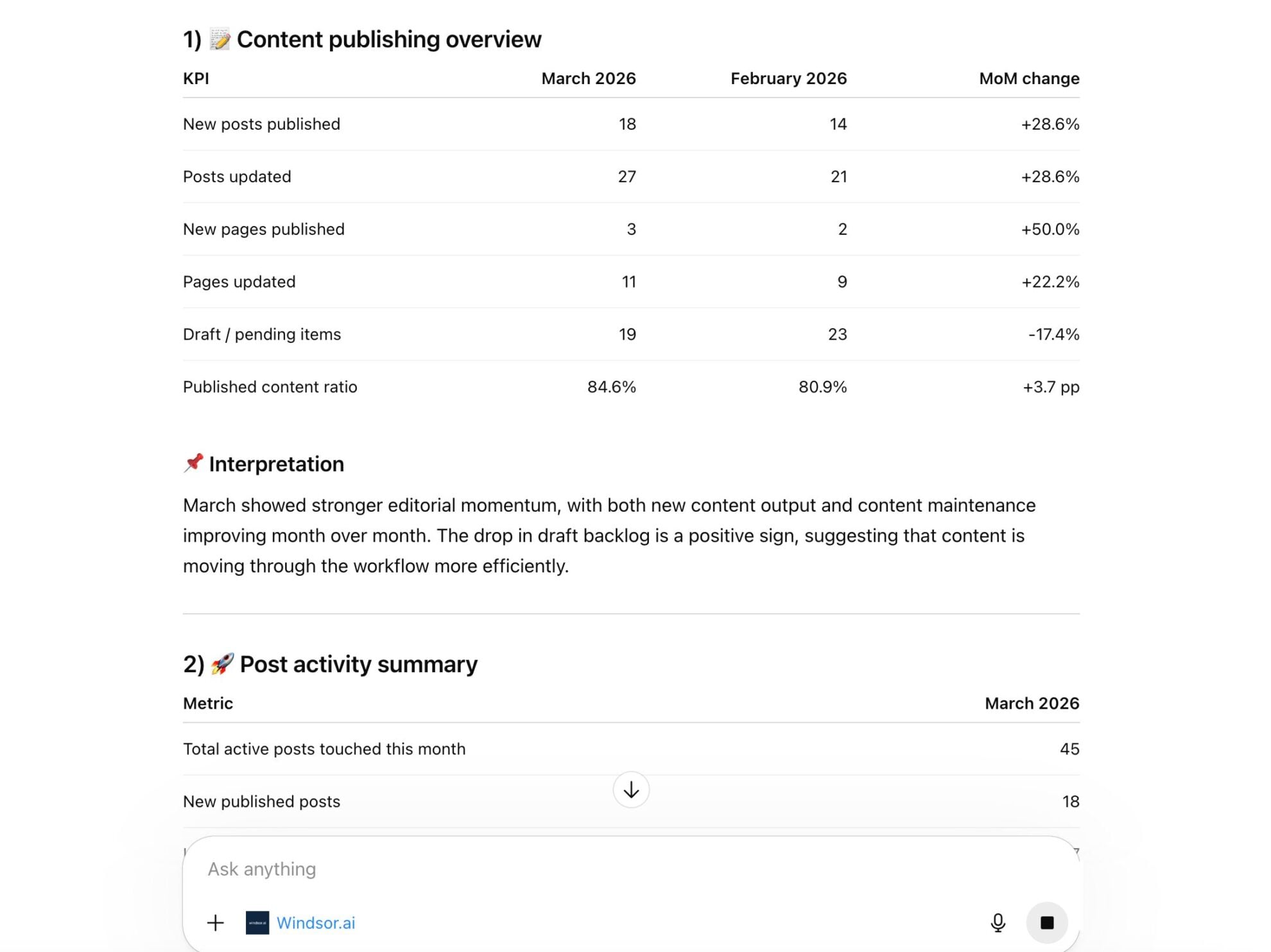
Bring your WordPress data into ChatGPT to eliminate manual analysis and instantly uncover what content drives traffic and engagement. Explore key use cases below:

Audit content freshness and decay
Prompt ChatGPT to find high-value posts that haven’t been updated in over six months by comparing publication and modification dates. This helps you prioritize which articles need a refresh to maintain their search engine rankings.

Generate missing metadata at scale
Scan your library for published pages that are missing excerpts or have duplicate titles. ChatGPT can then instantly draft SEO-friendly meta-descriptions for those specific pages to improve your click-through rates.

Analyze CTR by category
Combine WordPress data with Google Search Console via Windsor MCP to uncover which topics drive the most search demand. Use these insights to prioritize content updates and focus on categories with the highest growth potential.
Audit WordPress content next to Search Console and GA4
Windsor.ai connects 350+ sources, so one ChatGPT question can join your WordPress posts to their results: posts that lost Search Console clicks since their last update, pages with GA4 sessions but no internal links, or categories that bring sign-ups.
WordPress alone fits the free forever plan. WordPress with Search Console and GA4 is 3 sources, which starts at $19/month.
Available actions
Create Post Create a blog post on the connected WordPress site. Content is HTML or Gutenberg block markup and is stored as given. Defaults to a draft; pass status 'publish' to publish immediately, or status 'future' with a date to schedule. categories, tags, featured_media and author take numeric IDs, which the Categories, Tags, Media and Users tables provide. Editable afterwards via update_post.
Create a blog post on the connected WordPress site. Content is HTML or Gutenberg block markup and is stored as given. Defaults to a draft; pass status 'publish' to publish immediately, or status 'future' with a date to schedule. categories, tags, featured_media and author take numeric IDs, which the Categories, Tags, Media and Users tables provide. Editable afterwards via update_post.
Update Post Update an existing blog post on the connected WordPress site. post_id is the numeric ID from the Posts table. Only the fields provided are changed; everything else keeps its current value. Set status 'publish' to publish a draft, or 'draft' to unpublish. categories and tags replace the current terms rather than adding to them, and content, title and excerpt are replaced wholesale: send the complete new value, as text is never appended to what is already there. Changing the title, content or excerpt keeps the previous version as a revision in the Post Revisions table, which is the only way back from an accidental overwrite.
Update an existing blog post on the connected WordPress site. post_id is the numeric ID from the Posts table. Only the fields provided are changed; everything else keeps its current value. Set status 'publish' to publish a draft, or 'draft' to unpublish. categories and tags replace the current terms rather than adding to them, and content, title and excerpt are replaced wholesale: send the complete new value, as text is never appended to what is already there. Changing the title, content or excerpt keeps the previous version as a revision in the Post Revisions table, which is the only way back from an accidental overwrite.
Create Page Create a page on the connected WordPress site. Content is HTML or Gutenberg block markup and is stored as given. Defaults to a draft; pass status 'publish' to publish immediately, or status 'future' with a date to schedule. parent takes the ID of another page to nest this one under it, menu_order controls ordering among siblings, and template is a theme template file such as 'templates/full-width.php'. Editable afterwards via update_page.
Create a page on the connected WordPress site. Content is HTML or Gutenberg block markup and is stored as given. Defaults to a draft; pass status 'publish' to publish immediately, or status 'future' with a date to schedule. parent takes the ID of another page to nest this one under it, menu_order controls ordering among siblings, and template is a theme template file such as 'templates/full-width.php'. Editable afterwards via update_page.
Update Page Update an existing page on the connected WordPress site. page_id is the numeric ID from the Pages table. Only the fields provided are changed; everything else keeps its current value. Set status 'publish' to publish a draft, or 'draft' to unpublish. content, title and excerpt are replaced wholesale: send the complete new value, as text is never appended to what is already there. Changing the title, content or excerpt keeps the previous version as a revision in the Page Revisions table, which is the only way back from an accidental overwrite.
Update an existing page on the connected WordPress site. page_id is the numeric ID from the Pages table. Only the fields provided are changed; everything else keeps its current value. Set status 'publish' to publish a draft, or 'draft' to unpublish. content, title and excerpt are replaced wholesale: send the complete new value, as text is never appended to what is already there. Changing the title, content or excerpt keeps the previous version as a revision in the Page Revisions table, which is the only way back from an accidental overwrite.
Create Category Create a post category on the connected WordPress site. name is required; slug is derived from the name when omitted. parent takes another category's ID to nest this one under it. The new category's ID can then be passed to create_post or update_post.
Create a post category on the connected WordPress site. name is required; slug is derived from the name when omitted. parent takes another category's ID to nest this one under it. The new category's ID can then be passed to create_post or update_post.
Update Category Update an existing post category on the connected WordPress site. category_id is the numeric ID from the Categories table. Only the fields provided are changed. Renaming a category does not change its slug unless slug is passed too, so existing links keep working.
Update an existing post category on the connected WordPress site. category_id is the numeric ID from the Categories table. Only the fields provided are changed. Renaming a category does not change its slug unless slug is passed too, so existing links keep working.
Create Tag Create a post tag on the connected WordPress site. name is required; slug is derived from the name when omitted. Tags are flat, so unlike categories they cannot be nested. The new tag's ID can then be passed to create_post or update_post.
Create a post tag on the connected WordPress site. name is required; slug is derived from the name when omitted. Tags are flat, so unlike categories they cannot be nested. The new tag's ID can then be passed to create_post or update_post.
Update Tag Update an existing post tag on the connected WordPress site. tag_id is the numeric ID from the Tags table. Only the fields provided are changed. Renaming a tag does not change its slug unless slug is passed too, so existing links keep working.
Update an existing post tag on the connected WordPress site. tag_id is the numeric ID from the Tags table. Only the fields provided are changed. Renaming a tag does not change its slug unless slug is passed too, so existing links keep working.














Set up WordPress in ChatGPT with Windsor.ai
Three steps with screenshots below, plus a video of the Windsor.ai ChatGPT plugin. For every route, including the official WordPress.com plugin, see the full guide to connecting WordPress to ChatGPT.
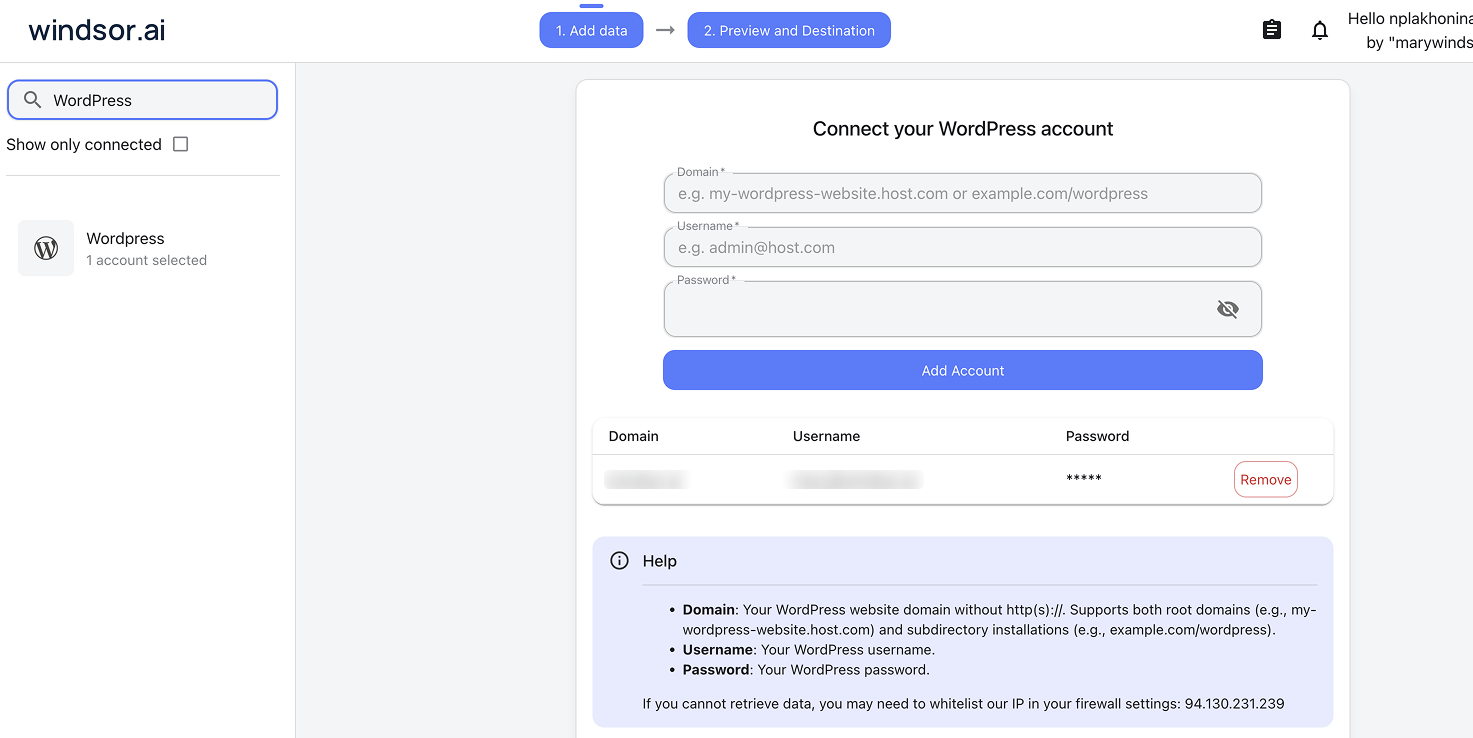
Select your data source
Choose WordPress as your data source and enter your site’s domain, WordPress username and an application password.
Install the Windsor.ai plugin
Log in to ChatGPT and open the Windsor.ai plugin, or click Plugins in the sidebar and search for Windsor.ai.
Click Install plugin, then sign in to Windsor.ai.

Query your WordPress data in ChatGPT
Open a new chat and start asking questions about your connected WordPress data using natural language.
Make sure that the Windsor.ai connector is enabled (click the + sign → More → Windsor.ai.)
FAQs
Should I use Windsor.ai or the WordPress.com plugin?
Use the WordPress.com plugin to manage a site hosted on WordPress.com: publishing, comments, media and settings. Use Windsor.ai to audit content on a self-hosted site next to Search Console, GA4 and other sources, and to write drafts, categories and tags back. The WordPress to ChatGPT setup guide covers each route.
Can ChatGPT publish to my WordPress site, or only read it?
Both. New posts and pages are created as drafts unless you explicitly ask to publish or schedule them, and an update only changes the fields you name. ChatGPT shows you the content before it writes, and the Available actions list above is pulled live from the Windsor.ai API, so it always reflects what is supported today.
How can I use ChatGPT to improve my site's SEO using WordPress data?
Ask ChatGPT to find posts that are missing excerpts or categories, or posts that lost Search Console clicks since their last update, then have it write the missing excerpts back into those posts. It can also suggest internal links by comparing the topics across your published posts.
Can I combine WordPress data with other sources like Google Analytics?
Yes. Connect GA4 and Search Console in Windsor.ai and ask ChatGPT to compare publishing dates with traffic, for example which types of post bring the most sessions in the week after they go live.
Can I use this to monitor multiple WordPress sites at once?
Yes. Connect several WordPress sites to Windsor.ai and compare publishing activity, content and engagement across them in the same ChatGPT chat.
Can ChatGPT help me organize my WordPress categories and tags?
Yes, and it can carry out the cleanup. ChatGPT can find duplicate and underused categories and tags, then create or rename them for you. Renaming keeps the slug unless you ask to change it, so existing links keep working.
Which WordPress data can ChatGPT read through Windsor.ai?
Windsor.ai reads 309 WordPress fields across posts, pages, comments, categories, tags, media, users and revisions, pulled through your site’s REST API. The WordPress field reference has the full list and the write actions documentation lists what ChatGPT can change.
What prompts can I use when analyzing WordPress data in ChatGPT?
These go further than a post count:
-
Compare our WordPress publishing dates with our GA4 sessions. Which types of content (for example how-to guides or lists) bring the most sessions in the 48 hours after publishing?
-
Show which categories each author writes in most and how those posts perform in Search Console. Who should own each core topic?
-
Compare our most-commented posts with our categories. Which topics get the most discussion, and which of those deserve a follow-up post?
How much does it cost to audit WordPress content in ChatGPT with Windsor.ai?
WordPress on its own fits Windsor.ai’s free forever plan, with no credit card. WordPress with Search Console and GA4 is 3 sources, which starts at $19/month; 7 sources start at $99/month. See the pricing page.
Tired of manual WordPress data exports? Try Windsor.ai today to automate your reporting


