 Destinations
 Data sources
 AI insights
 About us
 Careers
 Security
 Customer reviews
 Contact us
 Affiliate program
 Solution partners
 Template gallery
 Looker Studio templates
 Power BI templates
 Excel templates
 Google Sheets templates
 Tableau templates
 Facebook Ads templates
 Google Ads templates
 Data fields & Metrics
 AI prompt library & Guides
 Product documentation
 API documentation
 Case studies
 Blog
 Data models
 Windsor vs Supermetrics
 Windsor vs Funnel.io
 Windsor vs Fivetran
 Windsor vs Rivery
 Windsor vs Portermetrics
 Windsor vs Coupler.io
Connect YouTube to Antigravity
Connect your YouTube data to Antigravity with the Windsor.ai connector, and ask about your YouTube channel in plain language.
Ask for watch time by video, views by traffic source or subscribers gained per upload, built on your own Estimated Minutes Watched, Traffic Source and Subscribers Gained fields.
Forget CSVs. Stop copy/paste. Connect in minutes. No code required.
 Sign up with Google
 Free forever plan
No credit card needed










Get your YouTube data into Antigravity
YouTube is connected once in Windsor.ai, and these are the use cases the fields support:

Compare videos on watch time
Estimated Minutes Watched and Average View Percentage by Video title show which videos people keep watching.

See where views come from
Traffic Source shows how much comes from search, suggested videos and other places.

Follow subscriber growth
Subscribers Gained and Subscribers Lost per video show which uploads grow the channel.

Compare Shorts and long videos
Content Type splits views and watch time between Shorts and other videos.
Using Windsor.ai to connect data from YouTube to Antigravity
Without Windsor.ai, Antigravity answers about YouTube data come from a file you exported and pasted in. Through the Windsor.ai connector, Antigravity reads the live data with its real field names, so the answers match what is in YouTube today.
Connect in minutes, then ask about your videos, views, watch time, traffic sources and subscribers.


How to connect YouTube to Antigravity with Windsor.ai
Watch the video tutorial, or follow the step-by-step guide to connect your YouTube data to Antigravity with Windsor.ai.
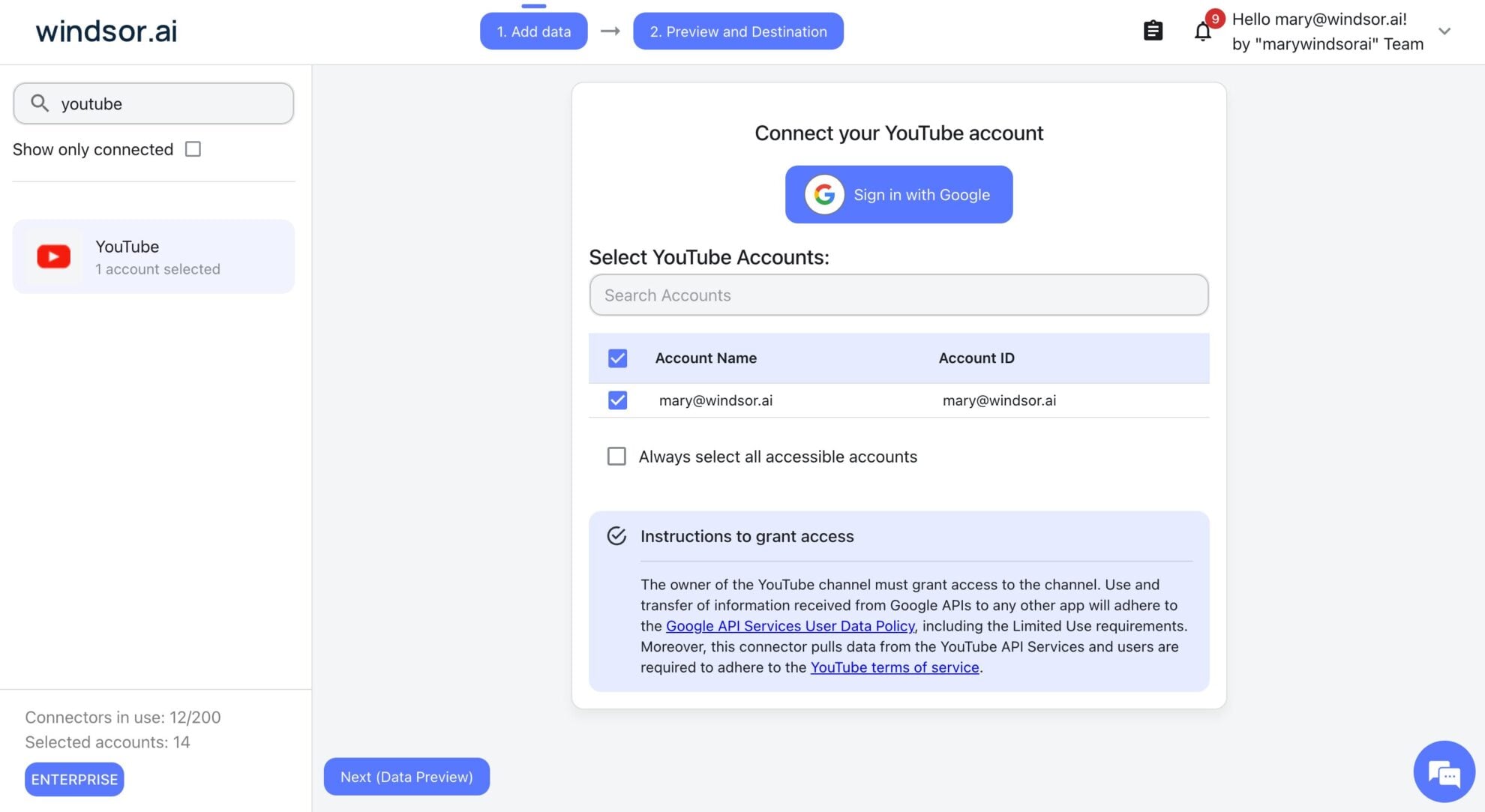
Connect YouTube in the Windsor.ai dashboard
Choose YouTube as your data source and sign in with the Google account that manages the channel. If the channel belongs to a Brand Account, pick the Brand Account.
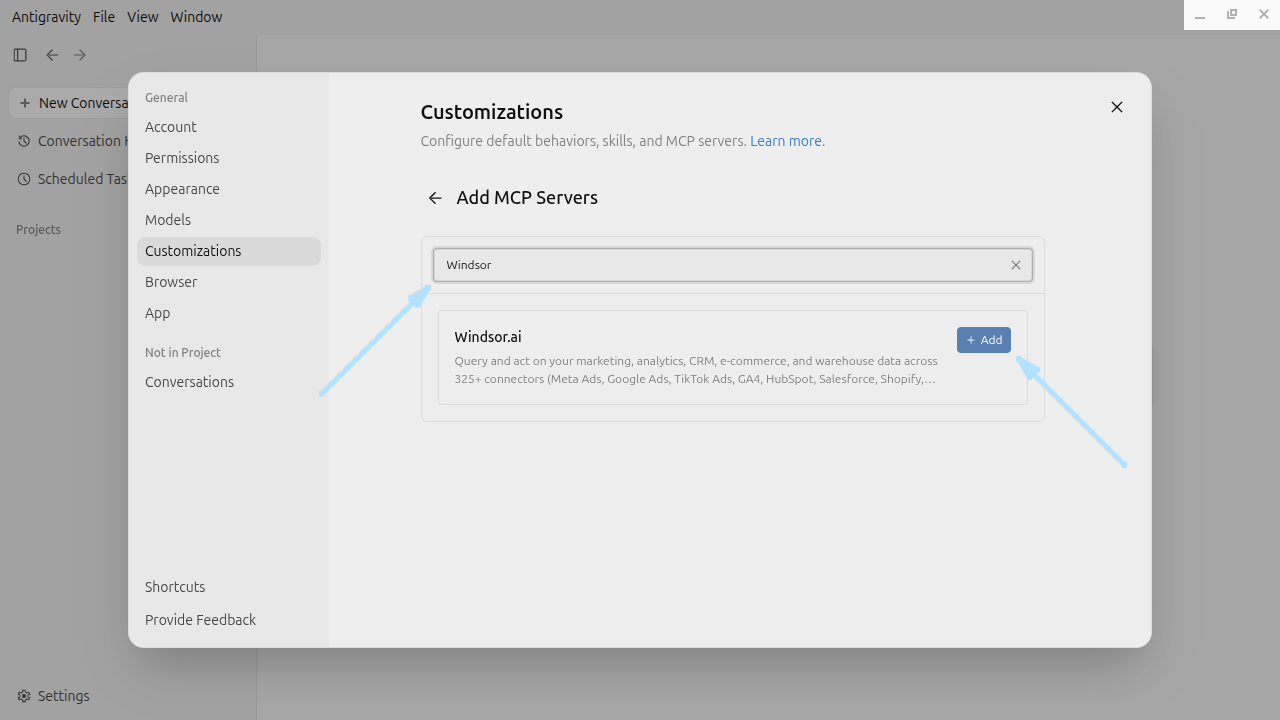
Add Windsor MCP in Antigravity
Open the Antigravity desktop app. At the bottom left of the main window, click Settings, then Customizations, then the Add MCP button. Type Windsor in the search bar and click Add.
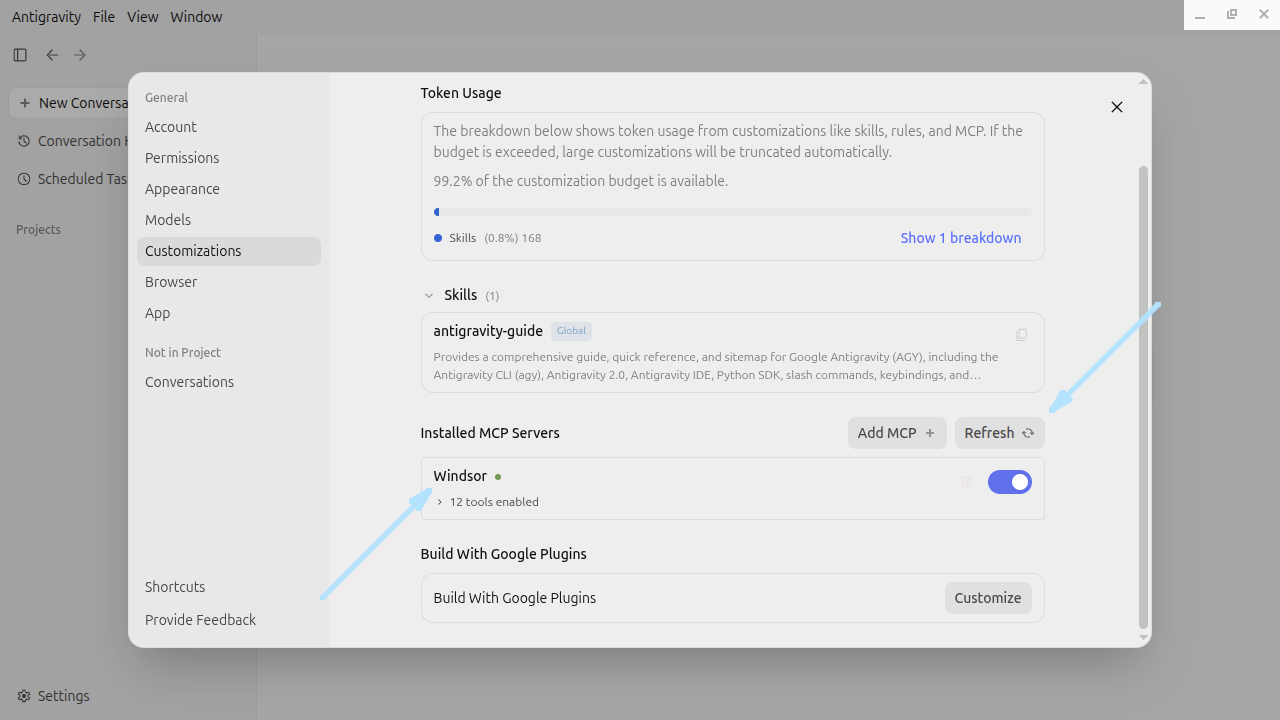
Finish the Windsor.ai sign-in
The Windsor.ai window opens. Click Finish to complete the sign-in, then click Refresh. Windsor appears in the list of installed MCP servers.
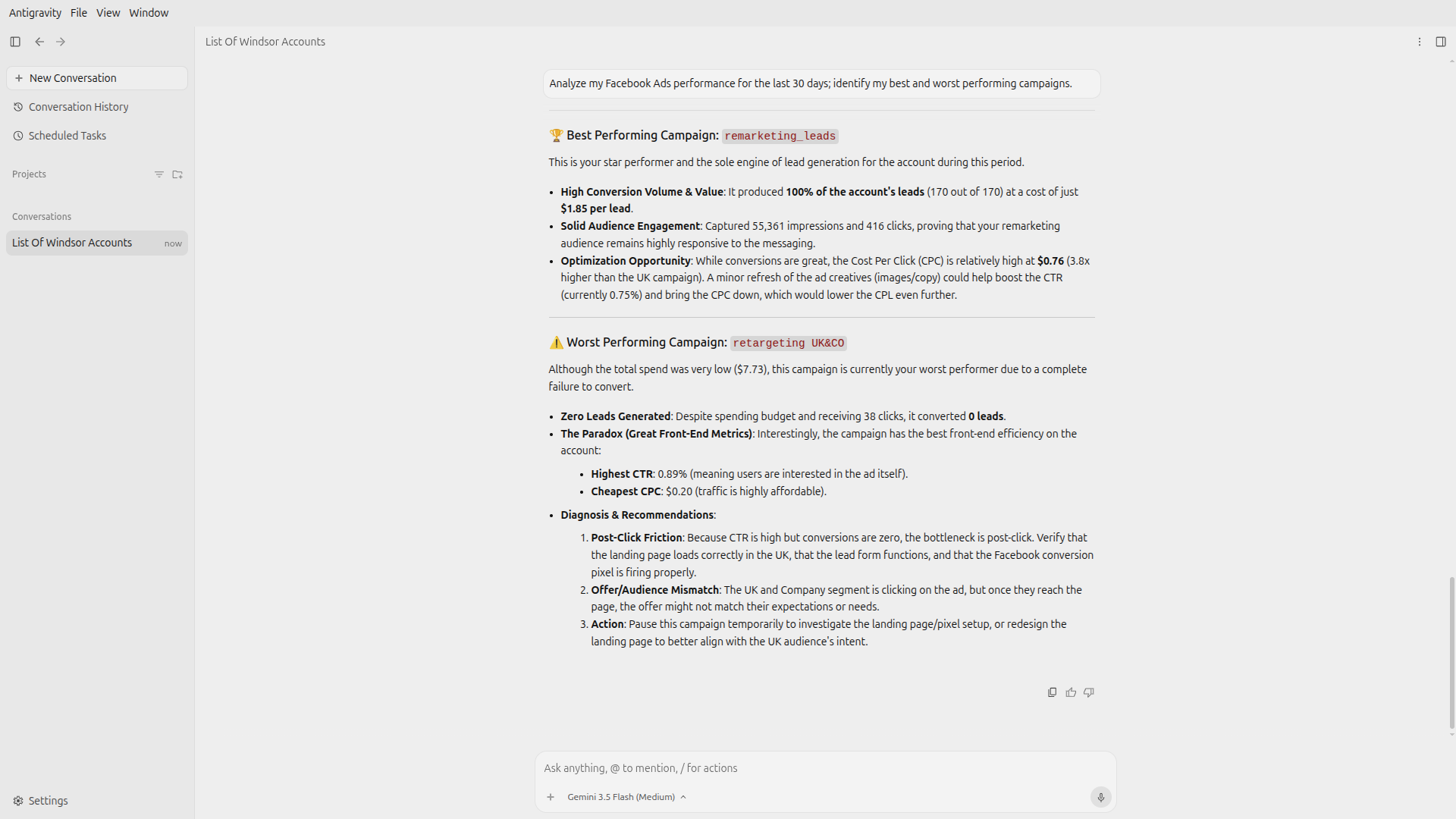
Ask Antigravity about your YouTube data
Close the Customizations window, return to the main window and ask about your YouTube data.
FAQs
What YouTube data can Antigravity use?
Windsor.ai gives access to 87 YouTube fields. These are the main groups; the YouTube field reference lists all of them:
- Views and watch time: Video title, Publish date, View Count, Estimated Minutes Watched, Average View Duration, Average View Percentage, Engaged Views.
- Engagement: Likes, Comments, Shares, Subscribers Gained, Subscribers Lost.
- Traffic and audience: Traffic Source, Country, Viewer Age Group, Viewer Gender.
- Video details: Video length, Content Type, Video tags, Playlist Title.
What can I ask Antigravity about my YouTube data?
These prompts name the fields to use, so the answer comes back on your own data:
-
List videos published in the last 90 days by Estimated Minutes Watched, with View Count and Average View Percentage.
-
Show View Count by Traffic Source for the last 28 days compared with the 28 days before.
-
Which videos brought the most Subscribers Gained this year?
-
Compare View Count and Average View Duration by Content Type for last month.
Can Antigravity change my YouTube data?
No. The YouTube connector is read-only. Antigravity can read your YouTube data through Windsor.ai and cannot create, edit or delete anything in YouTube.
Can I combine YouTube data with other sources in Antigravity?
Yes. Windsor.ai supports 350+ data sources, so you can connect YouTube alongside other tools and ask about them together. For example, put YouTube View Count by week next to GA4 Sessions from youtube.com for the same weeks, so channel views and site visits sit in one table.
Do I need to code to connect YouTube to Antigravity?
No. Connect YouTube in Windsor.ai, add Windsor to Antigravity, and sign in. After that you ask in plain language.
How much does it cost to integrate YouTube with Antigravity using Windsor.ai?
The free forever plan covers 1 data source, so connecting YouTube on its own costs nothing and needs no credit card. Combining YouTube with other sources needs a paid plan: $19/month for 3 sources or $99/month for 7. Antigravity is billed separately by Google. See the pricing page.
Do you have helpful links to get started with YouTube and Antigravity?
Yes. These are the resources to start with for the YouTube to Antigravity integration:
Tired of manual YouTube data exports? Try Windsor.ai today to work on live data


