Destinations
 Data sources
 AI insights
 About us
 Careers
 Security
 Customer reviews
 Contact us
 Affiliate program
 Solution partners
 Template gallery
 Looker Studio templates
 Power BI templates
 Excel templates
 Google Sheets templates
 Tableau templates
 Facebook Ads templates
 Google Ads templates
 Data fields & Metrics
 AI prompt library & Guides
 Product documentation
 API documentation
 Case studies
 Blog
Blog Data models
 Windsor vs Supermetrics
 Windsor vs Funnel.io
 Windsor vs Fivetran
 Windsor vs Rivery
 Windsor vs Portermetrics
 Windsor vs Coupler.io
Connect Zendesk to Google Sheets
It is very simple to connect Zendesk to Google Sheets, it can be done in a fast and easy manner with Windsor.ai.
Forget CSVs. Stop copy/paste. Connect data in 2 minutes. No code required.
 Sign up with Google
 Free forever plan
No credit card needed
Free forever plan
No credit card needed










Using Windsor.ai connector to import data from Zendesk into Google Sheets
Analyze your Zendesk data with Google Sheets and extract Zendesk data to Google Sheets with Windsor.ai.
See the value and return on every marketing touchpoint.















How to connect Zendesk to Google Sheets with Windsor.ai
Follow the steps below to get your Zendesk data into Google Sheets. For the last step you can choose between the Windsor.ai Google Sheets add-on and a quickstart IMPORTDATA formula.
2. Select your destination
Select Google Sheets as a data destination.

3. Choose how to get the data into your sheet
You can choose between two options.
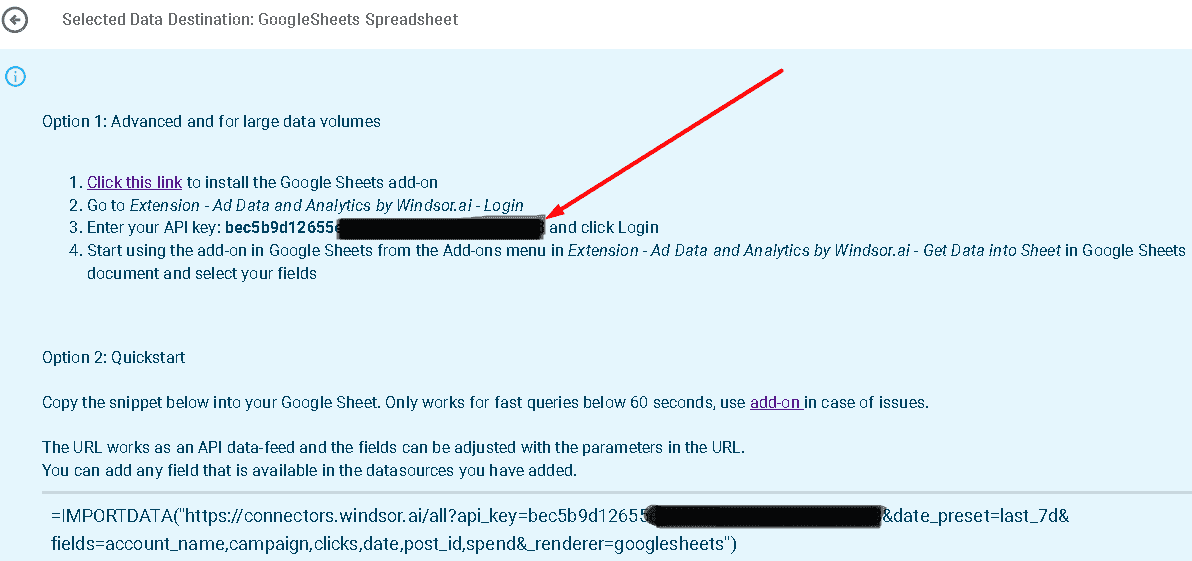
Option 1: Advanced and for large data volumes
- Click this link to install the Google Sheets add-on.
- Go to Extension – Ad Data and Analytics by Windsor.ai – Login.
- Enter your API key: [your API Key] and click Login.
- Start using the add-on in Google Sheets from the Add-ons menu in Extension – Ad Data and Analytics by Windsor.ai – Get Data into Sheet in your Google Sheets document and select your fields.
Option 2: Quickstart
- Copy the snippet below into your Google Sheet. Only works for fast queries below 60 seconds, use the add-on in case of issues.
- The URL works as an API data feed and the fields can be adjusted with the parameters in the URL.
- You can add any field that is available in the data sources you have added.
=IMPORTDATA("https://connectors.windsor.ai/zendesk_support?api_key=[your API Key]&date_preset=last_28d&fields=account_name,clicks,date&_renderer=googlesheets")
Replace [your API Key] with your API key. The list of selected fields must contain a date field. The fields which are listed after &fields= are simply a set of standard fields which you can customise. A full list of metrics and dimensions can be found in our Zendesk connector documentation. Customise the URL to your liking.
Tired of manual Zendesk data exports? Get started with Windsor.ai today to automate your reporting