 Destinations
 Data sources
 AI insights
 About us
 Careers
 Security
 Customer reviews
 Contact us
 Affiliate program
 Solution partners
 Template gallery
 Looker Studio templates
 Power BI templates
 Excel templates
 Google Sheets templates
 Tableau templates
 Facebook Ads templates
 Google Ads templates
 Data fields & Metrics
 AI prompt library & Guides
 Product documentation
 API documentation
 Case studies
 Blog
Blog Data models
 Windsor vs Supermetrics
 Windsor vs Funnel.io
 Windsor vs Fivetran
 Windsor vs Rivery
 Windsor vs Portermetrics
 Windsor vs Coupler.io
 Last updated: 1 September 2026




BigQuery workloads become complex as datasets and transformations scale. Manually running pipelines slows things down and increases the chance of errors. Automating BigQuery pipelines eliminates manual triggers and mistakes, making workflows consistent, dependable, and cost-efficient.
With BigQuery pipeline automation, tasks can run in parallel across datasets and regions, allowing for more efficient processing. Jobs adjust to shifting data volumes on their own. That way, analysts and engineers can spend their time on analysis and infrastructure optimization, rather than babysitting pipelines.
You can automate BigQuery pipelines with native schedulers, orchestration frameworks, or fully managed third-party solutions. For example, you can schedule jobs via Cloud Scheduler, Dataform, or Airflow, or simplify the entire process with a no-code ELT platform such as Windsor.ai, which automatically handles scheduling, orchestration, and schema changes for you.
In this article, we’ll look at the leading approaches to BigQuery pipeline automation and show how tools like Windsor.ai can help you implement them more quickly and reliably.
4 BigQuery pipeline automation methods
Running efficient workflows begins with selecting the optimal approach to automate BigQuery pipelines.
It can be achieved through scripts, native schedulers, or orchestration frameworks. Scripts with Cron jobs are fine for small, predictable workloads. For larger or more complex jobs, tools such as Scheduled Queries, Dataform, Cloud Composer, and Cloud Workflows offer advanced scheduling, dependency handling, and built-in monitoring.
At the highest level of automation, no-code ELT platforms such as Windsor.ai handle the entire process end-to-end, covering scheduling, orchestration, and schema changes, so your team can skip all building and maintenance hassles.
The choice depends on your integration needs, available technical expertise, and data volumes. Let’s overview each method in detail.
Method 1: Manual scripts & cron jobs
Prerequisites:
- Basic knowledge of SQL and/or Python
- Access to a Git repository or local directory for version control
- Familiarity with Cron (Linux) or Task Scheduler (Windows)
- Ability to manage logs and rerun failed jobs
Manual scripts scheduled with Cron jobs are a common way to start automating BigQuery ETL. You need to keep your SQL or Python scripts in a Git repository or local directory for version control, run jobs via shell scripts or the BigQuery Python client, and schedule them with Cron on Linux or Task Scheduler on Windows. Capturing logs is essential to identify failures and rerun incomplete jobs.
Example using Python and Cron:
from google.cloud import bigquery
client = bigquery.Client()
client.query("SELECT * FROM dataset.table").result()
Then schedule it in Cron, for example:
*/30 * * * * /usr/bin/python3 script.py
While this method works well for small datasets or one-time tasks, it still requires technical knowledge and ongoing maintenance. For non-technical teams, a no-code ELT tool like Windsor.ai provides a simpler, fully automated way to run and manage BigQuery pipelines without writing scripts or handling scheduling manually.
Method 2: Using BigQuery native tools
Prerequisites:
- Knowledge of SQL
- Familiarity with BigQuery console and project setup
- Understanding of dependency management (for Dataform)
- Git experience if using Dataform for version control
- Awareness of scheduling frequency and runtime limits
BigQuery native tools automate SQL transformations and workflow dependencies. The most common options are Scheduled Queries and Dataform, both of which reduce external dependencies and simplify pipeline maintenance.
Scheduled Queries trigger SQL transformations directly inside BigQuery. Dataform extends this workflow with dependency tracking, modular SQL, and Git-based version control. This approach automates BigQuery ETL tasks without building custom infrastructure.
Example Scheduled Query setup:
CREATE OR REPLACE TABLE project.dataset.daily_summary AS
SELECT date, COUNT(*) AS total
FROM project.dataset.raw
GROUP BY date;
You can set the schedule in the BigQuery console to run hourly or daily.
BigQuery native tools work well for steady workloads, but coordinating multiple jobs across systems can be cumbersome.
Method 3: Orchestration with Cloud Composer/Cloud Workflows
Prerequisites:
- Strong SQL skills
- Python programming experience (for Airflow DAGs)
- Familiarity with Apache Airflow concepts (DAGs, tasks, operators)
- Understanding of REST APIs (for Cloud Workflows)
- Knowledge of Google Cloud service accounts, permissions, and networking
- Ability to monitor logs, handle retries, and troubleshoot failures
Cloud Composer and Cloud Workflows are designed for advanced BigQuery pipeline automation. They can handle data ingestion, transformations, and interactions with external services.
Cloud Composer runs on Apache Airflow to manage DAGs (Directed Acyclic Graphs), enabling dynamic scheduling of BigQuery jobs, API calls, and data validation. Cloud Workflows is serverless, linking BigQuery steps with REST calls to provide simple, low-maintenance orchestration.
Example Airflow DAG task for BigQuery:
from airflow.providers.google.cloud.operators.bigquery import BigQueryInsertJobOperator
BigQueryInsertJobOperator(
  task_id="run_query",
  configuration={"query": {"query": "SELECT * FROM dataset.table", "useLegacySql": False}},
  location="US"
)
This approach scales smoothly and offers built-in monitoring, alerts, and strong dependency control, making it a good fit for enterprise-grade BigQuery ELT automation. However, it’s one of the most complex methods to implement and requires solid technical expertise.
Method 4: Using Automated ETL/ELT tools like Windsor.ai
Prerequisites:
- Windsor.ai account (free plan or paid subscription)
- BigQuery project with billing enabled
Windsor.ai is a fully automated, no-code ETL/ELT platform that removes the need for custom coding or manual steps to build and maintain BigQuery pipelines. It’s an all-in-one data integration solution, purpose-built for BigQuery and other warehouses and BI tools, covering data extraction, loading, and basic transformations.
The biggest advantage of Windsor.ai is its no-code interface, which allows even non-technical users to create complex integrations from multiple data sources. Windsor.ai includes the BigQuery destination on every plan, starting at $19/month, and you can test the whole setup on the free plan first.
Why use Windsor.ai for BigQuery pipeline automation:
- 350+ native connectors for BigQuery: Integrate and automate BigQuery ELT/ETL from hundreds of marketing, CRM, and analytics platforms in a single place.
- Automatic schema handling: Windsor.ai detects schema changes automatically, preventing your active pipelines from failing.
- No-code setup: No need for extraction scripts or Cron jobs; Windsor-powered pipelines deliver analysis-ready datasets in under 5 minutes.
- Incremental loading: Only new or changed data is synced, saving resources and optimizing costs.
- Flexible scheduling: Refresh data every 15 minutes, hourly, or daily, directly in the Windsor dashboard.
- Built-in monitoring & retries: View query-level logs, receive failure alerts, and manually retry jobs without restarting the entire pipeline.
- Partitioning & clustering support: Load data into partitioned or clustered BigQuery tables for faster and more cost-efficient queries.
- Transparent pricing: Fixed pricing plans start at $19/month, with all connectors and destinations included in every tier.
Windsor.ai simplifies BigQuery automation, reduces engineering overhead, and streamlines reporting.
Summary: Comparing BigQuery pipeline automation methods
| Method | Setup complexity | Maintenance effort | Flexibility | Real-time sync | Best for |
| Manual scripts | High: requires coding and server setup | Frequent hands-on updates | Very flexible, full control | Possible, but requires extra coding | Engineers who want full control of every step |
| BigQuery native tools | Moderate: basic SQL/programming knowledge | Queries need updates as data changes | Works well for SQL automation | Limited to scheduled jobs | Analysts automating recurring queries |
| Cloud Composer / Workflows | Very high: complex setup | Easier than raw scripts, but still technical | Highly flexible with branching, dependencies, retries | Supports event-driven triggers | Data engineers running multi-step workflows |
| Windsor.ai | Very low: no-code setup in 5 minutes | Minimal maintenance | Limited by source API, but sufficient for most marketing/data workflows | Near real-time sync possible | Marketers and data teams who need fast, reliable insights |
How to use Windsor.ai to automate BigQuery pipelines: setup steps
To get started with Windsor.ai, you just need to connect your data sources (Facebook Ads, GA4, Shopify, etc.), pick the required reporting fields, apply filters if needed, and choose the BigQuery destination. Create a job by entering project details and scheduling a refresh, and start syncing data in minutes.
Step 1: Sign up and create your free account.
Step 2: Connect a data source and select the account(s) you want to pull data from.
Step 3: Configure reporting fields, select a date range, and apply any filters if needed.
Step 4: Select BigQuery as the destination.
Step 5: Create a destination task: Enter your Project ID and Dataset ID, select a sync interval, and authorize via your Google account or with a service account key. Advanced options allow you to enable partitioning and/or clustering.
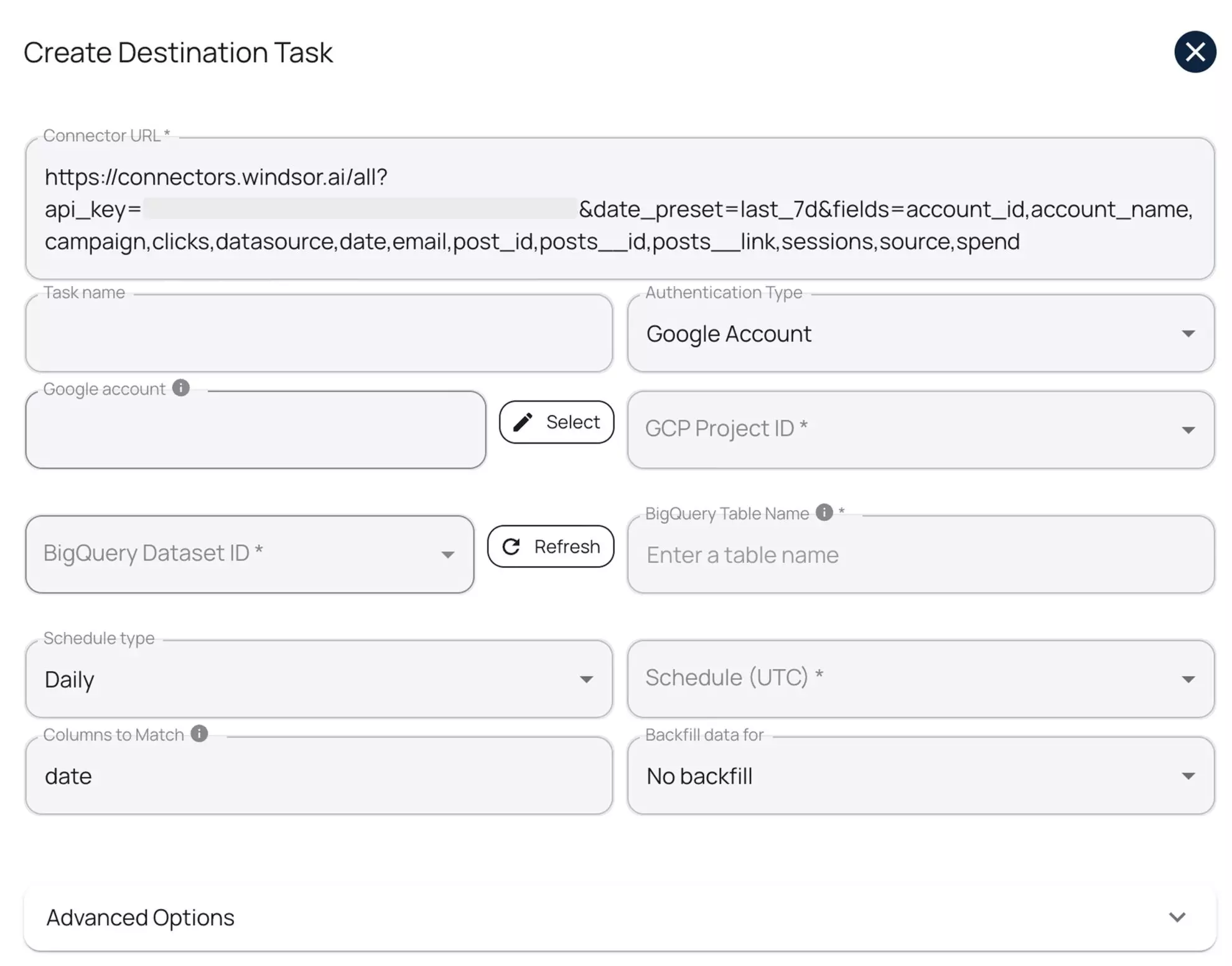
You can test the connection before running the task. Then click ‘Save’ and Windsor will automatically push your data into your specified dataset without manual job creation.
This is one of the simplest methods for automating BigQuery pipelines available today.
Try it now: https://onboard.windsor.ai/.
BigQuery pipeline automation best practices
BigQuery pipeline automation enhances ETL and ELT performance, reduces costs, and improves reliability. Effective steps include incremental loads, timed scheduling, schema validation, partitioning, retries, and post-load checks. These steps help pipelines run more smoothly, reduce errors, and maintain accurate data as workloads increase.
These BigQuery pipeline automation practices help optimize ETL and ELT workflows, improve processing efficiency, reduce costs, and maintain data reliability.
1. Use incremental loads
Loading full datasets each time is slow and costly. Incremental loads speed up processing by only updating the records that have changed. In BigQuery ETL automation, this reduces query costs and speeds up pipeline runs.
For example, use WHERE updated_at > TIMESTAMP_SUB(CURRENT_TIMESTAMP(), INTERVAL 1 DAY) to capture changes. In ELT workflows, load raw changes into staging tables, then merge them into the main dataset.
MERGE INTO target AS t
USING staging AS s
ON t.id = s.id
WHEN MATCHED THEN
  UPDATE SET t.col1 = s.col1
WHEN NOT MATCHED THEN
  INSERT (id, col1) VALUES s.id, s.col1;
2. Schedule syncs smartly
Cloud Scheduler can help you trigger ETL workflows at precise intervals, while Pub/Sub and Cloud Functions allow safe orchestration. This way, BigQuery jobs only run after the source data is confirmed available, preventing errors and unnecessary load.
Example: Using Cloud Scheduler to trigger a BigQuery ETL job via Pub/Sub and Cloud Function
1. Create a Pub/Sub topic:
gcloud pubsub topics create etl-topic
2. Schedule a message to be published hourly:
gcloud scheduler jobs create pubsub etl-trigger
  --schedule="0 * * * *"
  --topic=etl-topic
  --message-body="start"
3. Cloud Function subscribes to etl-topic and runs the BigQuery job when a message is received:
from google.cloud import bigquery

def trigger_etl(event, context):
    client = bigquery.Client()
    client.query("""
        INSERT INTO dataset.daily_summary
        SELECT * FROM dataset.raw
        WHERE updated_at > TIMESTAMP_SUB(CURRENT_TIMESTAMP(), INTERVAL 1 HOUR)
    """).result()
By scheduling jobs this way, you reduce load contention, maintain consistent data freshness, and make your BigQuery pipelines more reliable in production.
3. Monitor schema changes
Unexpected schema changes can break automated BigQuery ETL pipelines. To maintain accuracy, always validate upstream fields and data types before running transformations. Early detection prevents failed merges, incorrect reports, and costly reruns.
BigQuery’s INFORMATION_SCHEMA.COLUMNS view allows you to compare the actual schema of a table with the expected schema:
SELECT column_name, data_type
FROM mydataset.INFORMATION_SCHEMA.COLUMNS
WHERE table_name = 'staging_table';
- Compare the results against your expected schema programmatically or manually.
- Log any mismatches and alert the team before executing downstream jobs.
This proactive approach ensures your ELT automation handles schema drift gracefully, keeping pipelines reliable and production-ready.
4. Use partitioned tables
Partitioned tables improve query performance and reduce scan costs in BigQuery pipelines by limiting queries to relevant date ranges.
When automating BigQuery ETL, create ingestion-time or column-based partitions to keep tables optimized for performance and cost.
Example: Partitioning a table by a date column
CREATE TABLE sales_data
PARTITION BY DATE(order_date) AS
SELECT * FROM staging_sales;
- Use ingestion-time partitions for automatically partitioned tables based on load timestamp.
- Use column-based partitions for queries filtered by a specific date column (like order_date).
Partitioning works best in combination with incremental loads, providing maximum scalability, faster queries, and cost-efficient BigQuery ETL pipelines.
5. Add retry and alerting logic
Without proper error handling, automated pipelines can fail and disrupt downstream reporting. Implement retries to handle temporary failures and alerts to notify your team immediately.
- Retries: BigQuery queries can be retried programmatically. If using the bq CLI, you can use the –retry flag:
bq query --use_legacy_sql=false --max_retries=3 'SELECT COUNT(*) FROM dataset.table'
Note: –max_retries is the correct flag for CLI retry logic.
- Alerts: Combine Pub/Sub with Cloud Functions to trigger alerts after failed jobs. Then, integrate with Cloud Monitoring to send notifications via Slack, email, or other channels.
This setup ensures your BigQuery ETL/ELT pipelines are resilient, can recover automatically from transient errors, and keep your team informed when action is required.
6. Validate post-load data
Automation doesn’t stop once data is loaded. Always validate post-load data to detect anomalies before downstream reporting. Common checks in BigQuery ELT pipelines include:
- Record counts
- Null value checks
- Checksum or hash comparisons
Example: Compare record counts between staging and target tables
SELECT COUNT(*) AS cnt FROM target_table
EXCEPT DISTINCT
SELECT COUNT(*) AS cnt FROM staging_table;
- If the query returns rows, it indicates a mismatch that needs investigation.
You can build these validations into your automated pipeline for faster feedback.
Consistent post-load validation ensures data accuracy, builds trust in your reports, and allows you to automate BigQuery ETL/ELT workflows with confidence.
💡 A warehouse is not the only destination for this data. Windsor.ai can also send it to an AI assistant, where you can explore it in plain language instead of SQL: BigQuery to Claude and BigQuery to ChatGPT.
Conclusion
Choosing how to automate BigQuery depends on your team’s strengths and project demands.
- BigQuery native tools work well for analysts with minimal engineering resources.
- Orchestration frameworks help engineers manage complex workflows reliably.
- No-code ELT platforms, like Windsor.ai, make pipeline automation accessible to both technical users and business teams, without writing a single line of code.
With proper BigQuery automation, engineers spend less time on repetitive tasks and fixes and more on infrastructure improvements and data insights. Automated pipelines scale effortlessly as data volumes grow, resulting in faster insights, lower costs, and fewer errors.
Ready to simplify your BigQuery ETL/ELT workflows? Get started for free with Windsor.ai and automate your data pipelines in minutes, not days.
FAQs
What is BigQuery pipeline automation?
BigQuery pipeline automation is the process of scheduling, running, and maintaining ETL/ELT workflows automatically, without manual intervention. It ensures data is loaded, transformed, and ready for analysis efficiently and reliably.
Why should I automate BigQuery pipelines?
BigQuery pipeline automation reduces human error, lowers operational costs, streamlines data integration, and allows your team to focus on analysis and infrastructure improvements rather than manually managing and fixing pipelines.
What are the main methods for BigQuery pipeline automation?
- Manual scripts & Cron jobs: Suitable for small workloads, but requires coding and server setup.
- BigQuery native tools: Scheduled Queries and Dataform automate SQL transformations with moderate effort.
- Orchestration frameworks: Cloud Composer and Cloud Workflows handle complex, multi-step pipelines with full dependency control.
- No-code ELT platforms: Windsor.ai automates data ingestion, transformation, and scheduling in BigQuery without coding.
What tools can I use to automate BigQuery pipelines?
Windsor, Fivetran, dbt, Airflow, Dataform, and Cloud Composer are common picks.
Can I automate BigQuery without writing code?
Yes! You can automate BigQuery without writing any code by using no-code ELT platforms like Windsor.ai. Our platform lets you connect to 350+ data sources, schedule data ingestion, handle transformations, and manage schema changes, all through a user-friendly interface.
With Windsor.ai, you don’t need to write SQL scripts, set up Cron jobs, or manage orchestration frameworks manually. You can start your pipeline in minutes, set scheduled syncs, and rely on built-in monitoring and retries to keep your BigQuery data accurate and up-to-date.
Can I use Windsor.ai for real-time or incremental data loading?
Yes. Windsor.ai supports incremental syncs, updating only new or changed records, and can refresh datasets on schedules as frequent as every 15 minutes, enabling near-real-time automation.
What's the difference between ETL and ELT in BigQuery?
ETL transforms data before loading to BigQuery, reducing in-warehouse processing. ELT loads the raw data first, then transforms it in the warehouse using SQL. In BigQuery, ELT is preferred because the engine handles large-scale processing efficiently.
What are common pitfalls in automating BigQuery pipelines?
Common problems include skipping table partitioning, ignoring schema checks, and letting query costs run unchecked. Without proper monitoring, a failed job might sit unnoticed for days. Solid scheduling, enforced cost thresholds, and built-in retry logic go a long way in avoiding these issues.


