 Destinations
 Data sources
 AI insights
 About us
 Careers
 Security
 Customer reviews
 Contact us
 Affiliate program
 Solution partners
 Template gallery
 Looker Studio templates
 Power BI templates
 Excel templates
 Google Sheets templates
 Tableau templates
 Facebook Ads templates
 Google Ads templates
 Data fields & Metrics
 AI prompt library & Guides
 Product documentation
 API documentation
 Case studies
 Blog
Blog Data models
 Windsor vs Supermetrics
 Windsor vs Funnel.io
 Windsor vs Fivetran
 Windsor vs Rivery
 Windsor vs Portermetrics
 Windsor vs Coupler.io
 Last updated: 8 September 2026




Connect Jira to Claude by authorizing your workspace at onboard.windsor.ai/app/jira, then adding the Windsor.ai connector in Claude. Once both are done, open a new chat and ask about your sprints and issues.
Here’s the problem it solves: Product teams generate more structured data than almost anyone else in the company. Each issue, sprint, bug, status change, and time entry is captured in Jira with timestamps, assignees, and priorities.
Yet, answering even simple delivery questions, such as whether we are shipping faster or slower, which team member is overloaded, or how many bugs are slipping into production, often requires mastering JQL, building custom dashboards, or waiting for someone to pull a report.
Connecting Jira to Claude removes that step, and there is more than one way to do it.
Atlassian’s official Rovo connector for Claude lets you read and update Jira issues by chat, and Claude Agent for Jira takes an assigned work item through to a draft pull request.
For engineering managers, product managers, and Scrum masters who want a full picture across sprints, teams, and other business tools, Windsor MCP provides a cross-source analytics connection. The full comparison is below.
🚀 Connect Jira along with your business stack to Claude with Windsor MCP. Get started for free → onboard.windsor.ai/app/jira.
Once Jira is integrated with Claude, you can instantly ask questions such as:
- What is our average cycle time from In Progress to Done over the last 8 sprints, and is it trending up or down?
- Which team members have the most open issues assigned to them right now, and how many are blocked?
- How many bugs were reported in production last month, and which components do they belong to?
- Which epics are furthest behind their estimated completion date?
Windsor MCP links your Jira projects to Claude, so you can get summaries, cross-project comparisons, and charts in under a minute without any custom API setup.
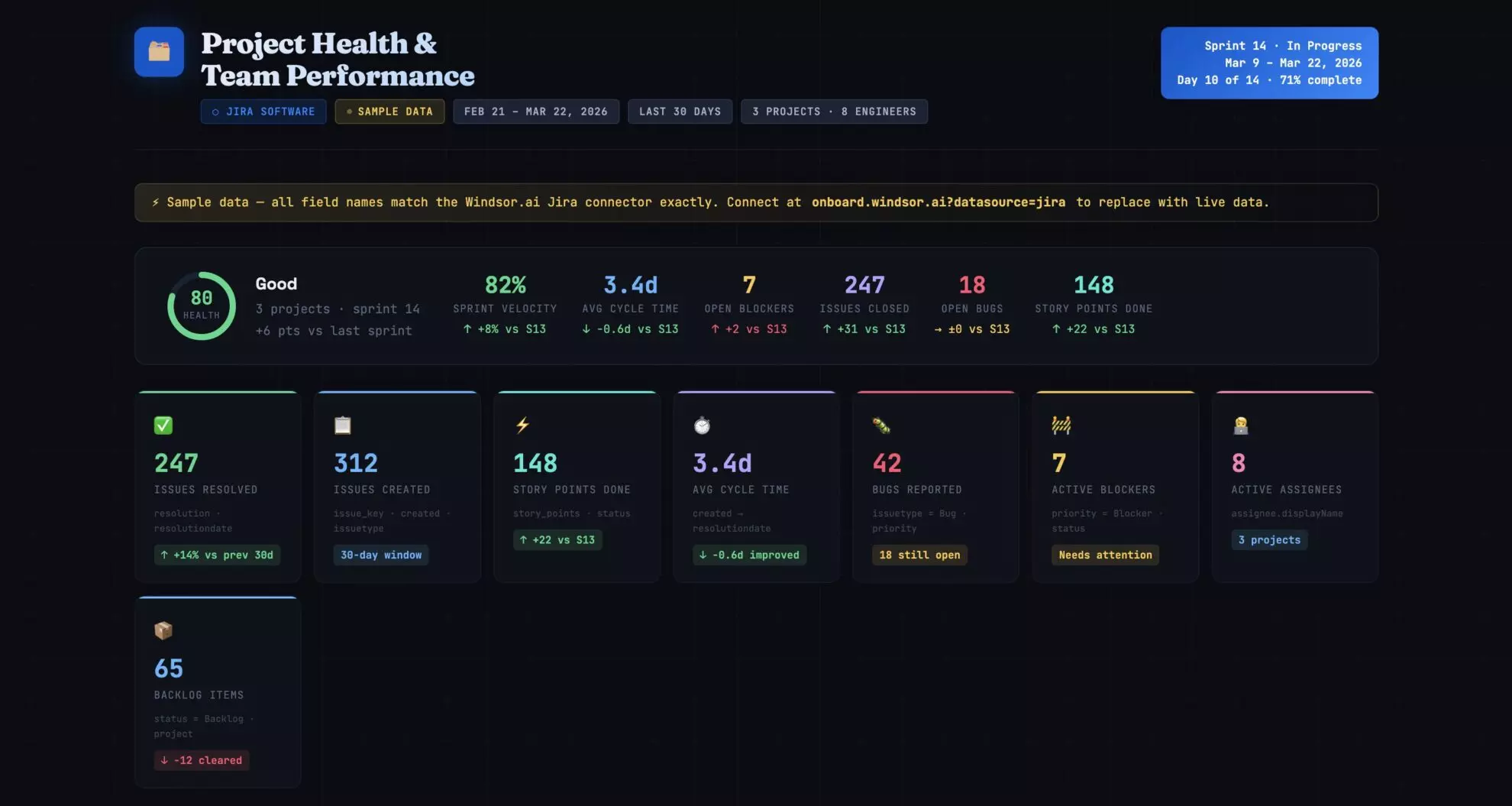
3 steps to connect Jira to Claude with Windsor MCP
Windsor MCP integrates Jira into Claude without config files or developer work.
📖 Full documentation: windsor.ai/documentation/windsor-mcp/how-to-integrate-data-into-claude/.
Prerequisites
Before connecting Jira to Claude, make sure you have the following:
- A Windsor.ai account (free forever plan, no credit card)
- A Jira Cloud account with API token access
- A Claude account
Step 1. Connect Jira to Windsor.ai
Go to onboard.windsor.ai/app/jira and select Jira as your data source. Add your Jira account(s) by entering the Domain, Email associated with your Jira project, and API Token.

Step 2. Add Windsor as a connector in Claude
In Claude, open Customize, then Connectors, search for Windsor, and click Add. Sign in to your Windsor.ai account when prompted. You can also open the Windsor.ai listing in the Claude directory and click Connect.

Optionally, set the permission to “Always allow” so your Jira data is live in every Claude conversation automatically; you won’t need to re-connect each time.
Step 3. Start querying your Jira data in Claude
Open a new Claude conversation and start with a quick test prompt to confirm the connection is working:
Connect to Windsor MCP and list all the data sources connected to my account. Do you see any Jira projects available?
Once you’ve confirmed the data is flowing, move on to deeper analysis.
What you can do with Jira data in Claude: Prompt ideas
These prompts give you a starting point for various common analytical use cases. Just replace project names, field names, and thresholds with the ones that match your Jira setup.
Sprint performance: understanding delivery trends over time
Jira’s sprint reports show one sprint at a time, while Claude can analyze all your sprints together and surface the velocity trends and commitment accuracy that no single sprint view shows.
Velocity trend: are we getting faster, slower, or inconsistent
Prompt idea:
Using Jira sprint data for the last 8 completed sprints in [project name]:

For each sprint, show:
- Sprint name and end date
- Story points committed (at sprint start)
- Story points completed
- Completion rate (completed / committed %)
- Number of issues carried over to the next sprint

Calculate average velocity and average completion rate across all 8 sprints.

Is velocity trending up, down, or flat over this period?
Which sprint had the worst completion rate, and how many issues were carried over from it into the following sprint?
Sprint commitment accuracy: are estimates getting better or worse?
Prompt idea:
For the last 6 sprints in [project name], compare committed story points at sprint start vs. completed story points at sprint end.

Calculate:
- Over-commitment rate: sprints where committed > completed by more than 20%
- Under-commitment rate: sprints where completed > committed by more than 20%
- Average estimation error (absolute difference between committed and completed)

Is estimation accuracy improving over time or deteriorating?
Are there specific issue types (Bug, Story, Task) that are most commonly the source of incomplete sprint work?
Cycle time and flow efficiency: finding where work gets stuck
Velocity measures how much you deliver and cycle time measures how long each item takes, and Claude can help you find where the gap between the two comes from.
Cycle time by issue type: what takes longest and why
Prompt idea:
Using Jira issue data for all issues resolved in the last 90 days in [project name]:

For each issue type (Story, Bug, Task, Sub-task):
- Average cycle time from status 'In Progress' to 'Done' (in days)
- Median cycle time
- 90th percentile cycle time (the long tail)
- Count of issues resolved

Which issue type has the longest average cycle time?

Which has the widest spread between median and 90th percentile, high variance signals unpredictability in that work category.

Are bugs resolved faster or slower than stories on average?
Workflow bottleneck: in which status do issues spend the most time?
Prompt idea:
For all issues transitioned through your workflow in the last 60 days:

For each status (To Do, In Progress, In Review, QA, Blocked, Done):
- Average time issues spent in that status (in hours or days)
- Count of issues that passed through it
- Count of issues currently sitting in it

Which status has the longest average dwell time?

Are there issues that have been sitting in 'In Review' or 'QA' for more than 5 business days? List the top 10 by time in status.

What proportion of total cycle time is spent waiting vs. active work?
Blocked issues: what is holding up delivery right now?
Prompt idea:
Find all issues in [project name] currently marked as Blocked or with a 'impediment' flag:

For each blocked issue:
- Issue key and summary
- Assignee
- How many days it has been blocked (created date of blocker or date status was set to Blocked)
- Current sprint (if in one)
- Priority

How many total story points are blocked across all active sprints?

Which team member has the most blocked issues assigned to them?

Are any blocked issues on the critical path for an upcoming release?
Bug tracking and quality: measuring what’s escaping to production
Bug data in Jira rarely gets analyzed beyond a count. Patterns in bug origin, component, and resolution time say far more, but finding them usually means building a custom filter or exporting to a spreadsheet, where Claude can find them from a single prompt.
Bug escape rate: how many bugs are reaching production?
Prompt idea:
Using Jira bug data for the last 6 months in [project name]:
- Total bugs reported per month
- Bugs labelled or tagged as 'production' or 'escaped' (vs. caught in QA), (use your team's label convention)
- Bug escape rate: production bugs as % of total bugs per month
- Average time to resolve production bugs vs. QA-caught bugs

Is the bug escape rate improving or worsening month-over-month?

Which months had the highest escape rate, do they correlate with release dates or sprint end dates?
Bug source analysis: which components generate the most issues
Prompt idea:
For all bugs created in the last 90 days across [project name]:

Group by component (or label if components aren't used):
- Total bug count per component
- % of total bugs
- Average priority level (assign numeric value: Blocker=4, Critical=3, Major=2, Minor=1, calculate weighted average)
- Average days to resolve

Which component generates the most bugs?

Which generates the highest-severity bugs on average?

Is there a component where bugs are resolved significantly slower than the rest, a signal of complexity or ownership ambiguity?
Recurring issues: are the same bugs coming back?
Prompt idea:
Look for patterns in resolved bugs from the last 6 months:
- Are there bugs with similar summaries or labels that have been filed multiple times (recurrence pattern)?
- Which components have the most re-opened issues (status moved back from Done to In Progress or Reopened)?
- What is the re-open rate across all resolved bugs (re-opened / total resolved)?

Flag any component where the re-open rate exceeds 15%, that suggests fixes are not addressing root causes.
Backlog health and epic progress: keeping the roadmap honest
Backlog aging: how old is your unstarted work
Prompt idea:
For all issues in [project name] with status 'To Do' or 'Backlog':
- Total count and total story points (estimated)
- Average age (days since created)
- Issues older than 90 days: count, % of total backlog, list of top 10 by age with summary and priority
- Unestimated issues (no story points): count and % of backlog

Is there a pattern in the oldest backlog items, are they all a particular issue type, component, or label?

What is the oldest unstarted issue in the backlog?

If the team maintains current velocity, how many sprints would it take to clear the backlog as it stands today?
Epic progress: which initiatives are on track vs. slipping
Prompt idea:
For all active epics in [project name]:

For each epic, show:
- Epic name and target end date (if set)
- Total child issues
- Issues completed (status = Done)
- Issues in progress
- Issues not started
- Completion % (Done / Total)
- Story points completed vs. total estimated

Which epics are more than 20% behind where they should be given elapsed time vs. target date?

Which epics have the most unestimated child issues, a risk to accurate forecasting?

Are there epics with no activity (no status changes) in the last 14 days?
Team workload: who has too much and who has capacity
Workload imbalance slows delivery and is hard to see in Jira without a custom assignee report for each sprint, which Claude can replace with one prompt.
Current workload distribution: is work spread evenly?
Prompt idea:
For all open issues in [project name] currently in active sprints:

For each assignee, show:
- Total open issues assigned
- Total open story points (estimated)
- Breakdown by issue type (Stories, Bugs, Tasks)
- Count of issues with priority Blocker or Critical
- Count of issues with status Blocked

Who has the highest total story point load?

Is there a team member with significantly more Blocker/Critical issue  than others, indicating they may be the bottleneck on urgent work?

Are there any unassigned issues in the active sprint?
Individual throughput: who is consistently delivering?
Prompt idea:
For all issues resolved in the last 60 days in [project name]:

For each assignee:
- Total issues resolved
- Total story points delivered
- Average cycle time (days from In Progress to Done)
- Issue type breakdown of resolved work

Who has the highest throughput by story points?

Is there a meaningful difference in average cycle time between team members, and does it correlate with issue type or complexity?

Are there team members with high assignment counts but low resolution counts, a sign of context-switching or blocking issues?
Bonus: Blending Jira with other data sources
Jira’s delivery data is most useful when combined with business context that lives elsewhere, such as customer feedback or website analytics.
🔗 Windsor connects Jira alongside 350+ other sources so Claude can answer questions that cross system boundaries.
Combinations to try:
- Jira + GitHub or GitLab: Connect issue resolution to code activity. Which Jira tickets correspond to the most commits? Are there PRs that have been open for weeks with no linked Jira resolution? Which sprints had the highest commit volume but lowest issue close rate, a signal of untracked work or rework?
- Jira + Salesforce or HubSpot: Link customer-reported bugs to pipeline risk. If a customer with a $200k renewal has three open Critical bugs in Jira, that’s a churn signal. Connect CRM account data with Jira issue labels or customer tags to surface those risks before the renewal conversation.
- Jira + Zendesk or Intercom: Match support ticket volume against Jira bug reports. Which components generate the most support tickets and the most bugs simultaneously? If a feature area is producing both, that’s a product quality problem you can size by support volume as well as bug count.
- Jira + Google Sheets: Engineering and product teams often maintain capacity plans, roadmap timelines, and headcount models in spreadsheets. Connect those alongside Jira to ask Claude: Does our actual sprint velocity support the delivery dates we’ve committed to in the roadmap? Which epics are at risk given the current throughput?
- Jira + Slack: Correlate message volume and channel activity with sprint periods. Do teams generate significantly more Slack messages in the week before a sprint ends, a proxy for crunch and fire-fighting? Does that correlate with lower completion rates in those sprints?
What Jira data Windsor MCP makes available in Claude
The Windsor.ai Jira connector provides 450+ metrics and dimensions to Claude for real-time analysis. View all supported data fields.
| Jira data | What Claude can answer with it |
| Issues & Tasks | Issue counts by status, assignee, and priority; backlog sizing; and “stale” issue detection. |
| Sprints & Velocity | Sprint commitment vs. completion rates, velocity trends, and carry-over analysis. |
| Status & Transitions | Cycle time (created to resolved), time-in-status, and workflow bottleneck identification. |
| Assignees & Teams | Workload distribution, individual throughput, and “bus factor” risk assessment. |
| Epics & Hierarchy | Epic progress tracking, story count per epic, and roadmap-level delivery health. |
| Fix versions | Release readiness, bug counts per version, and post-launch stability analysis. |
| Story points | Estimation accuracy, velocity calculation, and unestimated backlog audits. |
| Worklogs (time tracking) | Actual vs. estimated hours, effort efficiency, and labor cost allocation. |
| Components & Labels | Bug source analysis and feature-area performance clustering. |
Key Jira fields Windsor sends to Claude
Windsor exposes Jira’s API tables as flat fields with a table prefix, so issues__key is the key column of the issues table. The fields below are the ones teams query most through Windsor, in that order:
-
issues__key,issues__id,issues__projectkey: The identifiers Claude uses to count, group, and reference issues per project. -
issues__fields: The full field set of each issue in one object, including summary, description, status, assignee, priority, labels, components, story points, and the resolution date. Most of the prompts above read from here. -
issues__created&issues__updated: The timestamps behind backlog aging and lead time. -
issues__changelog: The status history of each issue, which cycle time and time-in-status calculations depend on. -
sprints__name,sprints__state,sprints__startdate,sprints__enddate&sprints__completedate: Sprint metadata for velocity and commitment-accuracy trends across active, closed, and future sprints. -
sprint_issues__sprintid&sprint_issues__key: Which issues belong to which sprint, the join Claude needs for carry-over and scope-creep analysis. -
issue_worklogs__timespentseconds,issue_worklogs__started&issue_worklogs__author: Logged time per person and issue, for estimated-versus-actual effort. -
issue_comments__body,issue_comments__author&issue_comments__created: Comment text and timing, used to explain why blocked work is stuck. -
projects__name&projects__key: Multi-project analysis for teams managing several product lines. -
issue_types__name,issue_priorities__name,workflow_statuses__name,project_components__name&labels__label: The lookup tables Claude uses to cluster issues by type, priority, workflow stage, component, or label.
Atlassian’s official Claude connector vs. Windsor.ai: which one to use?
Atlassian and Anthropic now ship official ways to put Jira inside Claude, so the right method depends on the job:
- Best for working on tickets from Claude, such as summarizing the issues assigned to you or creating tickets in bulk: the Atlassian Rovo connector. It installs with one click from Claude’s connector directory, reads and writes Jira and Confluence, and works in Claude on the web, desktop, mobile, and Claude Code.
- Best for handing coding work to an agent: Claude Agent for Jira, launched in June 2026. You assign a work item to Claude in Jira, and it implements the change in a sandbox and opens a draft pull request for review. It needs an Anthropic API key and a GitHub service account.
- Best for delivery analytics across Jira and the rest of your stack, such as cycle time by team or open critical bugs next to renewal risk in your CRM: the Windsor.ai connector. It streams Jira issues, sprints, and worklogs into Claude as data alongside 350+ other sources (Salesforce, GitHub, Zendesk, Google Sheets). It is analysis only: it reads Jira and never changes a ticket.
These are not mutually exclusive. Claude supports multiple connectors at once, so the Rovo connector and Windsor.ai can run side by side in the same account: Rovo to change things in Jira, and Windsor.ai when the question spans more than Jira.
Should I use Atlassian’s official Claude connector or Windsor.ai?
Both have a place. Atlassian’s Rovo connector is for operating Jira from Claude, reading and updating issues, while Windsor.ai is for analyzing delivery data, putting sprints, cycle times, and bug counts next to your CRM and support desk in one Claude conversation. If you only need to manage tickets by chat, the official connector covers it. When a question involves customer accounts, support volume, or a capacity plan alongside Jira, Windsor.ai is the connector that brings those sources together.
Conclusion
Jira holds a detailed, timestamped record of how your engineering team works, what they build, how long it takes, where it gets stuck, and what keeps breaking, yet the team generating the most structured data in the company often has the least accessible analytics about its own work.
Connecting Jira to Claude via Windsor MCP makes sprint velocity, cycle time, bug escape rates, backlog aging, workload distribution, and epic progress available in plain language, without JQL or a custom dashboard. When the answer requires context from outside Jira, like a customer account at risk, a GitHub PR sitting unmerged, or a capacity plan in a spreadsheet, Windsor connects those too.
🚀 Connect Jira and other business tools to Claude with Windsor MCP in less than 60 seconds. Start for free now!
FAQs
What is the easiest way to integrate Jira with Claude?
Both official routes are one-click installs, so the easiest choice depends on what you want to do. For managing tickets by chat, add Atlassian’s Rovo connector from Claude’s connector directory. For analysis that covers sprint reporting, cycle time, and workload distribution, go to onboard.windsor.ai/app/jira, connect your Jira account, select your projects, and add Windsor.ai as a connector in Claude. There is no technical setup on either path, and the two can run side by side.
What's the difference between Atlassian's official Claude connector and Windsor.ai?
They solve different problems. Atlassian’s Rovo connector is built for working inside Jira and Confluence: it reads and writes issues and pages, and it stays within Atlassian data. Windsor.ai is built for analytics: it reads Jira as data and combines it with 350+ other sources in the same Claude conversation, such as Salesforce, GitHub, Zendesk, and Google Sheets, and it never changes a ticket. Use the Rovo connector to manage Jira tickets from Claude, and Windsor.ai to analyze your team’s delivery data alongside everything else in the business. Claude supports both at once.
Do I need Jira admin permissions to connect Windsor?
No. Windsor requires only standard user-level access with Browse Projects permission on the projects you want to analyse. You do not need Jira admin rights to set up the integration. If you want to expose specific projects rather than your entire Jira instance, you can select which projects Windsor accesses during the setup flow.
Can Windsor access custom fields in Jira?
Yes. Windsor makes custom fields available to Claude alongside standard Jira fields. This includes custom story point fields, team labels, customer tags, business value scores, severity ratings, and any other custom field your team has configured. Reference them in prompts using the same field name they have in your Jira configuration.
Can I analyze multiple Jira projects in one Claude conversation?
Yes. You can connect multiple Jira projects to Windsor and query across all of them in a single Claude conversation. This is particularly useful for engineering managers overseeing several teams, or for cross-project comparisons like velocity benchmarking or bug rate comparison between product areas.
Can I blend Jira data with GitHub, Salesforce, or Zendesk?
Yes. Windsor connects Jira alongside any of its 350+ supported integrations. Common combinations: Jira + GitHub for linking code commits to issue resolution, Jira + Salesforce to correlate open bugs with customer accounts at churn risk, and Jira + Zendesk to measure the support impact of product quality issues.
How fresh is the Jira data Windsor sends to Claude?
Windsor pulls Jira data in real time when Claude needs it to answer a question. There is no scheduled cache or refresh window; each time you ask a question, Windsor queries your current Jira state directly from the API. Sprint updates, newly resolved issues, and status changes are reflected immediately in the next Claude conversation.


