 Destinations
 Data sources
 AI insights
 About us
 Careers
 Security
 Customer reviews
 Contact us
 Affiliate program
 Solution partners
 Template gallery
 Looker Studio templates
 Power BI templates
 Excel templates
 Google Sheets templates
 Tableau templates
 Facebook Ads templates
 Google Ads templates
 Data fields & Metrics
 AI prompt library & Guides
 Product documentation
 API documentation
 Case studies
 Blog
Blog Data models
 Windsor vs Supermetrics
 Windsor vs Funnel.io
 Windsor vs Fivetran
 Windsor vs Rivery
 Windsor vs Portermetrics
 Windsor vs Coupler.io
 Last updated: 8 September 2026




Connect a MySQL database to Claude by linking it at onboard.windsor.ai/app/mysql, then adding the Windsor.ai connector in Claude, no developer required. From there, open a new chat and ask questions about your database in plain English.
Here’s the problem it solves: Most MySQL databases are sitting on a goldmine of business intelligence that can’t be accessed without a developer.
Your WooCommerce store has years of order history, customer behavior, and product performance data. Your SaaS app’s MySQL backend knows exactly which features drive retention and which pricing tiers churn fastest. Your WordPress site’s database contains every form submission, every membership record, every transaction, structured, timestamped, and queryable.
But for most non-technical teams, that data is frozen. Getting answers means filing a request, waiting for a developer to write a query, receiving a CSV, and then repeating the whole process every time the question changes.
With Windsor MCP, that engineering bottleneck disappears. Windsor connects directly to your MySQL database and makes your actual tables available inside Claude, letting anyone on your team ask analytical questions in human language. No SQL knowledge required, no developer in the loop.
🚀 Connect your MySQL database to Claude with Windsor MCP. Start for free: onboard.windsor.ai/app/mysql.
Once connected, insights that your team used to wait days for become instant. You can simply ask:
- Which WooCommerce product categories drove the most repeat purchases this quarter?
- Which subscription plan has the highest churn rate in the first 30 days?
- Which customer segment has the highest average order value but the lowest purchase frequency?
- Which Meta Ads campaigns produced customers who actually stayed past 90 days?
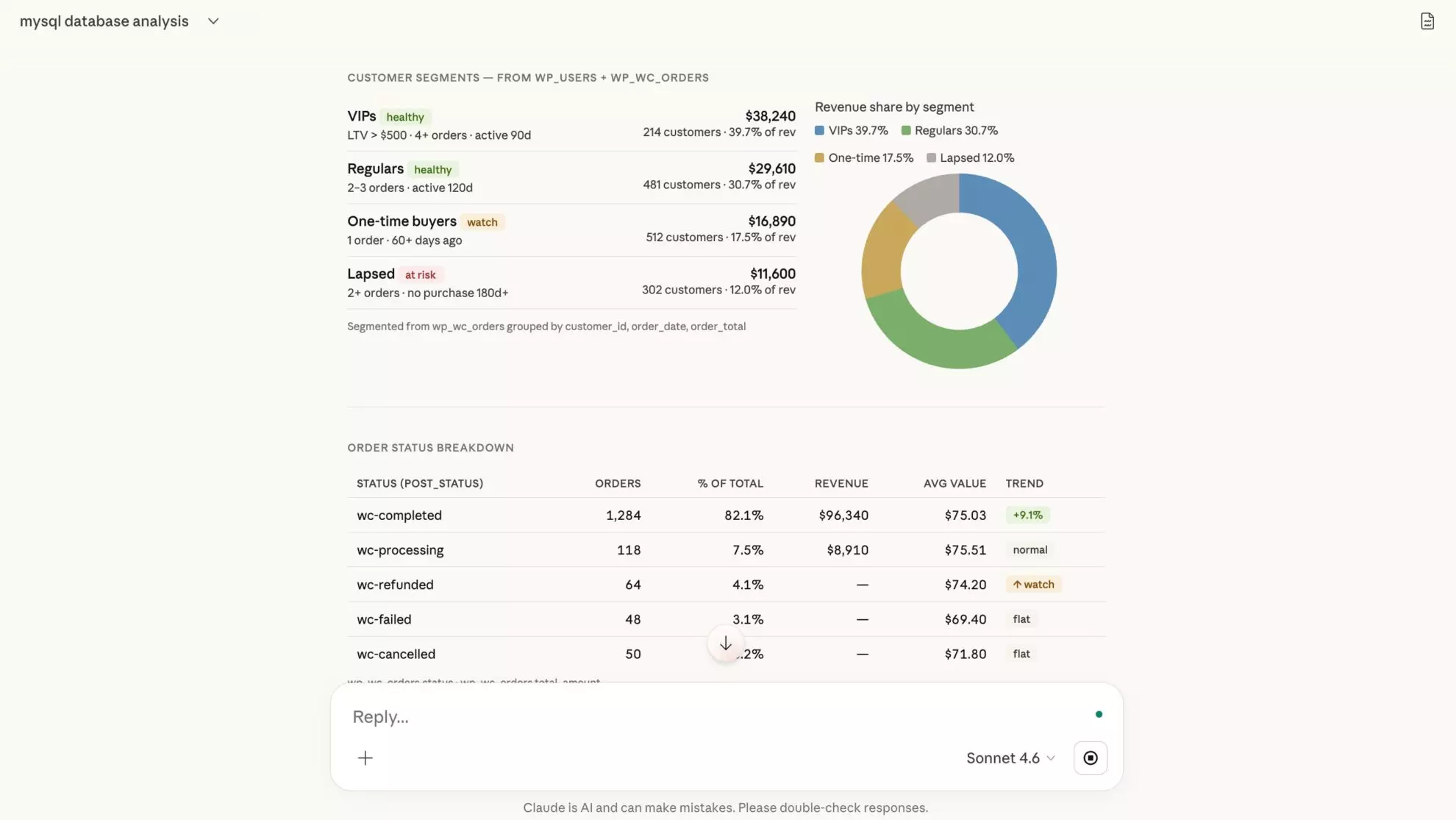
Claude instantly analyzes your MySQL tables, automatically joins across your schema the way a SQL query would, and returns in-depth answers with tables, comparisons, and summaries your whole team can act on.
How to connect MySQL to Claude with Windsor MCP: 3 steps
Windsor MCP connects to your MySQL instance via a standard database connection and makes your existing tables available inside Claude as a live, queryable dataset. The setup takes three steps and requires zero engineering work.
📖 Full documentation: windsor.ai/documentation/windsor-mcp/how-to-integrate-data-into-claude/.
Prerequisites
- A Windsor.ai account (free or paid plan – pricing)
- MySQL 5.7+ or any MySQL-compatible database (MariaDB, Amazon Aurora MySQL, PlanetScale, etc.)
- Read-only database credentials (a dedicated read-only user is strongly recommended)
- Network access: your MySQL host must be reachable from Windsor’s IPs, or you can use an SSH tunnel for private instances
- A Claude account
Steps to connect MySQL to Claude
1. Go to onboard.windsor.ai/app/mysql and connect your MySQL database.
Enter your connection details: host, port (default 3306), database name, table name, username, and password. Windsor will test the connection and fetch available tables. If your database contains multiple tables, you should connect them one by one.

2. In Claude, open Customize, then Connectors, search for Windsor, and click Add. Sign in to your Windsor.ai account when prompted. You can also open the Windsor.ai listing in the Claude directory and click Connect.
💡 Quick tips: Set the Windsor connector to “Always allow” in Claude so your MySQL tables are live in every conversation. If your database is on a private VPC or shared hosting with IP restrictions, you’ll need to whitelist Windsor’s IP range first.
3. Explore and analyze your MySQL data in Claude using natural-language prompts. Ask questions about individual tables or run analyses across all connected tables within a single conversation.
Depending on the data in your database, you might ask questions like:
-
“Show the top 5 customers by revenue in each region for the past year and highlight any whose spending has decreased compared to the previous year.”
-
“Identify products with increasing sales trends over the last three quarters and correlate them with promotional campaigns.”
-
“Compare monthly sales trends between January and February for each product category, and flag any significant anomalies.”
-
“Find customers who haven’t placed an order in the last 6 months and segment them by their average purchase value and preferred product category.”
Alternative connection method: Claude Desktop with MCP proxy
For teams that want full control over the connection and prefer a local setup, install mcp-proxy and configure Windsor MCP in your Claude Desktop config file (replace <your-windsor-api-key> with your actual API key from Windsor.ai):
{
  "mcpServers": {
    "windsor": {
      "command": "mcp-proxy",
      "args": ["https://mcp.windsor.ai/", "--transport=streamablehttp"],
      "env": { "API_ACCESS_TOKEN": "<your-windsor-api-key>" }
    }
  }
}
Save the config and restart Claude Desktop. Your MySQL tables are now queryable from your desktop environment.
How Windsor reads your MySQL schema
Windsor does not impose a fixed field list on your MySQL database. Instead of mapping your columns to a predefined set of Windsor fields, it reads your actual schema and makes it available to Claude exactly as it exists in your database.
In practice, this means three things:
- Table and column names are yours. If your WooCommerce database has a wp_wc_orders table with a billing_email column, that’s exactly what you reference in your prompts. No aliases, no translations.
- Custom fields are included automatically. WordPress and WooCommerce store custom metadata in tables like wp_postmeta and wp_usermeta. ACF fields, custom order statuses, membership levels, all of it is queryable without any additional configuration.
- Schema changes propagate instantly. Add a column to a table, install a plugin that adds new tables, run a migration; the next Claude conversation picks up the new structure automatically.
This is particularly valuable for WordPress and WooCommerce users, where the schema is a combination of core tables, plugin-added tables, and custom metadata, a mix that would be nearly impossible to normalize into a fixed field list.
Prompt ideas: What you can do with your MySQL data in Claude
The use cases below are grouped by the type of MySQL-backed system they apply to. Use your actual table and column names in place of the examples, while the analytical logic stays the same.
🤖 For more prompt ideas across various data sources, browse the Windsor AI Prompt Library: windsor.ai/prompt-library/.
If your MySQL database powers a WooCommerce or WordPress site
WooCommerce stores years of order data, customer history, and product performance inside MySQL, but the native reporting is limited to what WooCommerce’s dashboard was built to show. The real intelligence is in the raw tables, and it’s almost never surfaced.
The WooCommerce schema stores orders in wp_wc_orders (or wp_posts for older installs), line items in wp_woocommerce_order_items and wp_woocommerce_order_itemmeta, customer data in wp_users and wp_usermeta, and product data in wp_posts and wp_postmeta.
Once Windsor connects those tables to Claude, the analysis becomes conversational.
Revenue analysis beyond what WooCommerce reports show
Prompt example:
Using wp_wc_orders and wp_woocommerce_order_items, for the last 12 months:

Calculate monthly revenue, average order value, and order count.

Then identify:
- The top 3 months by revenue, and what product categories drove them
- The 3 months with the lowest AOV, and whether that correlates with discount usage (check wp_wc_orders for discount_total > 0)
- The product categories that appear in 5+ item orders vs. single-item orders

Are customers who buy multiple categories on their first order more likely to place a second order?
Cross-reference with order_date and customer_id to calculate 90-day repeat purchase rate by first-order category count.
Customer segmentation: who your WooCommerce buyers actually are
Prompt example:
Using wp_wc_orders and wp_users, calculate per customer_id:
- Total lifetime spend (sum of order_total where status = 'wc-completed')
- Number of completed orders
- Days between first and most recent order (lifespan)
- Average days between orders (purchase frequency)
- Most purchased product category (from order items)

Segment into:
- VIPs: lifetime spend > $500, 4+ orders, last order within 90 days
- Regulars: 2-3 orders, last order within 120 days
- One-time buyers: exactly 1 completed order, 60+ days ago
- Lapsed: 2+ orders, no purchase in 180+ days

For each segment: total revenue contribution, average LTV, count.
Which segment represents the largest revenue risk if they don't re-engage?
Coupon and discount impact: are promotions attracting loyal buyers or one-timers?
Prompt example:
Join wp_wc_orders with wp_woocommerce_order_items to identify orders where a coupon was applied (coupon line items have type = 'coupon').

For customers whose first order included a coupon vs. those who paid full price:
- What % placed a second order within 90 days?
- What was their average second-order value?
- What is their 12-month LTV?

Which specific coupon codes (from the coupon item name) produced customers with the highest 90-day repeat rate?
Which coupon codes produced the most one-time buyers?
Product performance: what’s actually driving margin
Prompt example:
Using wp_woocommerce_order_items, wp_woocommerce_order_itemmeta, and wp_postmeta:

For each product_id in the last 6 months, show:
- Total units sold
- Total revenue
- Number of orders it appeared in
- % of orders where it was the only item (single-product orders)
- % of orders where it appeared with another product (basket attach rate)

Which products have the highest attach rate (appear most often with other products)? These are our natural cross-sell anchors.
Which products appear almost exclusively in single-item orders? These may need bundling or upsell prompting at checkout.
If your MySQL database powers a SaaS application or web app
Most SaaS products built in the last decade run on MySQL. The application backend knows everything about how users behave, but that knowledge stays locked inside tables that only engineers can read.
Windsor MCP for MySQL to Claude integration makes these essential product insights accessible to any team member in just seconds.
Pricing plan analysis: which plan actually retains users?
Using the subscriptions table and users table, for each plan_name or plan_id:
- Total active subscribers
- Trial-to-paid conversion rate (where trial_end is not null and subscription_status moved to 'active')
- 30-day churn rate (cancelled within 30 days of becoming active)
- 90-day retention rate
- Average monthly revenue per user (mrr / subscriber count)

Which plan has the best 90-day retention?
Which plan has the highest trial conversion but worst 30-day retention?

For users who churned within 30 days: what was their last_login_date?
Were they logging in at all before cancelling?
Feature usage vs. retention: what keeps users around?
Prompt example:
Using the user_events table and subscriptions table, for users who became active in the last 6 months:

Group users into two cohorts:
1) Retained: still active at 90 days
2) Churned: cancelled before 90 days

For each cohort, calculate the average number of times each event_type was triggered in the first 14 days after signup.

Which event_types appear significantly more often in retained users?
These are our activation milestones — the actions that predict long-term retention.
Which event_type has the biggest gap between cohorts?
Support ticket patterns: which product areas create the most friction?
Prompt example:
Using the support_tickets table and users table:

For each ticket_category or ticket_tag:
- Total ticket count in the last 90 days
- Median first_response_time (minutes)
- Median resolution_time (hours)
- % of tickets from users on a trial vs. paid plan
- Churn rate of users who submitted a ticket in that category
  (cross-reference with subscription_status 30 days after ticket creation)

Which ticket categories have the highest post-ticket churn rate?
These represent product problems serious enough to push users out.

Which categories are almost exclusively from trial users?
These represent potential onboarding friction that could be solved before it reaches support.
If you’re blending MySQL data with paid ads to understand true acquisition ROI
MySQL-backed businesses, especially WooCommerce stores and SaaS apps, often spend significantly on paid ads across Google Ads, Meta Ads, or affiliate channels without a clear picture of what that spend actually produces in terms of retained revenue.
The ad platform shows conversions. The database shows what happened next.
🔗 Windsor MCP supports 350+ data sources and allows you to combine both your MySQL database and marketing, sales, CRM, or affiliate platforms in Claude simultaneously.
You can then ask questions that span all connected data sources using UTM parameters or order IDs as the bridge between them.
True ROAS for WooCommerce: ad revenue vs. actual completed order revenue
Ad platforms report conversion value at the moment of purchase. Your MySQL database knows which of those orders actually completed, weren’t refunded, and led to a second purchase.
Prompt example:
Join wp_wc_orders (with utm_source and utm_campaign stored in order meta via wp_postmeta, key '_wc_order_attribution_utm_campaign') with Google Ads campaign spend data.

For each campaign:
- Reported ad conversion value (from Google Ads)
- Actual completed order revenue (wp_wc_orders where status = 'wc-completed', NOT including wc-refunded or wc-failed)
- Refund rate for orders from that campaign
- % of customers who placed a second order within 90 days
- True ROAS: actual completed revenue / ad spend

Which campaigns have a gap of more than 20% between reported and actual revenue — caused by refunds or failed payments?
Which campaigns produce the highest second-purchase rate?
Affiliate and referral channel quality: beyond the first click
For WooCommerce stores using affiliate plugins (AffiliateWP, YITH, etc.) or referral programs, the affiliate tables in MySQL tell you where customers came from, but not whether they were worth acquiring.
Prompt example:
Using the affiliate_referrals table (or equivalent from your affiliate plugin) joined with wp_wc_orders and wp_users:

For each affiliate_id or referral_source:
- Total referred customers
- Average first-order value
- 90-day repeat purchase rate
- Average LTV at 6 months
- Refund rate on first order

Which affiliates drive customers with the highest LTV?
Which affiliates have a high volume but above-average refund rate on first orders — a signal of incentive misalignment or traffic quality issues?

Cross-reference with affiliate commission paid (if stored) to calculate net revenue per affiliate after commissions and refunds.
Email campaign performance vs. actual orders: does your email revenue hold up?
Email platforms report opens, clicks, and attributed revenue. Your MySQL database shows whether the orders actually went through.
Prompt example:
Join your Klaviyo or Mailchimp campaign data with wp_wc_orders using email address as the join key (customer_email in wp_wc_orders).

For each email campaign:
- Reported revenue (from email platform)
- Actual completed order revenue in MySQL within 7 days of send date
- % discrepancy between reported and actual (email platforms often use longer attribution windows or count multi-touch)
- Average order value of orders placed by recipients
- Repeat purchase rate of email-converted customers in next 60 days

Which campaigns have the largest gap between reported and actual revenue?
Which produce the highest-value repeat buyers?
If you’re a developer or analyst exploring an unfamiliar MySQL database
MySQL databases, especially those backing WordPress sites, legacy apps, or acquired businesses, often have schemas that no one fully understands. Tables built by plugins, tables added by developers who left, tables that look important but may be unused.
Here’s how to get oriented fast by integrating your MySQL data into Claude.
Schema reverse-engineering: understanding what you’ve inherited
Prompt example:
Look at the tables available in this MySQL database. For each table:

- Explain what it represents based on its column names and data types
- Identify likely primary keys and foreign key relationships to other tables
- Flag any tables that appear to be WordPress core tables (wp_ prefix standard) vs. plugin-added vs. custom application tables
- Estimate row counts or data volume if visible

Which tables have the most cross-references (appear as foreign keys in other tables)?
These are our core entities — the tables that anchor the rest of the schema.

Suggest 5 cross-table analyses that would answer real business questions given this schema.
Query performance diagnosis: finding tables that are slow to analyze
Prompt example:
For tables with more than 100,000 rows, look at the column structure and identify:

- Columns that are likely used in WHERE clauses (status fields, date fields, user_id, foreign keys) — these should have indexes
- Columns storing serialized data (WordPress stores serialized PHP arrays in longtext columns) — flag these as they can't be queried efficiently
- Date columns that could be used for time-series partitioning

For the wp_postmeta or equivalent metadata table:
- How many rows does it have?
- What are the most common meta_key values?

Metadata tables in WordPress-based apps often have millions of rows and are a common source of slow queries.
How Windsor MCP works with MySQL and Claude
Windsor connects to your MySQL database via a standard TCP connection using the MySQL protocol. It reads your schema, enumerates your selected tables, and makes the full structure, including every column, every data type, every row, available inside Claude as a queryable dataset.
Because Windsor reads your actual schema rather than mapping to a fixed field list, there is no translation layer between your database and what Claude sees.
💡 Your table names, column names, and custom fields should be referenced directly in your prompts.
Core capabilities
- Full schema access. Windsor reads every selected table and all its columns. Claude works with your real MySQL schema, including columns added by plugins, migrations, or custom development.
- WordPress and WooCommerce schema support. Windsor handles the WordPress table structure out of the box, including core tables, postmeta, usermeta, and plugin-added tables. Serialized metadata fields are flagged appropriately.
- MySQL-compatible database support. Windsor’s connector works with MySQL 5.7+, MariaDB, Amazon Aurora (MySQL mode), PlanetScale, Percona Server, and any other MySQL-wire-compatible database.
- Multi-table joins in natural language. Claude can join across tables, aggregate data, filter by any column, and follow relationships, the same operations you’d write in SQL, expressed in plain English.
- Cross-source analysis with 350+ integrations. Windsor connects your MySQL database alongside ad platforms (Google Ads, Meta Ads, TikTok Ads), e-commerce tools (Shopify, Amazon), CRMs (Salesforce, HubSpot), email platforms (Klaviyo, Mailchimp), and payment systems (Stripe, PayPal), all queryable in a single Claude conversation. The join key is whatever field you pass through: utm_campaign, customer_email, order_id.
- Production-safe by design. Windsor’s MySQL connector uses read-only credentials. For production MySQL instances, connecting via a read replica is supported and recommended.
Conclusion
MySQL is the database that the web runs on: WooCommerce stores, SaaS applications, content platforms, and marketplaces. For most of the businesses built on it, the data has been accumulating for years. The questions have always been obvious. The bottleneck was always getting to the answers without a developer in the loop.
Windsor MCP removes that challenge. Connect your MySQL database once, and every table you’ve selected becomes available to Claude as a live, analysis-ready dataset. The insight that used to require a Jira ticket and a two-day wait now takes a single prompt.
For WooCommerce merchants, that means customer segmentation, coupon impact analysis, and product performance insights without touching phpMyAdmin. For SaaS teams, it means pricing plan retention analysis and feature adoption patterns on demand. For marketing teams blending MySQL with other channels, it means seeing the actual revenue behind every campaign, not just the attributed conversion value.
🚀 Connect your MySQL database to Claude with Windsor MCP in less than a minute! Start for free now: onboard.windsor.ai/app/mysql.
FAQs
What is the easiest way to connect MySQL to Claude?
The easiest way is using Windsor MCP. You just enter your MySQL credentials in Windsor, add Windsor as a connector in Claude, and start querying your data in natural language. No code or manual exports are required.
What version of MySQL does Windsor support?
Windsor supports MySQL 5.7 and above, including MySQL 8.0. It also works with any MySQL-wire-compatible database: MariaDB (all recent versions), Amazon Aurora in MySQL mode, PlanetScale, Percona Server, and Google Cloud SQL or Azure Database for MySQL.
My MySQL database is on shared hosting with no public IP. Can I still connect?
Yes, though you’ll need to check your hosting provider’s options. Most managed hosting providers (SiteGround, WP Engine, Kinsta, Flywheel) allow you to whitelist specific external IP addresses for database access. Whitelist Windsor’s IP range in your hosting control panel, then connect using your database host, port, and credentials. For hosts that don’t support external IP whitelisting, an SSH tunnel is the alternative.
I use WordPress. Which tables should I connect?
For WooCommerce analysis, the most useful tables are wp_wc_orders, wp_woocommerce_order_items, wp_woocommerce_order_itemmeta, wp_users, wp_usermeta, wp_posts, and wp_postmeta. For membership plugins (MemberPress, Restrict Content Pro), add the plugin’s membership and transaction tables. For affiliate analysis, add the tables from your affiliate plugin (e.g., affwp_referrals, affwp_affiliates for AffiliateWP). You don’t need to connect every WordPress table; start with the ones that contain transactional and customer data.
Can Windsor handle WordPress's serialized metadata fields?
Windsor can read serialized fields stored in wp_postmeta and wp_usermeta, and Claude will flag when a column contains serialized data. However, querying inside serialized values (e.g., filtering on a specific key within a serialized array) is not supported; this is a limitation of MySQL itself, not Windsor. For custom fields stored by ACF or similar plugins, the queryable fields depend on how the plugin stores data: ACF in ‘raw’ mode stores values as standard key-value pairs in wp_postmeta, which Windsor handles cleanly.
How does Windsor connect my MySQL data with my ad platform data?
When you connect your MySQL database and an ad platform (Google Ads, Meta Ads, etc.) to Windsor, both datasets become available in the same Claude conversation. You need to write a prompt referencing both, and then Claude joins them automatically for cross-channel analysis. No ETL pipeline or pre-built join logic is required.
Is my MySQL database secure when connected to Windsor?
Yes. Windsor is SOC 2 Type II certified, and data is encrypted in transit and at rest. For production, use a dedicated user with SELECT-only permission and connect via a read replica.
My database has millions of rows. Will this still work?
Yes. Windsor queries your MySQL database on-demand when Claude needs data to answer a question. For large tables, it’s good practice to be specific in your prompts: give Claude a date range, a status filter, or a row limit, so queries stay efficient. Claude will also naturally scope queries based on the context of your question.
Can I use Windsor to connect to MySQL and another database (e.g., PostgreSQL) at the same time?
Yes. You can connect multiple databases of different types to Windsor, and all of them become available in the same Claude conversation. If your application data is in MySQL and your analytics warehouse is in PostgreSQL, you can ask Claude to join or compare data across both in a single prompt.


