 Destinations
 Data sources
 AI insights
 About us
 Careers
 Security
 Customer reviews
 Contact us
 Affiliate program
 Solution partners
 Template gallery
 Looker Studio templates
 Power BI templates
 Excel templates
 Google Sheets templates
 Tableau templates
 Facebook Ads templates
 Google Ads templates
 Data fields & Metrics
 AI prompt library & Guides
 Product documentation
 API documentation
 Case studies
 Blog
Blog Data models
 Windsor vs Supermetrics
 Windsor vs Funnel.io
 Windsor vs Fivetran
 Windsor vs Rivery
 Windsor vs Portermetrics
 Windsor vs Coupler.io
Connect Salesforce to Claude
Windsor is the Claude connector that puts Salesforce next to the rest of your data: leads, opportunities and closed revenue in the same chat as Google Ads, Meta Ads, GA4 and 350+ other sources, through one install.
Salesforce also ships its own Claude plugin and hosted MCP servers. Both are covered below, with a table on which route fits which team.
Forget CSVs. Stop copy/paste. Connect data in minutes. No code required.
 Sign up with Google
 Free forever plan









Drive revenue growth with Salesforce to Claude integration
With Salesforce data in Claude through Windsor, you can:

Get quick AI insights
Ask for a pipeline summary, a stage breakdown or a chart and Claude builds it from current Salesforce data inside the chat. No SOQL and no report builder needed.

Analyze data in natural language
Ask in plain English, for example which leads are most likely to convert or which accounts have the most open opportunities, and get a structured answer you can keep questioning.

Link marketing to sales
Put Salesforce next to Google Ads, Meta Ads and GA4 in the same chat and ask which campaigns produced closed-won revenue rather than lead volume. Salesforce’s own plugin has no ad or analytics data; Windsor brings all of it through one connector.

Flag stalled deals
Ask Claude for open opportunities with no next step, an overdue task, or more days in a stage than your average. Windsor pulls the OpportunityHistory table as well, so time in each stage comes from the stage-change log.
Using Windsor.ai to connect data from Salesforce to Claude
The Windsor Salesforce connector covers Accounts, Campaigns, Campaign Members, Contacts, Leads, Opportunities, Opportunity Contact Roles, Opportunity Line Items and Tasks, plus the Lead History and Opportunity History tables that record every stage, amount and close-date change. Custom fields on those objects come through under their API names, so a lead’s UTM source or a custom deal field is as queryable as Amount or Stage.
Claude reads through Windsor’s MCP connector, so every prompt runs against current Salesforce data. The same connector can create, update or delete records when you ask, and Claude states the exact change and asks you to confirm before it runs.
One Salesforce connection also feeds Windsor’s other destinations, so the numbers Claude reports match your Data Studio, Power BI or BigQuery reports.
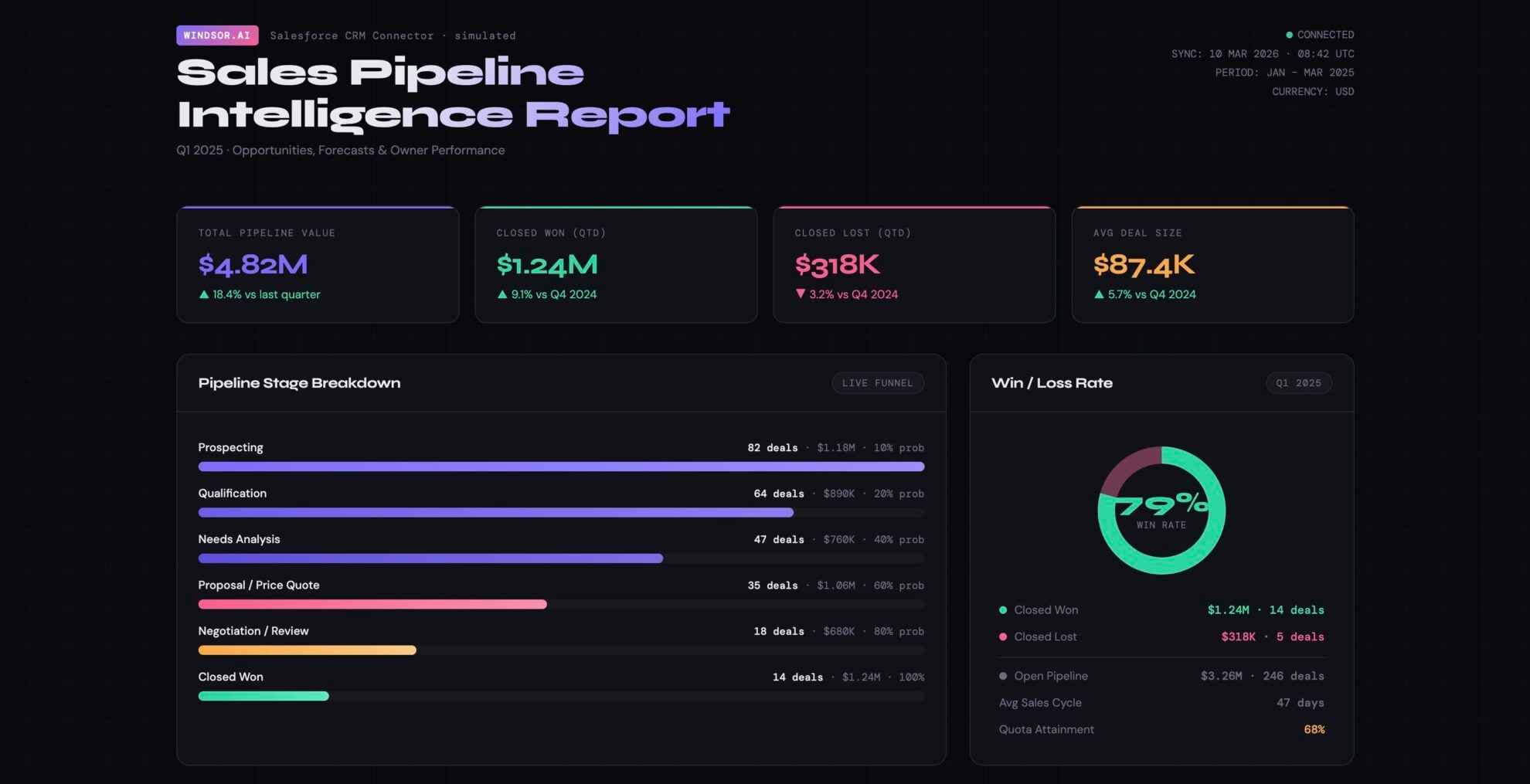
Available actions
Update Object Update field values on a Salesforce record of any object type (Opportunity, Lead, Contact, Account, Case, custom objects, ...). Only the provided fields are changed. Use field API names (e.g. StageName, Amount, My_Field__c) and pass null as a value to clear a field.
Update field values on a Salesforce record of any object type (Opportunity, Lead, Contact, Account, Case, custom objects, ...). Only the provided fields are changed. Use field API names (e.g. StageName, Amount, My_Field__c) and pass null as a value to clear a field.
Create Object Create a new Salesforce record of any object type (Opportunity, Lead, Contact, Account, Case, custom objects, ...). Use field API names (e.g. LastName, Company, Amount, My_Field__c); the required fields depend on the object type. Returns the id of the new record, which update_object and delete_object can then use.
Create a new Salesforce record of any object type (Opportunity, Lead, Contact, Account, Case, custom objects, ...). Use field API names (e.g. LastName, Company, Amount, My_Field__c); the required fields depend on the object type. Returns the id of the new record, which update_object and delete_object can then use.
Delete Object Permanently delete a Salesforce record of any object type (Opportunity, Lead, Contact, Account, Case, custom objects, ...) by id. Salesforce moves the record to the Recycle Bin for 15 days, from where a user can restore it in the Salesforce UI but not through Windsor. Tell the user this is permanent before you ask them to confirm.
Permanently delete a Salesforce record of any object type (Opportunity, Lead, Contact, Account, Case, custom objects, ...) by id. Salesforce moves the record to the Recycle Bin for 15 days, from where a user can restore it in the Salesforce UI but not through Windsor. Tell the user this is permanent before you ask them to confirm.














How to connect Salesforce to Claude with Windsor.ai
Explore our video tutorial and a step-by-step guide to integrate your data from any source into Claude with the Windsor.ai connector.
Select your data source
Choose Salesforce as your data source and grant access to Windsor.ai.
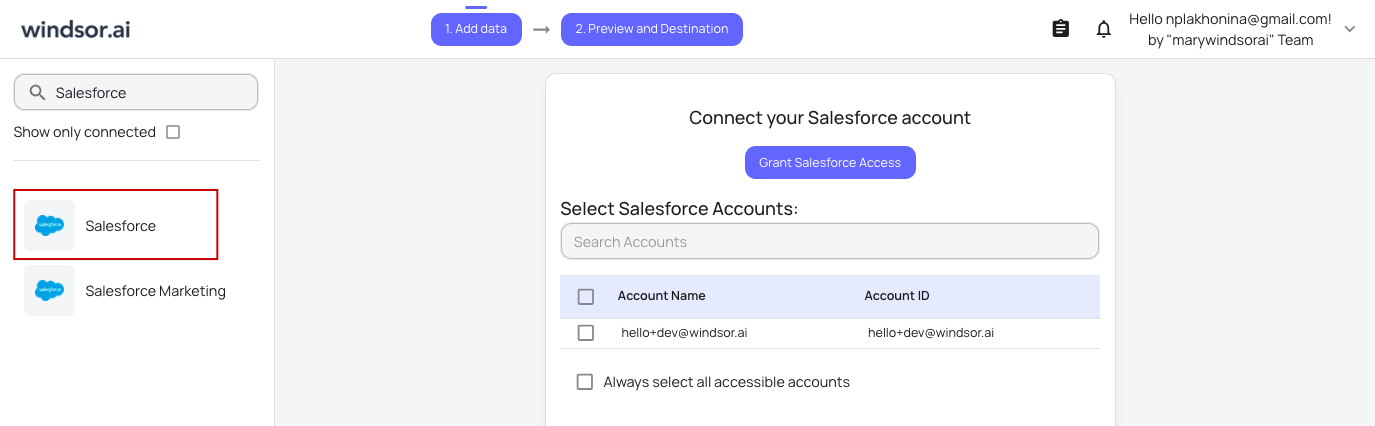
Install the Windsor.ai connector in Claude
In Claude, open Customize, then Connectors, search for Windsor and click Add. Sign in to your Windsor.ai account when prompted, and the connector appears in your Connectors list. You can also open the Windsor.ai listing in the Claude directory and click Connect.

Query your data in Claude
Start a new chat and ask Claude questions about your connected data: summarize KPIs, create client reporting dashboards, or run advanced analyses.

Three ways to connect Salesforce to Claude
Since September 2026 there are three working routes, and they fit different teams. Salesforce’s own plugin is built for sellers who work in Sales Cloud all day. The hosted MCP servers are for admins and developers who want SOQL, Flows and Apex actions available from Claude Code or Claude Desktop. Windsor is for anyone who needs Salesforce numbers next to the rest of the stack, or wants the connection running in a minute with their own Salesforce login.
| Sales Cloud in Claude (Salesforce’s plugin) | Salesforce hosted MCP servers | Windsor connector | |
|---|---|---|---|
| What it is | Salesforce’s plugin with 37 prebuilt sales skills: account research, call prep, pipeline review, CRM updates | Salesforce’s own MCP endpoints for the Platform, Data 360, Tableau, MuleSoft and Slack, plus custom servers built from Apex, Flows and prompt templates | One Claude connector for Salesforce and 350+ other sources; the same connection feeds Data Studio, Power BI, BigQuery and more |
| Status | Open beta since 14 September 2026, on AgentExchange | Standard servers generally available | Live |
| Who sets it up | A Salesforce admin requests access on AgentExchange, then the Claude org owner enables it. Needs the latest Sales Cloud Enterprise edition | A Salesforce admin activates the servers in Setup and creates an External Client App for OAuth | You, with a Salesforce login that has API access. No Setup work in Salesforce |
| Claude plans and surfaces | Paid plans (Pro, Max, Team, Enterprise); web, desktop and Cowork | Claude Code, Claude Desktop, or as a custom connector on the web (any plan; Free allows one custom connector) | Every Claude plan, including Free; web, desktop and Claude Code |
| Reads | Records the signed-in user can see | SOQL queries, records and metadata the user can see | 11 tables including Lead and Opportunity history, 42 metrics, 305 dimensions |
| Writes | Yes, with approval before each change | Yes: records, plus any Flow or Apex action you expose | Create, update and delete records, with confirmation before each write |
| Data outside Salesforce | Slack, through its own connector | No | Google Ads, Meta Ads, GA4, HubSpot, Shopify and 350+ more |
Route 1: Sales Cloud in Claude, Salesforce’s own plugin
Salesforce and Anthropic announced the plugin under the Claudeforce partnership on 26 August 2026, and it reached open beta on AgentExchange on 14 September. It brings your accounts, opportunities and pipeline into Claude with 37 skills built by Salesforce, from renewal prep to QBR decks, and it writes back: logging calls, creating tasks, adding contacts, moving stages and close dates. Setup is admin-led: a Salesforce admin requests access on AgentExchange, the Primary Owner or an Owner of your Claude organization enables Salesforce in Claude, and each person then signs in with their own Salesforce account. Claude sees only what that user’s Salesforce permissions allow and asks for approval before each change. Two things to check first: the beta needs the latest Sales Cloud Enterprise edition, and it runs on paid Claude plans only. Skills beyond sales are announced for late 2026.
Route 2: Salesforce hosted MCP servers
For admins and developers. Salesforce hosts standard MCP servers for the Platform, Data 360, Tableau, MuleSoft and Slack, and you can publish custom servers that expose invocable Apex, autolaunched Flows, Apex REST endpoints and Prompt Builder templates as tools. Three steps: in Setup, open MCP Servers and activate the servers you need; create an External Client App with OAuth enabled, the callback set to Claude’s (https://claude.ai/api/mcp/auth_callback for web and desktop, http://localhost:38000/callback for Claude Code), the refresh_token and mcp_api scopes and PKCE on; then add the server URL and consumer key in Claude Code with claude mcp add and authenticate from /mcp, or add it as a custom connector on the web or desktop app. Standard user permissions apply on top of the app’s access. This route gives you raw SOQL and your own Flows from Claude, and nothing from outside Salesforce.
Route 3: Windsor, Salesforce next to everything else
The three steps above: pick Salesforce as a source in Windsor and sign in, add Windsor from Claude’s connector list (Customize, Connectors, search Windsor, Add), then ask. In Claude Code, run claude plugin install windsor-ai and sign in. You get the 11 Salesforce tables listed above, the create, update and delete actions, and every other source your team reports on in the same chat, so “which campaigns closed revenue last quarter” is one question rather than an export from two systems. The free forever plan covers one source with no credit card; blending Salesforce with ad platforms or GA4 needs a paid plan, from $19 a month for 3 sources.
Which one: if you sell from Sales Cloud all day, install Salesforce’s plugin. If you are an admin who wants Claude Code to run SOQL and Flows, use the hosted MCP servers. If you report on Salesforce together with ad spend, web analytics or other systems, or you want the connection without a Setup ticket, use Windsor. Windsor and the plugin can sit side by side in the same Claude account.
FAQs
What is the Windsor.ai Salesforce to Claude integration?
Windsor’s Salesforce connector (powered by Windsor MCP) is a no-code integration that pulls your Salesforce CRM data and makes it available in Claude in minutes. You get current leads, opportunities, accounts and sales metrics, and can ask for summaries, comparisons and recommendations in plain English.
What can I do with Salesforce data in Claude?
Once your Salesforce data is in Claude, you can:
- Track sales performance. Get daily, weekly, or monthly reports of closed deals, revenue, and rep performance across teams or regions.
- Prioritize high-value leads. Ask Claude to highlight top leads based on likelihood to convert, past interactions, or deal size.
- Identify bottlenecks and risks. Detect stalled deals, overdue follow-ups, or accounts at risk of churn and get actionable recommendations.
- Create custom reports. Ask Claude to generate dashboards, tables, or summaries in plain language.
- Run cross-channel analysis. Combine Salesforce data with 350+ other channels for a complete view of business performance.
Find more details about Windsor MCP for Claude use cases in this guide: https://windsor.ai/how-to-use-windsor-mcp-examples-use-cases/.
How often does the Salesforce data refresh in Claude with Windsor MCP?
Every time you send a prompt. Windsor MCP is a live API link, so each question pulls the latest numbers from your CRM rather than a cached copy.
What prompts can I use when analyzing Salesforce data in Claude?
Beyond basic performance summaries, you can use more advanced, specific prompts to uncover deeper insights. Here are some examples:
-
Analyze our 'Closed-Lost' opportunities from the last 3 months. Group them by 'Loss Reason' and suggest three changes to our sales process to improve our win rate.
-
Compare our Google Ads spend data with our Salesforce 'Closed-Won' revenue. Which specific ad campaigns produced the highest actual sales, not just lead volume?
-
Calculate the average number of days it takes for a Lead to move from 'New' to 'Closed-Won' for each Sales Rep. Identify the bottleneck stage where most deals get stuck.
-
Summarize revenue from closed deals in the last 90 days and forecast potential revenue for the next month. Highlight deviations from targets and trends by region or product line.
How much does it cost to integrate Salesforce into Claude using Windsor.ai?
Windsor has a free forever plan with no credit card, and it covers one data source, so Salesforce on its own in Claude is free. Blending Salesforce with Google Ads, Meta Ads or GA4 needs more sources: paid plans start at $19 a month for 3 sources and $99 for 7. See the pricing page for the current tiers.
How long does it take to connect Salesforce to Claude?
A few minutes with Windsor: sign in to Salesforce from Windsor, add Windsor in Claude’s connector list, ask your first question. No code and no Salesforce Setup work.
Do you have helpful links to get started with integrating Salesforce and Claude using Windsor.ai?
Yes. These cover the Salesforce fields Windsor returns and the Claude install:
Can Claude analyze sales rep performance and find pipeline bottlenecks?
Yes. Claude can compare reps on closed revenue, deal count, average deal size and win rate across teams, regions or periods, and it can walk the funnel stage by stage to show where deals sit longest. Because Windsor pulls the OpportunityHistory table, time in stage comes from the stage-change log, and the Task table adds calls and meetings per rep.
What is Claudeforce, and what does Salesforce's official Claude integration include?
Claudeforce is the partnership Salesforce and Anthropic announced on 26 August 2026. It has three parts: Salesforce in Claude, the Sales Cloud plugin with 37 prebuilt sales skills that reached open beta on AgentExchange on 14 September 2026; Claude in Salesforce, where Claude is the reasoning model behind Agentforce and Slack AI; and Salesforce-hosted MCP servers that connect Claude directly to an org’s data and actions.
Should I use Salesforce's official Claude integration or Windsor.ai?
They solve different problems and can run side by side. Salesforce’s plugin puts your org inside Claude with prebuilt sales skills and governed writes, for teams that live in Sales Cloud, and it needs a paid Claude plan, the latest Sales Cloud Enterprise edition and an admin to enable it. Windsor puts Salesforce next to the rest of your stack: leads, opportunities and revenue alongside Google Ads, Meta Ads and GA4, on any Claude plan, connected with your own Salesforce login. Pick Windsor when the question spans systems, or when nobody is going to file the Setup ticket.
Does Salesforce have its own MCP server?
Yes. Salesforce hosts standard MCP servers for the Platform, Data 360, Tableau, MuleSoft and Slack, and admins can publish custom servers built from Apex, Flows and prompt templates. They are off by default: an admin activates them in Setup and creates an External Client App so Claude can sign in with OAuth. Windsor is also an MCP server, listed in Claude’s connector directory, and it covers Salesforce together with 350+ other sources.
How do I connect Salesforce to Claude Code?
Two ways. With Salesforce’s hosted MCP servers, an admin creates an External Client App with the Claude Code callback (http://localhost:38000/callback), then you run claude mcp add with the server URL and consumer key and authenticate from /mcp. With Windsor, run claude plugin install windsor-ai, sign in, and the Salesforce tables and actions are available in the session alongside every other source you connected.
Can I connect Pardot (Account Engagement) to Claude as well?
Yes. Pardot is a separate Windsor connector with prospect, campaign, email, email statistics, visitor and opportunity tables, and it installs in Claude and Claude Code the same way. With both connected you can put Pardot email engagement next to Salesforce opportunities in one chat.
Can I connect Claude to Salesforce data without giving it raw API access?
Yes. With Windsor, Claude never holds Salesforce credentials or an API token. You authorize Windsor with a Salesforce user, and Claude only calls Windsor’s tools, which return results for the objects that user can see. If you want to limit scope, connect a dedicated integration user with a restricted profile. Salesforce’s plugin works on the same principle: Claude signs in as each person and sees only what their permissions allow.
Can Claude replace Salesforce?
No. Every route on this page works on top of Salesforce. Claude reads and writes CRM records through a connector, and Salesforce stays the system of record: validation rules, Flows and user permissions still apply to anything Claude writes.
Tired of manual Salesforce data exports? Try Windsor.ai today to automate your reporting


