 Destinations
 Data sources
 AI insights
 About us
 Careers
 Security
 Customer reviews
 Contact us
 Affiliate program
 Solution partners
 Template gallery
 Looker Studio templates
 Power BI templates
 Excel templates
 Google Sheets templates
 Tableau templates
 Facebook Ads templates
 Google Ads templates
 Data fields & Metrics
 AI prompt library & Guides
 Product documentation
 API documentation
 Case studies
 Blog
Blog Data models
 Windsor vs Supermetrics
 Windsor vs Funnel.io
 Windsor vs Fivetran
 Windsor vs Rivery
 Windsor vs Portermetrics
 Windsor vs Coupler.io
 Last updated: 8 September 2026




Connect TikTok Shop to Claude by authorizing your seller account at onboard.windsor.ai/app/tiktok_shop, then adding the Windsor.ai connector in Claude. From there, open a new chat and ask about your orders and revenue.
Here’s the blind spot it fixes: TikTok Shop generated $15.82 billion in US sales in 2025 — up over 100% year-on-year, making it one of the fastest-growing commerce channels in history.
Yet, native analytics often leave sellers flying blind. The Seller Center shows you revenue and order counts, but it rarely explains the why behind the numbers. It doesn’t easily help you answer:
- Product demand: Why are specific SKUs outperforming others in your Showcase versus your LIVE streams?
- Affiliate integrity: Which creators are driving high-volume sales that actually stay “Closed,” and which are plagued by high return rates?
- Ad synergy: Is your GMV growth a result of organic viral moments, or is it directly correlated to your TikTok Ads spend?
Before, unlocking these insights meant manual spreadsheet gymnastics by downloading settlement reports from the Seller Center and cross-referencing them with TikTok Ads Manager.
With Windsor.ai MCP, you can now bridge this data integration gap in under a minute. By streaming over 150 TikTok Shop metrics and dimensions, including order status, SKU-level data, and creator IDs, directly into Claude, you can transform your raw shop data into a conversational analyst.
🚀 Connect TikTok Shop to Claude with Windsor MCP. Try it free → onboard.windsor.ai/app/tiktok_shop.
Dive deeper by asking Claude to blend your shop sales with ad spend to uncover your true ROAS or generate visual summaries of weekly KPIs.

Once your TikTok Shop data is connected to Claude, you can ask:
- Which products have the highest GMV this month, and how does their return rate compare to the rest of the catalogue?
- Which affiliates drove the most orders last week, and what was the average order value they generated?
- How does my TikTok Shop revenue trend compare week-on-week over the last 8 weeks?
- Which products are selling well through LIVE but underperforming through affiliate videos, and vice versa?
- What is my net revenue after affiliate commissions and refunds for the last 30 days, by product category?
Here’s how you get started.
Steps to connect TikTok Shop to Claude with Windsor MCP
Connect your TikTok Shop account and get your first Claude insights in three simple steps. No code required, set up in under a minute.
📖 Full documentation: windsor.ai/documentation/windsor-mcp/how-to-integrate-data-into-claude/.
Prerequisites
Before you connect TikTok Shop to Claude, make sure you have:
- A Windsor.ai account (free or paid plan, from $19/month)
- A TikTok Shop Seller Center account with an active shop (seller-level or admin access)
- A Claude account
Step 1. Connect TikTok Shop to Windsor
Go to onboard.windsor.ai/app/tiktok_shop and select TikTok Shop as your data source. Click on Grant TikTok Shop Access and complete the authorization.

Select the TikTok shop(s) that you’d like to sync to Claude.
❗ Special note: Windsor’s TikTok Shop connector will pull data directly from the TikTok Shop Open API, the same API that powers Seller Center, and make that commerce data available inside Claude. It is the fastest no-code way to get your TikTok Shop order and affiliate data into Claude.
Step 2. Add the Windsor.ai connector in Claude
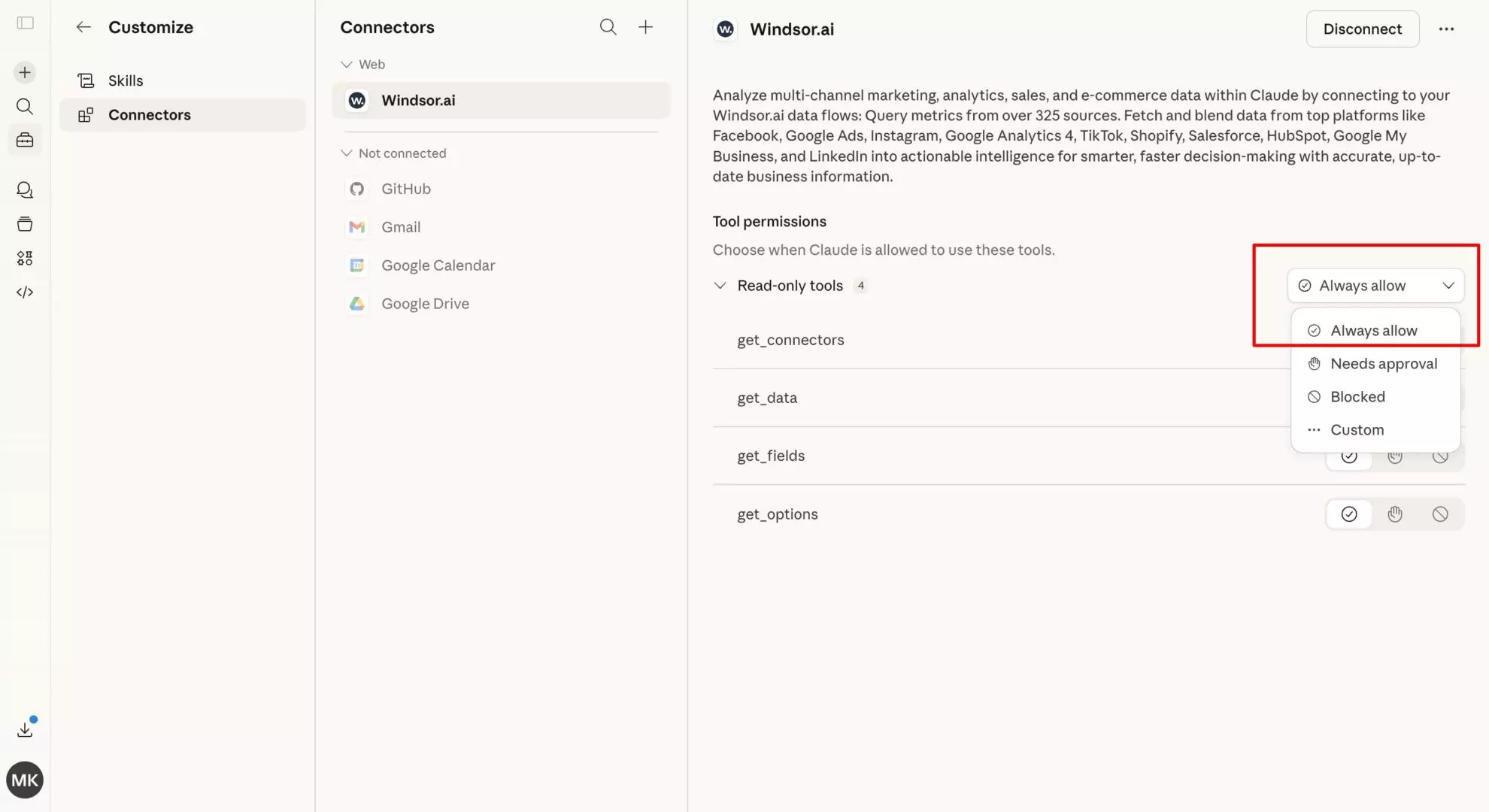
In Claude, open Customize, then Connectors, search for Windsor, and click Add. Sign in to your Windsor.ai account when prompted. You can also open the Windsor.ai listing in the Claude directory and click Connect.

💡 Quick tip: Set the permission to “Always allow” so your TikTok Shop data is live in every Claude conversation going forward, removing the need to re-authenticate the connection.
Step 3. Start querying your TikTok Shop data in Claude
Open a new Claude conversation and confirm the connection with a simple test prompt:
Connect to Windsor MCP and list all available TikTok Shop accounts.
Once the data is flowing, move into the deeper analysis of any area you’re interested in.
What you can do with TikTok Shop data in Claude: Use cases & prompt ideas
These prompts are crafted for the most common seller use cases and pain points. Simply replace product names, affiliate IDs, and date ranges with the ones relevant to your shop to get instant insights.
Sales and GMV: understanding what’s actually growing
TikTok Shop GMV can spike dramatically from a single viral video or LIVE session and look like growth when it’s actually a one-time event.
Claude can separate the trend from the noise.
GMV trend: sustainable growth or viral spikes?
Prompt idea:
Using TikTok Shop order and GMV data for the last 12 weeks, calculate:

- Total GMV per week
- Order count per week
- Average order value per week
- Week-on-week growth rate

Identify any weeks where GMV spiked more than 50% above the 8-week rolling average.
What was the order source for those weeks (LIVE, short video, shop tab)?

Excluding those spike weeks, what is the underlying GMV trend?

Is the business growing on a base level, or is growth entirely dependent on viral events?
Product performance: which SKUs are carrying the shop?
Prompt idea:
For all products sold in the last 30 days, summarize:

- Total GMV per product
- Units sold
- Average selling price
- Return rate %
- Net GMV after returns

Rank by net GMV descending.

1) Which 3 products account for more than 50% of net GMV?
2) Are there products with strong gross GMV but a return rate above 15% — meaning they look good in the dashboard but are destroying net revenue?
3) Which products have the lowest return rates AND growing order volume? These are our most reliable sellers.
Order source analysis: LIVE vs. short video vs. shop tab
Prompt idea:
Break down orders and GMV by source (LIVE, short_video, shop_tab, search) for the last 30 days:

For each source, show:
- Total orders
- Total GMV
- Average order value
- Return rate

1) Which source drives the highest AOV?
2) Which drives the highest volume?
3) Which has the lowest return rate? Indicating buyers from that source are more intentional and less likely to regret the purchase.
Affiliate and creator performance: defining who is worth the commission
TikTok Shop’s affiliate programme is one of its defining features — creators promote your products in their videos and LIVE streams and earn a commission on every sale.
But not all affiliates are equal, and the Seller Center dashboard makes it difficult to calculate true ROI per creator.
Claude handles it in a single prompt.
Affiliate ROI: which creators are profitable after commission?
Prompt idea:
Using TikTok Shop affiliate data for the last 30 days:

For each affiliate (by affiliate_id or creator_name), summarize:
- Total orders driven
- Total GMV driven
- Commission paid (commission_rate × GMV)
- Net revenue contribution (GMV - commissions - refunds from affiliate-driven orders)
- Return rate on their orders
- Average order value

Rank by net revenue contribution descending.

1) Which affiliates have a high GMV but a return rate above 20% - meaning their audience buys and immediately returns?
2) Which affiliates have modest GMV but a return rate under 5% and strong AOV? Our hidden high-quality partners.

Flag any affiliate where commission paid exceeds 40% of their driven GMV — that arrangement is likely unprofitable net of returns.
Top affiliate vs. long-tail: where to focus your creator relationships
Prompt idea:
For the last 60 days, compare:

Group A: Top 10 affiliates by GMV
Group B: All remaining affiliates (the long tail)

For each group, show:
- Total GMV
- Total commission paid
- Blended return rate
- Average order value
- Number of active affiliates

1) What % of total affiliate GMV comes from the top 10?
2) What is the commission rate difference between top affiliates and long-tail affiliates?
3) Is there a meaningful quality difference (return rate, AOV) between the two groups — or does the long tail perform equally well at lower cost?
Returns and refunds: the metric TikTok Shop sellers often undertrack
TikTok Shop return rates are frequently higher than on established platforms, partly because the impulse purchase dynamic of video commerce means buyers are less considered in their decisions.
Understanding your return patterns is the difference between a healthy margin and a business that looks profitable but isn’t.
Claude helps you get that done.
Return rate by product category: where is your margin being eroded?
Prompt idea:
Using TikTok Shop order and return data for the last 90 days:

For each product category, summarize:
- Total units sold
- Total units returned
- Return rate %
- Total GMV from that category
- Total refund value
- Net GMV (GMV minus refunds)

1) Which category has the highest return rate?
2) Which category has the largest absolute refund value — the biggest hit to net revenue?
3) Are there categories where gross GMV looks strong but net GMV after returns puts them in the bottom half of your catalogue?
Return rate by order source: which traffic converts to kept purchases
Prompt idea:
Compare return rates by order source (LIVE, short_video, shop_tab):

For each source, show:
- Return rate %
- Average days to return (order_date to return_date)
- Most common return reason (if available in data)

1) Which source has the highest return rate?
2) Is there a difference in how quickly buyers return by source — do LIVE buyers return faster (impulse regret) compared to shop tab buyers (who browsed intentionally)?
Bonus: Blending TikTok Shop with other data sources
TikTok Shop commerce data becomes far more actionable when combined with your full marketing and operations stack.
🔗 Windsor MCP connects 350+ apps, including advertising, sales, CRM, e-commerce, analytics, and finance, into a single, unified dataset, fully normalized and ready for AI analysis in Claude.
Here are the most impactful data blending scenarios to implement:
- TikTok Shop + TikTok Ads: The most important cross-source question for any TikTok seller: how much of your Shop GMV is organic vs. paid? Connect TikTok Ads spend alongside Shop order data and ask Claude to calculate the true blended ROAS (total Shop revenue divided by total TikTok Ads spend) and identify which ad campaigns are driving Shop purchases vs. which are just generating profile visits.
- TikTok Shop + TikTok Organic: Windsor has a separate TikTok Organic connector that surfaces video views, engagement rates, and follower data. Connect both alongside Shop data to ask: which organic videos correlate with spikes in Shop orders for the featured products? Which creators have strong organic engagement but low affiliate conversion, and vice versa?
- TikTok Shop + Shopify or WooCommerce: Brands selling across both TikTok Shop and their own website face a channel mix question: where is the margin better, and is TikTok Shop cannibalising DTC revenue or growing the total pie? Connect both and ask Claude to compare average order value, return rates, and customer repeat purchase behaviour by channel.
- TikTok Shop + Meta Ads or Google Ads: Understanding TikTok Shop’s contribution within your full media mix. Connect all ad platforms and Shop revenue data to ask Claude: when TikTok Shop revenue spikes, does it correlate with increased TikTok Ads spend, or with organic viral events? What is the marginal revenue contribution of each paid channel against Shop GMV?
- TikTok Shop + Google Sheets: Brands that track creator gifting, sample costs, content budgets, and affiliate targets in spreadsheets can connect those alongside Shop data. Ask Claude to compare budgeted vs. actual affiliate commission spend, or calculate true creator ROI inclusive of gifting costs that aren’t tracked in Seller Center.
What TikTok Shop data does Windsor stream to Claude?
The Windsor.ai TikTok Shop connector provides a deep-dive commerce dataset, sending over 150 metrics and dimensions to Claude for real-time retail intelligence. View all supported data fields.
| TikTok Shop data | What Claude can answer with it |
| Orders & GMV | Volume trends, AOV, and the critical split between Gross GMV and Net GMV (post-refunds). |
| Products & SKUs | Revenue by SKU, product-level return rates, and high-performing price points. |
| Traffic sources | Performance by “Surface”: identifying if revenue is driven by LIVEs, Videos, or the Shop Tab. |
| Affiliates & Creators | ROI per creator, commission costs vs. settled revenue, and affiliate-driven return rates. |
| Settlements & Fees | Actual cash-out amounts net of platform fees, commissions, and customer refunds. |
| Promotions & Coupons | Impact of Flash Deals and platform campaigns on total volume vs. net profitability. |
| Logistics & Shipping | Tracking status (Shipped, Delivered, Completed) to identify fulfillment bottlenecks. |
Key TikTok Shop fields Windsor sends to Claude
Windsor flattens TikTok’s complex commerce API into an AI-ready schema. These are the most valuable fields for Claude’s analysis:
order_id,order_status,create_time: The foundational dataset. Claude usesorder_statusto filter out “Cancelled” or “Refunded” orders so you aren’t making decisions based on “fake” GMV.original_total_price&seller_discount: Used to calculate the true discount depth of your promotions and their impact on margins.product_name,sku_name,sku_id: Essential for granular inventory analysis. Claude can use these to tell you which specific color or size variant is your “hero” SKU.source_type(LIVE, Video, Showcase, Search): Perhaps the most valuable field. It identifies the “Surface” where the order started.creator_name,creator_id,is_affiliate_order: The core of your creator strategy. These fields allow Claude to rank your top-performing affiliates by Settled Revenue, not just clicks.shipping_provider_name&tracking_number: Allows Claude to audit your logistics performance and identify if specific carriers are causing delivery delays.currency,region,buyer_email: Geographic and customer dimensions. Useful for comparing performance across the US, UK, and SE Asian markets.settlement_id&check_cash_time: These fields track the actual movement of money. Claude can use them to forecast your cash flow based on TikTok’s payout cycles.
Conclusion
TikTok Shop is a powerful commerce channel, not just a content platform with a checkout button. For brands and sellers who take it seriously, it demands the same level of analytical rigour as any other revenue stream: product-level margin analysis, creator ROI tracking, return rate management, and multi-channel attribution.
Seller Center was built for operations, not analysis. Windsor MCP fills that gap by pulling your Shop data directly from the TikTok Shop Open API, making it live inside Claude, and letting you ask the questions that actually drive decisions.
And when those questions require context from your ad spend, your website, or your creator cost tracking, Windsor connects those too.
🚀 Make winning business decisions by connecting TikTok Shop to Claude with Windsor MCP. Start for free now → onboard.windsor.ai/app/tiktok_shop.
FAQs
What is the easiest way to connect TikTok Shop to Claude?
Windsor MCP. Go to onboard.windsor.ai/app/tiktok_shop, authorise Windsor with your TikTok Shop seller account, then add Windsor as a connector in Claude. Your Shop data, such as orders, products, affiliates, settlements, etc., is live in every Claude conversation from that point on. No API credentials to manage, no exports, no spreadsheets.
What's the difference between TikTok Shop data and TikTok Ads data?
They are completely separate systems. TikTok Ads data covers your advertising campaigns — spend, impressions, clicks, video views, and attributed conversions tracked by the TikTok pixel. TikTok Shop data covers actual commerce transactions — orders placed through the Shop, products sold, GMV, affiliate commissions, refunds, and settlements. A brand running TikTok Ads that send traffic to TikTok Shop will have data in both systems, and the most valuable analysis often requires blending them. Windsor connects both.
Can Windsor connect to both TikTok Shop and TikTok Ads/Organic in the same Claude conversation?
Yes. Windsor has separate connectors for TikTok Shop, TikTok Ads, and TikTok Organic. You can connect all three to Windsor and query across them in a single Claude conversation. For example, ask Claude to calculate the true ROAS of your TikTok Ads spend against actual Shop orders, or compare organic video engagement against Shop conversion rates for the same products.
Does Windsor support TikTok Shop accounts in multiple regions?
Can Claude connect to my affiliate and creator performance data from TikTok Shop?
Yes. Windsor makes TikTok Shop affiliate data available to Claude, including orders driven per affiliate, GMV per affiliate, commission rates, and commission amounts. This allows Claude to calculate true affiliate ROI (net revenue after commissions and returns) on a per-creator basis. This analysis is extremely difficult to do inside Seller Center without custom exports.
Can I blend TikTok Shop data with my Shopify store in Claude?
Yes. This is one of the most useful cross-source analyses for multi-channel sellers. Connect TikTok Shop and Shopify (or WooCommerce) to Windsor and ask Claude to compare average order value, return rates, and repeat purchase behaviour by channel. Windsor supports 350+ integrations, so the same conversation can include your ad platform data, email platform, and any other source relevant to understanding your full commerce picture.
Does the Windsor MCP require me to share my TikTok password?
No. Windsor uses OAuth 2.0; you log in directly on TikTok’s secure server and authorize the connection there. Windsor never sees your password, and you can revoke access anytime from the TikTok Seller Center.
Is there a limit to how much data I can sync from TikTok Shop?
The Windsor MCP is designed to handle high-volume shops. Whether you have 50 orders or 50,000, the integration flattens the data into a schema that fits within Claude’s context window. For extremely large historical deep dives (e.g., three years of data), Claude may summarize the findings to stay within its memory limits, but the connection remains stable.


