 Destinations
 Data sources
 AI insights
 About us
 Careers
 Security
 Customer reviews
 Contact us
 Affiliate program
 Solution partners
 Template gallery
 Looker Studio templates
 Power BI templates
 Excel templates
 Google Sheets templates
 Tableau templates
 Facebook Ads templates
 Google Ads templates
 Data fields & Metrics
 AI prompt library & Guides
 Product documentation
 API documentation
 Case studies
 Blog
Blog Data models
 Windsor vs Supermetrics
 Windsor vs Funnel.io
 Windsor vs Fivetran
 Windsor vs Rivery
 Windsor vs Portermetrics
 Windsor vs Coupler.io
 Last updated: 16 October 2026




To connect Xero to Claude, authorize your organization at onboard.windsor.ai/app/xero and add the Windsor.ai connector in Claude. No code, two steps. That’s it. Start a new chat and ask about your finances.
Here’s the mismatch it fixes: Xero knows everything about your business finances. Every invoice, bill, bank transaction, and payroll run is timestamped, categorized, and stored.
But gaining insights from this raw data is harder than collecting it. Xero’s built-in reports are designed for compliance, not for the questions you actually ask: which clients are most profitable, which expense categories are growing fastest, and whether cash flow will cover payroll next month.
Getting these answers usually means exporting to spreadsheets, building custom BI dashboards, or waiting for your accountant’s next monthly review.
With Windsor MCP, you connect your Xero account directly to Claude. Your invoices, contacts, accounts, transactions, and expense claims become a live dataset you can deeply analyze in plain English with no exports, no formulas, and no accountant required for routine questions.
🚀 Connect Xero to Claude with Windsor MCP. Try it free for 30 days: onboard.windsor.ai/app/xero.
Once connected, you can simply ask:
- Which clients haven’t paid invoices older than 60 days, and what do they owe in total?
- How does this month’s gross profit compare to the same month last year?
- Which expense categories have grown the most as a percentage of revenue over the last 6 months?
- What’s our projected cash position at the end of next month based on outstanding invoices and bills due?
- Which suppliers are we spending the most with, and has that spending increased this year?
Understand your financial performance more deeply and generate insightful visual reports with just a single prompt.
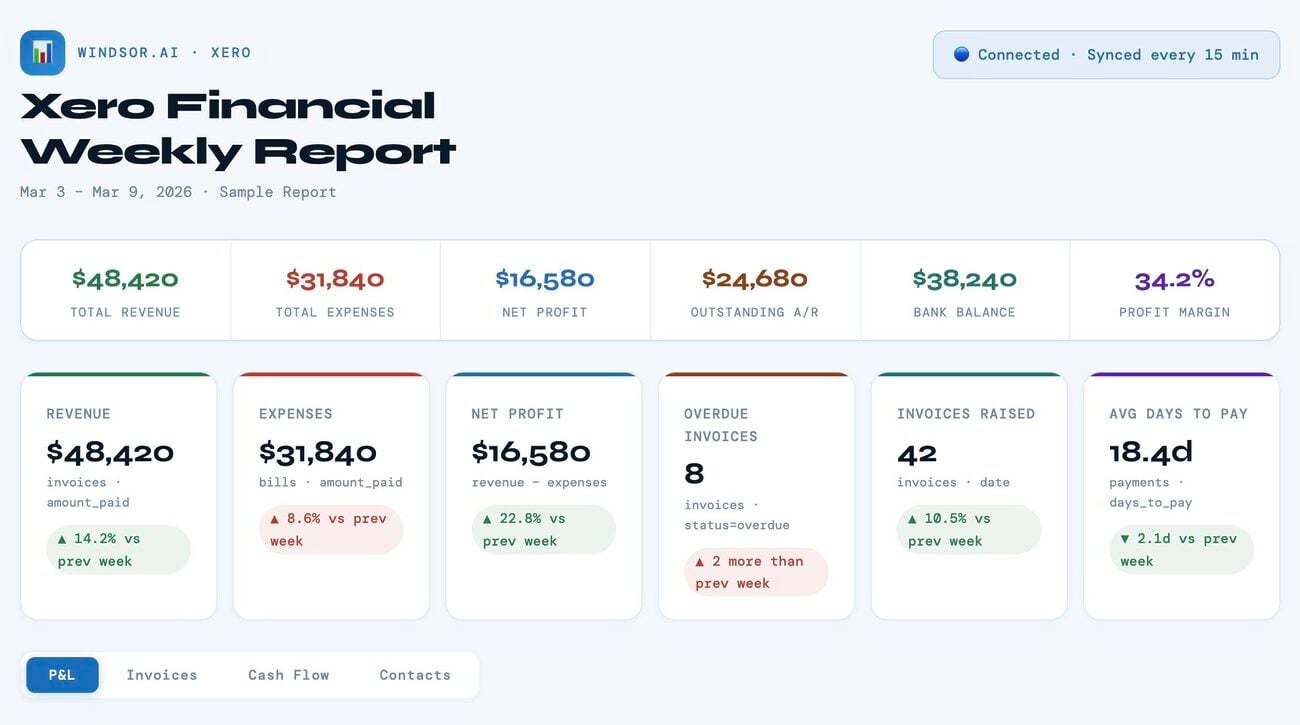
Here’s how you automate your Xero reporting and analysis in Claude with Windsor.ai in three simple steps.
The automated way to connect Xero to Claude with Windsor MCP
Xero natively only supports connecting to Claude via a manual developer setup for Claude Desktop, which can be complex and time-consuming, especially for non-technical financial teams.
With Windsor MCP’s direct connector, you can skip all that: all your Xero information is automatically streamed into Claude as a live, analysis-ready dataset. No code or maintenance required.
📖 Full documentation: windsor.ai/documentation/windsor-mcp/how-to-integrate-data-into-claude/.
Prerequisites
- A Windsor.ai account (free or paid plan, from $19/month)
- A Xero account (with read-only or higher permissions)
- A Claude.ai account
Steps to connect Xero to Claude
1. Go to onboard.windsor.ai/app/xero and connect your Xero account. Windsor uses Xero’s official OAuth connection; no passwords are shared.
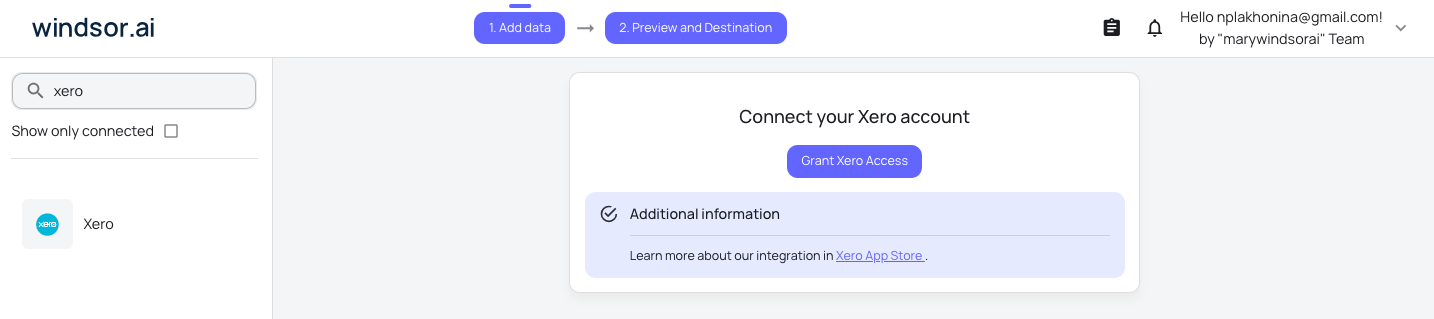
💡 Pro tip: If you manage multiple Xero organizations, common for accountants, bookkeepers, and group company structures, you can connect each one to Windsor separately and query across them in Claude.
2. In Claude, open Customize, then Connectors, search for Windsor and click Add. Sign in to your Windsor.ai account when prompted. You can also open the Windsor.ai listing in the Claude directory and click Connect.

3. Start querying your Zero data in Claude using natural-language prompts like:
- “Summarize all invoices over $5,000 this month.”
- “Which expense categories grew the fastest last month?”
- “Compare revenue vs. cost for each project this quarter.”
- “Identify any duplicate payments or unusual entries in the last 90 days.”
Xero data you can stream to Claude via Windsor.ai
Windsor connects to Xero’s API and makes 50+ metrics and 350+ dimensions available for Claude to analyze:
| Xero data | Available fields (via Windsor MCP) | What Claude can answer | Sample Claude prompts |
|---|---|---|---|
| Invoices | InvoiceID, InvoiceNumber, Date, DueDate, AmountDue, AmountPaid, CurrencyCode, Status, Contact, LineItems, Payments | Overdue invoices, average payment times, revenue by customer, invoice status breakdown | “Which invoices are overdue by more than 30 days?”, “Summarize revenue by client for last month.” |
| Bills (accounts payable) | BillID, BillNumber, Date, DueDate, Amount, CurrencyCode, Contact, LineItems, Status | Outstanding bills, supplier spend analysis, cash flow obligations | “Which bills are overdue?”, “Show total supplier spend last quarter.” |
| Bank transactions | BankTransactionID, Date, Reference, Type, Amount, CurrencyCode, IsReconciled, BankAccount, Contact | Spending patterns, reconciliation status, month-on-month trends | “Which transactions are unreconciled?”, “Show total payments by category this month.” |
| Contacts | ContactID, Name, FirstName, LastName, EmailAddress, AccountsReceivableTaxType, AccountsPayableTaxType, IsCustomer, IsSupplier, Balances, BankAccountDetails | Client profitability, supplier concentration, payment behavior | “Which clients are most profitable?”, “Which suppliers have the largest outstanding bills?” |
| Accounts & chart of accounts | AccountID, AccountName, Code, Type, CurrencyCode, TaxType, Description, Status | P&L by account, balance sheet positions, expense category analysis | “Show total expenses by account this quarter.”, “Compare revenue across departments.” |
| Payments | PaymentID, Date, Amount, PaymentType, Account, Invoice, Overpayment, CurrencyCode, IsReconciled | Payment timing, reconciled vs. unreconciled, outstanding payments | “Which invoices were paid late?”, “What is the total reconciled amount this month?” |
| Credit notes | CreditNoteID, CreditNoteNumber, Date, Contact, Status, Amount, RemainingCredit, CurrencyCode | Refund rates by client or product, credit note patterns | “List all credit notes issued this month.”, “Which clients have the most refunds?” |
| Expense claims | ExpenseClaimID, Contact, Date, Total, Status, LineItems, Category | Employee expense trends, approval status, category breakdown | “Show expenses by category last quarter.”, “Which claims are pending approval?” |
| Budgets | BudgetID, AccountID, TrackingCategoryID, BudgetAmount, StartDate, EndDate | Budget vs. actuals by account, variance analysis | “Which accounts are over budget?”, “Compare actual spend to budget by department.” |
| Tracking Categories | TrackingCategoryID, Name, Option, Status | Performance by region, project, department | “Which projects are over budget?”, “Show revenue by region.” |
What you can do with Xero data in Claude: Prompt ideas
🤖 Discover more prompt ideas across different data sources: windsor.ai/prompt-library/.
1. Cash flow: understanding your position before it becomes a problem
Cash flow is the question small business owners and finance managers worry about most, but check least often, because getting a real picture requires pulling data from multiple places. In Xero, it all lives together: outstanding invoices, upcoming bills, bank balances. Claude can summarize it in seconds.
Prompt idea: 30-day cash flow forecast
Using Xero invoice and bill data:
- Total outstanding invoices due in the next 30 days (by due_date), grouped by week
- Total bills due in the next 30 days, grouped by week
- Net cash position per week (expected inflows minus outflows)
- Any weeks where outflows exceed expected inflows

Also flag: invoices past due_date that are still unpaid — these are expected inflows that may not arrive on time.
What is the total overdue amount and how long overdue on average?
Prompt idea: aged receivables to understand who owes you money and how long they have owed it
From Xero invoice data, produce a full aged receivables report:

Group outstanding invoices by:
- Current (not yet due)
- 1–30 days overdue
- 31–60 days overdue
- 61–90 days overdue
- 90+ days overdue

For each bucket: total amount outstanding, number of invoices, and the top 3 contacts by overdue balance.

Which single client has the largest outstanding balance?
Which client has the oldest unpaid invoice?
What percentage of total receivables is more than 60 days overdue?
2. Profitability: understanding where the money actually goes
Xero records every revenue and expense transaction, which means Claude can build a genuine picture of profitability, not just top-line revenue, but margin by client, by service line, or by any tracking category you use.
Prompt idea: P&L summary with year-on-year comparison
Using Xero account transaction data, produce a plain-English P&L summary for the current financial year to date vs. the same period last year:

- Total revenue
- Cost of sales / direct costs
- Gross profit and gross margin %
- Operating expenses by major category
- Net profit and net margin %

For each line, show the year-on-year change in both amount and percentage.
Which expense category has grown fastest as a share of revenue?
Is gross margin improving or deteriorating compared to last year?
Prompt idea: profitability by tracking category
Using Xero transaction data filtered by tracking category:

For each [project / region / department], show for the last 6 months:
- Total revenue allocated to that category
- Total direct costs allocated
- Gross profit and gross margin %
- Top 3 expense accounts within that category

Which tracking category is most profitable?
Which has the worst margin — and is it improving or worsening over time?
Are there categories running at a loss that are being subsidised by more profitable ones?
Prompt idea: client profitability analysis to spot your most and least valuable customers
Using Xero invoice and credit note data, for the last 12 months, for each contact (customer):

- Total invoiced revenue
- Total credit notes issued (refunds or adjustments)
- Net revenue (invoiced minus credit notes)
- Number of invoices
- Average invoice value
- Average days to pay

Rank by net revenue descending.
Who are the top 10 clients by revenue?
Which clients have the highest credit note rate — refunds as a % of invoiced revenue?
Which clients are the slowest payers on average?
3. Expense management: tracking spend before it surprises you
Prompt idea: expense trend analysis to see what’s growing and what isn’t
Using Xero bill and bank transaction data, for the last 12 months, show monthly spend by account category (e.g., software subscriptions, contractor costs, office expenses, travel, marketing).

For each category:
- Monthly spend trend (is it growing, shrinking, or flat?)
- Total spend this year vs. last year
- Largest single transaction in the category this year

Which expense categories have grown more than 20% year-on-year?
Which categories have the highest month-to-month volatility?
Are there any categories where a single supplier accounts for more than 80% of total spend — concentration risk?
Prompt idea: defining supplier spend concentration to detect over-reliance on any single vendor
From Xero bill data for the last 12 months, for each supplier contact:

- Total spend
- Number of bills
- Average bill value
- % of total company expenditure

Who are the top 10 suppliers by total spend?
Which suppliers have you paid consistently every month vs. occasionally?

Flag any supplier that represents more than 15% of total bill spend — that's a concentration risk if the relationship or pricing changes.
Prompt idea: planned budget vs. actuals estimation
Using Xero budget data and actual account transactions for the current month to date:

For each account with a budget set:
- Budgeted amount
- Actual spend or revenue to date
- Variance (amount and %)
- Projected full-month figure at current run rate

Flag any account where actual is tracking more than 15% above or below budget.

Which accounts have the largest absolute variance?
At current run rate, will we end the month above or below the budgeted net profit?
4. For accountants and bookkeepers: faster client reviews
Accountants and bookkeepers managing multiple Xero organisations through Xero Practice Manager or Xero HQ can connect each client organisation to Windsor separately.
Claude then becomes a tool for rapid client review prep, surfacing the questions worth asking before the meeting rather than during it.
Prompt idea: pre-meeting client financial health check
For [client organization], produce a financial health summary covering the last 3 months:

1. Cash position: current bank balance, total receivables outstanding, total payables outstanding, net working capital
2. Revenue trend: monthly revenue for the last 3 months vs. same period last year, growth or decline %
3. Expense flags: any expense categories that have grown more than 20% vs. the prior quarter
4. Receivables risk: total overdue invoices, any contacts with invoices 60+ days overdue
5. One key question to raise with the client based on the above

Write in plain English. This is for a 15-minute client call.
Prompt idea: reconciliation status check
- How many bank transactions are currently unreconciled in Xero?
- What is the date range of the oldest unreconciled transactions?
- Which bank account has the most unreconciled items?
- Are there any transactions that have been sitting unreconciled for more than 30 days?

List the top 10 by amount.
Bonus: blending Xero with other data sources
Xero holds your financial ground truth. When you combine it with data from other systems your business uses for marketing, sales, e-commerce, CRM, or other needs, you can answer questions that neither source could answer alone.
🔗 Windsor MCP connects data from 350+ sources (Xero, Meta Ads, Google Ads, HubSpot, Salesforce, Shopify, etc.) and streams a unified, analysis-ready dataset directly to Claude, handling all essential data prep and normalization under the hood.
Here are some of the most common Xero data blending scenarios you can try with Windsor MCP:
- Xero + Salesforce or HubSpot: Match invoiced revenue in Xero against closed-won opportunities in your CRM. Which sales channels produce clients who actually pay on time? Which lead sources produce your highest-margin customers? Connect CRM deal data to Xero contact revenue to find out.
- Xero + Stripe: Xero records the invoice; Stripe records the payment. Connect both to reconcile payment processing fees against invoiced amounts, identify failed or refunded payments that haven’t updated in Xero, and track net revenue after fees by product or subscription plan.
- Xero + Google Sheets: Finance teams often maintain budget models and headcount plans in Sheets that Xero doesn’t know about. Connect both and ask Claude to compare your Sheets forecast against actual Xero transactions, budget vs. actuals without manual VLOOKUP.
- Xero + payroll or HR tools (BambooHR, Rippling, Gusto): Cross-reference Xero payroll expense accounts against actual headcount and salary data from your HR system. Are payroll costs tracking in line with headcount changes? Which departments have the highest cost per head?
- Xero + Google Ads or Meta Ads: Marketing spend in Xero (bills from agencies, platform invoices) against actual ad platform performance data. Is what you’re being billed matching what the platforms report? What is the true marketing cost as a percentage of revenue?
Conclusion
Xero is the backbone of your business finances, but turning raw financial data into actionable insights is a real headache for most teams.
Windsor MCP simplifies this by giving Claude direct access to your Xero data, no code, no dev setup, no exports required. Now, you can instantly analyze cash flow, profitability, aged receivables, expense trends, and budget variances with AI in less than a minute.
Plus, when you want a bigger picture, Windsor can automatically blend Xero with your CRM, payroll, ad spend, or other business systems.
Teams on Gemini Enterprise can compare the Windsor.ai data store route with Xero’s own Gemini app in how to connect Xero to Gemini Enterprise.
🚀 Start making data-driven decisions today: Connect Xero to Claude with Windsor MCP and unlock real-time financial insights → Start for free.
FAQs
What is the easiest way to connect Xero to Claude?
Windsor MCP. Go to onboard.windsor.ai/app/xero, connect your Xero account via the standard Xero login (no passwords shared with Windsor), then add Windsor as a connector in Claude. Done in under a minute. Your Xero data is live in every Claude conversation from that point.
Is my Xero financial data safe when connected to Windsor?
Yes. Windsor is SOC 2 compliant, and the connection uses Xero’s official OAuth. You control which data Windsor can access through Xero’s permissions.
Can Windsor connect to multiple Xero organizations?
Yes. You can connect multiple Xero organisations to Windsor, each with its own connection. This is particularly useful for accountants and bookkeepers managing client organizations or businesses with a group company structure. Each organisation can be queried independently in Claude, or compared against others in a single conversation.
Can Claude see my Xero tracking categories?
Yes. If you use Xero tracking categories (for projects, departments, regions, or any custom dimension), Windsor makes those available to Claude. You can filter, group, and compare any financial data by tracking category, which is one of the most useful analytical features in Xero and one that the standard Xero reports make difficult to use flexibly.
Does Windsor work with Xero in all countries?
Windsor connects to Xero via the Xero API, which works across all regions where Xero operates: the UK, Australia, New Zealand, the US, Canada, South Africa, and others. Currency is handled as stored in your Xero organization.
Can I blend my Xero data with other tools like Salesforce, Stripe, or Google Sheets?
Yes. This is one of Windsor’s most powerful capabilities. Connect Xero alongside any of Windsor’s 350+ supported integrations, and Claude can analyse across all of them in a single conversation. Common combinations: Xero + Salesforce for client profitability vs. CRM deal source, Xero + Stripe for payment reconciliation, Xero + Google Sheets for budget vs. actuals using a Sheets-based forecast model.


