 Destinations
 Data sources
 AI insights
 About us
 Careers
 Security
 Customer reviews
 Contact us
 Affiliate program
 Solution partners
 Template gallery
 Looker Studio templates
 Power BI templates
 Excel templates
 Google Sheets templates
 Tableau templates
 Facebook Ads templates
 Google Ads templates
 Data fields & Metrics
 AI prompt library & Guides
 Product documentation
 API documentation
 Case studies
 Blog
Blog Data models
 Windsor vs Supermetrics
 Windsor vs Funnel.io
 Windsor vs Fivetran
 Windsor vs Rivery
 Windsor vs Portermetrics
 Windsor vs Coupler.io
 Last updated: 20 August 2026




E-commerce brands have more store data than ever, but most teams still struggle to turn it into clear actions.
Revenue, customer behavior, products, discounts, refunds, retention, inventory, and associated ad spend are often analyzed separately, making it difficult to see what is actually driving growth or hurting profitability.
With Windsor, brands can connect their store data and use AI to uncover what is happening across the business: which customers are most valuable, which products are driving profit, where revenue is coming from, which products are at risk of stocking out, and which areas need attention before they become problems.
For brands that also connect advertising platforms, Windsor can go even further by linking store outcomes back to campaigns and acquisition sources to uncover which channels drive the strongest retention, LTV, and repeat purchases.
🚀 Get started with Windsor MCP + AI for free to improve ROAS, reduce wasted spend, and grow revenue faster.
In this guide, we will cover the most valuable e-commerce prompts and use cases to help you get more from your data.
How Windsor MCP and AI tools work together for e-commerce brands: use cases and prompts
With Windsor MCP, you can use AI tools to analyze your data, uncover trends, spot issues, and answer questions about campaign performance, customer behavior, product demand, and budget allocation in seconds.
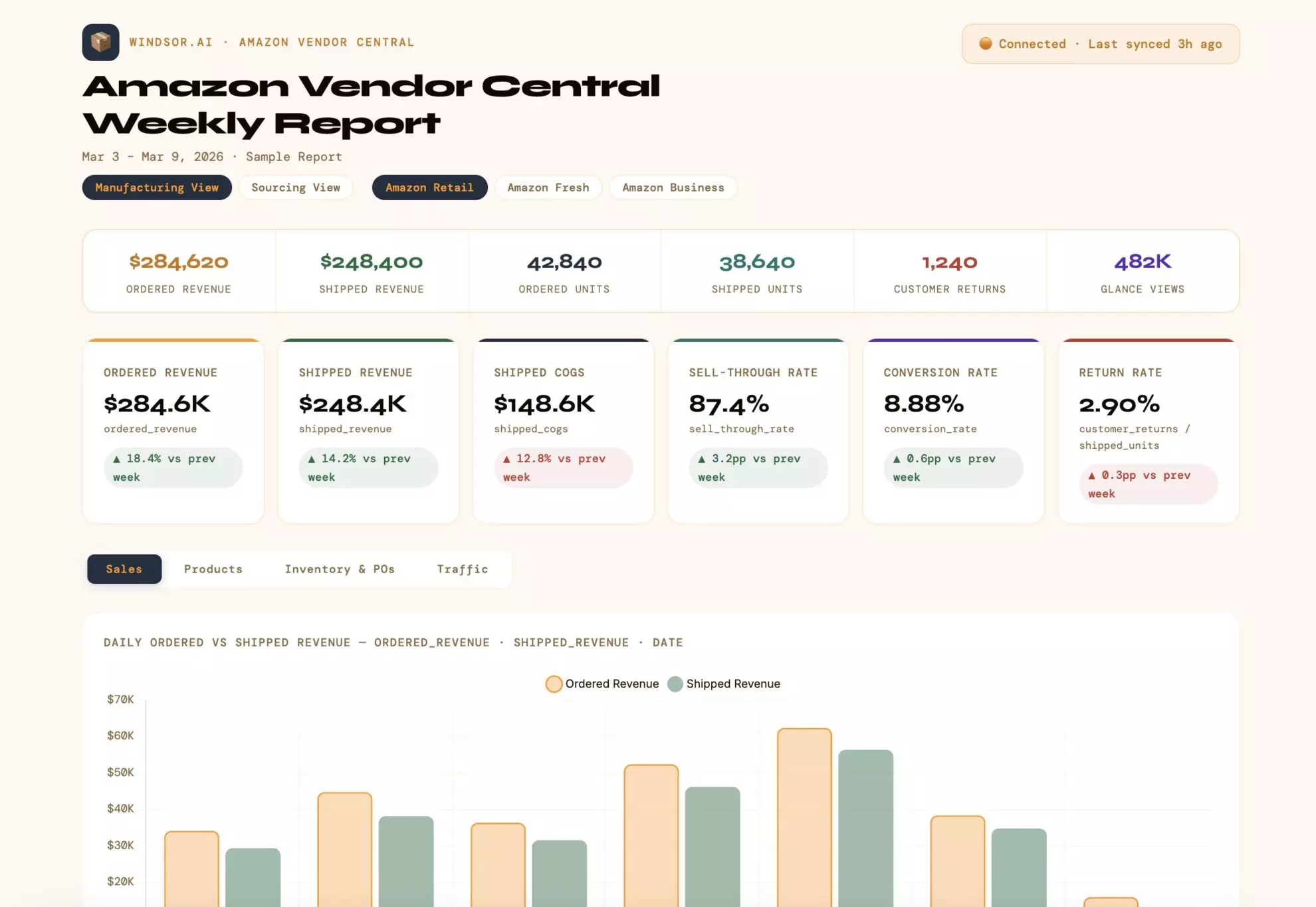
The use cases below show how e-commerce brands can turn those insights into action. Each example includes the problem it solves, who it is for, how it works, a ready-to-use prompt, and the type of output you can expect.
1. Calculate true ROAS by campaign
The challenge:
Ad platforms report ROAS based on attributed conversions, but attribution windows, view-through counting, and platform self-reporting inflate the numbers. The only way to know if a campaign is actually profitable is to match what you spent in the ad platform against what genuinely landed in your store.
Without connecting ad spend to real order revenue, brands routinely scale campaigns that look profitable in the dashboard but are losing money at the order level once discounts, refunds, and cost of goods are factored in.
Best for:
- E-commerce brands running campaigns across two or more ad platforms
- Performance marketers who suspect their platform-reported ROAS is overstated
- Brands running heavy promotional periods where discount depth affects real margins
How it works:
Windsor connects your ad platform spend (Meta, Google, Amazon, TikTok) with your store (Shopify, WooCommerce, Amazon, Magento) order data. By matching campaign spend in each period against actual net order revenue, after discounts and refunds, AI can calculate a true, store-verified ROAS for every campaign running across every channel.
Prompt:
Connect [Store Name]'s Shopify order data with Meta Ads, Google Ads, and [any other active ad platforms] via Windsor.

For the last 30 days, calculate the true ROAS for each active campaign by matching:

- Ad platform spend per campaign (from the ad platform connector)
- Net store revenue generated in the same period (total order value minus total discounts and refunded order value from Shopify)

For each campaign, return:

- Platform
- Campaign name
- Total ad spend
- Gross revenue (as reported by the platform)
- Net store revenue (order revenue after discounts and refunds from Shopify)
- Platform-reported ROAS
- True store ROAS (net revenue ÷ ad spend)
- Gap between platform-reported and true ROAS (%)

Flag any campaign where the gap between platform-reported and true ROAS exceeds 30% — these represent the highest risk of misallocation.

Rank campaigns from highest to lowest true ROAS and identify the top 3 and bottom 3.

Format the output as a cross-channel true ROAS report, ordered by true ROAS descending.
What you’ll get:
A side-by-side comparison of what each campaign claims to earn versus what it actually delivers to your store after discounts and refunds. This is the single most important number for scaling decisions and one that no ad platform will show you on its own.
2. Analyze new vs. returning customers
The challenge:
Revenue growth can come from two very different places: winning new customers or reselling to existing ones. A brand that looks like it’s growing may actually be generating most of its revenue from the same buyers cycling back while new customer acquisition quietly stalls.
Without separating new from returning customer revenue at the order level, it’s impossible to know whether your business is genuinely expanding or just retaining well.
Best for:
- DTC brands tracking the health of acquisition vs. retention over time
- E-commerce operators designing separate strategies for first-time and repeat buyers
- Brands preparing for a retention or loyalty program and needing a baseline
How it works:
Windsor pulls the store’s customer and order data, including each customer’s lifetime order count, total spend, acquisition date, and the sales channel of each order. AI can then calculate how revenue, order volume, and AOV split between genuinely new and returning buyers, and which channels are over- or under-indexed toward each group.
Prompt:
Using [Store Name]'s [Shopify] data connected via Windsor, analyze the split between new and returning customer orders for the last 60 days.

Part 1 — Store-level split

Calculate for the full period:

- Total orders and revenue from new customers (first-time buyers, lifetime order count = 1)
- Total orders and revenue from returning customers (lifetime order count > 1)
- Share of total revenue from each group (%)
- Average order value: new customers vs. returning customers
- Week-over-week trend: is the new customer share growing, stable, or shrinking over the 8 weeks in the period?

Part 2 — Split by sales channel

For each sales channel available in the order data, calculate:

- New customer orders and revenue
- Returning customer orders and revenue
- New customer share of that channel's total orders (%)
- Average order value for each group within the channel

Flag any channel where returning customers account for more than 70% of orders — this channel may be functioning more as a retention touchpoint than an acquisition driver.

Flag any channel where new customer share is above 60% — this is a strong acquisition channel worth protecting or scaling.

Part 3 — New customer retention signal

For new customers acquired in the first 30 days of the period, calculate:

- How many placed a second order before the end of the 60-day window?
- What is the early repeat purchase rate (second orders ÷ new customers)?
- What was the average time to second order for those who returned?

This shows whether new customers being acquired right now are the kind who come back.

Format the output as a store-level summary table, a channel breakdown table, and a new customer retention signal section.
What you’ll get:
A clean picture of whether your revenue growth is coming from new buyers or returning ones, which channels are genuinely driving acquisition versus retaining existing customers, and whether the new customers you’re winning right now show any early signs of becoming repeat buyers.
3. Summarize weekly performance
The challenge:
A store can have a good or bad week for many different reasons. Revenue may increase because of more orders, higher AOV, or more traffic. Revenue may also stay flat even if the conversion rate drops or returning customers make up a larger share of sales.
Looking at only revenue does not show what is really happening in the business. Without a weekly view of store performance, it’s hard to understand which metrics improved, which declined, and what is driving the overall result.
Best for:
- E-commerce teams monitoring overall store health week to week
- E-commerce brands preparing recurring performance reports
- Operators who want a simple view of sales, traffic, and customer trends
- Teams looking for early warning signs in conversion rate, AOV, or order volume
How it works:
Windsor pulls store performance data, including revenue, orders, customers, sessions, average order value, and conversion rate. AI can then compare the latest week to the previous week, identify which metrics improved or declined, and surface the biggest changes driving overall store performance.
Prompt:
Using [Store Name]'s [Shopify] data connected via Windsor, analyze store performance for the last completed 7-day period compared to the previous 7-day period.

Part 1 — Store-level performance

Calculate for the latest week and compare to the previous week:

- Total revenue
- Total orders
- Total customers
- New customers vs. returning customers
- Average order value (AOV)
- Website sessions
- Conversion rate
- Revenue per session
- Week-over-week % change for each metric

Part 2 — Customer behavior trends

Calculate:

- Share of orders from new vs. returning customers
- Share of revenue from new vs. returning customers
- Average order value for new customers vs. returning customers
- Repeat purchase rate
- Change in returning customer share compared to the previous week

Flag:

- If the conversion rate dropped while traffic increased
- If orders increased but AOV declined
- If the returning customer share is increasing while new customer growth slows
- If revenue growth is being driven mainly by more traffic rather than better conversion or higher AOV

Part 3 — Product and order trends

Identify:

- Top-selling products by revenue and order volume
- Products with the biggest week-over-week revenue growth
- Products with the largest revenue decline
- Any unusually large changes in refunds, discounts, or canceled orders, if available

Part 4 — Executive summary

Provide:

- A short summary of whether the store had a stronger or weaker week overall
- The main drivers behind the performance change
- Any risks or unusual trends that need attention
- Recommended areas to improve next week

Format the output as an executive summary, a store KPI comparison table, a customer behavior table, a product performance section, and a short list of key wins, issues, and recommended actions.
What you’ll get:
A fast, executive-level view of how the business performed this week, what changed compared to last week, which items drove growth or decline, and where you should focus next.
4. Compare customer lifetime value (LTV) by acquisition channel
The challenge:
The cheapest clicks are rarely from the most valuable customers. A channel that brings in low-cost customers may still perform poorly if those customers only purchase once and never return.
Without LTV data, brands often underinvest in channels that bring in high-value customers and overinvest in channels that look efficient but deliver weak long-term returns.
Best for:
- E-commerce brands with enough purchase history to calculate 90- or 180-day LTV
- Growth teams making long-term budget decisions
- Brands using multiple acquisition channels with different audience profiles
How it works:
Windsor connects your customer history, including total spend, order count, acquisition date, sales channel, and source tags.
AI can then group customers by acquisition source and calculate cumulative LTV at 30, 90, and 180 days, showing which channels bring the most valuable long-term customers.
Prompt:
Using [Store Name]'s [Shopify] customer and order data in Windsor, calculate the Customer Lifetime Value (LTV) for customers acquired through each major channel over the last 12 months.

For each acquisition channel, using available order sales channel and source tags, calculate:

- Total number of customers acquired in the last 12 months
- Average LTV at 30 days post-acquisition
- Average LTV at 90 days post-acquisition
- Average LTV at 180 days post-acquisition
- Average order count per customer by 180 days
- Average order value (AOV) for each channel's customer cohort

Then:

- Rank channels by 180-day LTV from highest to lowest
- Identify which channel has the highest repeat purchase rate
- Flag any channel with high acquisition volume but below-average LTV
- Estimate which channels bring the strongest long-term customer value

Format the output as a channel LTV comparison table followed by a short recommendation summary.
What you’ll get:
A clear view of which acquisition sources bring the most valuable customers over time, helping you invest more confidently in the channels that drive stronger retention and long-term revenue.
💡 Want to go deeper? Connect your ad platforms in Windsor and run this prompt to see which channels bring the most valuable long-term customers and calculate your true ROAS.
5. Analyze product-level profitability
The challenge:
Top-selling products are not always the most profitable ones. High-volume SKUs can carry high return rates, heavy discounting, or low margins that make them net negative contributors to the business. Without looking at revenue, discounts, and refunds at the product level, brands often scale the wrong products.
Best for:
- E-commerce operators making merchandising and inventory investment decisions
- Brands with large catalogs where a small number of products drive most profit
- Teams considering which products to feature in paid campaigns
How it works:
Windsor pulls Shopify’s line-item order data, including the revenue, discount value, and refund status for each product across all orders. AI can then calculate the net revenue contribution of each product after discounts and returns, rank products by true profitability, and identify which SKUs have the strongest repeat purchase signals.
Prompt:
Using [Store Name]'s [Shopify] order and line-item data in Windsor, analyze product-level profitability for the last 90 days.

For each product (SKU or product title), calculate:

- Total gross revenue (sum of line-item price × quantity ordered)
- Total discount value applied to orders containing this product
- Total refund value for returned units of this product
- Net revenue (gross revenue minus discounts and refunds)
- Number of units sold
- Number of distinct orders containing this product
- Refund rate (refunded units ÷ units sold, as a %)
- Repeat purchase signal: what % of customers who bought this product placed a second order within 90 days?

Rank products by net revenue from highest to lowest.

Then flag:

- Products in the top 20 by gross revenue but with a refund rate above 15% — these may be eroding net margin
- Products with a low order count but a repeat purchase rate above 40% — these are potential loyalty drivers worth promoting more
- Products where the total discount applied exceeds 25% of gross revenue — these may only sell because of heavy discounting

Format the output as a product profitability table, followed by a flagged list for each category above.
What you’ll get:
A clear ranking of which products are genuinely driving revenue versus which are inflating gross numbers while eroding net margin through returns and discounting. This is the foundation for smarter inventory investment, campaign targeting, and bundling decisions.
6. Predict stockouts for top-selling products
The challenge:
Running out of stock on a top-selling product is one of the most expensive and avoidable mistakes in e-commerce. Lost sales, frustrated customers, and wasted ad spend on products that can’t be purchased all compound into a major revenue hit, and most brands only notice when it’s already too late.
Best for:
- E-commerce operators managing inventory across multiple SKUs
- Brands running paid campaigns on products that could sell out
- Stores heading into peak demand periods (promotions, seasonal surges, launches)
How it works:
Windsor connects your store’s line-item sales data and inventory fields, allowing AI to calculate the recent daily sales velocity of each SKU and estimate how many days of stock remain at that pace, flagging the products most likely to stock out before the next reorder can arrive.
Prompt:
Using [Store Name]'s [Shopify] order and inventory data in Windsor, identify products at risk of stocking out within the next 21 days.

For each active product (SKU), calculate:

- Average daily units sold over the last 14 days (sales velocity)
- Average daily units sold over the last 30 days (for trend comparison)
- Current fulfillable quantity (unfulfilled inventory available)
- Estimated days of stock remaining at the 14-day average sales velocity
- Whether sales velocity is accelerating or decelerating (compare 14-day vs. 30-day average)

Flag all SKUs where:

- Estimated days of stock remaining is fewer than 21 days
- Sales velocity has increased more than 20% in the last 14 days vs. the prior 14 days (acceleration risk)

For each flagged SKU, include:

- Product name and SKU
- Current inventory level
- Daily sales velocity (14-day average)
- Estimated stockout date
- Velocity trend (accelerating / stable / decelerating)
- Urgency label: Critical (fewer than 7 days), High (7–14 days), Medium (14–21 days)

Format the output as a stockout risk report, ordered by urgency, then by estimated days remaining.
What you’ll get:
A forward-looking inventory risk list with estimated stockout dates for every at-risk SKU. Brands using this weekly can prevent stockouts on high-velocity products before they happen and pause ad spend on products about to go out of stock rather than wasting budget sending traffic to unavailable items.
7. Find bundle and cross-sell opportunities
The challenge:
Most e-commerce brands leave significant revenue on the table by selling products individually when customers would willingly buy them together. The data to identify the best bundle combinations already exists in order history, but most store dashboards don’t surface it in a usable way.
Best for:
- E-commerce brands looking to increase average order value (AOV)
- Stores with catalogs of 20+ products where natural pairings aren’t obvious
- Brands building new product bundles, kits, or “frequently bought together” features
How it works:
Windsor connects your store’s line-item order data, allowing AI to identify which products appear most frequently in the same order. It can calculate co-purchase frequency, the lift in AOV when specific products are bought together, and which combinations are strong enough to justify a formal bundle offer.
Prompt:
Using [Store Name]'s [Shopify] order and line-item data in Windsor, identify the strongest product bundle and cross-sell opportunities from the last 180 days of orders.

Step 1 — Co-purchase frequency analysis

For all orders containing two or more line items, identify every unique product pair that appeared in the same order.

For each product pair, calculate:

- Co-purchase count (number of orders containing both products)
- Co-purchase rate (co-purchase count ÷ total orders containing either product)
- Average order value for orders containing this pair vs. orders containing just one of the two products
- AOV lift from the pair (% increase in AOV when both products are in the same order)

Return the top 15 product pairs by co-purchase count, filtered to pairs with a co-purchase rate above 10%.

Step 2 — Bundle revenue potential

For the top 10 pairs, estimate the bundle revenue opportunity:

- How many orders in the period contained Product A but not Product B?
- If 20% of those single-product buyers were converted to buy both, how much additional revenue would that generate?

Step 3 — Cross-sell by customer segment

Identify whether high-LTV customers (top 20% by total spend) show different co-purchase patterns than average customers.

Format the output as a co-purchase frequency table, followed by a bundle opportunity table with estimated revenue potential for each top pair.
What you’ll get:
A data-backed list of which product combinations your customers already choose naturally, ranked by frequency and AOV lift. This eliminates guesswork from bundle creation and gives the marketing team specific pairs to promote as cross-sells in post-purchase flows, product pages, and ad campaigns.
8. Forecast product demand and revenue trends
The challenge:
Demand forecasting based on gut feel leads to overstocking slow movers and running out of fast ones. Brands that can’t project which products or categories are likely to grow or contract in the next 4–8 weeks end up making reactive inventory and ad spend decisions instead of proactive ones.
Best for:
- E-commerce brands with at least 12 months of order history
- Stores planning ahead for seasonal peaks, promotions, or new launches
- Operators making reorder and media budget decisions 4–8 weeks in advance
How it works:
Windsor pulls the full order history and allows AI to identify seasonal patterns, week-over-week sales momentum, and category-level growth trends. By comparing recent velocity against the same period in prior years, AI can flag which products and categories are accelerating, plateauing, or in decline.
Prompt:
Using [Store Name]'s [Shopify] order history available through Windsor, forecast demand and revenue trends for the next 8 weeks.

Step 1 — Historical trend analysis

For each product category (or collection) in the store, calculate:

- Total revenue and units sold by month for the last 12 months
- Year-over-year revenue growth rate for the last 3 months
- Week-over-week sales velocity trend for the last 6 weeks (accelerating, stable, or decelerating)
- Seasonal index: how does each category's revenue in [upcoming months] compare to the annual average, based on prior year data?

Step 2 — Growth and decline flags

Flag categories where:
- Year-over-year revenue growth exceeds 25% in the last 3 months (high-growth — consider increasing stock and ad spend)
- Year-over-year revenue growth is negative for 2 or more consecutive months (declining — review pricing, product range, or promotional strategy)
- Current week-over-week velocity is accelerating more than 15% above the 6-week average (early trend signal)

Step 3 — 8-week revenue forecast

For the top 10 products by revenue in the last 90 days, project estimated weekly revenue for the next 8 weeks based on:

- Recent sales velocity (last 4 weeks)
- Seasonal adjustment from prior year patterns

Present the forecast as a range (low/mid/high) based on whether velocity holds, accelerates 10%, or decelerates 10%.

Format the output as a category trend table, followed by an 8-week product-level demand forecast.
What you’ll get:
A forward-looking view of where revenue growth is likely to come from in the next two months, grounded in actual sales history and seasonal patterns. This gives buyers, operations teams, and media planners the shared demand signal they need to make aligned decisions.
9. Identify best-selling products and fastest-growing categories
The challenge:
In a catalog of dozens or hundreds of products, it’s easy to keep attention on familiar bestsellers while missing the newer products and categories that are quietly growing fast. Brands that don’t track category-level growth momentum regularly end up underinvesting in their next wave of bestsellers.
Best for:
- E-commerce brands with multi-category catalogs
- Merchandising and buying teams tracking what to reorder and promote
- Performance marketers deciding which products to feature in campaigns
How it works:
Windsor pulls store’s order and line-item data and allows AI to rank products and categories by revenue, unit volume, and growth momentum, comparing recent performance against the prior period to surface what’s accelerating.
Prompt:
Using [Store Name]'s [Shopify] order and line-item data in Windsor, identify the best-selling products and fastest-growing categories for the last 60 days.

Part 1 — Top products

For all products sold in the last 60 days, calculate:

- Total net revenue (after discounts)
- Total units sold
- Number of distinct orders containing this product
- Revenue growth vs. the prior 60 days (%)
- Average order value of orders containing this product

Return the top 20 products by net revenue and the top 10 by revenue growth rate (minimum 50 orders in the period to qualify).

Part 2 — Category and collection performance

Group products by their Shopify collection or category and calculate:

- Total revenue per category, last 60 days vs. prior 60 days
- Revenue growth rate (%)
- Units sold
- Average selling price per unit (to flag if growth is being driven by volume or price)

Rank categories by revenue and flag the top 3 fastest-growing by revenue growth rate.

Part 3 — Emerging products

Identify products that had zero or near-zero sales in the prior 60 days but are generating meaningful revenue now (more than $500 in the current period). These are new entrants worth watching.

Format the output as a product ranking table, a category growth table, and a separate list of emerging products.
What you’ll get:
A real-time snapshot of what’s selling, what’s growing, and what’s just starting to break through, across both the product and category level. This is the starting point for any merchandising, promotional, or media planning conversation.
10. Identify high-value customer segments
The challenge:
Not all customers are worth the same, and marketing to a million customers the same way wastes the budget that should be concentrated on the 10% who generate 40% of revenue. Most store dashboards show total customers and average AOV, but don’t surface the behavioral and value-based segments that actually matter for targeting.
Best for:
- E-commerce brands building VIP, loyalty, or retention programs
- Performance marketers creating high-LTV lookalike audiences for paid campaigns
- Operators prioritizing which customer groups to re-engage first
How it works:
Windsor pulls customer-level data, including total spend, order count, average order value, and tags, and allows AI to segment customers into value tiers, identify what they buy, and flag which groups have the highest long-term revenue potential.
Prompt:
Using [Store Name]'s customer data in Windsor, identify and profile the highest-value customer segments.

Step 1 — Value tier segmentation

Segment all customers with at least one order into tiers based on lifetime total spend and order count:

- Champions: Top 10% by lifetime spend AND more than 3 lifetime orders
- Loyal: Lifetime spend in the top 30% AND 2–3 lifetime orders
- Promising: 1–2 orders, but AOV above the store average
- At-risk: 2+ prior orders but no purchase in the last 90 days
- One-time buyers: Exactly 1 order, more than 90 days ago

For each tier, calculate:

- Customer count and % of total customer base
- Total revenue contribution (%)
- Average lifetime spend
- Average order count
- Average order value
- Average days since last order

Step 2 — Champion profile

For the Champions segment, identify:

- Top 5 products most commonly purchased by this group
- Most common acquisition channel (based on order source tags where available)
- Average repurchase interval (days between orders)

Step 3 — Re-engagement opportunity

For the At-risk segment, flag customers who:

- Have 3+ lifetime orders (high historical value), AND
- Have not ordered in 60–120 days (within re-engagement window before full churn)

Return a count of these customers and their combined historical revenue.

Format the output as a tier summary table, a Champion profile, and an At-risk re-engagement opportunity summary.
What you’ll get:
A tiered map of your customer base that shows exactly where revenue is concentrated, what your most valuable customers look like, and which formerly loyal customers are slipping away in time to re-engage them.
11. Measure promotion and discount effectiveness
The challenge:
Discounts drive sales, but not always incremental ones. Many promotions simply pull forward purchases that would have happened anyway, or train customers to only buy on sale, eroding long-term margins without generating real revenue growth.
Without measuring whether a discount drove new customers, larger baskets, or faster repurchases, brands can’t tell if their promotions are investments or giveaways.
Best for:
- E-commerce brands running regular promotional campaigns, sales events, or coupon codes
- Teams evaluating whether a discount strategy is growing or shrinking net revenue
- Operators preparing for major sale events (Black Friday, seasonal promotions)
How it works:
Windsor pulls order-level discount data, including discount codes used, total discount value per order, and whether the buying customer was new or returning, allowing AI to calculate the true incremental impact of each promotion on revenue, new customer acquisition, and margin.
Prompt:
Using [Store Name]'s order data in Windsor, analyze the effectiveness of promotions and discount codes used in the last 90 days.

For each discount code or promotional tag used in the period, calculate:

- Number of orders using this code
- Total gross revenue from orders using this code
- Total discount value given (absolute and as % of gross revenue)
- Net revenue after discounts
- Average order value: orders with this code vs. orders without any discount in the same period
- New customer rate: % of orders using this code that came from first-time buyers
- Repeat customer rate: % from returning customers (indicates promotional dependency risk)
- 60-day repeat purchase rate for customers acquired through this promotion (did they come back?)

Flag promotions where:

- The discount represents more than 30% of gross order revenue (deep discount dependency)
- More than 70% of usage is by returning customers (not driving acquisition, potentially cannibalizing full-price repeat purchases)
- The 60-day repeat purchase rate for customers acquired through the promotion is more than 20% below the store average (bargain hunters who don't return)

Rank promotions by net revenue contribution from highest to lowest.

Format the output as a promotion effectiveness table, followed by a flagged risk list.
What you’ll get:
A clear read on which promotions are growing the business and which are training customers to wait for sales. This analysis is particularly valuable before planning the next promotional calendar, showing which discount mechanics earn long-term customers and which just drain margin.
12. Analyze refunds and returns
The challenge:
Refunds and returns are one of the most under-analyzed cost drivers in e-commerce. A product with a 20% return rate can appear profitable in gross revenue reports while quietly destroying margin. High return rates also signal product quality issues, misleading descriptions, or sizing and fit problems that compound over time.
Best for:
- E-commerce brands with physical products and meaningful return volumes
- Operators tracking the true net margin contribution of individual products
- Brands that want to identify whether certain campaigns are attracting low-quality buyers who return at higher rates
How it works:
Windsor pulls refund and return data, including financial status, cancellation reasons, and which products were returned, allowing AI to calculate return rates by product, channel, and customer segment, and flag where return-driven margin erosion is highest.
Prompt:
Using [Store Name]'s order and refund data in Windsor, analyze return and refund patterns for the last 90 days.

Part 1 — Overall return metrics

Calculate:

- Total number of refunded or partially refunded orders
- Total refund value as a % of gross revenue
- Most common order cancellation reasons (where available in the data)
- Return rate by fulfillment status (were items returned before or after delivery?)

Part 2 — Product-level return rates

For all products with more than 20 units sold in the period, calculate:

- Units returned
- Return rate (returned units ÷ units sold, %)
- Revenue lost to returns per product

Flag products where the return rate exceeds 15% — these are candidates for product description review, photography updates, or quality audits.

Rank products by absolute revenue lost to returns (highest first).

Part 3 — Channel and segment correlation

For the top 5 acquisition channels by order volume, calculate the return rate of orders attributed to each channel.

Flag any channel where the return rate is more than 5 percentage points above the store average — this may indicate that ads for this channel are attracting poorly matched buyers or overpromising on product claims.

Part 4 — Customer behavior

Flag customers who have placed more than 3 orders in the last 12 months with a refund or return in each — these may represent bracket-buying behavior (buying multiple options, returning the rest).

Format the output as a store-level return summary, a product-level return rate table, and a channel return rate comparison.
What you’ll get:
A full map of where refunds and returns are eroding revenue: by product, by channel, and by customer pattern. Most brands discover that a small number of SKUs and one or two channels account for a disproportionate share of their return volume, making the fix highly targeted.
13. Compare geographic performance
The challenge:
A campaign that performs well nationally can be dragged down by a handful of regions where it shouldn’t be running at all, and a strong regional market can go unscaled simply because no one looked at the data that way.
Geography is one of the most consistently underused dimensions in e-commerce performance analysis, despite the fact that shipping costs, purchasing behavior, and product relevance vary enormously by location.
Best for:
- E-commerce brands selling across multiple countries or regions
- Performance marketers optimizing geographic bid adjustments or exclusions
- Operators evaluating whether to localize pricing, offers, or product range by market
How it works:
Windsor connects order shipping address data with ad platform geographic performance data, allowing AI to compare revenue, AOV, return rates, and paid campaign efficiency across countries, regions, and cities.
Prompt:
Using [Store Name]'s order data and [Meta Ads / Google Ads — specify which are connected] via Windsor, analyze geographic performance for the last 60 days.

Part 1 — Store revenue by geography

For each country, and for the top 5 countries by revenue broken down further by region/state, calculate:

- Total net revenue (after discounts)
- Number of orders
- Average order value (AOV)
- Return rate (refunded orders ÷ total orders, %)
- Repeat purchase rate (customers with more than 1 order in the period, %)

Rank countries by net revenue and flag any country where AOV is more than 20% above or below the overall store average.

Part 2 — Ad performance by geography

For each country in the connected ad platforms, retrieve:

- Total ad spend
- Total attributed conversions
- CPA
- ROAS (where conversion value is tracked)

Part 3 — Cross-analysis

Join the store revenue and ad performance data to calculate the true blended ROAS by country (store net revenue ÷ ad spend for each geography).

Flag countries where:

- Blended ROAS is more than 30% above average (potential to scale spend)
- Blended ROAS is more than 30% below average with more than $200 in ad spend (potential to reduce or pause)
- AOV and repeat purchase rate are both above average but ad spend is minimal (untapped organic market worth testing with paid)

Format the output as a geographic performance table, followed by a flagged list of scale and reduce opportunities by country.
What you’ll get:
A country-by-country and region-by-region breakdown of where your store revenue is most efficient, and where ad spend is underperforming or missing the mark. For brands selling internationally, this analysis often reveals one or two markets that should be scaled and one or two that should be paused almost immediately.
14. Detect churn risk and re-engage customers before it’s too late
The challenge:
Customer churn is rarely a sudden event; it’s a gradual drift that starts weeks before a customer stops buying entirely. By the time a customer is clearly gone, re-engagement is expensive and often too late. The brands that protect revenue best are the ones that catch the drift early, when a well-timed offer or message can still bring someone back.
Best for:
- E-commerce brands with repeat purchase cycles of 30–90 days
- Retention and CRM teams building automated win-back flows
- Operators who want to prioritize which lapsed customers are worth the cost of re-engagement
How it works:
Windsor pulls full customer order history, including total order count, last order date, total lifetime spend, and average repurchase interval, and allows AI to identify customers who are overdue for their next purchase based on their own historical behavior, not a generic time cutoff.
Prompt:
Using [Store Name]'s customer and order data in Windsor, identify customers at risk of churning and prioritize them for re-engagement.

Step 1 — Establish expected repurchase windows

For all customers with 2+ orders, calculate the average number of days between their consecutive purchases (individual repurchase interval).

Use these individual intervals — not a fixed store-wide cutoff — to define when a customer is "overdue." A customer who typically buys every 25 days is at risk after 35 days of silence; a customer who buys every 90 days is not.

Step 2 — Flag at-risk customers

Identify customers who meet all of the following:

- At least 2 lifetime orders (they have established a purchasing pattern)
- Days since last order exceeds 1.5× their personal average repurchase interval
- Have not placed an order in the last 30 days

Segment flagged customers into:

- High priority: 3+ lifetime orders AND lifetime spend in the top 30% of the customer base
- Medium priority: 2 lifetime orders OR lifetime spend in the middle 30–70%
- Lower priority: 2 lifetime orders, below-average spend

Step 3 — Last purchase context

For each high-priority at-risk customer, retrieve:

- Last product purchased (category and product name)
- Last order value
- Total lifetime spend
- Days since last order vs. their personal repurchase interval

This context allows for personalized re-engagement messaging tied to what they actually bought.

Step 4 — Segment size and revenue at stake

Calculate the total number of customers in each priority segment and their combined lifetime revenue — this is the revenue base at risk if they churn fully.

Format the output as a churn risk summary (counts and revenue at stake per segment), followed by a high-priority customer table with last purchase context.
What you’ll get:
A precision-targeted list of customers who are going quiet, ranked by how much they’re worth and personalized with the context needed to bring them back. This is far more actionable than a generic “hasn’t ordered in 60 days” filter, because it’s calibrated to each customer’s own buying rhythm.
15. Enhance product descriptions based on top sellers
The challenge:
Most product descriptions are written once and never updated, even though some products consistently sell better than others. Often, top-selling products succeed because their descriptions communicate benefits more clearly, answer common objections, highlight the right features, or create a stronger emotional appeal.
Without comparing top-performing and weak-performing product pages, brands miss opportunities to improve conversion rates across the catalog.
Best for:
- E-commerce brands with large product catalogs
- Teams looking to improve conversion rates without changing pricing or traffic
- Merchandising teams updating underperforming product pages
- Brands launching new products
How it works:
Windsor pulls product descriptions and performance data, including revenue, conversion rate, units sold, refunds, and repeat purchase behavior. AI can then identify the top-performing products, analyze the text patterns they share, and compare them to weaker-performing products to uncover what is missing in their descriptions.
Prompt:
Using [Store Name]'s [Shopify] product and order data in Windsor, identify the common traits of the store's highest-performing product pages and recommend description improvements for weaker-performing products.

Step 1 — Identify top-performing products

Select the top 10 products based on a combination of:

- Revenue
- Conversion rate
- Units sold

Analyze the product descriptions of these products and identify common patterns, such as:

- Description length
- Use of bullet points
- Focus on benefits vs. features
- Presence of sizing, ingredients, materials, or technical details
- Use of urgency, social proof, guarantees, or FAQs
- Tone of voice and readability

Step 2 — Compare with weaker-performing products

For products with:

- High traffic but low conversion rate
- Below-average revenue per product page view

Compare their descriptions against the top-performing patterns and identify what may be missing or unclear.

Step 3 — Generate improvement recommendations

For each weak-performing product, recommend:

- What sections should be added or rewritten
- Which missing details should be included
- Whether the description should focus more on benefits, use cases, materials, sizing, ingredients, FAQs, or trust-building elements
- Suggested structural improvements, such as shorter paragraphs, bullet points, or clearer calls to action

Format the output as:

- A summary of the common patterns across top-selling product descriptions
- A comparison table of top-performing vs. weak-performing product pages
- A prioritized list of description improvements for underperforming products
What you’ll get:
A creative view of what makes your best product pages successful and a practical set of recommendations to improve weaker descriptions, increase conversion rates, and create a more consistent shopping experience across the catalog.
Pro tips for more effective AI analysis as an e-commerce brand
Always filter by store ID or account ID
When you have multiple stores or ad accounts connected to Windsor, an unfiltered prompt will blend data across all of them.
Always specify the account or store ID in every prompt to make sure you are analyzing the right data and not mixing numbers across different properties.
Build a prompt library for your most repeated tasks
The prompts in this guide are starting points. Once you find the versions that work best for your business, save them. Build an internal library with ready-to-use prompts for your most common tasks:
- Weekly ROAS check by campaign
- New vs. returning customer breakdown
- Stockout risk alert for top products
- LTV comparison across channels
- Monthly wasted spend audit
This saves time and ensures consistency every time you run an analysis.
Ask AI to output in the format you need
AI tools can structure their output in whatever format fits your workflow. Add a formatting instruction to the end of any prompt to get exactly what you need:
Format the output as:
- A summary table with key metrics per channel
- Followed by a 3-bullet executive summary
- Followed by 3 recommended actions, each supported by a specific data point
Connect organic sources alongside paid for the full picture
The use cases in this guide focus on paid channels because that is where most e-commerce ad budgets sit. Windsor also connects organic sources, including Google Search Console, Instagram Insights, and many others.
Adding these gives you a complete view of revenue across all touchpoints and helps you understand how paid campaigns interact with organic performance over time.
Run daily or weekly health checks, not just monthly reviews
Monthly reporting catches problems after they have already cost you money. Running a quick daily or weekly health check using Windsor and AI means anomalies, budget issues, and underperforming campaigns get flagged early, before they become expensive.
Use Windsor with Claude for analysis, ChatGPT for documents
Both tools work well with Windsor data.
In practice, Claude produces stronger narrative analysis, strategic recommendations, and visual dashboards. ChatGPT handles formatted documents and structured tables particularly well.
Many e-commerce teams use both: Claude for interpretation and ChatGPT for the final deliverable.
Conclusion
Data is useless if it’s trapped in silos. In the age of AI, the brands that win are the ones with a connected, AI-ready data layer. Windsor MCP integrates your store and other business channels into one cohesive engine, turning raw numbers into actionable insights that drive real revenue.
Don’t let your budget get lost in the gaps. Scale your ROAS with the power of Windsor and AI working in sync.
🚀 Get started with Windsor.ai for free and connect your first data source in under a minute: https://onboard.windsor.ai/.


