 Destinations
 Data sources
 AI insights
 About us
 Careers
 Security
 Customer reviews
 Contact us
 Affiliate program
 Solution partners
 Template gallery
 Looker Studio templates
 Power BI templates
 Excel templates
 Google Sheets templates
 Tableau templates
 Facebook Ads templates
 Google Ads templates
 Data fields & Metrics
 AI prompt library & Guides
 Product documentation
 API documentation
 Case studies
 Blog
 Data models
 Windsor vs Supermetrics
 Windsor vs Funnel.io
 Windsor vs Fivetran
 Windsor vs Rivery
 Windsor vs Portermetrics
 Windsor vs Coupler.io
Connect Adalyser to ChatGPT
Automatically sync your Adalyser TV response data to ChatGPT using the Windsor.ai connector.
Query your Adalyser data in ChatGPT using natural language to see which TV spots, channels, and dayparts drive digital response, with AI-driven insights on leads, sales, and ROI across every campaign.
Connect in minutes. No code required.
 Sign up with Google
 Free forever plan
No credit card needed






Get instant AI insights from your Adalyser TV campaigns in ChatGPT
Windsor MCP streams your live Adalyser TV response data into ChatGPT, so you skip the manual cross-referencing and go straight to the analysis. Explore key use cases:

Catch TV-driven spikes early
Ask ChatGPT to flag which channel, daypart, or programme triggered the biggest jump in Lead Uplift this week, so you can double down on what’s working.

Compare cost efficiency across airings
Get CPT, CPL, and CPA broken down by campaign in one prompt, instead of cross-referencing airtime logs against a separate cost sheet.

Tie sales to specific TV spots
Ask ChatGPT which TV spots generated the most Sales Value and Sale Count relative to Gross Cost, so budget shifts toward what’s converting.

Track response trends by week
Break down leads, sales, and impacts by week or month to see whether TV-driven response is building or fading.

Optimize channel and daypart mix
Ask ChatGPT to rank channels and dayparts by ROI, so media planning shifts toward the slots that move digital response.
Using Windsor.ai to connect data from Adalyser to ChatGPT
Bringing Adalyser TV response data into ChatGPT usually means manual exports, data cleanup, or costly reporting platforms, especially when cross-referencing airtime logs against web and app analytics by hand to catch which TV spot moved the needle. Windsor.ai removes that friction with an MCP connector that automatically collects, structures, and streams your Adalyser data directly into ChatGPT.
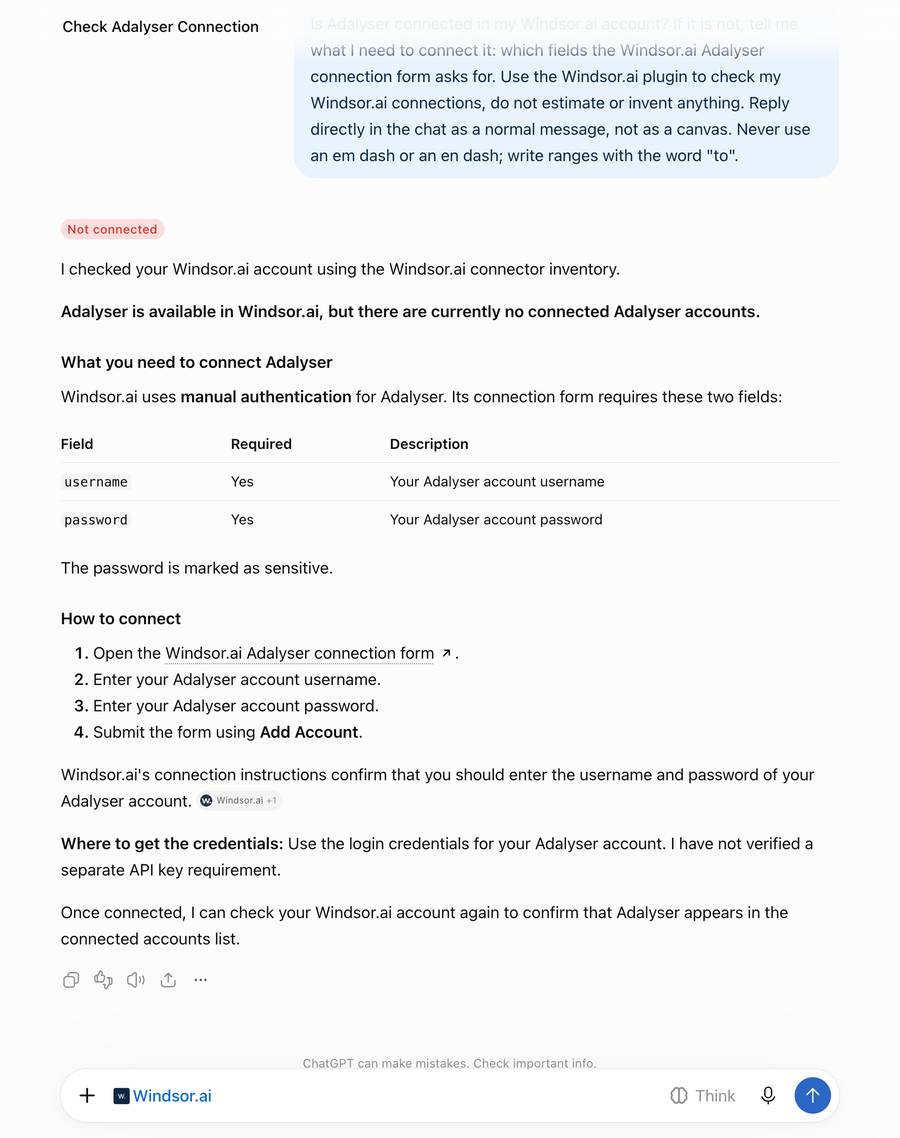
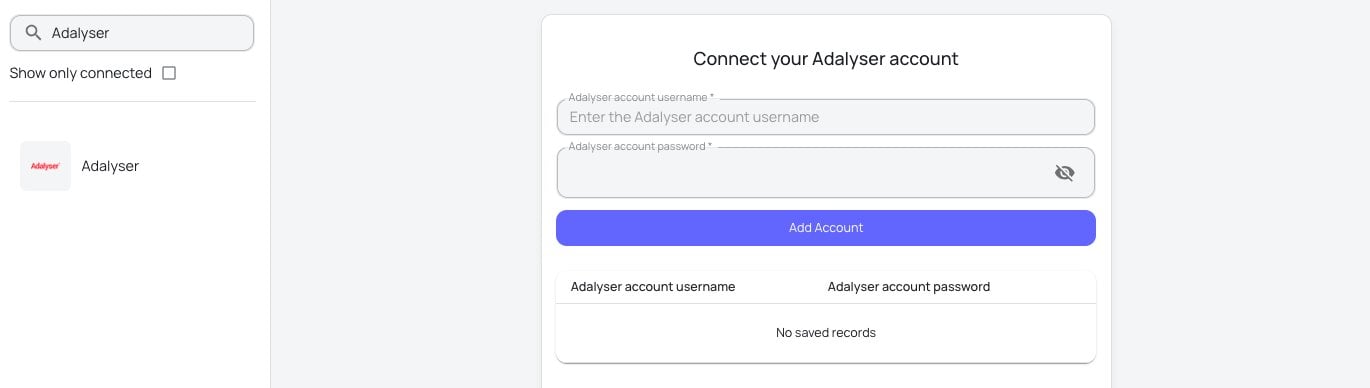
Windsor.ai connects to Adalyser with your Adalyser account username and password. The connector has 93 fields (23 metrics and 70 dimensions), listed in the Adalyser field reference. It is read-only: Adalyser has no write actions in Windsor.ai (write actions list, checked on 20 November 2026), so ChatGPT can read your data but cannot change anything in Adalyser.
We have no Adalyser account connected to our Windsor.ai account, so on 20 November 2026 we asked ChatGPT whether Adalyser is connected and what the connection needs. It answered “Not connected” and named the same two required fields as the Windsor.ai form, your Adalyser account username and password, then the same last step: select Add Account.






How to connect Adalyser to ChatGPT with Windsor.ai
Explore our video tutorial and a step-by-step guide to integrate your Adalyser data into ChatGPT with the Windsor.ai connector. Setup details, the Adalyser fields and prompts are in how to connect Adalyser to ChatGPT.
Install the Windsor.ai plugin
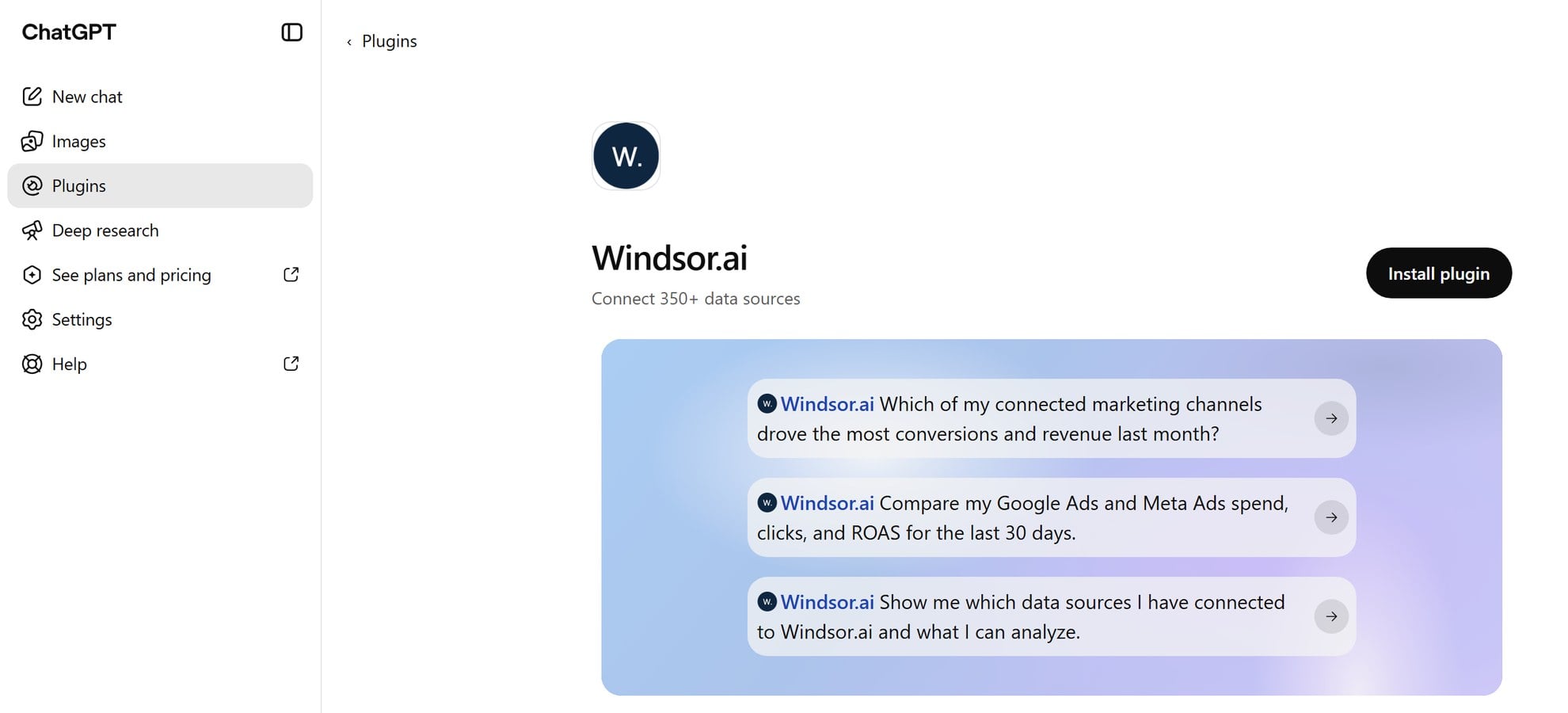
In ChatGPT, select Plugins in the sidebar and search for Windsor.ai, or open the Windsor.ai plugin page.
Select Install plugin, then sign in to Windsor.ai and authorize access.
Query your Adalyser data in ChatGPT
Open a new chat and start asking questions about your connected Adalyser data using natural language.
To make sure ChatGPT uses Windsor.ai, click the + sign and pick Windsor.ai, or type @Windsor.ai.
FAQs
What Adalyser data can I analyze in ChatGPT?
Windsor.ai gives ChatGPT access to all 93 Adalyser fields (23 metrics, 70 dimensions). Some of them, by group:
- TV cost and reach: Impacts, TVRS, Gross Cost, Client Cost, CPT, CPA, CPL, CPS.
- Leads and sales: Conversions, Lead Baseline, Lead Uplift, Sales Value, Sale Count, CVR, ROI, IPL.
- Airtime and scheduling: Channel, Daypart, Programme, Creative, Date, Day, Time.
- Digital response sources: Lead Origins Direct, Organic Search and Paid Search, Sale Origins Direct, Organic Search and Paid Search, Lead Sources Desktop and Mobile.
The full list is in the Adalyser field reference.
Can ChatGPT tell me which TV spots are driving the most digital response?
Yes. Windsor.ai streams Impacts, Lead Uplift, and Sale Count for every channel, daypart, and programme, so ChatGPT can flag the airings generating the strongest lift in leads and sales.
Can ChatGPT track my Adalyser performance trends over time?
Yes. Windsor.ai streams date, week, month, and year breakdowns alongside every metric, so ChatGPT can show whether leads, sales, and ROI are trending up or down over any period you ask about.
What prompts can I use to analyze Adalyser data in ChatGPT?
-
Rank my TV channels by ROI and flag any below the account average.
-
How did Lead Baseline compare to Lead Uplift month over month?
-
Which programme generated the most Sales Value relative to Gross Cost?
-
Break down CPS by desktop vs mobile response sources for the last quarter.
How much does it cost to integrate Adalyser into ChatGPT using Windsor.ai?
Windsor.ai has a free forever plan with 1 data source and the last 30 days of data. Paid plans start at $19/month for 3 sources, billed annually. See the pricing page.
Can I combine Adalyser data with other channels in ChatGPT?
Yes. Windsor.ai supports 350+ data sources, so you can connect Adalyser alongside Google Ads or Meta Ads to see blended TV and digital spend and conversions across every channel in one place.
Do you have helpful links to get started with integrating Adalyser and ChatGPT using Windsor.ai?
Yes:
- How to connect Adalyser to ChatGPT: setup, fields and prompts
- Adalyser field reference: all 93 fields
- How to integrate data into ChatGPT: plugin setup
- Write actions list: which connectors ChatGPT can change data in
Tired of manual Adalyser data exports? Try Windsor.ai today to automate your reporting


