 Destinations
 Data sources
 AI insights
 About us
 Careers
 Security
 Customer reviews
 Contact us
 Affiliate program
 Solution partners
 Template gallery
 Looker Studio templates
 Power BI templates
 Excel templates
 Google Sheets templates
 Tableau templates
 Facebook Ads templates
 Google Ads templates
 Data fields & Metrics
 AI prompt library & Guides
 Product documentation
 API documentation
 Case studies
 Blog
 Data models
 Windsor vs Supermetrics
 Windsor vs Funnel.io
 Windsor vs Fivetran
 Windsor vs Rivery
 Windsor vs Portermetrics
 Windsor vs Coupler.io
Connect Amazon Seller Central to Cursor
Connect your Amazon Seller Central data to Cursor with the Windsor.ai connector, so the dashboards and scripts Cursor builds use your real sales, traffic, inventory, returns, and fee data.
Ask Cursor for a days-of-cover inventory script, a returns reason report, or a fee margin canvas built on your own salesByAsin, afn-fulfillable-quantity, Return Reason, and estimated-fee-total fields.
Forget CSVs. Stop copy/paste. Connect in minutes. No code required.
 Sign up with Google
 Free forever plan










Write seller operations scripts on your real Amazon data
Cursor works inside your project, so what it builds from your Amazon Seller Central data stays with you as files, scripts, and canvases you can rerun. Key use cases:

Know how many days of stock you really have
Cursor can combine afn-fulfillable-quantity with recent salesByAsin-unitsOrdered and write a script that shows days of cover per ASIN, so stock-outs are flagged before they happen.

Find why products come back
Ask for a report that groups returns by Return Reason and Merchant SKU with Refunded Amount, so the products and reasons that cost the most are clear.

Check whether a listing converts its traffic
Using trafficByAsin-browserSessions, trafficByAsin-buyBoxPercentage, and salesByAsin-unitsOrdered, Cursor can show products that get traffic but lose the Buy Box or fail to convert.

See margin after fees
Cursor can bring estimated-fee-total, referral and fulfillment fees, and sales-price together to show how much of each price is left after Amazon takes its share.
Using Windsor.ai to connect data from Amazon Seller Central to Cursor
Without Windsor.ai, Cursor builds on placeholder numbers or on CSV exports you paste into the project. Windsor MCP gives Cursor live Amazon Seller Central data with the real field names, so the dashboards and scripts it writes match your account.
Connect in minutes, then ask Cursor to build something with your Amazon Seller Central data.
Available actions
Update Listing
Update editable attributes of an existing Amazon product listing (product card), identified by seller SKU. Provide only the fields to change; at least one is required. title sets the product title (item_name). description sets the product description. bullet_points replaces the ENTIRE list of bullet points (About this item) — pass every bullet you want to keep, not just new ones; it cannot be empty (clearing all bullets is not supported). price sets the standard offer price in the marketplace currency. Updates are submitted as a partial patch and processed asynchronously by Amazon: a successful response means the submission was ACCEPTED for processing, not that it is live yet. Requires the Product Listing role on the SP-API application.


How to connect Amazon Seller Central to Cursor with Windsor.ai
Explore our video tutorial and a step-by-step guide to add Windsor MCP to Cursor and start building on your Amazon Seller Central data.
Connect Amazon Seller Central in the Windsor.ai dashboard
Log in at onboard.windsor.ai, choose Amazon Seller Central as your data source, and grant Windsor.ai access.

Add Windsor MCP in Cursor
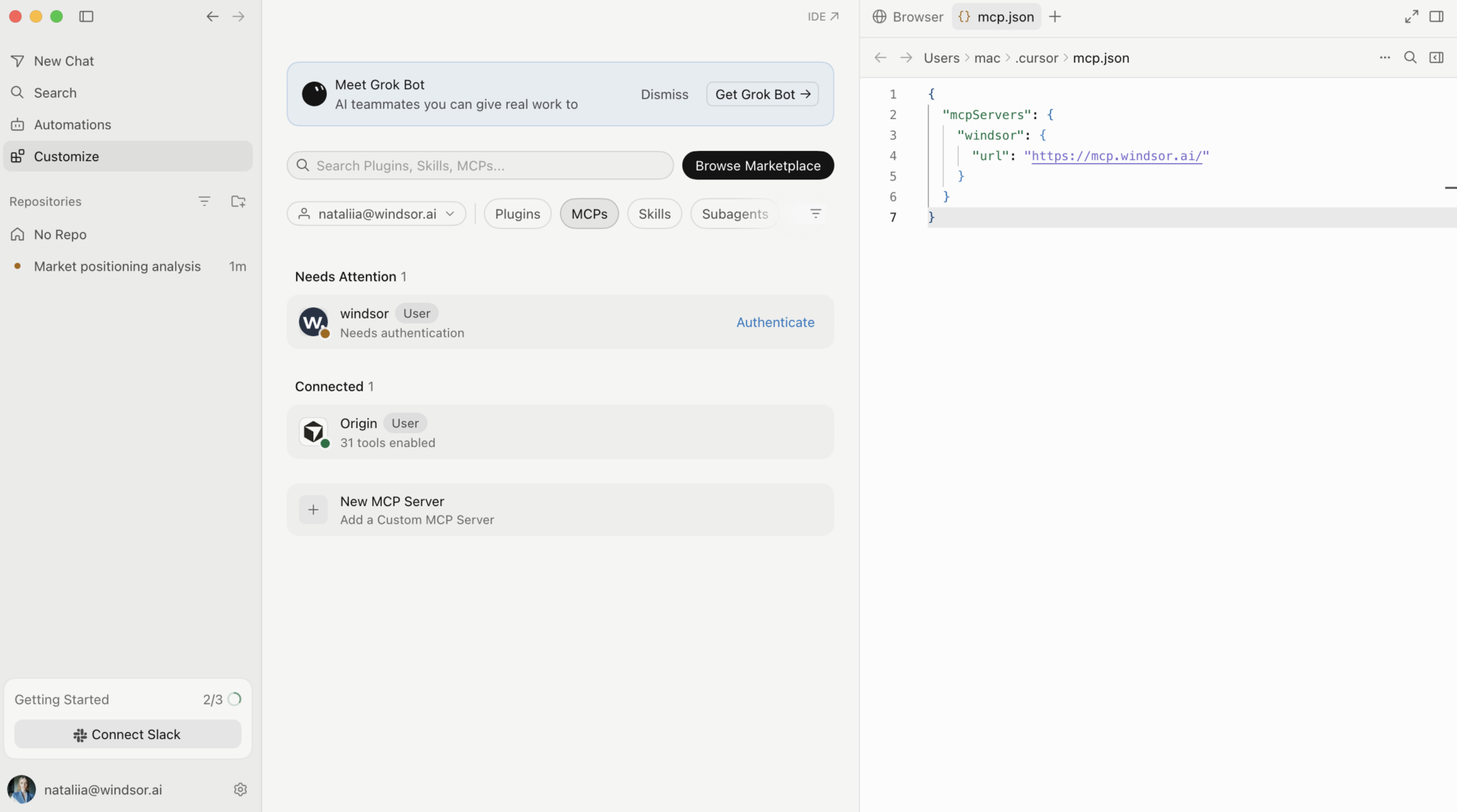
Open Settings in Cursor Desktop and go to Tools & Integrations → New MCP Server. When mcp.json opens, add Windsor:
{
  "mcpServers": {
    "windsor": {
      "url": "https://mcp.windsor.ai/"
    }
  }
}
Authenticate with Windsor.ai
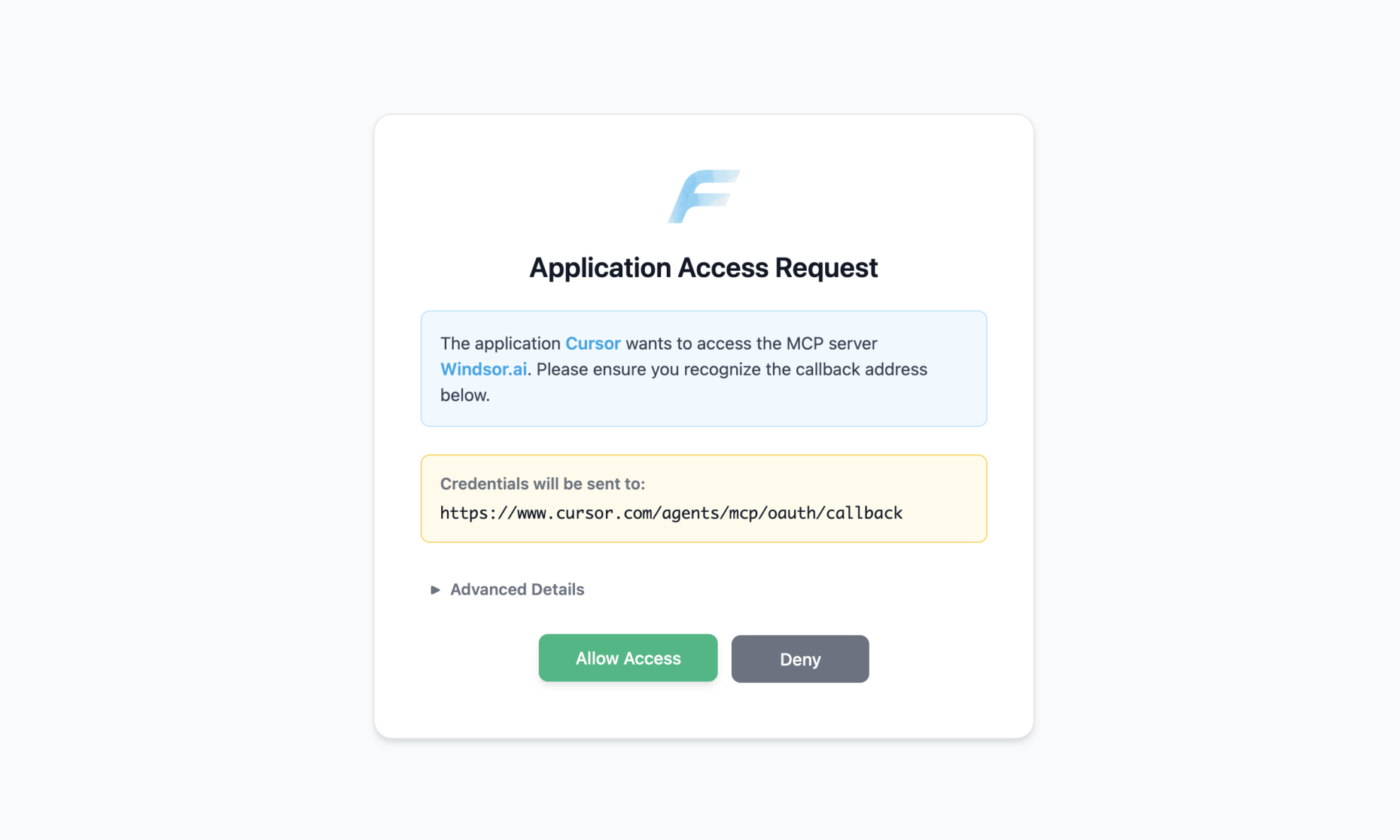
Save mcp.json. Windsor appears in your MCP list and asks you to authenticate. Click Authenticate and sign in to Windsor.ai in the browser.
Ask Cursor to build on your Amazon Seller Central data
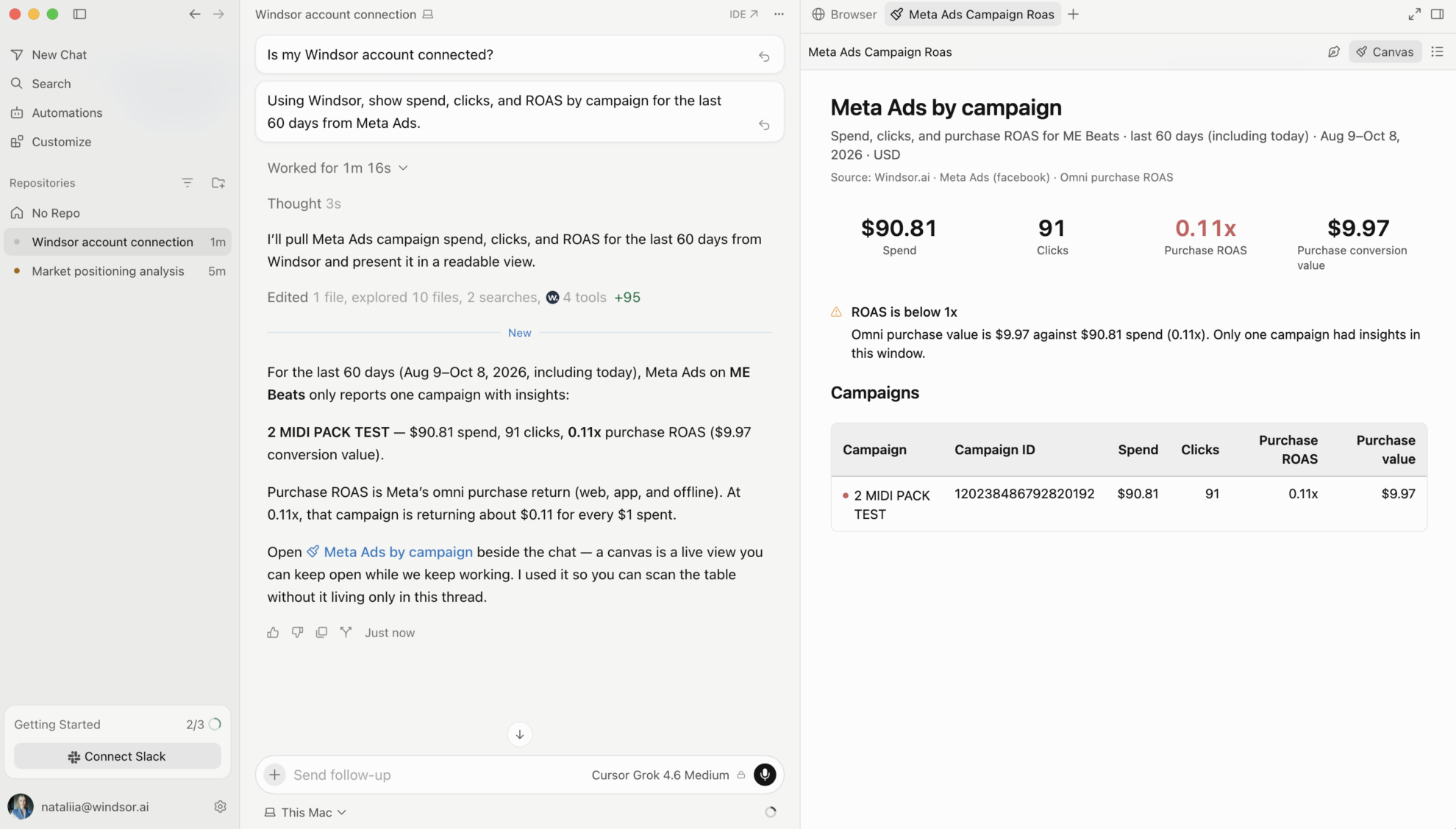
Open a chat in your project and ask about your Amazon Seller Central data.
FAQs
What Amazon Seller Central data can Cursor use?
Windsor.ai gives Cursor access to 900+ Amazon Seller Central fields. These are some of the groups; the Amazon Seller Central field reference lists all of them:
- Sales and traffic by ASIN: salesByAsin-orderedProductSales-amount, salesByAsin-unitsOrdered, salesByAsin-refundRate, trafficByAsin-browserSessions, trafficByAsin-buyBoxPercentage.
- Sales by date: salesByDate-orderedProductSales-amount, salesByDate-unitsOrdered, salesByDate-refundRate.
- FBA inventory: afn-fulfillable-quantity, afn-unsellable-quantity, afn-inbound-shipped-quantity, afn-total-quantity, sku, asin, your-price.
- Returns: Return Reason, Return quantity, Refunded Amount, Merchant SKU, Resolution.
- Fees: estimated-fee-total, estimated-referral-fee-per-unit, expected-fulfillment-fee-per-unit, sales-price.
- Search demand (Brand Analytics, for sellers with Amazon Brand Registry): searchQueryData-searchQuery, searchQueryData-searchQueryVolume, impressionData-asinImpressionShare, purchaseData-asinPurchaseShare.
What prompts can I use to build with Amazon Seller Central data in Cursor?
Cursor works best when you ask it to build something with a clear output. Each of these names the fields to use and the file or canvas you want back:
-
Pull sku, asin, afn-fulfillable-quantity, and afn-inbound-shipped-quantity, and pull salesByAsin-unitsOrdered for the last 28 days. Write a script that calculates daily sales rate and days of cover per ASIN, adds inbound units, and lists ASINs with under 21 days of cover. Save restock_priority.csv sorted by days of cover and show me the top 15.
-
Pull Return Reason, Return quantity, Refunded Amount, Merchant SKU, and Item Name for the last 90 days. Group by Merchant SKU and Return Reason, rank combinations by Refunded Amount, and write a short read on which reasons look fixable through listing changes and which look like product issues.
-
Pull asin, trafficByAsin-browserSessions, trafficByAsin-buyBoxPercentage, and salesByAsin-unitsOrdered for the last 30 days. Find ASINs with over 200 sessions where trafficByAsin-buyBoxPercentage is below 80% or trafficByAsin-unitSessionPercentage is in the bottom quartile, and write the checks to run for each group.
-
Pull sku, your-price, estimated-fee-total, estimated-referral-fee-per-unit, and expected-fulfillment-fee-per-unit. Calculate fees as a share of price for each sku, build a canvas that ranks products by fee burden, and list products where fees take more than 35% of the price.
-
Pull salesByDate-orderedProductSales-amount, salesByDate-unitsOrdered, and salesByDate-refundRate by date for the last 90 days. Build a canvas of weekly sales and refund rate, and flag weeks where refund rate rose while sales grew, with a note on what to check in returns.
-
Pull searchQueryData-searchQuery, searchQueryData-searchQueryVolume, impressionData-asinImpressionShare, and purchaseData-asinPurchaseShare for my ASINs, if Brand Analytics is available for my account. List queries with high volume where my impression share is much higher than my purchase share and write what that suggests about the listing or price.
Can Cursor turn Amazon Seller Central data into dashboards I can share?
Yes. Cursor can render a dashboard, analysis, or report as a canvas next to the chat, and it saves the canvas so you can reopen and rerun it later with fresh data. On paid Cursor plans you can publish a canvas to a read-only share link for teammates. See the Cursor canvas documentation for the current plan requirements.
Can Cursor change my Amazon Seller Central account?
Yes. Windsor.ai has write actions for Amazon Seller Central, and Cursor can run them through Windsor MCP when you ask: it can update a product listing. See the full list of write actions.
Can I combine Amazon Seller Central data with other sources in Cursor?
Yes. Windsor.ai supports 350+ data sources, so you can connect Amazon Seller Central alongside tools such as Amazon Ads, Google Ads, or Shopify and ask Cursor to work with them together. For example, ask Cursor to join Seller Central salesByAsin-orderedProductSales-amount by ASIN with Amazon Ads Cost by Advertised ASIN, then write a report that shows which products grow without paid support.
How do I add Windsor MCP to Cursor?
Open Settings in Cursor Desktop, go to Tools & Integrations → New MCP Server, and add Windsor to mcp.json:
{
  "mcpServers": {
    "windsor": {
      "url": "https://mcp.windsor.ai/"
    }
  }
}
Save the file, click Authenticate next to Windsor in your MCP list, and sign in to Windsor.ai in the browser.
Do I need to code to connect Amazon Seller Central to Cursor?
No. The connection takes no code: connect Amazon Seller Central in Windsor.ai, add Windsor to Cursor’s MCP settings, and sign in. After that you describe what you want in plain language, and Cursor writes and runs the code. You can read and edit everything it produces.
How much does it cost to integrate Amazon Seller Central with Cursor using Windsor.ai?
The free forever plan covers 1 data source, so connecting Amazon Seller Central on its own costs nothing and needs no credit card. Combining Amazon Seller Central with other sources, such as Amazon Ads or Shopify, needs a paid plan: $19/month for 3 sources or $99/month for 7. Cursor is billed separately by Cursor. See the pricing page.
Do you have helpful links to get started with integrating Amazon Seller Central and Cursor using Windsor.ai?
Yes, we have helpful resources to help you get started. You can explore our official documentation for Amazon Seller Central to Cursor integration with Windsor.ai:
Tired of manual Amazon Seller Central data exports? Try Windsor.ai today to build on live data


