 Destinations
 Data sources
 AI insights
 About us
 Careers
 Security
 Customer reviews
 Contact us
 Affiliate program
 Solution partners
 Template gallery
 Looker Studio templates
 Power BI templates
 Excel templates
 Google Sheets templates
 Tableau templates
 Facebook Ads templates
 Google Ads templates
 Data fields & Metrics
 AI prompt library & Guides
 Product documentation
 API documentation
 Case studies
 Blog
Blog Data models
 Windsor vs Supermetrics
 Windsor vs Funnel.io
 Windsor vs Fivetran
 Windsor vs Rivery
 Windsor vs Portermetrics
 Windsor vs Coupler.io
Connect Amazon Seller Central to Gemini Enterprise
Connect your Amazon Seller Central data to Gemini Enterprise with the Windsor.ai connector, and ask about your Amazon store in plain language.
Ask for sales by ASIN, stock cover, returns by reason or fees per SKU, built on your own salesByAsin-orderedProductSales-amount, afn-fulfillable-quantity and Return Reason fields.
Forget CSVs. Stop copy/paste. Connect in minutes. No code required.
 Sign up with Google
 Free forever plan









Get your Amazon Seller Central data into Gemini Enterprise
Amazon Seller Central is connected once in Windsor.ai, and these are the use cases the fields support:

Check stock against sales
afn-fulfillable-quantity next to salesByAsin-unitsOrdered shows which SKUs are close to running out.

Find why products come back
Return Reason and Return quantity by Merchant SKU show which products are returned most and why.

See whether listings convert
trafficByAsin-browserSessions and trafficByAsin-buyBoxPercentage sit next to units ordered for each ASIN.

Look at fees per product
estimated-fee-total and sales-price per SKU show how much of the price goes to Amazon fees.
Using Windsor.ai to connect data from Amazon Seller Central to Gemini Enterprise
Without Windsor.ai, Gemini Enterprise answers about Amazon Seller Central data come from a file you exported and pasted in. Through the Windsor.ai connector, Gemini Enterprise reads the live data with its real field names, so the answers match what is in Amazon Seller Central today.
Connect in minutes, then ask about your sales, traffic, FBA inventory, returns and fees.
Available actions
Update Listing Update editable attributes of an existing Amazon product listing (product card), identified by seller SKU. Provide only the fields to change; at least one is required. title sets the product title (item_name). description sets the product description. bullet_points replaces the ENTIRE list of bullet points (About this item) — pass every bullet you want to keep, not just new ones; it cannot be empty (clearing all bullets is not supported). price sets the standard offer price in the marketplace currency. Updates are submitted as a partial patch and processed asynchronously by Amazon: a successful response means the submission was ACCEPTED for processing, not that it is live yet. Requires the Product Listing role on the SP-API application.
Update editable attributes of an existing Amazon product listing (product card), identified by seller SKU. Provide only the fields to change; at least one is required. title sets the product title (item_name). description sets the product description. bullet_points replaces the ENTIRE list of bullet points (About this item) — pass every bullet you want to keep, not just new ones; it cannot be empty (clearing all bullets is not supported). price sets the standard offer price in the marketplace currency. Updates are submitted as a partial patch and processed asynchronously by Amazon: a successful response means the submission was ACCEPTED for processing, not that it is live yet. Requires the Product Listing role on the SP-API application.














How to connect Amazon Seller Central to Gemini Enterprise with Windsor.ai
Watch the video tutorial, or follow the step-by-step guide to connect your Amazon Seller Central data to Gemini Enterprise with Windsor.ai.
Connect Amazon Seller Central in your Windsor.ai dashboard
Log in at onboard.windsor.ai, choose Amazon Seller Central as your data source and sign in to grant Windsor.ai access to your account. Gemini can only query sources connected in Windsor.ai.

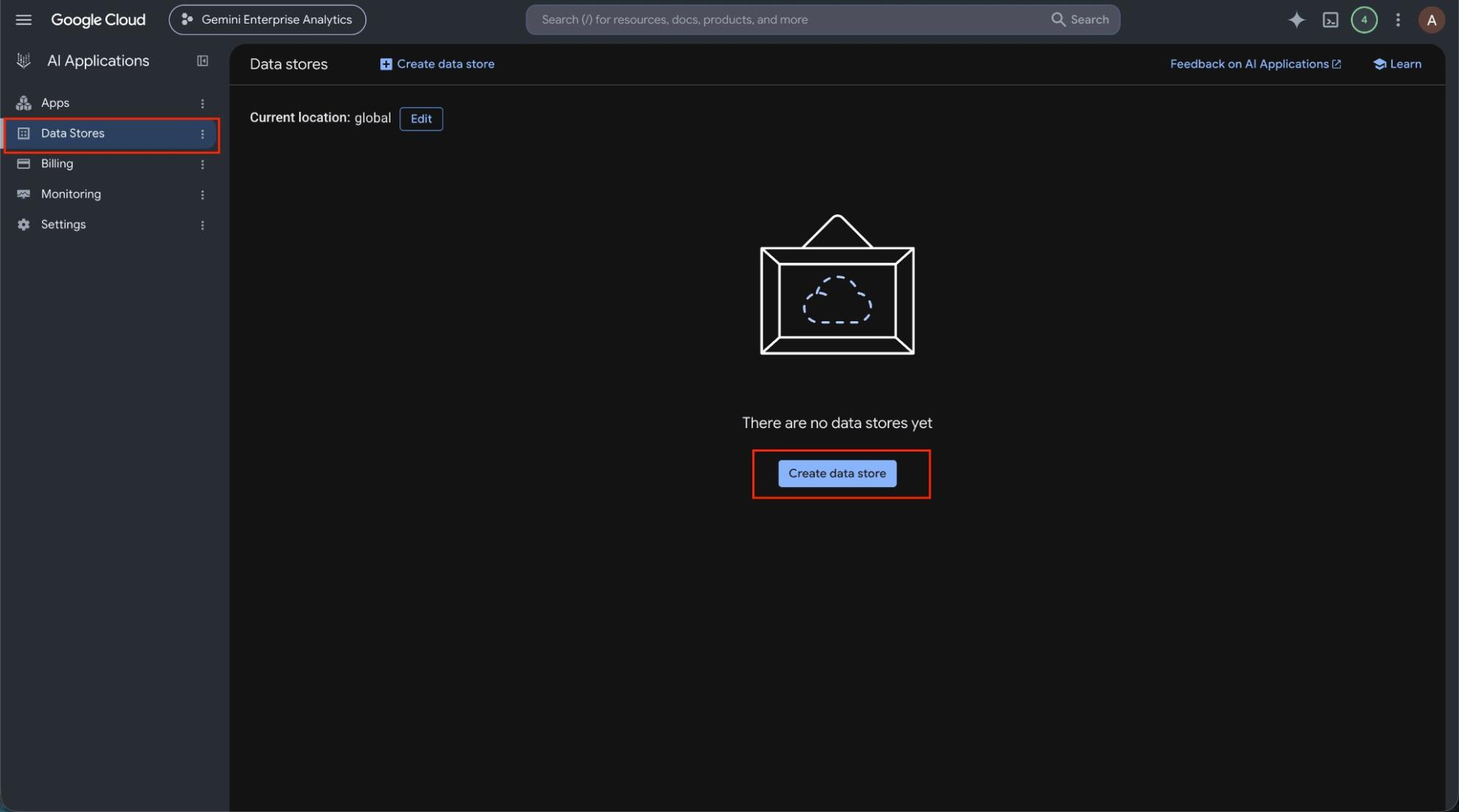
Create the Windsor.ai data store in Google Cloud
In the Google Cloud console, open Gemini Enterprise, go to Data stores and click Create data store. Under Third-party data sources, find Windsor.ai and click Add data source. Choose the actions to enable, set the location and create the store.
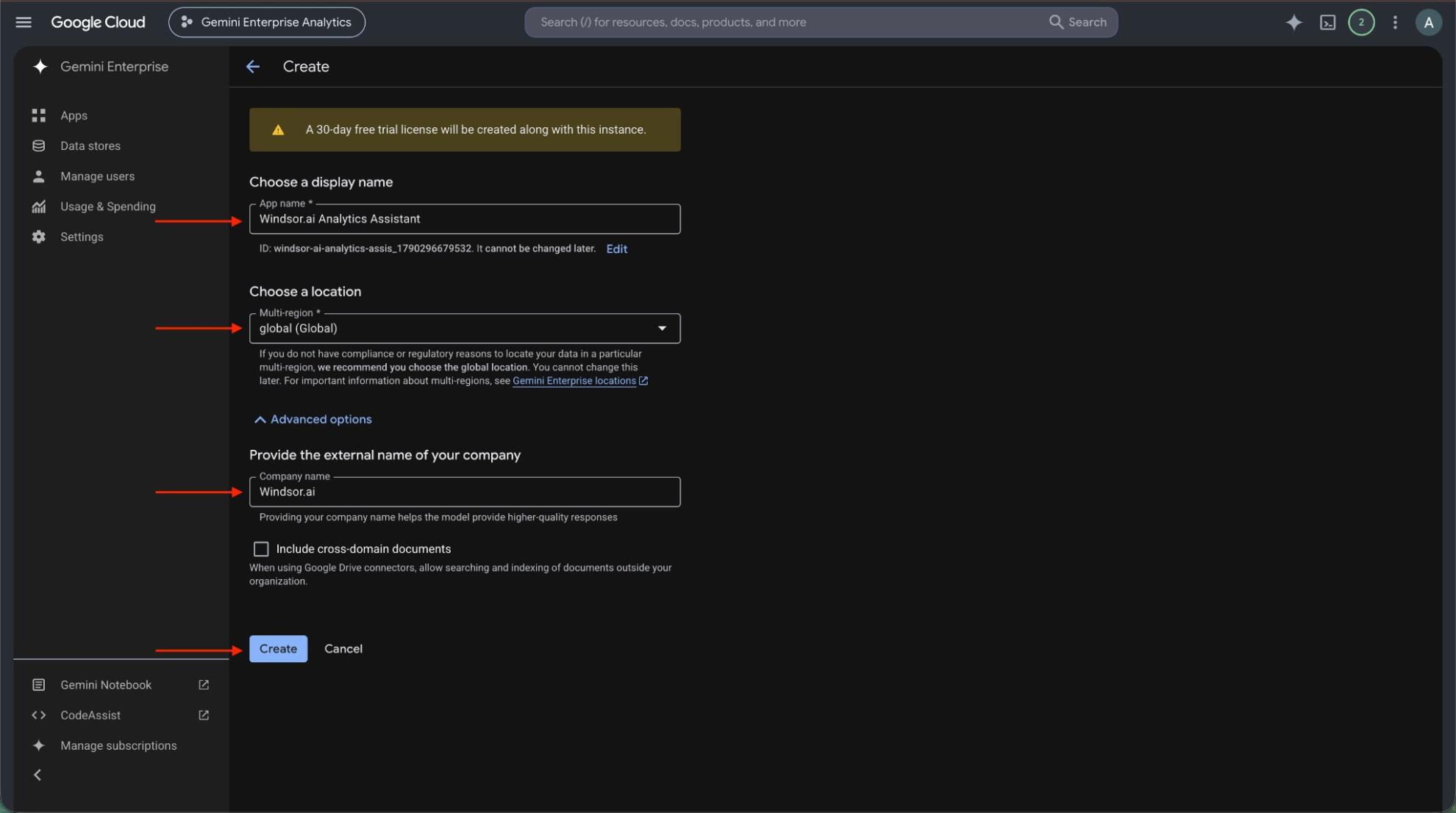
Create an app and connect the data store
Create a Gemini Enterprise app in the same location as your data store, or pick an existing one. Then open Connected data stores in the app and add the Windsor.ai data store.
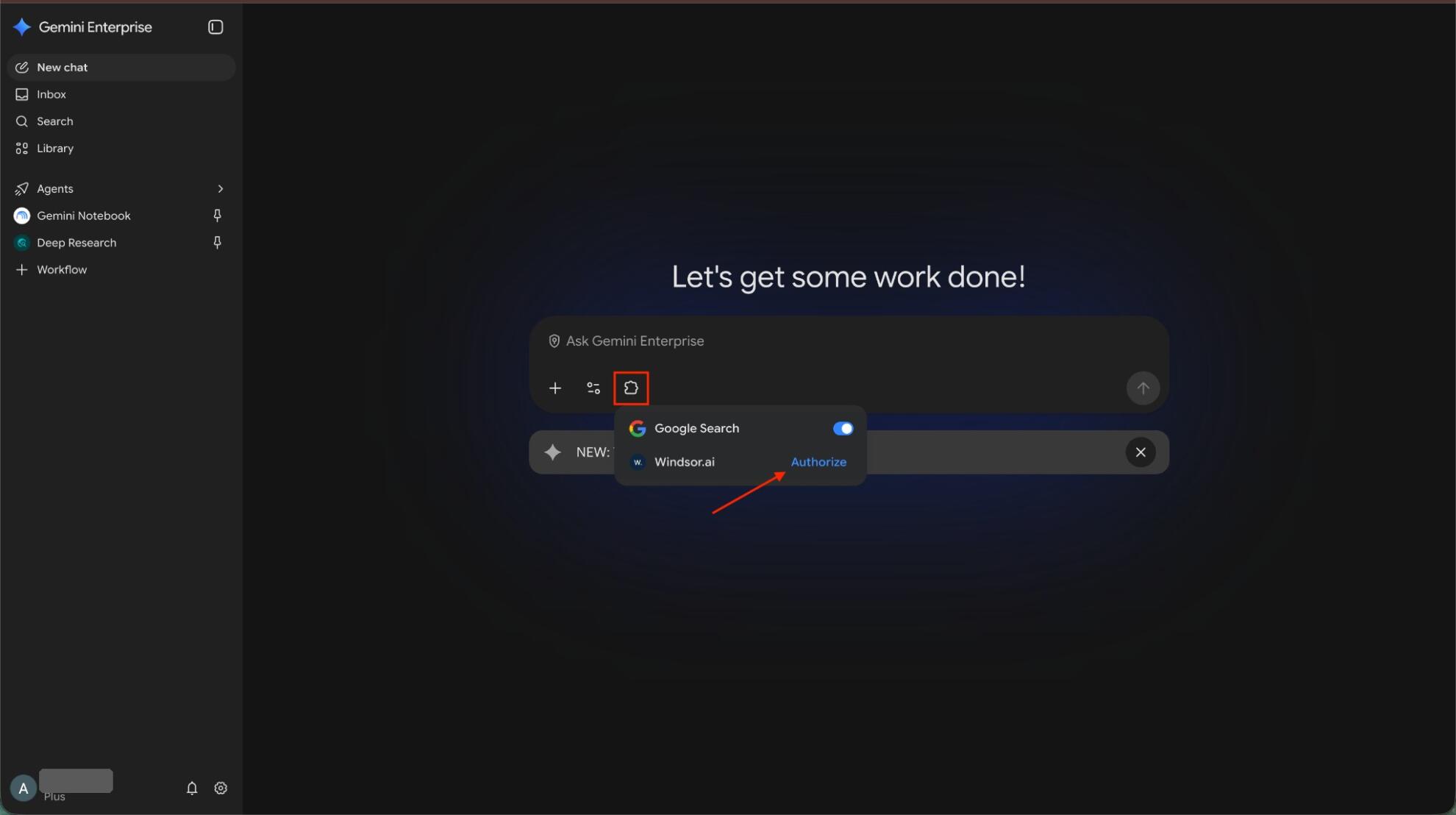
Authorize Windsor.ai
Open the app’s web app, click the puzzle piece icon and click Authorize next to Windsor.ai. Allow access, sign in to Windsor.ai if asked, and click Finish.
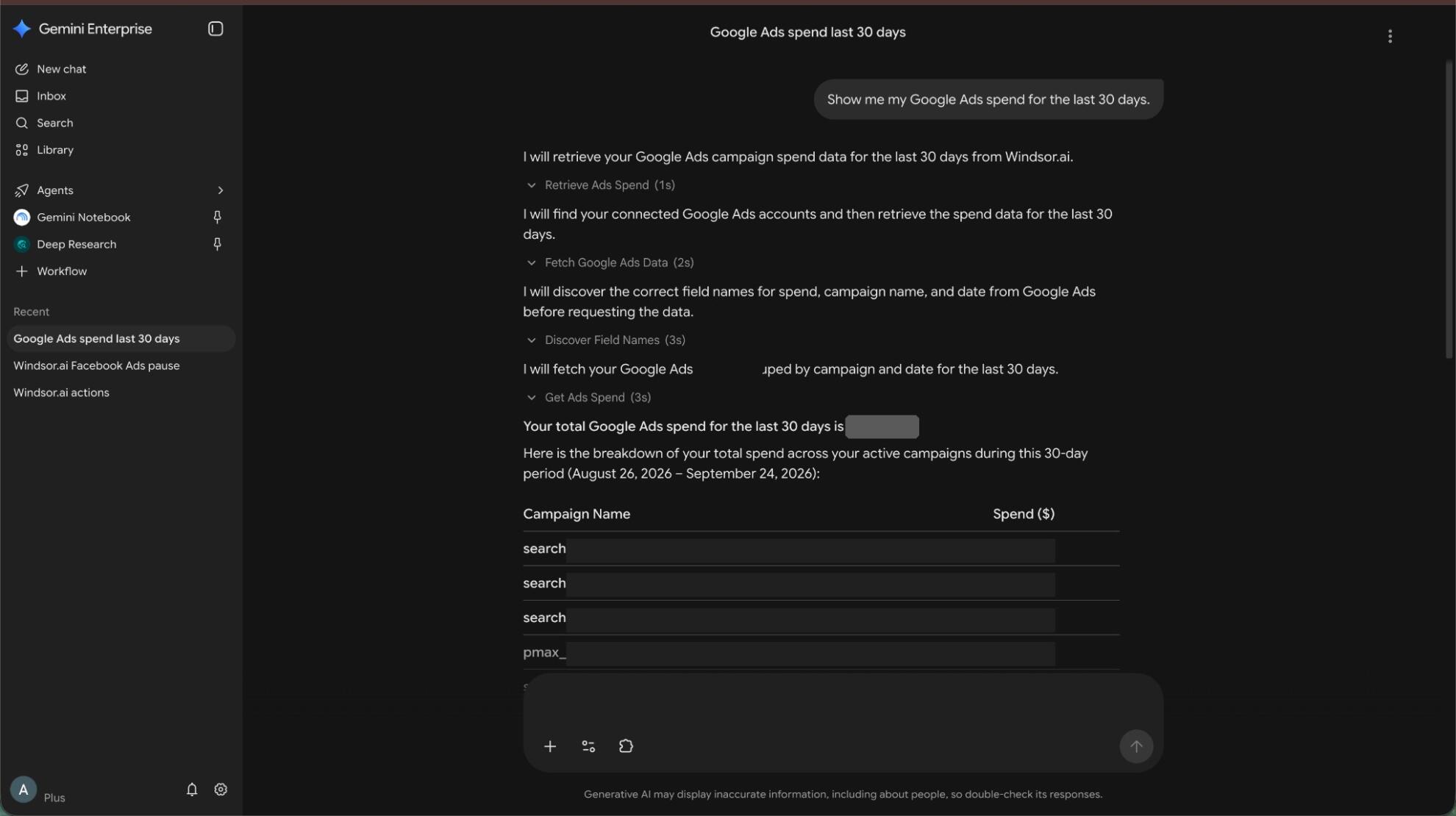
Ask Gemini about your Amazon Seller Central data
Ask a question such as “Show salesByAsin-orderedProductSales-amount and salesByAsin-unitsOrdered by ASIN for the last 30 days, top 20.” Data can take about 10 minutes to appear after you connect the data store to the app.
FAQs
What Amazon Seller Central data can Gemini Enterprise use?
Windsor.ai gives access to 900+ Amazon Seller Central fields. These are the main groups; the Amazon Seller Central field reference lists all of them:
- Sales and traffic by ASIN: salesByAsin-orderedProductSales-amount, salesByAsin-unitsOrdered, salesByAsin-refundRate, trafficByAsin-browserSessions, trafficByAsin-buyBoxPercentage.
- Sales by date: salesByDate-orderedProductSales-amount, salesByDate-unitsOrdered, salesByDate-refundRate.
- FBA inventory: afn-fulfillable-quantity, afn-unsellable-quantity, afn-inbound-shipped-quantity, sku, asin.
- Returns: Return Reason, Return quantity, Refunded Amount, Merchant SKU.
- Fees: estimated-fee-total, estimated-referral-fee-per-unit, expected-fulfillment-fee-per-unit, sales-price.
What can I ask Gemini Enterprise about my Amazon Seller Central data?
These prompts name the fields to use, so the answer comes back on your own data:
-
Show salesByAsin-orderedProductSales-amount and salesByAsin-unitsOrdered by ASIN for the last 30 days, top 20.
-
Which SKUs have afn-fulfillable-quantity below 30 days of average daily units ordered?
-
List the top Return Reasons by Merchant SKU for last month with Return quantity.
-
Compare trafficByAsin-buyBoxPercentage and browser sessions for my top 10 ASINs this month.
Can Gemini Enterprise make changes in my Amazon Seller Central account?
Yes. Windsor.ai has write actions for Amazon Seller Central, so Gemini Enterprise can make changes when you ask: it can update a product listing. Execute Action must be enabled on the Windsor.ai data store, and Write actions must be on in your Windsor.ai account. See the full list of write actions.
Can I combine Amazon Seller Central data with other sources in Gemini Enterprise?
Yes. Windsor.ai supports 350+ data sources, so you can connect Amazon Seller Central alongside other tools and ask about them together. For example, put Seller Central sales by ASIN next to Amazon Ads Cost for the same ASINs, so total sales and ad spend sit in one table.
Do I need to code to connect Amazon Seller Central to Gemini Enterprise?
No. Connect Amazon Seller Central in Windsor.ai, add Windsor to Gemini Enterprise, and sign in. After that you ask in plain language.
How much does it cost to integrate Amazon Seller Central with Gemini Enterprise using Windsor.ai?
The free forever plan covers 1 data source, so connecting Amazon Seller Central on its own costs nothing and needs no credit card. Combining Amazon Seller Central with other sources needs a paid plan: $19/month for 3 sources or $99/month for 7. Gemini Enterprise is billed separately by Google. See the pricing page.
Do you have helpful links to get started with Amazon Seller Central and Gemini Enterprise?
Yes. These are the resources to start with for the Amazon Seller Central to Gemini Enterprise integration:
Tired of manual Amazon Seller Central data exports? Try Windsor.ai today to work on live data


