Destinations
 Data sources
 AI insights
 About us
 Careers
 Security
 Customer reviews
 Contact us
 Affiliate program
 Solution partners
 Template gallery
 Looker Studio templates
 Power BI templates
 Excel templates
 Google Sheets templates
 Tableau templates
 Facebook Ads templates
 Google Ads templates
 Data fields & Metrics
 AI prompt library & Guides
 Product documentation
 API documentation
 Case studies
 Blog
 Data models
 Windsor vs Supermetrics
 Windsor vs Funnel.io
 Windsor vs Fivetran
 Windsor vs Rivery
 Windsor vs Portermetrics
 Windsor vs Coupler.io
Connect Cin7 Omni to Python
Load Cin7 Omni data into pandas from a Windsor.ai API URL, with the sales order, stock and product fields you pick.
Calculate product margins from line item prices and cost of goods sold, or work out reorder quantities from stock and open sales, in your own Python code.
Forget CSVs. Stop copy/paste. Connect in minutes. No code required.
 Sign up with Google
 Free forever plan
No credit card needed










Get your Cin7 Omni data into Python
Cin7 Omni is connected once in Windsor.ai, and these are the use cases the fields support:

Reorder before stock runs out
stock.available, stock.incoming and stock.open_sales per stock.product_name and stock.branch_name show which products will not cover the orders already taken.

Compare sales channels
sales_orders.total by sales_orders.source and sales_orders.created_date shows what each channel sold in a period.

Follow purchase orders
purchase_orders.estimated_arrival_date next to purchase_orders.fully_received_date shows which supplier orders are late and which supplier they came from.
Using Windsor.ai to connect data from Cin7 Omni to Python
Windsor.ai moves your Cin7 Omni fields into Python on a connection you set up once, so the scripts stay on live records rather than a CSV someone exported last week.
Pick the fields you need and Windsor.ai handles the rest.







How to connect Cin7 Omni to Python with Windsor.ai
Explore a step-by-step guide to integrate your Cin7 Omni data into Python with the Windsor.ai connector.
Connect a data source
In your Windsor.ai dashboard, connect Cin7 Omni: enter your Cin7 Omni API username and API key. Select the account(s) you want to pull data from and click Next.
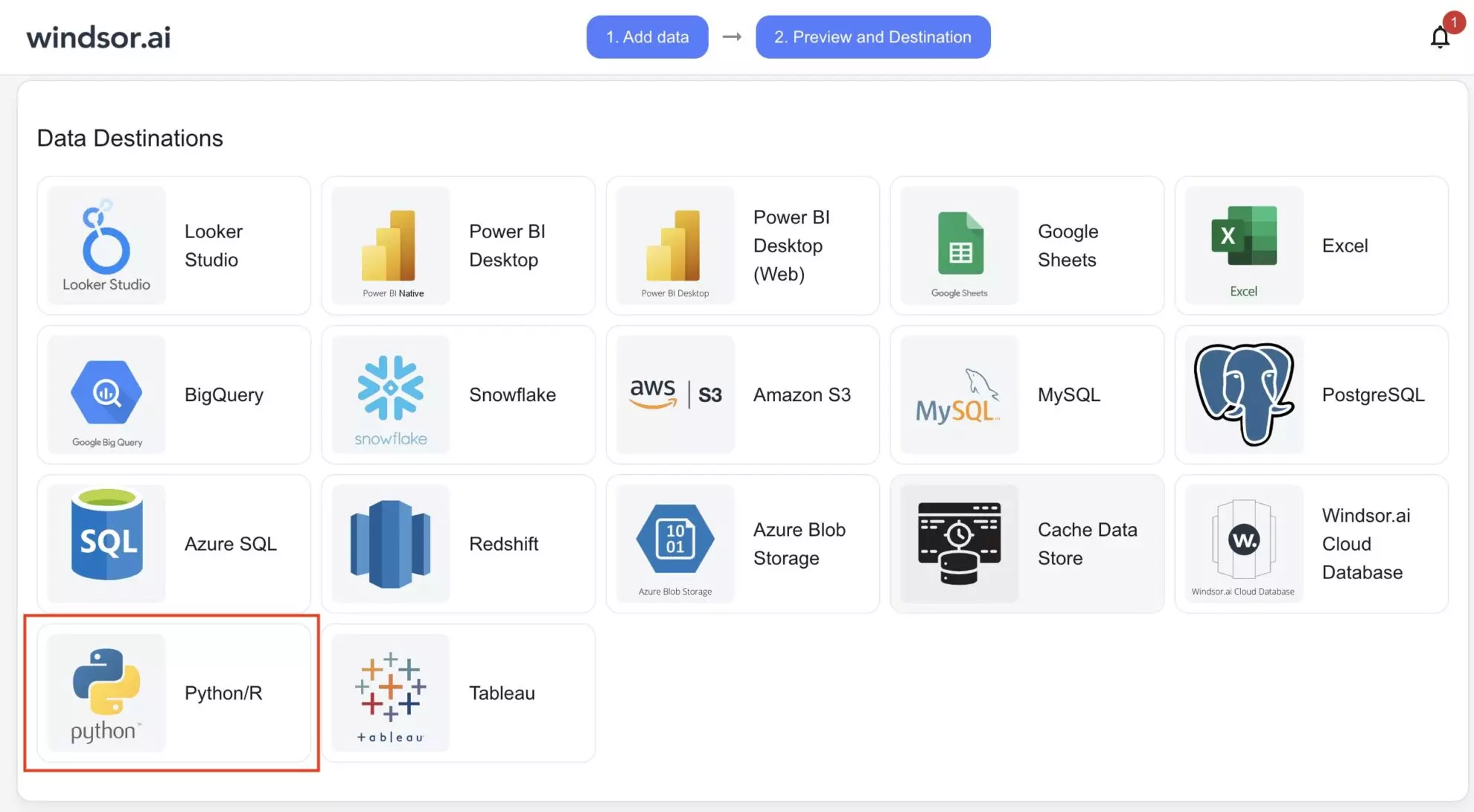
Set Python as a data destination
Scroll down and choose Python from the data destination list. Copy the API Key URL provided in the instructions below.
Integrate the API Key URL into your Python code to stream data
Use Python’s requests or a similar library to retrieve data from Windsor.ai by making an API call with your obtained API Key URL.
FAQs
What Cin7 Omni data can I load into Python?
Windsor.ai gives access to 239 Cin7 Omni fields. These are the groups; the Cin7 Omni field reference lists all of them:
- Sales orders: sales_orders.reference, sales_orders.created_date, sales_orders.status, sales_orders.stage, sales_orders.source, sales_orders.company, sales_orders.total, sales_orders.product_total, sales_orders.discount_total, sales_orders.freight_total, sales_orders.dispatched_date.
- Sales order line items: sales_order_line_items.name, sales_order_line_items.code, sales_order_line_items.qty, sales_order_line_items.qty_shipped, sales_order_line_items.unit_price, sales_order_line_items.unit_cost, sales_order_line_items.cogs, sales_order_line_items.discount.
- Stock: stock.product_name, stock.code, stock.branch_name, stock.stock_on_hand, stock.available, stock.incoming, stock.open_sales, stock.holding.
- Products and options: products.product_name, products.brand, products.category, products.status, product_options.option_code, product_options.retail_price, product_options.wholesale_price, product_options.stock_available.
- Purchase orders: purchase_orders.reference, purchase_orders.company, purchase_orders.status, purchase_orders.estimated_arrival_date, purchase_orders.fully_received_date, purchase_orders.total, purchase_order_line_items.name, purchase_order_line_items.qty.
- Credit notes and payments: credit_notes.credit_note_number, credit_notes.credit_note_date, credit_notes.total, credit_notes.sales_reference, credit_note_line_items.name, credit_note_line_items.qty, payments.amount, payments.method, payments.payment_date.
- Date and account: Date, Week, Month, Account Name, Account ID.
How does Windsor.ai load Cin7 Omni data into Python?
Windsor.ai gives you an API URL for your selected Cin7 Omni fields. Call it from Python with requests or a similar library and load the response into pandas or your own code.
Does the Cin7 Omni connector include customer details?
Yes. Sales orders and credit notes include sales_orders.email, sales_orders.company and billing and delivery fields such as sales_orders.billing_city and sales_orders.delivery_postal_code. Pick only the fields you need when you set up a report or ask a question.
Can I combine Cin7 Omni data with other sources in my scripts?
Yes. Windsor.ai supports 350+ data sources, so Cin7 Omni data can sit next to other connected sources in the same scripts. For example, put Google Ads Spend by Date next to Cin7 Omni sales_orders.total by sales_orders.created_date, to see ad spend and order value for the same days.
Do I need to code to connect Cin7 Omni to Python?
No. You connect Cin7 Omni in the Windsor.ai dashboard, pick the fields you want, and Windsor.ai handles the transfer.
How much does it cost to integrate Cin7 Omni with Python using Windsor.ai?
The free forever plan covers 1 data source, so connecting Cin7 Omni on its own costs nothing and needs no credit card. Combining Cin7 Omni with other sources needs a paid plan: $19/month for 3 sources or $99/month for 7. See the pricing page.
Do you have helpful links to get started with Cin7 Omni and Python?
Yes. These are the resources to start with for the Cin7 Omni to Python integration:
Tired of manual Cin7 Omni data exports? Try Windsor.ai today to work on live data