Destinations
 Data sources
 AI insights
 About us
 Careers
 Security
 Customer reviews
 Contact us
 Affiliate program
 Solution partners
 Template gallery
 Looker Studio templates
 Power BI templates
 Excel templates
 Google Sheets templates
 Tableau templates
 Facebook Ads templates
 Google Ads templates
 Data fields & Metrics
 AI prompt library & Guides
 Product documentation
 API documentation
 Case studies
 Blog
 Data models
 Windsor vs Supermetrics
 Windsor vs Funnel.io
 Windsor vs Fivetran
 Windsor vs Rivery
 Windsor vs Portermetrics
 Windsor vs Coupler.io
Connect Criteo to ChatGPT
Connect your Criteo account to ChatGPT with the Windsor.ai connector.
Ask about your Criteo retargeting data in plain English: spend, revenue and ROAS by campaign, exposed users against transactions, and reach and frequency by ad set.
Connect in minutes. No code required.
 Sign up with Google
 Free forever plan










What you can do with Criteo data in ChatGPT
Windsor.ai lets ChatGPT read your Criteo reporting data when you ask, without exporting reports from Criteo. Explore key use cases:

Find unprofitable campaigns fast
Put Spend next to post-click Revenue for each campaign to find the ones where cost is higher than returns. Ask ChatGPT to rank campaigns by ROAS and list the ones below the level you set.

Spot ad exposure drop-offs
Compare Exposed users, the people who were served a Criteo ad, with Transactions by campaign. ChatGPT works out transactions per exposed user and shows the campaigns where it is lowest.

Fix audience reach gaps
Compare Audience with Reach, the share of the audience that saw at least one ad, and with Frequency by ad set, to find ad sets that reach too few people or show ads too often.
Using Windsor.ai to connect data from Criteo to ChatGPT
Bringing Criteo data into ChatGPT usually means exporting reports from the Criteo dashboard. Windsor.ai connects to Criteo with a Criteo sign-in, and the Windsor.ai plugin lets ChatGPT read the data when you ask. The connector has 98 fields, including spend, impressions, clicks, reach, frequency, exposed users, transactions, revenue and ROAS by campaign, ad set, ad and device, listed in the Criteo field reference. It is read-only: Criteo has no write actions in Windsor.ai (write actions list, checked on 20 November 2026).
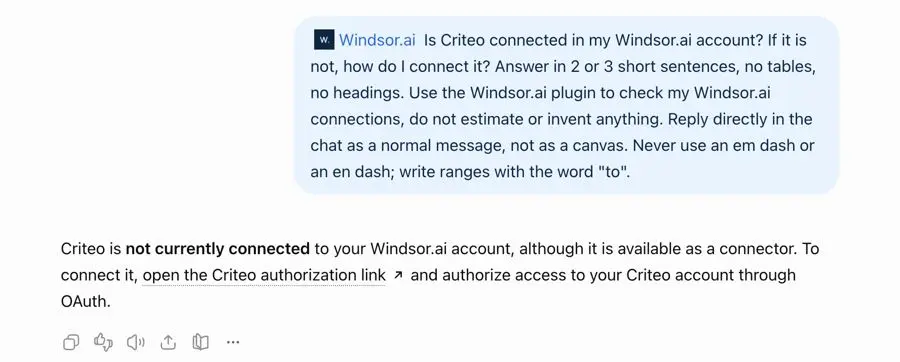
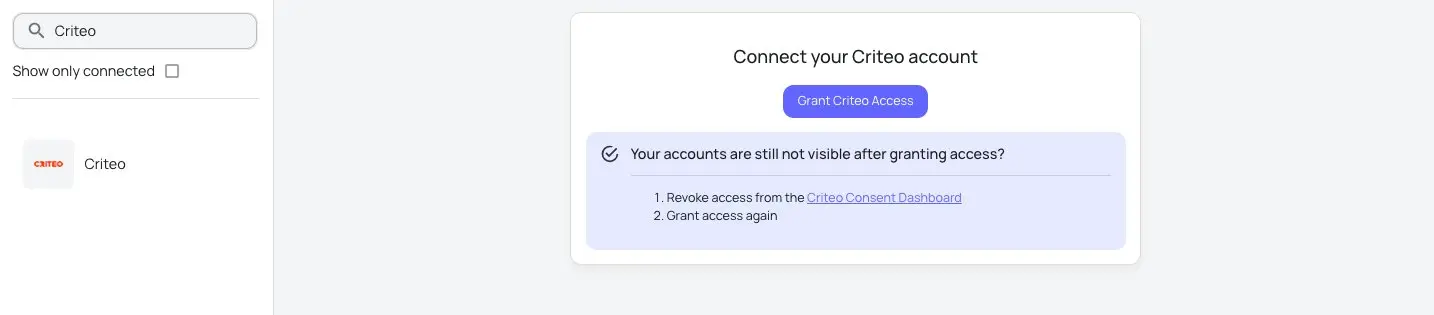
On 20 November 2026 we asked ChatGPT about Criteo in our own Windsor.ai account, which has no Criteo account added. It answered that Criteo is not connected and pointed to the Criteo authorization page, which matches the Grant Criteo Access button. The Criteo to ChatGPT how-to shows each setup step.






How to connect Criteo to ChatGPT data with Windsor.ai
Watch the video and follow the Criteo to ChatGPT how-to or the Windsor.ai ChatGPT setup guide to connect your Criteo data to ChatGPT.
Install the Windsor.ai plugin
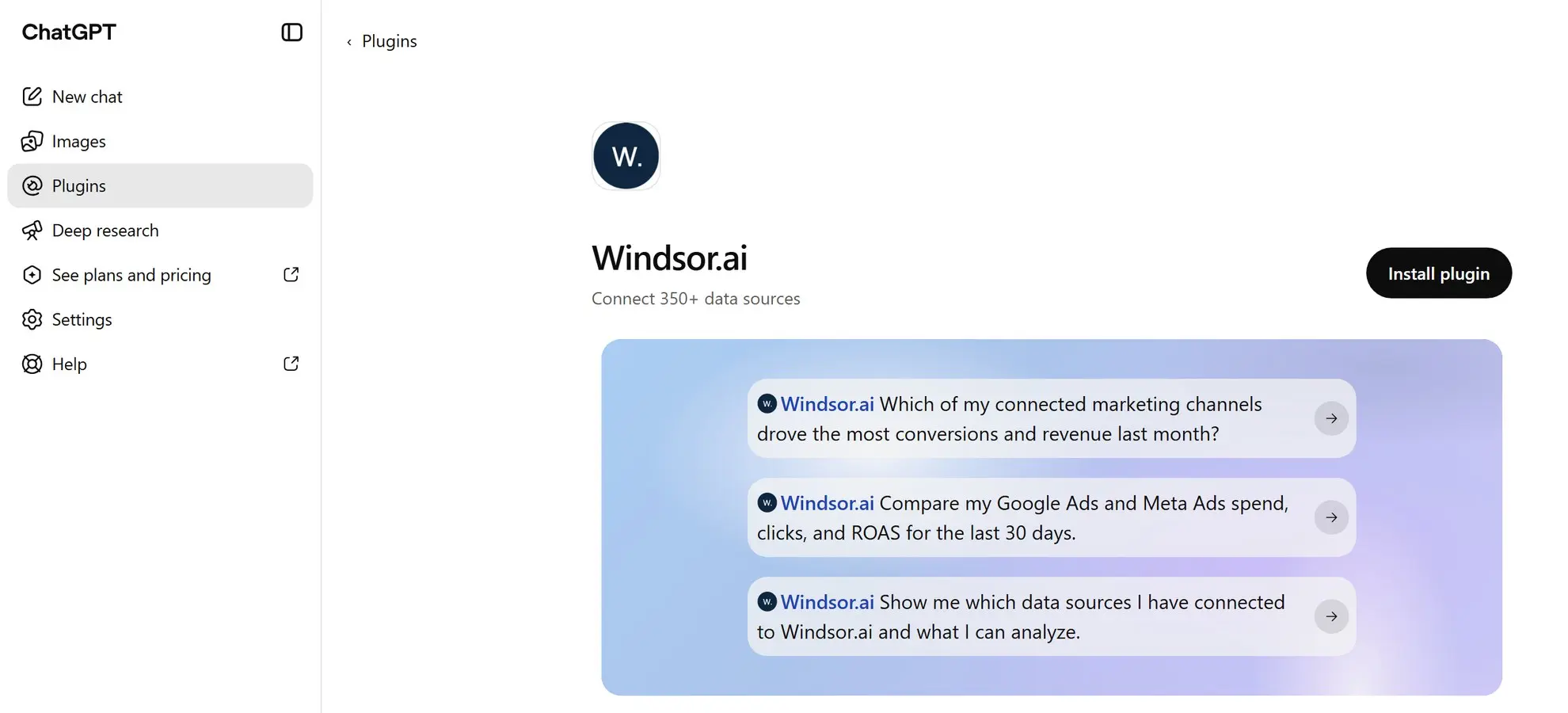
In ChatGPT, select Plugins in the sidebar and search for Windsor.ai, or open the Windsor.ai plugin page.
Select Install plugin, then sign in to Windsor.ai and authorize access.
Query your Criteo data in ChatGPT
Open a new chat and start asking questions about your connected Criteo data using natural language.
To make sure ChatGPT uses Windsor.ai, click the + sign and pick Windsor.ai, or type @Windsor.ai.
FAQs
What Criteo metrics can I analyze in ChatGPT via Windsor.ai?
98 Criteo fields: 49 metrics, 7 rates and the rest dimensions, listed in the Criteo field reference. They include Impressions, Clicks, Spend, Reach, Frequency, Exposed users, Transactions, Revenue and ROAS in post-click, cross device and post-view versions, video metrics and invalid traffic, by campaign, ad set, ad, device and date.
Can I connect multiple Criteo accounts to ChatGPT?
Yes. Every advertiser your Criteo login can see shows up in Windsor.ai. If an account is missing, revoke access in the Criteo Consent Dashboard and grant access again.
What prompts can I use to analyze Criteo data in ChatGPT?
-
Compare Revenue with Post-View Revenue across all campaigns for the last 30 days, with Spend for each.
-
Compare Transactions with Transactions including cross device by campaign for the last 30 days.
-
Rank campaigns by ROAS for the last 30 days and show Spend and Revenue for each.
-
Which campaigns had many Exposed users but few Transactions in the last 14 days?
The free forever plan reaches back 30 days. A prompt for a quarter needs a paid plan.
How much does it cost to integrate Criteo into ChatGPT using Windsor.ai?
Windsor.ai has a free forever plan with 1 data source and the last 30 days of data. Paid plans start at $19/month for 3 sources, billed annually. See the pricing page.
Can ChatGPT change my Criteo campaigns?
No. The connection is read-only. Criteo has no write actions in Windsor.ai (write actions list, checked on 20 November 2026). ChatGPT can report on campaigns and spend, but it can’t change them. The Criteo to ChatGPT how-to shows each setup step.
Tired of manual Criteo data exports? Try Windsor.ai today to automate your reporting