Destinations
 Data sources
 AI insights
 About us
 Careers
 Security
 Customer reviews
 Contact us
 Affiliate program
 Solution partners
 Template gallery
 Looker Studio templates
 Power BI templates
 Excel templates
 Google Sheets templates
 Tableau templates
 Facebook Ads templates
 Google Ads templates
 Data fields & Metrics
 AI prompt library & Guides
 Product documentation
 API documentation
 Case studies
 Blog
Blog Data models
 Windsor vs Supermetrics
 Windsor vs Funnel.io
 Windsor vs Fivetran
 Windsor vs Rivery
 Windsor vs Portermetrics
 Windsor vs Coupler.io
Connect Facebook (Meta) Ads to Perplexity
Automatically sync your Facebook Ads data to Perplexity using the Windsor.ai connector.
Ask Perplexity why your ROAS dropped, which campaigns are wasting budget, and where to reallocate spend, using your live Facebook Ads data.
Forget CSVs. Stop copy/paste. Connect in minutes. No code required.
 Sign up with Google
 Free forever plan
No credit card needed
Free forever plan
No credit card needed









Optimize your campaigns with the Facebook Ads to Perplexity integration
Connect your Facebook Ads data to Perplexity via Windsor MCP and turn raw performance metrics into clear decisions in seconds. Key use cases:

Eliminate wasted spend
Eliminate wasted spend
Quickly spot underperforming campaigns based on spend, cost per purchase, and conversion rate ranking. Get a prioritized list of what to pause or fix before it eats into your budget.

Scale high-performing creatives
Scale high-performing creatives
Identify which videos and creatives truly hold attention using ThruPlay rate, watch time, and quartile data. Double down on what drives conversions and catch early signs of creative fatigue before performance drops.

Measure true ROAS across channels
Measure true ROAS across channels
Combine Facebook Ads with 350+ other sources, for example, Google Ads and Shopify, to calculate your blended ROAS. See the full picture of spend, attributed revenue, and assisted conversions so you can optimize your budget across channels, not in silos.

Connect data to market context
Connect data to market context
When CPM rises or CTR drops, go beyond the numbers. Perplexity enriches your data with real-time web insights, helping you see whether performance shifts are driven by seasonality, platform trends, competitive activity, or internal factors such as creative fatigue, targeting choices, or bid strategy.
Using Windsor.ai to connect data from Facebook Ads to Perplexity
Turn your Facebook Ads data into actionable insights without manual exports, complex setup, or costly tools. Windsor.ai automatically collects, standardizes, and delivers your campaign data straight into Perplexity in just minutes.
Interact with your data using AI, uncover meaningful patterns, and enhance your decisions with Perplexity’s real-time web insights for a clearer view of the market.
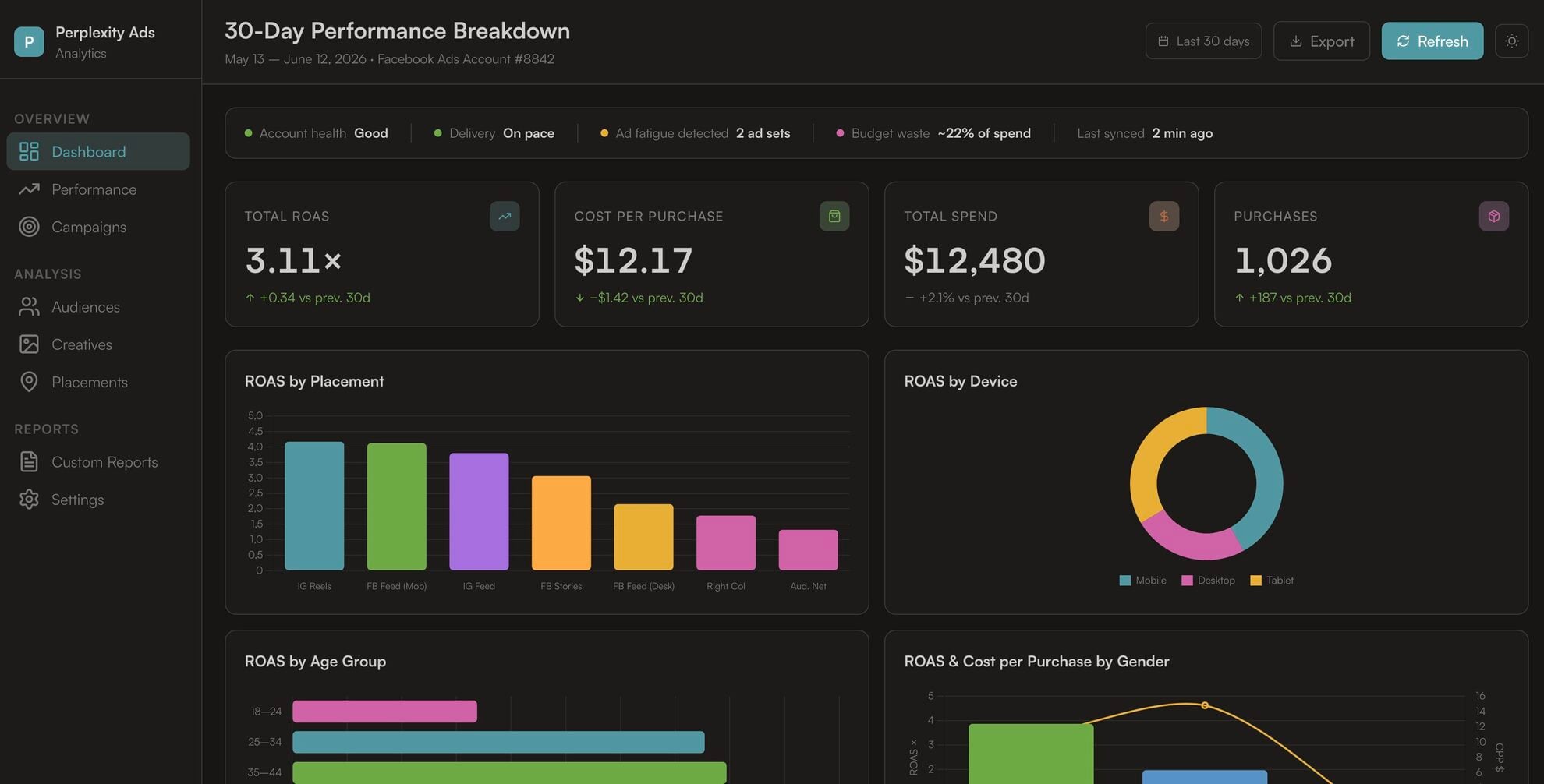














How to connect Facebook Ads to Perplexity with Windsor.ai
Explore our video tutorial and a step-by-step guide to integrate your data from any source into Perplexity with the Windsor.ai connector.
Connect data source in Windsor.ai dashboard
Connect your Facebook Ads to Windsor.ai. Select the necessary account(s) you want to pull data from and click “Next.”

Add Windsor.ai as a custom connector
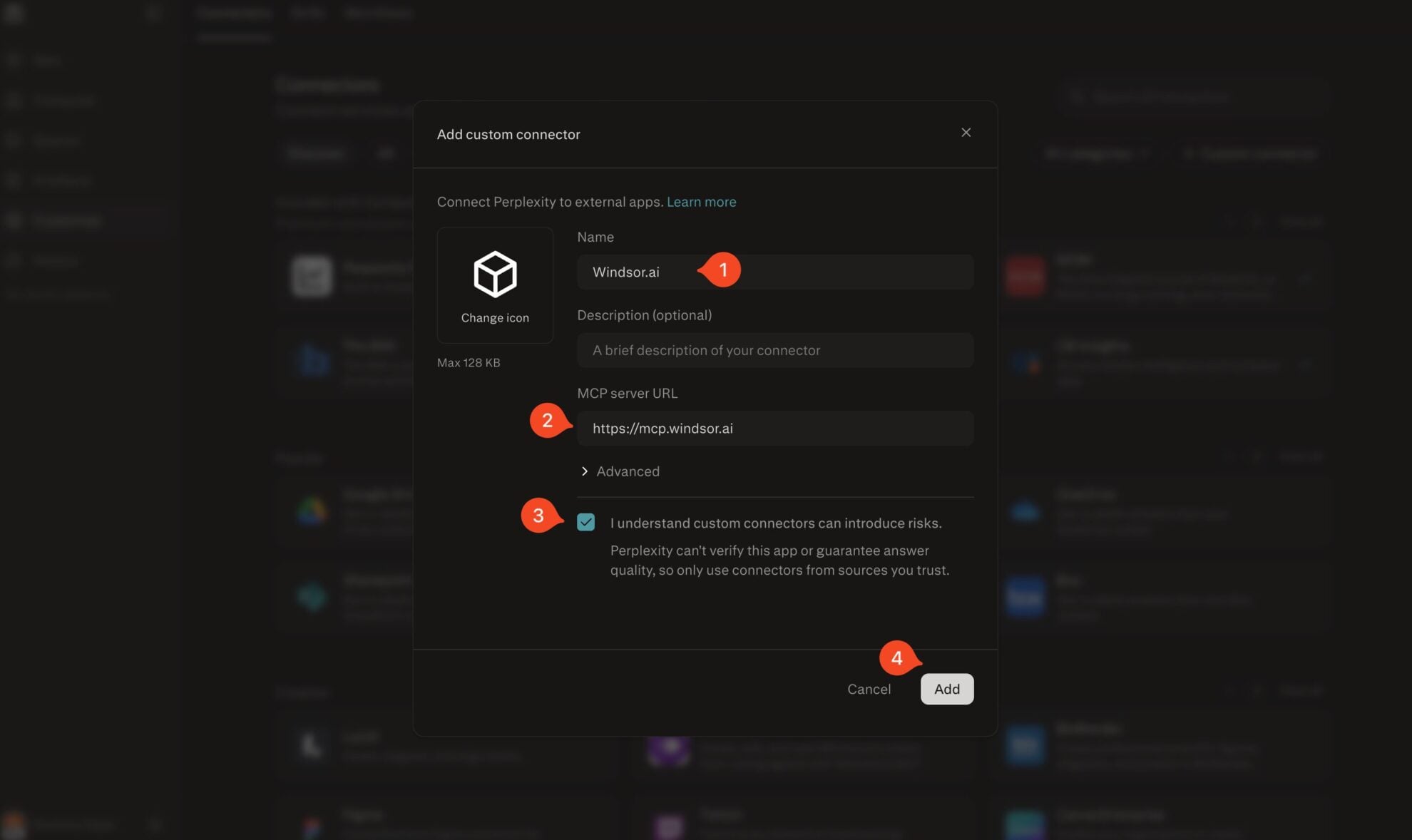
Go to perplexity.ai/computer/connectors and click + Custom connector. Fill in the details:
- Name: Windsor.ai
- MCP server URL: https://mcp.windsor.ai
Tick ‘I understand custom connectors can introduce risks’ and click Add.
Install the connector
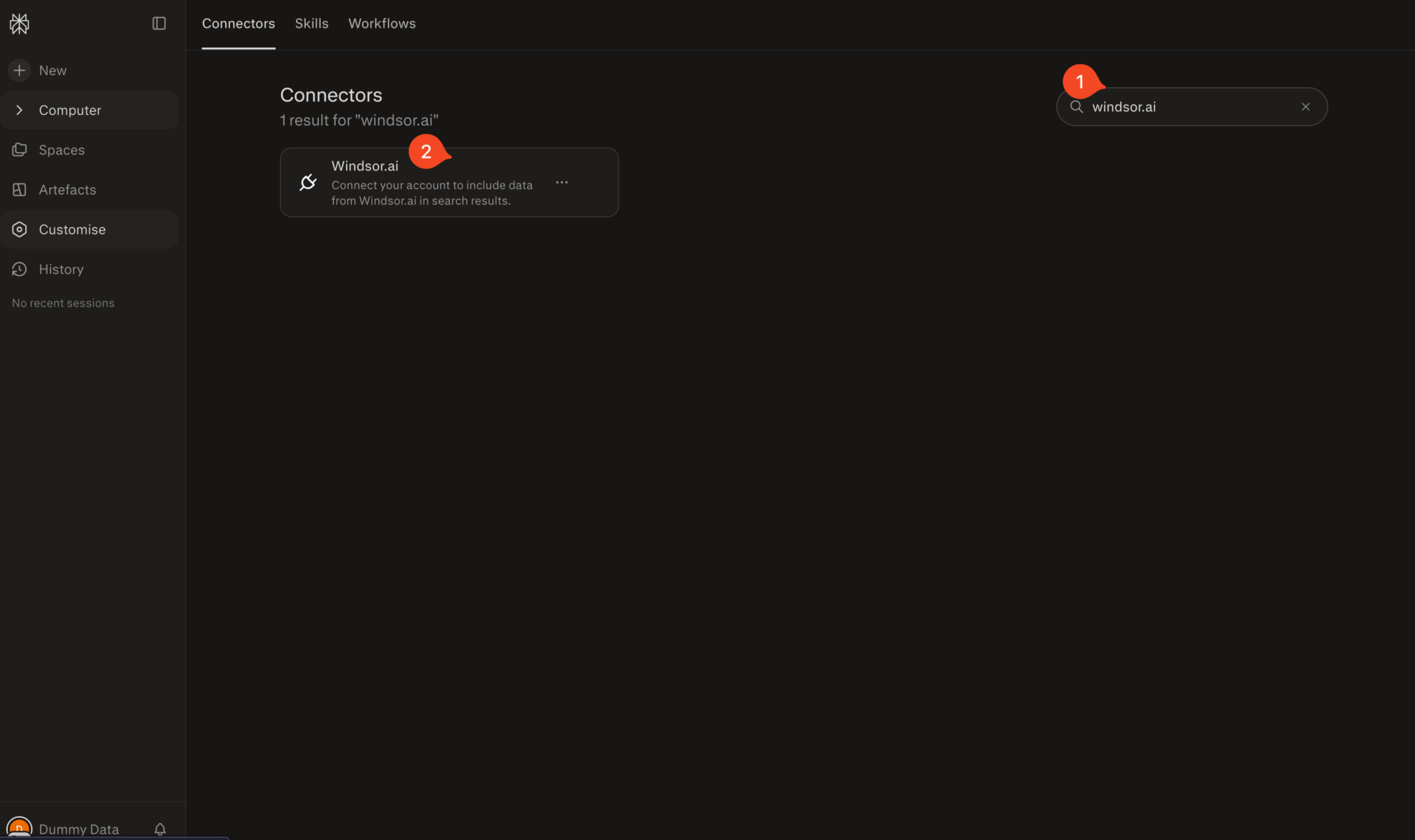
Search for Windsor.ai in the connectors list, click the card, then click Add connector.
Confirm by clicking Allow Access in the pop-up.
Enable Windsor.ai in your chat
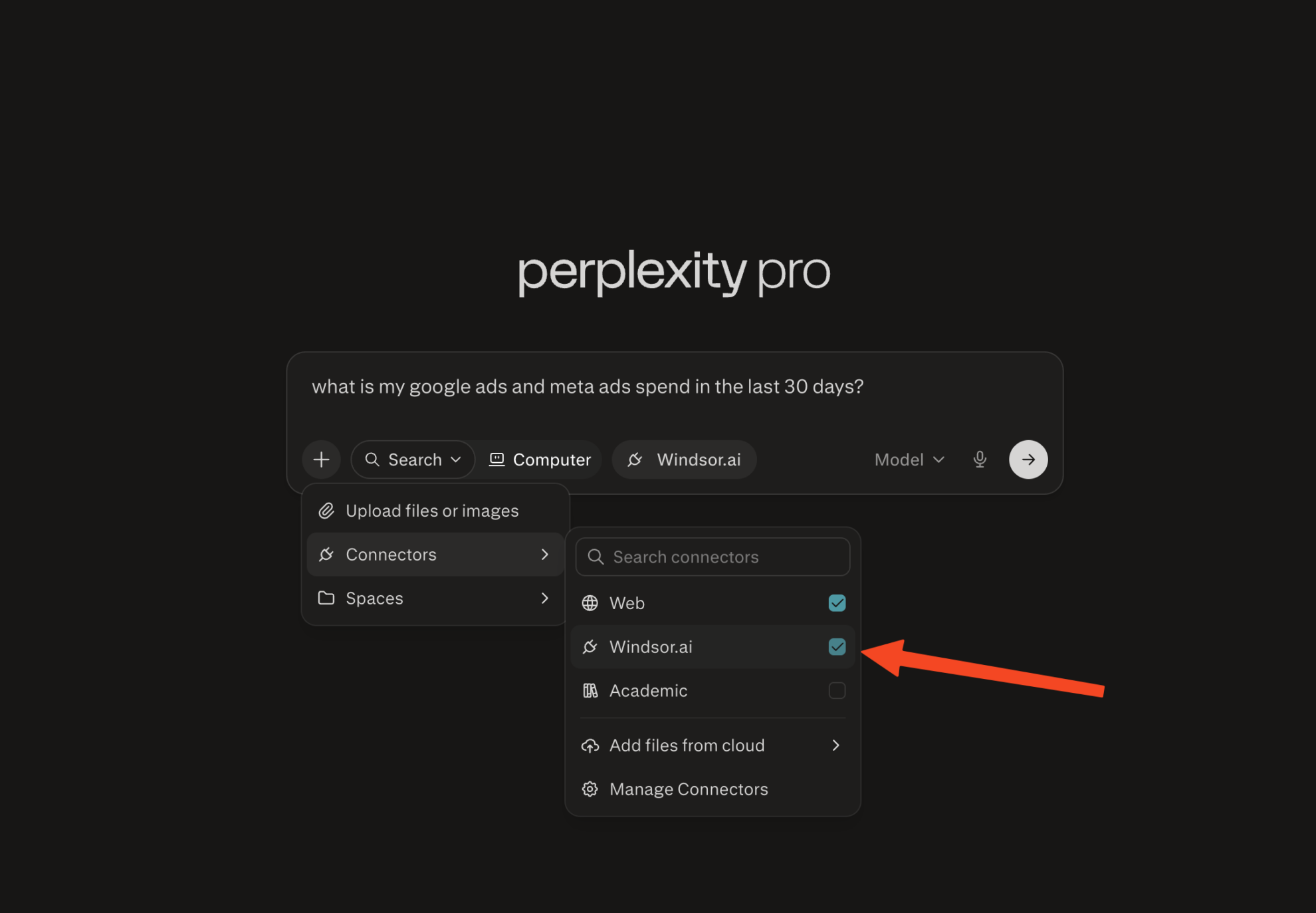
In a new chat, click +, choose Connectors, and check Windsor.ai.
Start querying your data
You can now ask questions about your integrated Windsor.ai data.

FAQs
How long does it take to set up the Facebook Ads to Perplexity integration?
The setup takes under a minute. Connect your Facebook Ads account in the Windsor.ai dashboard, then add Windsor as a custom MCP connector in Perplexity under Settings → Connectors. Once added, your data is immediately available for querying.
Does this integration require a Perplexity Pro subscription?
Yes. Adding custom MCP connectors in Perplexity requires a Perplexity Pro subscription on your Perplexity account.
On the Windsor.ai side, you can start on the free forever plan; no credit card required. Paid Windsor plans start at $19/month if you need more data sources and accounts.
What can I do with Facebook Ads data in Perplexity?
Once your Facebook Ads data is connected to Perplexity, you can:
- Ask natural-language questions about your campaigns, ad sets, and ads, and get AI-powered insights in seconds.
- Generate performance summaries on key metrics like spend, ROAS, CPM, CTR, and conversions, broken down by campaign, ad set, placement, age, gender, country, or device.
- Diagnose creative fatigue by analyzing quality ranking, engagement rate ranking, and frequency data, and catch audience saturation before it impacts your results.
- Monitor video performance across quartiles (3-second plays, ThruPlays, and average watch time) to identify which creatives hold attention and where viewers drop off.
- Identify wasted ad spend by surfacing high-frequency, low-converting ad sets, underpacing campaigns, and placements.
- Combine your ad data with Perplexity’s live web search and ask whether a CTR drop correlates with a competitor move, a platform update, or a shift in market demand.
- Connect Facebook Ads alongside 350+ other sources (Google Ads, GA4, CRM, or Shopify) to get a complete view of your customer journey and true cross-channel ad effectiveness.
Does Windsor.ai pull Facebook Ads video metrics into Perplexity?
Yes. Windsor.ai supports the full range of Facebook video engagement metrics, including 3-second video plays, 2-second continuous views, plays at 25%, 50%, 75%, 95%, and 100% of video length, ThruPlays (played to completion or at least 15 seconds), average watch time, and 30-second views.
Can I compare Facebook Ads alongside Google Ads in Perplexity?
Yes. Windsor.ai supports 350+ data sources, and you can query multiple sources in the same Perplexity conversation. Once both Facebook Ads and Google Ads are connected, you can ask Perplexity to compare spend, CPM, CPC, CTR, cost per conversion, and ROAS across both platforms, without merging spreadsheets or building a dashboard.
Can Perplexity help me analyze Facebook Ads frequency and audience saturation?
Yes. Ask Perplexity to flag ad sets where frequency is climbing above your threshold, correlate frequency increases with CTR or ROAS decline, and identify which audiences are most saturated, giving you the data you need to decide when to refresh creative or expand targeting.
What prompts can I use when analyzing Facebook Ads data in Perplexity?
Use these prompts for deeper analysis of your Facebook Ads data, uncovering patterns and strategic opportunities:
Break down my ROAS and cost per purchase by placement, device, age, and gender for the last 30 days. Which combinations are delivering the best results and which are wasting budget?
Show me video performance for all active ads: ThruPlay rate, average watch time, and cost per ThruPlay. Which creatives hold attention past 50% and which drop off early?
Which Facebook Ads campaigns are driving the most new customers vs. returning customers? Cross-reference with my CRM data to see lifetime value by acquisition campaign.
My Facebook Ads ROAS looks strong, but overall revenue is flat. Pull my Shopify orders and GA4 sessions for the same period. Is Facebook driving incremental revenue or cannibalizing organic traffic?
Compare my Facebook Ads and Google Ads spend, ROAS, and cost per purchase for the last 30 days. Which channel is delivering better results?
Do you have helpful links to get started with integrating Facebook Ads and Perplexity using Windsor.ai?
Yes, we have helpful resources to help you get started. You can explore our official documentation and tutorials for seamless Facebook Ads to Perplexity integration with Windsor.ai:
Tired of manual Facebook Ads data exports? Try Windsor.ai today to automate your reporting