Destinations
 Data sources
 AI insights
 About us
 Careers
 Security
 Customer reviews
 Contact us
 Affiliate program
 Solution partners
 Template gallery
 Looker Studio templates
 Power BI templates
 Excel templates
 Google Sheets templates
 Tableau templates
 Facebook Ads templates
 Google Ads templates
 Data fields & Metrics
 AI prompt library & Guides
 Product documentation
 API documentation
 Case studies
 Blog
 Data models
 Windsor vs Supermetrics
 Windsor vs Funnel.io
 Windsor vs Fivetran
 Windsor vs Rivery
 Windsor vs Portermetrics
 Windsor vs Coupler.io
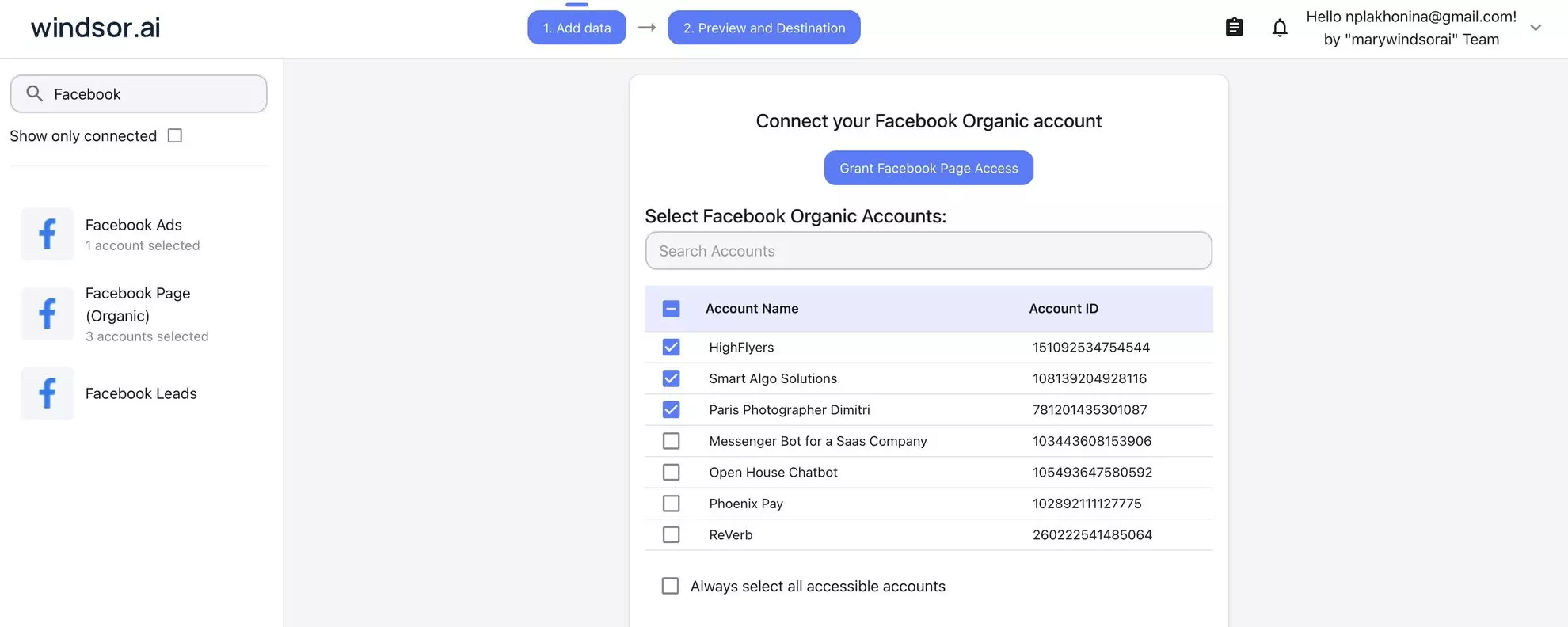
Connect Facebook Page Insights to Perplexity
Automatically sync your Facebook organic data to Perplexity using the Windsor.ai connector.
Chat with your Facebook Page Insights data in Perplexity to spot trends, understand what content works, and optimize your organic strategy with AI-powered insights.
Forget CSVs. Stop copy/paste. Connect in minutes. No code required.
 Sign up with Google
 Free forever plan








Boost your organic performance with Facebook Page Insights and Perplexity integration
Once your Facebook Page Insights are connected through Windsor.ai, Perplexity becomes your always-on marketing assistant, ready to answer questions, surface patterns, and turn raw metrics into clear next steps. Explore key use cases:

Identify your best-performing content
Find out which post formats, Reels, videos, carousels, or plain text consistently drive the most reach and engagement on your Page. Stop guessing what works and let your own data tell you.

Understand audience growth
Monitor follower gains, unfollows, and net growth week by week to understand what drives people to follow, or leave your Page. Connect spikes and drops directly to the content you posted that week.

Compare organic vs. paid performance
Blend your Facebook Organic data with Meta Ads in the same Perplexity conversation to see where paid amplification adds value and where organic alone is doing the heavy lifting. Make smarter budget decisions with the full picture.

Spot video drop-offs
Find out exactly where viewers stop watching your Facebook videos and Reels by querying average watch time and retention data directly in Perplexity. Fix weak hooks, trim dead seconds, and improve completion rates before your next post goes out.
Using Windsor.ai to connect data from Facebook Page Insights to Perplexity
Connecting Facebook Organic data to Perplexity the traditional way means exporting CSVs, wrestling with an API, or manually preparing data. Windsor.ai eliminates these challenges with an MCP connector that automatically syncs your Facebook Page Insights data directly into Perplexity.
Ask questions about your organic performance in plain language and get instant answers and recommendations.

Available actions
Create Photo Post
Publish a single image post to a connected Facebook Page. Provide either a publicly accessible image URL or the photo_id returned by upload_photo for a local file, plus an optional caption. For a text/link-only post use create_post instead. Set scheduled_publish_time (UTC ISO 8601, e.g. 2026-11-20T10:00:00Z) to schedule the post; Facebook accepts 10 minutes to 29 days ahead. Use list_scheduled_posts to see scheduled posts and delete_post to cancel one.
Create Post
Publish a post to a connected Facebook Page's feed. Provide a message (post text), a link (shared URL), or both - at least one is required. For an image post use create_photo_post, for a video create_video_post or create_reel. Set scheduled_publish_time (UTC ISO 8601, e.g. 2026-11-20T10:00:00Z) to schedule the post; Facebook accepts 10 minutes to 29 days ahead. Use list_scheduled_posts to see scheduled posts and delete_post to cancel one.
Create Reel
Publish a Reel to a connected Facebook Page from a publicly accessible video URL, with an optional description (hashtags allowed). The video must be 3 to 90 seconds long, 9:16, at least 540x960 and 24 to 60 fps; MP4 is recommended. A JPEG photo URL also works: Facebook publishes the photo as a Reel of less than one second. Facebook downloads the file from the URL, so the link must point at the file itself and not need a sign-in. A Page can publish at most 30 posts a day through the API. For a landscape or longer video use create_video_post instead.
Create Video Post
Publish a video post to a connected Facebook Page from a publicly accessible video URL (MP4 recommended), with an optional title and description. Facebook downloads the file from the URL, so the link must point at the file itself and not need a sign-in. Set scheduled_publish_time (UTC ISO 8601, e.g. 2026-11-20T10:00:00Z) to schedule the post; Facebook accepts 10 minutes to 29 days ahead. Use list_scheduled_posts to see scheduled posts and delete_post to cancel one. For a vertical short video use create_reel instead; Reels cannot be scheduled.
Delete Post
Permanently delete a post from a connected Facebook Page. This cannot be undone.
List Scheduled Posts
List the scheduled posts of a connected Facebook Page. Each post has its post_id, message and scheduled_publish_time (UTC). Use delete_post to cancel one. Returns up to limit posts.
Send Message
Send a Messenger text reply from a connected Facebook Page to a person. recipient_id is the message_from_id of a message that the person sent, as returned by the Messages fields. Facebook accepts the reply only within 24 hours of the person's last message.
Update Post
Replace the text of a post on a connected Facebook Page. Facebook allows this only for posts that were published through Windsor.ai (create_post or create_photo_post). The action refuses posts made on Facebook or with other tools.
Upload Photo
Upload one image file (JPEG, PNG or GIF, at most 4 MB) to a connected Facebook Page and return its photo_id. The image is sent as a file uploaded with the request, so it needs no public URL. Nothing is published: pass the photo_id to create_photo_post to publish it. Facebook deletes an unpublished photo after about 24 hours.






How to connect Facebook Page Insights to Perplexity with Windsor.ai
Explore our video tutorial and a step-by-step guide to integrate your data from any source into Perplexity with the Windsor.ai connector.
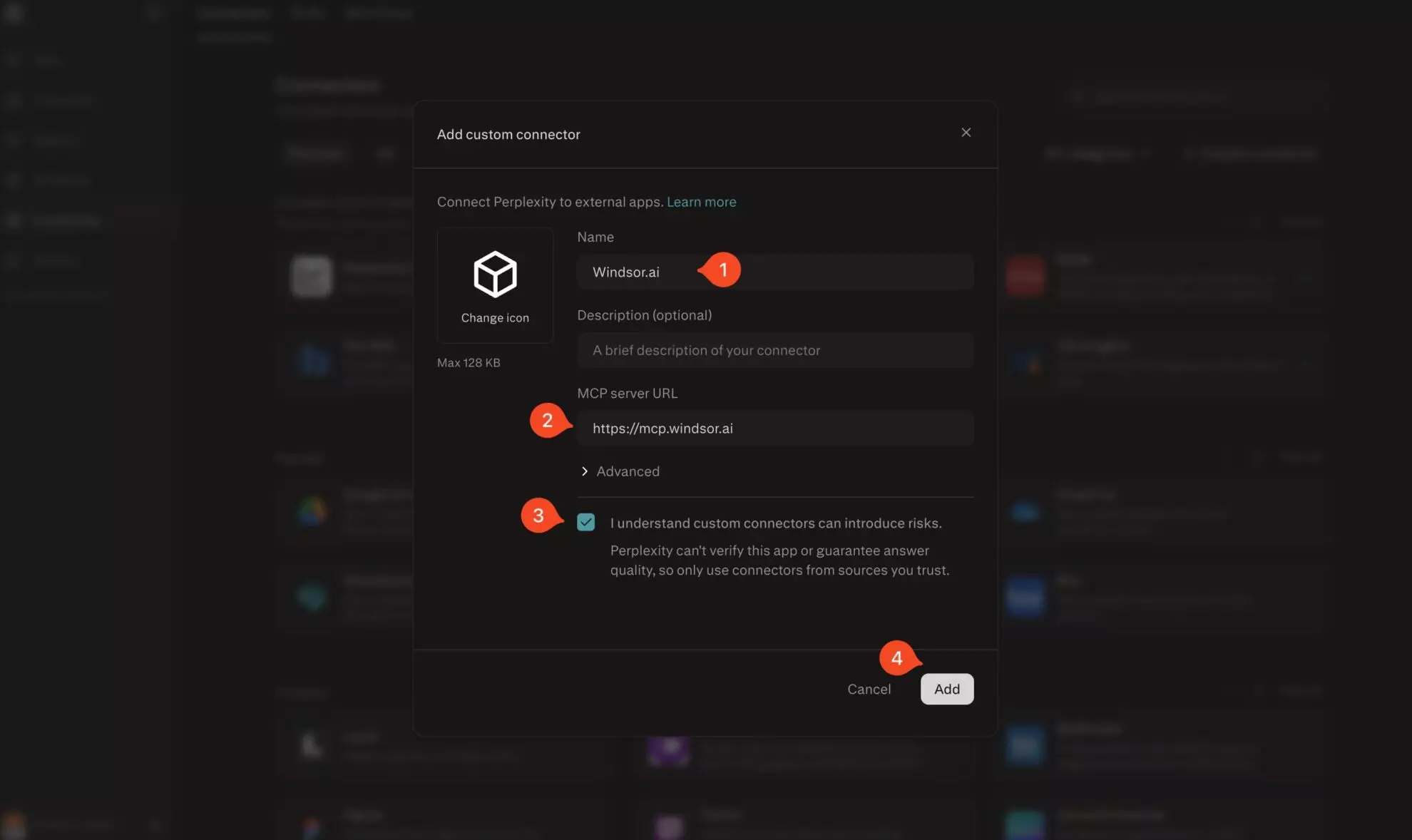
Add Windsor.ai as a custom connector
Go to perplexity.ai/computer/connectors and click + Custom connector. Fill in the details:
- Name: Windsor.ai
- MCP server URL: https://mcp.windsor.ai
Tick ‘I understand custom connectors can introduce risks’ and click Add.
Install the connector
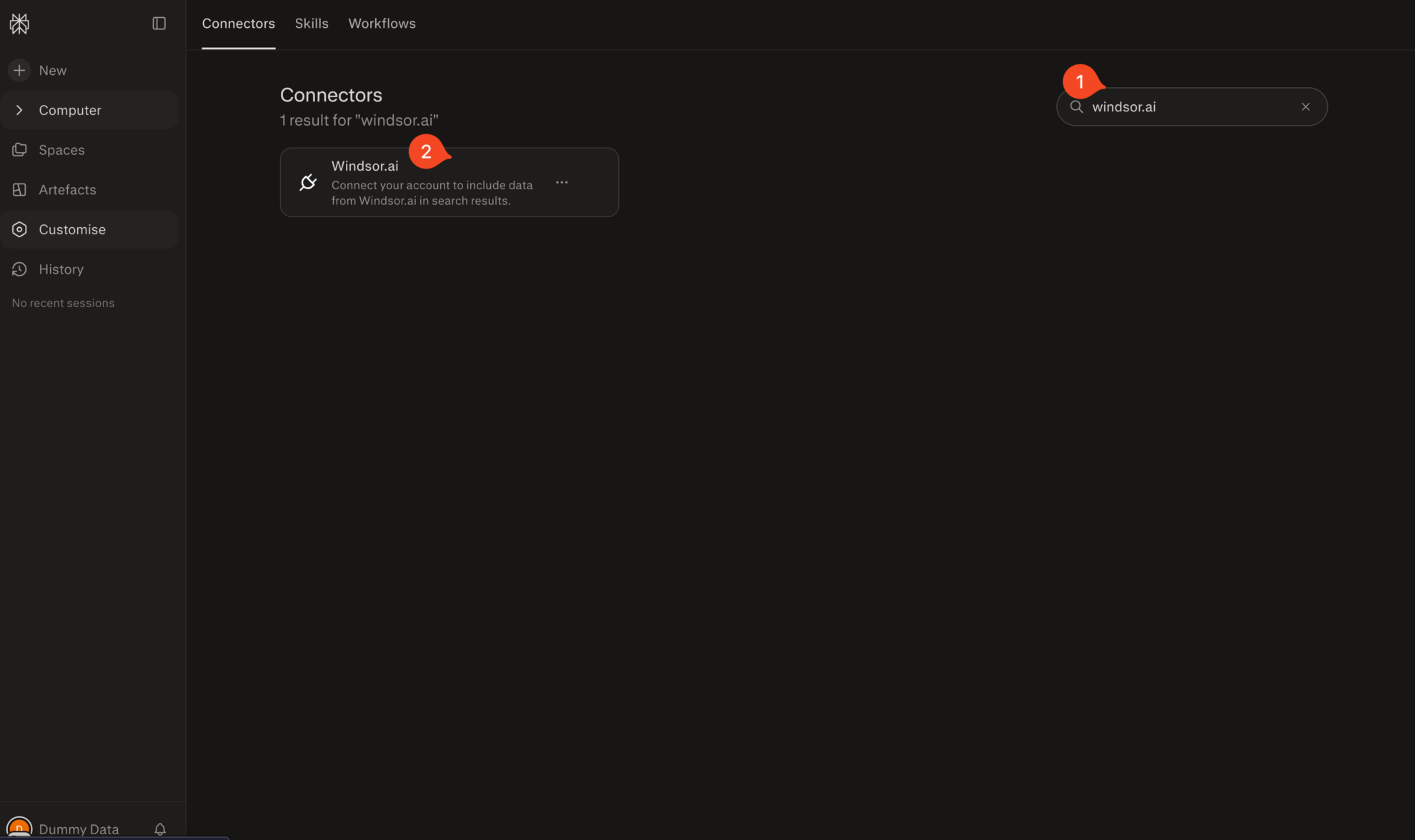
Search for Windsor.ai in the connectors list, click the card, then click Add connector.
Confirm by clicking Allow Access in the pop-up.
Enable Windsor.ai in your chat
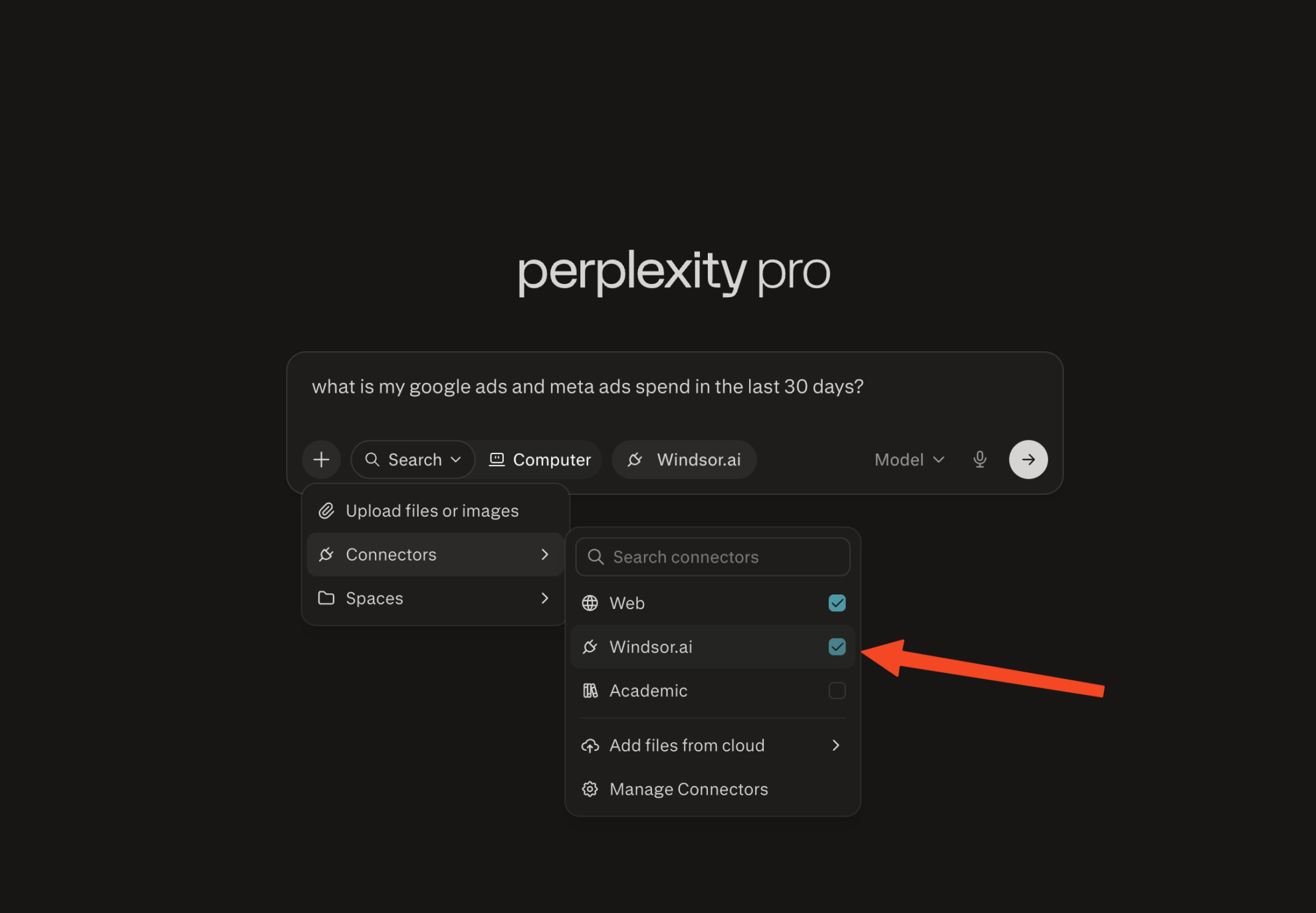
In a new chat, click +, choose Connectors, and check Windsor.ai.
Start querying your data
You can now ask questions about your integrated Windsor.ai data.

FAQs
Can Perplexity help explain drops in Facebook organic reach or engagement?
Yes. When reach, impressions, or engagement decline, you can ask Perplexity to diagnose possible causes based on your data and external context. It can highlight changes in posting frequency, content type, creative performance, or audience behavior, and also flag broader platform or seasonal trends from the live web.
Does the integration include Facebook Reels and video metrics?
Yes, the connector exposes both video and Reels metrics such as views, autoplay views, click‑to‑play views, 10s/15s/30s views, watch time, average time watched, replay counts, and total plays. You can also analyze Reels-specific metrics like followers gained from a reel, reactions, comments, and shares.
Can Perplexity help me build a stronger Facebook content strategy?
Yes. Perplexity highlights the posts, videos, and reels that actually work best for reach, engagement, watch time, and follower growth. It spots patterns across your top performers (formats, topics, hooks, captions, and posting times), so you can generate new content ideas based on proven winners instead of guessing what to publish next.
How much does it cost to connect Facebook Organic to Perplexity with Windsor.ai?
Windsor.ai offers several pricing options depending on your data volume, with paid plans starting from 19 $/month and a free‑forever plan for smaller setups. To use the integration inside Perplexity, you also need an active Perplexity Pro subscription on your Perplexity account.
What prompts can I use when analyzing Facebook Page Insights data in Perplexity?
Use these prompts for deeper analysis of your Facebook Page Insights data, uncovering patterns and strategic opportunities:
-
Using my Facebook Page Insights data for the last 90 days, analyze which post types (link, photo, video, reels) drive the highest engagement rate relative to reach. Break it down by organic vs paid impressions and show which formats are over‑ or under‑performing against my page average.
-
Look at my Facebook videos and reels over the last 60 days and identify which ones have the best combination of watch time, average time watched, and 10‑second/15‑second views. Tell me what they have in common in terms of topic, length, and posting time, and suggest 10 new content ideas that follow the same patterns.
-
Analyze my Facebook Page follower and unfollower trends over the last 6 months. Show me which specific posts or reels were followed by spikes in follows or unfollows, and explain what may have caused those changes based on content, reactions, and comments.
-
For the last quarter, break down my Facebook post impressions and reach by country, city, and language where data is available. Identify my top 5 most engaged audience segments and recommend how I should adapt content topics, formats, and posting times to better serve those segments.
Do you have helpful links to get started with integrating Facebook Page Insights and Perplexity using Windsor.ai?
Yes, we have helpful resources to help you get started. You can explore our official documentation and tutorials for seamless Facebook Page Insights to Perplexity integration with Windsor.ai:
Tired of manual Facebook Page Insights data exports? Try Windsor.ai today to automate your reporting