 Destinations
 Data sources
 AI insights
 About us
 Careers
 Security
 Customer reviews
 Contact us
 Affiliate program
 Solution partners
 Template gallery
 Looker Studio templates
 Power BI templates
 Excel templates
 Google Sheets templates
 Tableau templates
 Facebook Ads templates
 Google Ads templates
 Data fields & Metrics
 AI prompt library & Guides
 Product documentation
 API documentation
 Case studies
 Blog
Blog Data models
 Windsor vs Supermetrics
 Windsor vs Funnel.io
 Windsor vs Fivetran
 Windsor vs Rivery
 Windsor vs Portermetrics
 Windsor vs Coupler.io
Connect Google Ads to Perplexity
Automatically sync your Google Ads data to Perplexity using the Windsor.ai connector.
Calculate your true ROAS, cut wasted spend, and scale tactics that convert, all through natural language conversation in Perplexity.
Forget CSVs. Stop copy/paste. Connect in minutes. No code required.
 Sign up with Google
 Free forever plan
No credit card needed
Free forever plan
No credit card needed









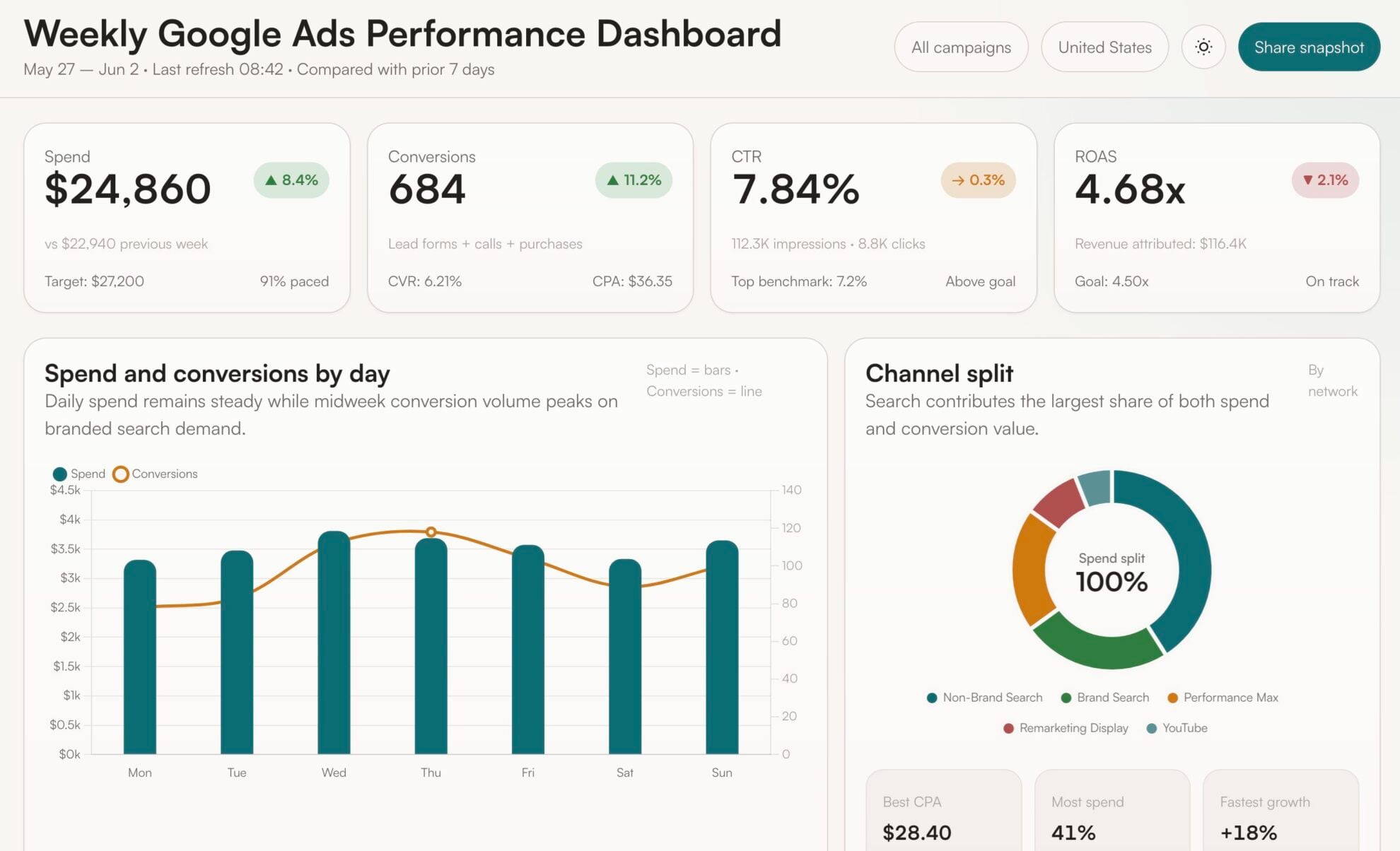
Make smarter Google Ads decisions with AI-powered data analysis
Connect Google Ads to Perplexity using Windsor.ai and get instant insights from your live ad data without exports, manual analysis, or waiting for reports. Explore key use cases:

Diagnose campaign inefficiency
Ask Perplexity which campaigns exceeded your target CPA last month, broken down by ad group, device, and match type. Instantly see where you’re wasting budget and reallocate spend to profitable segments before losses compound.

Audit keyword quality
Pull keywords with low Quality Scores, high click volume, and zero conversions, grouped by campaign and match type. Spot the terms that inflate CPCs without driving revenue, so you can refine your structure, ads, and negatives to lower CPA and free up budget for high‑intent traffic.

Uncover search term opportunities
Perplexity automatically surfaces search terms that convert above your target ROAS but are not yet covered as exact match keywords. Turn these proven intent signals into tightly themed ad groups, boost impression share on what already works, and outpace competitors on your best‑performing queries.

Compare cross-channel ROI
Blend Google Ads costs with Meta Ads and Shopify (or your CRM) revenue to calculate real cross‑channel ROAS and CAC. See where each additional dollar delivers the highest incremental profit and shift budgets with confidence instead of guesswork.

Add research to your existing insights
Combine your Google Ads performance data with live market and competitor research. Benchmark your CPCs and CTRs, spot upcoming trends, and scan competitor messaging so every optimization is driven by both your numbers and the market.
Using Windsor.ai to connect data from Google Ads to Perplexity
Getting your Google Ads data into an AI tool is a manual, fragile, and time-consuming process. Windsor.ai fixes that. Your campaign data is delivered directly to Perplexity in minutes: always fresh, structured, and ready for analysis.
Spend your time making decisions, not preparing data.














How to connect Google Ads to Perplexity with Windsor.ai
Explore our video tutorial and a step-by-step guide to integrate your data from any source into Perplexity with the Windsor.ai connector.
Connect data source in Windsor.ai dashboard
Connect your Google Ads to Windsor.ai. Select the necessary account(s) you want to pull data from and click “Next.”

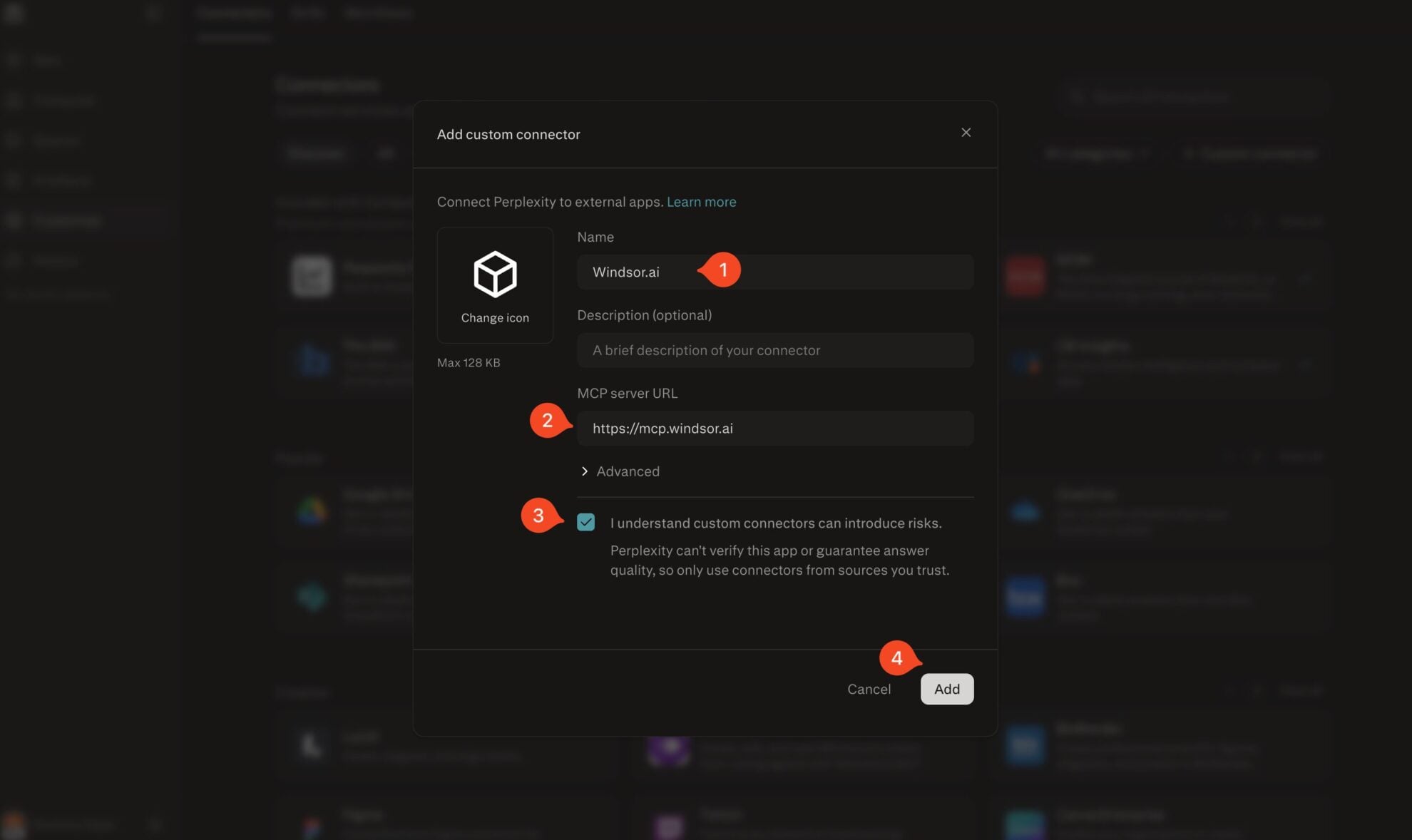
Add Windsor.ai as a custom connector
Go to perplexity.ai/computer/connectors and click + Custom connector. Fill in the details:
- Name: Windsor.ai
- MCP server URL: https://mcp.windsor.ai
Tick ‘I understand custom connectors can introduce risks’ and click Add.
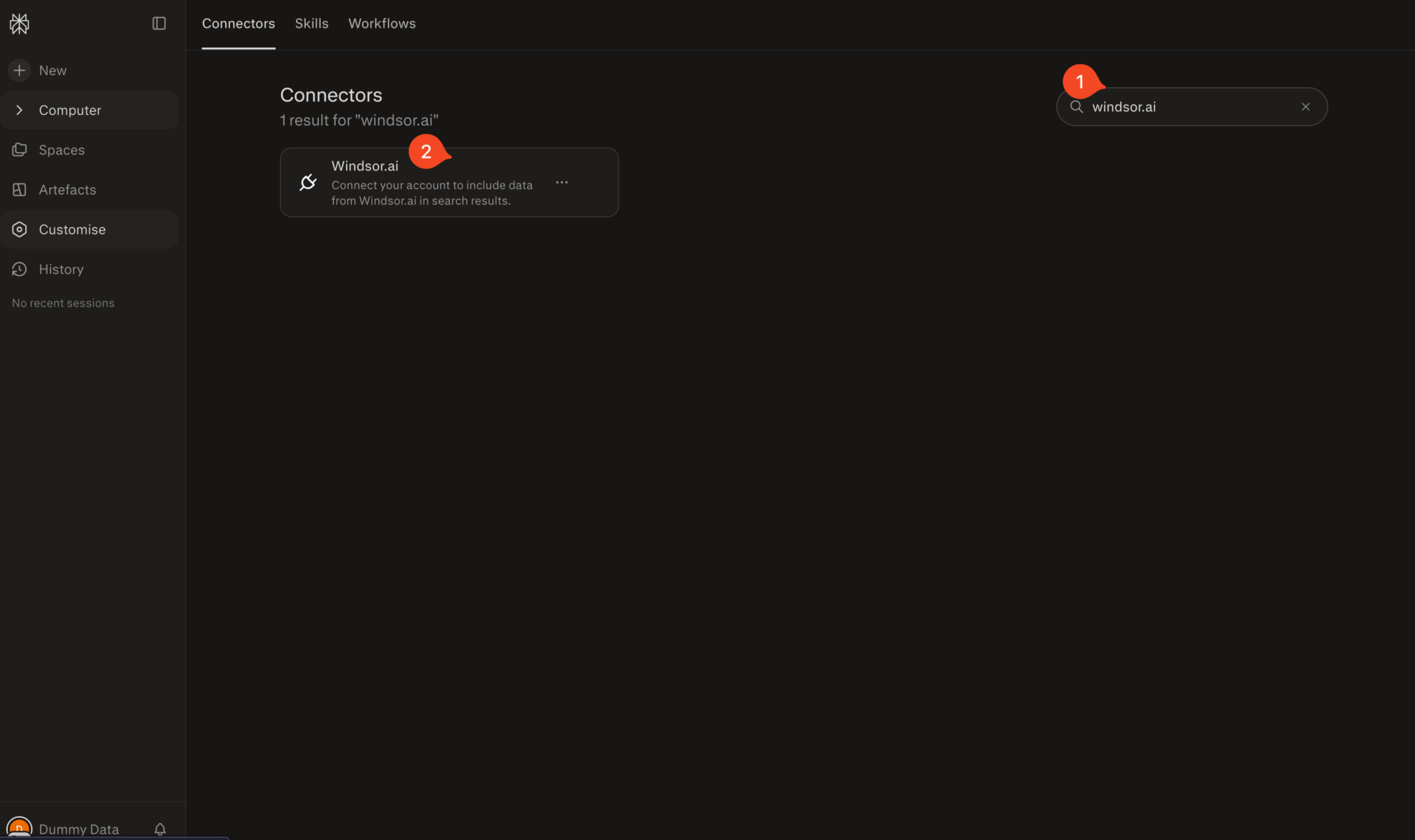
Install the connector
Search for Windsor.ai in the connectors list, click the card, then click Add connector.
Confirm by clicking Allow Access in the pop-up.
Enable Windsor.ai in your chat
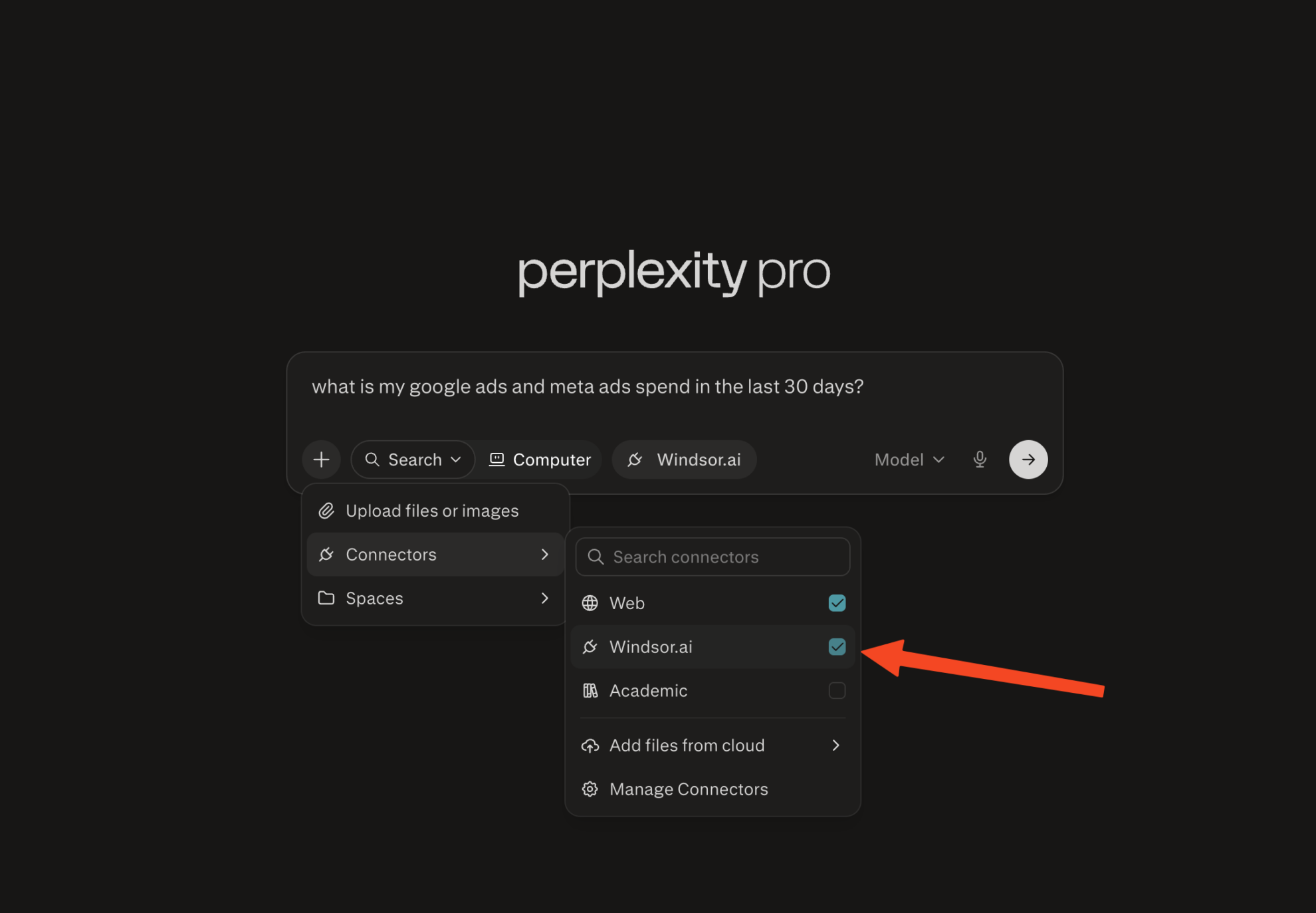
In a new chat, click +, choose Connectors, and check Windsor.ai.
Start querying your data
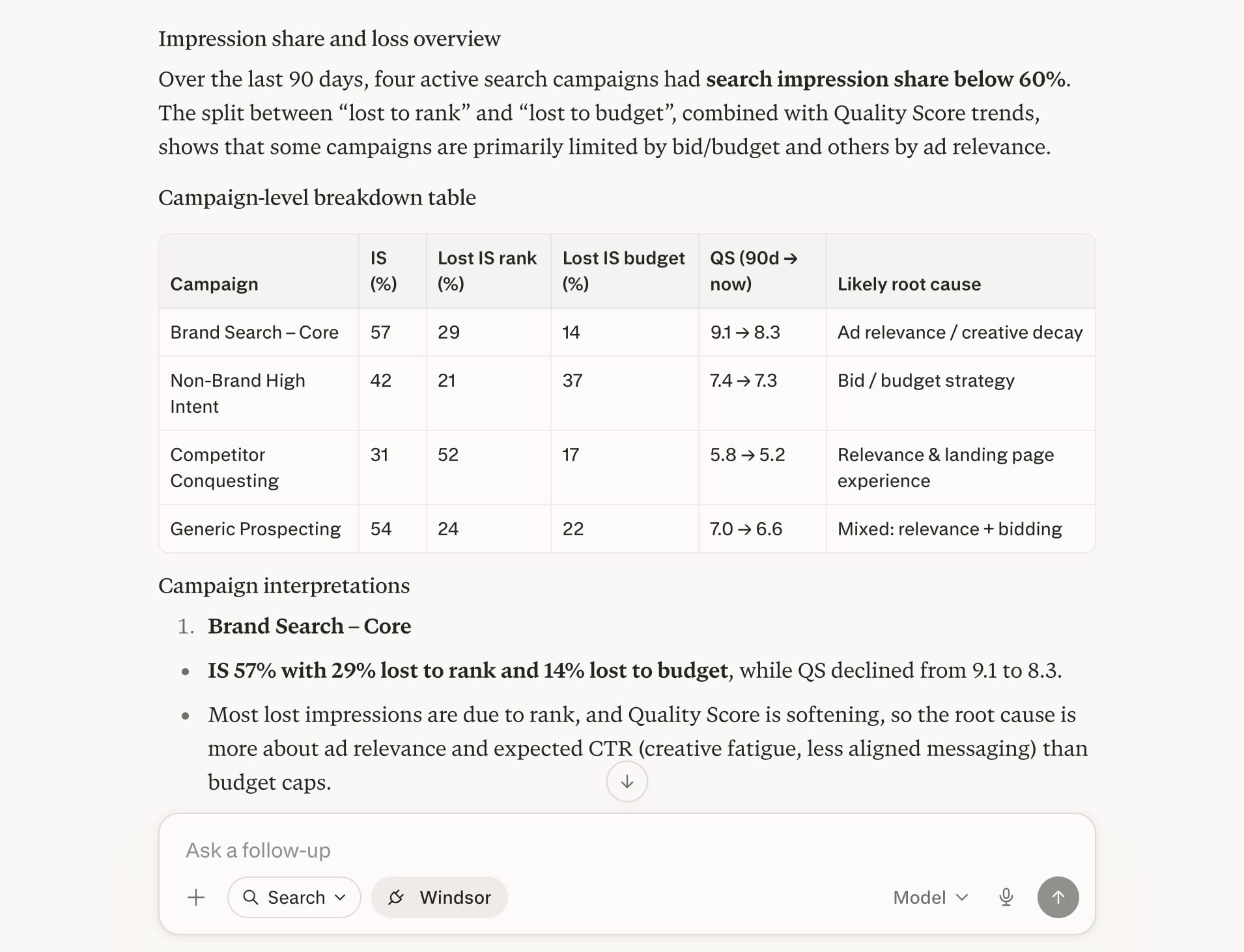
You can now ask questions about your integrated Windsor.ai data.
FAQs
Do I need a paid Windsor.ai plan to use Google Ads with Perplexity?
No. Windsor.ai has a free forever plan; no credit card required. The free plan includes 1 active data source and 1 account, which covers a single Google Ads account connected to Perplexity. If you need more sources (e.g., Google Ads, Meta Ads, GA4), paid plans start at $19/month.
What Google Ads data is available for analysis in Perplexity via Windsor.ai?
Windsor.ai gives Perplexity access to 431 Google Ads metrics and 1,906 dimensions, covering every major area of campaign analysis:
- Campaign and ad group performance: impressions, clicks, CTR, average CPC, cost/spend, conversions, conversion rate, cost per conversion, ROAS, all conversions, all conversion value.
- Search and keywords: keyword text, match type, Quality Score, search impression share, absolute top impression share, and top impression share.
- Audience and segmentation dimensions: break down any metric by device (desktop, mobile, tablet), geography (country, city, region), ad network type, click type, campaign type, and campaign status.
- Budget and bidding data: cost, average CPM, average CPE, cost per all conversions, and value per conversion.
- Display and video metrics: active view impressions, active view viewability, video views, video view rate, engagement rate, and engagement for Performance Max, Discovery, and YouTube campaigns.
- Shopping campaigns: product title, brand, category, product ID, product type, and merchant center data.
Can I blend Google Ads data with other sources in Perplexity?
Yes. With Windsor.ai, you can combine Google Ads with 350+ data sources, including Google Analytics 4, Facebook Ads, Instagram, TikTok, LinkedIn, and Shopify. This allows you to ask cross-channel questions like ‘Compare my Google Ads and Meta Ads ROAS for last month’ or ‘Which channel drove the most revenue from new customers this quarter?’.
Can Perplexity help me identify wasting budget?
Yes. Ask Perplexity, ‘Which campaigns have the highest spend and lowest ROAS this month?’ or ‘Show me ad groups where cost per conversion exceeds my target.’ Windsor.ai pulls live cost, conversion, and ROAS data from your Google Ads account, so Perplexity can surface underperforming campaigns, ad groups, or keywords that drain your budget.
What prompts can I use when analyzing Google Ads data in Perplexity?
Use these prompts to uncover in-depth insights into your advertising performance:
-
Identify any campaigns where CTR dropped more than 20% week-over-week in the last 60 days but impressions stayed flat or grew. For each anomaly, show the affected ad groups and the search terms that were active during the drop period.
-
For campaigns where search impression share is below 60%, break down the lost impression share by 'lost to rank' vs 'lost to budget' over the last 90 days. Correlate with Quality Score changes to identify whether the root cause is bid strategy or ad relevance.
-
Compare same-day conversions vs. 30-day view-through conversions for my top 5 campaigns by spend. Identify which campaigns are most undervalued by last-click attribution and by how much.
-
Find all users who clicked a Meta Ad and then converted via a Google Ads search campaign within 7 days. What was the average time between first touch and conversion, and which Google Ads campaign closed the most of these journeys?
-
Using my average order value and COGS from Shopify, calculate the maximum CPC I can afford per keyword category in Google Ads while maintaining a 30% profit margin. Flag any keyword groups currently bidding above that threshold.
Do you have helpful links to get started with integrating Google Ads and Perplexity using Windsor.ai?
Yes, we have helpful resources to help you get started. You can explore our official documentation and tutorials for seamless Google Ads to Perplexity integration with Windsor.ai:
Tired of manual Google Ads data exports? Try Windsor.ai today to automate your reporting


