 Destinations
 Data sources
 AI insights
 About us
 Careers
 Security
 Customer reviews
 Contact us
 Affiliate program
 Solution partners
 Template gallery
 Looker Studio templates
 Power BI templates
 Excel templates
 Google Sheets templates
 Tableau templates
 Facebook Ads templates
 Google Ads templates
 Data fields & Metrics
 AI prompt library & Guides
 Product documentation
 API documentation
 Case studies
 Blog
Blog Data models
 Windsor vs Supermetrics
 Windsor vs Funnel.io
 Windsor vs Fivetran
 Windsor vs Rivery
 Windsor vs Portermetrics
 Windsor vs Coupler.io
Connect Instagram Pubic to Perplexity
Automatically sync your Instagram Public data to Perplexity using the Windsor.ai connector.
Analyze any public Instagram profile in Perplexity to spot top-performing posts, identify trending topics, and know exactly what content to replicate.
Forget CSVs. Stop copy/paste. Connect in minutes. No code required.
 Sign up with Google
 Free forever plan
No credit card needed
Free forever plan
No credit card needed










Turn raw data into AI insights with Instagram Public to Perplexity integration
With Windsor MCP, your Instagram Public data flows directly into Perplexity, allowing you to cut time on manual exports and spend more on analysis, strategy, and creating content. Some of the key use cases:

Benchmark competitors
Choose competitors’ profiles you need and ask Perplexity to compare their posting frequency, average likes, and top content formats against yours. Know exactly where you stand without manually scrolling their feed.

Find your next influencer to collaborate
Pull public metrics from any influencer profile: follower count, average likes per post, comment-to-like ratio, and best-performing content types. Vet partnerships with real engagement data before you reach out.

Spot trending topics
Track which posts across multiple public profiles are spiking in likes and comments right now. Identify the topics and formats gaining traction in your niche and create content while the trend is still rising.
Using Windsor.ai to connect data from Instagram Public to Perplexity
Most ways to send Instagram Public data to AI rely on manual exports, data prep, or complex technical setups. Windsor.ai’s MCP connector removes this friction by automatically syncing your data into Perplexity in just a few minutes.
Once it’s set up, use natural‑language prompts to generate AI‑driven insights from your Instagram Public data.















How to connect Instagram Public to Perplexity with Windsor.ai
Explore our video tutorial and a step-by-step guide to integrate your Instagram Public data into Perplexity with the Windsor.ai connector.
Connect data source in Windsor.ai dashboard
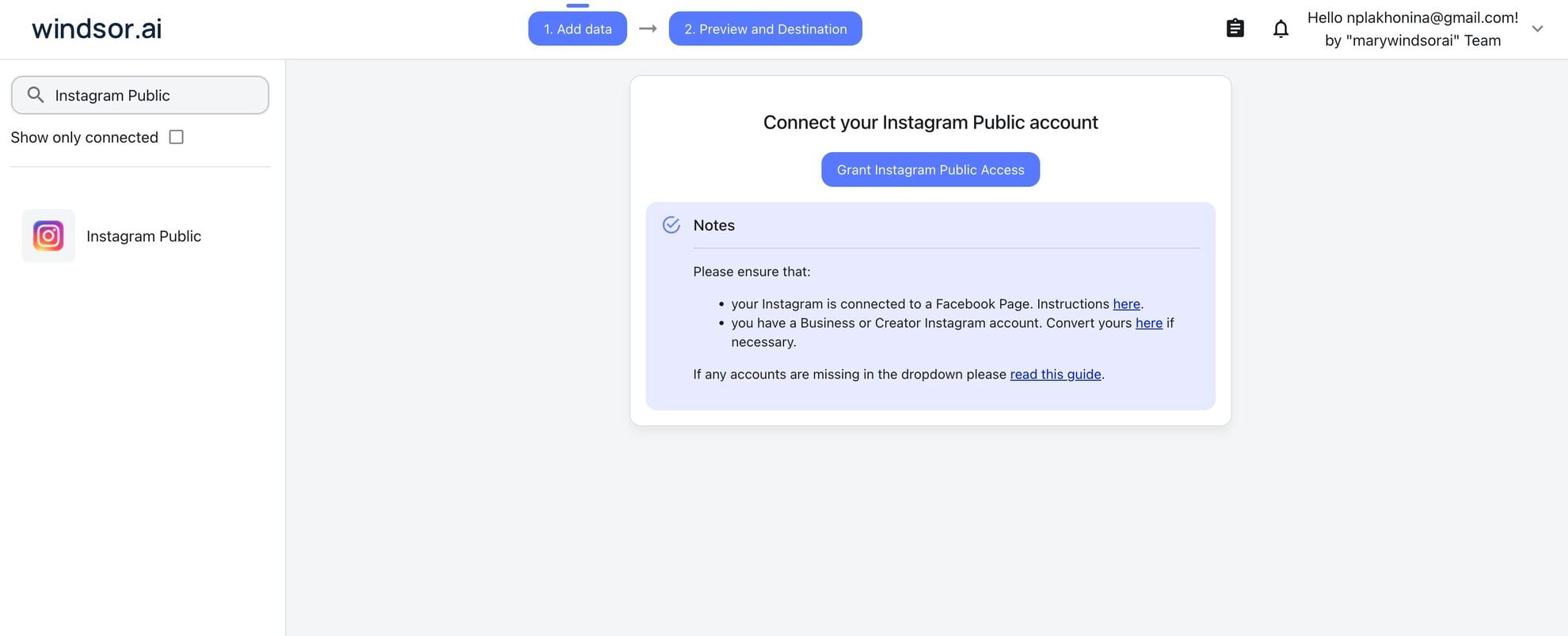
Connect your Instagram Public to Windsor.ai. Select the necessary account(s) you want to pull data from and click “Next.”
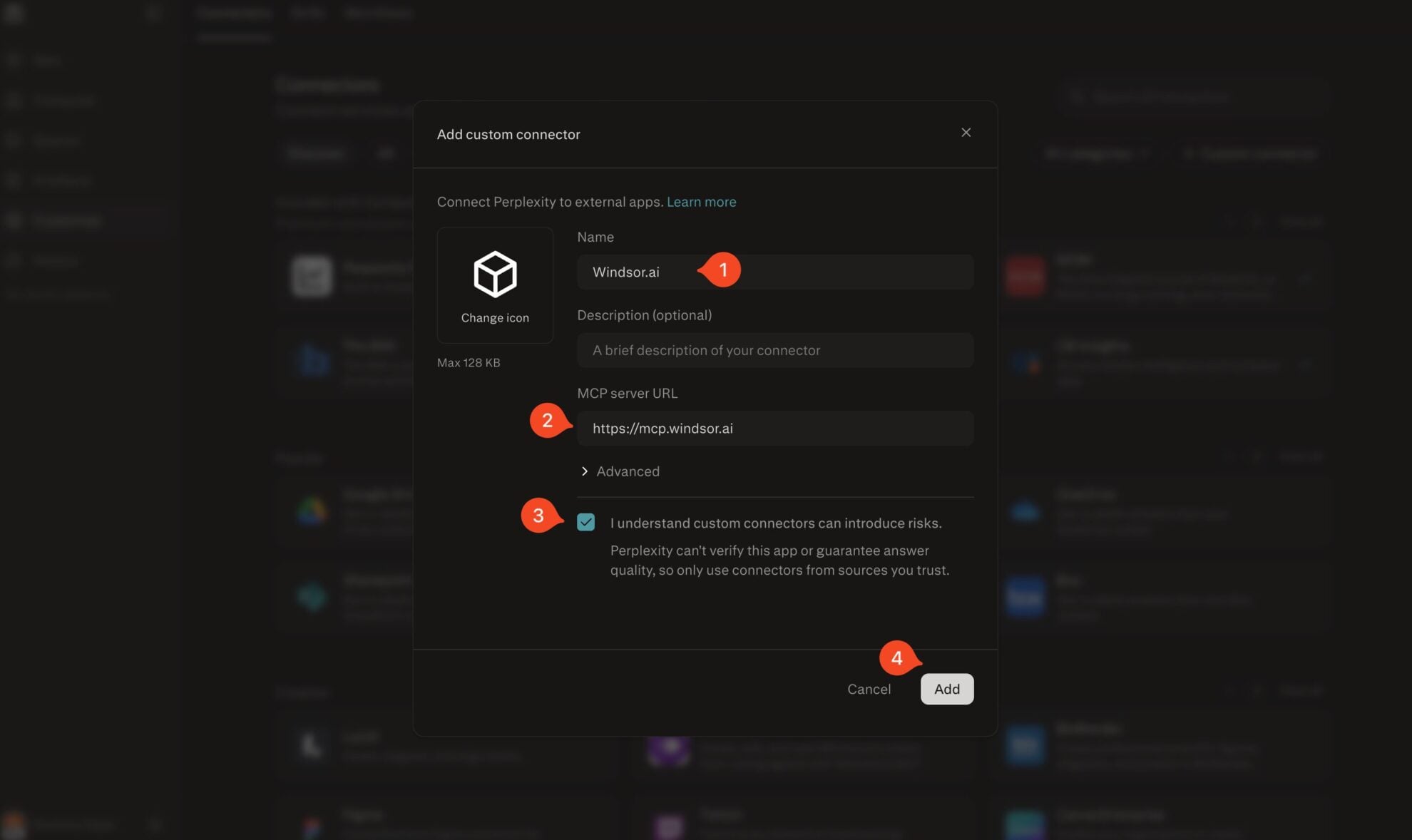
Add Windsor.ai as a custom connector
Go to perplexity.ai/computer/connectors and click + Custom connector. Fill in the details:
- Name: Windsor.ai
- MCP server URL: https://mcp.windsor.ai
Tick ‘I understand custom connectors can introduce risks’ and click Add.
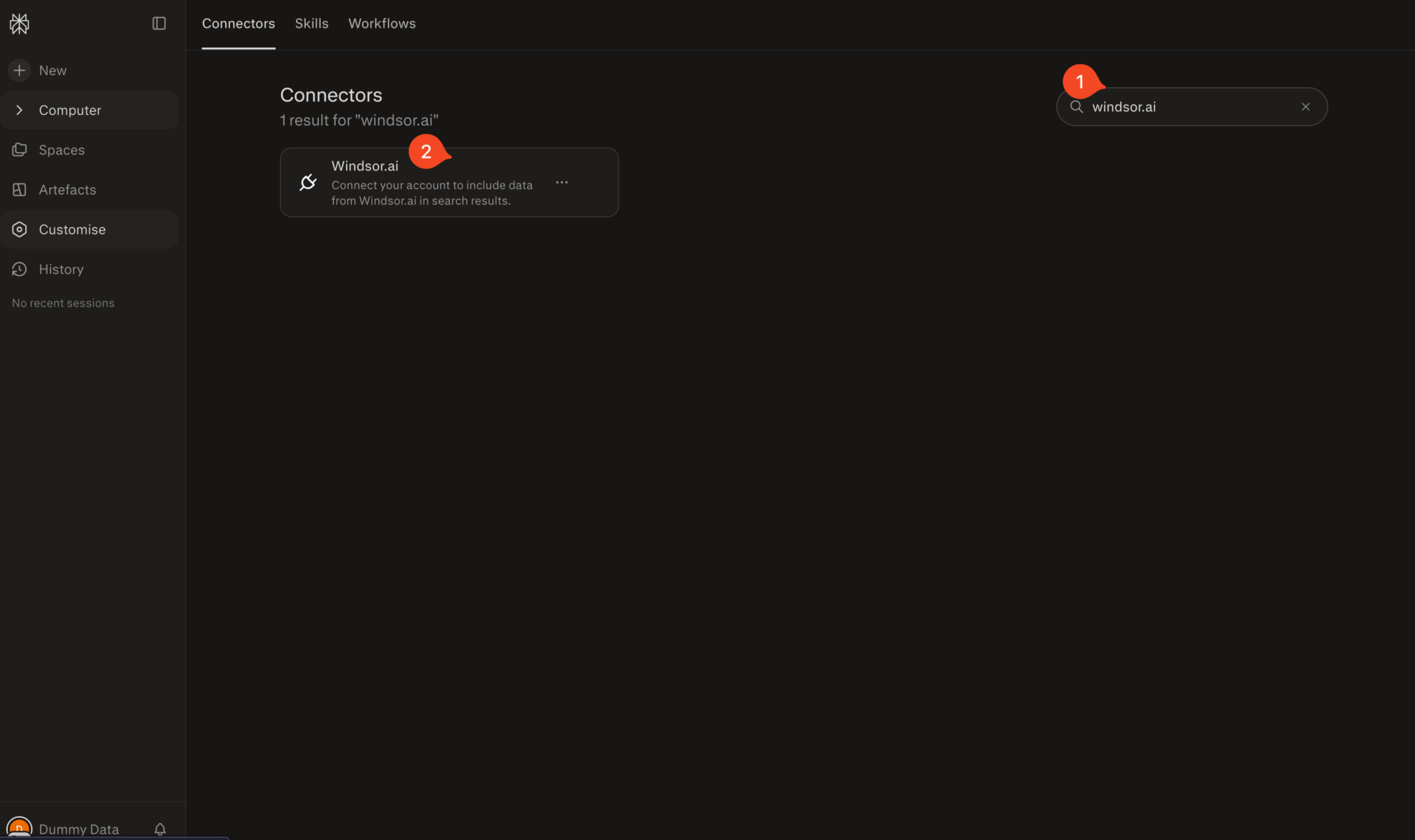
Install the connector
Search for Windsor.ai in the connectors list, click the card, then click Add connector.
Confirm by clicking Allow Access in the pop-up.
Enable Windsor.ai in your chat
In a new chat, click +, choose Connectors, and check Windsor.ai.
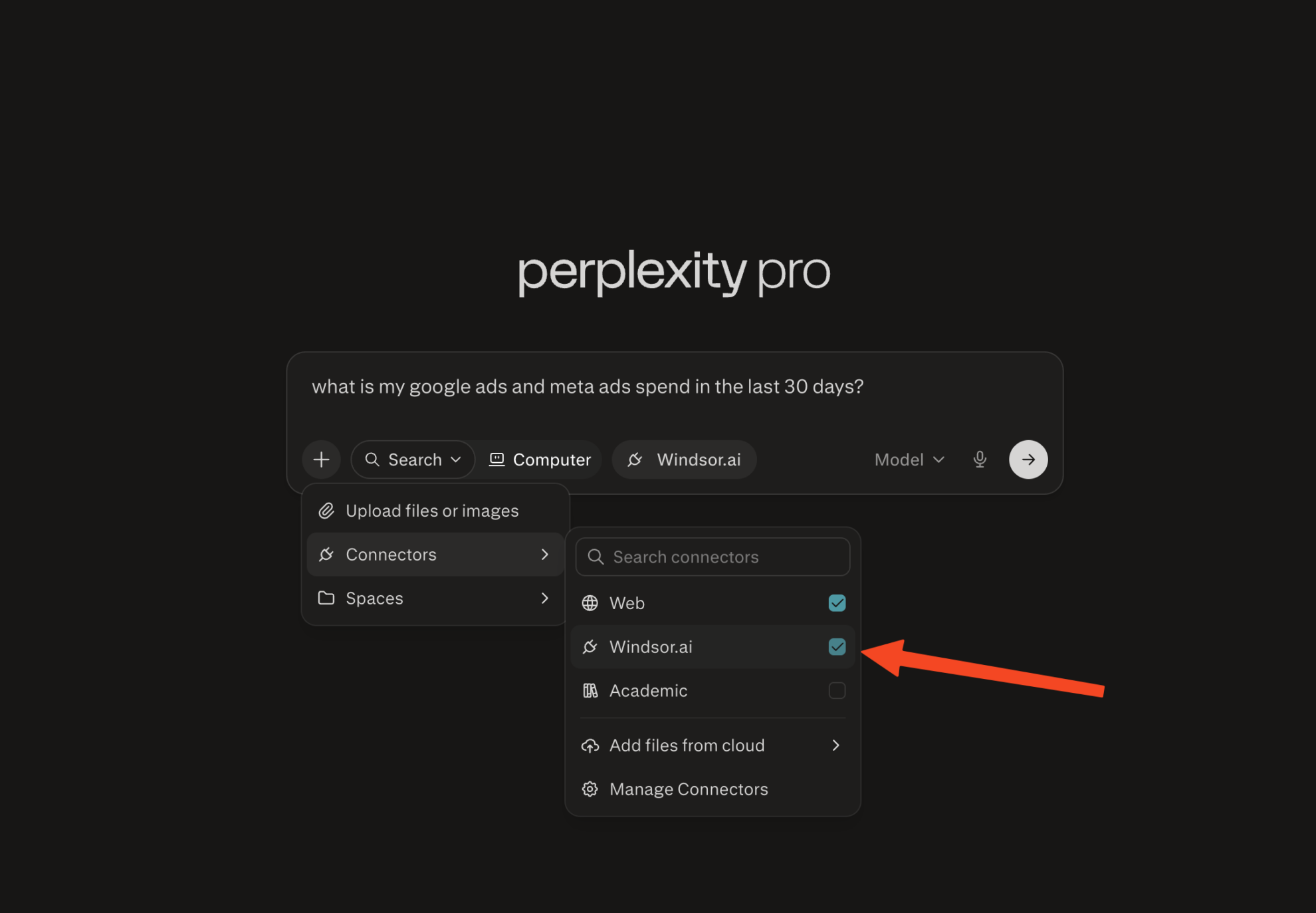
Start querying your data
You can now ask questions about your integrated Windsor.ai data.
FAQs
Do I need a paid Windsor.ai plan to connect Instagram Public to Perplexity?
Windsor.ai offers a Forever Free plan with 1 data source and 1 account, which is enough to connect a single Instagram Public profile to Perplexity; if you need more sources or accounts, you can upgrade to a paid plan starting at $19/month.
How do I connect Instagram Public to Perplexity using Windsor.ai?
Open Perplexity, go to Settings → MCP Servers, and add Windsor’s MCP. Then log into Windsor.ai, add the Instagram Public connector, and authorize via OAuth. Once connected, Perplexity can query your Instagram Public data in real time, with no CSV exports or manual updates.
What can I do with Instagram Public data in Perplexity?
Once your Instagram Public data is in Perplexity, you can track any public profile:
- Monitor content performance: Ask which posts got the most likes or comments this month and get a ranked breakdown instantly.
- Track follower growth: Query follower counts across competitors, influencers, or any public account you’re watching over time.
- Benchmark competitors: Pull public metrics from any account and compare them side by side in one Perplexity conversation.
- Identify winning content formats: Ask which media type (Reel, Carousel, Image, Video) drives the highest average engagement.
- Audit posting frequency: Find out how posting cadence correlates with like and comment counts across different weeks or months.
Does the Windsor Instagram Public connector capture post captions?
Yes. Every post’s media_caption is included. You can ask Perplexity to find patterns between caption length or content and engagement levels, for example, “Which posts with questions in the caption get more comments?”
What prompts can I use when analyzing Instagram Public data in Perplexity?
-
For [profile name], group all posts from the last 6 months by media type. For each type, calculate the average likes per post, average comments per post, and total post count. Rank by average likes descending and highlight which format has the highest comment-to-like ratio.
-
Compare the top 5 posts (by likes) vs. the bottom 5 posts (by likes) from [profile name] over the last 60 days. What do the high performers have in common across media type, posting time, and caption length?
-
Pull data for [profile A], [profile B], and [profile C] for the last 30 days. For each account, calculate: total posts published, average likes per post, average comments per post, and comments-to-likes ratio. Rank all three accounts on each metric and tell me which account has the most consistent engagement.
-
For [profile name], analyze the relationship between posting frequency (posts per week) and average weekly engagement (likes + comments per post) over the last 12 weeks. Does posting more frequently correlate with higher or lower per-post engagement? Show the data by week.
Do you have helpful links to get started with integrating Instagram Public and Perplexity using Windsor.ai?
Yes, we have helpful resources to help you get started. You can explore our official documentation and tutorials for seamless Instagram Public to Perplexity integration with Windsor.ai:
Tired of manual Instagram Public data exports? Try Windsor.ai today to automate your reporting


