 Destinations
 Data sources
 AI insights
 About us
 Careers
 Security
 Customer reviews
 Contact us
 Affiliate program
 Solution partners
 Template gallery
 Looker Studio templates
 Power BI templates
 Excel templates
 Google Sheets templates
 Tableau templates
 Facebook Ads templates
 Google Ads templates
 Data fields & Metrics
 AI prompt library & Guides
 Product documentation
 API documentation
 Case studies
 Blog
Blog Data models
 Windsor vs Supermetrics
 Windsor vs Funnel.io
 Windsor vs Fivetran
 Windsor vs Rivery
 Windsor vs Portermetrics
 Windsor vs Coupler.io
Connect LinkedIn Ads to ChatGPT
Automatically sync your LinkedIn Ads data to ChatGPT using the Windsor.ai connector.
Bring LinkedIn Ads into ChatGPT to get AI-driven insights and take actions. Pause campaigns, enable new creatives, and set a budget without leaving the chat.
Forget CSVs. Stop copy/paste. Connect data in minutes. No code required.
 Sign up with Google
 Free forever plan









Analyze and manage your LinkedIn Ads campaigns in ChatGPT
Sync your LinkedIn Ads data into ChatGPT via Windsor MCP and improve your advertising performance with these benefits and use cases:

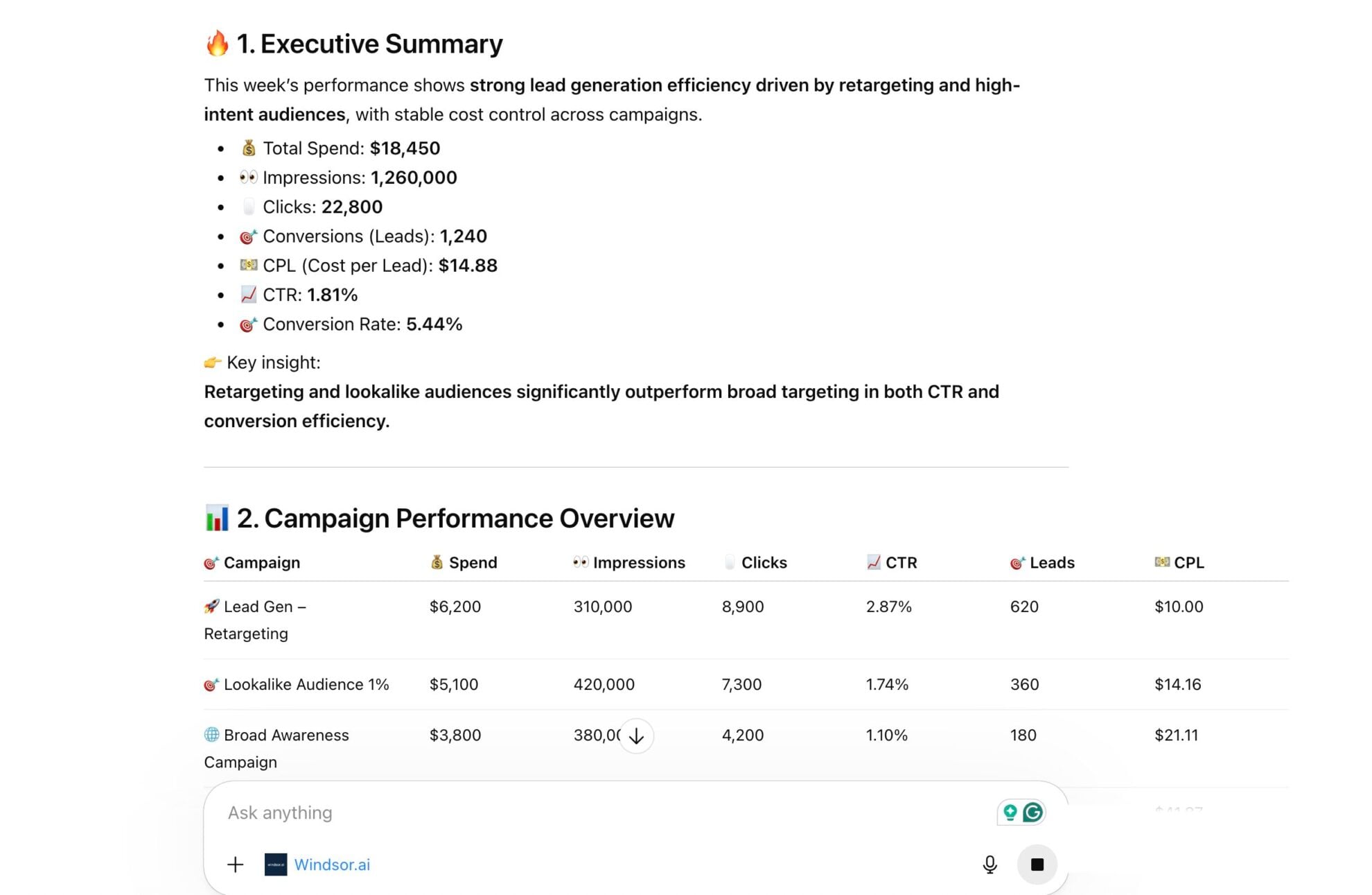
Get instant AI answers
Analyze your LinkedIn Ads data in seconds without setting up BI tools or writing queries. ChatGPT aggregates large volumes of data and delivers actionable insights instantly.

Detect ad fatigue early
Monitor how often audiences see your ads and how engagement drops over time. When ChatGPT flags a fatigued creative, ask it to pause that ad and enable a fresh variant you already have queued.

Identify most profitable industries
Ask ChatGPT to compare advertising spend and conversions across industries to determine which B2B sectors deliver the lowest acquisition costs or highest conversion value. Focus your efforts on the most profitable verticals to maximize ROI.

Control budget from the chat
ChatGPT identifies the campaign bleeding your budget and lets you switch off the losing creatives and ad sets, and push more budget toward your winners, all without switching to LinkedIn Campaign Manager.
Using Windsor.ai to connect data from LinkedIn Ads to ChatGPT
Instead of exporting CSVs or relying on complex tools, use Windsor.ai’s connector to collect, normalize, and stream your LinkedIn Ads data directly to ChatGPT.
Connect in minutes and turn your advertising data into AI insights.
Available actions
Enable Campaign Group Enable a paused LinkedIn Ads campaign group. Reversible via pause_campaign_group.
Enable a paused LinkedIn Ads campaign group. Reversible via pause_campaign_group.
Pause Campaign Group Pause an active LinkedIn Ads campaign group. Reversible via enable_campaign_group.
Pause an active LinkedIn Ads campaign group. Reversible via enable_campaign_group.
Enable Campaign Enable a paused LinkedIn Ads campaign. Reversible via pause_campaign.
Enable a paused LinkedIn Ads campaign. Reversible via pause_campaign.
Pause Campaign Pause an active LinkedIn Ads campaign. Reversible via enable_campaign.
Pause an active LinkedIn Ads campaign. Reversible via enable_campaign.
Enable Creative Enable a paused LinkedIn Ads creative. Reversible via pause_creative.
Enable a paused LinkedIn Ads creative. Reversible via pause_creative.
Pause Creative Pause an active LinkedIn Ads creative. Reversible via enable_creative.
Pause an active LinkedIn Ads creative. Reversible via enable_creative.
Set Campaign Group Budget Set the total budget of a LinkedIn Ads campaign group. The amount is in the account currency major unit (e.g. 100.00 means one hundred); the currency is resolved automatically from the account. The campaign group must have a schedule end date for a total budget to apply.
Set the total budget of a LinkedIn Ads campaign group. The amount is in the account currency major unit (e.g. 100.00 means one hundred); the currency is resolved automatically from the account. The campaign group must have a schedule end date for a total budget to apply.
Set Campaign Budget Set the daily or total budget of a LinkedIn Ads campaign. The amount is in the account currency major unit (e.g. 100.00 means one hundred); the currency is resolved automatically from the account. A total budget requires the campaign to have a schedule end date.
Set the daily or total budget of a LinkedIn Ads campaign. The amount is in the account currency major unit (e.g. 100.00 means one hundred); the currency is resolved automatically from the account. A total budget requires the campaign to have a schedule end date.
Rename Campaign Change the name of a LinkedIn Ads campaign. Only the name changes; budget, schedule, targeting and status are left untouched, and reporting stays attached because it keys on the campaign id.
Change the name of a LinkedIn Ads campaign. Only the name changes; budget, schedule, targeting and status are left untouched, and reporting stays attached because it keys on the campaign id.
Set Campaign Schedule Change the run schedule of a LinkedIn Ads campaign. Provide start_date and/or end_date as YYYY-MM-DD; at least one is required. The unspecified bound keeps its current value. The end date is exclusive: the campaign stops at the start of that day. The start date cannot be changed once the campaign has started.
Change the run schedule of a LinkedIn Ads campaign. Provide start_date and/or end_date as YYYY-MM-DD; at least one is required. The unspecified bound keeps its current value. The end date is exclusive: the campaign stops at the start of that day. The start date cannot be changed once the campaign has started.
Create Creative Create a new ad (creative) in a LinkedIn Ads campaign from an existing post. post_urn must reference a published post or InMail content (urn:li:ugcPost:..., urn:li:share:... or urn:li:adInMailContent:...); the connector does not build post content from scratch. Created as DRAFT by default so it does not serve until enabled with enable_creative.
Create a new ad (creative) in a LinkedIn Ads campaign from an existing post. post_urn must reference a published post or InMail content (urn:li:ugcPost:..., urn:li:share:... or urn:li:adInMailContent:...); the connector does not build post content from scratch. Created as DRAFT by default so it does not serve until enabled with enable_creative.
Set Campaign Targeting Replace the target audience (targetingCriteria) of a LinkedIn Ads campaign. include and exclude map a facet name to a list of full entity URNs, for example {"locations": ["urn:li:geo:103644278"], "interfaceLocales": ["urn:li:locale:en_US"], "industries": ["urn:li:industry:9"]}. Included facets are AND-ed together and the values within a facet are OR-ed. interfaceLocales is required. locations and profileLocations cannot be used together. The resulting audience must have at least 300 members. This replaces the campaign's entire audience.
Replace the target audience (targetingCriteria) of a LinkedIn Ads campaign. include and exclude map a facet name to a list of full entity URNs, for example {"locations": ["urn:li:geo:103644278"], "interfaceLocales": ["urn:li:locale:en_US"], "industries": ["urn:li:industry:9"]}. Included facets are AND-ed together and the values within a facet are OR-ed. interfaceLocales is required. locations and profileLocations cannot be used together. The resulting audience must have at least 300 members. This replaces the campaign's entire audience.














How to connect LinkedIn Ads to ChatGPT data with Windsor.ai
Explore our video tutorial and a step-by-step guide to seamlessly integrate your data from any source into ChatGPT with the Windsor.ai connector.
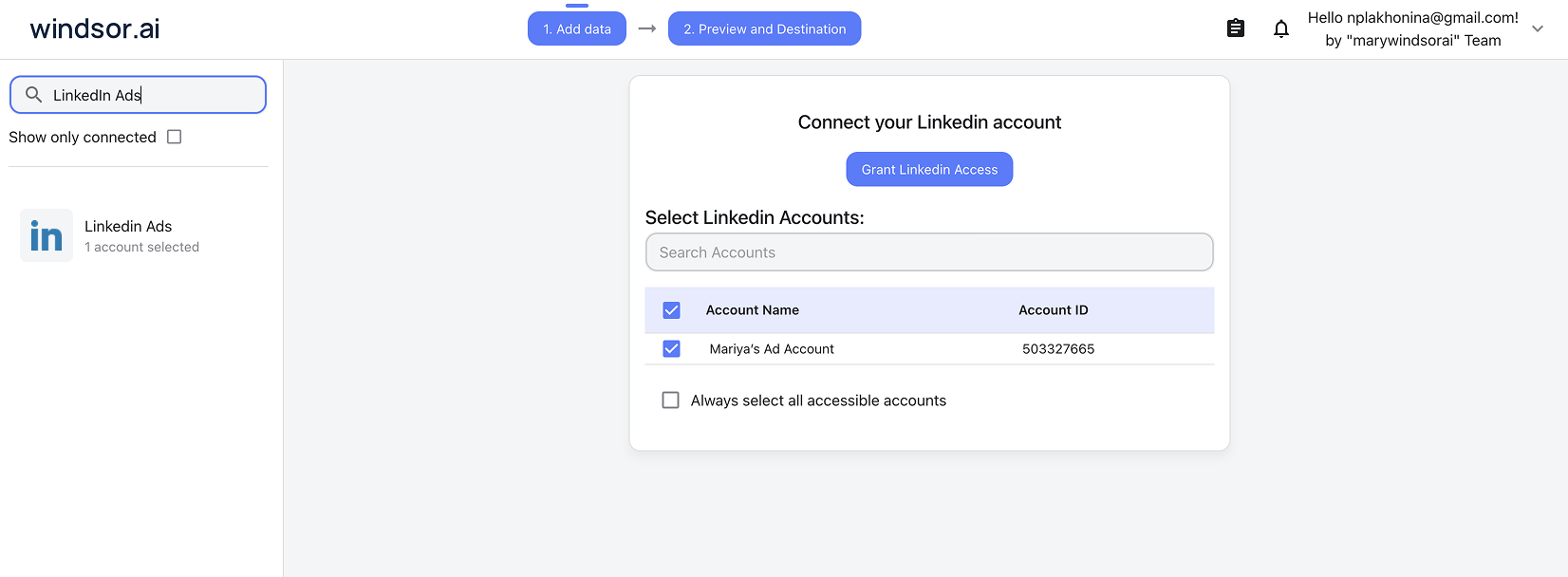
Select your data source
Choose LinkedIn Ads as your data source and grant access to Windsor.ai.
Install the Windsor.ai connector
Log in to your ChatGPT account and open this Windsor.ai connector page.
Click Connect, then authorize access.

Query and manage your LinkedIn Ads campaigns in ChatGPT
Open a new chat, start asking questions about your connected LinkedIn Ads data, or execute changes right away.
Make sure that the Windsor.ai connector is enabled (click the + sign → More → Windsor.ai.)
FAQs
What can I do with LinkedIn Ads data in ChatGPT?
Once your LinkedIn Ads data is in ChatGPT, you can:
- Analyze professional demographics. Instantly identify which Job Seniority, Company Size, or Industry segments are driving your highest quality MQLs (Marketing Qualified Leads) without digging through demographic reports.
- Detect and fix budget leakage. ChatGPT flags high-spend, low-conversion campaigns, then pauses them or cuts their budget on the spot under your instruction.
- Evaluate creative performance. Ask ChatGPT to explain why specific ad creatives (Video vs. Single Image) are resonating with a particular job function.
- Automated executive summaries. Generate weekly performance summaries and reports that transform your metrics into business updates in seconds.
- Run cross-channel analysis. If you connect LinkedIn Ads to other sources like Google Ads, Meta Ads, or GA4, you can ask ChatGPT to compare your B2B acquisition costs across platforms to optimize your total marketing mix.
Can I compare LinkedIn Ads performance to other channels like Google Ads?
Yes. Windsor.ai lets you blend data from multiple platforms. For example, you can connect LinkedIn Ads and Google Ads and ask ChatGPT to compare the cost per lead (CPL) of your LinkedIn B2B campaigns with your Google Search campaigns for the same time period. This helps you identify which channels generate leads more efficiently.
What prompts can I use when analyzing LinkedIn Ads data in ChatGPT?
Go beyond simple summaries by using more advanced, targeted prompts. Here are some examples:
-
Compare lead form opens with completed leads over the past 30 days. Identify which lead forms have the highest drop-off rate and suggest whether the form headline or the number of questions might be causing friction.
-
Analyze the relationship between
member_seniorityandoneclickleads. Identify which seniority levels are driving the most expensive leads and recommend budget reallocations to focus on the seniority segments with the highest conversion rate. -
Forecast our month-end ad spend based on the last 7 days of campaign spending. Identify any campaigns where the cost per conversion has increased by more than 20% compared to the previous week and flag them for review.
-
Compare how long users spend viewing each ad with how often they click on it. Identify ads that attract strong attention but generate few clicks, and suggest stronger call-to-action wording to improve performance.
-
Identify all creatives with a CTR below 0.4% and at least 5,000 impressions in the last 30 days. Pause each one and list its CTR and spend before pausing.
-
Compare cost per lead across all active campaign groups this month. Set the total budget on the lowest-CPL campaign group to $5,000, and reduce the highest-CPL campaign group's total budget to $1,000, confirming both changes.
-
Find the campaign with the highest cost per lead among decision-maker seniority levels (Director and above). Pause it and enable the [campaign name] campaign group instead, which historically converts that segment more efficiently.
How much does it cost to integrate LinkedIn Ads into ChatGPT using Windsor.ai?
Windsor.ai is free to start, no credit card required. Paid plans start at $19/month and scale by the number of sources and accounts. See the pricing page.
How long does it take to connect LinkedIn Ads to ChatGPT?
With Windsor.ai’s intuitive connector, the integration process takes just a few minutes. No technical expertise is required; connecting LinkedIn Ads to ChatGPT is simple, straightforward, and completely code-free.
Do you have helpful links to get started with integrating LinkedIn Ads and ChatGPT using Windsor.ai?
Yes, we have helpful resources to help you get started. You can explore our official documentation and tutorials for seamless LinkedIn Ads to ChatGPT integration with Windsor.ai:
Can ChatGPT help me optimize my LinkedIn bidding strategy?
Absolutely. By analyzing metrics such as impressions, clicks, CPC, conversions, and spend from LinkedIn Ads, ChatGPT can identify campaigns where your bids may be too high or too low. It can highlight high-cost segments, detect underperforming campaigns, and suggest adjustments to improve cost efficiency and maximize conversions.
Can I take action on LinkedIn Ads from ChatGPT, or just analyze data?
Both. Windsor.ai’s connector supports write actions for LinkedIn Ads: pause and enable campaigns, ad sets, and ads, and update budgets, all directly from ChatGPT. So when ChatGPT spots a campaign bleeding budget or a creative losing steam, you don’t just get the insight, you can act on it in the same chat, no LinkedIn Campaign Manager needed.
How do I use write actions with LinkedIn Ads in ChatGPT?
Write actions work directly through the native Windsor.ai app connection in ChatGPT, the same one you use for reading data. No manual setup, no developer mode, no extra steps.
Tired of manual LinkedIn Ads data exports? Try Windsor.ai today to automate your reporting


