 Destinations
 Data sources
 AI insights
 About us
 Careers
 Security
 Customer reviews
 Contact us
 Affiliate program
 Solution partners
 Template gallery
 Looker Studio templates
 Power BI templates
 Excel templates
 Google Sheets templates
 Tableau templates
 Facebook Ads templates
 Google Ads templates
 Data fields & Metrics
 AI prompt library & Guides
 Product documentation
 API documentation
 Case studies
 Blog
Blog Data models
 Windsor vs Supermetrics
 Windsor vs Funnel.io
 Windsor vs Fivetran
 Windsor vs Rivery
 Windsor vs Portermetrics
 Windsor vs Coupler.io
Connect LinkedIn Ads to Perplexity
Automatically sync your LinkedIn Ads data to Perplexity using the Windsor.ai connector.
Analyze your LinkedIn Ads data in Perplexity to cut wasted spend, find your highest-converting audiences, and lower cost per lead with instant insights.
Forget CSVs. Stop copy/paste. Connect in minutes. No code required.
 Sign up with Google
 Free forever plan









Turn raw LinkedIn data into AI-powered insights in Perplexity
Connect LinkedIn Ads to Perplexity via Windsor MCP to query key ad metrics like spend, CTR, CPC, and conversions in plain language and make faster optimization decisions. Discover key use cases:

Find wasted spend
Rank campaigns by spend against conversions and clicks to surface the ones burning budget without results. Use these findings to pause underperformers instantly and reallocate budget to campaigns that actually convert.

Audit lead form drop-off
Compare form opens against one-click lead submissions across all lead gen campaigns. Spot which forms lose prospects after the click and check headline, description, and review status in the same query.

Compare attribution windows
Pull post-click and post-view conversions side-by-side for every conversion campaign. See which campaigns rely on view-through attribution to look good, and reset ROAS expectations accordingly.

Spot audience efficiency gaps
Break down CPC and conversions by job function, seniority, and industry simultaneously. Shift budget toward the segments that convert and cut the ones that don’t, backed by your actual spend data.
Using Windsor.ai to connect data from LinkedIn Ads to Perplexity
Most ways to send LinkedIn Ads data to AI rely on manual exports, data prep, or complex technical setups. Windsor.ai’s MCP connector removes this friction by automatically syncing your ad data into Perplexity in just a few minutes.
Once it’s set up, use natural‑language prompts to generate AI‑driven insights from your LinkedIn Ads data.

Available actions
Enable Campaign Group Enable a paused LinkedIn Ads campaign group. Reversible via pause_campaign_group.
Enable a paused LinkedIn Ads campaign group. Reversible via pause_campaign_group.
Pause Campaign Group Pause an active LinkedIn Ads campaign group. Reversible via enable_campaign_group.
Pause an active LinkedIn Ads campaign group. Reversible via enable_campaign_group.
Enable Campaign Enable a paused LinkedIn Ads campaign. Reversible via pause_campaign.
Enable a paused LinkedIn Ads campaign. Reversible via pause_campaign.
Pause Campaign Pause an active LinkedIn Ads campaign. Reversible via enable_campaign.
Pause an active LinkedIn Ads campaign. Reversible via enable_campaign.
Enable Creative Enable a paused LinkedIn Ads creative. Reversible via pause_creative.
Enable a paused LinkedIn Ads creative. Reversible via pause_creative.
Pause Creative Pause an active LinkedIn Ads creative. Reversible via enable_creative.
Pause an active LinkedIn Ads creative. Reversible via enable_creative.
Set Campaign Group Budget Set the total budget of a LinkedIn Ads campaign group. The amount is in the account currency major unit (e.g. 100.00 means one hundred); the currency is resolved automatically from the account. The campaign group must have a schedule end date for a total budget to apply.
Set the total budget of a LinkedIn Ads campaign group. The amount is in the account currency major unit (e.g. 100.00 means one hundred); the currency is resolved automatically from the account. The campaign group must have a schedule end date for a total budget to apply.
Set Campaign Budget Set the daily or total budget of a LinkedIn Ads campaign. The amount is in the account currency major unit (e.g. 100.00 means one hundred); the currency is resolved automatically from the account. A total budget requires the campaign to have a schedule end date.
Set the daily or total budget of a LinkedIn Ads campaign. The amount is in the account currency major unit (e.g. 100.00 means one hundred); the currency is resolved automatically from the account. A total budget requires the campaign to have a schedule end date.
Rename Campaign Change the name of a LinkedIn Ads campaign. Only the name changes; budget, schedule, targeting and status are left untouched, and reporting stays attached because it keys on the campaign id.
Change the name of a LinkedIn Ads campaign. Only the name changes; budget, schedule, targeting and status are left untouched, and reporting stays attached because it keys on the campaign id.
Set Campaign Schedule Change the run schedule of a LinkedIn Ads campaign. Provide start_date and/or end_date as YYYY-MM-DD; at least one is required. The unspecified bound keeps its current value. The end date is exclusive: the campaign stops at the start of that day. The start date cannot be changed once the campaign has started.
Change the run schedule of a LinkedIn Ads campaign. Provide start_date and/or end_date as YYYY-MM-DD; at least one is required. The unspecified bound keeps its current value. The end date is exclusive: the campaign stops at the start of that day. The start date cannot be changed once the campaign has started.
Create Creative Create a new ad (creative) in a LinkedIn Ads campaign from an existing post. post_urn must reference a published post or InMail content (urn:li:ugcPost:..., urn:li:share:... or urn:li:adInMailContent:...); the connector does not build post content from scratch. Created as DRAFT by default so it does not serve until enabled with enable_creative.
Create a new ad (creative) in a LinkedIn Ads campaign from an existing post. post_urn must reference a published post or InMail content (urn:li:ugcPost:..., urn:li:share:... or urn:li:adInMailContent:...); the connector does not build post content from scratch. Created as DRAFT by default so it does not serve until enabled with enable_creative.
Set Campaign Targeting Replace the target audience (targetingCriteria) of a LinkedIn Ads campaign. include and exclude map a facet name to a list of full entity URNs, for example {"locations": ["urn:li:geo:103644278"], "interfaceLocales": ["urn:li:locale:en_US"], "industries": ["urn:li:industry:9"]}. Included facets are AND-ed together and the values within a facet are OR-ed. interfaceLocales is required. locations and profileLocations cannot be used together. The resulting audience must have at least 300 members. This replaces the campaign's entire audience.
Replace the target audience (targetingCriteria) of a LinkedIn Ads campaign. include and exclude map a facet name to a list of full entity URNs, for example {"locations": ["urn:li:geo:103644278"], "interfaceLocales": ["urn:li:locale:en_US"], "industries": ["urn:li:industry:9"]}. Included facets are AND-ed together and the values within a facet are OR-ed. interfaceLocales is required. locations and profileLocations cannot be used together. The resulting audience must have at least 300 members. This replaces the campaign's entire audience.














How to connect LinkedIn Ads to Perplexity with Windsor.ai
Explore our video tutorial and a step-by-step guide to integrate your LinkedIn Ads data into Perplexity with the Windsor.ai connector.
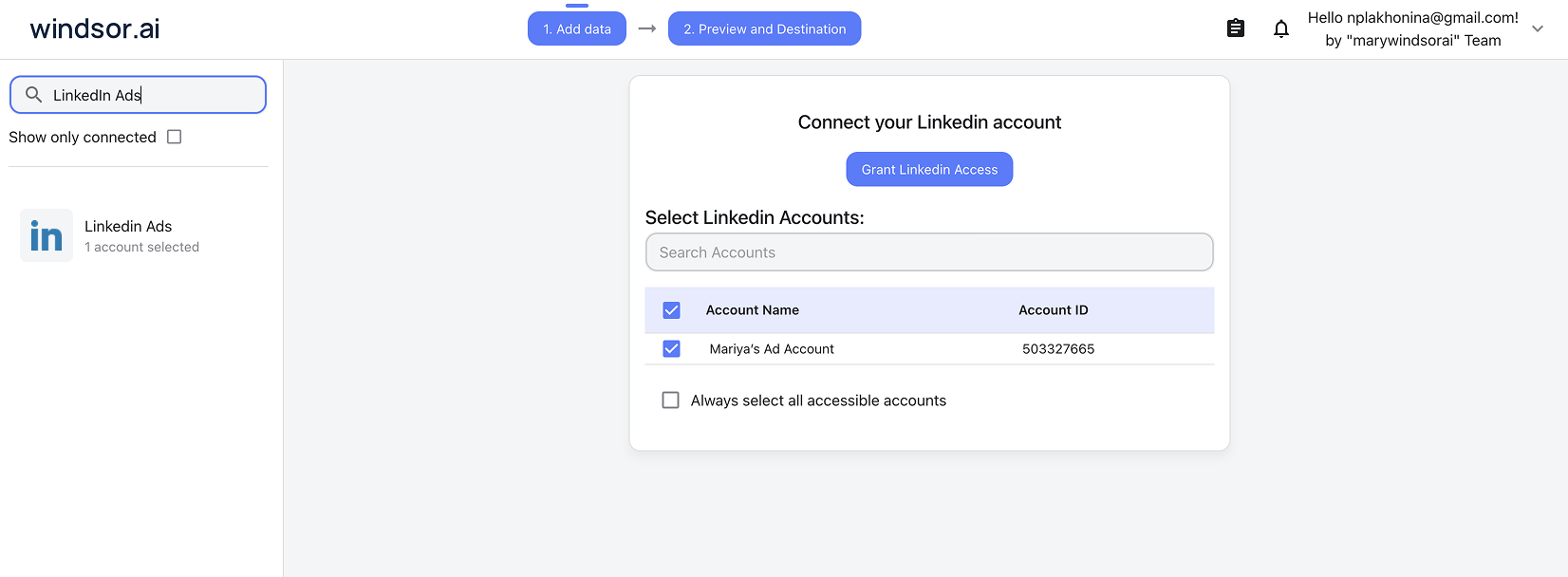
Connect data source in Windsor.ai dashboard
Connect your LinkedIn Ads to Windsor.ai. Select the necessary account(s) you want to pull data from and click “Next.”
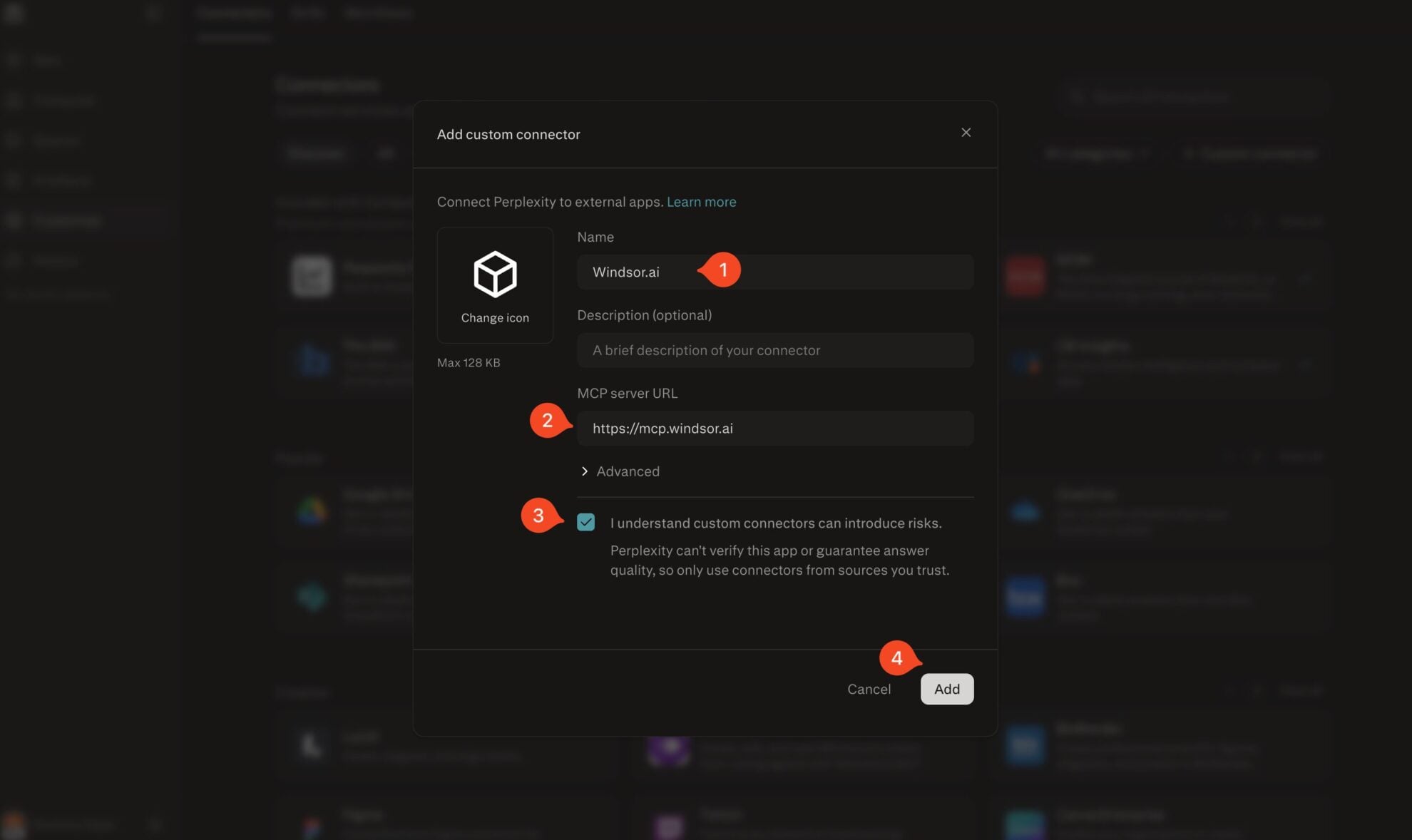
Add Windsor.ai as a custom connector
Go to perplexity.ai/computer/connectors and click + Custom connector. Fill in the details:
- Name: Windsor.ai
- MCP server URL: https://mcp.windsor.ai
Tick ‘I understand custom connectors can introduce risks’ and click Add.
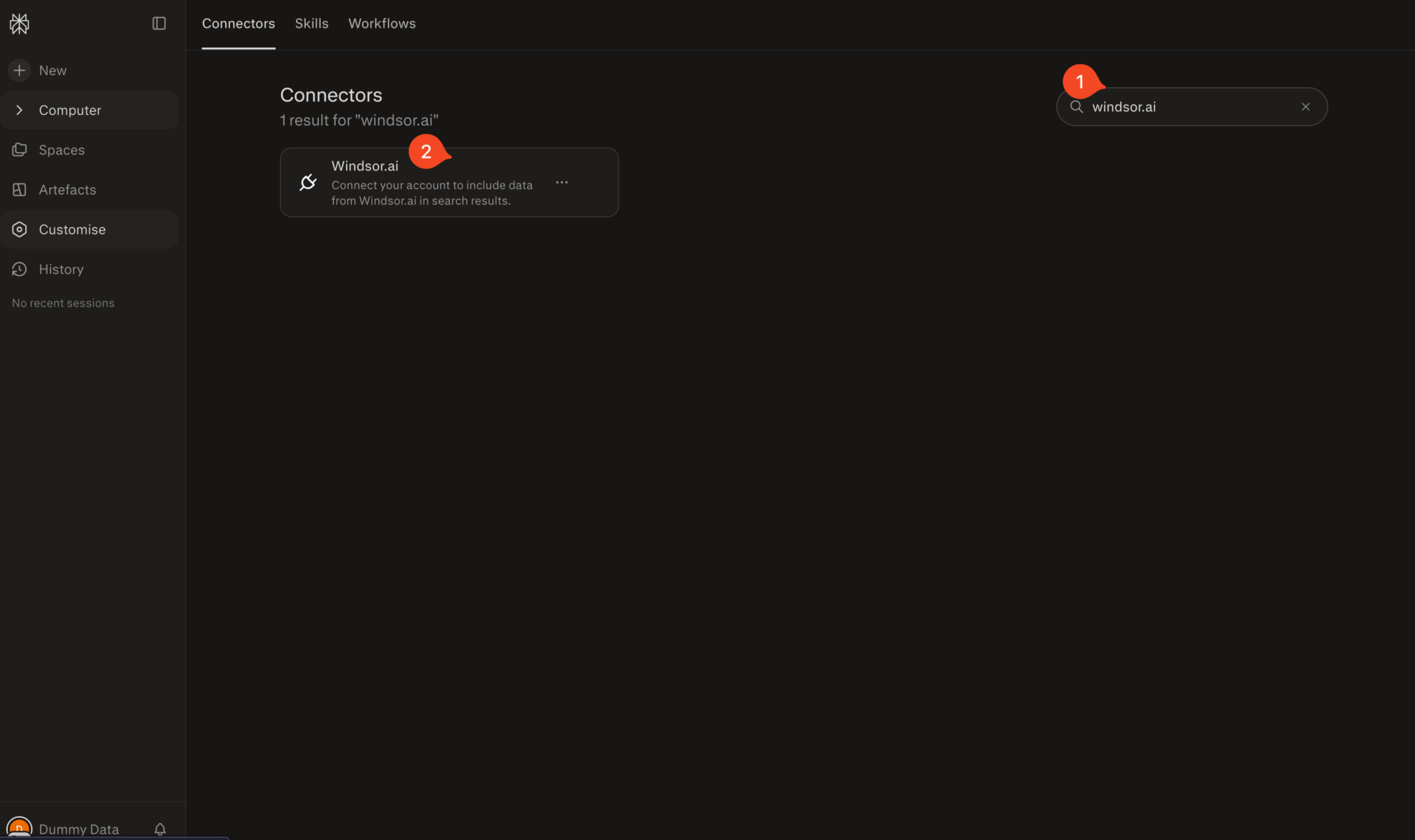
Install the connector
Search for Windsor.ai in the connectors list, click the card, then click Add connector.
Confirm by clicking Allow Access in the pop-up.
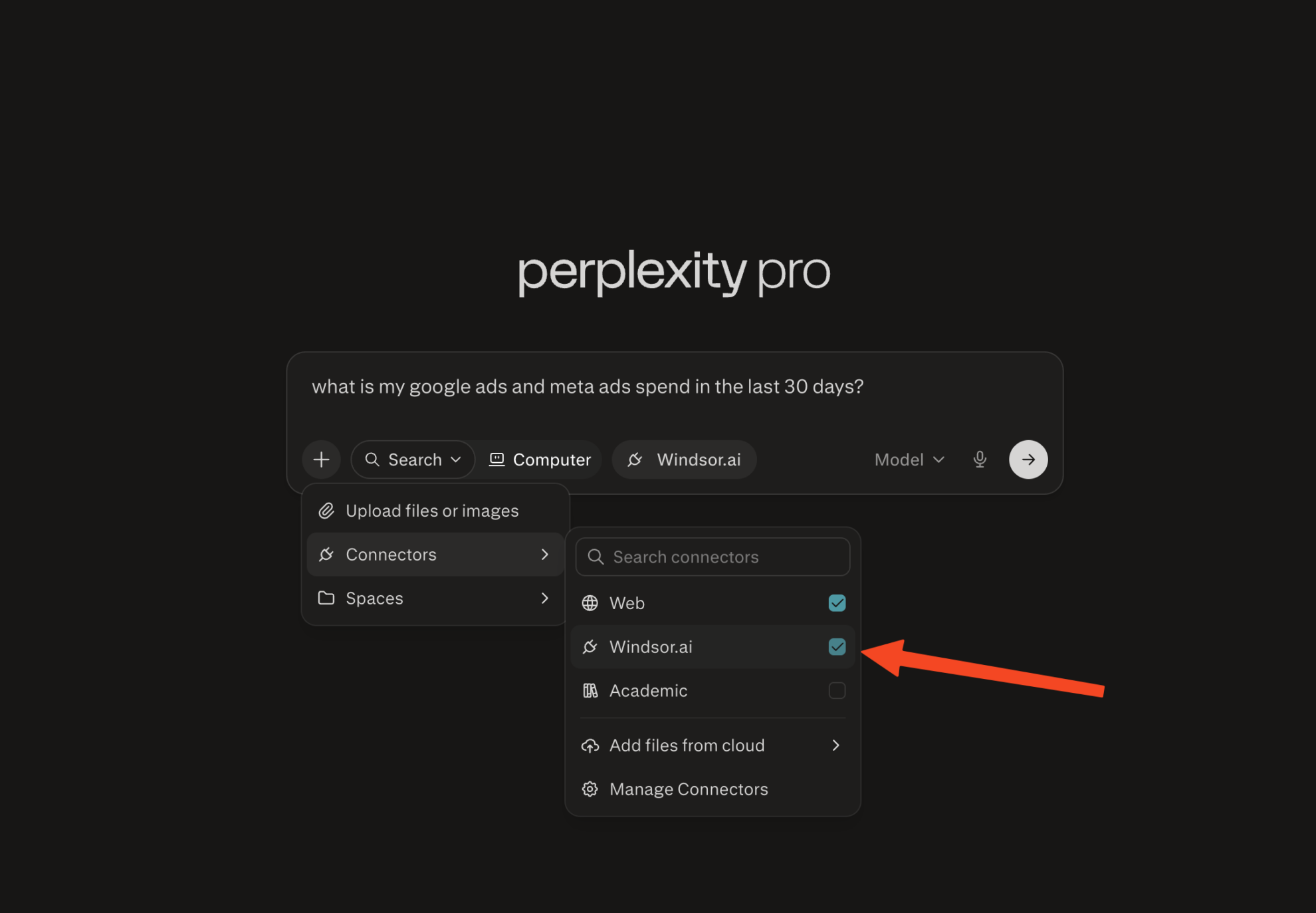
Enable Windsor.ai in your chat
In a new chat, click +, choose Connectors, and check Windsor.ai.
Start querying your data
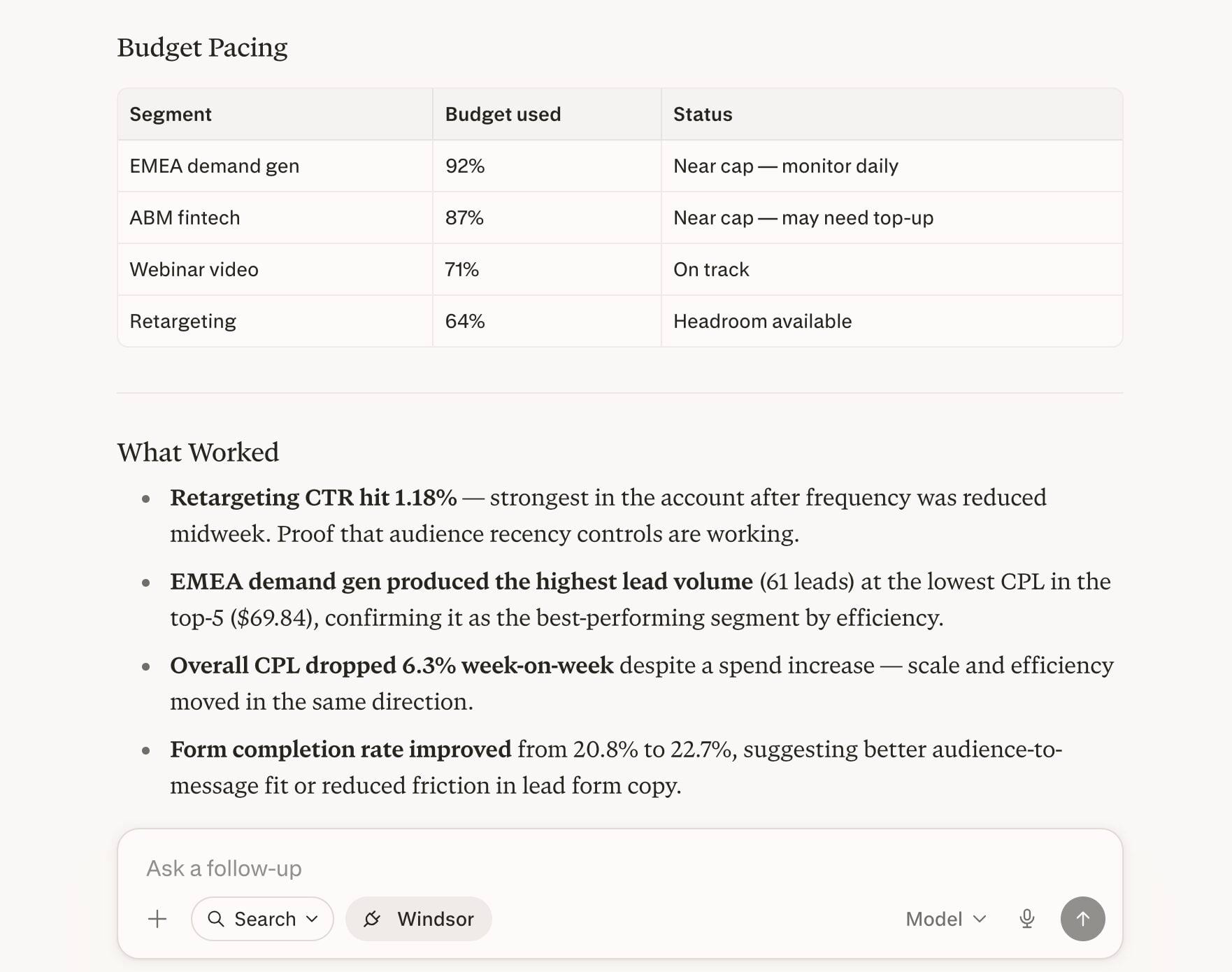
You can now ask questions about your integrated Windsor.ai data.
FAQs
What LinkedIn Ads metrics can I analyze in Perplexity via Windsor.ai?
Windsor.ai gives you access to a wide range of LinkedIn Ads metrics and dimensions, including:
- Reach and visibility: impressions, approximate unique impressions, average frequency, audience penetration.
- Engagement: clicks, CTR, engagement rate, engagements (clicks, likes, comments, shares, follows), one-click leads.
- Cost and efficiency: spend, CPC, CPM, cost per external website conversion.
- Conversions: external website conversions, post-click conversions, post-view conversions.
- Video: video views, starts, completions, average dwell time.
- Audience dimensions: member job title, job function, seniority, industry, company name, company size, country, region.
Can I analyze LinkedIn Lead Gen Form performance in Perplexity?
Yes. Windsor.ai pulls LinkedIn’s Lead Gen Form metrics, including form opens, one-click leads, and cost per lead. You can also pull form-level metadata: form name, headline, submission confirmation message, and current approval status, useful for diagnosing why a form is underperforming.
Can Perplexity help me identify wasted LinkedIn Ads spend?
Absolutely. Ask Perplexity to rank your campaigns by spend against conversions, clicks, or engagement, and it will flag the ones burning budget without results.
What makes Perplexity specifically useful for analyzing LinkedIn Ads?
Perplexity is uniquely useful for LinkedIn Ads because it doesn’t just read your Windsor data; it enriches it. It can pull in fresh web-based benchmarks, typical CPC/CTR ranges for your industry, and public competitor activity, then reason over all of that alongside your live campaign metrics. Instead of looking at your performance in a vacuum, you see how your LinkedIn Ads stack up against the wider market in real time.
Is Windsor.ai's LinkedIn Perplexity integration free?
Windsor.ai has a free-forever plan; no credit card required. The free plan gives you access to LinkedIn Ads as a source and lets you connect Perplexity as a destination. Paid plans start at $19/month and unlock more sources and higher account limits.
What prompts can I use when analyzing LinkedIn Ads data in Perplexity?
-
Break down my LinkedIn Ads CTR and CPC by member seniority level for the last 30 days. Which seniority delivers the most efficient cost per click, and which one is dragging down overall performance?
-
Analyze my LinkedIn video ads for the past month. Show view starts, 25%, 50%, 75%, and completion rates for each campaign. Which video has the highest drop-off between 50% and completion, and what's the average dwell time across all video campaigns?
-
Compare post-click conversions vs post-view conversions by campaign for the last 60 days. Which campaigns drive most of their conversions from view-through, and does that correlate with higher or lower CPM?
-
Show me Lead Gen Form performance across all active campaigns: form opens, one-click leads, and cost per lead. Flag any forms with a high open-to-submit drop-off and list their current review status.
-
Segment last month's LinkedIn Ads spend and external website conversions by member job function and member industry simultaneously. Which job function and industry combination delivers the lowest cost per conversion? Use this to suggest which targeting segments I should scale and which I should pause.
Do you have helpful links to get started with integrating LinkedIn Ads and Perplexity using Windsor.ai?
Yes, we have helpful resources to help you get started. You can explore our official documentation and tutorials for seamless LinkedIn Ads to Perplexity integration with Windsor.ai:
Can I analyze LinkedIn Ads alongside other marketing sources in Perplexity?
Yes. Windsor.ai connects 350+ sources, so you can add Google Ads, Meta Ads, TikTok, or any other active channel and ask cross-channel questions in a single Perplexity conversation.
Tired of manual LinkedIn Ads data exports? Try Windsor.ai today to automate your reporting


