 Destinations
 Data sources
 AI insights
 About us
 Careers
 Security
 Customer reviews
 Contact us
 Affiliate program
 Solution partners
 Template gallery
 Looker Studio templates
 Power BI templates
 Excel templates
 Google Sheets templates
 Tableau templates
 Facebook Ads templates
 Google Ads templates
 Data fields & Metrics
 AI prompt library & Guides
 Product documentation
 API documentation
 Case studies
 Blog
Blog Data models
 Windsor vs Supermetrics
 Windsor vs Funnel.io
 Windsor vs Fivetran
 Windsor vs Rivery
 Windsor vs Portermetrics
 Windsor vs Coupler.io
Connect LinkedIn Pages to Perplexity
Automatically sync your LinkedIn Pages data to Perplexity using the Windsor.ai connector.
Use your live LinkedIn organic data in Perplexity to see which posts are actually earning engagement, understand audience behavior, and compare organic versus paid follower growth.
Forget CSVs. Stop copy/paste. Connect in minutes. No code required.
 Sign up with Google
 Free forever plan









Grow followers and engagement with the LinkedIn Pages to Perplexity integration
Windsor MCP streams your LinkedIn Pages analytics into Perplexity, so you skip the manual exports and go straight to the decisions that help you grow your audience. Explore key use cases:

Segment followers by seniority
Find out if your followers are senior decision-makers or junior titles. Feed that into your ABM and targeting strategy, shifting paid promotion toward the seniority level sales want in the pipeline.

Benchmark post click-through rate
Ask Perplexity to rank posts by clicks per impression, not by reach. Brief your content team to replicate the hooks and CTAs from your highest-CTR posts, not just your most-viewed ones.

Separate organic and paid growth
See exactly how many new followers came from your content versus from LinkedIn Ads. Understand whether your organic content is driving real growth on its own, or if you’re dependent on paid just to keep the follower count moving.

Surface high-mention posts
Peprlexity quickly identifies the posts that got your company tagged or mentioned most. Hand those to sales and partnerships as ready-made social proof, and brief your content team to repeat the angle.
Using Windsor.ai to connect data from LinkedIn Pages to Perplexity
Most ways to send LinkedIn Pages data to AI rely on manual exports, complex technical setups, or costly tools. Windsor.ai’s MCP connector removes this friction by automatically syncing your LinkedIn organic data into Perplexity in just a few minutes.
Once it’s set up, use natural‑language prompts to generate AI‑driven insights from your data.
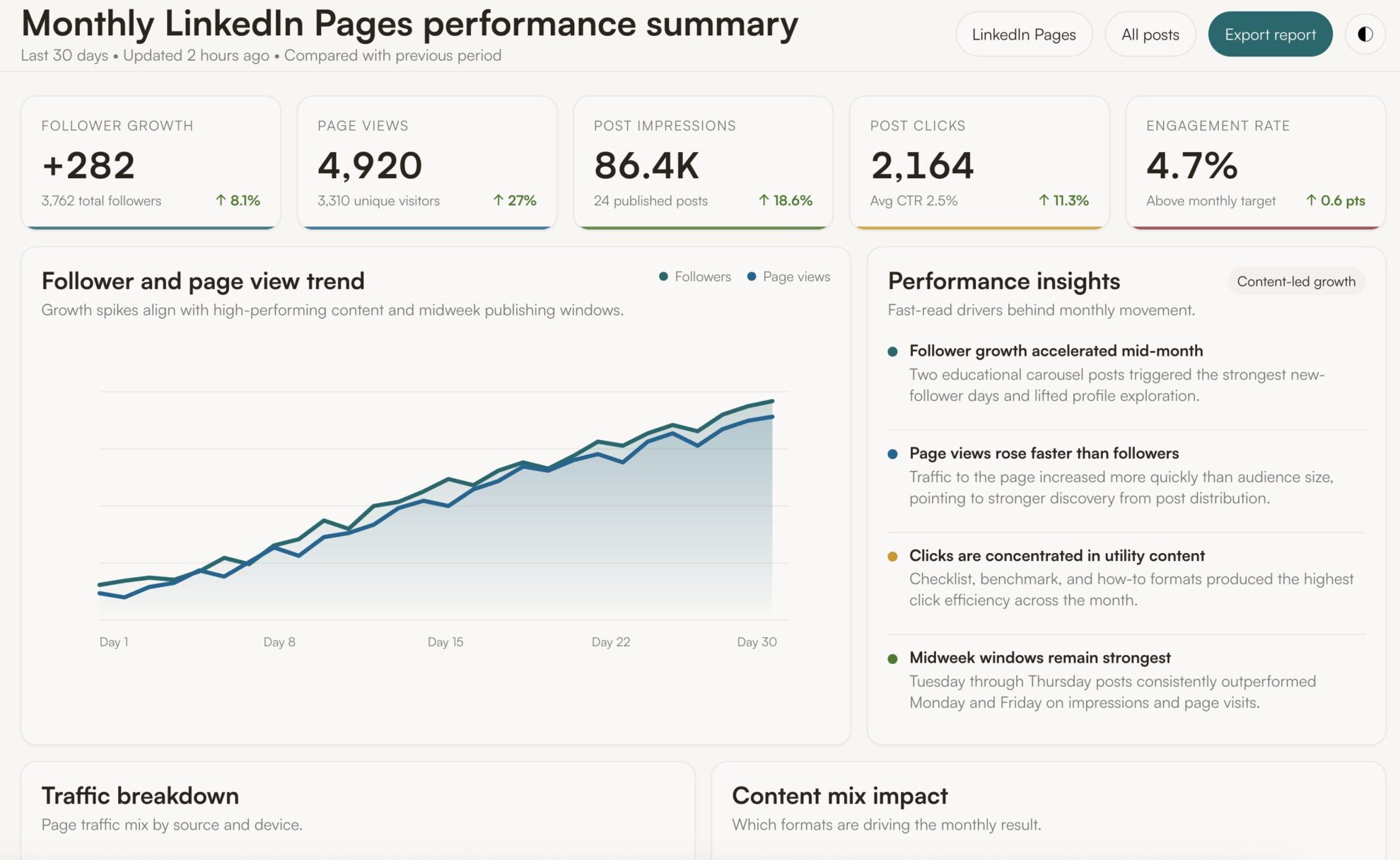
Available actions
Create Post Publish a post to a connected LinkedIn company page. Provide commentary (post text), a link (shared URL), or both - at least one is required. A link is shared as an article card, so link_title is required with a link (LinkedIn does not fetch the page title) and link_description is optional. For an image post use create_image_post instead.
Publish a post to a connected LinkedIn company page. Provide commentary (post text), a link (shared URL), or both - at least one is required. A link is shared as an article card, so link_title is required with a link (LinkedIn does not fetch the page title) and link_description is optional. For an image post use create_image_post instead.
Create Image Post Publish a single image post to a connected LinkedIn company page. Provide either a publicly accessible image URL, which is downloaded and uploaded to LinkedIn, or the image_urn returned by upload_image for a local file, plus optional commentary (post text). For a text/link-only post use create_post instead.
Publish a single image post to a connected LinkedIn company page. Provide either a publicly accessible image URL, which is downloaded and uploaded to LinkedIn, or the image_urn returned by upload_image for a local file, plus optional commentary (post text). For a text/link-only post use create_post instead.
Upload Image Upload one image file (JPEG, PNG or GIF) to a connected LinkedIn company page and return its image_urn. The image is sent as a file uploaded with the request, so it needs no public URL. Nothing is published: pass the image_urn to create_image_post to publish it.
Upload one image file (JPEG, PNG or GIF) to a connected LinkedIn company page and return its image_urn. The image is sent as a file uploaded with the request, so it needs no public URL. Nothing is published: pass the image_urn to create_image_post to publish it.














How to connect LinkedIn Pages to Perplexity with Windsor.ai
Explore our video tutorial and a step-by-step guide to integrate your LinkedIn Pages data into Perplexity with the Windsor.ai connector.
Connect data source in Windsor.ai dashboard
Connect your LinkedIn Pages to Windsor.ai. Select the necessary account(s) you want to pull data from and click “Next.”

Add Windsor.ai as a custom connector
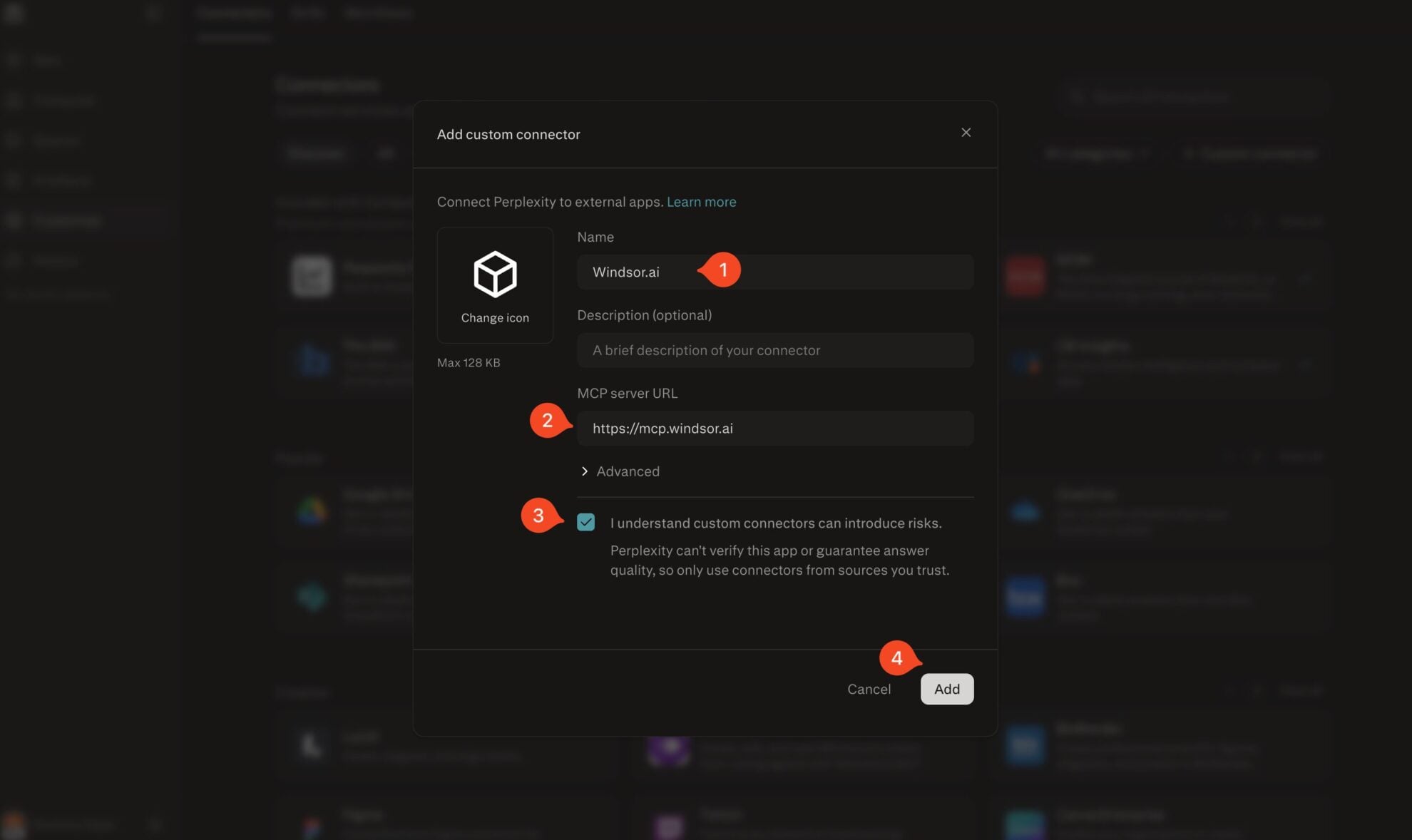
Go to perplexity.ai/computer/connectors and click + Custom connector. Fill in the details:
- Name: Windsor.ai
- MCP server URL: https://mcp.windsor.ai
Tick ‘I understand custom connectors can introduce risks’ and click Add.
Install the connector
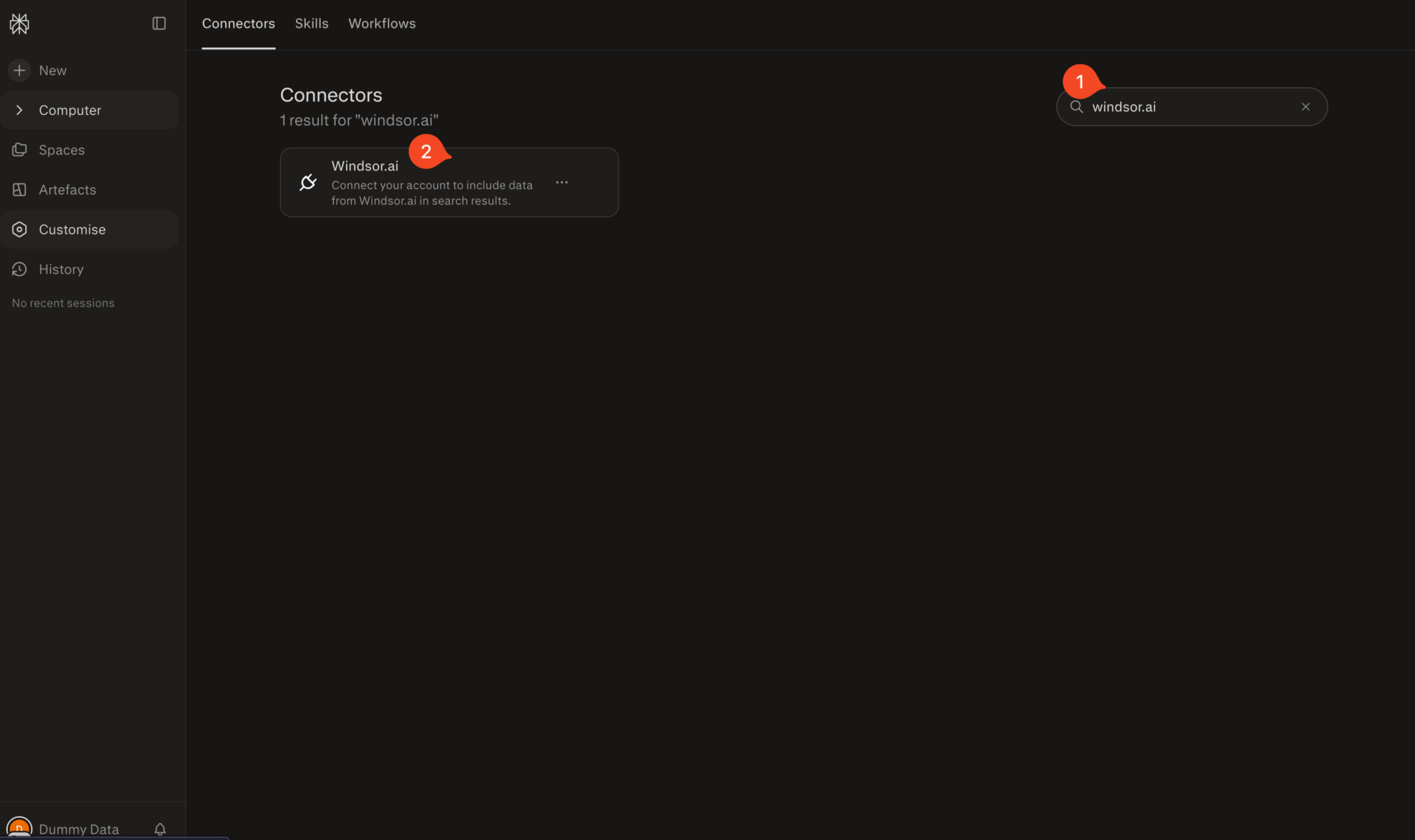
Search for Windsor.ai in the connectors list, click the card, then click Add connector.
Confirm by clicking Allow Access in the pop-up.
Enable Windsor.ai in your chat
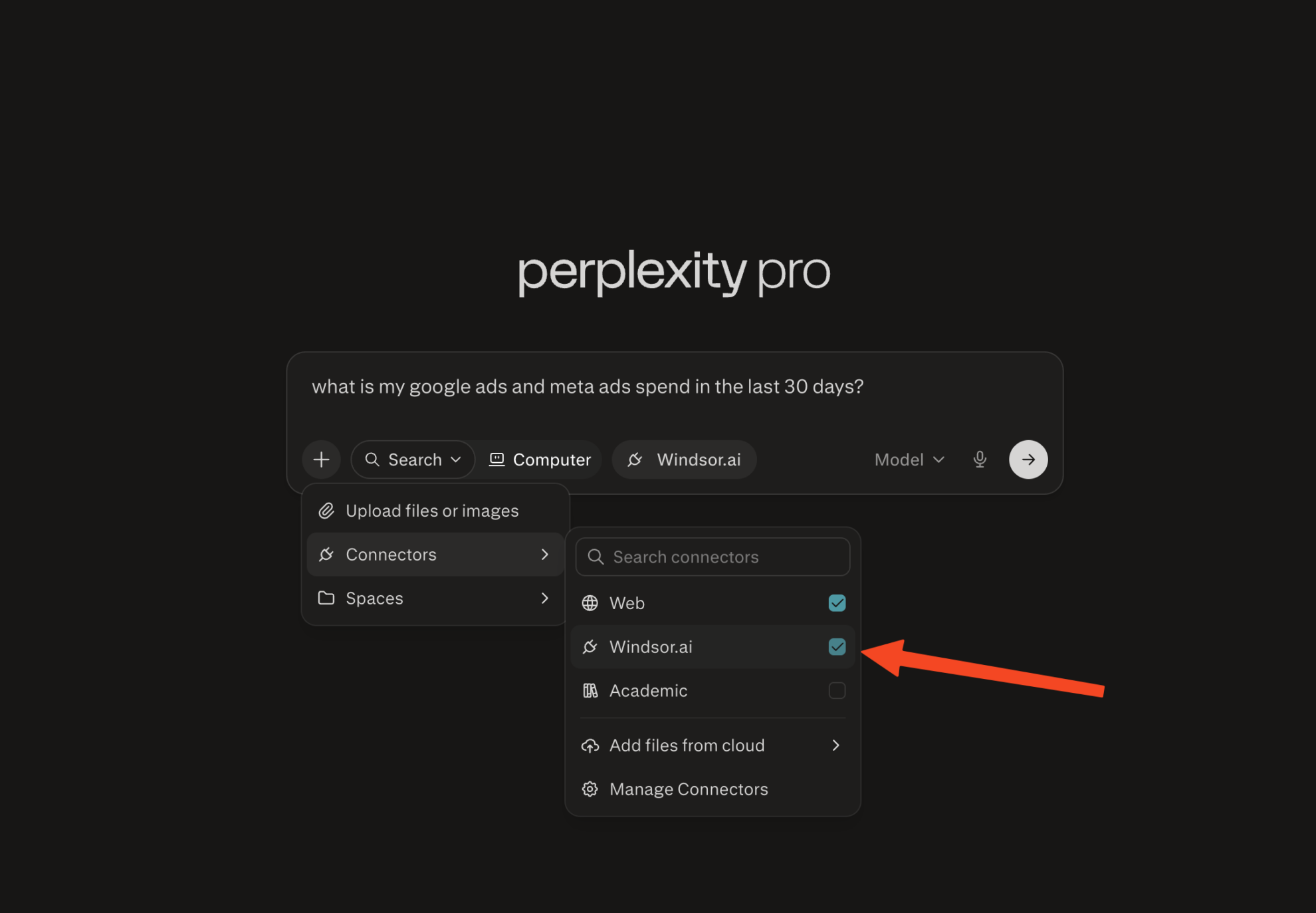
In a new chat, click +, choose Connectors, and check Windsor.ai.
Start querying your data
You can now ask questions about your integrated Windsor.ai data.
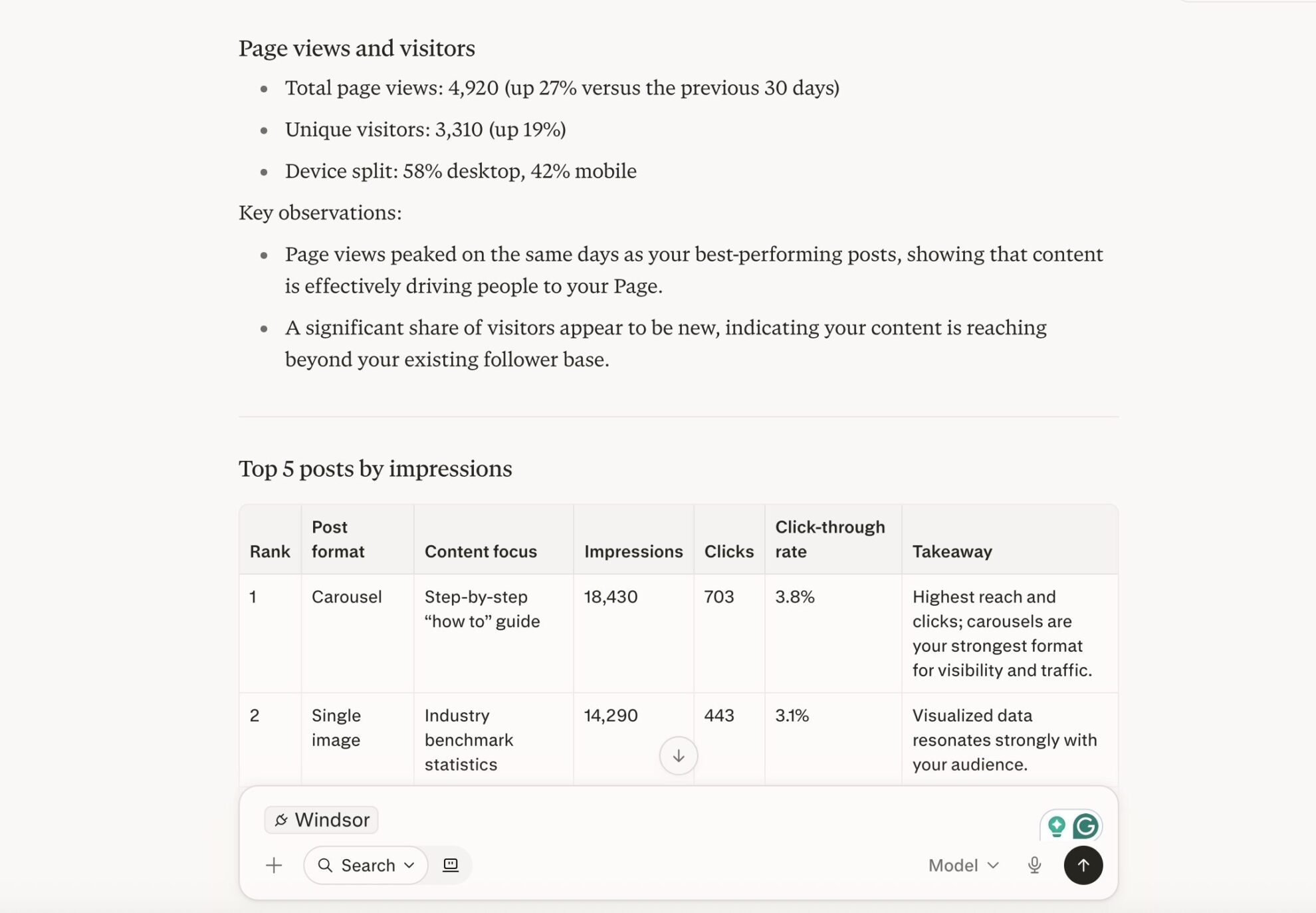
FAQs
How do I connect LinkedIn Pages to Perplexity with Windsor.ai?
Connect your LinkedIn Page in the Windsor.ai dashboard, then add Windsor.ai as a custom connector in Perplexity under Settings → Connectors (MCP server URL: https://mcp.windsor.ai). Enable Windsor.ai in a new chat and start asking questions. No code required.
Do I need a Perplexity Pro subscription to connect LinkedIn Pages?
Yes. Custom MCP connectors are available on Perplexity Pro, Max, and Enterprise plans. On the Windsor.ai side, you can start on the free forever plan, no credit card needed.
What can I do with LinkedIn Pages data in Perplexity?
Once your LinkedIn Pages data is in Perplexity, you can:
- Track follower growth: Monitor organic and paid follower gains day by day and catch exactly when growth speeds up or stalls.
- Rank your best content: Compare posts by impressions, clicks, likes, comments, and shares to see which formats and topics actually earn engagement.
- Analyze Page traffic: See how visitors move through your Overview, About, Jobs, Careers, People, and Products tabs, and whether they’re on desktop or mobile.
- Segment your audience: Break followers down by country, industry, seniority, job function, and company size to know exactly who follows you.
- Monitor recruiting impact: Track clicks on job listings, employee profiles, and careers page banners to see how your Page supports hiring.
- Add market context: Ask Perplexity to connect an engagement spike or drop to industry news, competitor moves, or platform changes using its live web search.
- Blend with other channels: Combine LinkedIn Pages with LinkedIn Ads and 350+ other sources for a full view of organic and paid brand impact.
Can Perplexity help me identify my best-performing LinkedIn posts?
Yes. Ask Perplexity to rank your posts by impressions, unique impressions, clicks, likes, comments, shares, and click-through rate. It flags the formats and topics that consistently earn the most engagement, so you know what to publish more of.
Can I separate organic follower growth from paid (LinkedIn Ads) follower growth?
Yes. Windsor.ai reports organic and paid follower gains separately, so Perplexity can tell you exactly how many followers came from content vs. LinkedIn Ads, and whether your organic growth holds up on its own.
What prompts can I use when analyzing LinkedIn Pages data in Perplexity?
-
Analyze my post impressions, clicks, and engagement rate over the last 6 months by day of week and posting time. Identify the publishing windows that consistently produce the strongest first-week engagement.
-
Cross-reference my daily organic follower gains with my post topics and formats over the last 90 days. Which content themes are most associated with follower growth spikes, and which had no measurable effect?
-
Compare clicks on my Jobs and Careers pages against my follower growth by seniority and job function over the last quarter. Is my Page attracting the audience my recruiting team actually wants to reach?
-
My engagement rate dropped in the last 30 days, even though impressions held steady. Search for any recent LinkedIn algorithm changes or platform news that could explain the shift, and compare that against my posting frequency and format mix.
-
Combine my LinkedIn Pages' organic metrics with my LinkedIn Ads data. For the last 60 days, how much of my follower growth and page traffic came from organic content versus paid campaigns, and which is more cost-efficient per new follower?
Do you have helpful links to get started with integrating LinkedIn Pages and Perplexity using Windsor.ai?
Yes, we have helpful resources to help you get started. You can explore our official documentation and tutorials for seamless LinkedIn Pages to Perplexity integration with Windsor.ai:
Can Perplexity benchmark my LinkedIn Page performance against market or industry trends?
Yes. Because Perplexity combines your Windsor.ai data with real-time web search, you can ask whether an engagement dip lines up with a platform algorithm change, a competitor announcement, or a broader industry trend, not just your own numbers in isolation.
Tired of manual LinkedIn Pages data exports? Try Windsor.ai today to automate your reporting


