 Destinations
 Data sources
 AI insights
 About us
 Careers
 Security
 Customer reviews
 Contact us
 Affiliate program
 Solution partners
 Template gallery
 Looker Studio templates
 Power BI templates
 Excel templates
 Google Sheets templates
 Tableau templates
 Facebook Ads templates
 Google Ads templates
 Data fields & Metrics
 AI prompt library & Guides
 Product documentation
 API documentation
 Case studies
 Blog
 Data models
 Windsor vs Supermetrics
 Windsor vs Funnel.io
 Windsor vs Fivetran
 Windsor vs Rivery
 Windsor vs Portermetrics
 Windsor vs Coupler.io
Connect Productive.io to Manus
Connect your Productive.io data to Manus with the Windsor.ai connector, and ask about your budgets, projects and time entries in plain language.
Ask which budgets are close to their planned hours, how much of the logged time is billable, or which tasks have stalled, built on your own Productive.io records.
Forget CSVs. Stop copy/paste. Connect in minutes. No code required.
 Sign up with Google
 Free forever plan










Get your Productive.io data into Manus
Productive.io is connected once in Windsor.ai, and these are the use cases the fields support:

Track budget burn
Budget Utilization next to Budgeted Hours and Actual Hours shows which budgets are close to or over their planned time.

Check billable time
Billable Hours against Actual Hours per budget shows how much of the logged time can be invoiced.

Find stalled tasks
Open tasks with an old Task Last Activity At show work that nobody has touched for a while.

Review invoicing
Invoice Amount by month of Invoiced On shows how much was invoiced to clients each month.
Using Windsor.ai to connect data from Productive.io to Manus
Without Windsor.ai, Manus answers about Productive.io data come from a file you exported and pasted in. Through the Windsor.ai connector, Manus reads the live records with their real field names, so the answers match what is in Productive.io today.
Connect in minutes, then ask about your budgets, projects, tasks, time entries and invoices.


How to connect Productive.io to Manus with Windsor.ai
Watch the video tutorial, or follow the step-by-step guide to connect your Productive.io data to Manus with Windsor.ai.
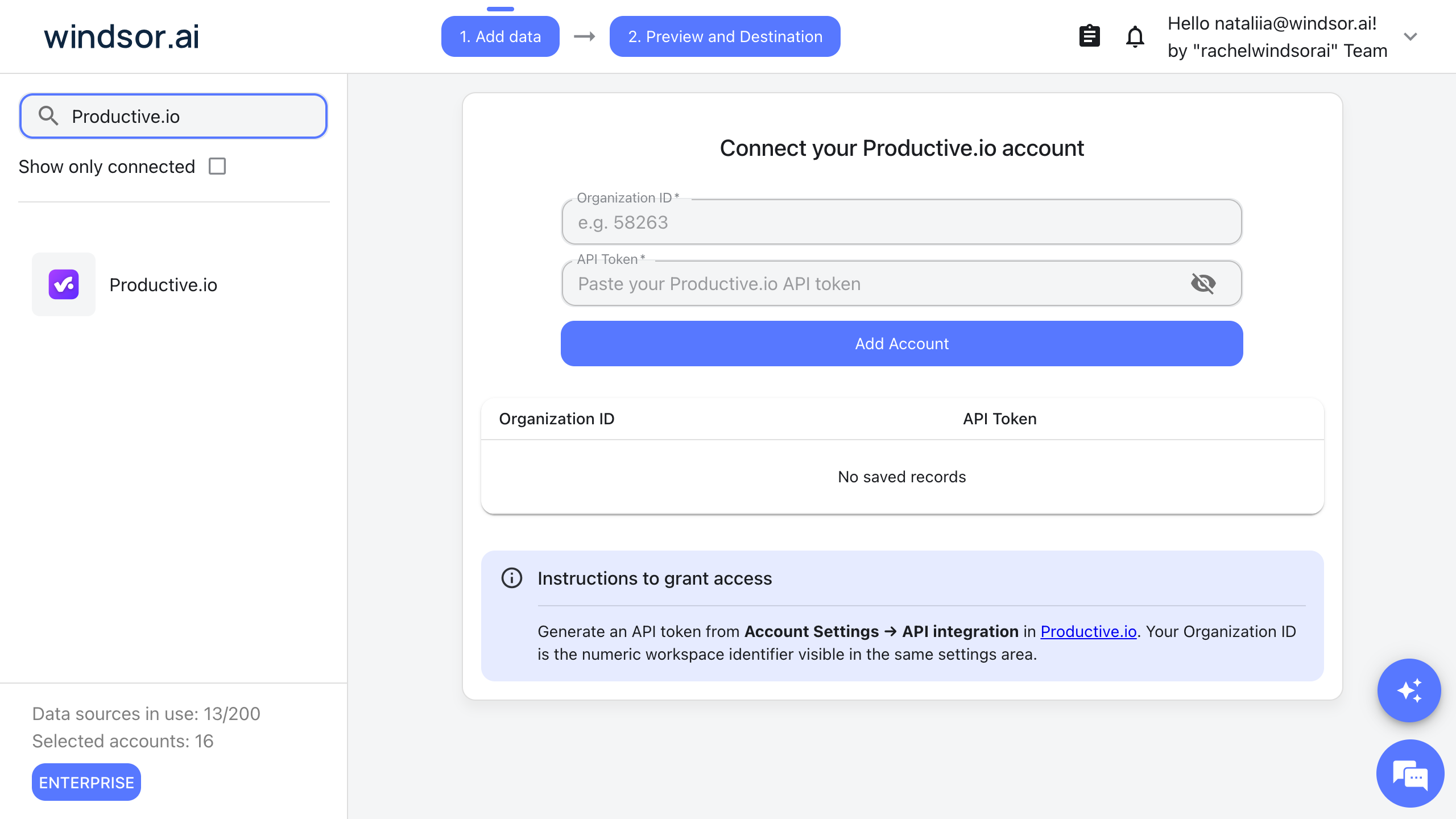
Connect Productive.io in your Windsor.ai dashboard
Log in at onboard.windsor.ai, choose Productive.io as your data source and enter your Organization ID and an API token. You create the token in Productive.io under Account Settings, then API integration, and the Organization ID is shown in the same settings area.
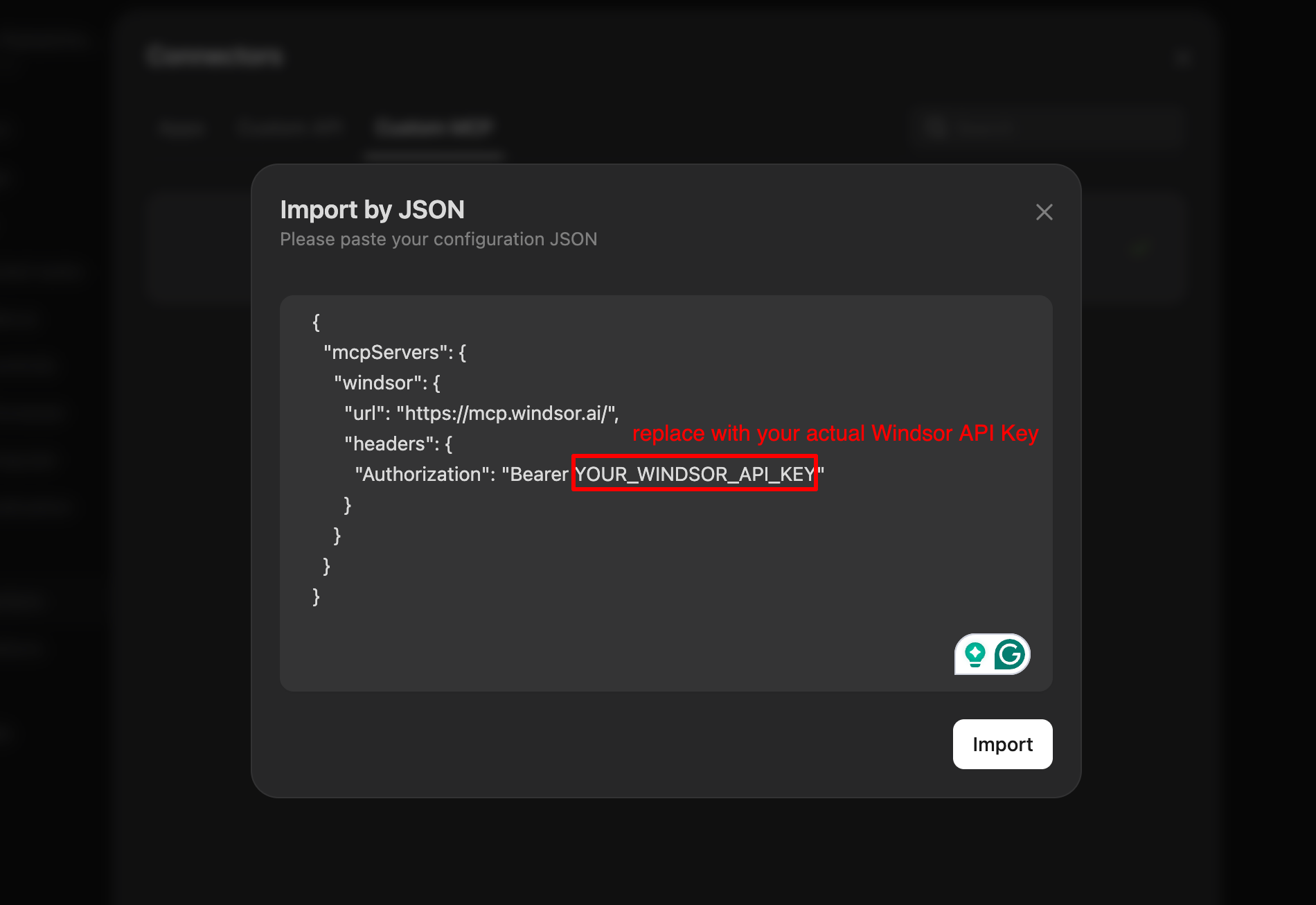
Open Custom MCP in Manus
In Manus, open Settings and go to Connectors. Open the Custom MCP tab, click Add custom MCP server and choose Import by JSON.

Paste the Windsor configuration
Copy the configuration from your Windsor.ai account at onboard.windsor.ai/app/data-preview#MANUS, paste it into Manus and click Import. Windsor then appears in your list of connectors.
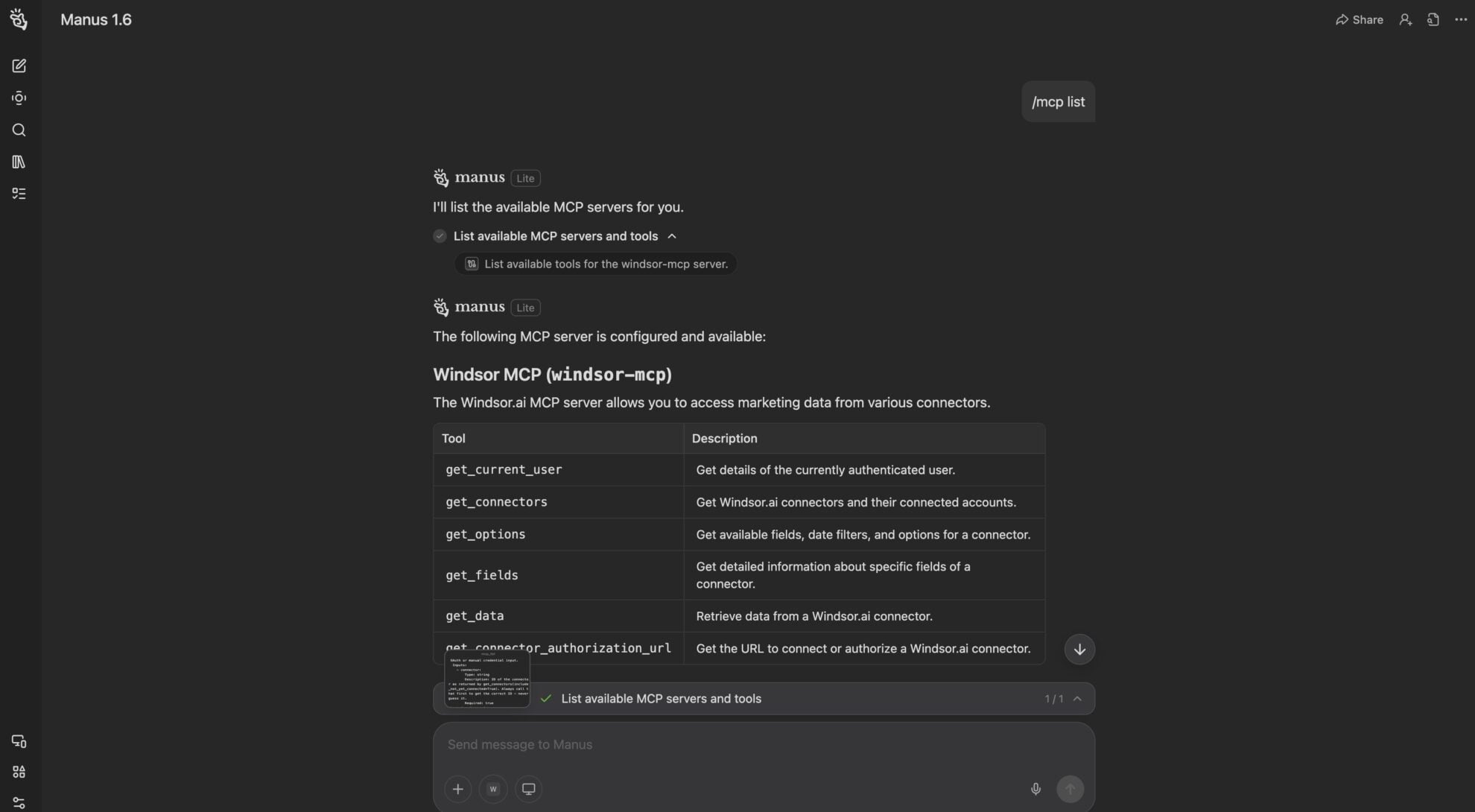
Ask Manus about your Productive.io data
Start with a test prompt such as “What data sources are connected to my windsor.ai account?” Then ask about your Productive.io data.
FAQs
What Productive.io data can Manus use?
Windsor.ai gives access to 78 Productive.io fields. These are the groups; the Productive.io field reference lists all of them:
- Budgets: Budget Name, Budgeted Hours, Actual Hours, Billable Hours, Budget Utilization, Budgeted Revenue.
- Projects: Project Name, Project Number, Project Manager ID, Project Last Activity At, Project Archived At.
- Tasks: Task Title, Task Closed, Task Closed At, Task Last Activity At, Task Worked Hours, Task Assignee ID.
- Time entries: Time Entry Date, Time Entry Hours, Time Entry Billable Minutes, Time Entry Billable, Time Entry Note, Time Entry Person ID.
- Invoices: Invoice Number, Invoice Status, Invoiced On, Invoice Amount, Invoice Company ID.
- Companies, people and services: Company Name, Company Domain, Person First Name, Person Last Name, Person Email, Service Name.
What can I ask Manus about my Productive.io data?
These prompts name the fields to use, so the answer comes back on your own records:
-
Which budgets have a Budget Utilization above 90%? Show Budget Name, Budgeted Hours and Actual Hours.
-
Compare Billable Hours with Actual Hours for each Budget Name and list the budgets with the lowest billable share.
-
List open tasks whose Task Last Activity At is more than 14 days ago, with Task Title and Task Project ID.
-
Sum Time Entry Hours and Time Entry Billable Minutes by week for the last 8 weeks.
Can Manus change my Productive.io data?
No. The Productive.io connector is read-only. Manus can read your Productive.io records through Windsor.ai and cannot create, edit or delete anything in Productive.io.
Does the Productive.io connector include personal details?
Yes. People records carry first and last names and email addresses, for example Person Email, and time entries carry the free-text Time Entry Note. Pick only the fields you need when you set up a report or ask a question.
Can I combine Productive.io data with other sources in Manus?
Yes. Windsor.ai supports 350+ data sources, so you can connect Productive.io alongside tools such as Google Ads, GA4 or Shopify and ask about them together. For example, put HubSpot Deal Amount for won deals by Deal Close Date next to the Budgeted Revenue of your Productive.io budgets for the same clients.
Do I need to code to connect Productive.io to Manus?
No. Connect Productive.io in Windsor.ai, add Windsor to Manus, and sign in. After that you ask in plain language.
How much does it cost to integrate Productive.io with Manus using Windsor.ai?
The free forever plan covers 1 data source, so connecting Productive.io on its own costs nothing and needs no credit card. Combining Productive.io with other sources needs a paid plan: $19/month for 3 sources or $99/month for 7. Manus is billed separately by Manus. See the pricing page.
Do you have helpful links to get started with Productive.io and Manus?
Yes. These are the resources to start with for the Productive.io to Manus integration:
Tired of manual Productive.io data exports? Try Windsor.ai today to work on live data


