 Destinations
 Data sources
 AI insights
 About us
 Careers
 Security
 Customer reviews
 Contact us
 Affiliate program
 Solution partners
 Template gallery
 Looker Studio templates
 Power BI templates
 Excel templates
 Google Sheets templates
 Tableau templates
 Facebook Ads templates
 Google Ads templates
 Data fields & Metrics
 AI prompt library & Guides
 Product documentation
 API documentation
 Case studies
 Blog
Blog Data models
 Windsor vs Supermetrics
 Windsor vs Funnel.io
 Windsor vs Fivetran
 Windsor vs Rivery
 Windsor vs Portermetrics
 Windsor vs Coupler.io
Connect Salesforce to Microsoft Copilot
Automatically sync your Salesforce data to Microsoft Copilot using the Windsor.ai connector.
Bring your Salesforce data into Microsoft Copilot for quick and in-depth AI analysis. Evaluate sales rep performance, spot stalled deals, and accelerate revenue growth.
Forget CSVs. Stop copy/paste. Connect in minutes. No code required.
 Sign up with Google
 Free forever plan









Improve win rates with Salesforce to Microsoft Copilot integration
Forget manual analysis and static dashboards. Ask Copilot Agent questions about your sales performance and get AI-driven insights in seconds. Here’s what your team can do:

Track lead quality
Track lead quality
Ask Copilot to break down lead conversion rates by source, industry, and company size. Find out which sources produce pipeline that actually closes, and which ones generate volume without revenue.

Spot stalled deals
Spot stalled deals
Use Copilot to surface opportunities that haven’t changed stage or logged any activity recently, ranked by close date and deal value. Focus your team on the right deals and move them forward before they slip.

Connect Salesforce to ad spend
Connect Salesforce to ad spend
With Windsor.ai, you can blend Salesforce with your ad platforms (Meta, TikTok Ads or LinkedIn Ads) to understand which channels generate the highest-value deals and fastest-closing pipeline. This helps you shift your marketing budget to those that e, not just lead volume.

Act on Salesforce data in Teams
Act on Salesforce data in Teams
Query Copilot Agent directly in Teams to discuss pipeline updates and share deal summaries with your team. Also, you can configure automated alerts to flag at-risk opportunities in a channel, so the whole team stays aligned without a meeting.
Using Windsor.ai to connect data from Salesforce to Copilot
Salesforce stores some of the most valuable data in your business: deals, leads, accounts, and sales activities. The problem is getting to it quickly for analysis. Windsor MCP automatically pulls, cleans, and delivers your Salesforce data directly into Copilot Agent, with no manual exports or technical setups.
Connect once and generate AI-powered insights into pipeline health, deal progression, and sales performance.
Available actions
Update Object Update field values on a Salesforce record of any object type (Opportunity, Lead, Contact, Account, Case, custom objects, ...). Only the provided fields are changed. Use field API names (e.g. StageName, Amount, My_Field__c) and pass null as a value to clear a field.
Update field values on a Salesforce record of any object type (Opportunity, Lead, Contact, Account, Case, custom objects, ...). Only the provided fields are changed. Use field API names (e.g. StageName, Amount, My_Field__c) and pass null as a value to clear a field.
Create Object Create a new Salesforce record of any object type (Opportunity, Lead, Contact, Account, Case, custom objects, ...). Use field API names (e.g. LastName, Company, Amount, My_Field__c); the required fields depend on the object type. Returns the id of the new record, which update_object and delete_object can then use.
Create a new Salesforce record of any object type (Opportunity, Lead, Contact, Account, Case, custom objects, ...). Use field API names (e.g. LastName, Company, Amount, My_Field__c); the required fields depend on the object type. Returns the id of the new record, which update_object and delete_object can then use.
Delete Object Permanently delete a Salesforce record of any object type (Opportunity, Lead, Contact, Account, Case, custom objects, ...) by id. Salesforce moves the record to the Recycle Bin for 15 days, from where a user can restore it in the Salesforce UI but not through Windsor. Tell the user this is permanent before you ask them to confirm.
Permanently delete a Salesforce record of any object type (Opportunity, Lead, Contact, Account, Case, custom objects, ...) by id. Salesforce moves the record to the Recycle Bin for 15 days, from where a user can restore it in the Salesforce UI but not through Windsor. Tell the user this is permanent before you ask them to confirm.














How to connect Salesforce to Copilot Agent with Windsor.ai
Explore our step-by-step guide to integrate your Salesforce data into Copilot with the Windsor.ai connector.
Connect data source in Windsor.ai dashboard
Connect your Salesforce to Windsor.ai. Select the necessary account(s) you want to pull data from and click “Next.”

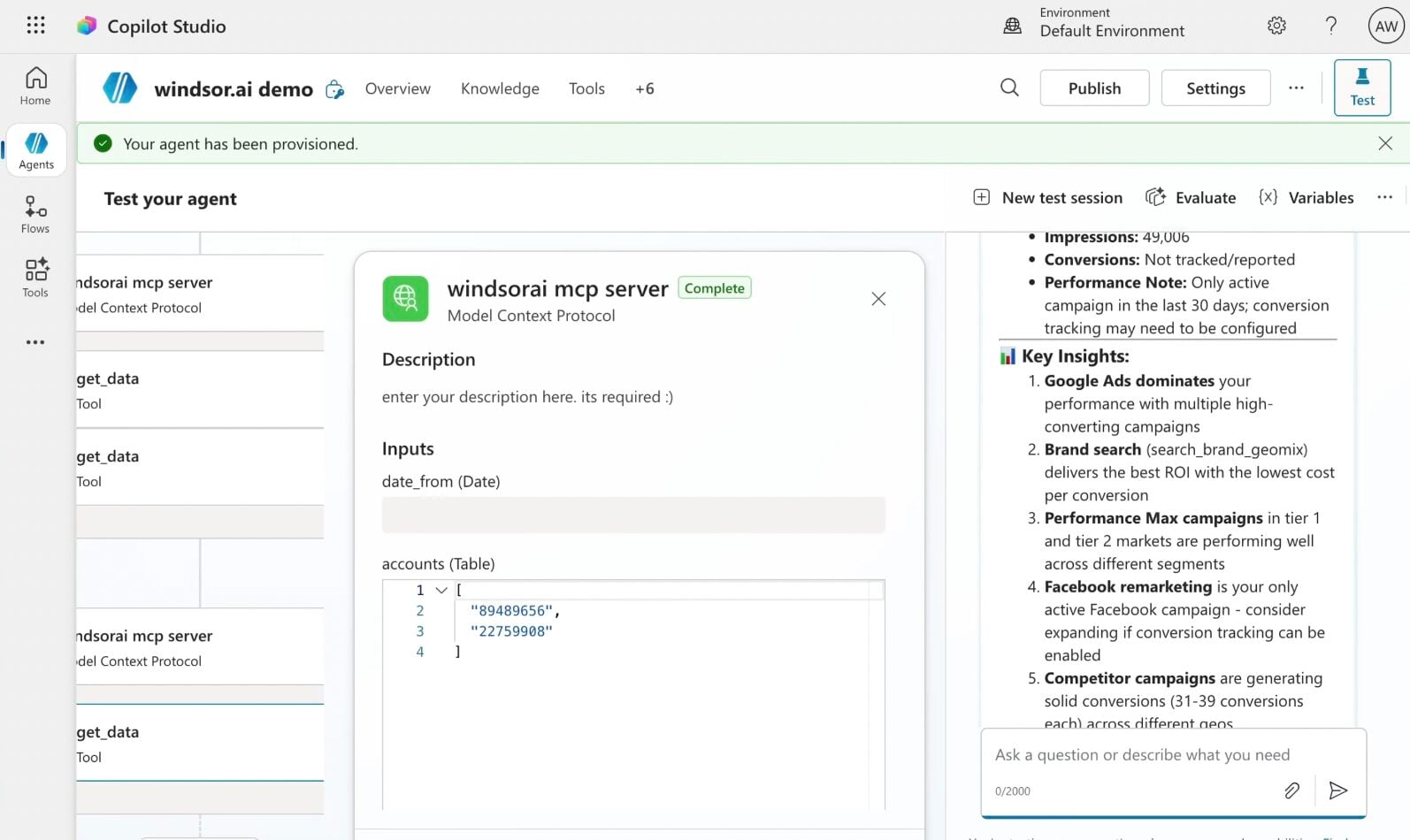
Create a new agent (Windsor MCP) in Copilot
In Microsoft Copilot Studio, create a new agent.
Click + Add tool and select + New tool -> Model Context Protocol.
- Server Name: Windsor MCP
- Server URL: https://mcp.windsor.ai
- Authentication: API Key
- Header name: Authorization

Create a new connection
On the next screen, click the dropdown under ‘Not connected’ and select Create new connection.
⚠️ Important: Enter your Windsor API key with the Bearer prefix.

Confirm credentials and start querying
Start a new chat. Copilot will prompt you to connect to Windsor MCP via the Connections manager. Click Connect -> Submit.
Return to the chat and click Retry in your agent prompt.
You can now ask questions about your integrated Windsor.ai data.
FAQs
What is the Windsor.ai Salesforce Copilot Agent connector?
Windsor.ai’s Salesforce Copilot Agent connector (via Windsor MCP) is a no-code integration that automatically pulls, cleans, and streams your leads, contacts, opportunities, accounts, campaigns, and task data into the Copilot workspace. It enables you to analyse pipeline health, deal progression, lead quality, and sales rep performance in plain language, and get structured answers in seconds.
Windsor MCP also lets you blend Salesforce with 350+ data sources in a single chat, so you can connect CRM performance to marketing spend, ad channels, or any other part of your business.
What Salesforce metrics are available for analysis with Windsor.ai?
Windsor.ai makes 33 metrics and 269 dimensions from Salesforce available in Copilot Agent, including:
- Opportunities: deal amount, stage, probability, close date, forecast category, lead source, opportunity type, and won/lost status, including full stage history through opportunity history data.
- Leads: lead status, source, industry, company size, rating, conversion date, and converted opportunity ID to track the full journey from first touch to closed deal.
- Accounts: account type, industry, annual revenue, number of employees, billing location, and last activity date for a complete view of your customer and prospect base.
- Contacts: contact title, department, lead source, email bounce status, and last activity date linked to their parent account.
- Campaigns: budgeted cost, actual cost, expected revenue, number of leads, converted leads, opportunities, won opportunities, and responses to measure true campaign ROI.
- Tasks: task status, priority, due date, call type, call duration, and subject to monitor sales activity and follow-up compliance across your team.
Can Copilot identify stalled deals in my Salesforce pipeline?
Yes. Ask Copilot to surface opportunities that haven’t changed stage or logged any activity in a defined period, cross-referenced with their close date and current probability. Get a prioritized list of deals that need attention before they are lost.
Can I analyze sales rep performance in Copilot without building a dashboard?
Absolutely. Copilot Agent can compare reps by pipeline value created, deals closed won, average deal size, average days to close, and overdue task count, giving your an instant performance snapshot.
Can I connect Salesforce data with my ad platforms in Copilot?
Connect Salesforce with Google Ads, Meta, LinkedIn Ads, or Microsoft Ads via Windsor.ai to trace closed won opportunities back to their original lead source and ad channel. Find out which paid channels generate the highest average deal size and shortest sales cycle, and use these insights to make budget allocation decisions based on actual revenue, not just lead volume.
What prompts can I use when analyzing Salesforce data in Copilot Agent?
Here are examples of more specific prompts you can use to dive deep into your Salesforce data:
-
Analyse opportunity history for all deals closed in the last 90 days. How many stage changes did won deals go through on average compared to lost deals? At which stage did lost deals most commonly stall or regress?
-
Look at all the leads created in the last 6 months by lead source. For each source, calculate the conversion rate to opportunity and the average time from lead creation to conversion. Which sources produce the fastest and highest-quality pipeline?
-
Compare sales rep performance over the last quarter by total pipeline value created, number of deals closed won, average deal size, and average days to close. Are there reps with high pipeline creation but low close rates, suggesting a qualification or follow-up problem?
-
Analyse campaign performance across all active Salesforce campaigns. For each campaign, compare budgeted cost against actual cost, number of leads generated, conversion rate to opportunity, and total value of won opportunities. Which campaigns delivered the highest return on investment?
-
Look at all opportunities with a probability above 70% that have had no activity in the last 14 days. Cross-reference with their close date, how many are due to close within 30 days with no recent engagement? Flag these as at-risk deals that need immediate follow-up.
Can Copilot help with Salesforce pipeline forecasting?
Yes. By combining opportunity amount, probability, forecast category, close date, and stage history, Copilot can give you a clearer picture of likely revenue for any given period.
How much does it cost to integrate Salesforce into Copilot using Windsor.ai?
Windsor.ai is free to start, no credit card required. Paid plans start at $19/month and scale by the number of sources and accounts. See the pricing page.
How long does it take to connect Salesforce to Copilot?
With Windsor MCP, the integration process takes a few minutes. No technical expertise or coding is required; connecting data to Copilot is simple, straightforward, and accessible to everyone.
Do you have helpful links to get started with integrating Salesforce and Copilot Agent using Windsor.ai?
Yes, we have helpful resources to help you get started. You can explore our official documentation and tutorials for seamless Salesforce to Copilot Agent integration with Windsor.ai:
Tired of manual Salesforce data exports? Try Windsor.ai today to automate your reporting


