 Destinations
 Data sources
 AI insights
 About us
 Careers
 Security
 Customer reviews
 Contact us
 Affiliate program
 Solution partners
 Template gallery
 Looker Studio templates
 Power BI templates
 Excel templates
 Google Sheets templates
 Tableau templates
 Facebook Ads templates
 Google Ads templates
 Data fields & Metrics
 AI prompt library & Guides
 Product documentation
 API documentation
 Case studies
 Blog
Blog Data models
 Windsor vs Supermetrics
 Windsor vs Funnel.io
 Windsor vs Fivetran
 Windsor vs Rivery
 Windsor vs Portermetrics
 Windsor vs Coupler.io
Connect Salesforce to Lovable
Automatically sync your Salesforce data to Lovable using the Windsor.ai connector.
Connect Salesforce to Lovable and get instant AI answers on every deal, lead, and campaign, so your team spends less time reporting and more time closing.
Forget CSVs. Stop copy/paste. Connect data in minutes. No code required.
 Sign up with Google
 Free forever plan
No credit card needed
Free forever plan
No credit card needed










Close more deals with AI-powered Salesforce analysis
Windsor MCP handles the entire data pipeline automatically, so instead of exporting, formatting, and analyzing manually, you ask a question and get the answer in seconds. Here’s what you can do:

Spot stalled deals instantly
Surface every open opportunity with no activity in the last 14 days, a slipping close date, or an overdue task. Give your sales team a daily action list before deals go cold, without digging through Salesforce filters.

Track pipeline stage velocity
Use opportunity history data to measure how long deals spend in each stage and where drop-off is highest. Identify the exact stage where your pipeline leaks and fix the process before it costs another quarter.

Connect ad spend to closed revenue
Blend Salesforce opportunity data with Google Ads or Facebook Ads spend in Lovable. Ask which campaigns generated leads that converted into won opportunities and understand your true cost per closed deal, not just cost per lead.

Build custom sales dashboards
Instead of a static slide deck or exported CSV, Lovable generates a live web app your entire team can bookmark and track. Share it via a link and keep everyone aligned on pipeline health, rep performance, and closed revenue.
Using Windsor.ai to connect data from Salesforce to Lovable
Most ways to send Salesforce data to Lovable involve manual exports, data cleanup, or costly tools. Windsor MCP removes this complexity by pulling, organizing, and streaming your CRM data into Lovable.
Ask questions in plain language and get real-time insights in seconds.
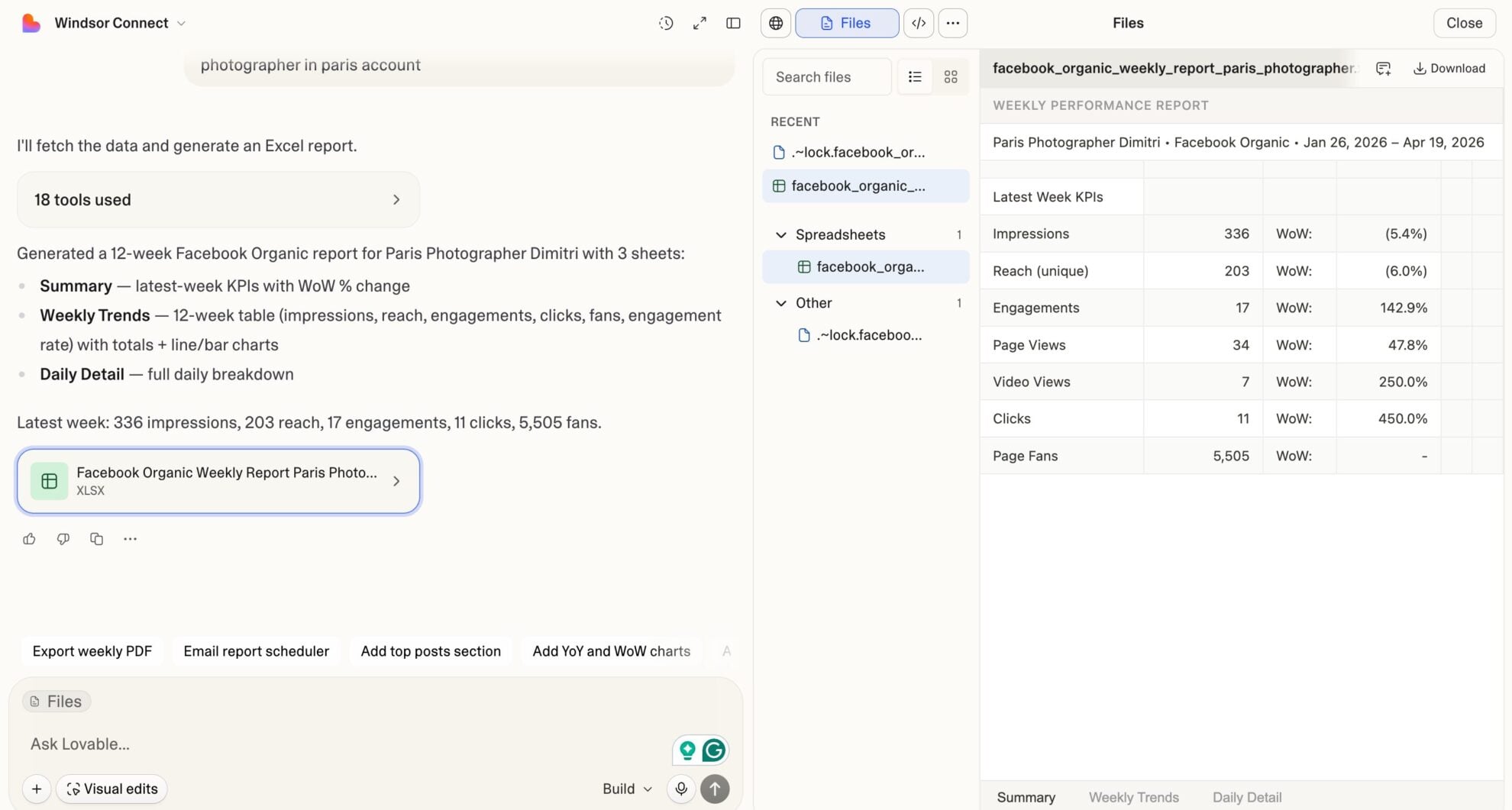














How to connect Salesforce to Lovable with Windsor.ai
Explore our video tutorial and a step-by-step guide to integrate your Salesforce data into Lovable with the Windsor.ai connector.
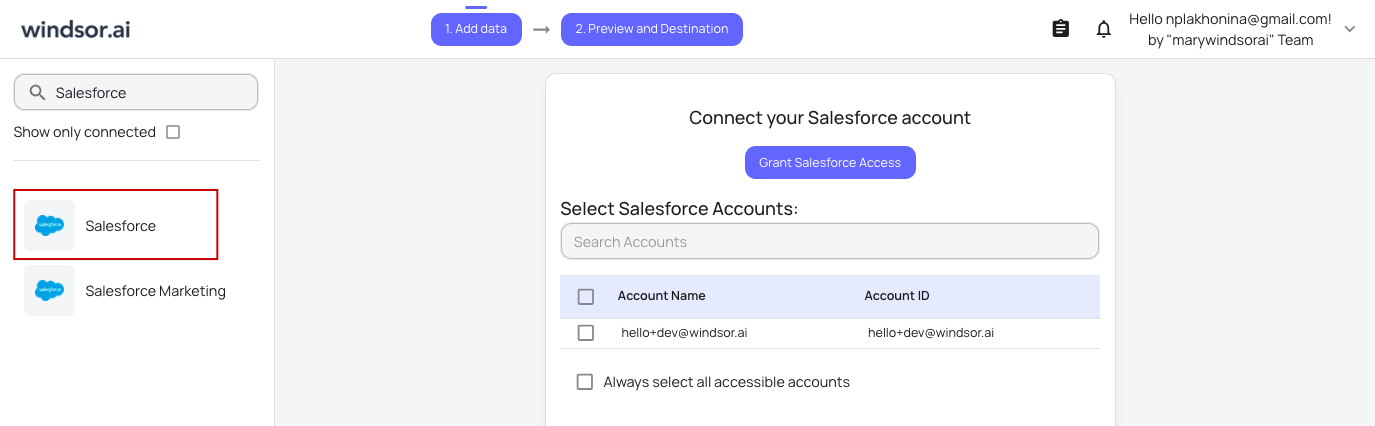
Select your data source
Choose Salesforce as your data source and grant access to Windsor.ai.
Select custom connector in Lovable
In Lovable, open Connectors and select Custom MCP.

Add MCP server
Enter the following details:
- Name: Windsor.ai
- URL: https://mcp.windsor.ai/
Click Add & Authorize to save the connector and authorize access to Windsor.ai.

Authorize and start querying your data
Once added, Windsor will appear in your list of connectors. Enable Always allow permissions for faster access.
Open a new chat and start querying your connected data.

FAQs
Can I track campaign ROI from spend to closed revenue in Lovable?
Yes. Windsor.ai pulls Salesforce fields such as campaign budgeted cost, actual cost, number of leads, converted leads, number of won opportunities, and value of won opportunities. Ask Lovable which campaigns delivered the best return on investment, from first lead to closed deal, and get instant answers without building a custom Salesforce report.
Can I monitor individual sales rep performance in Lovable?
Absolutely. Lovable compares win rates, average deal size, pipeline volume, and overdue task counts by rep, delivering a clear view of who is outperforming, who is on track, and who needs attention before the quarter closes.
What prompts can I use to analyze my Salesforce data in Lovable?
Beyond basic performance summaries, you can use more advanced, specific prompts to uncover deeper insights. For example:
-
Analyze opportunity history for the last 90 days. For each deal that was lost, show how many times the close date was pushed back, how many stage changes it went through, and the original vs. final amount. Identify patterns in deals that slipped before being lost.
-
For the last 6 months, break down win rate by lead source, opportunity type, and account industry. Identify the three combinations of source, type, and industry with the highest win rate and the three with the lowest. Flag any combination receiving significant pipeline volume but underperforming on win rate.
-
Pull all accounts with annual revenue above $1M that have had no opportunity activity in the last 60 days. Show last activity date, account owner, industry, and total historical opportunity value. Rank by highest historical value first (these are the re-engagement targets).
-
For each sales rep, show total pipeline amount, number of open deals, average deal size, win rate, and number of overdue tasks for the last quarter. Identify reps with high pipeline volume but low win rate and flag deals they own that have close dates passing without activity.
Can I combine Salesforce data with marketing sources in Lovable?
Yes, Windsor.ai supports 350+ data sources. Blend Salesforce with Facebook Ads, Google Ads, HubSpot, Klaviyo, or GA4 in the same Lovable conversation for a comprehensive cross-channel analysis.
Do you have helpful links to get started with integrating Salesforce and Lovable using Windsor.ai?
Yes, we have helpful resources to help you get started. You can explore our official documentation and tutorials for seamless Salesforce to Lovable integration with Windsor.ai:
Can I build a live Salesforce pipeline dashboard in Lovable?
Yes. Describe what you need, and Lovable generates a fully interactive, shareable app from your live Salesforce data. No Salesforce report builder, BI tool, or engineer required.
Tired of manual Salesforce data exports? Try Windsor.ai today to automate your reporting


