 Destinations
 Data sources
 AI insights
 About us
 Careers
 Security
 Customer reviews
 Contact us
 Affiliate program
 Solution partners
 Template gallery
 Looker Studio templates
 Power BI templates
 Excel templates
 Google Sheets templates
 Tableau templates
 Facebook Ads templates
 Google Ads templates
 Data fields & Metrics
 AI prompt library & Guides
 Product documentation
 API documentation
 Case studies
 Blog
Blog Data models
 Windsor vs Supermetrics
 Windsor vs Funnel.io
 Windsor vs Fivetran
 Windsor vs Rivery
 Windsor vs Portermetrics
 Windsor vs Coupler.io
How to integrate data into Lovable with Windsor MCP
Windsor MCP lets you connect 350+ marketing, sales, analytics, and e-commerce data sources directly to Lovable. Once connected, you can build internal tools, dashboards, customer-facing apps, and AI workflows powered by your live business data, without manual CSV uploads or custom integrations.
Follow these simple steps to connect your data to Lovable through Windsor.ai MCP in less than a minute.
Prerequisites
To use Windsor MCP with Lovable, you need:
- A Windsor.ai account with at least one connected data source
- A Lovable account on a paid plan (custom MCP connectors are only available on paid plans)
🚀 Start using Windsor MCP on the free forever plan, no credit card needed: https://onboard.windsor.ai/
Steps to configure Windsor MCP for Lovable
1. Log in to your Windsor.ai account at https://onboard.windsor.ai/ and connect the data sources you want to use inside Lovable.
2. In Lovable, open Connectors and select Custom MCP.
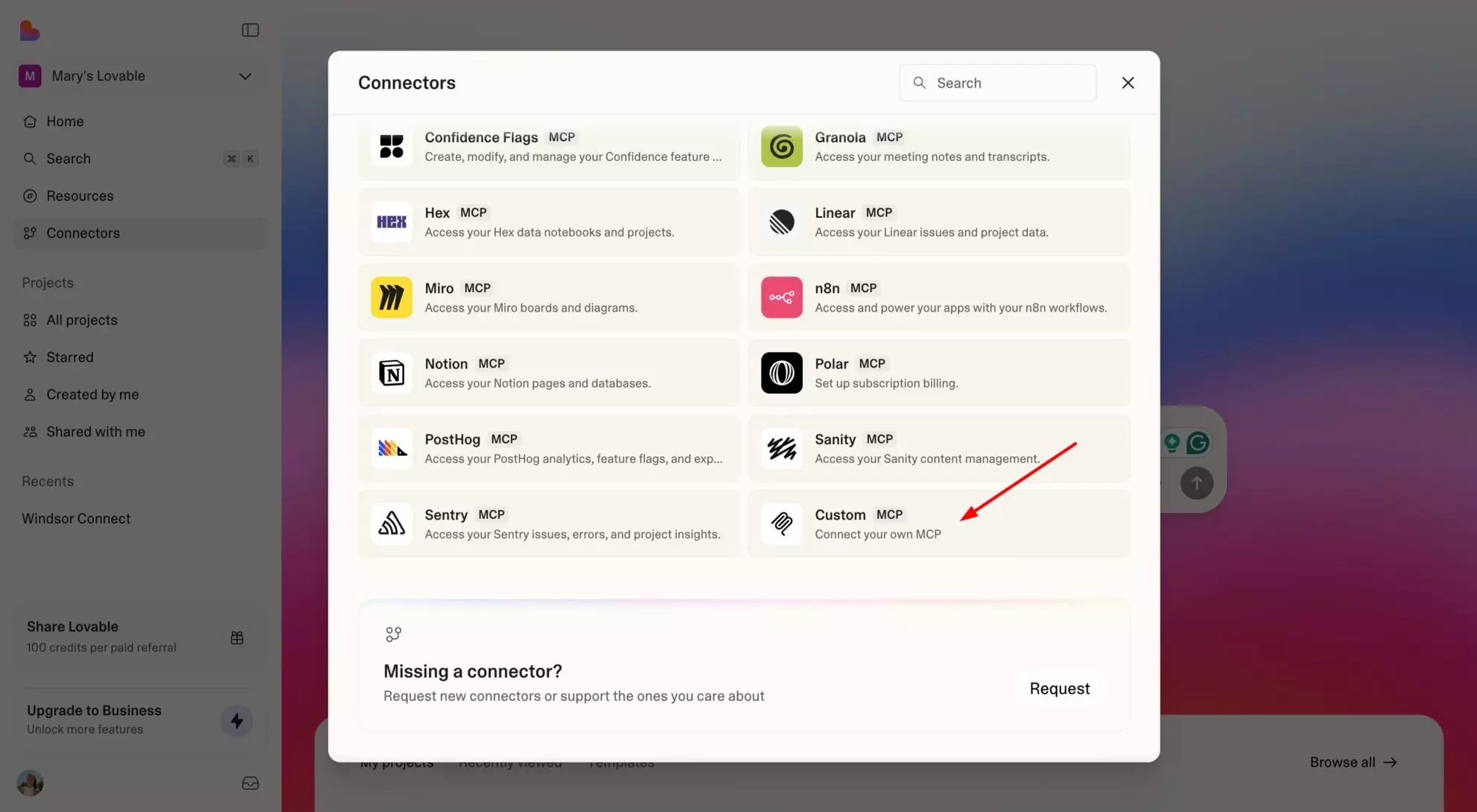
3. Enter the following details:
- Name: Windsor.ai
- URL:
https://mcp.windsor.ai/
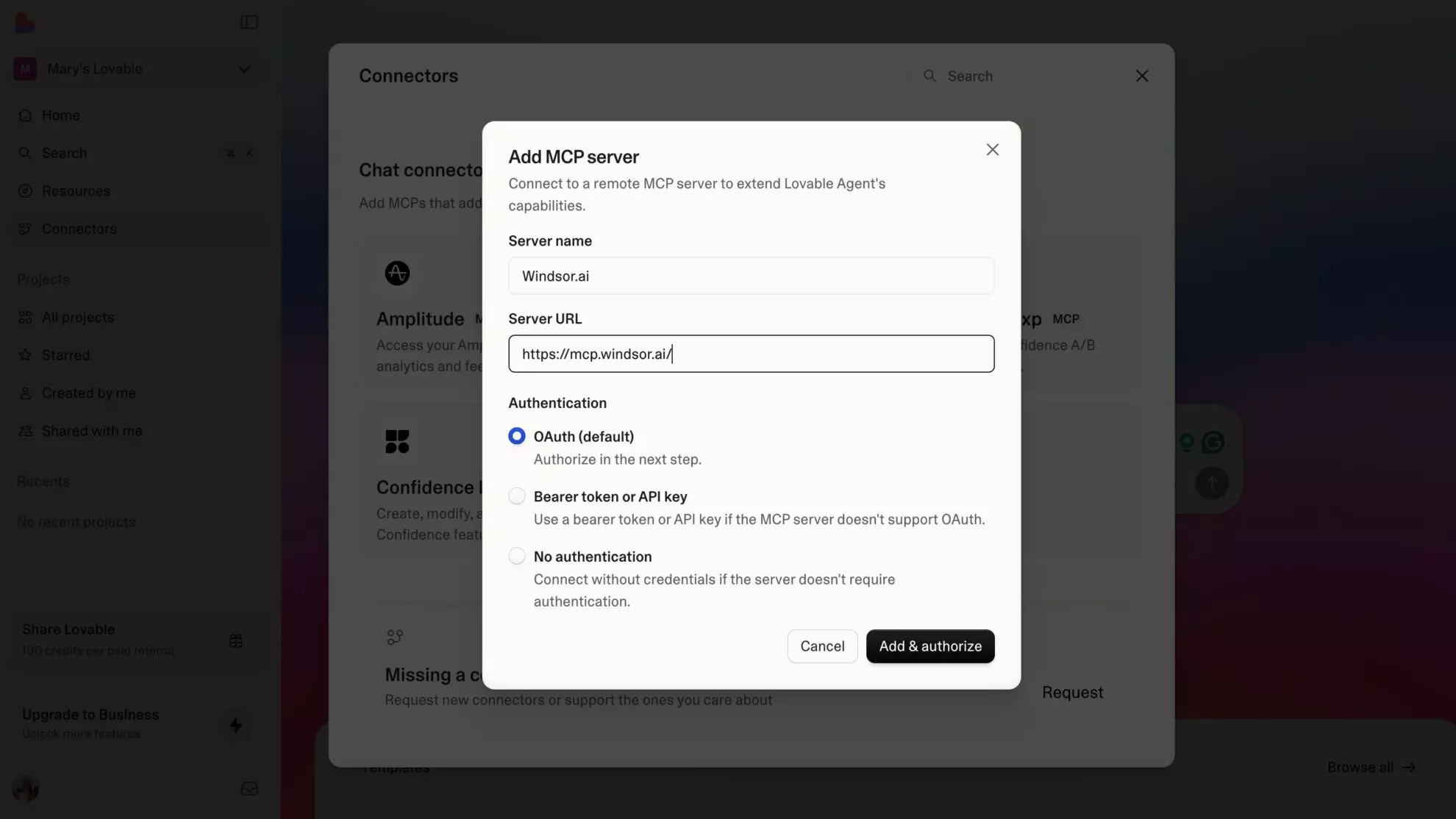
4. Click Add & Authorize to save the connector and authorize access to Windsor.ai.
Once added, Windsor will appear in your list of connectors. Enable Always allow permissions for faster access.

Start querying your data in Lovable
Now, you can start querying your business data directly inside Lovable.
Try a simple test prompt like:
What data sources are currently connected to my Windsor.ai account?
Is the data retrieved correctly?
Go further and ask Lovable to build dashboards from your marketing data, create customer-facing reporting portals, compare campaign performance across channels, generate internal analytics tools, build AI workflows, or even create a website powered by your live business data.
Helpful links
- About Windsor MCP – Learn more about Windsor.ai MCP, including supported data sources, compatible AI tools, common use cases, and key benefits.
- Windsor MCP use cases & examples (30+ prompts inside) – Explore Windsor MCP examples and prompt ideas to see how different teams use AI for reporting, marketing analysis, customer insights, forecasting, and more.
- AI Prompt Library by Windsor.ai – Browse ready-to-use prompts tailored to different data sources, teams, and business goals.
Tired of manual data reporting and analysis? Get started with Windsor MCP today to unlock instant AI insights


