 Destinations
 Data sources
 AI insights
 About us
 Careers
 Security
 Customer reviews
 Contact us
 Affiliate program
 Solution partners
 Template gallery
 Looker Studio templates
 Power BI templates
 Excel templates
 Google Sheets templates
 Tableau templates
 Facebook Ads templates
 Google Ads templates
 Data fields & Metrics
 AI prompt library & Guides
 Product documentation
 API documentation
 Case studies
 Blog
Blog Data models
 Windsor vs Supermetrics
 Windsor vs Funnel.io
 Windsor vs Fivetran
 Windsor vs Rivery
 Windsor vs Portermetrics
 Windsor vs Coupler.io
Connect Semrush to ChatGPT
Automatically sync your Semrush SEO and competitive data to ChatGPT using the Windsor.ai connector.
Chat with your Semrush data in ChatGPT to catch ranking changes before they cost you traffic, using natural-language questions instead of digging through separate keyword, backlink, and SERP-feature reports.
Forget CSVs. Stop copy/paste. Connect in minutes. No code required.
 Sign up with Google
 Free forever plan
No credit card needed
Free forever plan
No credit card needed










Get instant SEO insights with Semrush to ChatGPT integration
Windsor MCP streams your live Semrush data into ChatGPT, so you skip the dashboard and go straight to what’s moving your rankings. Explore key use cases:

Track SERP feature ownership
Ask ChatGPT to break down keywords triggering AI Overview, featured snippets, or carousels to see where you’re winning or losing visibility beyond the blue links.

Audit backlink profile health
Compare Authority Score and referring domains over time to catch real link-building progress or a sudden toxic-link spike.

Monitor keyword intent mix
Break down organic traffic by commercial, informational, and transactional intent to see if your content actually matches buyer intent.

Spot ranking volatility fast
Compare organic positions improved against declined and lost to catch the impact of an algorithm update before it snowballs.
Using Windsor.ai to connect data from Semrush to ChatGPT
Cross-referencing keyword rankings against backlink health normally means pulling two or three separate Semrush reports and merging them by hand. Windsor MCP collapses that into one feed, streaming your keyword, backlink, and domain data directly into ChatGPT.
Connect once and start asking questions about rankings, backlinks, and keyword intent in plain English.
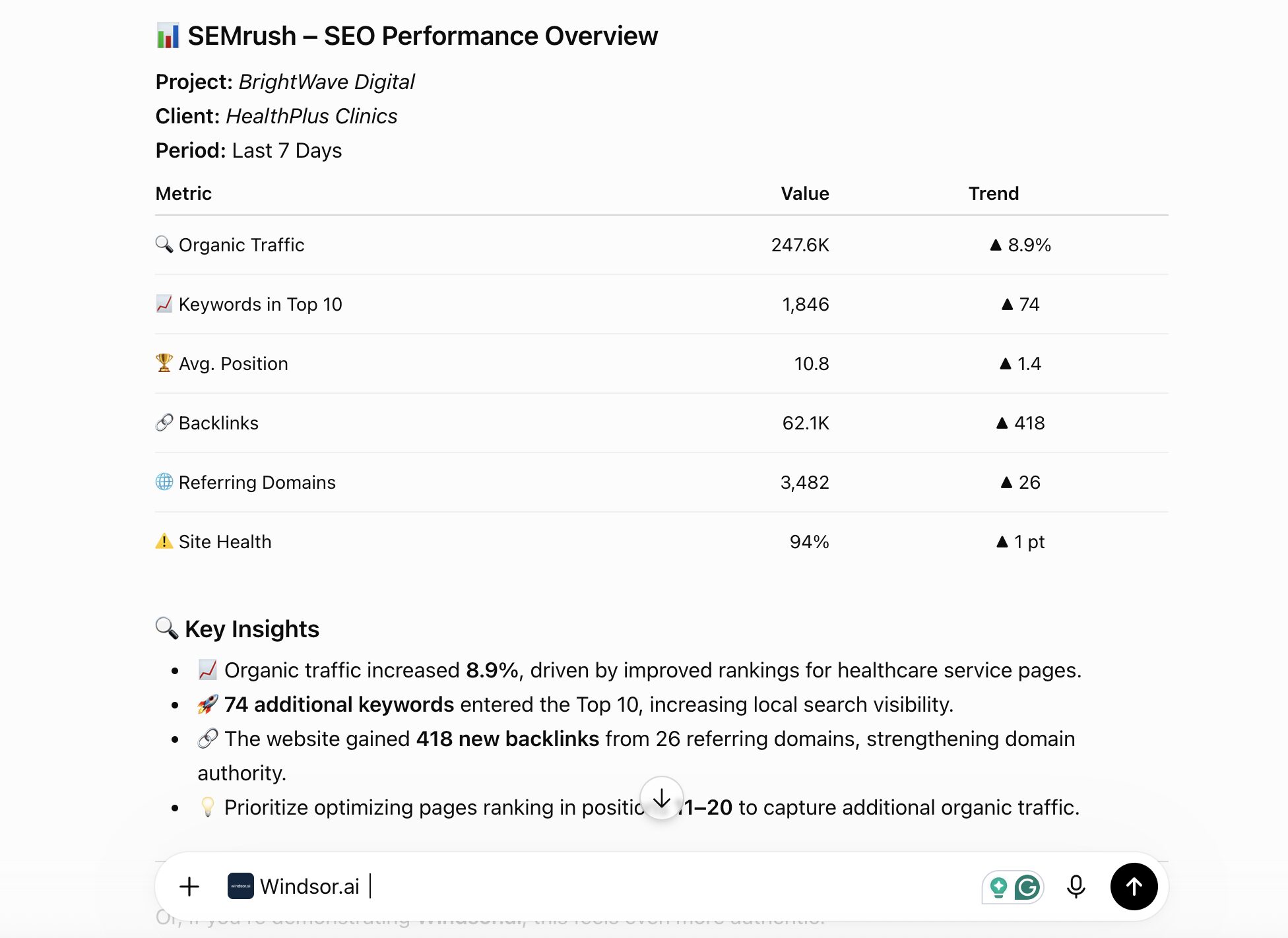














How to connect Semrush to ChatGPT with Windsor.ai
Explore our video tutorial and a step-by-step guide to integrate your Semrush data into ChatGPT with the Windsor.ai connector.
Connect Semrush in the Windsor.ai dashboard
Choose Semrush as your data source and grant access to Windsor.ai.
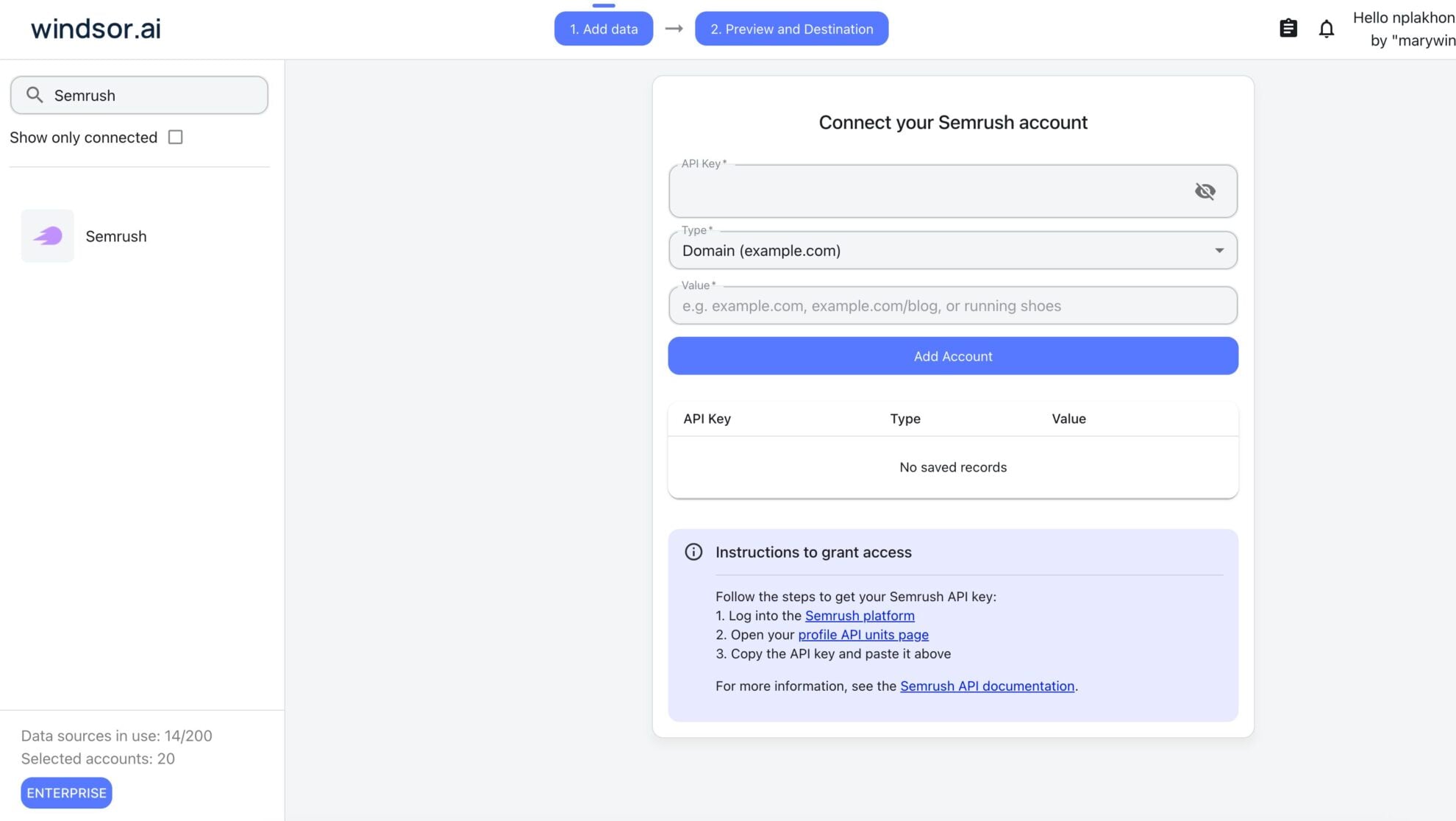
Install the Windsor.ai connector
Log in to your ChatGPT account and open this Windsor.ai connector page.
Click Connect, then authorize access.

Query your Semrush data in ChatGPT
Open a new chat and start asking questions about your connected Semrush data using natural language.
Make sure that the Windsor.ai connector is enabled (click the + sign → More → Windsor.ai).
FAQs
What Semrush data can I analyze in ChatGPT?
Windsor.ai gives ChatGPT access to all 196 Semrush fields (170 metrics, 8 dimensions), organized into groups such as:
- Overview (145 fields): keywords triggering SERP features like AI Overview, featured snippets, carousels, and buying guides, plus intent-based traffic and position counts.
- Backlinks (15 fields): Authority Score, referring domains, referring IPs, Class C IPs, and backlink type (follow, form, frame, image).
- Keywords (8 fields): CPC, competition, keyword difficulty index, search volume, number of results.
- Domains (5 fields): organic positions improved, declined, lost, and new, plus overall rank.
Can ChatGPT tell me which SERP features I'm winning or losing, like AI Overview or featured snippets?
Yes. Windsor.ai streams keyword-level fields for every major SERP feature (AI Overview, AMP, carousels, buying guides, application listings, and more), so ChatGPT can show exactly which features your keywords currently trigger.
Can ChatGPT analyze my backlink profile quality, not just the total count?
Yes. Windsor.ai streams Authority Score, referring domains, referring IPs, and Class C IPs together, so ChatGPT can assess link diversity and authority trends rather than just a raw backlink count.
Can ChatGPT break down my keywords by search intent?
Yes. Semrush classifies keywords by commercial, informational, navigational, transactional, and unknown intent, and Windsor.ai streams the position and traffic data for each, so ChatGPT can show whether your rankings actually match buyer intent.
What prompts can I use to analyze Semrush data in ChatGPT?
-
Rank my keywords by keyword difficulty against their current position. Which high-difficulty keywords am I already ranking well for, and which easy ones am I missing?
-
Compare my referring domains and Authority Score trend over the last 3 months against the prior 3 months. Is growth accelerating or slowing?
-
List keywords where I rank on page 2 (positions 11-20) with high search volume and commercial intent. Which are the best candidates to push to page 1?
-
Break down my organic traffic cost by intent category. Which intent group would cost the most to replace with paid search?
How much does it cost to integrate Semrush into ChatGPT using Windsor.ai?
Windsor.ai is free to start, no credit card required. Paid plans start at $19/month and scale by the number of sources and accounts. See the pricing page.
Can I combine Semrush data with other channels in ChatGPT?
Yes. Windsor.ai supports 350+ data sources, so you can connect Semrush alongside Google Search Console or Google Ads to compare organic and paid search performance for the same keywords side by side.
Do you have helpful links to get started with integrating Semrush and ChatGPT using Windsor.ai?
Yes, we have helpful resources to help you get started. You can explore our official documentation for seamless Semrush to ChatGPT integration with Windsor.ai:
Tired of manual Semrush data exports? Try Windsor.ai today to automate your reporting


