 Destinations
 Data sources
 AI insights
 About us
 Careers
 Security
 Customer reviews
 Contact us
 Affiliate program
 Solution partners
 Template gallery
 Looker Studio templates
 Power BI templates
 Excel templates
 Google Sheets templates
 Tableau templates
 Facebook Ads templates
 Google Ads templates
 Data fields & Metrics
 AI prompt library & Guides
 Product documentation
 API documentation
 Case studies
 Blog
Blog Data models
 Windsor vs Supermetrics
 Windsor vs Funnel.io
 Windsor vs Fivetran
 Windsor vs Rivery
 Windsor vs Portermetrics
 Windsor vs Coupler.io
Connect Snapchat Ads to Perplexity
Automatically sync your Snapchat Ads data to Perplexity using the Windsor.ai connector.
Ask Perplexity anything about your Snapchat Ads data and get instant AI insights. Find your top creatives, cut wasted spend, and target the audience that converts best.
Forget CSVs. Stop copy/paste. Connect in minutes. No code required.
 Sign up with Google
 Free forever plan
No credit card needed
Free forever plan
No credit card needed










Make the most out of your Snapchat Ads data in Perplexity
Once your Snapchat Ads account is connected, Perplexity turns spend, creative, and conversion data into insights and recommendations in seconds. Here’s what you can do:

Catch ad fatigue early
Track CTR, Swipe Up Rate, and frequency together to catch ad fatigue as soon as frequency climbs and Swipe Up Rate starts to fall. Refresh or pause the ad before performance drops further.

Diagnose video drop-off
See exactly where viewers stop watching across the 25%, 50%, 75%, and completion quartiles. Fix the hook or trim the length before you keep paying to lose the same viewers.

Separate earned from paid reach
Perplexity helps you identify how much of your impressions and engagement come from Snapchatters sharing your ad versus your ad spend. Double down on the creative formats that earn organic reach on their own.

Measure true ROAS
Combine Snapchat Ads spend with your Shopify orders to see which campaigns are driving purchases in your store, not just the app opens or sign-ups. Reallocate the budget toward the campaigns generating real revenue.
Using Windsor.ai to connect data from Snapchat Ads to Perplexity
Most methods to stream your Snapchat Ads data into AI require manual CSV exports, data cleanup, or expensive tools. Windsor.ai’s MCP connector removes this friction by automatically syncing Snapchat Ads data into Perplexity in just a few minutes.
Set up once and use natural‑language prompts to analyze your video ad performance.















How to connect Snapchat Ads to Perplexity with Windsor.ai
Explore our video tutorial and a step-by-step guide to integrate your Snapchat Ads data into Perplexity with the Windsor.ai connector.
Connect data source in Windsor.ai dashboard
Connect your Snapchat Ads to Windsor.ai. Select the necessary account(s) you want to pull data from and click “Next.”

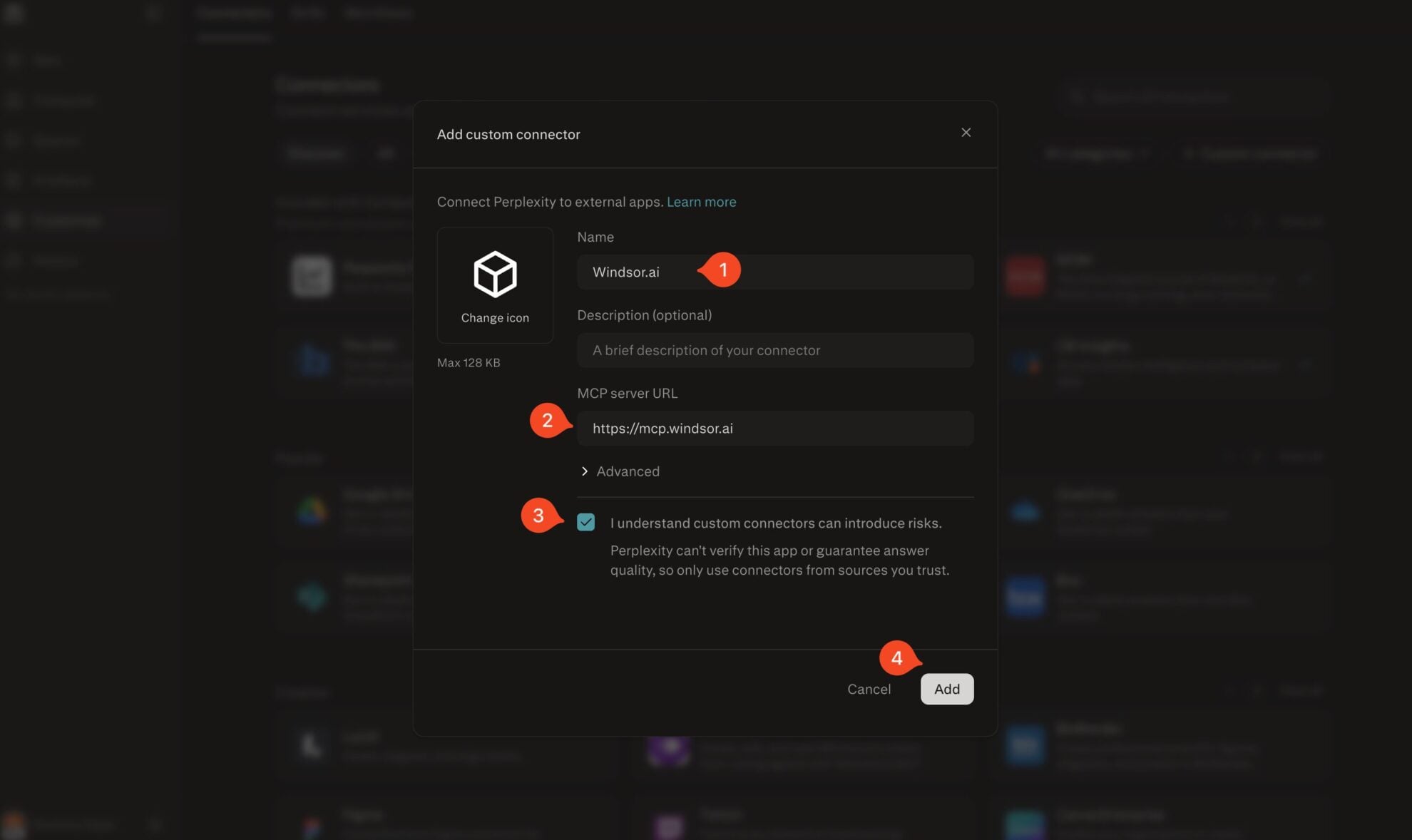
Add Windsor.ai as a custom connector
Go to perplexity.ai/computer/connectors and click + Custom connector. Fill in the details:
- Name: Windsor.ai
- MCP server URL: https://mcp.windsor.ai
Tick ‘I understand custom connectors can introduce risks’ and click Add.
Install the connector
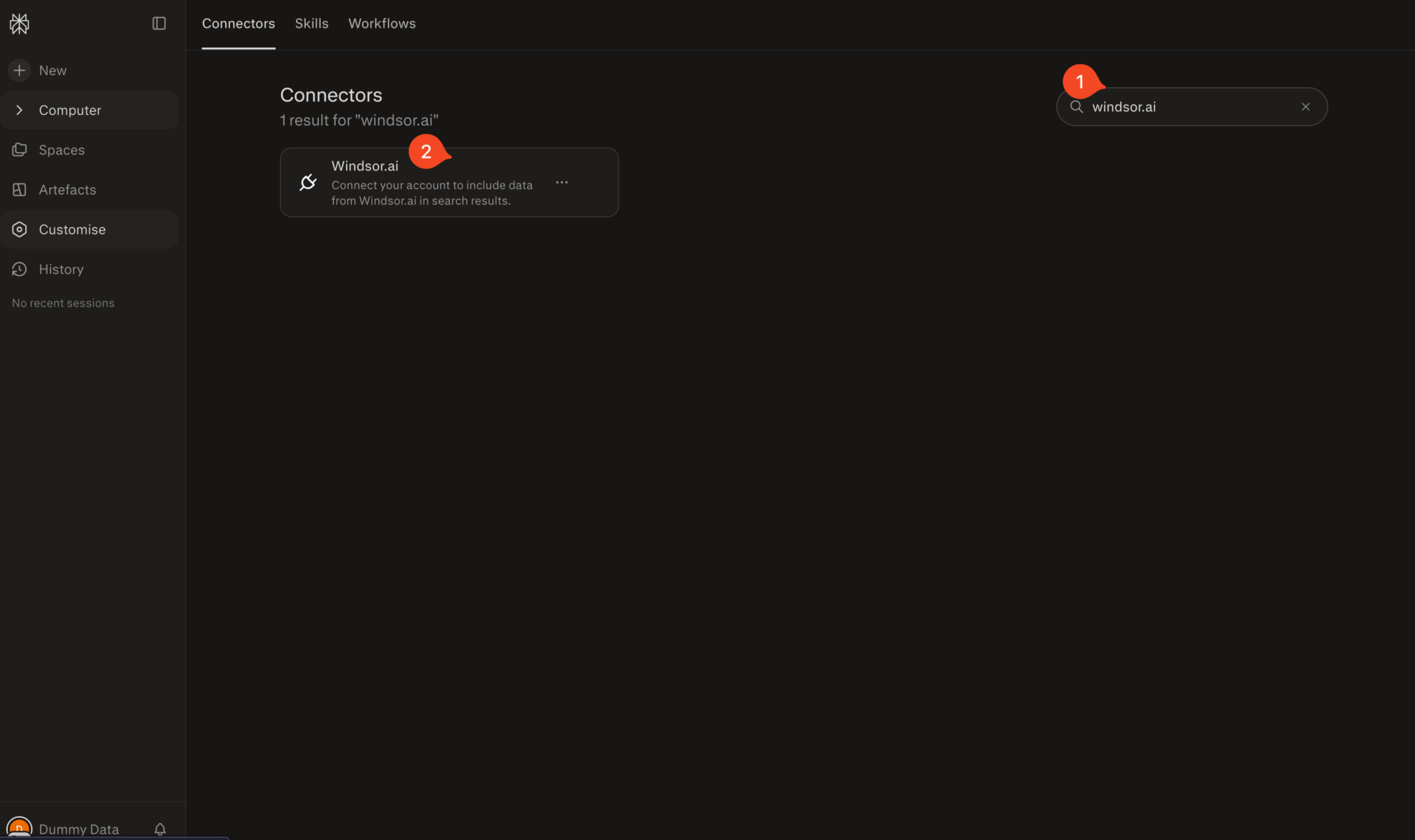
Search for Windsor.ai in the connectors list, click the card, then click Add connector.
Confirm by clicking Allow Access in the pop-up.
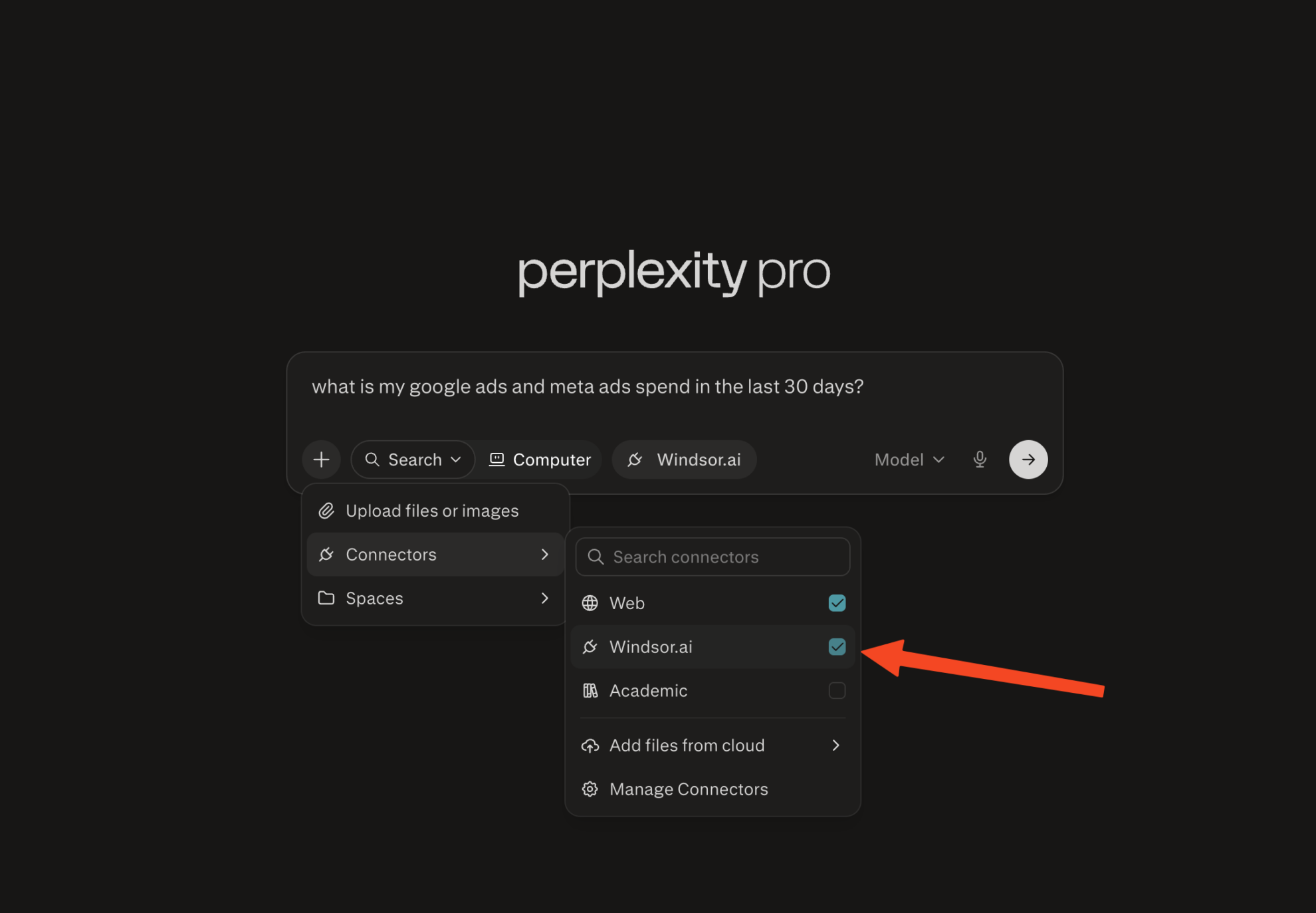
Enable Windsor.ai in your chat
In a new chat, click +, choose Connectors, and check Windsor.ai.
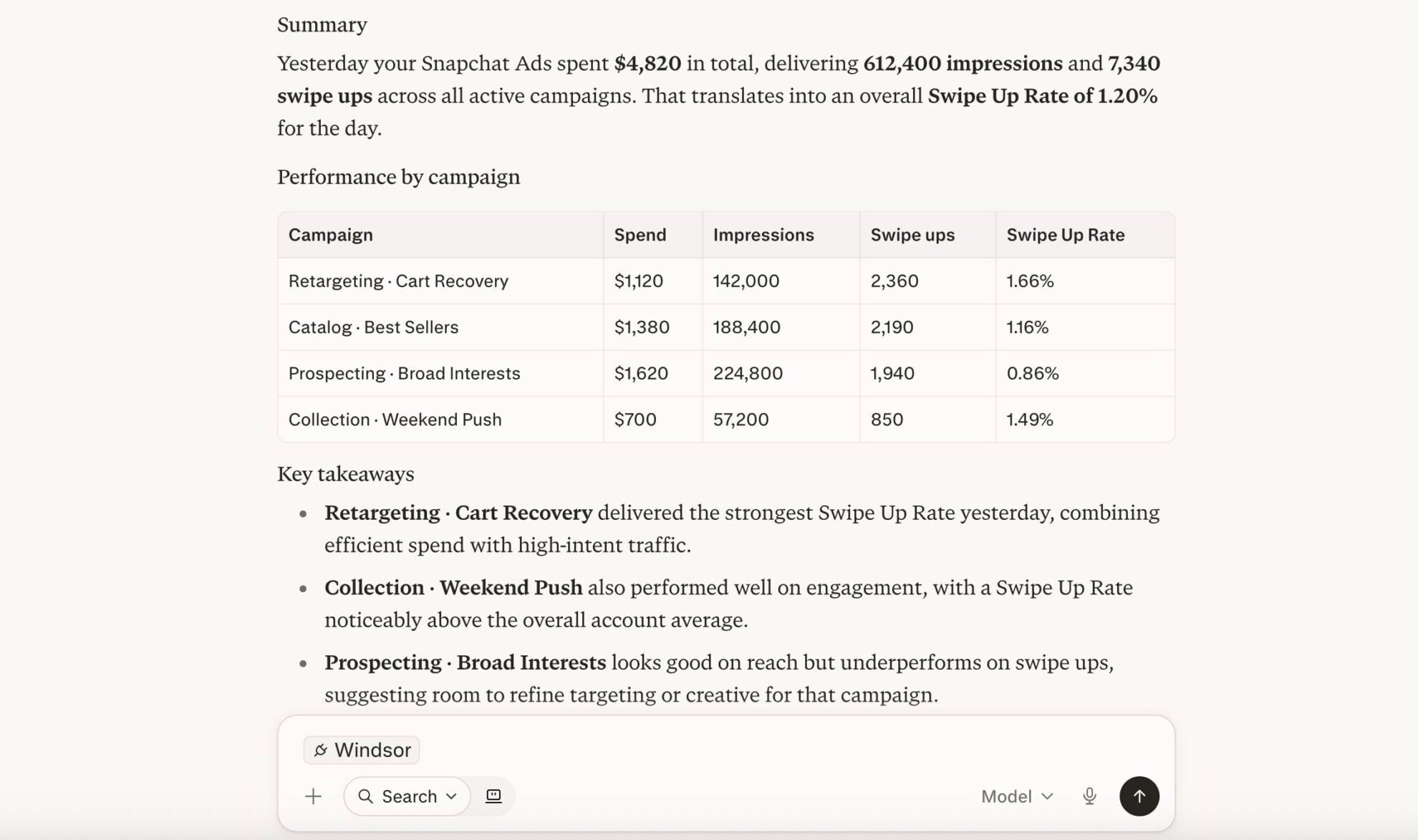
Start querying your data
You can now ask questions about your integrated Windsor.ai data.
FAQs
Do I need a Perplexity Pro subscription to connect Snapchat Ads?
Yes. Custom MCP connectors are available on Perplexity Pro, Max, and Enterprise plans. On the Windsor.ai side, you can start on the free forever plan, no credit card required.
What can I do with Snapchat Ads data in Perplexity?
Once your Snapchat Ads data is in Perplexity, you can:
- Find your best-performing creatives: Rank ads by Swipe Up Rate, clicks, and conversions to see which creative styles and hooks actually work.
- Catch ad fatigue early: Track CTR, Swipe Up Rate, and frequency together to spot creatives wearing out before performance craters.
- Analyze video completion: See where viewers drop off across the 25%, 50%, 75%, and completion quartiles.
- Compare ad squads and campaigns: See which ad squads are spending efficiently and which are quietly draining budget.
- Segment your audience: Break down performance by age, gender, country, region, device, and Snapchat’s own lifestyle categories.
- Blend with other channels: Combine Snapchat Ads with 350+ other sources, including Shopify, TikTok, and Meta Ads, to see how Snapchat contributes to overall performance.
Can Perplexity help me analyze conversion events beyond purchases?
Yes. Windsor.ai gives you access to attributed conversion events, including app opens, sign-ups, add to cart, start checkout, start trial, and subscribe, so you can ask Perplexity where users drop off in the funnel.
Can Perplexity help me spot wasted ad spend on Snapchat?
Yes. Ask Perplexity to compare spend against Swipe Up Rate and conversions across your ads and ad squads. That flags which ones are burning budget without engagement or conversions to show for it, so you know where to cut before more is wasted.
What prompts can I use when analyzing Snapchat Ads data in Perplexity?
-
Analyze video view quartiles and completion rate across my video ads for the last 30 days. Which video lengths or creative styles hold attention through to completion?
-
Compare paid impressions and earned impressions across my Story and Collection ads for the last 60 days. How much of my reach is coming from organic sharing versus paid delivery?
-
Track CTR, Swipe Up Rate, and frequency for my top 15 ads over the last 45 days. Which ads show rising frequency alongside falling Swipe Up Rate, a sign of ad fatigue?
-
Walk through my conversion funnel from app opens to sign ups to purchases over the last 30 days by campaign. Where are the biggest drop-offs?
-
Pull my Snapchat Ads spend and conversions alongside my Shopify orders for the last 30 days. Which campaigns are actually driving orders, not just app-level conversions?
Do you have helpful links to get started with integrating Snapchat Ads and Perplexity using Windsor.ai?
Yes, we have helpful resources to help you get started. You can explore our official documentation and tutorials for seamless Snapchat Ads to Perplexity integration with Windsor.ai:
Tired of manual Snapchat Ads data exports? Try Windsor.ai today to automate your reporting


