 Destinations
 Data sources
 AI insights
 About us
 Careers
 Security
 Customer reviews
 Contact us
 Affiliate program
 Solution partners
 Template gallery
 Looker Studio templates
 Power BI templates
 Excel templates
 Google Sheets templates
 Tableau templates
 Facebook Ads templates
 Google Ads templates
 Data fields & Metrics
 AI prompt library & Guides
 Product documentation
 API documentation
 Case studies
 Blog
Blog Data models
 Windsor vs Supermetrics
 Windsor vs Funnel.io
 Windsor vs Fivetran
 Windsor vs Rivery
 Windsor vs Portermetrics
 Windsor vs Coupler.io
Connect TikTok Organic to Copilot Agent
Automatically sync your TikTok Organic data to Microsoft Copilot using the Windsor.ai connector.
Generate insights from your TikTok Organic data in Copilot Agent and optimize your content strategy for stronger reach, engagement, and follower growth.
Forget CSVs. Stop copy/paste. Connect in minutes. No code required.
 Sign up with Google
 Free forever plan
No credit card needed
Free forever plan
No credit card needed










Make the most out of your data with TikTok Organic to Copilot Agent integration
Pull your TikTok Organic data into Copilot Agent via Windsor.ai and get instant answers about video content, audience engagement, and follower growth. Key use cases and benefits include:

Track follower growth trends
Track follower growth trends by analyzing daily gains alongside video performance to identify which publishing days and content types drive the strongest growth, and compare spikes in follower loss with posting activity to uncover patterns behind audience drop-off.

Identify top-performing videos
Rank your videos by total views, likes, shares, and comments over any date range to identify which content formats, topics, and video lengths consistently outperform the rest. Use this to build a repeatable content formula instead of guessing what works.

Measure content-driven profile actions
Track website clicks, bio link clicks, profile views, and new followers generated per video to separate content that entertains from content that converts viewers into followers or website visitors.

Collaborate on data in Microsoft 365
Since Copilot Agent runs inside Microsoft 365, your content team can query TikTok Organic performance directly in Teams, share insights, or draft performance update emails in Outlook, all without switching tools.
Using Windsor.ai to connect data from TikTok Organic to Copilot
TikTok Organic generates rich data, but getting it into your AI workspace often requires manual exports, API work, or costly software. Windsor MCP automates the entire process by pulling, cleaning, and streaming your TikTok Organic data directly into Microsoft Copilot Agent.
Connect in minutes and start querying your video content performance using natural language.
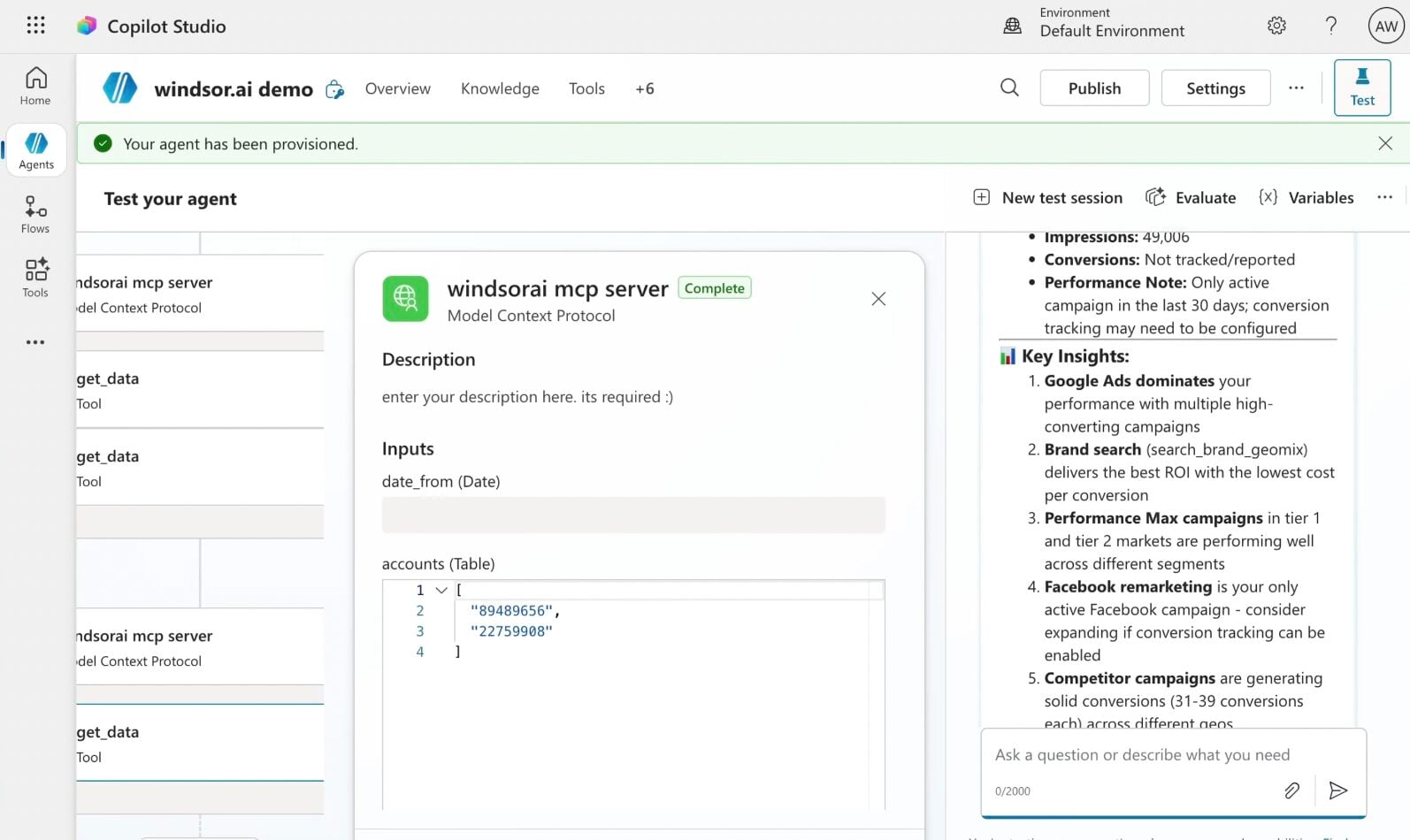














How to connect TikTok Organic to Copilot Agent with Windsor.ai
Explore our step-by-step guide to integrate your TikTok Organic data into Copilot with the Windsor.ai connector.
Connect data source in Windsor.ai dashboard
Connect your TikTok Organic to Windsor.ai. Select the necessary account(s) you want to pull data from and click “Next.”

Create a new agent (Windsor MCP) in Copilot
In Microsoft Copilot Studio, create a new agent.
Click + Add tool and select + New tool -> Model Context Protocol.
- Server Name: Windsor MCP
- Server URL: https://mcp.windsor.ai
- Authentication: API Key
- Header name: Authorization

Create a new connection
On the next screen, click the dropdown under ‘Not connected’ and select Create new connection.
⚠️ Important: Enter your Windsor API key with the Bearer prefix.

Confirm credentials and start querying
Start a new chat. Copilot will prompt you to connect to Windsor MCP via the Connections manager. Click Connect -> Submit.
Return to the chat and click Retry in your agent prompt.
You can now ask questions about your integrated Windsor.ai data.
FAQs
Which TikTok Organic data is available for analysis with Windsor.ai?
Windsor.ai’s TikTok Organic connector gives Copilot Agent access to 90+ metrics and dimensions in four categories:
- Video performance: total views, likes, shares, comments, favorites, full video watched rate, average watch time, total watch time, video reach, new followers per video, and profile views per video.
- Audience demographics: age group, gender, country, city distribution at both account and video level, new vs. returning viewers, follower vs. non-follower breakdown.
- Follower and account growth: daily follower gains, daily follower losses, total followers, following count, engaged audience, profile views, bio link clicks, website clicks.
- Content discovery: impression sources by video (For You, Follow, Hashtag, Sound, Search), video retention percentage by second, audience activity by hour.
Can I combine TikTok Organic data with TikTok Ads in Copilot Agent?
Yes. Connect both TikTok Organic and TikTok Ads through Windsor.ai and ask Copilot to compare organic video views, engagement, and profile actions against paid campaign performance in the same conversation.
Can Copilot Agent analyze video retention second by second?
Yes. Windsor.ai pulls video view retention percentage at each second of your videos, allowing Copilot to identify the exact moment viewers drop off.
What prompts can I use when analyzing TikTok Organic data in Copilot Agent?
Here are examples of more specific prompts you can use to dive deep into your TikTok Organic data:
-
Analyze the video retention curve for my top 5 most-viewed videos. At which second does each video experience the sharpest drop in viewers? Identify whether the drop-off pattern is consistent across all videos or unique to specific content types.
-
Compare new viewer percentage vs. returning viewer percentage across my last 30 videos. Which content attracts the most new audiences and which retains existing followers? Is there a pattern in video length or topic?
-
Show my top 10 videos by new followers generated. For each show total views, full video watched rate, and impression sources. Which content format drives the most follower growth per view?
-
Connect my TikTok Organic data with TikTok Ads and compare video views, profile views, and engagement rates between organic and paid content over the last 30 days. Which organic videos show strong enough performance to justify boosting with paid spend?
How much does it cost to integrate TikTok Organic into Copilot using Windsor.ai?
Windsor.ai is free to start, no credit card required. Paid plans start at $19/month and scale by the number of sources and accounts. See the pricing page.
How long does it take to connect TikTok Organic to Copilot?
With Windsor MCP, the integration process takes a few minutes. No technical expertise or coding is required; connecting data to Copilot is simple, straightforward, and accessible to everyone.
Do you have helpful links to get started with integrating TikTok Organic and Copilot Agent using Windsor.ai?
Yes, we have helpful resources to help you get started. You can explore our official documentation and tutorials for seamless TikTok Organic to Copilot Agent integration with Windsor.ai:
Tired of manual TikTok Organic data exports? Try Windsor.ai today to automate your reporting


