 Destinations
 Data sources
 AI insights
 About us
 Careers
 Security
 Customer reviews
 Contact us
 Affiliate program
 Solution partners
 Template gallery
 Looker Studio templates
 Power BI templates
 Excel templates
 Google Sheets templates
 Tableau templates
 Facebook Ads templates
 Google Ads templates
 Data fields & Metrics
 AI prompt library & Guides
 Product documentation
 API documentation
 Case studies
 Blog
 Data models
 Windsor vs Supermetrics
 Windsor vs Funnel.io
 Windsor vs Fivetran
 Windsor vs Rivery
 Windsor vs Portermetrics
 Windsor vs Coupler.io
Connect TikTok Organic to Cursor
Connect your TikTok Organic data to Cursor with the Windsor.ai connector, so the dashboards and scripts Cursor builds use your real video, engagement, follower and audience data.
Ask Cursor for a video performance canvas, a posting time chart or a follower growth report built on your own Video Views Count, Full Video Watched Rate, Audience Activity Hour and Video New Followers fields.
Forget CSVs. Stop copy/paste. Connect in minutes. No code required.
 Sign up with Google
 Free forever plan
No credit card needed










Build video reports on live TikTok Organic data in your Cursor project
Cursor works inside your project, so what it builds from your TikTok Organic data stays with you as files, scripts and canvases you can rerun. Key use cases:

Rank videos by views and completion
Cursor can build a canvas of each Video Caption by Video Views Count, Full Video Watched Rate and Video Shares Total Count.

Find videos that bring followers
Ask for a script that ranks videos by Video New Followers and saves the list with Video Create Time to a file.

Check watch time against length
Video Average Time Watched next to Video Duration shows which videos people watch to the end.

Post when your audience is active
Cursor can chart Audience Activity Hour and write the hours with the most active followers to a note you keep.
Using Windsor.ai to connect data from TikTok Organic to Cursor
Without Windsor.ai, Cursor builds on placeholder numbers or on CSV exports you paste into the project. Windsor MCP gives Cursor live TikTok Organic data with the real field names, so the dashboards and scripts it writes match your account.
Connect in minutes, then ask Cursor to build something with your TikTok Organic data.


How to connect TikTok Organic to Cursor with Windsor.ai
Explore a step-by-step guide to add Windsor MCP to Cursor and start building on your TikTok Organic data.
Connect TikTok Organic in the Windsor.ai dashboard
Choose TikTok Organic as your data source and sign in to grant Windsor.ai access to your account.

Add Windsor MCP in Cursor
Open Settings in Cursor Desktop and go to Tools & Integrations → New MCP Server. When mcp.json opens, add Windsor:
{
  "mcpServers": {
    "windsor": {
      "url": "https://mcp.windsor.ai/"
    }
  }
}
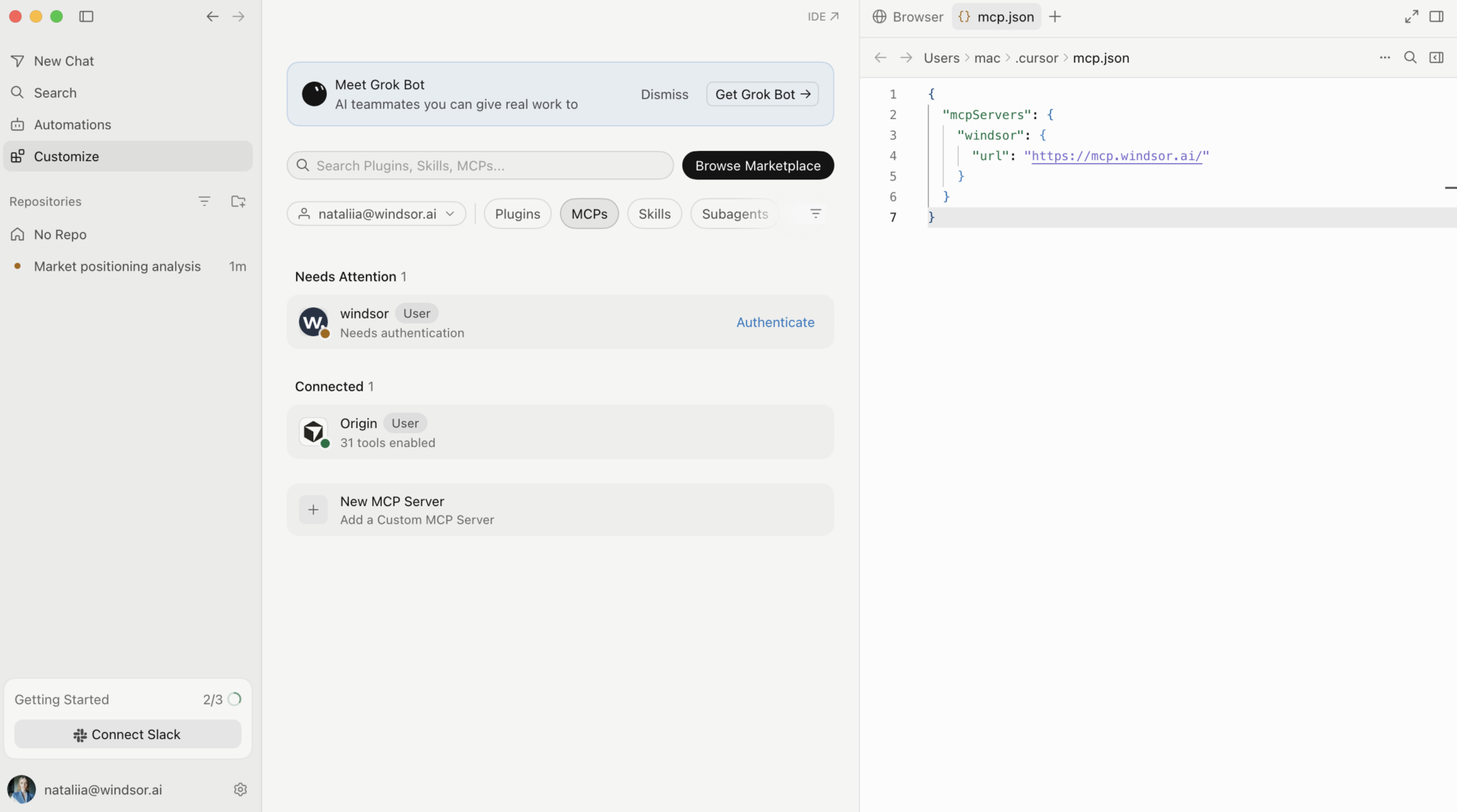
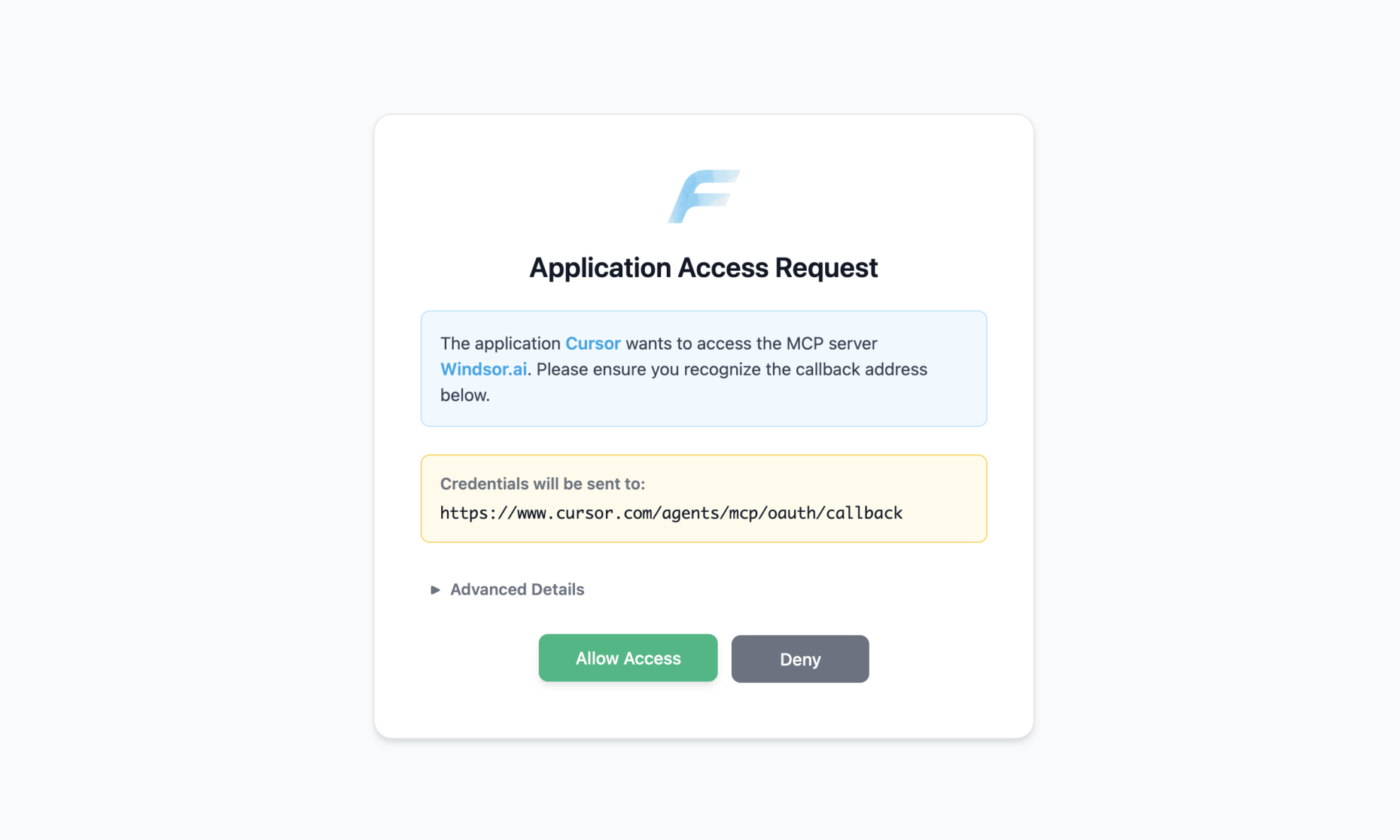
Authenticate with Windsor.ai
Save mcp.json. Windsor appears in your MCP list and asks you to authenticate. Click Authenticate and sign in to Windsor.ai in the browser.
Ask Cursor to build on your TikTok Organic data
Open a chat in your project and ask about your TikTok Organic data.
FAQs
What TikTok Organic data can Cursor use?
Windsor.ai gives Cursor access to 120 TikTok Organic fields. These are some of the groups; the TikTok Organic field reference lists all of them:
- Videos: Video Caption, Video Create Time, Video Duration, Video Views Count, Video Reach (Unique Viewers Total Count), Video Average Time Watched, Full Video Watched Rate.
- Engagement: Video Likes Total Count, Video Comments Total Count, Video Shares Total Count, Video Favorites Total Count, Video New Followers.
- Account: Total Followers Count, Daily Total Followers Growth, Profile Views, Bio Link Clicks.
- Audience: Audience Country, Audience Gender, Audience Ages Age Group, Audience Activity Hour.
What prompts can I use to build with TikTok Organic data in Cursor?
Cursor works best when you ask it to build something with a clear output. Each of these names the fields to use and the file or canvas you want back:
-
Pull Video Caption, Video Create Time, Video Views Count, Video Reach (Unique Viewers Total Count), Full Video Watched Rate and Video Shares Total Count for videos from the last 30 days. Build a canvas that ranks videos by views, shows the first 60 characters of each caption, and marks videos with a full watch rate above the account median.
-
Pull Video Caption, Video Create Time, Video Views Count and Video New Followers for this quarter. Write a Python script that calculates new followers per 1,000 views for each video and writes top_videos.csv sorted by that rate.
-
Pull Video Duration, Video Average Time Watched and Full Video Watched Rate for my last 20 videos. Build a scatter chart of average time watched as a share of duration, and list the videos where viewers leave before the halfway point.
-
Pull Audience Activity Hour and Audience Country. Build a chart of follower activity by hour and write posting_times.md with the three busiest hours and the top countries, so I can plan when to post.
-
Pull Total Followers Count, Daily Total Followers Growth, Profile Views and Bio Link Clicks by Date for the last 12 weeks. Write a weekly report as tiktok_account.md with the totals by week, and keep the script in the project so I can rerun it.
Can Cursor turn TikTok Organic data into dashboards I can share?
Yes. Cursor can render a dashboard, analysis or report as a canvas next to the chat, and it saves the canvas so you can reopen and rerun it later with fresh data. On paid Cursor plans you can publish a canvas to a read-only share link that members of your Cursor team can open. See the Cursor canvas documentation for the current plan requirements.
Can Cursor change my TikTok Organic data?
No. The TikTok Organic connector is read-only. Cursor reads your TikTok Organic data through Windsor MCP and can write scripts, files and reports in your project, but it cannot create, edit or delete anything in TikTok Organic.
Can I combine TikTok Organic data with other sources in Cursor?
Yes. Windsor.ai supports 350+ data sources, so you can connect TikTok Organic alongside tools such as TikTok Ads, Instagram or YouTube and ask Cursor to work with them together. For example, ask Cursor to put TikTok Organic Video Views Count by week next to TikTok Ads Cost for the same weeks, and build one chart of organic views and paid spend.
How do I add Windsor MCP to Cursor?
Open Settings in Cursor Desktop, go to Tools & Integrations → New MCP Server, and add Windsor to mcp.json:
{
  "mcpServers": {
    "windsor": {
      "url": "https://mcp.windsor.ai/"
    }
  }
}
Save the file, click Authenticate next to Windsor in your MCP list, and sign in to Windsor.ai in the browser.
Do I need to code to connect TikTok Organic to Cursor?
No. The connection takes no code: connect TikTok Organic in Windsor.ai, add Windsor to Cursor’s MCP settings, and sign in. After that you describe what you want in plain language, and Cursor writes and runs the code. You can read and edit everything it produces.
How much does it cost to integrate TikTok Organic with Cursor using Windsor.ai?
The free forever plan covers 1 data source, so connecting TikTok Organic on its own costs nothing and needs no credit card. Combining TikTok Organic with other sources, such as TikTok Ads, needs a paid plan: $19/month for 3 sources or $99/month for 7. Cursor is billed separately by Cursor. See the pricing page.
Do you have helpful links to get started with TikTok Organic and Cursor?
Yes. These are the resources to start with for the TikTok Organic to Cursor integration:
Tired of manual TikTok Organic data exports? Try Windsor.ai today to build on live data


