 Destinations
 Data sources
 AI insights
 About us
 Careers
 Security
 Customer reviews
 Contact us
 Affiliate program
 Solution partners
 Template gallery
 Looker Studio templates
 Power BI templates
 Excel templates
 Google Sheets templates
 Tableau templates
 Facebook Ads templates
 Google Ads templates
 Data fields & Metrics
 AI prompt library & Guides
 Product documentation
 API documentation
 Case studies
 Blog
Blog Data models
 Windsor vs Supermetrics
 Windsor vs Funnel.io
 Windsor vs Fivetran
 Windsor vs Rivery
 Windsor vs Portermetrics
 Windsor vs Coupler.io
Connect Yandex Metrica to ChatGPT
Automatically sync your Yandex Metrica session and page-view data to ChatGPT using the Windsor.ai connector.
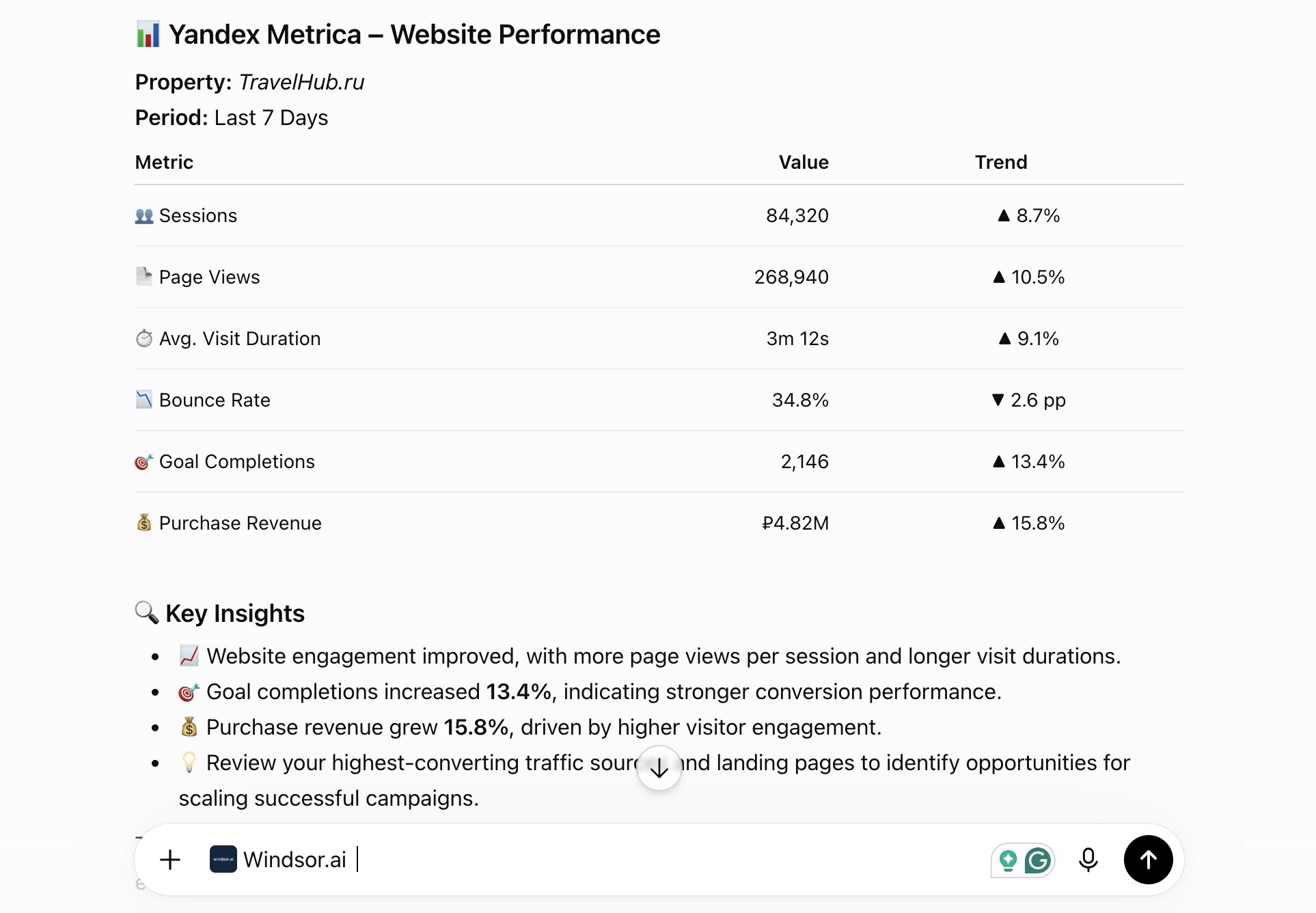
Ask ChatGPT questions in plain English about traffic sources, device mix and offline calls on your site, with no custom export pipeline.
Forget CSVs. Stop copy/paste. Connect in minutes. No code required.
 Sign up with Google
 Free forever plan
No credit card needed
Free forever plan
No credit card needed










Analyze raw session data with Yandex Metrica to ChatGPT integration
Windsor MCP gives ChatGPT your Yandex Metrica session and page-view data without a custom export pipeline.

See which sources lead to purchases
Use the last traffic source, UTM and purchase revenue fields together to count which channels lead to completed purchases.

Spot broken pages and errors
Use HTTP error and download fields to catch pages throwing errors or triggering unexpected downloads before users complain.

Analyze device and screen mix
Break sessions down by device category, screen resolution and operating system to see how your audience views your site.

Track offline calls
Use offline call duration, missed-call flag, and call tag fields to connect phone conversions back to the session that generated them.
Using Windsor.ai to connect data from Yandex Metrica to ChatGPT
Yandex Metrica’s raw session and page-view data usually requires a custom export pipeline before you can analyze it anywhere else. Windsor MCP streams that data directly into ChatGPT.
Connect once and start asking questions about traffic sources, device mix, and offline call conversions in plain English. For example questions that combine web analytics with Search Console and ad data, see how to use Windsor.ai for web analytics.














How to connect Yandex Metrica to ChatGPT with Windsor.ai
Explore our video tutorial and a step-by-step guide to integrate your Yandex Metrica data into ChatGPT with the Windsor.ai connector.
Connect Yandex Metrica in the Windsor.ai dashboard
Choose Yandex Metrica as your data source. Windsor.ai asks for two values: a Yandex OAuth token with the metrika:read permission in Authentication Token, and your tag number in Counter ID. Paste both and click Add Account.

Install the Windsor.ai connector
In ChatGPT, click Plugins in the sidebar and search for Windsor.ai, or open the Windsor.ai plugin page. Click Install plugin and sign in to your Windsor.ai account when asked.

Query your Yandex Metrica data in ChatGPT
Open a new chat and ask questions about your connected Yandex Metrica data in plain English.
FAQs
What Yandex Metrica data can I analyze in ChatGPT?
Windsor.ai gives ChatGPT access to all 238 Yandex Metrica fields: two tables of individual session and page-view rows that ChatGPT can count and aggregate when you ask, plus shared fields such as account, source and date parts:
- Sessions (136 fields): traffic source, UTM parameters, GCLID, ecommerce purchase and product data, device category, screen resolution, operating system, and offline call tracking (duration, missed status, tag).
- Page views (81 fields): URL, page title, referrer, HTTP error status, bounce flag, file downloads, and UTM parameters.
Can ChatGPT tell me which traffic sources lead to purchases?
Yes. Windsor.ai streams last traffic source and UTM data alongside purchase revenue and product fields on the same session row, so ChatGPT can count how many sessions from each source ended in a completed purchase.
Can ChatGPT find pages that are throwing errors or triggering unexpected downloads?
Yes. Every page view includes an HTTP error field and a download flag, so ChatGPT can surface URLs with elevated error rates or unusual download activity.
Can ChatGPT connect offline phone call conversions back to the session that generated them?
Yes. Windsor.ai sends offline call duration, missed-call status and call tag with the session’s traffic source and campaign data, so ChatGPT can link each call to the campaign that brought the visitor.
What prompts can I use to analyze Yandex Metrica data in ChatGPT?
-
Count sessions by operating system and device category for the last 30 days. Is mobile traffic converting at a different rate than desktop?
-
Find sessions with a purchase where the last traffic source was organic search. What UTM campaigns, if any, were involved earlier in the session?
-
List the pages with the highest bounce rate (using the notBounce flag) over the last 14 days, along with their referrer.
-
Break down offline calls by talk duration and campaign for the last 30 days. Which campaigns generate the longest, most substantive calls?
How do I get a Yandex Metrica token for Windsor.ai?
Create it in Yandex OAuth while signed in to the Yandex account that owns the Metrica tag or has access to it:
- Open oauth.yandex.com, create an app and choose For API access or debugging.
- Under data access, add metrika:read. If you sign in with an organization account, also add passport:business.
- Click Create app and copy the ClientID.
- Open
https://oauth.yandex.com/authorize?response_type=token&client_id=YOUR_CLIENT_IDwith your ClientID, click Allow and copy the token shown. - Paste it into the Authentication Token field in Windsor.ai.
Windsor.ai only reads your Yandex Metrica data, so metrika:read is the only Metrica permission it needs. Yandex describes the same steps in its Metrica API authorization guide.
Where do I find my Yandex Metrica Counter ID?
The Counter ID is your tag number. Yandex’s English interface calls counters “tags”. Open any report for the tag in Metrica: the number after id= in the address bar is the Counter ID. It is also in the tag code under Settings, on the Tag tab.
To report on several sites, enter each tag’s Counter ID with a token and click Add Account again.
Why did my Yandex Metrica connection stop returning data?
The token has usually expired or lost access. Yandex issues tokens for a limited time (its documentation gives one year for Metrica access as an example). A token also stops working when the Yandex account’s password changes, or when its owner loses access to the tag. Create a new token with the same steps and add it in Windsor.ai with the same Counter ID.
How much does it cost to integrate Yandex Metrica into ChatGPT using Windsor.ai?
Windsor.ai is free to start, no credit card required. Paid plans start at $19/month and scale by the number of sources and accounts. See the pricing page.
Can I combine Yandex Metrica data with other channels in ChatGPT?
Yes. Windsor.ai supports 350+ data sources, so you can connect Yandex Metrica alongside Google Ads or Meta Ads to see how paid campaigns relate to on-site session behavior and purchases.
Do you have helpful links to get started with integrating Yandex Metrica and ChatGPT using Windsor.ai?
Yes. These pages cover the Yandex Metrica fields, the ChatGPT setup and web analytics questions to ask with AI:
- Yandex Metrica Field Reference: every session and page-view field ID with its type.
- ChatGPT Integration Documentation: installing the Windsor.ai plugin in ChatGPT, step by step.
- How to use Windsor.ai for web analytics with AI: example questions that combine analytics, Search Console and ad data.
Tired of manual Yandex Metrica data exports? Try Windsor.ai today to automate your reporting


