 Destinations
 Data sources
 AI insights
 About us
 Careers
 Security
 Customer reviews
 Contact us
 Affiliate program
 Solution partners
 Template gallery
 Looker Studio templates
 Power BI templates
 Excel templates
 Google Sheets templates
 Tableau templates
 Facebook Ads templates
 Google Ads templates
 Data fields & Metrics
 AI prompt library & Guides
 Product documentation
 API documentation
 Case studies
 Blog
Blog Data models
 Windsor vs Supermetrics
 Windsor vs Funnel.io
 Windsor vs Fivetran
 Windsor vs Rivery
 Windsor vs Portermetrics
 Windsor vs Coupler.io
Connect YouTube to ChatGPT
The Windsor.ai plugin gives ChatGPT your channel’s YouTube Analytics: views, watch time, average percentage viewed, traffic sources and subscribers, per video and per day, plus your audience’s age and gender.
Ask which video lengths hold viewers, which older videos still bring views and how Shorts compare with long-form, across every video at once.
 Sign up with Google
 Free forever plan
No credit card needed
Free forever plan
No credit card needed









What you can do with YouTube data in ChatGPT
Nataliia Plakhonina, who runs the Windsor.ai YouTube channel, judges a video on views, engaged views, average view duration, likes and comments together. “In YouTube Studio, I can see analytics per video, but it’s hard to compare videos side by side,” she says. With many videos, comparing them would mean a Google Sheets table updated every week.
Through the plugin, ChatGPT reads your channel’s YouTube Analytics for every video and day when you ask, and answers in a table. We asked the questions below about the Windsor.ai YouTube channel in October 2026, for 3 July to 30 September 2026, and checked each answer against the same data pulled from the connector ourselves.

See which video lengths hold viewers
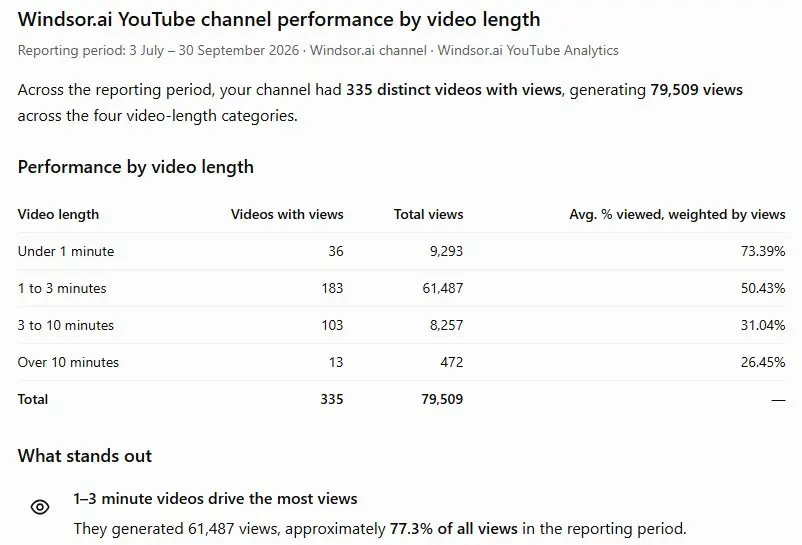
We asked ChatGPT to group our videos by length and show views and the average percentage viewed for each group. Videos of 1 to 3 minutes brought 61,487 of 79,509 views (77%), with viewers watching 50% of each video on average. Videos of 3 to 10 minutes held 31%, and those over 10 minutes 26%. Videos under a minute showed 73%, but that figure is lifted by Shorts replays: several of our Shorts are above 100% viewed. Every number matched our own pull.

Find older videos that still bring views
Ask which videos published before a date got the most views in a recent period. For our channel, a product overview published in September 2025 led with 1,294 views from July to September 2026, and a December 2023 video on our Data Studio connectors came second with 581. By our own count, the 182 videos published before 2026 brought 13% of the period’s views. ChatGPT’s per-video numbers matched the connector, but it gave the channel total as 79,559, 50 more than the connector returns for those dates, so ask it to show the total it divides by.

Compare Shorts with long-form
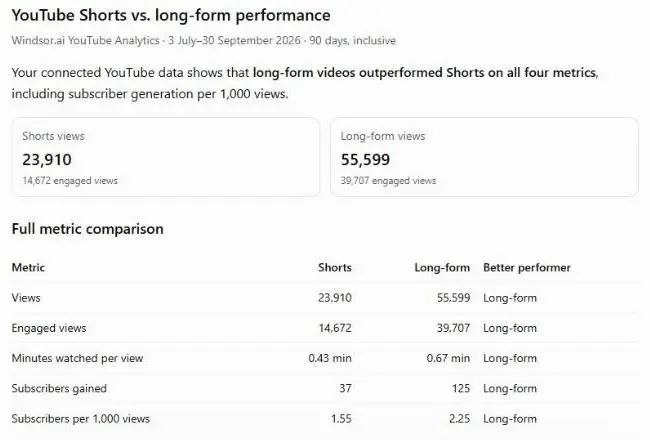
The content type field separates Shorts, regular videos, live streams and stories, so ChatGPT does not have to guess from length. From 3 July to 30 September 2026, our Shorts had 23,910 views and 1.55 subscribers per 1,000 views; long-form videos had 55,599 views and 2.25 subscribers per 1,000. For Shorts, ask for engaged views too: since 31 March 2025 YouTube counts every Shorts play and replay as a view.

Put YouTube next to your other data
With GA4 connected as well, ask whether weeks with more YouTube views also brought more website sessions from YouTube. GA4 cannot tell which video sent a visit unless the links in your video descriptions carry UTM tags. Each extra source counts toward your Windsor.ai plan.
What YouTube data ChatGPT gets through Windsor.ai
The plugin gets your channel’s data from the YouTube Analytics API and the YouTube Data API. You sign in with the channel owner’s Google account, or with an owner or manager of the Brand Account if the channel still uses one. People invited through YouTube Studio’s channel permissions cannot connect it, because YouTube does not give them API access.
- Performance per video and per day: views, engaged views, estimated minutes watched, average view duration, average view percentage, likes, dislikes, comments, shares, subscribers gained and lost, playlist adds and removes.
- Channel: subscribers gained and lost per day, total subscribers, total views, number of public videos.
- Video details: title, description, tags, category, length, publish date, privacy status, whether captions exist.
- How viewers found you: traffic source (YouTube search, suggested videos, external sites, Shorts feed, playlists, notifications).
- Audience: age group and gender as percentages of viewers.
The plugin does not include impressions, thumbnail click-through rate, the audience retention curve inside a video, device type, revenue, or the site or search term behind a view (checked 9 October 2026). When we asked ChatGPT for videos with a high click-through rate, it said the data was not there and did not make up a list. YouTube Studio shows all of these.
The YouTube connection is read-only. ChatGPT can analyze your channel and draft titles, descriptions or a publishing plan, but it cannot upload, edit or delete anything on YouTube.














How to connect YouTube to ChatGPT data with Windsor.ai
Watch the video or follow the steps below. The full setup, with troubleshooting, is in our guide to connecting YouTube Analytics to ChatGPT.
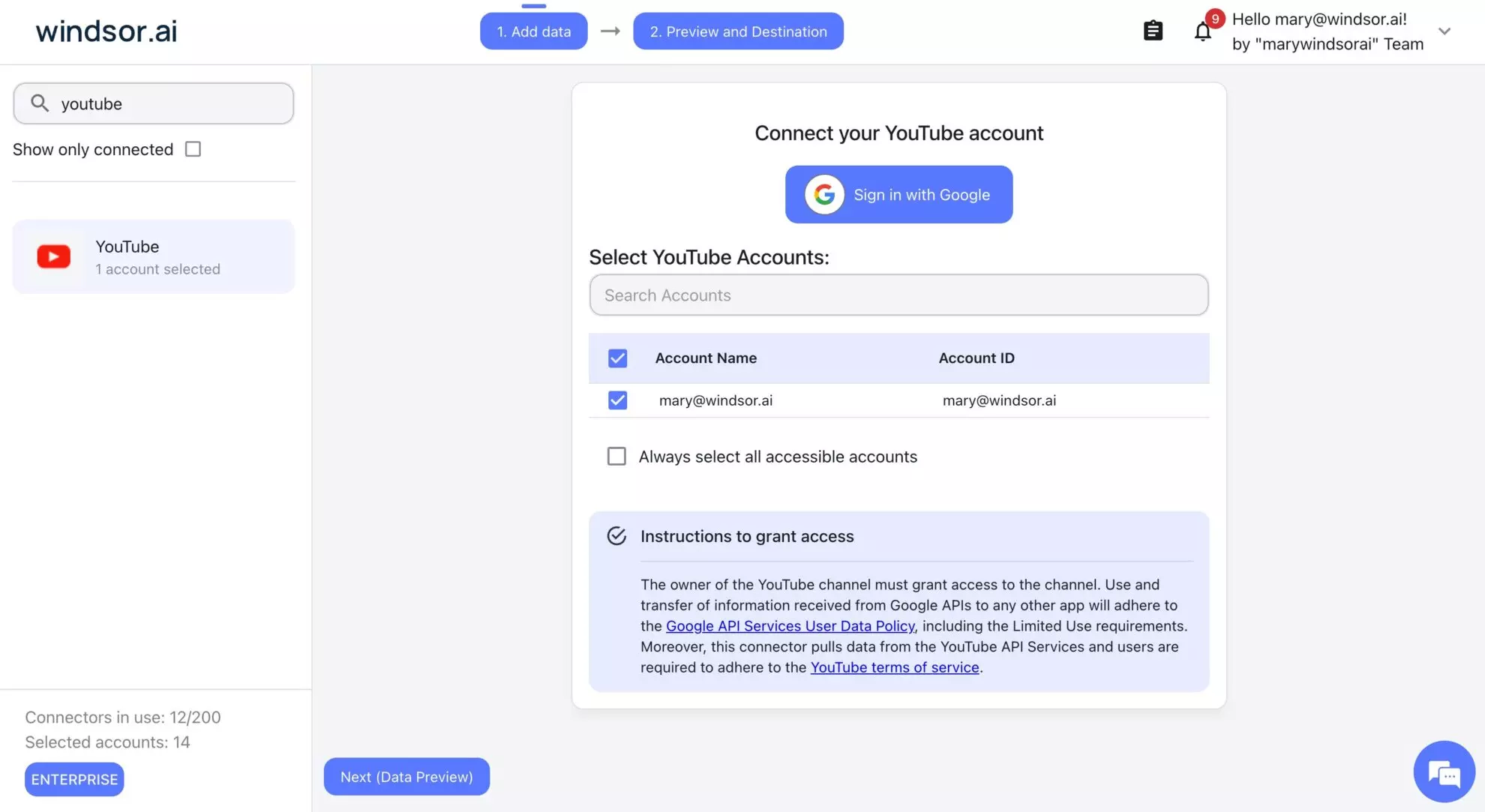
Connect YouTube in Windsor.ai
Open onboard.windsor.ai/app/youtube, sign in with Google as the channel owner (or a Brand Account owner or manager) and select your channel.
Add the Windsor.ai plugin in ChatGPT
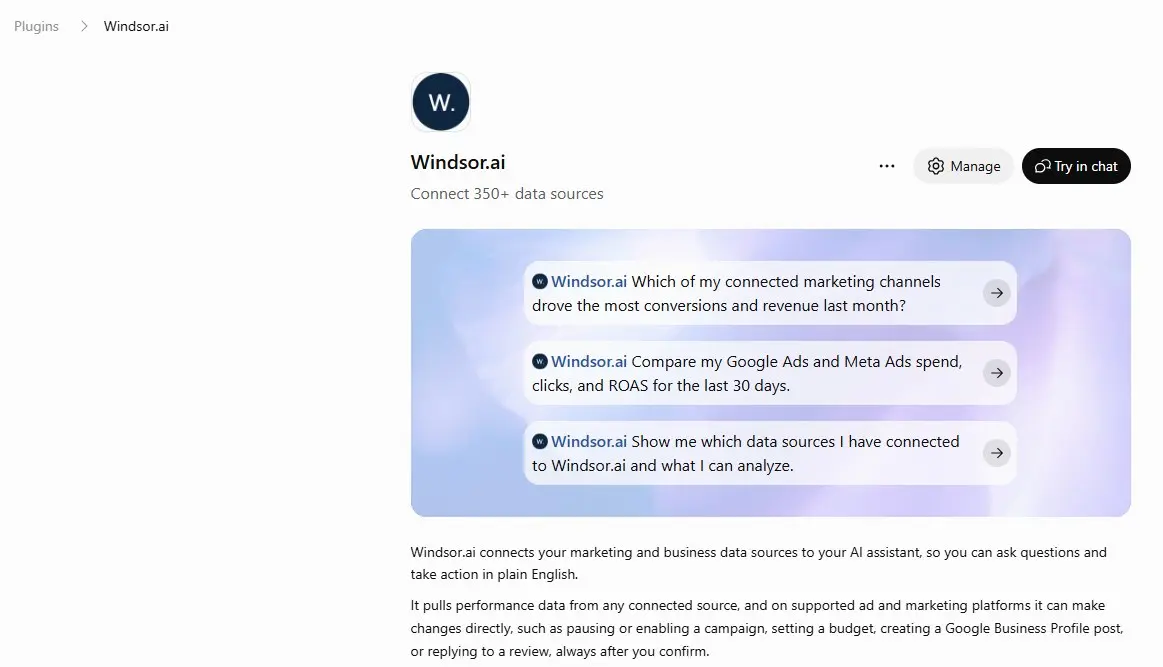
Open the Windsor.ai plugin page in ChatGPT and click Connect (or Install plugin, if that is the button you see). Sign in to Windsor.ai when ChatGPT asks.
Ask about your channel
In a new chat, click + and choose Windsor.ai, or type @Windsor and pick it from the Plugins list. Then ask, for example, “Which videos published before 2026 got the most views in the last 90 days?”
Ways to get YouTube data into ChatGPT
A CSV export from YouTube Studio, uploaded to a chat, works for one report and one period at a time, and includes what Studio shows in that report. The Windsor.ai plugin reads every video and day when you ask, so you can change the question without exporting again, and it can put YouTube next to GA4, Search Console or ad accounts in the same chat. For impressions, thumbnail click-through rate and retention curves, use YouTube Studio.
FAQs
Can ChatGPT watch my YouTube videos through Windsor.ai?
No. Through the plugin, ChatGPT gets your channel’s numbers and each video’s title, description, tags and length, not the picture or sound. When we pasted a link to one of our videos into ChatGPT, it said it could not retrieve the video and asked us to upload it. To give ChatGPT what a video says, copy its transcript from YouTube (Show transcript in the description) into the chat.
Which YouTube metrics can I analyze in ChatGPT?
Views, engaged views, watch time, average view duration, average view percentage, likes, comments, shares and subscribers gained and lost, per video and per day; traffic sources; content type (Shorts, videos, live streams, stories); viewer age and gender; and video details such as title, tags and length. See the YouTube field reference for every field.
Can I see where viewers drop off inside a video?
No. The plugin does not include the audience retention curve. You get average view duration and average percentage viewed per video. The second-by-second graph is only in YouTube Studio.
Does it include impressions and thumbnail click-through rate?
No. When we asked ChatGPT for videos with a high click-through rate, it said the data was not available and did not make up a list. YouTube Studio shows impressions and click-through rate.
Will ChatGPT's numbers match YouTube Studio?
Mostly, with known differences. YouTube says Studio data can take a few days to appear, and totals for recent dates keep growing. Studio’s Average view duration is not watch time divided by views. Studio notes that views are counted differently from 27 August 2026, so compare periods on the same side of that date. For the 3 months we tested, YouTube Studio showed 79,542 views and the connector 79,509.
Does it work for Shorts?
Yes. Each video is labeled by content type, so ChatGPT can compare Shorts with long-form without guessing from length; Shorts uploaded since 15 October 2024 can be up to 3 minutes long. Compare engaged views as well as views, and expect some Shorts to show more than 100% viewed, because replays add watch time.
How fresh is the YouTube data in ChatGPT?
ChatGPT requests the data from Windsor.ai each time you ask. Recent days can come from Windsor.ai’s cache, and on plans with hourly refresh the most recent days can be fetched again. YouTube itself can take a few days to finish recent data.
Can ChatGPT change my videos or channel?
No. The YouTube connection is read-only: it had no write actions when we checked on 11 October 2026. ChatGPT can draft titles, descriptions or a posting plan, and you make the changes in YouTube Studio.
Can I connect a Brand Account channel?
Yes. Sign in with the channel owner’s account, or as an owner or manager of the Brand Account if the channel has not moved to YouTube Studio’s channel permissions. People invited through channel permissions (Manager, Editor or Viewer) cannot connect it, because YouTube does not give them API access.
Does OpenAI train on my YouTube data?
OpenAI says that on Free, Plus, Go and Pro plans it may use information accessed through apps to train its models if “Improve the model for everyone” is on in your data controls. On Business, Enterprise and Edu plans it does not by default.
How much does it cost?
The ChatGPT plugin is included on every Windsor.ai plan. The free forever plan covers one data source and one account with no credit card, with the last 30 days of data. Paid plans start at $19 a month for 3 sources and $99 a month for 7, billed annually. See the pricing page.
Can I connect YouTube to Gemini Enterprise too?
Yes. Windsor.ai adds your YouTube channel data to Gemini Enterprise as a data store, set up in Google Cloud. The steps are in how to connect YouTube Analytics to Gemini Enterprise.
Ask ChatGPT about your YouTube channel. Try Windsor.ai free


