Destinations
 Data sources
 AI insights
 About us
 Careers
 Security
 Customer reviews
 Contact us
 Affiliate program
 Solution partners
 Template gallery
 Looker Studio templates
 Power BI templates
 Excel templates
 Google Sheets templates
 Tableau templates
 Facebook Ads templates
 Google Ads templates
 Data fields & Metrics
 AI prompt library & Guides
 Product documentation
 API documentation
 Case studies
 Blog
Blog Data models
 Windsor vs Supermetrics
 Windsor vs Funnel.io
 Windsor vs Fivetran
 Windsor vs Rivery
 Windsor vs Portermetrics
 Windsor vs Coupler.io
Understanding your Monthly Active Rows (MARs) usage in Windsor.ai
Windsor.ai has a SaaS pricing model with fixed plans, including a limited data volume per plan for database destinations, measured in Monthly Active Rows (MARs).
While Windsor.ai doesn’t charge directly per MAR usage, each plan includes a fixed MAR allowance. If your usage exceeds that amount, you can either:
- Pay for the additional MARs at your plan’s rate at the end of the billing cycle, or
- Upgrade your plan for greater included volume
MARs tracking gives you a clear view of how much data your pipelines process and helps optimize sync frequency, filtering, and source configuration.
What are Monthly Active Rows (MARs)?
Monthly Active Rows represent the number of unique rows or data records processed and streamed to your data warehouse or database destination within a given billing period. It’s a measure of how many distinct data records were actually written or updated during the month.
MARs don’t count the number of transformations or repeated queries, only the unique rows inserted or updated in the destination.
For instance, if 10,000 unique campaign-day rows were loaded to BigQuery during the billing cycle, your Monthly Active Rows = 10,000.
How Windsor.ai counts MARs
In Windsor.ai, we follow a typical approach to measuring MARs based on the total volume of unique rows transferred or updated in data warehouse destinations during a billing month:
- A unique row means a new record transferred into a supported destination.
- Data updates and overwrites also contribute to MARs, since they involve transferring new unique rows to the destination.
- MARs are reset monthly at the start of each billing cycle.
- For backfills, if there were no updates and the same set of fields is used, we don’t count MARs.
How it works: Each record your connector returns is hashed, and these unique hashes are used to determine how many distinct rows have been synced.
If a row’s data values change, its hash changes as well, so it’s counted as a new active row. If a row’s data stays identical across syncs, Windsor.ai recognizes it as unchanged and does not count it again.
This ensures you are measured only on new or updated data, not repeated syncs of the same data.
Let’s look at a simple example to understand how Windsor.ai counts Monthly Active Rows.
Suppose you have a small campaign performance table with spend and clicks:
| ID | Campaign Name | Spend | Clicks |
| a | Alpha Ads | 100 | 20 |
| b | Beta Ads | 200 | 40 |
| c | Gamma Ads | 300 | 60 |
Week 1: Initial sync
All three records are new, so 3 MARs are counted.
Week 2: Updates
If the spend for campaign b was updated from 200 to 250:
- That row’s hash changes.
- Windsor.ai counts it as a new MAR because the data for the spend field changed.
Now the total is 4 MARs for this billing month.
Week 3: No data changes
If you re-sync the same data with identical values, no new MARs are counted.
Week 4: Add new campaign
Adding a new campaign d means one new data point inserted results in +1 MAR. The total MARs this month are 5.
What counts in MAR usage in Windsor.ai
| Action | Counts toward MARs | Description |
|---|---|---|
| Inserting new data into a warehouse/database | Yes | Every new row streamed increases MARs |
| Updating an existing record | Yes | Updates create new writes to the destination, so they count toward MARs |
| Syncing to BI tools (e.g., Looker Studio, Sheets) | No | Non-database destinations don’t count toward MAR limits |
| Deletes in the source | No | Deletions in the source don’t add to MARs |
| Resyncing existing data with no changes | No | If the data is unchanged and a resync occurs, MARs are not added |
Windsor.ai’s plan tiers with the included MAR volume
| Plan | Included MARs | Rate per additional 1M MARs |
|---|---|---|
| Free | 5M | |
| Basic | 5M | $20 |
| Standard | 7.5M | $10 |
| Plus | 10M | $8 |
| Professional | 50M | $4 |
| Enterprise | 50M+ | $3 |
You can pay for the additional used MARs at the end of the billing period without changing your plan, or upgrade when your data usage consistently exceeds your allowance.
How to track your MAR usage in Windsor.ai
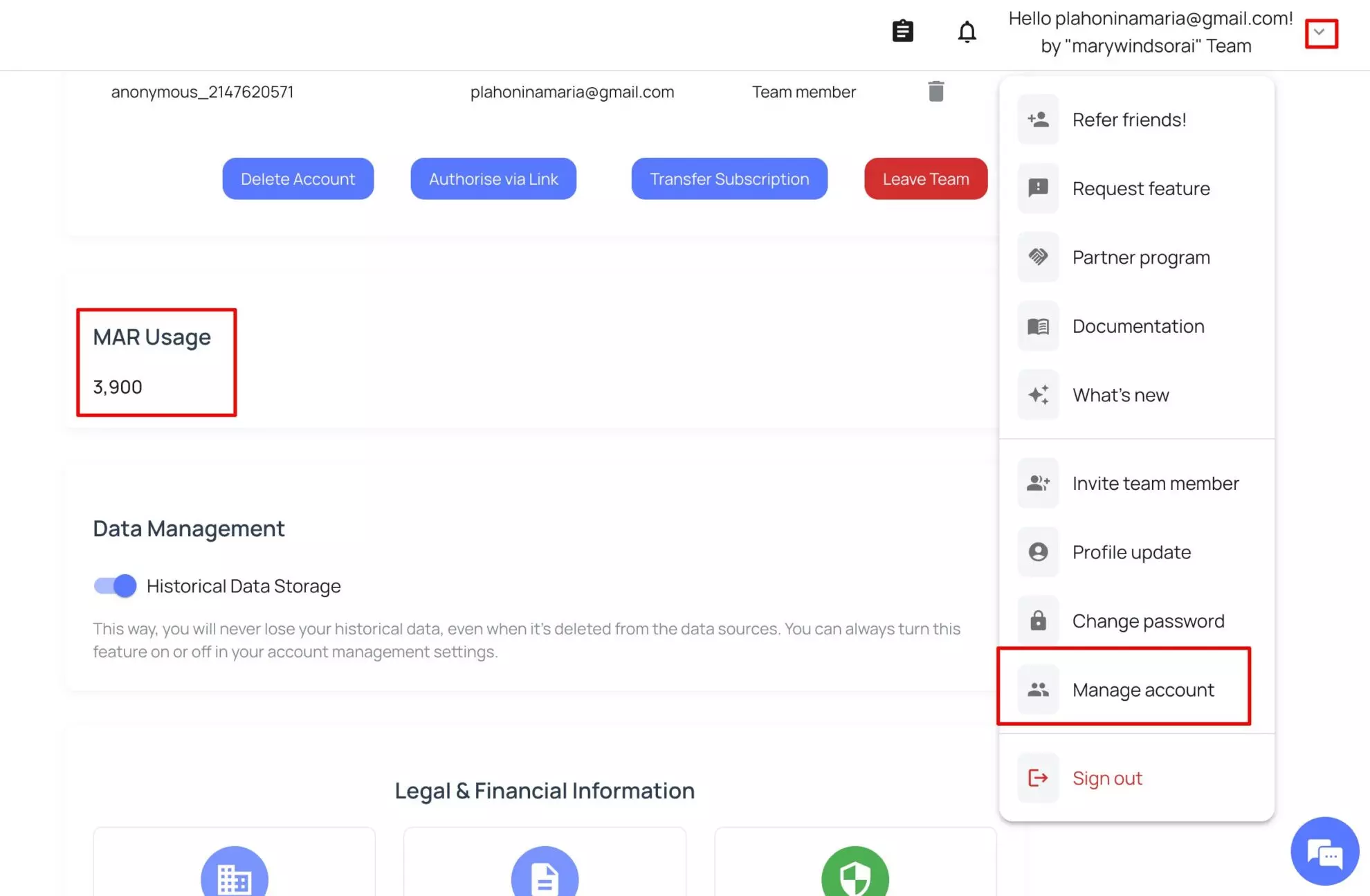
You can track MAR usage inside your Windsor.ai dashboard. Go to your windsor account. Find Settings → Manage account and click on it. Here you can see your current MARs usage.
Practical examples of counting MARs in Windsor.ai
Example 1: New rows added (increases MARs)
| Operation | Description | Result |
| You import 1,000 new leads from Salesforce to BigQuery. | Each lead is a new record written to your destination. | +1,000 MARs |
Example 2: Updating existing records (increases MARs)
| Operation | Description | Result |
| You update 300 existing rows (status or field changed). | Each update triggers a new write operation. | +300 MARs |
Example 3: Re-sync or backfill (doesn’t increase MARs)
| Operation | Description | Result |
| You re-sync a Facebook Ads table with 20,000 rows. | No row has updated data in all 20,000 rows. | +0 MARs |
Example 4: Syncing to a BI tool (no MAR impact)
| Operation | Description | Result |
| You send data to a Looker Studio dashboard. | Windsor doesn’t count MARs for BI destinations. | +0 MARs |
Example 5: Large historical import (rapid MAR increase)
| Operation | Description | Result |
| You connect Google Ads and stream 3 years of data to Snowflake (let’s say 1.5M rows of data). | Every record written adds to the MAR count. | +1.5M MARs |
Historical imports are often the biggest contributors to MAR spikes. Schedule them wisely.
Example 6: How MARs grow over time
| Week | Operation | Rows written | How they affect MARs | Cumulative MARs |
| Week 1 | Initial sync from HubSpot (100K rows) | 100K | All 100K are new records | 100K |
| Week 2 | New campaign data (50K rows) | +50k | 50K new unique rows | 150K |
| Week 3 | Update existing contacts (10K rows) | +10K | Only the records with changed fields generate new hashes and are counted. If no field changes, MARs remain the same. | Up to 160k |
| Week 4 | Backfill 2 years of deals (1M rows) | +1M | Only the new or previously unseen records are counted. Rows that already exist are not recounted. | Up to 1.16M |
Notes:
- If Week 3 contained only re-synced unchanged data: total stays 150K.
- If the 1M backfill includes previously synced rows with no changes: the final total would be lower than 1.16M, since duplicates and unchanged data aren’t counted again.
- If your plan includes 1M MARs and your final count reaches 1.16M, you will exceed 160K MARs. The additional usage will be billed at your plan’s extra MAR rate as outlined on windsor.ai/pricing.
Conclusion
Windsor.ai’s Monthly Active Rows (MARs) metric provides a transparent and efficient way to understand how much data your pipelines move every month.
By tracking unique data hashes, Windsor accurately measures only new or changed records, ensuring that unchanged or duplicate syncs never inflate your usage.
This approach gives you a fair and realistic view of your actual data activity, while Windsor’s plan-based pricing keeps your costs predictable and transparent.
Whether you are syncing marketing data into BigQuery, pushing CRM data into Looker Studio or automating dashboards across multiple destinations, your MAR usage reflects genuine data movement, not redundant re-syncs.
FAQs
Do updates to existing records increase my MAR count?
Yes, if the data actually changes. When Windsor.ai detects a change in any field of a record, the row’s hash changes, and it’s counted as a new MAR. However, if you re-sync the same unchanged data, it will not increase your MAR count.
What happens if I re-sync my data daily but nothing changes?
You won’t be charged additional MARs. Windsor.ai compares the hash of each record across syncs. If the data is identical, it’s ignored for MAR calculation. Only new or changed records contribute to your MARs.
How often does Windsor.ai reset MAR counts?
MAR counts reset automatically at the start of each new billing cycle. This allows you to monitor data movement per month aligned with your plan’s included MAR limit.
If I update the same record multiple times in one month, how is it counted?
Each unique change to the record counts as a new MAR. For example, if a campaign’s “spend” value changes three times in a month, it generates three MARs. One for each version of that record’s data.
Are historical data backfills counted in MARs?
Yes. When you backfill or re-import historical data that hasn’t been seen before, Windsor.ai counts each new row as a new MAR. If the historical data was synced earlier and hasn’t changed, it won’t add to your MARs.
Do deleted rows affect MARs?
No. Deleting a record from your source or destination does not increase or decrease your MAR usage. Windsor.ai only counts rows that are written or updated, not removed.
Does Windsor.ai count MARs separately for each destination?
Yes. If you sync the same data to multiple destinations, Windsor counts MARs independently per destination. Each destination’s sync is treated as a separate data flow.
Can I see my current MAR usage inside Windsor.ai?
Yes, you can monitor MAR usage anytime in your Windsor.ai dashboard. Go to Settings → Manage account. Here you can see your MARs usage.
Is there a way to see how many rows were pulled per sync or query?
You can view the number of rows per query in the Query history (logs). However, it shows all rows included, not only the unique ones.
What happens if I exceed the MAR limit included in my plan?
If your total MARs exceed the included limit for your plan, you’ll be billed based on the additional data volume rate specified in your pricing tier.
Tired of juggling fragmented data? Get started with Windsor.ai today to create a single source of truth