Destinations
 Data sources
 AI insights
 About us
 Careers
 Security
 Customer reviews
 Contact us
 Affiliate program
 Solution partners
 Template gallery
 Looker Studio templates
 Power BI templates
 Excel templates
 Google Sheets templates
 Tableau templates
 Facebook Ads templates
 Google Ads templates
 Data fields & Metrics
 AI prompt library & Guides
 Product documentation
 API documentation
 Case studies
 Blog
Blog Data models
 Windsor vs Supermetrics
 Windsor vs Funnel.io
 Windsor vs Fivetran
 Windsor vs Rivery
 Windsor vs Portermetrics
 Windsor vs Coupler.io
 Last updated: 11 August 2026




Most SaaS teams I’ve worked with waste close to 30 hours a week on manual data work. That’s nearly a full-time job spent exporting CSVs, fixing broken spreadsheets, and asking, “Wait, which number’s right?”
I’ve been in those rooms. Sales shows one revenue figure, marketing has another, and product says their numbers are the real ones. Instead of moving forward, the meeting circles around data debates. Nothing gets done, and everyone walks out annoyed.
But it’s not a lack of data; it’s the mess that slows down the company. Teams spend more energy wrangling numbers than actually using them.
That’s why automated ELT data pipelines matter. They pull information from all the different tools you’re already using, clean it up, and drop it in one place.
In this guide, I’ll break down how SaaS companies can boost their operational efficiency through well-designed data pipelines. We’ll also discuss real examples and use cases for teams like sales, support, and product, plus simple steps to implement data pipelines without relying on data engineers.
What are data pipelines for SaaS companies?
Back at one of the SaaS startups I worked with, we hit a wall. Customer data originated from the HubSpot app, payments were stored in a PostgreSQL database, and marketing information resided in paid media platforms and Mailchimp.
Every team had its own numbers. In meetings, people were arguing over whose spreadsheet to trust.
That’s when we set up our first data pipeline using the Windsor.ai data ingestion tool. It grabbed raw data from all those scattered places, automatically fixed the messy parts, and loaded it directly into a data warehouse (BigQuery) -> analytics tool (Looker Studio).
The steps are simple enough: collect → clean → store → use. Sources can be your web app, mobile app, CRM, API, or database. Tools like dbt, Airflow, or custom Python scripts handle the cleanup. Then the polished data is sent to a data warehouse like Snowflake, BigQuery, or Databricks, where it can be actually used or streamed further to BI tools for dashboards.
For SaaS companies, a data pipeline isn’t optional. It’s the backbone of making fast, confident decisions without getting buried in fragmented, messy data.
Why SaaS companies struggle with data
I’ve yet to meet a SaaS team that hasn’t wrestled with messy data. What should be a growth engine often feels more like quicksand.
Here’s what usually goes wrong:
Broken reporting
Manual reporting eats time like nothing else. Someone downloads CSVs, another builds pivot tables, then someone else fixes broken formulas.
By the end, the numbers don’t even match, and nobody’s sure which ones are right. And honestly, even if they are, the data’s already old.
Disconnected tools
Sales teams use a CRM like Salesforce or Pipedrive. Marketing depends on social media, advertising, and analytics apps. Product tracks everything in a tool like Mixpanel. Support logs tickets in Zendesk.
The problem is, none of these tools really talk to each other. So you’re left stitching together half-stories. The same customer shows up under three different names, and nobody trusts the information.
Delayed decisions
When the numbers don’t match, decisions stall. Leadership asks about churn or expansion revenue, and the answer takes weeks.
By then, the market’s moved on. Speed dies because no one trusts the data enough to act.
Overloaded teams
Small teams can’t keep pace once the company takes off. What worked for 100 customers collapses under 10,000.
Instead of strategy, people spend days cleaning spreadsheets and rechecking data pulls. It burns them out fast.
Lost insights
The saddest part is that valuable signals slip through the cracks. Churn warnings, product usage spikes, customer feedback you’re collecting with your feedback form – they are all hidden in scattered spreadsheets and disconnected systems. You miss chances to improve, upsell, and keep customers around.
How data pipelines solve these problems
Now let’s see how building an automated data pipeline with Windsor.ai can solve all these problems:
Time savings
Manual reporting burns hours every week. Implementing data pipelines helps reports run themselves on a schedule, accurate and ready when you need them, by relying on automated data processing to ensure accuracy and efficiency.
Dashboards stop being weekly snapshots and become live feeds of the business. A support manager sees ticket spikes the moment they happen. A product lead watches usage climb the day a new feature goes live.
Better decisions
SaaS companies waste too much energy debating numbers. Sales shows one churn rate, marketing shows another, and finance has a third version. With a unified data pipeline, all the data flows into one place and creates a single source of truth.
That consistency helps leaders act faster because they aren’t second-guessing the data. They can spot churn before it bites, pick up revenue swings early, and double down on features customers love. Incorporating competitive intelligence software can further enhance decision-making by providing insights into competitor strategies, market shifts, and emerging opportunities.
Team efficiency
The biggest shift comes inside the team. People finally get to use their skills on strategy, growth projects, and customer conversations. And because everyone runs on the same numbers, collaboration becomes smoother. The pipeline keeps the company moving forward, not sideways. That’s how pipelines free your people to actually build the business.
Windsor.ai covers all this. It’s an all-in-one tool for gathering and tracking business metrics from Google Ads, Facebook, LinkedIn, and 350+ other platforms, putting clean, unified data straight into your reporting environment.
With Windsor.ai, marketing and data teams stop pulling reports manually every week and get their time back to work on insights and optimizations instead of data wrangling.
Examples of SaaS companies using data pipelines
I’ve worked with enough SaaS teams to know that the problems feel different on the surface. But they all share the same root cause, which is messy, scattered data.
Some examples of SaaS companies using data pipelines are:
Enhancing customer success
One client had a solid product but couldn’t keep customers around. The success team only found out a customer was unhappy when the cancellation email landed. By then, the damage was done.
Once we set up a pipeline that tracked logins, feature use, and ticket activity, the picture changed. Accounts showing early signs of churn popped onto their radar automatically.
Instead of reacting too late, the team could reach out in time to fix the relationship. Churn slowed down, and morale shot up.
Increasing sales
I’ve also seen sales teams waste weeks chasing leads that were never going to buy. They had a huge list, but no clear signal on who was serious and who was kicking tires.
After connecting marketing data, trial usage, and call notes through a pipeline, reps finally had a clear view. They could see who had actually logged in, tested features, or engaged with campaigns. That focus made their lives easier and significantly increased sales.
Understanding product
Product debates are the worst when nobody has data. I sat in one meeting where three leaders argued about which feature mattered most for a fintech software development tool. It was all opinion.
With a pipeline feeding usage data into dashboards, the guessing stopped. The team could clearly see what features customers used daily, what they ignored, and where drop-offs happened.
Improving support
Support is always under pressure. At one startup, agents answered the same five questions over and over again.
When we piped all that ticket data into one system, the patterns lit up. The company built better help docs, automated the easy stuff, and trained agents on the tougher problems.
Customers solved things quickly, and support finally got room to breathe.
By moving from manual reporting to Windsor.ai, you can cut reporting time in half because the data flow becomes fully automated.
Getting started with data pipelines: simple steps any SaaS company can take
The biggest mistake I see SaaS companies make with data pipelines is that they try to build Rome in a day.
Massive plans, expensive tools, six-month timelines… and by the time anything’s live, the team has already lost faith.
Here’s how I suggest you start:
Start small (month 1)
Pick one problem that’s driving you crazy right now. Maybe it’s churn reports that take a week to pull together. Or it’s not knowing which features impact the conversions.
Don’t worry about “building a pipeline.” Worry about solving that one thing.
You don’t need an army of engineers either. With Windsor.ai, which allows you to automate data moving from any tool to BI dashboards, spreadsheets, or data warehouses, you can start in no time with zero code and maintenance. Define the data you want to analyze and let Windsor handle the rest.
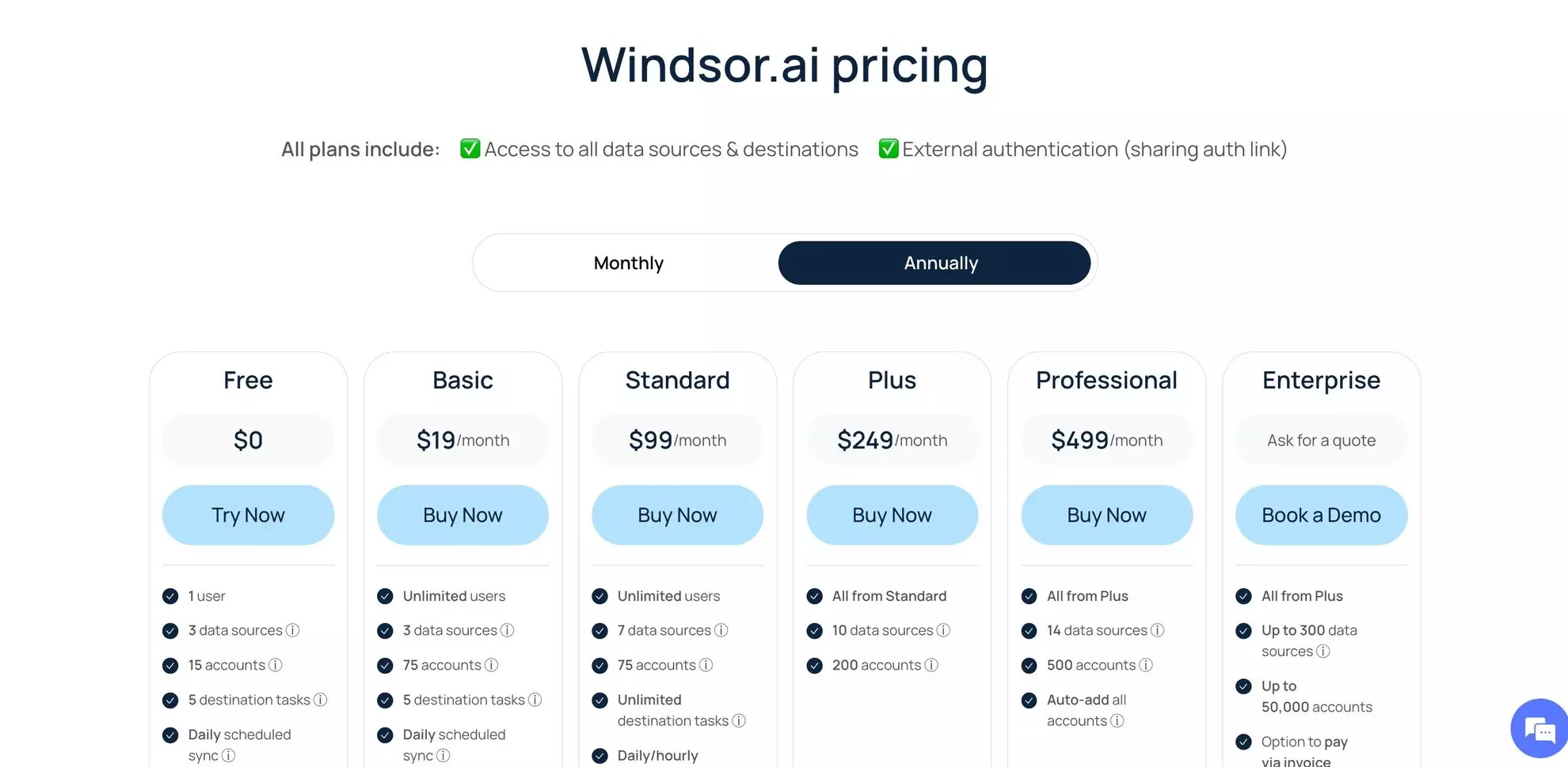
Get started with Windsor’s 30-day free trial to connect up to 3 data sources and send data to any analytical environment with daily refreshes.
Connect your main tools (month 2)
Once you’ve tasted that first win, link the next three (or more) systems: your CRM, your support tool, and your product analytics. When you merge data from all these platforms, things change.
Instead of ten different spreadsheets, you’ve got automated cross-channel reports that everyone can read.
Depending on your Windsor.ai pricing plan, you can connect as many as 350+ tools and extract near real-time updates along with the AI insights from your favourite LLM chat.
Continue adding more data sources (months 3–6)
Now expand. Pipe in support tickets so patterns stand out. Add product usage logs so you can track behavior in real time.
Connect billing and finance so revenue sits next to usage. This is how you will build a nervous system for the whole company.
You can also feed offline-to-online data into your pipeline, using a dynamic QR code generator to sync scans directly with your CRM or analytics tools for real-time customer insights.
Make it better over time
Here’s the part people forget: pipelines aren’t finished projects. They’re living systems. Keep asking teams what would make their lives easier.
Marketing might need automated reports from different paid media channels. Sales might want more details on trials. Support might want faster flags on churn signals. The product might want cohort data.
Every new connection should solve a real pain, not just add complexity. Do that, and what started as a quick fix becomes the backbone of your business.
Using Windsor.ai for SaaS data pipelines
Windsor.ai comes with pre-built connectors for 350+ marketing, sales, CRM, support, accounting, and analytics tools. They automatically pull data from your connected data sources and load it into your preferred analytical environment, be it a BI dashboard, data warehouse, or spreadsheet.
Both data teams and non-technical departments can set these up in a single afternoon without touching a line of code. They’re affordable, starting from just $19/month.
Once your data needs get heavier, with Windsor, you can easily send it to a scalable database or data warehouse. Our connectors effectively handle large volumes, giving you more control, and come with professional support.
Measuring the success and ROI of SaaS data pipelines
The question always comes up: how do you know if the pipeline’s working? The easiest way is to measure what used to frustrate you most.
Start with time. If your team spent hours every week patching spreadsheets and now those reports show up automatically, that’s a clear win.
Then look at decision speed. Before, leadership waited weeks for numbers they could trust. After the pipeline, they’re making calls in days, sometimes on the spot. That shift shows up fast in growth.
Customer impact matters too. Watch churn, support ticket resolution times, or NPS scores. When data flows smoothly, customers get faster responses, better experiences, and fewer mistakes. Those improvements show up in retention.
And of course, do the math. Compare what you spend on tools with the hours saved, the churn prevented, and the deals closed. Most SaaS companies I’ve worked with start to see real returns within three to six months after introducing Windsor.ai into their analytics workflow.
Common mistakes to avoid
A lot of SaaS teams roll out data pipelines, and the same mistakes keep showing up. They’re not usually technical slip-ups. More often, it’s how the project gets handled.
Starting too big
Ambition kills more pipeline projects than bugs. Teams try to connect everything in one go, and it just gets messy. People burn out, nothing ships, and everyone loses faith. The teams that win usually start small — one problem, one tool, one win.
Choosing tools that are too complex
I’ve seen startups pick fancy enterprise tools like Fivetran because they “look scalable.” Six months later, the dashboards are half-built, and nobody knows how to maintain them.
If you don’t have engineers sitting around, pick a no-code tool like Windsor.ai that has a simple interface and lets your teams use it right away.
Not training the team
This one’s sneaky. You set up a solid pipeline, but nobody bothers to explain it to the people who need it.
A month later, reports sit unopened because no one trusts them. Even an hour of training changes adoption completely.
Ignoring data quality
Bad data doesn’t get better just because you move it faster. If your CRM is full of duplicates, the pipeline just pushes duplicates into your dashboards.
Clean first, then connect. Otherwise, you’ll just scale the chaos.
Also, you should always run quick checks when you make any changes to your data pipelines.
Forgetting to measure results
The last mistake is not proving the value. If you can’t prove it saves time or helps make decisions, leaders probably won’t back the next change.
Conclusion
SaaS companies don’t usually fail because they lack data. The real issue isn’t a lack of data. It’s that it’s scattered everywhere, messy, and a pain to use.
A good data pipeline fixes that. It takes hours of manual work off the team’s plate and makes decisions happen faster instead of dragging on.
If you’re starting, don’t overcomplicate it. Forget the big “perfect system” for now. Just hook up the tools you already use. When people see reliable data appear without the grind, they’ll want more.
From there, grow step by step. Add new sources, refine what’s working, and keep improving. Pipelines aren’t a one-time project. They’re a system that grows with your business.
🚀 Start your Windsor.ai free trial and see how quick and simple building data pipelines for SaaS could be. No more fragmented data and manual CSV uploads. Get access to always fresh insights through the automated cross-channel reports.