 Destinations
 Data sources
 AI insights
 About us
 Careers
 Security
 Customer reviews
 Contact us
 Affiliate program
 Solution partners
 Template gallery
 Looker Studio templates
 Power BI templates
 Excel templates
 Google Sheets templates
 Tableau templates
 Facebook Ads templates
 Google Ads templates
 Data fields & Metrics
 AI prompt library & Guides
 Product documentation
 API documentation
 Case studies
 Blog
Blog Data models
 Windsor vs Supermetrics
 Windsor vs Funnel.io
 Windsor vs Fivetran
 Windsor vs Rivery
 Windsor vs Portermetrics
 Windsor vs Coupler.io
Connect Adjust to Claude
Automatically sync your Adjust data to Claude using the Windsor.ai connector.
Move beyond fragmented mobile attribution and start scaling with AI-driven insights that pinpoint wasted spend, detect fraud, and reveal your highest-value users.
Forget CSVs. Stop copy/paste. Connect data in minutes. No code required.
 Sign up with Google
 Free forever plan
No credit card needed
Free forever plan
No credit card needed










Streamline analytics with Adjust to Claude integration
Connect Adjust to Claude with Windsor.ai to turn your mobile attribution data into instant AI insights and next step recommendations. Discover key use cases below:

Measure true ROAS
With Windsor.ai, you can connect your All Revenue (Cohort) from Adjust with the Total Cost from all your ad platforms (like Google Ads, Meta, or TikTok Ads). Prompt Claude determine your true ROAS by mapping long-term user value back to the original top-of-funnel marketing spend.

Audit organic lift
Compare your Paid Installs against Organic Installs to see if your marketing spend is truly driving new users or just replacing organic ones. Ask Claude to find periods where increasing ad spend failed to move the needle on total installs, suggesting a high cannibalization rate.

Detect wasted budget
Spot early signs of inefficient spend by analyzing installs, engagement quality, and post-install revenue. Claude flags campaigns that generate volume but fail to drive real value, so you can cut spend before losses compound.
Using Windsor.ai to connect data from Adjust to Claude
Forget manual exports, API work, and time-consuming data cleanup. Windsor.ai’s connector automatically pulls, cleans, and streams your Adjust mobile attribution data directly into Claude.
Connect in minutes and use natural language prompts to audit user acquisition, detect performance drops across campaigns, and understand where to reallocate budget.















How to connect Adjust to Claude with Windsor.ai
Explore our video tutorial and a step-by-step guide to integrate your data from any source into Claude with the Windsor.ai connector.
Select your data source
Choose Adjust as your data source and grant access to Windsor.ai.

Install the Windsor.ai connector in Claude
In Claude, open Customize, then Connectors, search for Windsor and click Add. Sign in to your Windsor.ai account when prompted, and the connector appears in your Connectors list. You can also open the Windsor.ai listing in the Claude directory and click Connect.
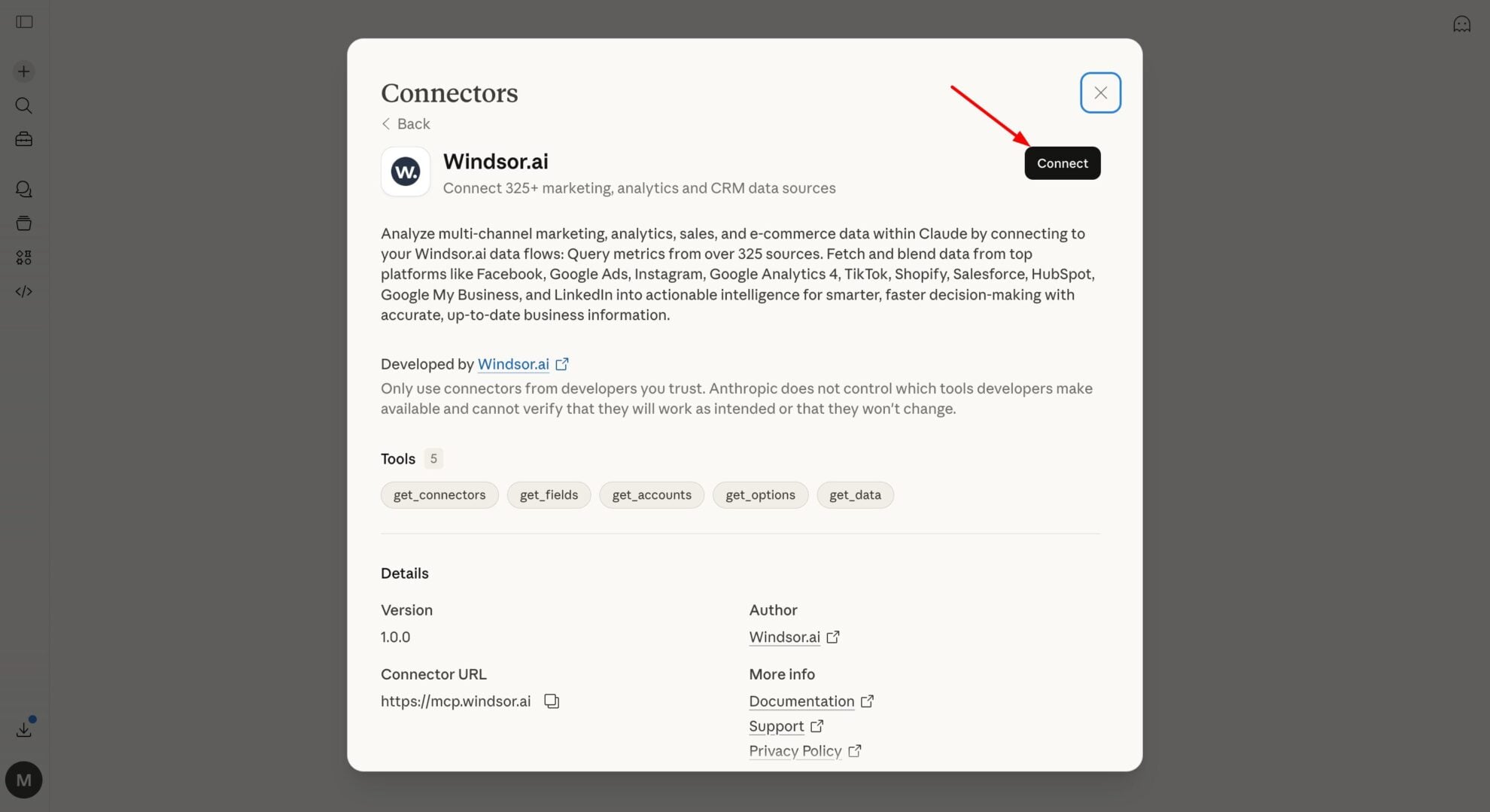
Query your data in Claude
Start a new chat and ask Claude questions about your connected data: summarize KPIs, create client reporting dashboards, or run advanced analyses.

FAQs
How do I set up the Adjust to Claude integration with Windsor.ai?
Connecting your Adjust data to Claude with Windsor.ai takes just 3 simple steps:
- Connect your Adjust account inside your Windsor.ai account.
- Enable the Windsor.ai connector in Claude from the ‘Connectors menu.’
- Authorize and start querying your data using natural language prompts.
Can Claude reconcile Adjust data with my ad spend?
Yes. By combining Adjust attribution data with platforms like Meta Ads or TikTok Ads via Windsor.ai, Claude can link ad spend directly to actual app revenue, giving you a clear view of true ROAS across channels.
How Claude can help me optimize my Cost Per Install (CPI)?
Claude analyzes your CPI across networks and highlights where you’re overpaying for installs. It can recommend pausing inefficient partners and reallocating budget toward sources that drive better retention and in-app revenue.
What prompts can I use when analyzing Adjust data in Claude?
Use more advanced, specific prompts to extract deeper insights from your Adjust data. For example:
-
Examine Rejected Install Rate alongside signals like Anonymous IP and Click Injection across ad partners. Highlight networks with high fraud rates and estimate how much budget you could recover by cutting underperforming sources.
-
Analyze our Revenue (Cohort) using the Mature vs. Immature filters. Based on the behavior of our 30-day cohorts from the last quarter, project the expected LTV of our newest installs and tell me if our current eCPI is sustainable.
-
Review the gap between Installs and Revenue Events. Is there a specific campaign or ad group where users install but fail to hit the first 'key event' (like registration) within 24 hours? Suggest a UX or messaging change to fix this funnel leak.
-
Analyze our ROI and Retention by Country and Business Region. Find the 'undervalued' markets where we have high user quality but low competition, and model a 20% budget shift into those regions for next month.
How much does it cost to integrate Adjust into Claude using Windsor.ai?
Windsor.ai’s pricing for Claude data integration varies depending on the number of connected accounts and data sources. We offer absolutely transparent pricing plans for diversified business needs and budgets.
How long does it take to connect Adjust to Claude?
With Windsor.ai’s easy-to-use connector, the integration process takes just a few minutes. No technical expertise is needed; syncing Adjust to Claude is simple, straightforward, and completely code-free.
Do you have helpful links to get started with integrating Adjust and Claude using Windsor.ai?
Yes, we have helpful resources to help you get started. You can explore our official documentation and tutorials for seamless Adjust to Claude integration with Windsor.ai:
Tired of manual Adjust data exports? Try Windsor.ai today to automate your reporting


