 Destinations
 Data sources
 AI insights
 About us
 Careers
 Security
 Customer reviews
 Contact us
 Affiliate program
 Solution partners
 Template gallery
 Looker Studio templates
 Power BI templates
 Excel templates
 Google Sheets templates
 Tableau templates
 Facebook Ads templates
 Google Ads templates
 Data fields & Metrics
 AI prompt library & Guides
 Product documentation
 API documentation
 Case studies
 Blog
Blog Data models
 Windsor vs Supermetrics
 Windsor vs Funnel.io
 Windsor vs Fivetran
 Windsor vs Rivery
 Windsor vs Portermetrics
 Windsor vs Coupler.io
Connect Apple Search Ads to Claude
Automatically sync your Apple Search Ads data to Claude using the Windsor.ai connector.
Generate AI-driven insights that explain your Apple Search Ads performance and show how to optimize campaigns for maximum ROAS.
Forget CSVs. Stop copy/paste. Connect data in minutes. No code required.
 Sign up with Google
 Free forever plan
No credit card needed
Free forever plan
No credit card needed










Unlock deeper insights from Apple Search Ads data in Claude
By streaming your ASA metrics directly into Claude, you move from static reporting to active interpretation of your advertising performance. Explore key benefits and use cases below:

Evaluate creative relevance gaps
Claude analyzes the relationship between Tap-Through Rate (TTR) and conversion rates across different ad groups. It can pinpoint keywords where users are clicking but not installing, suggesting a mismatch between the search intent and your current Custom Product Pages.

Flag performance decay
Compare the current CPT and Conversion Rate against the previous 14-day average to detect creative fatigue. Claude will alert you if an ad group’s efficiency is dropping so you can refresh your assets before the CPA exceeds your goal.

Predict diminishing returns
Review historical impressions and spend patterns to find the ‘ceiling’ for your top-performing keywords. Claude can estimate the point where increasing your Default Bid Amount will no longer yield more installs, preventing wasted budget.

Get a prioritized action plan
Instead of just surfacing insights, Claude delivers a prioritized action plan, highlighting bid adjustments, negative keywords to add, and underperforming creatives to pause. This lets you move straight to optimization without guesswork.
Using Windsor.ai to connect data from Apple Search Ads to Claude
Forget manual exports, data cleanup, and complex setups. Windsor.ai’s connector automatically pulls, cleans, and streams your Apple Search Ads data directly into Claude for advanced AI analysis.
Connect in minutes and use natural language prompts to audit your ad campaign performance and find scaling opportunities.















How to connect Apple Search Ads to Claude with Windsor.ai
Explore our video tutorial and a step-by-step guide to integrate your data from any source into Claude with the Windsor.ai connector.
Select your data source
Choose Apple Search Ads as your data source and grant access to Windsor.ai.

Install the Windsor.ai connector in Claude
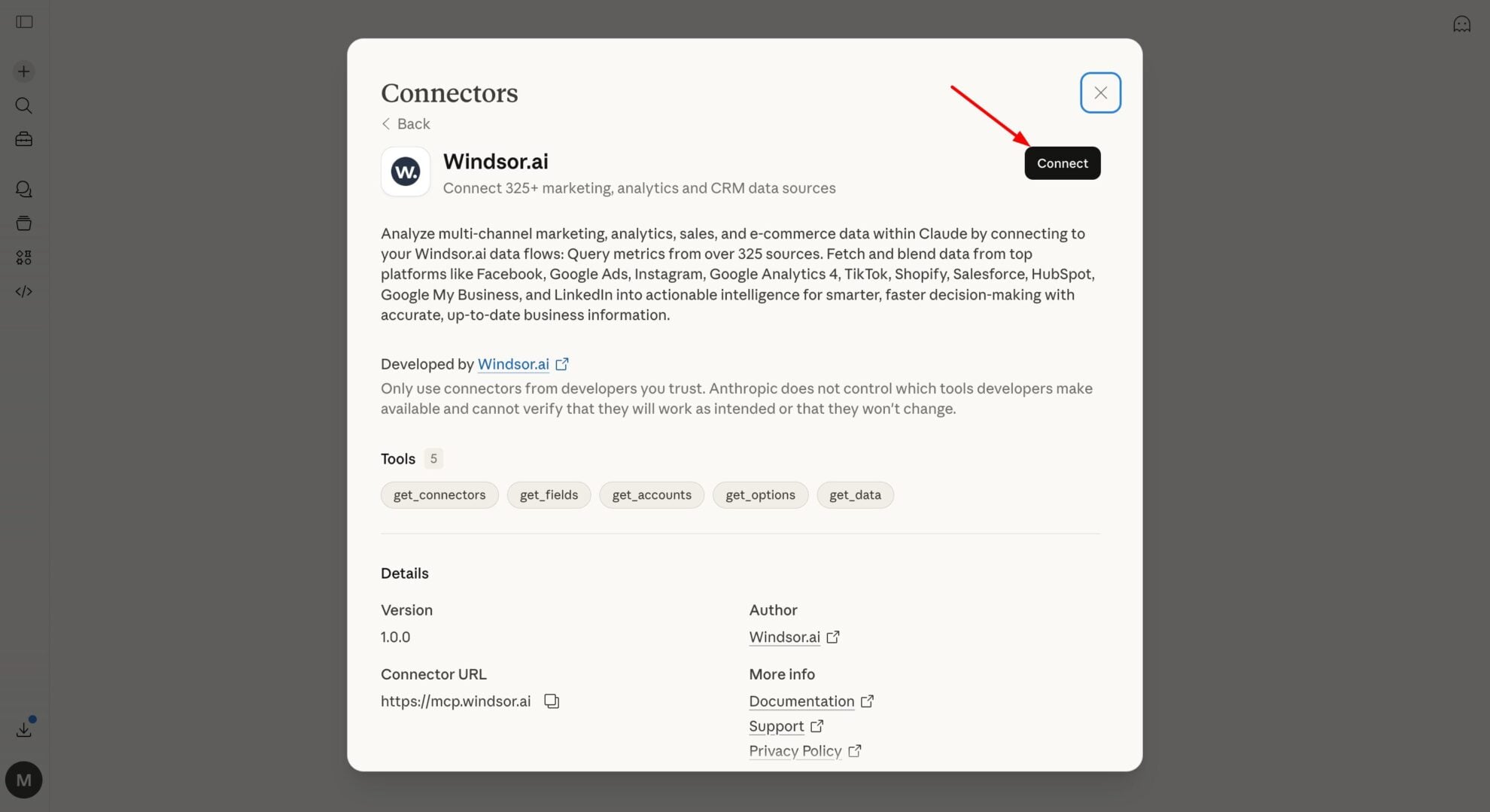
In Claude, open Customize, then Connectors, search for Windsor and click Add. Sign in to your Windsor.ai account when prompted, and the connector appears in your Connectors list. You can also open the Windsor.ai listing in the Claude directory and click Connect.
Query your data in Claude
Start a new chat and ask Claude questions about your connected data: summarize KPIs, create client reporting dashboards, or run advanced analyses.

FAQs
Is there a limit to how many ASA accounts I can connect?
No. Windsor.ai supports multi-account management, allowing agencies with multiple Apple Search Ads accounts to analyze all data in one place. Claude can then run cross-account audits and generate aggregated performance summaries across your entire portfolio using a single prompt.
What Apple Search Ads metrics are available for analysis?
The integration supports all key Apple Search Ads metrics and dimensions, including impressions, taps, installs, spend, CPT, CPA, conversion rate, and TTR. You can also access campaign, ad group, keyword, and search term data (such as campaign name, keyword ID, match type, and search terms) for deeper performance analysis.
How fresh is the Apple Search Ads data in Claude?
When you ask Claude a question, the Windsor MCP fetches the most recent data available from the Apple Search Ads API. This enables real-time monitoring of budget pacing and campaign shifts without manual exports and delays.
Can Claude help calculate my true ROAS for Apple Search Ads?
Absolutely. Use Windsor.ai to blend Apple Search Ads spend with revenue data from App Store Connect or Shopify, so Claude can calculate your true return on ad spend. This shows whether your paid installs are driving profitable long-term users.
Can Claude suggest new keywords for my Apple Search Ads campaigns?
Yes. By analyzing your top-performing keywords and App Store category, Claude can generate high-intent search terms. It can also group them into Brand, Category, and Competitor campaigns based on search trends.
What prompts can I use when analyzing Apple Search Ads data in Claude?
Use more advanced, specific prompts to extract deeper insights from your Apple Search Ads data. For example:
-
Analyze our Search Match performance and identify search terms driving installs below average CPA. Suggest which terms should be moved into dedicated Exact Match ad groups to scale volume.
-
Compare Tap-Through Rate and Conversion Rate across campaigns to find out where users tap but don’t install. Highlight potential mismatches between keywords and App Store pages and suggest which Custom Product Pages to improve.
-
Compare Brand and Category campaigns to identify rising CPT on brand keywords due to competition. Estimate how much budget is spent on brand protection and suggest where bids can be reduced without losing installs.
-
Analyze performance trends over the last 90 days using Impressions and Conversion Rate. If total spend increases by 25% next month, estimate the impact on installs and identify the point where CPA would exceed the target.
How much does it cost to integrate Apple Search Ads into Claude using Windsor.ai?
Windsor.ai’s pricing for Claude data integration varies depending on the number of connected accounts and data sources. We offer absolutely transparent pricing plans for diversified business needs and budgets.
How long does it take to connect Apple Search Ads to Claude?
With Windsor.ai’s easy-to-use connector, the integration process takes just a few minutes. No technical expertise is needed; syncing Apple Search Ads to Claude is simple, straightforward, and completely code-free.
Do you have helpful links to get started with integrating Apple Search Ads and Claude using Windsor.ai?
Yes, we have helpful resources to help you get started. You can explore our official documentation and tutorials for seamless Apple Search Ads to Claude integration with Windsor.ai:
Tired of manual Apple Search Ads data exports? Try Windsor.ai today to automate your reporting


