 Destinations
 Data sources
 AI insights
 About us
 Careers
 Security
 Customer reviews
 Contact us
 Affiliate program
 Solution partners
 Template gallery
 Looker Studio templates
 Power BI templates
 Excel templates
 Google Sheets templates
 Tableau templates
 Facebook Ads templates
 Google Ads templates
 Data fields & Metrics
 AI prompt library & Guides
 Product documentation
 API documentation
 Case studies
 Blog
Blog Data models
 Windsor vs Supermetrics
 Windsor vs Funnel.io
 Windsor vs Fivetran
 Windsor vs Rivery
 Windsor vs Portermetrics
 Windsor vs Coupler.io
 Last updated: 1 October 2026




GA4 tracks everything your users do.
But it doesn’t tell you what to do next.
The answers you actually need, such as what’s driving conversions, where users drop off, what pages are working, are buried in Explorations, spreadsheets, and custom dashboards.
And most teams never get that far.
With Windsor MCP, you can turn your Google Analytics 4 data into instant, AI-powered insights in seconds. Just connect your GA4 account to ChatGPT using the Windsor.ai native app and start exploring your data through natural conversation.
🚀 Connect GA4 to ChatGPT with Windsor MCP. Start free → onboard.windsor.ai/app/googleanalytics4.
Once connected, questions that used to require hours of reporting become simple conversations, such as:
- Which landing pages are attracting paid traffic but failing to generate key events (conversions)?
- Where exactly do users drop off in the checkout funnel, and does it vary by device?
- Which organic search queries drive engagement but no conversions?
- Which acquisition channels bring repeat users vs one-time visitors?
- How did traffic and conversion rates change after the latest site update?
ChatGPT works directly with your live GA4 data to deliver in-depth strategic answers that previously required an analyst, multiple tools, and days of work.
Here’s how you get started.
Steps to connect GA4 to ChatGPT with Windsor MCP
Connecting GA4 to ChatGPT takes just two steps; no code or complex technical setup required. The entire integration runs through the native Windsor.ai connector for ChatGPT.
📖 Step-by-step documentation: How to Integrate Data into ChatGPT with Windsor MCP.
Prerequisites
Before connecting GA4 to ChatGPT, make sure you have:
- An active Windsor.ai account: free or paid plan (pricing)
- Access to a GA4 property (Viewer role or higher is sufficient)
- An active ChatGPT account
Step 1. Connect GA4 to Windsor
Go to onboard.windsor.ai/app/ga4 and select Google Analytics 4 as your data source.
Sign in with the Google account that has access to your GA4 property and approve the connection. Select the property(s) you want to analyze in ChatGPT.
💡 Pro tip: If you manage several GA4 properties (different regions, different brands, or a staging and production environment), you can connect each to Windsor.ai and query them independently or compare them in the same conversation.
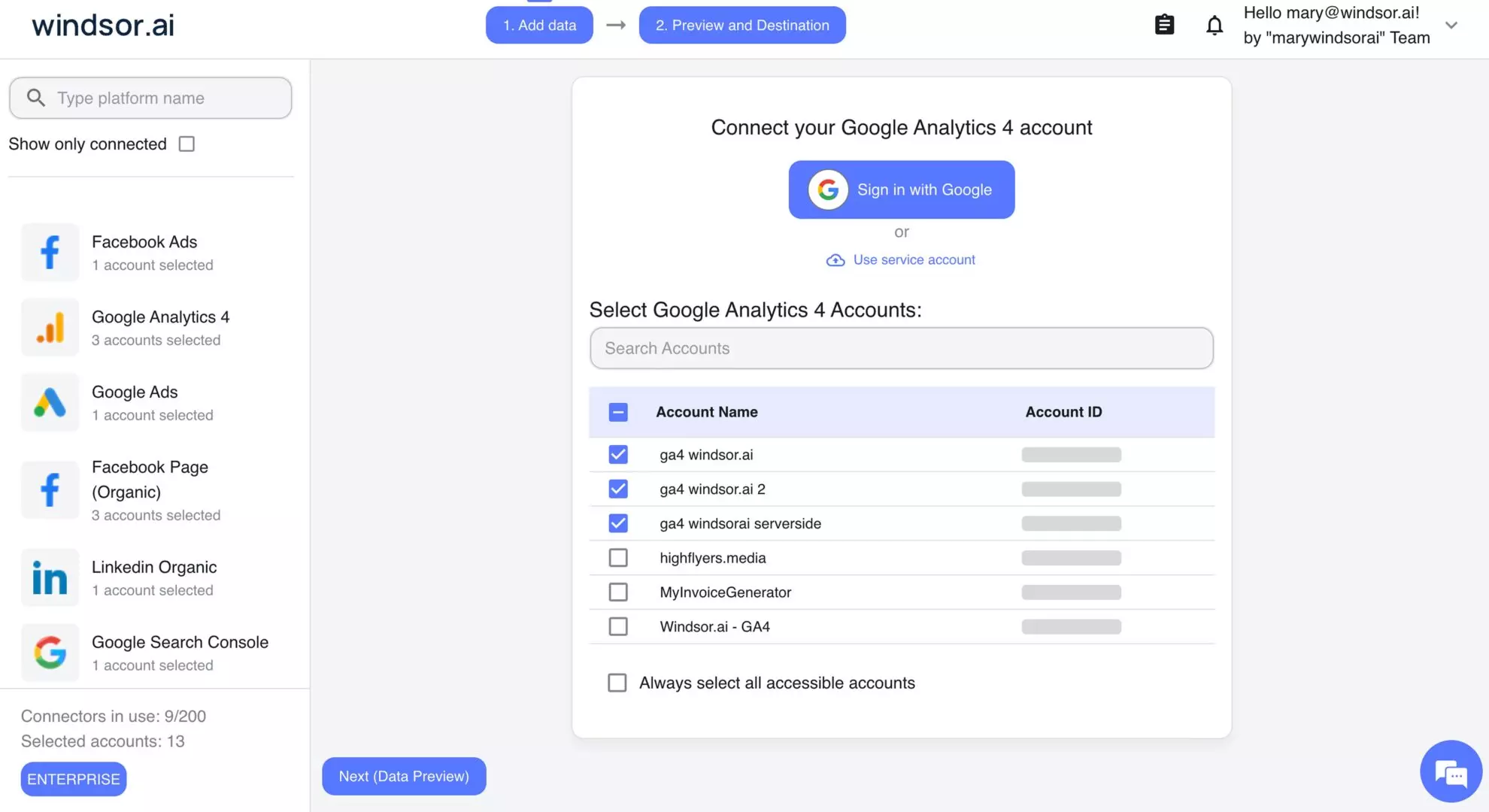
Windsor pulls your raw GA4 data directly from the source and normalizes it in the background, making it structured and ready for natural language queries in ChatGPT.
Step 2. Add the Windsor.ai app for ChatGPT
Open the Windsor.ai app page in ChatGPT and click Connect. Complete the setup by granting ChatGPT access to your Windsor.ai account.
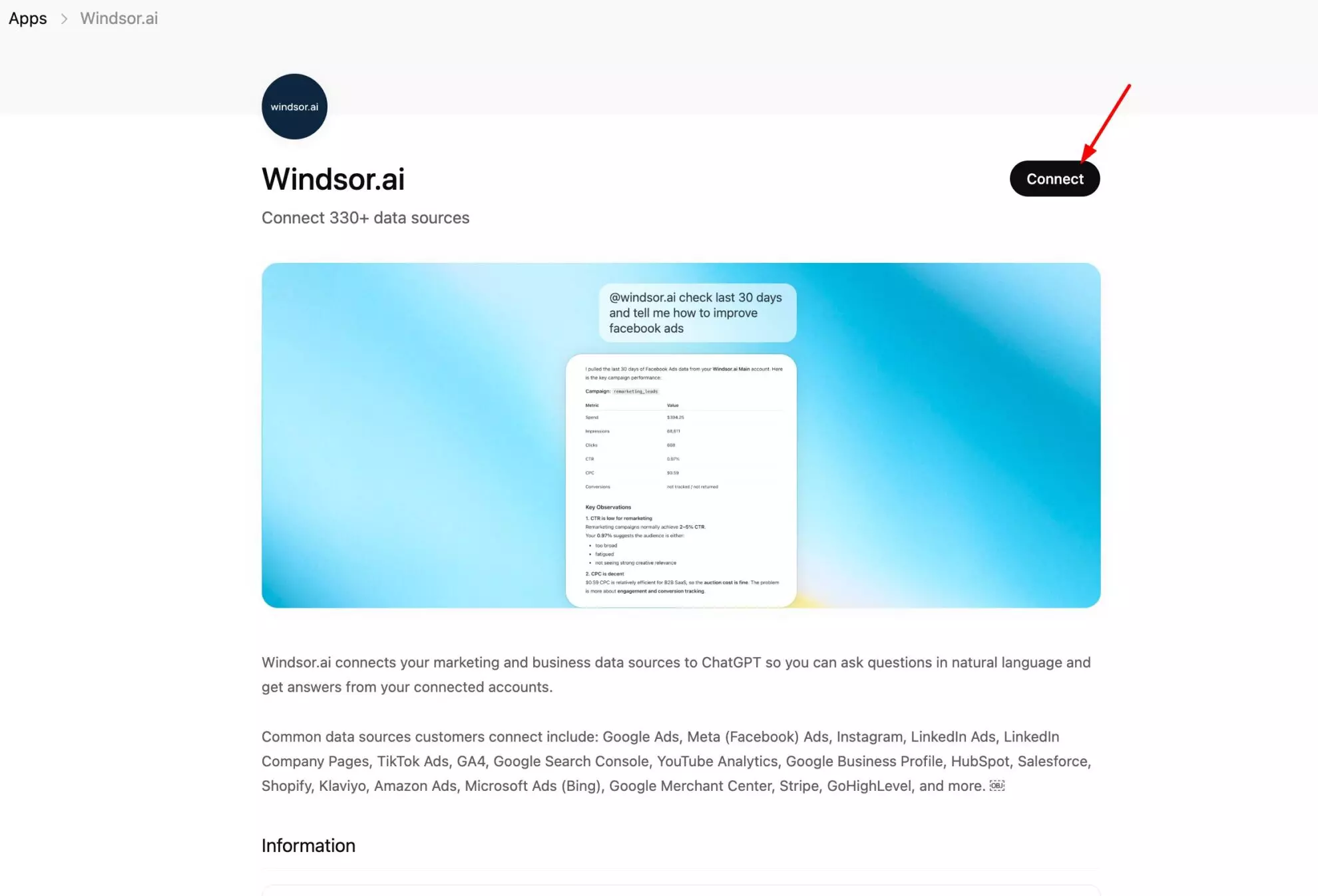
Windsor MCP is now live in your ChatGPT environment. Start a chat and confirm the connection with a quick test prompt:
List the data sources connected to my Windsor account.
Do you see Google Analytics 4 there?
Once ChatGPT recognizes your GA4 property, you’re ready to start asking questions about your site traffic, user behaviour, and conversion data.
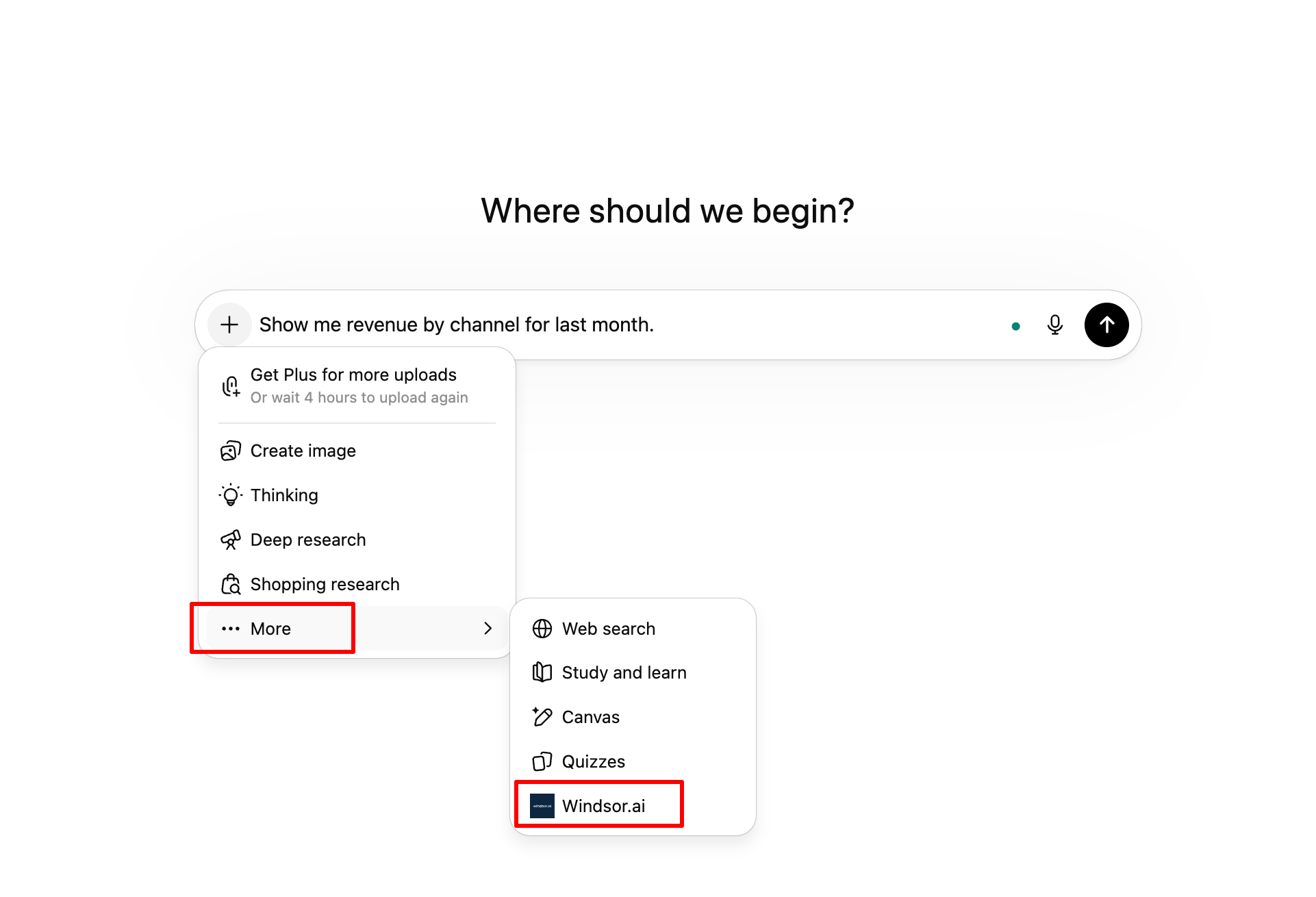
No ongoing maintenance required. If the connection was lost, just activate the Windsor.ai connector in any new ChatGPT conversation via the + icon → More → windsor.ai.
What GA4 data Windsor makes available in ChatGPT
Windsor connects to the GA4 Data API and gives ChatGPT access to your full analytics dataset, covering 475+ data fields.
The most analytically useful data types are the following:
| GA4 data | What ChatGPT can answer with it |
| Sessions & traffic | Session count, engaged sessions, engagement rate, sessions by channel and source/medium: the starting point for any traffic analysis |
| Users & audiences | Active users, new vs. returning users, user retention, audience segments: who is visiting and whether they come back |
| Acquisition channels | Default channel grouping, source, medium, campaign: traffic origin broken down to the level you need for attribution decisions |
| Page & screen performance | Views, engaged sessions per page, average engagement time per page, scroll depth, entrances, exits: how individual pages are performing |
| Events | All events firing in your property: event name, event count, event parameters, including standard and custom events |
| Conversions | Conversion event name, conversion count, conversion rate: which goal events are completing and at what rate by channel and page |
| E-commerce | Purchase events, revenue, transactions, average order value, items viewed vs. purchased: for properties with GA4 e-commerce tracking |
| Funnel steps | Step-by-step completion rates for defined funnel sequences: add to cart, begin checkout, purchase, and where users exit |
| Device & geography | Device category (mobile/desktop/tablet), operating system, browser, country, city: for segmenting performance by user context |
| Landing pages | Entry pages, bounce rate per landing page, engagement rate, conversion rate: the quality of first impressions by page |
| Search terms (via Search Console link) | Organic search queries driving sessions if GA4 is linked to Search Console: what users searched before arriving |
Key Google Analytics 4 metrics and dimensions you can stream to ChatGPT
Here is a structured list of the most essential categories and fields supported by Windsor:
1. Acquisition & traffic source
These fields identify how users found your website or app.
-
Essential dimensions:
campaign,campaign_id,source,medium,session_source,session_medium,first_user_source,landing_page. -
Essential metrics:
sessions,new_users,active_users,total_users.
2. User engagement & behavior
These track what users do once they arrive and how long they stay.
-
Essential Dimensions:
page_path,page_title,event_name,hostname,device_category,browser,operating_system. -
Essential Metrics:
engagement_rate,bounce_rate,average_session_duration,engaged_sessions,screen_page_views,scrolls.
3. E-commerce & revenue
Critical for online stores to track sales and product performance.
-
Essential dimensions:
item_id,item_name,item_category,transaction_id,coupon. -
Essential metrics:
purchase_revenue,total_revenue,transactions(orpurchases),add_to_carts,checkouts,average_purchase_revenue.
4. Attribution & conversions
Used for understanding the touchpoints that lead to a “Key Event” (formerly Conversion).
-
Essential dimensions:
attribution_source,attribution_medium,attribution_campaign. -
Essential metrics:
conversions(Key Events),session_conversion_rate,user_conversion_rate,cost_per_conversion.
5. Geographical & demographic
Data about where your users are located and their characteristics.
-
Essential dimensions:
country,region,city,language,age,gender.
What you can do with GA4 data in ChatGPT
The prompts below reflect the real questions that come up most often in real GA4 analytics workflows.
Just replace property names, page paths, event names, and date ranges with the ones from your own setup.
🤖 For more prompt ideas across GA4 and other data sources: windsor.ai/prompt-library/.
1. Traffic and acquisition: understanding what’s driving sessions and engagement
GA4’s acquisition reports show you where traffic comes from. But they don’t tell you whether that traffic is any good, whether it engages, returns, or converts. ChatGPT can cut through all of it in one prompt.
Channel quality comparison: which sources send users who actually engage?
Using GA4 data for the last 30 days, for each default_channel_group, show:

- Total sessions
- New users
- Engaged sessions
- Engagement rate (engaged sessions / total sessions)
- Average engagement time per session (seconds)
- Conversions
- Conversion rate (conversions / sessions)

Rank by conversion rate descending.

1. Which channels have a high session count but below-average engagement rate?
These are bringing volume without quality.

2. Which channels have a low session count but high engagement rate and conversion rate?
These are underinvested relative to their efficiency.
Source/medium deep dive: where high-value sessions are really coming from?
For the last 60 days, break down sessions by source / medium (not just channel grouping — go one level deeper).

For each source/medium combination with more than 100 sessions:
- Sessions, engaged sessions, engagement rate
- Conversions, conversion rate
- Average engagement time

Flag any source/medium where:

1. Engagement rate is more than 20 percentage points below the property average — likely low-quality or misattributed traffic.
2. Conversion rate is above 5% — these are our hidden high-performers worth examining more closely.

Are there any source/medium combinations that appear suspicious (e.g., very high sessions with near-zero engagement time)?

These may indicate bot traffic or misconfigured tracking.
Traffic trend: what changed and when?
Compare GA4 session data for the last 30 days vs. the prior 30 days by default_channel_group.

For each channel:
- Sessions this period vs. prior period (absolute and % change)
- Engagement rate this period vs. prior period
- Conversion rate this period vs. prior period

Which channels grew in sessions but declined in engagement rate?
(That pattern — more volume, lower quality — often indicates a paid campaign scaling without quality controls.)

Which channels declined in sessions but held or improved their conversion rate?
(Losing volume but keeping efficiency.)

For the channel with the largest absolute session decline:
What were the top 5 landing pages driving sessions in that channel during the prior period?
2. Landing page performance: what happens the moment someone arrives
The landing page is where ad spend, SEO effort, and email clicks either pay off or don’t. GA4 has the data to assess every entry point, but pulling it by channel, by campaign, and by conversion rate simultaneously requires an Exploration that most teams never get around to building.
ChatGPT covers this deep analysis with a single prompt.
Landing page audit: which entry pages are losing visitors immediately?
For all landing pages with more than 200 sessions in the last 30 days, show:
- Page path (landing_page)
- Sessions, entrances
- Engaged sessions, engagement rate
- Average engagement time (seconds)
- Conversions from that landing page
- Conversion rate

Sort by session count descending. Flag any landing page where:
- Engagement rate is below 40% (more than half of visitors leave immediately)
- Average engagement time is under 15 seconds
- Conversion rate is more than 50% below the site average

For the 5 worst-performing landing pages by engagement rate:
1. What is their primary traffic source?
2. Is low engagement a page quality issue, or a traffic source mismatch (the wrong audience being sent to the right page)?
Paid vs. organic landing page quality: are your ad destinations holding up?
Compare landing page performance for sessions from:
A) Paid search (default_channel_group = 'Paid Search')
B) Organic search (default_channel_group = 'Organic Search')

For the top 10 landing pages by paid search sessions, show:
- Engagement rate for paid traffic vs. organic traffic to the same page
- Conversion rate for paid vs. organic
- Average engagement time for paid vs. organic

1. Are there pages where paid traffic engages significantly less than organic traffic?
(That's a keyword-to-page mismatch signal — the ad is promising something the page doesn't deliver.)

2. Which pages perform equally well or better for paid traffic?
(Those are our strongest ad destinations.)
3. Funnel and conversion analysis: finding where users drop off
GA4’s funnel Explorations are genuinely powerful but time-consuming to build and fragile to maintain.
The questions every e-commerce and SaaS team has about their conversion funnel are answerable in ChatGPT in seconds.
E-commerce funnel: mapping the path from product view to purchase
Using GA4 e-commerce event data for the last 30 days, build a funnel:
Step 1: view_item (product viewed)
Step 2: add_to_cart
Step 3: begin_checkout
Step 4: add_payment_info
Step 5: purchase

For each step, show:
- Total event count
- Drop-off rate from the previous step (%)
- Completion rate from step 1 through to this step

1. Which step has the highest drop-off?
2. Does drop-off at checkout differ by device_category?
3. Mobile checkout abandonment is often 2-3x higher than desktop — is that true here?

For users who completed add_to_cart but not begin_checkout:
1. What was their average session duration and how many pages did they view?
2. Are they browsers or intent buyers who hit a blocker?
Conversion rate by device: where is the mobile experience failing?
For the last 30 days, compare conversion performance by device_category (mobile, desktop, tablet).

For each device:
- Sessions, engaged sessions, engagement rate
- Conversions, conversion rate
- Average engagement time
- Top 3 converting landing pages

1. What is the gap in conversion rate between mobile and desktop?
(An industry-average gap is 2-3x in favour of desktop.)
2. Is the gap here larger than that — suggesting mobile UX issues beyond normal friction?

For mobile sessions specifically:
1. What are the top 5 exit pages (where users leave most often)?
2. Are any of them checkout or payment steps — pointing to a mobile checkout experience problem?
Goal completion rate over time: are conversions trending in the right direction?
Using GA4 conversion event data for the last 12 weeks (group by week):

For each key conversion event (e.g. purchase, lead_form_submit, sign_up, demo_booked — use the ones configured in your property):
- Weekly conversion count
- Weekly conversion rate (conversions / sessions)
- Week-on-week change in both

1. Is conversion rate trending up, flat, or declining?
2. Are there specific weeks where conversion rate dropped sharply while session count held steady — suggesting a site change, a checkout issue, or an external factor affecting intent?
3. Which conversion event has the most volatile week-on-week rate?
4. Content and SEO audit: defining which pages are actually working
For content teams and SEO managers, GA4 holds the ground truth about how content performs beyond rankings and impressions, based on actual engaged sessions, time on page, and scroll depth.
The analysis most content teams want requires combining page data with channel data in ways GA4’s standard reports don’t show in one place.
ChatGPT performs that kind of complex audit automatically.
Content performance by organic traffic: what pages are actually delivering in terms of SEO?
Filter GA4 data to sessions from organic search (default_channel_grouping = 'Organic Search') for the last 14 days.

For each page_path with more than 50 organic sessions, show:
- Organic sessions
- Engaged sessions and engagement rate
- Average engagement time (seconds)
- Scroll depth (if scroll events are tracked — what % reach 50% and 90%)
- Conversions from organic traffic to that page

1. Which pages attract the most organic sessions but have engagement rates below 50%?
(These rank well but fail to hold visitors — a content quality or intent mismatch issue.)

2. Which pages have low organic session counts but high engagement rate and conversion rate?
(These are underranked, high-quality pages worth additional SEO investment.)
New content performance: how are recent pages ramping up?
Identify pages that first received sessions within the last 60 days
(filter by first_session_date on the page or use page creation date if available as a custom dimension).

For those new pages, show:
- Total sessions to date
- Engagement rate
- Conversion rate
- Primary traffic source

1. Are new pages attracting organic traffic at all, or is all traffic from direct or internal links?
2. Which new pages have the best engagement rate in their first 60 days?
(These are our strongest new content pieces and worth promoting further.)
User behaviour and retention: are visitors coming back?
GA4’s user-centric model makes retention analysis possible in a way Universal Analytics never really was.
But surfacing those insights requires cohort analysis that most teams never run.
ChatGPT makes it a one-prompt job.
New vs. returning user comparison: are you retaining the traffic you acquire?
For the last 7 days, compare new users vs. returning users:

For each group, show:
- Session count, engaged session rate
- Average sessions per user
- Average engagement time per session
- Conversion rate

1. What % of total sessions come from returning users?

2. Do returning users convert at a higher rate than new users?
(If returning users convert 3x+ better than new users, that's a strong signal that acquisition is working but first-visit experience needs improvement — the site wins people over on repeat visits, not on first contact.)

3. Which acquisition channels produce the most returning users?
(These channels are building habits, not just clicks.)
User path analysis: what do visitors do before converting?
For users who completed a key conversion event (e.g. purchase or lead_form_submit) in the last 7 days:

1. What are the most common page sequences in the 3 pages before conversion?
(Use page_path and event sequences if available, or session-level path data.)

2. Are there pages that appear consistently in converting paths but that don't receive direct traffic?
(These are hidden enablers in the journey that aren't being promoted or linked to prominently.)

For users who visited the pricing page but did NOT convert:
- What pages did they visit after pricing?
- Are they going to the FAQ, the about page, or leaving the site?
(That exit pattern reveals the objection they couldn't resolve.)
Advanced analysis: Blending GA4 with other data sources in ChatGPT
GA4 tells you how users behave on your site. But the most complete picture of your marketing performance is uncovered when you combine that behaviour data with what’s happening before the visit and after the conversion.
Windsor connects all of your touchpoints in a single view for effective cross-channel analysis. Here are some helpful combinations to try:
Ad performance & intent
| Integration | Core objective | Key question for ChatGPT |
| GA4 + Google Ads | Creative-to-page alignment | “Identify campaigns with a high CTR in Google Ads but <30% engagement in GA4. Where is the messaging mismatch?” |
| GA4 + Meta Ads | Traffic quality validation | “Compare post-click behavior for Meta vs. Google. Which Meta campaigns drive ‘browsers’ vs. ‘one-hit wonders’ who bounce?” |
Revenue & conversion integrity
| Integration | Core objective | Key question for ChatGPT |
| GA4 + Shopify / WooCommerce | Revenue reconciliation | “Compare GA4 reported revenue vs. actual store sales. Which traffic sources show the highest discrepancy or refund rates?” |
| GA4 + Klaviyo / Mailchimp | Email lifecycle value | “Which email flows produce the most engaged site sessions vs. those that drive high traffic but zero purchases?” |
Search & content optimization
| Integration | Core objective | Key question for ChatGPT |
| GA4 + Search Console | High-intent queries | “Identify queries with an average position between 11 and 20 in GSC that have a GA4 conversion rate higher than our site average. Which specific pages should we optimize to capture this ‘hidden’ revenue?” |
How Windsor MCP works with GA4 and ChatGPT
Windsor.ai connects directly to the Google Analytics 4 Data API, streaming your traffic, conversions, and user behavior data straight into your ChatGPT conversations. Google also publishes its own open-source GA4 server, but ChatGPT cannot run it directly. Our Google Analytics MCP guide compares the two routes.
Every insight is based on the live state of your property with no manual exports, stale CSVs, or data silos, powered by these features:
- Real-time property data: Unlike static reports, Windsor queries the API the moment you ask a question. This means morning conversion trends or yesterday’s session spikes are visible instantly, without waiting for a scheduled refresh.
- Multi-property intelligence: You can connect multiple GA4 properties to a single Windsor account. This allows ChatGPT to perform cross-brand analysis or regional site comparisons in a single prompt, perfect for agencies and multi-brand organizations.
- Cross-source data blending: This is the true superpower. GA4 doesn’t live in a vacuum; Windsor allows you to blend it with 350+ integrations (Meta Ads, Shopify, Klaviyo, etc.). You can finally ask: “How does my Facebook spend yesterday correlate with my GA4 checkout behavior this morning?”
- Custom events & dimensions: Your tracking is unique. Windsor exposes your custom GA4 events, like scroll depth, button clicks, or specific lead types, so ChatGPT can analyze the specific KPIs that matter most to your business.
- Secure connection: Data integrity is paramount. Windsor connects via a secure API integration. ChatGPT can read and analyze your GA4 data to generate insights, while your GA4 setup remains fully protected.
Conclusion
Stop building reports. Start asking questions.
Most brands use 10% of their GA4 data because the other 90% is trapped behind a complex UI. Windsor MCP bridges that gap, connecting GA4 directly to ChatGPT for instant cross-channel analysis.
From striking distance SEO opportunities to full-funnel reporting, the answers you need are now just one prompt away. Don’t just track your data. Talk to it.
🚀 Your First AI-Powered GA4 Audit is 1 Minute Away. Get started for free →
FAQs
What is the easiest way to connect GA4 to ChatGPT?
Windsor MCP, as it’s the direct connector for ChatGPT with a one-click setup. Your live analytics data is automatically available in every ChatGPT conversation from that point on. No Explorations to build, no exports to run, no spreadsheets to maintain.
Do I need GA4 Admin access to connect Windsor?
No. Viewer-level access to a GA4 property is sufficient for Windsor to read your data. Windsor only needs permission to query the GA4 Data API; it does not need to modify the property, create events, or change any configuration. If you can view reports in GA4, you can connect Windsor.
Does Windsor support custom events and custom dimensions from GA4?
Yes. Windsor makes your custom GA4 events and custom dimensions available to ChatGPT alongside standard metrics and dimensions. If your team has set up custom events for video plays, scroll depth, form interactions, or specific user actions, those are queryable in ChatGPT using the same event names as in your GA4 property.
Can Windsor connect to multiple GA4 properties in one ChatGPT conversation?
Yes. Each GA4 property connects to Windsor as a separate data source. If you manage multiple properties, you can make all of them available in the same ChatGPT conversation. You can compare session quality across sites, benchmark conversion rates between markets, or analyze a client’s property alongside their ad platform data.
Can I blend GA4 data with Google Ads or Meta Ads in ChatGPT?
Yes, this is one of the most valuable uses of Windsor’s cross-source capability. Connect GA4 alongside your ad platforms and ask ChatGPT to join on-site behaviour (engagement rate, conversion rate, session duration) with campaign performance (spend, CPC, impressions). The join key is typically utm_source and utm_campaign, which flow from your ads into GA4’s session attribution. Windsor connects the sources; ChatGPT does the analysis.
My GA4 property is linked to Google Search Console. Can ChatGPT access that data too?
Yes, if you connect both. Windsor connects to GA4 and to Google Search Console as separate data sources, and ChatGPT can analyze them together, for example which organic search queries generate clicks (Search Console) and what those sessions do on the site (GA4).
Does Windsor work with GA4 e-commerce tracking?
Yes. If your GA4 property has e-commerce tracking enabled (purchase events, add_to_cart, begin_checkout, view_item), Windsor makes all of those events and their associated parameters (revenue, transaction_id, item_id, quantity) available to ChatGPT. This allows funnel analysis, product performance reporting, and revenue attribution by channel, all in natural language.
How current is the GA4 data Windsor sends to ChatGPT?
Windsor queries the GA4 Data API in real time when ChatGPT needs data to answer a question. GA4 itself has a data processing lag of approximately 24–48 hours for some metrics, which is a GA4 platform limitation rather than a Windsor one. For most day-to-day analysis, data from the previous day and earlier is fully reliable and available.


