Destinations
 Data sources
 AI insights
 About us
 Careers
 Security
 Customer reviews
 Contact us
 Affiliate program
 Solution partners
 Template gallery
 Looker Studio templates
 Power BI templates
 Excel templates
 Google Sheets templates
 Tableau templates
 Facebook Ads templates
 Google Ads templates
 Data fields & Metrics
 AI prompt library & Guides
 Product documentation
 API documentation
 Case studies
 Blog
Blog Data models
 Windsor vs Supermetrics
 Windsor vs Funnel.io
 Windsor vs Fivetran
 Windsor vs Rivery
 Windsor vs Portermetrics
 Windsor vs Coupler.io
Connect Pinterest Ads to Claude
Automatically sync your Pinterest Ads data to Claude using the Windsor.ai connector.
Perform deep creative analysis, extract real-time ROI insights, and get actionable campaign optimization tips in just 3 quick steps.
Forget CSVs. Stop copy/paste. Connect data in minutes. No code required.
 Sign up with Google
 Free forever plan









Make the most out of your data with Pinterest Ads to Claude integration
Stream your Pinterest Ads metrics into Claude via Windsor.ai to explore your data using natural language and unlock these key advantages:

Get fast, AI-powered insights
Claude interprets your Pinterest Ads metrics in seconds, revealing trends, relationships, and performance patterns. Skip SQL, dashboards, or manual analysis and get the insights you need instantly.

Optimize campaigns
Query your Pinterest Ads data in Claude using prompts like “Which campaigns underperformed last week?” or “How can I improve CTR for my promoted pins?” and receive clear AI answers and recommendations.

Analyze traffic quality
Stream Pinterest Ads and GA4 data into Claude to see how Pinterest traffic behaves once it lands on your website, including bounce rates and session duration. Use these insights to optimize your creatives, targeting, and landing pages for higher conversions.

Detect creative fatigue early
Claude tracks your click-through rates (CTR) and engagement over time to detect when a specific Pin’s performance begins to decline. It alerts you early and recommends which creatives to refresh before your ROAS drops.
Using Windsor.ai to connect data from Pinterest Ads to Claude
Sending Pinterest Ads to Claude usually requires manual exports, data cleanups, or costly tools. Windsor.ai makes the process effortless with a connector that collects, organizes, and streams your Pinterest Ads metrics into Claude.
Connect in minutes and gain AI-driven insights to optimize your ad performance.















How to connect Pinterest Ads to Claude with Windsor.ai
Explore our video tutorial and a step-by-step guide to integrate your data from any source into Claude with the Windsor.ai connector.
Select your data source
Choose Pinterest Ads as your data source and grant access to Windsor.ai.

Install the Windsor.ai connector in Claude
In Claude, open Customize, then Connectors, search for Windsor and click Add. Sign in to your Windsor.ai account when prompted, and the connector appears in your Connectors list. You can also open the Windsor.ai listing in the Claude directory and click Connect.
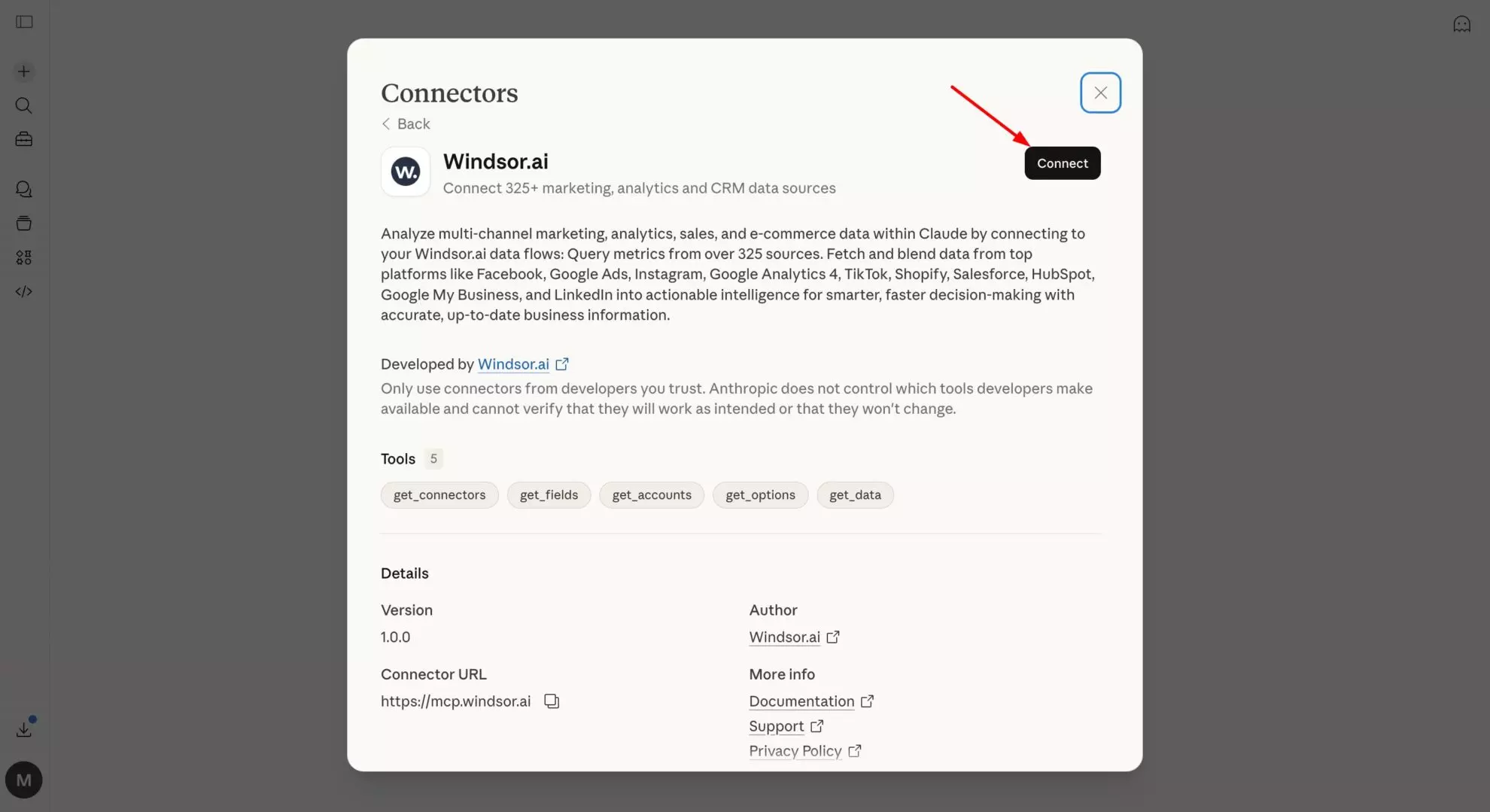
Query your data in Claude
Start a new chat and ask Claude questions about your connected data: summarize KPIs, create client reporting dashboards, or run advanced analyses.

FAQs
What can I do with Pinterest Ads data in Claude?
Once your Pinterest Ads data is available in Claude, you can:
- Generate instant performance reports (daily/weekly/monthly) with spend, impressions, clicks, saves, CTR, engagement rate, and more, returned as dashboards, tables, or CSV-ready outputs.
- Spot top and underperforming pins by analyzing results at the account, campaign, ad group, or creative level.
- Track trends over time to quickly identify spikes or drops in engagement, clicks, and saves.
- Optimize budgets and campaigns, asking Claude which pins, campaigns, or audiences to scale, pause, or reallocate based on engagement and cost efficiency.
- Run cross-channel analysis by combining Pinterest Ads with GA4, Google Ads, Shopify, CRM data, and more, all in one Claude conversation.
Find more details about Windsor MCP for Claude use cases in this guide: https://windsor.ai/how-to-use-windsor-mcp-examples-use-cases/.
What prompts can I use when analyzing Pinterest Ads data in Claude?
Beyond basic summaries, use more specific prompts to extract deeper insights from your Pinterest Ads data. For example:
-
Which pins consistently drive the highest Saves and CTR over the last 90 days, and detect patterns in visuals, messaging, or boards.
-
Compare engagement between organic and promoted pins for the same content to determine which performs better and why.
-
Identify ad_groups or pin_promotions with high frequency (>5) and declining CTR or total engagement over the last 7 days. Recommend creative refresh or audience rotation strategies.
-
Group performance by age, gender, and geo. Identify which demographic segments drive the highest ROAS and which segments underperform, and recommend where to reallocate ad spend.
How much does it cost to integrate Pinterest Ads into Claude using Windsor.ai?
Windsor.ai’s pricing for Claude data integration varies depending on the number of connected accounts and data sources. We offer absolutely transparent pricing plans for diversified business needs and budgets.
How long does it take to connect Pinterest Ads to Claude?
With Windsor.ai’s easy-to-use connector, the integration process takes just a few minutes. No technical expertise is needed; syncing Pinterest Ads to Claude is simple, straightforward, and completely code-free.
Do you have helpful links to get started with integrating Pinterest Ads and Claude using Windsor.ai?
Yes, we have helpful resources to help you get started. You can explore our official documentation and tutorials for seamless Pinterest Ads to Claude integration with Windsor.ai:
Can Claude analyze data from Pinterest 'Shopping Ads'?
Yes. If your Pinterest catalog and Shopping Ads data are connected, Claude can analyze product-level performance to identify which SKUs drive the most clicks, conversions, or revenue.
Can I combine Pinterest Ads with other marketing sources in Claude?
By utilizing the Windsor MCP, you can unify data from over 350+ sources into a single Claude conversation. Analyze Pinterest Ads alongside Google Ads, Meta Ads, and Pinterest Organic metrics to gain a 360-degree view of your marketing performance and customer journey.
Does the integration support Pinterest Organic data?
Yes, Windsor.ai offers a separate connector for Pinterest Organic. You can use both in the same Claude chat to compare how your paid efforts are boosting your overall organic visibility.
Tired of manual Pinterest Ads data exports? Try Windsor.ai today to automate your reporting