 Destinations
 Data sources
 AI insights
 About us
 Careers
 Security
 Customer reviews
 Contact us
 Affiliate program
 Solution partners
 Template gallery
 Looker Studio templates
 Power BI templates
 Excel templates
 Google Sheets templates
 Tableau templates
 Facebook Ads templates
 Google Ads templates
 Data fields & Metrics
 AI prompt library & Guides
 Product documentation
 API documentation
 Case studies
 Blog
Blog Data models
 Windsor vs Supermetrics
 Windsor vs Funnel.io
 Windsor vs Fivetran
 Windsor vs Rivery
 Windsor vs Portermetrics
 Windsor vs Coupler.io
 Last updated: 8 September 2026




Connect Pipedrive to Claude by authorizing your account at onboard.windsor.ai/app/pipedrive, then adding the Windsor.ai connector in Claude. That’s all it takes. Open a new chat and ask about your leads and deals.
Here’s the problem it solves: Pipedrive gives you a clear view of your sales pipeline, but turning that data into actionable insights often requires tedious exports, manual calculations, and custom dashboards.
Which leads are most likely to convert this quarter? Are your reps following up on time? Which stages are slowing down revenue? These questions aren’t easily answered with native Pipedrive reports.
Connecting Pipedrive to Claude via Windsor MCP transforms how you work with your sales data. Windsor automatically syncs your Pipedrive leads, deals, and stages into Claude, letting you ask natural-language questions just as you would to a top sales analyst. No code, no spreadsheets, no engineering bottlenecks; try it now and get AI-driven insights in less than a minute.
🚀 Connect Pipedrive to Claude with Windsor MCP. Try it free for 30 days → onboard.windsor.ai/app/pipedrive.
Once connected, you can ask questions like:
- Which leads added in the last 30 days have the highest expected deal value?
- Which deals are overdue or “rotten,” and what’s the total value at risk?
- How does each sales rep perform in closing deals by pipeline stage?
- What’s the average time a deal spends in each stage, and which stages slow down our pipeline?
- Which lead sources generate the most won deals and the highest revenue?
With Windsor, your Pipedrive data becomes a fully interactive analytics environment inside Claude, ready for instant decision-making, pipeline optimization tips, and performance summaries.
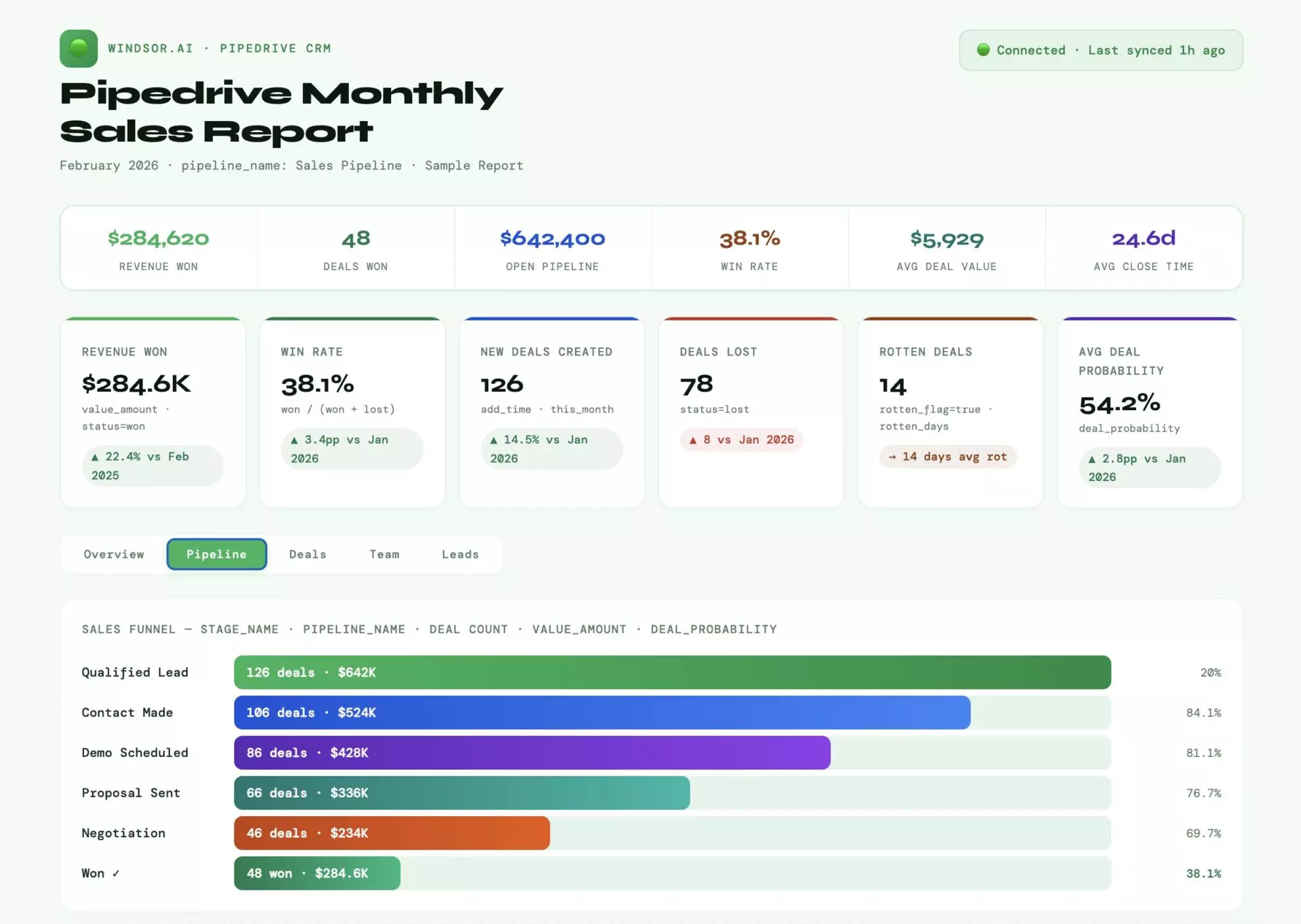
Here’s how you get started in three simple steps.
Steps to connect Pipedrive to Claude via Windsor MCP
Building the Pipedrive to Claude integration through Windsor.ai is a fully automated process that requires no technical skills.
Prerequisites
- A Pipedrive account with API access
- A Windsor.ai account (free or paid plan, starting from $19/month)
- A Claude.ai account
Step 1. Connect Pipedrive to Windsor.ai
Visit onboard.windsor.ai/app/pipedrive and connect your Pipedrive account via the API token.

You can find or generate your API key in Pipedrive API Settings.
Step 2. Install the Windsor.ai connector in Claude
In Claude, open Customize, then Connectors, search for Windsor, and click Add. Sign in to your Windsor.ai account when prompted. You can also open the Windsor.ai listing in the Claude directory and click Connect.

Grant access and complete the connection.
Step 3. Start querying your Pipedrive data in Claude
Now, your Pipedrive data is now live in every Claude conversation. Feel free to ask plain language questions to deeply explore your sales pipeline, deal performance, and lead management.
Sample prompts:
- Which leads haven’t been contacted in the last 7 days, and are at risk of going cold?
- Which reps have the highest ratio of won vs lost deals this month?
- Which lead sources generate the most won deals and the highest revenue?


What you can do with your Pipedrive data in Claude: Prompt ideas
Use these prompts to turn your Pipedrive data into an AI-powered sales analyst, helping you make faster, smarter decisions around the most common sales pains:
1. Lead management: prevent opportunities from slipping
Pain point: Leads are overlooked or lost in the pipeline.
Prompt:
Show me all leads added in the last 30 days that have not had any activity in over 7 days.

Include owner, lead value, source, and stage.

Highlight the top 10 highest-value leads at risk of going stale.
Insights you get: Prioritize follow-ups, reduce lead rot, and optimize owner allocation.
2. Pipeline health: identify bottlenecks
Pain point: Deals are stuck in certain stages, slowing revenue growth.
Prompt:
For each pipeline, summarize deals by stage with counts, total value, probability, and average time in stage.

Flag stages where deals have been longer than the stage_rotten_days threshold.
Insights you get: Spot slow-moving stages, improve lead nurturing strategy, and accelerate pipeline velocity.
3. Deal forecasting: predict revenue
Pain point: Managers lack a clear view of likely deal closures.
Prompt:
List all open deals expected to close the next 30 days, with owner, stage, value, and probability.

Calculate weighted expected revenue per sales rep and per pipeline.
Insights you get: Forecast revenue more accurately, identify over- or underperforming reps.
4. Rep performance: compare effectiveness
Pain point: Hard to assess how each sales rep performs across pipelines.
Prompt:
Show total deals added, deals won, average time to close, deal value, and deal probability for each sales rep in the last quarter.

Rank by total closed revenue.
Insights you get: Identify top performers, coaching opportunities, and pipeline imbalances.
5. Lead source ROI: know what works
Pain point: Marketing spend or lead generation efforts may be misaligned.
Prompt:
Break down leads and deals by source name for the last 90 days.

 Show lead count, deal count, deal value, and win rate per source. Highlight sources with the highest conversion efficiency.
Insights you get: Optimize lead acquisition strategy and marketing resource allocation.
6. Lost deal analysis: learn from missed opportunities
Pain point: Understanding why deals are lost is tedious and manual.
Prompt:
Summarize all lost deals in the last 6 months by stage, owner, value, and lost_reason.

Highlight patterns and common stages where deals are lost.
Insights you get: Improve sales processes, adjust strategy, and increase win rate.
Bonus: Combine Pipedrive with other data sources
While Pipedrive gives you visibility into your sales pipeline, the most impactful business decisions require context from multiple systems.
🔗 Windsor allows you to automatically blend Pipedrive data with 350+ other tools, providing a unified, cross-channel view of your sales and revenue performance.
All data is normalized under the hood, ready for comprehensive AI analysis in Claude.
CRM + Advertising data
- Use case: Understand the true cost of customer acquisition.
- How: Connect Pipedrive leads and deals with Google Ads, Facebook Ads, or LinkedIn Ads spend. Claude can calculate cost per acquired customer by campaign, ad set, or source.
- Benefit: Quickly identify which campaigns generate high-value leads and which are draining budget, enabling smarter ad spend allocation.
CRM + Revenue & E-commerce data
- Use case: Measure pipeline accuracy and deal closure impact on actual revenue.
- How: Combine Pipedrive with Shopify, Stripe, or other revenue platforms. Claude can match won deals against actual revenue collected, and flag discrepancies.
- Benefit: Pinpoint gaps between expected deal value and real revenue, improve forecasting, and optimize your sales team’s focus.
CRM + Marketing analytics data
- Use case: Track the full customer journey from first touch to closed deal.
- How: Merge Pipedrive data with GA4, Amplitude, or other analytics platforms. Claude can analyze lead source performance, campaign ROI, and influence on pipeline velocity.
- Benefit: Understand which marketing efforts actually move deals forward, optimize campaigns for ROI, and justify marketing spend with concrete pipeline impact.
CRM + Customer support & Retention data
- Use case: Identify post-sale churn risks.
- How: Blend Pipedrive deals with support ticket data or NPS surveys. Claude can highlight accounts with frequent support issues or low satisfaction scores.
- Benefit: Proactively engage at-risk customers, improve retention, and increase lifetime value.
CRM + Team performance data
- Use case: Optimize sales rep productivity and workload balance.
- How: Combine Pipedrive activity and deal data with team calendars or internal task systems. Claude can track follow-ups, overdue activities, and deal handoff efficiency.
- Benefit: Spot bottlenecks, improve follow-up rates, and increase overall close rates without manual tracking.
What Pipedrive data can you stream to Claude via Windsor MCP?
Windsor gives Claude access to all essential lead, stage, and deal objects from Pipedrive, covering ~170 fields, including:
Lead-related fields:
-
lead_id,lead_title,value_amount,value_currency -
owner_id,person_id,lead_source_name,lead_pipedrive_organization_id -
add_time,expected_close_date,update_time -
next_activity_id,was_seen,is_archived
Stage-related fields:
-
stage_id,stage_name,pipedrive_pipeline_id -
order_nr,deal_probability,pipeline_deal_probability -
rotten_flag,rotten_days,stage_active_flag
Deal-related fields:
-
deal_id,deal_title,deal_value,deal_currency -
deal_status,deal_probability,deal_expected_close_date -
deal_owner_name,deal_pipeline_id,deal_stage_id -
deal_activities_count,deal_done_activities_count,deal_notes_count -
deal_weighted_value,deal_stage_change_time
User and account fields:
-
account_id,account_name -
deal_creator_user_id_id,deal_creator_user_id_name,deal_creator_user_id_email
Conclusion
Your Pipedrive data has a story to tell. Stop reading the summary and start the conversation.
With Windsor MCP, Claude transforms your sales pipeline from a static list into a living strategy. From unmasking stage bottlenecks to predicting your next big win, you now have a 24/7 sales analyst at your fingertips.
🚀 Connect Pipedrive to Claude with Windsor.ai and unlock AI-powered sales insights in less than 60 seconds. Start for free now.
FAQs
Is it difficult to set this integration up if I’m not a developer?
Not at all. The setup is entirely no-code. You simply connect your Pipedrive account via an API token on the Windsor.ai dashboard and then add the Windsor.ai connector within your Claude settings. The entire process typically takes less than a minute.
Can Claude help me identify "at-risk" deals?
Absolutely. Because Windsor streams fields like rotten_days, deal_stage_change_time, and deal_activities_count, you can ask Claude: “Which deals in the ‘Negotiation’ stage haven’t been touched in 5 days and have a value over $5,000?” Claude will cross-reference these fields to give you a prioritized follow-up list.
Does this support the custom fields I've created in Pipedrive?
Yes. Windsor.ai syncs both standard and custom fields from Pipedrive. If you have custom fields for “Lead Score,” “Competitor Name,” or “Project Start Date,” Claude can use those dimensions to provide even more tailored analysis.
How many Pipedrive fields can Claude access?
The integration supports ~170 fields across Lead, Deal, Stage, and User objects. This includes everything from basic titles and values to deep metadata like deal_weighted_value, pipeline_deal_probability, and deal_done_activities_count.
Can I analyze performance across different sales teams?
Yes. By using fields like deal_owner_name, users_role_id, and deal_pipeline_id, you can ask Claude to compare the win rates or average close times between your “Mid-Market” and “Enterprise” teams, or even individual reps.
Can I combine Pipedrive data with my marketing spend?
Absolutely! This is one of the most powerful features. Since Windsor.ai supports 350+ sources, you can blend Pipedrive data with Google Ads or Facebook Ads. This allows Claude to answer: “What is the actual ROAS of my LinkedIn campaigns based on ‘Won’ deals in Pipedrive, not just ‘Leads’?”
Can Claude help with sales forecasting?
Yes. Claude can calculate your Weighted Pipeline Value by multiplying deal_value by deal_probability across all open deals. You can even ask it to project next month’s revenue based on your current expected_close_date trends.
What is the benefit of using the Windsor MCP over Claude's native "Projects" or file uploads?
File uploads are static; the moment you export a CSV from Pipedrive, it’s out of date. The Windsor MCP provides dynamic access. If a rep moves a deal to “Won” at 10:00 AM, Claude can see that change at 10:01 AM without you needing to upload a new file.
Is Windsor MCP free?
Yes. Windsor MCP is included on every plan, including our free-forever plan. If you need more accounts or data sources, paid plans start at $19/month.
What are the ways to connect Pipedrive data to Claude?
There are three primary integration methods, depending on your technical comfort and how live you need the data to be:
- Windsor MCP (recommended): Claude talks directly to Windsor’s server and pulls exactly the fields it needs in real time. Best for daily sales audits, live pipeline tracking, and cross-channel blending. Setup under 1 minute, no code.
- Manual CSV/Spreadsheet upload: You export a report from Pipedrive and upload the file into a Claude chat. Best for one-off historical deep dives. Downside: the data is dead the moment you download it.
- Custom API integration (DIY): You write a script that fetches data from the Pipedrive API and feeds it to Claude via the Anthropic API. Best for engineering teams building custom internal tools. Downside: requires tech skills and constant maintenance.


