 Destinations
 Data sources
 AI insights
 About us
 Careers
 Security
 Customer reviews
 Contact us
 Affiliate program
 Solution partners
 Template gallery
 Looker Studio templates
 Power BI templates
 Excel templates
 Google Sheets templates
 Tableau templates
 Facebook Ads templates
 Google Ads templates
 Data fields & Metrics
 AI prompt library & Guides
 Product documentation
 API documentation
 Case studies
 Blog
Blog Data models
 Windsor vs Supermetrics
 Windsor vs Funnel.io
 Windsor vs Fivetran
 Windsor vs Rivery
 Windsor vs Portermetrics
 Windsor vs Coupler.io
Connect Sprout Social to Claude
Automatically sync your Sprout Social data to Claude using the Windsor.ai connector.
Transform raw Sprout Social data into a powerful social media strategy with Claude to drive awareness, engagement, and audience growth.
Forget CSVs. Stop copy/paste. Connect data in minutes. No code required.
 Sign up with Google
 Free forever plan
No credit card needed
Free forever plan
No credit card needed









Optimize your content and publishing strategy with Sprout Social data in Claude
Use Windsor MCP to import your Sprout Social metrics into Claude to gain deeper insights into your social media performance. Discover key benefits and use cases:

Find optimal posting windows
Claude cross-references post_created_time with post_engagements to find your unique golden hours across different days of the week. It creates a custom publishing schedule for each network based on when your specific followers are most active.

Score video retention efficiency
Using post_video_views_p95 (95% completion) alongside post_video_length, Claude can identify the ‘sweet spot’ for your video duration. It tells you exactly at what second mark your audience typically drops off, helping you edit tighter, more engaging video content.

Analyze organic impact on paid ads
Compare days with high profile_impressions_organic (from Sprout) against your TikTok Ads and Meta Ads performance. Ask Claude to find out if spikes in organic activity lead to a lower Cost Per Click (CPC) on your paid ads the following day, proving that organic presence makes your paid ads more efficient.

Generate AI-powered recommendations
Claude doesn’t just analyze your data. Based on your Sprout Social performance, it can generate step-by-step action plans to help you optimize your content, publishing strategy, and overall social media performance.
Using Windsor.ai to connect data from Sprout Social to Claude
Integrating Sprout Social with Claude often requires manual exports, data cleanup, or complex API scripts. Windsor MCP removes this friction with a connector that automatically pulls, cleans, and sends your Sprout Social data directly into Claude.
Connect in minutes and get AI-powered insights into your social media performance.















How to connect Sprout Social to Claude with Windsor.ai
Explore our video tutorial and a step-by-step guide to integrate your data from any source into Claude with the Windsor.ai connector.
Select your data source
Choose Sprout Social as your data source and grant access to Windsor.ai.

Install the Windsor.ai connector in Claude
In Claude, open Customize, then Connectors, search for Windsor and click Add. Sign in to your Windsor.ai account when prompted, and the connector appears in your Connectors list. You can also open the Windsor.ai listing in the Claude directory and click Connect.
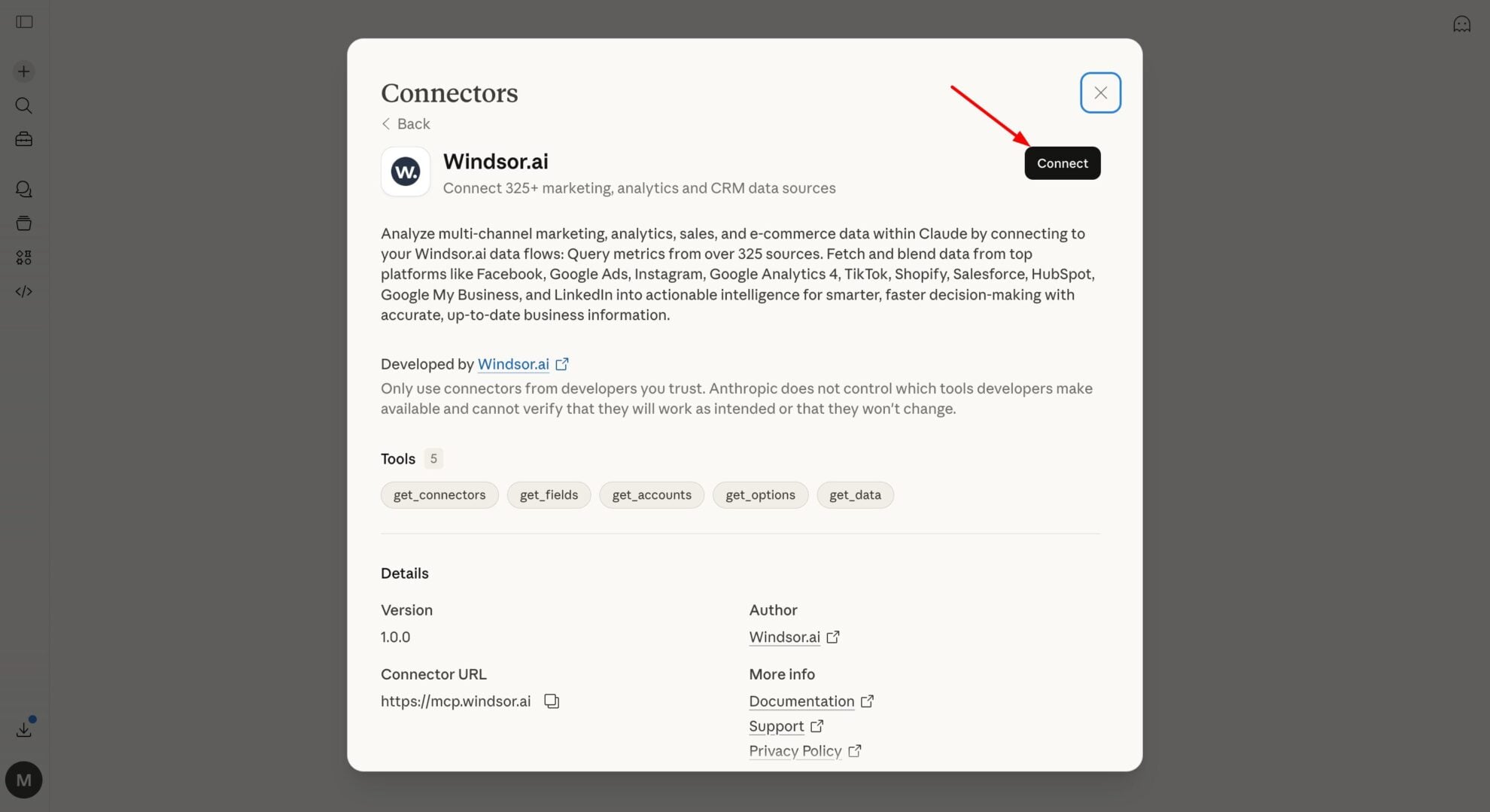
Query your data in Claude
Start a new chat and ask Claude questions about your connected data: summarize KPIs, create client reporting dashboards, or run advanced analyses.

FAQs
What can you do with Sprout Social data in Claude?
Once your Sprout Social data is in Claude, you can:
- Evaluate your content. Claude helps you identify patterns in successful content, whether it’s certain formats, topics, or messaging styles, so you can double down on what drives results.
- Spot patterns in engagement. Understand how engagement changes by day, campaign, or content type, and use those insights to make more strategic, data-driven decisions.
- Refine your messaging. Explore how different tones, captions, and content angles influence audience response. This makes it easier to fine-tune your messaging and create content that connects more effectively.
- Perform cross-channel analysis. Combine Sprout Social with Meta Ads or Google Ads to see which channels and strategies drive the best overall results.
Find more details about Windsor MCP for Claude use cases in this guide: https://windsor.ai/how-to-use-windsor-mcp-examples-use-cases/.
Can I compare performance across different social networks in one prompt?
Absolutely. Because Windsor.ai normalizes your data, you can ask Claude to compare the engagement rate of your video content on LinkedIn versus Instagram over the last 30 days. It will instantly analyze the data and surface clear comparisons.
Can Claude help me analyze audience sentiment from Sprout?
Yes. Claude processes fields like post_comments_positive and post_comments_negative to track shifts in brand perception and identify recurring themes in customer feedback.
Can Claude write new social posts based on my historical data?
Yes. By analyzing your post_text from high-performing posts, Claude can draft new captions that mimic your brand’s most successful ‘hooks’ and tones.
What prompts can I use when analyzing Sprout Social data in Claude?
Use more specific, advanced prompts to extract deeper insights from your Sprout Social data. For example:
-
Find the posts that traveled far beyond our current followers (viral reach). What was the specific 'spark' in those posts? Was it a certain hashtag, a controversial opinion, or a specific video format?
-
Analyze the performance of post_reach_organic versus post_reach_paid. Identify specific organic posts that had high likes or shares that should be prioritized for additional paid boosting to maximize ROI.
-
Monitor the post_engagement_rate_per_follower for our recurring series or campaigns over the last 90 days. Flag any specific content themes where engagement is steadily declining despite consistent impressions, suggesting it's time for a creative refresh.
-
Compare post_network data to see how the same post_text performs on different platforms. Identify if our audience on LinkedIn reacts differently compared to Instagram and suggest how to pivot the messaging for each.
How much does it cost to integrate Sprout Social into Claude using Windsor.ai?
Windsor.ai’s pricing for Claude data integration varies depending on the number of connected accounts and data sources. We offer absolutely transparent pricing plans for diversified business needs and budgets.
How long does it take to connect Sprout Social to Claude?
With Windsor.ai’s easy-to-use connector, the integration process takes just a few minutes. No technical expertise is needed; syncing Sprout Social to Claude is simple, straightforward, and completely code-free.
Do you have helpful links to get started with integrating Sprout Social and Claude using Windsor.ai?
Yes, we have helpful resources to help you get started. You can explore our official documentation and tutorials for seamless Sprout Social to Claude integration with Windsor.ai:
Tired of manual Sprout Social data exports? Try Windsor.ai today to automate your reporting


