 Destinations
 Data sources
 AI insights
 About us
 Careers
 Security
 Customer reviews
 Contact us
 Affiliate program
 Solution partners
 Template gallery
 Looker Studio templates
 Power BI templates
 Excel templates
 Google Sheets templates
 Tableau templates
 Facebook Ads templates
 Google Ads templates
 Data fields & Metrics
 AI prompt library & Guides
 Product documentation
 API documentation
 Case studies
 Blog
Blog Data models
 Windsor vs Supermetrics
 Windsor vs Funnel.io
 Windsor vs Fivetran
 Windsor vs Rivery
 Windsor vs Portermetrics
 Windsor vs Coupler.io
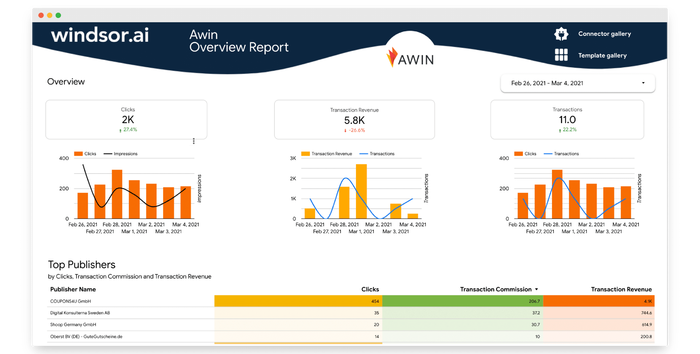
Free Awin Dashboard Templates
At Windsor.ai, we strive to make free Awin marketing reporting as effortless as possible for our users.
These free and customizable Awin templates will assist you in visualizing your data for easy reporting and analysis.
All the Awin dashboard report templates have easy-to-follow instructions.
Find the right template from Awin’s library and start using them to save time, effort and increase productivity.

What is an Awin Dashboard in 2024?
If you are looking for Awin dashboard templates, it’s important to note that Awin provides its own interface for users, and the customization options can be limited to what the platform itself offers.
Typically, users interact with Awin through their web-based dashboard, where they can track performance, view reports, and manage their affiliate marketing activities. If you are interested in customizing the way you view and analyze data, Awin might provide certain options within its dashboard settings.
However, if you are specifically looking for templates to visualize and analyze Awin data outside of the platform, you might consider using business intelligence tools or data visualization platforms that allow you to import and manipulate data from various sources, including Awin.
Here are some general steps you can take

Explore Awin Dashboard Settings
Check the Awin dashboard settings to see if there are any built-in customization options for the display of data and reports.

Business Intelligence Tools
Consider using business intelligence tools like Tableau, Power BI, or Looker Studio. These tools allow you to connect to various data sources, create custom dashboards, and visualize data in a way that suits your needs.

API Integration
Awin offers an API (Application Programming Interface) that allows you to retrieve data programmatically. If so, you could use this to integrate Awin data into a custom dashboard or reporting system.

Custom Development
If you have specific requirements and technical skills, you could develop a custom solution using programming languages like Python or JavaScript.
Turn your data into a strategic asset. Get instant insights across all your platforms with Windsor.ai


