 Destinations
 Data sources
 AI insights
 About us
 Careers
 Security
 Customer reviews
 Contact us
 Affiliate program
 Solution partners
 Template gallery
 Looker Studio templates
 Power BI templates
 Excel templates
 Google Sheets templates
 Tableau templates
 Facebook Ads templates
 Google Ads templates
 Data fields & Metrics
 AI prompt library & Guides
 Product documentation
 API documentation
 Case studies
 Blog
Blog Data models
 Windsor vs Supermetrics
 Windsor vs Funnel.io
 Windsor vs Fivetran
 Windsor vs Rivery
 Windsor vs Portermetrics
 Windsor vs Coupler.io
Connect Amazon Vendor Central to ChatGPT
Automatically sync your Amazon Vendor Central data to ChatGPT using the Windsor.ai connector.
Amazon Vendor Central is for invitation-only 1P vendors who sell wholesale to Amazon, which sets the retail price and handles fulfillment to the customer. Analyze your Vendor Central data in ChatGPT to optimize inventory, reduce revenue loss, and scale your business with AI insights. Selling directly as a third-party marketplace seller instead? See our Amazon Seller Central to ChatGPT integration guide.
Forget CSVs. Stop copy/paste. Connect data in minutes. No code required.
 Sign up with Google
 Free forever plan
No credit card needed
Free forever plan
No credit card needed










Streamline analytics with Amazon Vendor Central to ChatGPT integration
Connect Amazon Vendor Central to ChatGPT via Windsor.ai to get instant AI insights into your sales, inventory, and demand trends. Explore key use cases:

Reduce aged inventory costs
Ask ChatGPT to identify exactly how much capital is tied up in products that haven’t moved in over three months. Use these insights to prioritize specific items for immediate price markdowns or liquidation to avoid further storage fees.

Predict stockouts
Compare your current sellable units against high-certainty forecast levels (P90) for the upcoming month. Proactively adjust your production schedules for items that are predicted to run out before the next replenishment cycle.

Improve low-conversion products
Cross-reference your page views with actual units shipped to find products with high traffic, but low conversions. This allows you to focus on improving product descriptions, imagery, or pricing for high-interest items.

Spot revenue gaps
Let AI analyze the gap between what Amazon requested and what you actually successfully delivered to the warehouse. It will pinpoint fulfillment issues and calculate the total value of missed sales opportunities.
Using Windsor.ai to connect data from Amazon Vendor Central to ChatGPT
Skip manual exports and data cleanup. Windsor.ai streams your Amazon Vendor Central data directly into ChatGPT via MCP.
Connect in minutes and uncover where you’re losing revenue, which products are overstocked, and how to align inventory with real demand.
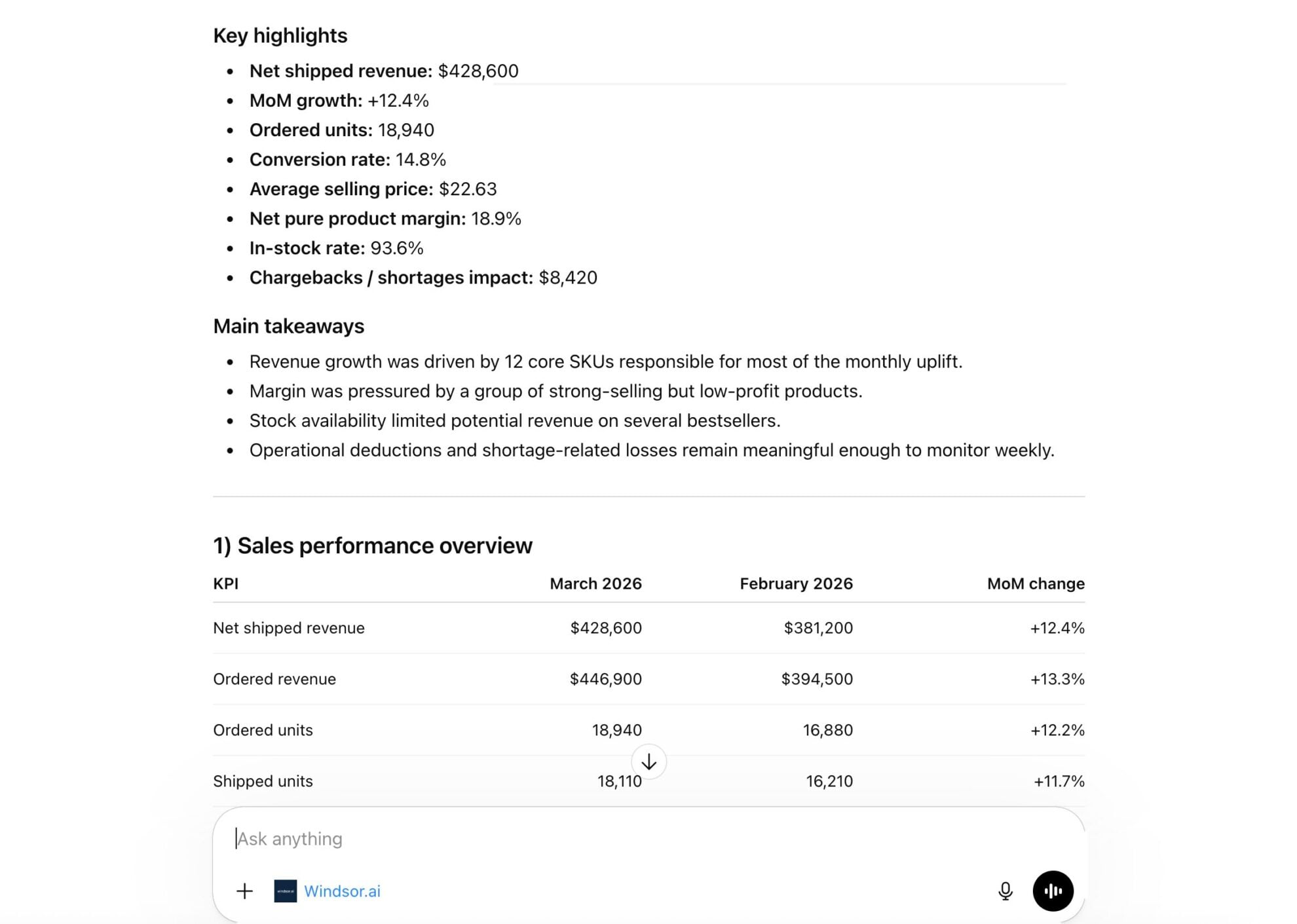














How to connect Amazon Vendor Central to ChatGPT data with Windsor.ai
Explore our video tutorial and a step-by-step guide to seamlessly integrate your data from any source into ChatGPT with the Windsor.ai connector.
Select your data source
Choose Amazon Vendor Central as your data source and grant access to Windsor.ai.

Install the Windsor.ai connector
Log in to your ChatGPT account and open this Windsor.ai connector page.
Click Connect, then authorize access.

Query your Amazon Vendor Central data in ChatGPT
Open a new chat and start asking questions about your connected Amazon Vendor Central data using natural language.
Make sure that the Windsor.ai connector is enabled (click the + sign → More → Windsor.ai.)
FAQs
What can I do with Amazon Vendor Central data in ChatGPT?
You can use ChatGPT as an AI assistant to analyze your Amazon Vendor data. Identify revenue gaps, forecast demand, detect out-of-stock products, and evaluate fulfillment performance, all using natural language.
Can ChatGPT help me identify my most profitable products?
Yes. By asking ChatGPT to compare your total revenue against costs and Amazon’s various deductions, you can quickly see which high-volume items are actually driving profit and which might be losing money after accounting for operational fees.
How ChatGPT can help me with inventory and supply chain planning?
ChatGPT can compare your current on-hand inventory against historical sales trends to predict when you might run out of stock. This allows you to adjust your production or shipping schedules weeks in advance.
Can I blend Amazon Vendor Central with other data sources?
Yes. Windsor.ai supports 350+ data sources. If you also run ads or sell on other platforms, Windsor.ai allows you to ask ChatGPT questions like, ‘How does our Amazon wholesale revenue compare to our Shopify sales this month?’
Is my data refreshed in real-time?
The connector provides access to your most recent data available through the Amazon API, ensuring the insights you get in ChatGPT reflect the current state of your wholesale business.
What prompts can I use to analyze Amazon Vendor Central data in ChatGPT?
Use advanced prompts in ChatGPT to uncover deeper insights from your Amazon Vendor Central data. For example:
-
Analyze our products by comparing their sales volume against their net product margin. Identify the top products that have both high volume and high margin, and the 'drain' products that are selling well but have low profitability.
-
Find products that have been sitting in sellable inventory for more than 90 days. Compare this against recent sales performance to prioritize items for promotion or liquidation.
-
Look at our average lead time days for the last quarter. Identify if products with longer lead times are directly correlated with a higher out-of-stock rate or lower fill rates.
-
Compare our 'mean forecast' units against the 'P90' (high-certainty) forecast for the next month. Which product categories show the most uncertainty in demand, and where should we increase our inventory buffer to avoid losing sales?
How much does it cost to integrate Amazon Vendor Central into ChatGPT using Windsor.ai?
Windsor.ai is free to start, no credit card required. Paid plans start at $19/month and scale by the number of sources and accounts. See the pricing page.
How long does it take to connect Amazon Vendor Central to ChatGPT?
With Windsor.ai’s intuitive connector, the integration process takes just a few minutes. No technical expertise is required; connecting Amazon Vendor Central to ChatGPT is simple, straightforward, and completely code-free.
Do you have helpful links to get started with integrating Amazon Vendor Central and ChatGPT using Windsor.ai?
Yes, we have helpful resources to help you get started. You can explore our official documentation and tutorials for seamless Amazon Vendor Central to ChatGPT integration with Windsor.ai:
Tired of manual Amazon Vendor Central data exports? Try Windsor.ai today to automate your reporting


