 Destinations
 Data sources
 AI insights
 About us
 Careers
 Security
 Customer reviews
 Contact us
 Affiliate program
 Solution partners
 Template gallery
 Looker Studio templates
 Power BI templates
 Excel templates
 Google Sheets templates
 Tableau templates
 Facebook Ads templates
 Google Ads templates
 Data fields & Metrics
 AI prompt library & Guides
 Product documentation
 API documentation
 Case studies
 Blog
 Data models
 Windsor vs Supermetrics
 Windsor vs Funnel.io
 Windsor vs Fivetran
 Windsor vs Rivery
 Windsor vs Portermetrics
 Windsor vs Coupler.io
Connect Amazon Seller Central to ChatGPT
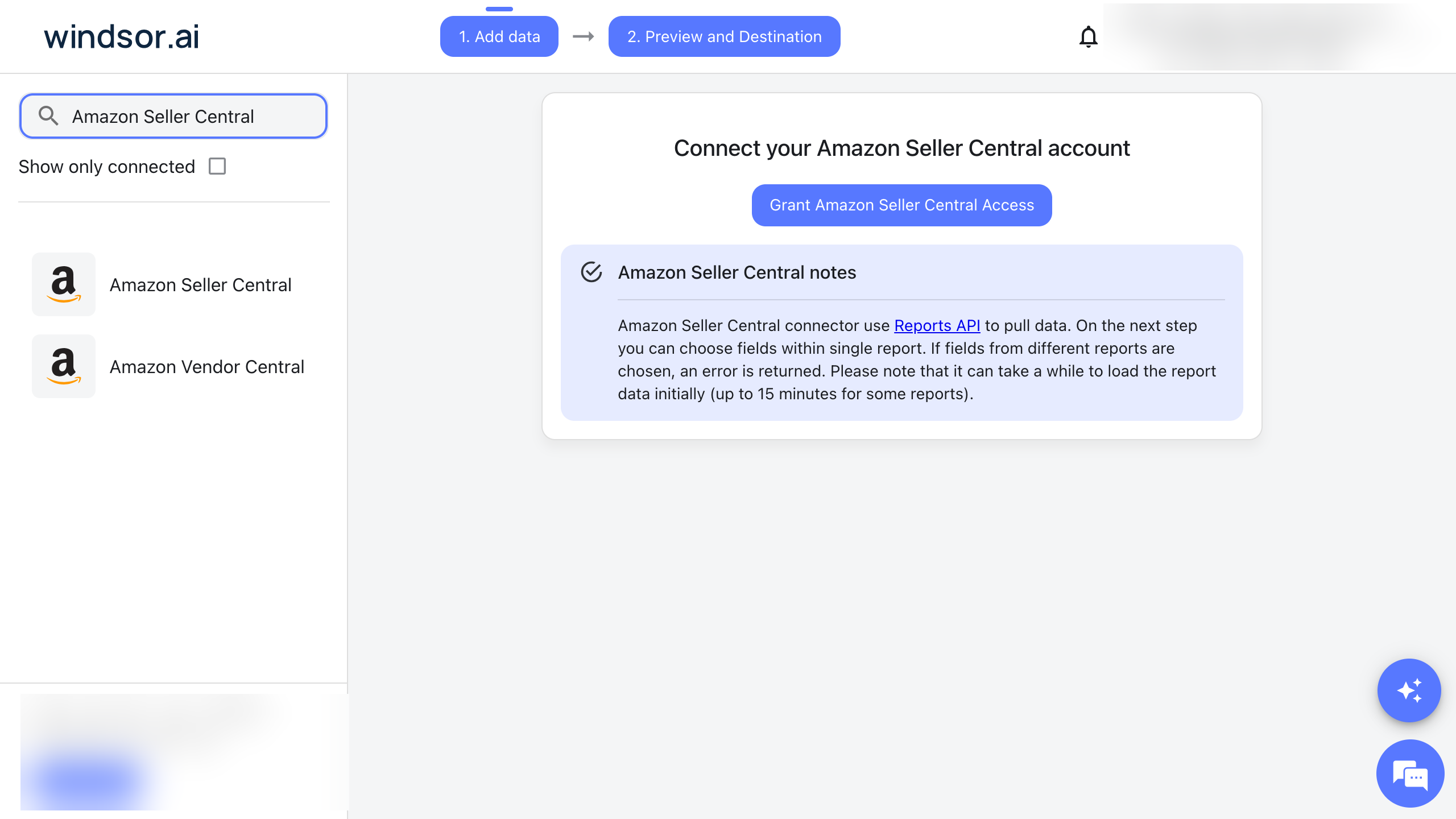
To connect Amazon Seller Central to ChatGPT, authorize your Seller Central account in Windsor.ai, then install the Windsor.ai plugin from Plugins in ChatGPT. There is no code to write and no server address to paste.
Ask ChatGPT about sales, sessions and Buy Box percentage per ASIN, fee estimates, days of supply, returns and account health. You can also update a listing’s price, title, description or bullet points after you confirm the change. If you sell wholesale to Amazon, see how to connect Amazon Vendor Central to ChatGPT.
Set up in three steps.
 Sign up with Google
 Free forever plan









Analyze sales, fees and stock with the Amazon Seller Central to ChatGPT integration
With your Amazon Seller Central reports in ChatGPT through Windsor.ai, you can:

Compare sales with fees per ASIN
Ask ChatGPT for ordered product sales, units ordered and refund rate per ASIN. Then ask for Amazon’s estimated referral and fulfillment fees per unit from the FBA fee estimates report. ChatGPT can combine the two answers, rank the products with the least revenue per unit after fees and suggest which prices or listings to check first.

Perform cross-channel analysis
Merge your Amazon Seller Central data with 350+ sources such as Amazon Ads, GA4, Meta Ads and Shopify to compare daily Amazon sales with your ad spend and store revenue. With Amazon Ads next to Seller Central, ChatGPT can work out your total advertising cost of sale (TACOS), which is ad spend as a share of total sales. You can test several sources free for the first 30 days. After that, combining sources needs a paid plan, from $19/month for 3 sources or $99/month for 7.

Prevent stockouts
Ask ChatGPT which FBA SKUs have the fewest days of supply and how many units are already inbound. For each SKU, it can add Amazon’s recommended inbound quantity from the same report.

Identify declining products
ChatGPT can compare units ordered, sessions and unit session percentage per ASIN month over month and list the ASINs whose sales or conversion rate fell. For each one, it can check the price and Buy Box percentage.
Check account health
Amazon’s seller performance report has your account health rating, order defect rate, late shipment rate and valid tracking rate. Amazon gives a target for each rate. The account health rating has a score and a status. Ask ChatGPT to list them and flag any rate close to its target.
Update listings
Update the price, title, description or bullet points of a listing by SKU from ChatGPT. ChatGPT shows the change and waits for your confirmation before it runs.
Example prompt: days of supply and inbound units per SKU
Try this prompt in ChatGPT after you connect Amazon Seller Central. It uses Amazon’s FBA inventory planning report:
For my Amazon Seller Central account, which FBA SKUs have fewer than 30 days of supply? For each, show the product name, available units, inbound units, units shipped in the last 30 days and Amazon’s recommended action.
Set days of supply against your supplier’s lead time to see which SKUs need stock first.
Available actions
Update Listing
Update editable attributes of an existing Amazon product listing (product card), identified by seller SKU. Provide only the fields to change; at least one is required. title sets the product title (item_name). description sets the product description. bullet_points replaces the ENTIRE list of bullet points (About this item) — pass every bullet you want to keep, not just new ones; it cannot be empty (clearing all bullets is not supported). price sets the standard offer price in the marketplace currency. Updates are submitted as a partial patch and processed asynchronously by Amazon: a successful response means the submission was ACCEPTED for processing, not that it is live yet. Requires the Product Listing role on the SP-API application.






How to connect Amazon Seller Central to ChatGPT with Windsor.ai
Explore our video tutorial and a step-by-step guide to bring data from any source into ChatGPT with the Windsor.ai plugin. For Amazon Seller Central, the full steps, prompts and fixes for common problems are in how to connect Amazon Seller Central to ChatGPT.
Install the Windsor.ai plugin
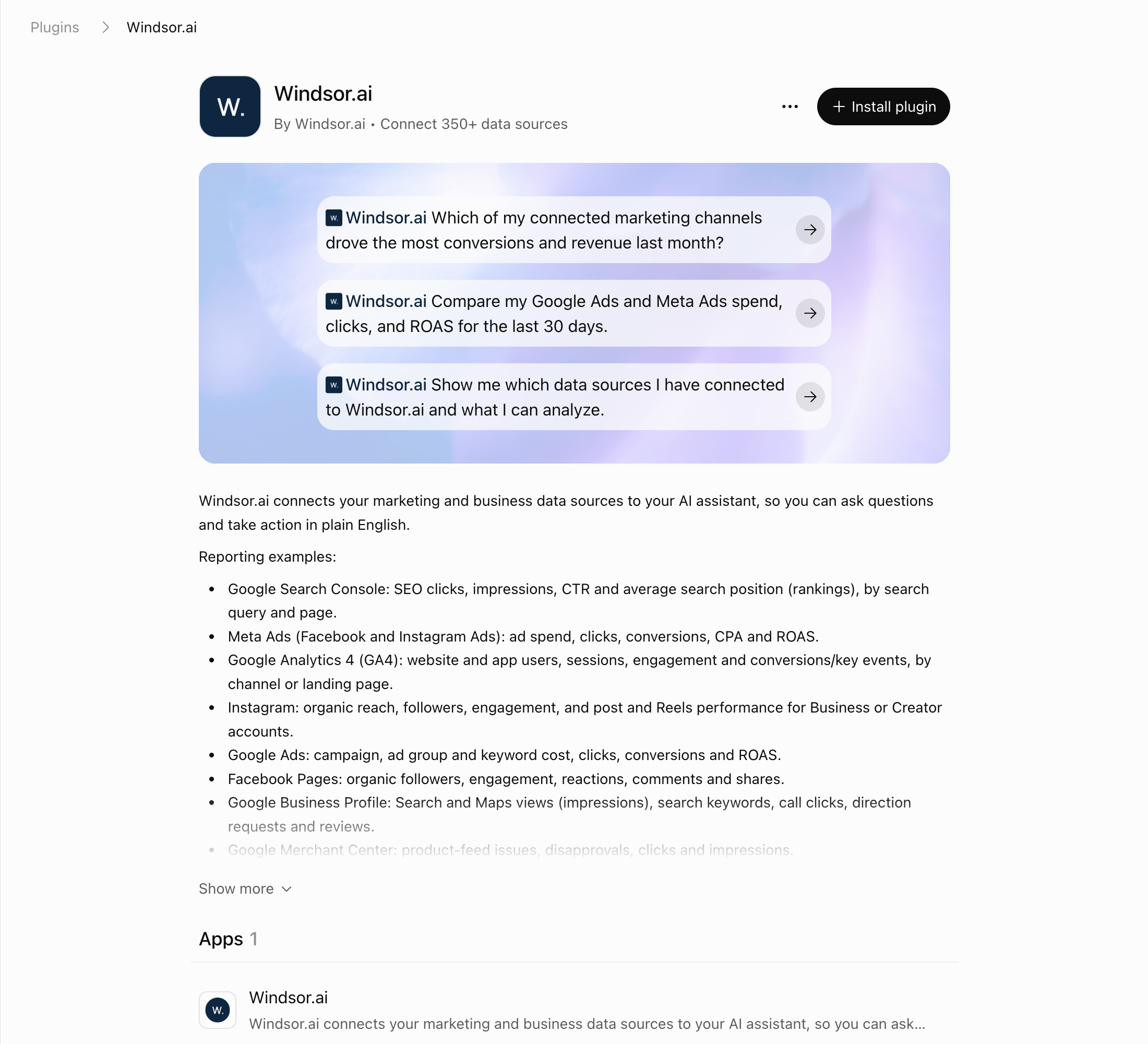
In ChatGPT, select Plugins in the sidebar and search for Windsor.ai, or open the Windsor.ai plugin page.
Select Install plugin, then sign in to Windsor.ai and authorize access. The Windsor.ai plugin works on ChatGPT’s Free plan.
Query your Amazon Seller Central data in ChatGPT
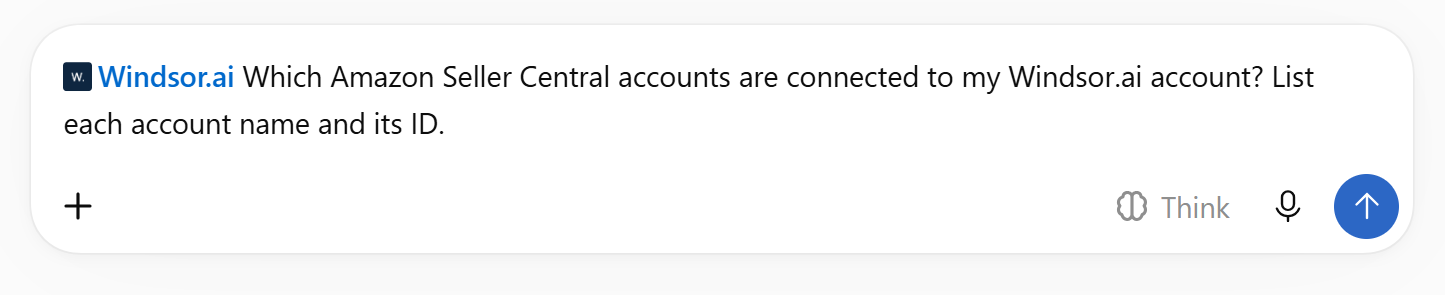
Open a new chat, select + and choose Windsor.ai, or type @Windsor.ai and pick it from the menu. Then ask about your Amazon Seller Central data in plain English. To check the connection first, ask: “Which Amazon Seller Central accounts are connected to my Windsor.ai account? List each account name and its ID.”
FAQs
Is there an official Amazon Seller Central plugin for ChatGPT?
No. ChatGPT’s Plugins directory has no Seller Central plugin from Amazon (searched “Seller Central” and “Amazon Seller” on 18 November 2026). On 23 September 2026, Amazon announced its Amazon Selling Partner plugin for Amazon Quick and, in beta, for Claude. It is for sellers in Amazon’s US stores (Amazon’s announcement). The announcement does not mention ChatGPT.
Other developers list Amazon seller plugins in ChatGPT’s directory, for example Adzviser Amazon Seller Central and NAVINES IQ Seller Insights. Business, Enterprise and Edu workspaces can also add custom MCP servers. You can also upload a report exported from Seller Central to a chat.
The Windsor.ai plugin reads your Seller Central data and has 1 write action for Amazon Seller Central, Update Listing (write actions list). The routes are compared in how to connect Amazon Seller Central to ChatGPT.
What can I do with Amazon Seller Central data in ChatGPT?
Once your Amazon Seller Central account is connected to ChatGPT, you can:
- Analyze product performance. Find top-selling products and products with falling sales.
- Compare revenue with fees. Ask for revenue per product, then for Amazon’s fees per product, plus ad spend if Amazon Ads is connected. ChatGPT can combine the answers to show which products keep the most after fees. Add your product costs in the chat and ChatGPT can estimate profit per product.
- Watch stock levels. Find products that may run out of stock soon and SKUs with slow turnover.
- Check account health. List your account health rating and status, and your order defect rate and late shipment rate with Amazon’s targets.
- Track sales over time. Compare sales month over month and spot seasonal changes in demand. Periods longer than 30 days need a paid plan.
- Run cross-channel analysis. Connect Seller Central with Amazon Ads, GA4, Meta Ads or Shopify to compare daily Amazon sales with ad spend and store revenue. Combining sources is free for the first 30 days, then needs a paid plan.
Which Amazon connector do I need: Seller Central, Vendor Central or Amazon Ads?
Amazon Seller Central is for third-party sellers who sell their own stock on Amazon. Vendor Central is for brands that sell wholesale to Amazon, which then resells the products. Amazon Ads covers Sponsored Products, Sponsored Brands and Sponsored Display campaigns, for sellers and vendors alike. Each is a separate connector in Windsor.ai. Connect Seller Central and Amazon Ads together to set ad spend next to sales. See how to connect Amazon Vendor Central to ChatGPT and how to connect Amazon Ads to ChatGPT.
Can ChatGPT take actions in Amazon Seller Central, or just analyze the data?
Both. Windsor.ai has 1 write action for Amazon Seller Central, Update Listing. It changes the title, description, bullet points or price of a listing by SKU from ChatGPT, after you confirm the change. Write actions run through the same Windsor.ai plugin you use to read data. When you update bullet points, the new list replaces the old one. Include every bullet you want to keep. A successful response means Amazon accepted the update for processing. The change can take some time to show on the listing. More examples are in Manage Amazon Ads, DSP, and Listings with an AI Assistant and the write actions list.
Do I need special permissions to update listings from ChatGPT?
Yes. The Seller Central user who authorizes Windsor.ai in Step 1 needs permission to grant app access and manage listings. Listing updates run through Windsor.ai’s Amazon Selling Partner API application, which has Amazon’s Product Listing role. You can see and remove the apps you authorized under Manage Your Apps in Seller Central. If the Update Listing action is not available, contact Windsor.ai support.
Does this integration support multiple Amazon marketplaces?
Yes. Windsor.ai can pull data from several Amazon marketplaces, for example Amazon.com, Amazon.co.uk and Amazon.de, and ChatGPT can compare them in one conversation. Amazon Seller Central is one connector, but each marketplace you connect counts as an account. The free forever plan includes 1 account, so it covers one marketplace. Comparing US, UK and DE needs a paid plan with enough accounts.
Can ChatGPT help improve my Amazon IPI (Inventory Performance Index) score?
Yes, from your inventory data. Windsor.ai does not return the IPI score itself. ChatGPT can work from the inventory fields (inventory age, estimated excess units, days of supply and Amazon’s recommended actions) to find excess stock and slow sell-through, two of the factors in your IPI score. It can then suggest promotions, replenishment changes or removal orders.
What prompts can I use to analyze Amazon Seller Central data?
Ask ChatGPT about one Seller Central report at a time, then ask it to combine the answers. A single request that mixes fields from different reports returns an error. Each prompt below that uses several reports asks for one report per step, for example:
-
For the last 90 days, show revenue and refund rate per ASIN for my top-selling products. Then, from the FBA fee estimates report, show the estimated fees per unit for the same ASINs. Then show ad spend per ASIN from Amazon Ads. Combine the answers, find the products with strong sales that keep little after ad spend, fees and refunds, and suggest whether to raise the price or lower ad spend for each.
-
Show total sales per ASIN from Seller Central for my top-selling products. Then show ad spend and ad-attributed sales per ASIN from Amazon Ads. Which products depend most on paid advertising? Highlight products with high ad spend where sales not attributed to ads are flat or falling.
-
Find products with high traffic and low conversion rates, and explain which listings may need work. Use sessions, unit session percentage, price and sales trend to find the most likely cause.
-
For my US, UK and DE marketplaces, show revenue and unit session percentage per ASIN. Then, from the FBA fee estimates report, show total fees per unit for the same ASINs in each marketplace. Combine the answers and find the products that keep the most revenue after fees in one marketplace and the least in another.
Prompts that cover more than 30 days need a paid plan. The first two prompts add Amazon Ads as a second source. That is free for the first 30 days and then needs a paid plan. The marketplace prompt needs an account for each marketplace you connect.
How often does the Amazon Seller Central data in ChatGPT update?
How often Amazon Seller Central data updates depends on your Windsor.ai plan. On the free forever and Basic plans, Windsor.ai re-fetches recent data from Amazon once a day. On the Standard and Plus plans, it re-fetches the recent window (usually the last 3 days) as often as once an hour. On the Professional and Enterprise plans, that can happen as often as every 15 minutes. The data is not re-fetched from Amazon each time you ask a question. Windsor.ai also keeps the result of each query for 6 hours. If ChatGPT sends the exact same query again within those 6 hours, it gets the stored result. Amazon builds each Seller Central report before Windsor.ai can read it. The first pull of a report can take a while.
How much does it cost to integrate Amazon Seller Central into ChatGPT using Windsor.ai?
You can start on Windsor.ai’s free forever plan, no credit card. In the first 30 days you can test up to 10 sources and 15 accounts. After that, the free forever plan covers 1 user, 1 data source and 1 account with the last 30 days of data. Each Amazon marketplace you connect counts as 1 account, so the free forever plan covers one marketplace. Paid plans start at $19/month for 3 sources (Basic). Standard is $99/month for 7 sources. Both prices are billed annually. See the pricing page for every plan.
How do I connect Amazon Seller Central to ChatGPT?
Connect Amazon Seller Central in Windsor.ai, install the Windsor.ai plugin in ChatGPT, then ask your first question in a new chat.
Do you have helpful links to get started with integrating Amazon Seller Central and ChatGPT using Windsor.ai?
Yes. These pages cover Amazon Seller Central in ChatGPT and other assistants with Windsor.ai:
- How to connect Amazon Seller Central to ChatGPT: setup steps, prompts and fixes for common problems
- How to connect Amazon Seller Central to Claude: the same data in Claude
- Manage Amazon Ads, DSP, and Listings with an AI Assistant: listing updates and Amazon Ads changes from a chat
- How to use Windsor.ai for e-commerce: Amazon next to your store and ad channels
- Amazon Seller Central Field Reference: every field and its description
- ChatGPT Integration Documentation: the Windsor.ai plugin for any source
Tired of manual Amazon Seller Central data exports? Try Windsor.ai today to automate your reporting


