 Destinations
 Data sources
 AI insights
 About us
 Careers
 Security
 Customer reviews
 Contact us
 Affiliate program
 Solution partners
 Template gallery
 Looker Studio templates
 Power BI templates
 Excel templates
 Google Sheets templates
 Tableau templates
 Facebook Ads templates
 Google Ads templates
 Data fields & Metrics
 AI prompt library & Guides
 Product documentation
 API documentation
 Case studies
 Blog
Blog Data models
 Windsor vs Supermetrics
 Windsor vs Funnel.io
 Windsor vs Fivetran
 Windsor vs Rivery
 Windsor vs Portermetrics
 Windsor vs Coupler.io
Connect Facebook Ads to ChatGPT
Automatically sync your Facebook Ads data to ChatGPT using the Windsor.ai connector.
Get AI-powered insights on your Facebook Ads data and take action instantly. Create, pause, or turn on campaigns and ad sets, and manage spend directly from ChatGPT.
Forget CSVs. Stop copy/paste. Connect data in minutes. No code required.
 Sign up with Google
 Free forever plan









Boost campaign efficiency with Facebook Ads to ChatGPT integration
Stream your Facebook Ads data into ChatGPT using Windsor.ai to save time on manual analysis and gain actionable insights across campaigns, ad sets, and ad creatives. Key benefits and use cases include:

Manage campaigns
Ask ChatGPT to find campaigns where CPA exceeded your target, then turn them off the moment you spot it. You can also create campaigns and ad sets from scratch in the same conversation. Executes changes in your Meta Ads account without opening Ads Manager.

Unify data across multiple channels
With Windsor.ai, combine Facebook Ads with 350+ sources like Google Ads, TikTok, and LinkedIn Ads. Compare performance across channels and uncover opportunities to optimize budgets, creatives, and your overall marketing strategy.
Creative fatigue detection
ChatGPT can help you analyze CTR trends and identify ads where engagement has dropped significantly. This alerts you when creatives likely need refreshing.

Smart budget reallocation
Let ChatGPT compare campaign performance across your account and highlight the top performers and losers. Instruct it to shift budget directly from your conversation, scaling winning campaigns faster.

Turn your best posts into ads
Spot a Facebook or Instagram post that’s already earning strong organic engagement, then turn it into a paid ad without writing new copy or building new creative. Ask ChatGPT to boost it straight into an ad set in the same conversation.
Using Windsor.ai to connect data from Facebook Ads to ChatGPT
Sending Facebook Ads data to ChatGPT usually requires manual exports, formatting, and complex setups. The Windsor.ai connector handles it automatically by collecting, structuring, and delivering your data to ChatGPT in minutes.
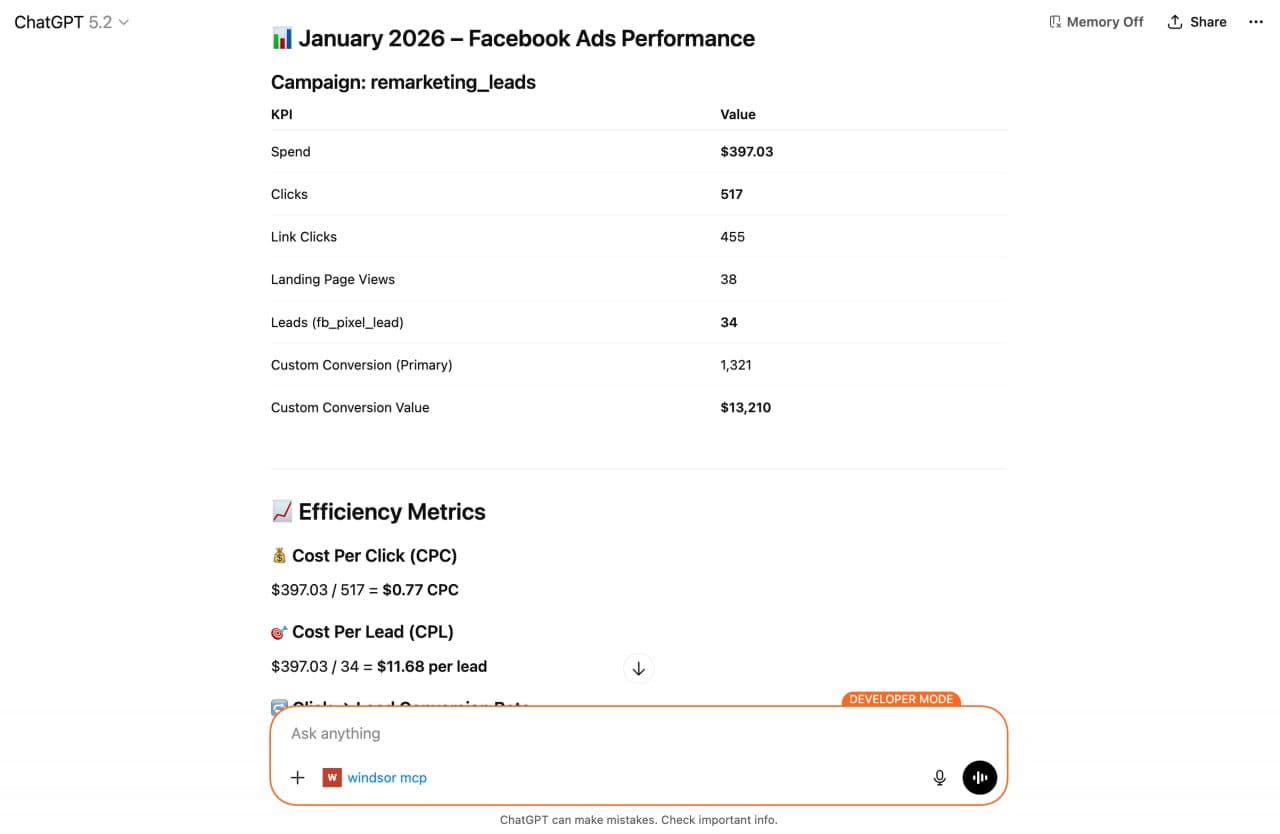
Connect your Facebook Ads account and receive AI-driven insights into ad performance. For a full walkthrough of the write actions covered here (pausing campaigns, shifting budgets, creating new ad sets), see How to Manage Facebook Ads Campaigns from ChatGPT.
Available actions
Create Ad Set Create a new ad set in an existing Meta Ads campaign (Facebook or Instagram). Created paused by default so it does not spend until enabled. Budget amounts are in the account currency minor unit (e.g. cents: 5000 means 50.00). Currencies without cents (CLP, COP, CRC, HUF, IDR, ISK, JPY, KRW, PYG, TWD, VND) use whole units: 300000 means 300000 COP. Provide at most one of daily_budget or lifetime_budget; omit both only when the campaign uses campaign budget optimization. lifetime_budget requires end_time. Some optimization goals require promoted_object, a Meta spec naming what is optimized (e.g. {"pixel_id": "<id>", "custom_event_type": "PURCHASE"} for conversions, or {"page_id": "<id>"} for page likes). destination_type sets where the ad sends people; for boosting an existing post (boost_post) use ON_POST with optimization_goal POST_ENGAGEMENT to keep engagement on the post (no call to action needed). A website or undefined destination instead makes Meta require a website URL and call to action in the creative. start_time and end_time are ISO 8601 timestamps (e.g. 2027-01-01T00:00:00-0800); start_time defaults to now and cannot be changed once the ad set has started, even while paused. An ad set with its own budget is created with bid_strategy LOWEST_COST_WITHOUT_CAP (highest volume) unless bid_strategy or bid_amount is given; pass bid_amount with a capped strategy (LOWEST_COST_WITH_BID_CAP or COST_CAP). Under campaign budget optimization the campaign's bid strategy applies and none is sent. Ads delivered to the EU require dsa_beneficiary and dsa_payor, naming who benefits from and who pays for the ad. Ads delivered to Taiwan, Singapore, Thailand, Brazil, Australia, Malaysia or India require regional_regulated_categories (e.g. SINGAPORE_UNIVERSAL) together with regional_regulation_identities holding the matching beneficiary and payer ids (e.g. {"singapore_universal_beneficiary": "<id>", "singapore_universal_payer": "<id>"}; THAILAND_UNIVERSAL, BRAZIL_REGULATION, AUSTRALIA_UNIVERSAL and MALAYSIA_UNIVERSAL use "universal_beneficiary" and "universal_payer"; financial service ads in Australia also declare AUSTRALIA_FINSERV with "australia_finserv_beneficiary" and "australia_finserv_payer"). These are verified identity ids from Meta Business settings > Verified identities (not page or business ids); ad account defaults are not inherited by ad sets created through the API. Meta also asks some accounts for a verified advertiser on any ad set ("Advertiser is missing"); then pass regional_regulation_identities with "universal_beneficiary" and "universal_payer" and add regional_regulated_categories only when the targeted country has a value listed above. extra_params passes further Meta ad set fields straight to the Graph API for anything this action does not model yet, e.g. {"attribution_spec": [{"event_type": "CLICK_THROUGH", "window_days": 7}]}. Prefer the named parameters where they exist: a key that repeats one already set is rejected, since only one of the two values could win.
Create a new ad set in an existing Meta Ads campaign (Facebook or Instagram). Created paused by default so it does not spend until enabled. Budget amounts are in the account currency minor unit (e.g. cents: 5000 means 50.00). Currencies without cents (CLP, COP, CRC, HUF, IDR, ISK, JPY, KRW, PYG, TWD, VND) use whole units: 300000 means 300000 COP. Provide at most one of daily_budget or lifetime_budget; omit both only when the campaign uses campaign budget optimization. lifetime_budget requires end_time. Some optimization goals require promoted_object, a Meta spec naming what is optimized (e.g. {"pixel_id": "<id>", "custom_event_type": "PURCHASE"} for conversions, or {"page_id": "<id>"} for page likes). destination_type sets where the ad sends people; for boosting an existing post (boost_post) use ON_POST with optimization_goal POST_ENGAGEMENT to keep engagement on the post (no call to action needed). A website or undefined destination instead makes Meta require a website URL and call to action in the creative. start_time and end_time are ISO 8601 timestamps (e.g. 2027-01-01T00:00:00-0800); start_time defaults to now and cannot be changed once the ad set has started, even while paused. An ad set with its own budget is created with bid_strategy LOWEST_COST_WITHOUT_CAP (highest volume) unless bid_strategy or bid_amount is given; pass bid_amount with a capped strategy (LOWEST_COST_WITH_BID_CAP or COST_CAP). Under campaign budget optimization the campaign's bid strategy applies and none is sent. Ads delivered to the EU require dsa_beneficiary and dsa_payor, naming who benefits from and who pays for the ad. Ads delivered to Taiwan, Singapore, Thailand, Brazil, Australia, Malaysia or India require regional_regulated_categories (e.g. SINGAPORE_UNIVERSAL) together with regional_regulation_identities holding the matching beneficiary and payer ids (e.g. {"singapore_universal_beneficiary": "<id>", "singapore_universal_payer": "<id>"}; THAILAND_UNIVERSAL, BRAZIL_REGULATION, AUSTRALIA_UNIVERSAL and MALAYSIA_UNIVERSAL use "universal_beneficiary" and "universal_payer"; financial service ads in Australia also declare AUSTRALIA_FINSERV with "australia_finserv_beneficiary" and "australia_finserv_payer"). These are verified identity ids from Meta Business settings > Verified identities (not page or business ids); ad account defaults are not inherited by ad sets created through the API. Meta also asks some accounts for a verified advertiser on any ad set ("Advertiser is missing"); then pass regional_regulation_identities with "universal_beneficiary" and "universal_payer" and add regional_regulated_categories only when the targeted country has a value listed above. extra_params passes further Meta ad set fields straight to the Graph API for anything this action does not model yet, e.g. {"attribution_spec": [{"event_type": "CLICK_THROUGH", "window_days": 7}]}. Prefer the named parameters where they exist: a key that repeats one already set is rejected, since only one of the two values could win.
Create Campaign Create a new Meta Ads campaign (Facebook or Instagram). Created paused by default so it does not spend until enabled. objective is a Meta campaign objective (e.g. OUTCOME_TRAFFIC, OUTCOME_LEADS, OUTCOME_SALES). special_ad_categories must list any regulated categories the ads fall under (e.g. HOUSING, EMPLOYMENT, CREDIT) or be empty; country declarations such as SINGAPORE_UNIVERSAL or TAIWAN_UNIVERSAL belong to regional_regulated_categories on the ad set instead. Setting a campaign budget enables campaign budget optimization; amounts are in the account currency minor unit (e.g. cents: 5000 means 50.00). Currencies without cents (CLP, COP, CRC, HUF, IDR, ISK, JPY, KRW, PYG, TWD, VND) use whole units: 300000 means 300000 COP. Provide at most one of daily_budget or lifetime_budget. A campaign with a budget (or with ad set budget sharing enabled) is created with bid_strategy LOWEST_COST_WITHOUT_CAP (highest volume) unless bid_strategy is given; its ad sets inherit it and cannot override it. Without a campaign budget leave bid_strategy unset and choose it per ad set in create_adset. When no campaign budget is set, some accounts require is_adset_budget_sharing_enabled to be specified.
Create a new Meta Ads campaign (Facebook or Instagram). Created paused by default so it does not spend until enabled. objective is a Meta campaign objective (e.g. OUTCOME_TRAFFIC, OUTCOME_LEADS, OUTCOME_SALES). special_ad_categories must list any regulated categories the ads fall under (e.g. HOUSING, EMPLOYMENT, CREDIT) or be empty; country declarations such as SINGAPORE_UNIVERSAL or TAIWAN_UNIVERSAL belong to regional_regulated_categories on the ad set instead. Setting a campaign budget enables campaign budget optimization; amounts are in the account currency minor unit (e.g. cents: 5000 means 50.00). Currencies without cents (CLP, COP, CRC, HUF, IDR, ISK, JPY, KRW, PYG, TWD, VND) use whole units: 300000 means 300000 COP. Provide at most one of daily_budget or lifetime_budget. A campaign with a budget (or with ad set budget sharing enabled) is created with bid_strategy LOWEST_COST_WITHOUT_CAP (highest volume) unless bid_strategy is given; its ad sets inherit it and cannot override it. Without a campaign budget leave bid_strategy unset and choose it per ad set in create_adset. When no campaign budget is set, some accounts require is_adset_budget_sharing_enabled to be specified.
Create Ad Create a new ad in an existing Meta Ads ad set (Facebook or Instagram). Created paused by default so it does not spend until enabled. The simplest way is to provide page_id and link plus optional text (message, headline, description), image_url or image_hash (from create_ad_image) and call_to_action_type; these build a single-image link ad creative automatically. For a Click-to-Message ad, set messaging_destination (MESSENGER or INSTAGRAM_DIRECT) instead of link; the message opens a conversation with the page. For a video ad, upload the video first with create_ad_video and pass its video_id here with page_id and a required thumbnail image_url or image_hash; message becomes the primary text, headline the title, description the caption, and call_to_action_type (with link) adds a button. For advanced cases, pass a full Meta creative spec via creative instead (e.g. {"creative_id": "<id>"} to reuse an existing creative, or {"object_story_spec": {...}}). Provide either the individual creative fields or creative, not both.
Create a new ad in an existing Meta Ads ad set (Facebook or Instagram). Created paused by default so it does not spend until enabled. The simplest way is to provide page_id and link plus optional text (message, headline, description), image_url or image_hash (from create_ad_image) and call_to_action_type; these build a single-image link ad creative automatically. For a Click-to-Message ad, set messaging_destination (MESSENGER or INSTAGRAM_DIRECT) instead of link; the message opens a conversation with the page. For a video ad, upload the video first with create_ad_video and pass its video_id here with page_id and a required thumbnail image_url or image_hash; message becomes the primary text, headline the title, description the caption, and call_to_action_type (with link) adds a button. For advanced cases, pass a full Meta creative spec via creative instead (e.g. {"creative_id": "<id>"} to reuse an existing creative, or {"object_story_spec": {...}}). Provide either the individual creative fields or creative, not both.
Update Campaign Update editable attributes of a Meta Ads campaign (Facebook or Instagram). Provide only the fields to change; at least one is required. spend_cap is a lifetime spend limit in the account currency minor unit (e.g. cents: 5000 means 50.00). Currencies without cents (CLP, COP, CRC, HUF, IDR, ISK, JPY, KRW, PYG, TWD, VND) use whole units: 300000 means 300000 COP. special_ad_categories lists the regulated categories the ads fall under (e.g. HOUSING, EMPLOYMENT, CREDIT) or is empty; country declarations such as SINGAPORE_UNIVERSAL or TAIWAN_UNIVERSAL belong to regional_regulated_categories on the ad set (update_adset) instead. Use pause_campaign/enable_campaign to change status and set_campaign_budget to change the budget. objective is fixed at creation and cannot be updated.
Update editable attributes of a Meta Ads campaign (Facebook or Instagram). Provide only the fields to change; at least one is required. spend_cap is a lifetime spend limit in the account currency minor unit (e.g. cents: 5000 means 50.00). Currencies without cents (CLP, COP, CRC, HUF, IDR, ISK, JPY, KRW, PYG, TWD, VND) use whole units: 300000 means 300000 COP. special_ad_categories lists the regulated categories the ads fall under (e.g. HOUSING, EMPLOYMENT, CREDIT) or is empty; country declarations such as SINGAPORE_UNIVERSAL or TAIWAN_UNIVERSAL belong to regional_regulated_categories on the ad set (update_adset) instead. Use pause_campaign/enable_campaign to change status and set_campaign_budget to change the budget. objective is fixed at creation and cannot be updated.
Update Ad Set Update editable attributes of a Meta Ads ad set (Facebook or Instagram). Provide only the fields to change; at least one is required. bid_amount is in the account currency minor unit (e.g. cents: 500 means 5.00). Currencies without cents (CLP, COP, CRC, HUF, IDR, ISK, JPY, KRW, PYG, TWD, VND) use whole units: 300000 means 300000 COP. Switching bid_strategy to a capped strategy (LOWEST_COST_WITH_BID_CAP or COST_CAP) requires bid_amount in the same call. start_time and end_time are ISO 8601 timestamps (e.g. 2027-01-01T00:00:00-0800); end_time less than one year ahead. Use pause_adset/enable_adset to change status and set_adset_budget to change the budget. Ads delivered to the EU require dsa_beneficiary and dsa_payor, naming who benefits from and who pays for the ad. Ads delivered to Taiwan, Singapore, Thailand, Brazil, Australia, Malaysia or India require regional_regulated_categories (e.g. SINGAPORE_UNIVERSAL) together with regional_regulation_identities holding the matching beneficiary and payer ids (e.g. {"singapore_universal_beneficiary": "<id>", "singapore_universal_payer": "<id>"}; THAILAND_UNIVERSAL, BRAZIL_REGULATION, AUSTRALIA_UNIVERSAL and MALAYSIA_UNIVERSAL use "universal_beneficiary" and "universal_payer"; financial service ads in Australia also declare AUSTRALIA_FINSERV with "australia_finserv_beneficiary" and "australia_finserv_payer"). These are verified identity ids from Meta Business settings > Verified identities (not page or business ids); ad account defaults are not inherited by ad sets created through the API. Meta also asks some accounts for a verified advertiser on any ad set ("Advertiser is missing"); then pass regional_regulation_identities with "universal_beneficiary" and "universal_payer" and add regional_regulated_categories only when the targeted country has a value listed above. extra_params passes further Meta ad set fields straight to the Graph API for anything this action does not model yet, e.g. {"attribution_spec": [{"event_type": "CLICK_THROUGH", "window_days": 7}]}. Prefer the named parameters where they exist: a key that repeats one already set is rejected, since only one of the two values could win.
Update editable attributes of a Meta Ads ad set (Facebook or Instagram). Provide only the fields to change; at least one is required. bid_amount is in the account currency minor unit (e.g. cents: 500 means 5.00). Currencies without cents (CLP, COP, CRC, HUF, IDR, ISK, JPY, KRW, PYG, TWD, VND) use whole units: 300000 means 300000 COP. Switching bid_strategy to a capped strategy (LOWEST_COST_WITH_BID_CAP or COST_CAP) requires bid_amount in the same call. start_time and end_time are ISO 8601 timestamps (e.g. 2027-01-01T00:00:00-0800); end_time less than one year ahead. Use pause_adset/enable_adset to change status and set_adset_budget to change the budget. Ads delivered to the EU require dsa_beneficiary and dsa_payor, naming who benefits from and who pays for the ad. Ads delivered to Taiwan, Singapore, Thailand, Brazil, Australia, Malaysia or India require regional_regulated_categories (e.g. SINGAPORE_UNIVERSAL) together with regional_regulation_identities holding the matching beneficiary and payer ids (e.g. {"singapore_universal_beneficiary": "<id>", "singapore_universal_payer": "<id>"}; THAILAND_UNIVERSAL, BRAZIL_REGULATION, AUSTRALIA_UNIVERSAL and MALAYSIA_UNIVERSAL use "universal_beneficiary" and "universal_payer"; financial service ads in Australia also declare AUSTRALIA_FINSERV with "australia_finserv_beneficiary" and "australia_finserv_payer"). These are verified identity ids from Meta Business settings > Verified identities (not page or business ids); ad account defaults are not inherited by ad sets created through the API. Meta also asks some accounts for a verified advertiser on any ad set ("Advertiser is missing"); then pass regional_regulation_identities with "universal_beneficiary" and "universal_payer" and add regional_regulated_categories only when the targeted country has a value listed above. extra_params passes further Meta ad set fields straight to the Graph API for anything this action does not model yet, e.g. {"attribution_spec": [{"event_type": "CLICK_THROUGH", "window_days": 7}]}. Prefer the named parameters where they exist: a key that repeats one already set is rejected, since only one of the two values could win.
Pause Campaign Pause an active Meta Ads campaign (Facebook or Instagram). Reversible via enable_campaign.
Pause an active Meta Ads campaign (Facebook or Instagram). Reversible via enable_campaign.
Set Campaign Budget Set the daily or lifetime budget of a Meta Ads campaign (Facebook or Instagram). The amount is in the account currency minor unit (e.g. cents: 5000 means 50.00). Currencies without cents (CLP, COP, CRC, HUF, IDR, ISK, JPY, KRW, PYG, TWD, VND) use whole units: 300000 means 300000 COP. Only one budget type applies at a time; setting one replaces the other. Meta rejects frequent budget changes on the same campaign; space out repeated changes instead of adjusting in rapid succession.
Set the daily or lifetime budget of a Meta Ads campaign (Facebook or Instagram). The amount is in the account currency minor unit (e.g. cents: 5000 means 50.00). Currencies without cents (CLP, COP, CRC, HUF, IDR, ISK, JPY, KRW, PYG, TWD, VND) use whole units: 300000 means 300000 COP. Only one budget type applies at a time; setting one replaces the other. Meta rejects frequent budget changes on the same campaign; space out repeated changes instead of adjusting in rapid succession.
Enable Campaign Activate a paused Meta Ads campaign (Facebook or Instagram). Reversible via pause_campaign.
Activate a paused Meta Ads campaign (Facebook or Instagram). Reversible via pause_campaign.
Enable Ad Activate a paused Meta Ads ad (Facebook or Instagram). Reversible via pause_ad.
Activate a paused Meta Ads ad (Facebook or Instagram). Reversible via pause_ad.
Enable Ad Set Activate a paused Meta Ads ad set (Facebook or Instagram). Reversible via pause_adset.
Activate a paused Meta Ads ad set (Facebook or Instagram). Reversible via pause_adset.
Pause Ad Pause an active Meta Ads ad (Facebook or Instagram). Reversible via enable_ad.
Pause an active Meta Ads ad (Facebook or Instagram). Reversible via enable_ad.
Update Ad Creative Edit the creative of an existing Meta Ads ad (Facebook or Instagram): ad copy (message), headline, description, destination link, image, call-to-action button, URL tracking tags and Advantage+ enhancement settings. Meta treats ad creatives as immutable, so this copies the ad's current creative (keeping its name, url_tags and degrees_of_freedom_spec), applies the changes, creates the result as a new creative and re-points the ad at it; the ad keeps its id, but the returned creative id is new. Provide ad_id plus at least one field to change. Editable content fields depend on the creative's media type: link ads support all of them; video ads support message, headline, description, image_url (thumbnail), link and call_to_action_type (the link lives on the button, so adding a link to a video ad without a button also requires call_to_action_type); photo ads only message (the caption) and image_url; text ads only message. For carousel ads (link ads with cards), message edits the text above the cards; headline, description, link, image_url and call_to_action_type live on the cards, so also pass card_index (0-based) to edit one specific card. url_tags (e.g. 'utm_source=x&utm_medium=y') and degrees_of_freedom_spec (a raw Meta spec) can be edited on any creative, including ads that promote an existing organic post (e.g. boosted posts) — but content fields on those ads cannot be edited; edit the post itself instead. Dynamic/catalog creatives cannot be edited at all. Omitted fields keep their current values; to clear url_tags pass an empty string, and to reset degrees_of_freedom_spec to Meta's default enhancement behavior pass an empty object. To swap the ad to a different existing creative, use update_ad instead.
Edit the creative of an existing Meta Ads ad (Facebook or Instagram): ad copy (message), headline, description, destination link, image, call-to-action button, URL tracking tags and Advantage+ enhancement settings. Meta treats ad creatives as immutable, so this copies the ad's current creative (keeping its name, url_tags and degrees_of_freedom_spec), applies the changes, creates the result as a new creative and re-points the ad at it; the ad keeps its id, but the returned creative id is new. Provide ad_id plus at least one field to change. Editable content fields depend on the creative's media type: link ads support all of them; video ads support message, headline, description, image_url (thumbnail), link and call_to_action_type (the link lives on the button, so adding a link to a video ad without a button also requires call_to_action_type); photo ads only message (the caption) and image_url; text ads only message. For carousel ads (link ads with cards), message edits the text above the cards; headline, description, link, image_url and call_to_action_type live on the cards, so also pass card_index (0-based) to edit one specific card. url_tags (e.g. 'utm_source=x&utm_medium=y') and degrees_of_freedom_spec (a raw Meta spec) can be edited on any creative, including ads that promote an existing organic post (e.g. boosted posts) — but content fields on those ads cannot be edited; edit the post itself instead. Dynamic/catalog creatives cannot be edited at all. Omitted fields keep their current values; to clear url_tags pass an empty string, and to reset degrees_of_freedom_spec to Meta's default enhancement behavior pass an empty object. To swap the ad to a different existing creative, use update_ad instead.
Pause Ad Set Pause an active Meta Ads ad set (Facebook or Instagram). Reversible via enable_adset.
Pause an active Meta Ads ad set (Facebook or Instagram). Reversible via enable_adset.
Set Ad Set Budget Set the daily or lifetime budget of a Meta Ads ad set (Facebook or Instagram). The amount is in the account currency minor unit (e.g. cents: 5000 means 50.00). Currencies without cents (CLP, COP, CRC, HUF, IDR, ISK, JPY, KRW, PYG, TWD, VND) use whole units: 300000 means 300000 COP. Only one budget type applies at a time; setting one replaces the other. Meta allows at most 4 budget changes per ad set per hour; further changes are rejected until the hour passes.
Set the daily or lifetime budget of a Meta Ads ad set (Facebook or Instagram). The amount is in the account currency minor unit (e.g. cents: 5000 means 50.00). Currencies without cents (CLP, COP, CRC, HUF, IDR, ISK, JPY, KRW, PYG, TWD, VND) use whole units: 300000 means 300000 COP. Only one budget type applies at a time; setting one replaces the other. Meta allows at most 4 budget changes per ad set per hour; further changes are rejected until the hour passes.
Update Ad Update editable attributes of a Meta Ads ad (Facebook or Instagram). Provide only the fields to change; at least one is required. creative swaps the ad to a different creative and is a Meta creative reference (e.g. {"creative_id": "<id>"}). conversion_domain is the registrable domain the ad drives conversions to (e.g. example.com), used for conversion attribution. display_sequence orders the ad within a sequenced campaign. Use pause_ad/enable_ad to change status.
Update editable attributes of a Meta Ads ad (Facebook or Instagram). Provide only the fields to change; at least one is required. creative swaps the ad to a different creative and is a Meta creative reference (e.g. {"creative_id": "<id>"}). conversion_domain is the registrable domain the ad drives conversions to (e.g. example.com), used for conversion attribution. display_sequence orders the ad within a sequenced campaign. Use pause_ad/enable_ad to change status.
Boost Post Boost (promote) an existing organic Facebook or Instagram post by creating a paid ad for it in an existing Meta Ads ad set. Provide the full post id (in '{page_id}_{post_id}' form, as it appears in the connector data) and the ad set to place the ad in. The ad reuses the published post as its creative via object_story_id, so no new copy or media is created. The target ad set MUST belong to an engagement campaign (objective OUTCOME_ENGAGEMENT) and name the post's page in its promoted_object; build it with create_campaign and create_adset first if needed. Two ad set shapes work: an ON_POST destination with optimization_goal POST_ENGAGEMENT (engagement on the post itself, no call-to-action needed), or a FACEBOOK_PAGE destination with optimization_goal PROFILE_AND_PAGE_ENGAGEMENT, which additionally requires a call-to-action button on the ad — pass call_to_action_type (e.g. VISIT_PROFILE) for that case, otherwise Meta rejects the ad with a 'call-to-action required' error. The page promoted by the ad set and the post's page must match, and the access token must have ads permission on that page. Created paused by default so it does not spend until enabled; use enable_ad to activate it.
Boost (promote) an existing organic Facebook or Instagram post by creating a paid ad for it in an existing Meta Ads ad set. Provide the full post id (in '{page_id}_{post_id}' form, as it appears in the connector data) and the ad set to place the ad in. The ad reuses the published post as its creative via object_story_id, so no new copy or media is created. The target ad set MUST belong to an engagement campaign (objective OUTCOME_ENGAGEMENT) and name the post's page in its promoted_object; build it with create_campaign and create_adset first if needed. Two ad set shapes work: an ON_POST destination with optimization_goal POST_ENGAGEMENT (engagement on the post itself, no call-to-action needed), or a FACEBOOK_PAGE destination with optimization_goal PROFILE_AND_PAGE_ENGAGEMENT, which additionally requires a call-to-action button on the ad — pass call_to_action_type (e.g. VISIT_PROFILE) for that case, otherwise Meta rejects the ad with a 'call-to-action required' error. The page promoted by the ad set and the post's page must match, and the access token must have ads permission on that page. Created paused by default so it does not spend until enabled; use enable_ad to activate it.
Set Page Welcome Message Set or update the automated welcome message (greeting / ice breaker) shown when a user opens the conversation from a Meta Ads Click-to-Message ad (Messenger or Instagram, OUTCOME_ENGAGEMENT / CONVERSATIONS). The welcome message lives on the ad creative, which Meta treats as immutable, so this builds a new creative that copies the ad's existing creative and only swaps the welcome message, then re-points the ad at it. Provide ad_id plus either welcome_message (plain greeting text, the common case) or welcome_message_spec (a full page_welcome_message structure for ice breakers / quick replies), not both. The change is verified by reading the new creative back; the action fails if Meta did not persist the value.
Set or update the automated welcome message (greeting / ice breaker) shown when a user opens the conversation from a Meta Ads Click-to-Message ad (Messenger or Instagram, OUTCOME_ENGAGEMENT / CONVERSATIONS). The welcome message lives on the ad creative, which Meta treats as immutable, so this builds a new creative that copies the ad's existing creative and only swaps the welcome message, then re-points the ad at it. Provide ad_id plus either welcome_message (plain greeting text, the common case) or welcome_message_spec (a full page_welcome_message structure for ice breakers / quick replies), not both. The change is verified by reading the new creative back; the action fails if Meta did not persist the value.
Create Ad Video Upload a video to a Meta Ads ad account from a public URL so it can be used in a video ad. Meta fetches the file from video_url and transcodes it; the action waits until the video is ready and returns its video_id. Pass that video_id to create_ad together with page_id and a thumbnail image_url to build the video ad. The upload cannot be undone via an action.
Upload a video to a Meta Ads ad account from a public URL so it can be used in a video ad. Meta fetches the file from video_url and transcodes it; the action waits until the video is ready and returns its video_id. Pass that video_id to create_ad together with page_id and a thumbnail image_url to build the video ad. The upload cannot be undone via an action.
Duplicate Ad Set Duplicate an existing Meta Ads ad set (Facebook or Instagram). The copy keeps the source targeting, budget and schedule. Copied paused by default so it does not spend until enabled. Set status_option to active to launch it, or inherited to keep the source status. Set campaign_id to move the copy to another campaign, or omit it to keep the copy in the source campaign. Set deep_copy to also duplicate the ads in the ad set; a synchronous copy is limited to 3 ads. There is no delete action, so pausing the copy does not remove it.
Duplicate an existing Meta Ads ad set (Facebook or Instagram). The copy keeps the source targeting, budget and schedule. Copied paused by default so it does not spend until enabled. Set status_option to active to launch it, or inherited to keep the source status. Set campaign_id to move the copy to another campaign, or omit it to keep the copy in the source campaign. Set deep_copy to also duplicate the ads in the ad set; a synchronous copy is limited to 3 ads. There is no delete action, so pausing the copy does not remove it.
Create Ad Image Upload one or more images (JPEG, PNG or GIF, up to 30 MB each, at most 20 images and 100 MB per request) to a Meta Ads ad account and return one image_hash per image, in the order the files were sent. The images are sent as files uploaded with the request, not as params or URLs; Meta's image endpoint has no URL option. Each image appears in the account's image library under its filename. Use each image_hash in create_ad via the creative field, e.g. object_story_spec.link_data.child_attachments[].image_hash for carousel cards. Meta deduplicates images by content, so re-uploading the same file returns the same image_hash. The upload cannot be undone via an action.
Upload one or more images (JPEG, PNG or GIF, up to 30 MB each, at most 20 images and 100 MB per request) to a Meta Ads ad account and return one image_hash per image, in the order the files were sent. The images are sent as files uploaded with the request, not as params or URLs; Meta's image endpoint has no URL option. Each image appears in the account's image library under its filename. Use each image_hash in create_ad via the creative field, e.g. object_story_spec.link_data.child_attachments[].image_hash for carousel cards. Meta deduplicates images by content, so re-uploading the same file returns the same image_hash. The upload cannot be undone via an action.














How to connect Facebook Ads to ChatGPT data with Windsor.ai
Explore our video tutorial and a step-by-step guide to integrate your data from any source into ChatGPT with the Windsor.ai connector.
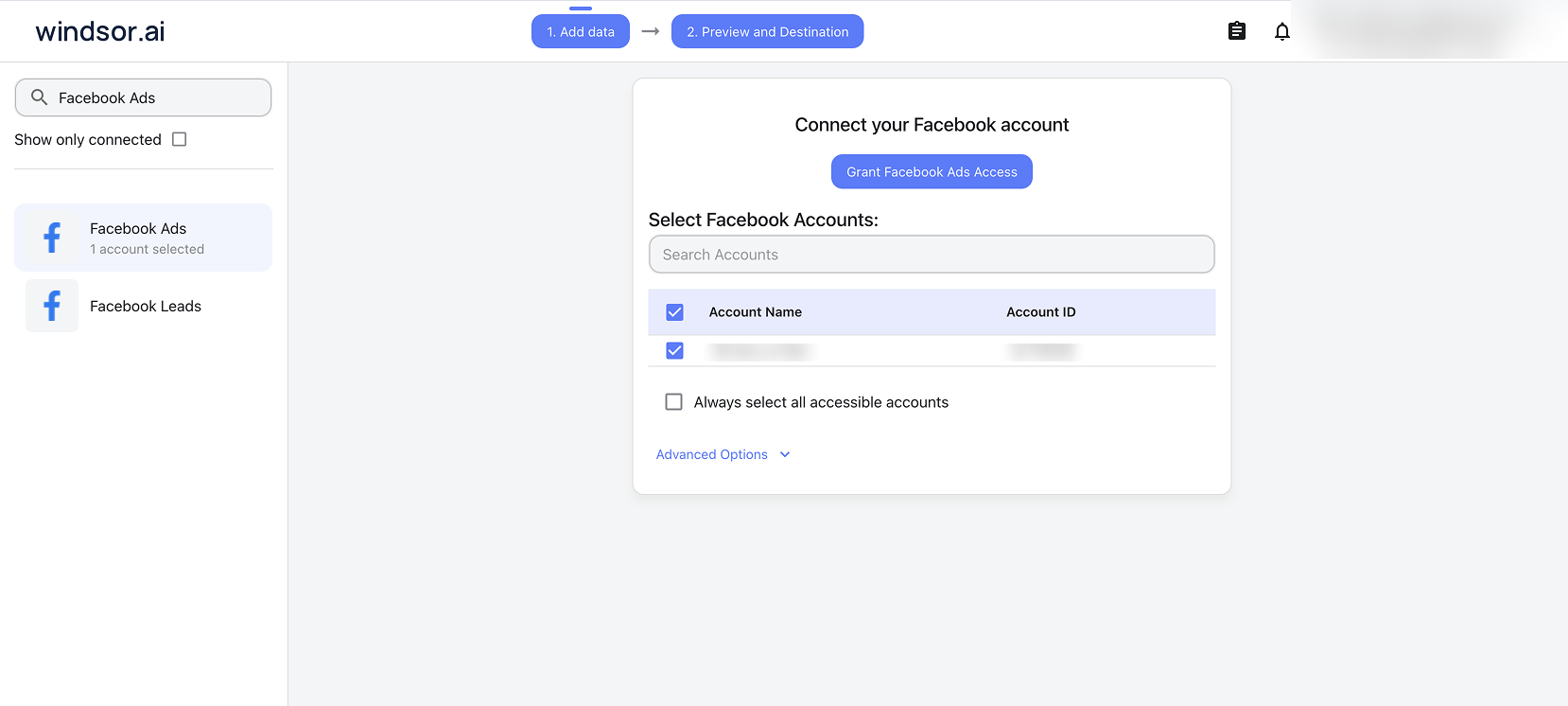
Select your data source
Choose Facebook Ads as your data source and grant access to Windsor.ai.
Install the Windsor.ai connector
Log in to your ChatGPT account and open this Windsor.ai connector page.
Click Connect, then authorize access.

Query and act on your Facebook Ads data in ChatGPT
Ask questions about your connected Facebook Ads data in natural language, and manage your campaigns right away.
Make sure that the Windsor.ai connector is enabled (click the + sign → More → Windsor.ai.)

FAQs
What can I do with Facebook Ads data in ChatGPT?
Once Facebook Ads is connected to ChatGPT, you can:
- Analyze campaign performance with clear summaries of spend, impressions, clicks, conversions, and ROAS across all campaigns.
- Identify top‑performing creatives to see which ads drive the highest engagement, CTR, and conversions, then double down on what works
- Gain audience and targeting insights by discovering which audiences, placements, and demographics deliver the best results and lowest CPA.
- Optimize ad spend by spotting campaigns with high spend but low conversions, then cut spend on underperformers and increase budgets on high‑ROAS ad sets directly from the chat.
- Pause or turn on campaigns and ad sets instantly after reviewing the AI’s recommendations, so you close the gap between insight and action.
- Create new campaigns and ad sets from scratch by describing your targeting, budget, and creative guidelines in plain language, then approving the final plan before it goes live.
- Turn organic wins into paid ads. Spot a Facebook or Instagram post that’s already performing organically, then push it into a paid ad set without leaving the chat.
Can ChatGPT manage my Meta Ads campaigns via Windsor MCP?
Yes. Windsor’s write-enabled MCP lets ChatGPT act on your Meta Ads directly from the chat while you stay in control. Use it to:
- Find campaigns that are draining budget without results.
- Review and confirm which ones to pause or turn back on.
- Shift budgets from underperforming campaigns into proven winners.
- Build a new campaign from scratch: set its objective, budget, and bid strategy, then add ad sets with your targeting and ads with your creative.
- Boost an existing Facebook or Instagram post into a paid ad, no new creative needed.
- Update your Facebook Page’s welcome message directly from the chat.
ChatGPT only executes changes after your explicit confirmation, so every action is auditable. Most, like pausing or budget changes, are reversible; creating a campaign, ad set, or ad can only be paused afterward, not undone, since Meta has no delete action for them.
How do I use write actions with Facebook Ads in ChatGPT?
Write actions work directly through the native Windsor.ai app connection in ChatGPT, the same one you use for reading data. No manual setup, no developer mode, no extra steps.
Known issue (added 6 October 2026): ad creation can fail
Right now, creating a new ad through ChatGPT can fail. This is a bug on Meta’s side affecting many apps, not something specific to Windsor, and Meta has an open, unresolved bug report (track it here). Until Meta fixes it, create the ad directly in Meta Ads Manager instead.
Any write actions that already succeeded are unaffected; campaigns and ad sets you created stay usable. If Meta’s interface asks you to confirm something about the account, confirming there and retrying through ChatGPT sometimes works, though not always. The bug doesn’t affect every account, so a different admin account on the same ad account is also worth trying.
Can ChatGPT create reports from Facebook Ads data?
Yes. ChatGPT can transform your Facebook Ads data into clear visual reports with a single prompt. Instead of manually building dashboards or spreadsheets, you can ask ChatGPT to generate charts, tables, performance summaries, or visual dashboards that highlight key campaign metrics and trends. Export these outputs in formats such as CSV, Excel, or PDF, making it easy to share insights with teams, stakeholders, or clients.
What prompts can I use to analyze Facebook Ads data in ChatGPT?
Beyond simple questions about daily performance, you can use more advanced prompts in ChatGPT to uncover deeper insights from your Facebook Ads data. For example:
-
Identify placements where spend exceeds 15% of the budget but contributes less than 5% of conversions, and suggest a specific budget shift toward the best-performing placement (ignore placements with fewer than 500 impressions).
-
Rank ads by Hook Rate (3-second views divided by impressions) and summarize the messaging angles and visual patterns that separate the top 10% performing creatives from the bottom 25%.
-
Analyze the last 90 days of campaign performance and determine whether ROAS fluctuations are driven by CPM inflation or by creative fatigue based on Frequency and CTR trends.
-
List 'Scale-Ready' campaigns (CPA 30% below target with high budget loss) and campaigns that should be paused due to inefficient spend.
-
Pause every campaign that has spent more than $150 in the last 7 days with a CPA more than 50% above my target, and list each one with its spend and CPA before making any changes.
-
Set the daily budget of my single best-ROAS ad set to $100, and reduce the two worst-ROAS ad sets to $20 each, confirming the exact before-and-after budget for each
How much does it cost to integrate Facebook Ads into ChatGPT using Windsor.ai?
Windsor.ai is free to start, no credit card required. Paid plans start at $19/month and scale by the number of sources and accounts. See the pricing page.
How long does it take to connect Facebook Ads to ChatGPT?
With Windsor.ai’s intuitive connector, the integration process takes just a few minutes. No technical expertise is required; connecting Facebook Ads to ChatGPT is simple, straightforward, and completely code-free.
Do you have helpful links to get started with integrating Facebook Ads and ChatGPT using Windsor.ai?
Yes, we have helpful resources to help you get started. You can explore our official documentation and tutorials for Facebook Ads to ChatGPT integration with Windsor.ai:
Can I combine Facebook Ads data with other marketing channels in ChatGPT?
Yes. Windsor.ai supports 350+ data sources, allowing you to combine Facebook Ads data with platforms like Google Ads, TikTok Ads, CRM systems, and analytics tools for cross-channel analysis in ChatGPT.
How can ChatGPT help optimize my Facebook Ads strategy?
ChatGPT can act as an AI-powered marketing analyst that interprets complex relationships between campaign metrics and delivers structured insights for your Facebook Ads account. Here’s how it can help:
- Detect inefficient ad spend. Identify campaigns or placements with high spend but low conversions and reallocate budget to ads with the highest ROAS.
- Analyze creative performance. Evaluate CTR, engagement, and conversion data to identify top-performing creatives and suggest new messaging variations, creative formats, and value propositions.
- Identify revenue drives. Combine ad data with CRM platforms like Salesforce or HubSpot to see which campaigns generate high-value leads and revenue, not just cheap clicks.
Does this integration support Facebook Organic and Instagram data?
Windsor.ai’s Facebook Ads connector uses the Meta Ads API, so it supports both Facebook Ads and Instagram Ads (paid data). If you want to pull organic metrics, Windsor.ai provides separate connectors for Facebook Page Insights and Instagram Insights (Organic).
Tired of manual Facebook Ads data exports? Try Windsor.ai today to automate your reporting


