 Destinations
 Data sources
 AI insights
 About us
 Careers
 Security
 Customer reviews
 Contact us
 Affiliate program
 Solution partners
 Template gallery
 Looker Studio templates
 Power BI templates
 Excel templates
 Google Sheets templates
 Tableau templates
 Facebook Ads templates
 Google Ads templates
 Data fields & Metrics
 AI prompt library & Guides
 Product documentation
 API documentation
 Case studies
 Blog
Blog Data models
 Windsor vs Supermetrics
 Windsor vs Funnel.io
 Windsor vs Fivetran
 Windsor vs Rivery
 Windsor vs Portermetrics
 Windsor vs Coupler.io
Connect Facebook Ads (Meta) to Copilot Agent
Automatically sync your Facebook Ads data to Microsoft Copilot using the Windsor.ai connector.
Use a Copilot Agent to analyze Facebook Ads performance, get AI-driven insights, and take actions, pause underperformers, adjust budgets, or create new campaigns.
Forget CSVs. Stop copy/paste. Connect in minutes. No code required.
 Sign up with Google
 Free forever plan









Optimize campaign performance with Facebook Ads to Copilot Agent integration
Use Windsor.ai to bring Facebook Ads data into a Copilot Agent in minutes and analyze the effectiveness of your marketing efforts. Explore the core benefits and use cases of this integration:

Creative fatigue detection
Ask Copilot Agent to monitor CTR trends over time and alert you when a specific ad creative starts to decline in engagement, so you can refresh it before performance drops further.

Human language analysis
Identify high-performing creatives and audience segments through natural language querying. Instead of navigating complex dashboards, you can receive instant strategic recommendations based on live Facebook bidding and conversion data.

Cross-channel insights
Combine Facebook Ads with GA4, Shopify, or your CRM to analyze how spikes in Facebook Ads spend correlate with sudden lifts in ‘Direct’ website traffic or organic search volume. Measure the indirect impact of social awareness and scale winning strategies that drive total business growth.

Budget rebalancing
Analyze daily spending patterns across your campaign portfolio to identify budget stuck in low-performing ad sets. The agent can recommend where to shift the budget and execute the change directly from the chat.

Campaign setup from scratch
Brief Copilot on your targeting, budget, and objective, and it will create a new Meta Ads campaign and ad set without opening Ads Manager. Review the full setup in the chat before anything goes live.
Using Windsor.ai to connect data from Facebook Ads to Copilot
Send your Facebook Ads data to Microsoft Copilot with zero engineering support or costly tools. Windsor.ai automatically collects, cleans, and prepares your Facebook Ads data so they are ready for analysis in Copilot Agent.
Generate instant AI-powered insights to optimize ad spend and capitalize on top-performing campaigns.
Available actions
Create Ad Set Create a new ad set in an existing Meta Ads campaign (Facebook or Instagram). Created paused by default so it does not spend until enabled. Budget amounts are in the account currency minor unit (e.g. cents: 5000 means 50.00). Currencies without cents (CLP, COP, CRC, HUF, IDR, ISK, JPY, KRW, PYG, TWD, VND) use whole units: 300000 means 300000 COP. Provide at most one of daily_budget or lifetime_budget; omit both only when the campaign uses campaign budget optimization. lifetime_budget requires end_time. Some optimization goals require promoted_object, a Meta spec naming what is optimized (e.g. {"pixel_id": "<id>", "custom_event_type": "PURCHASE"} for conversions, or {"page_id": "<id>"} for page likes). destination_type sets where the ad sends people; for boosting an existing post (boost_post) use ON_POST with optimization_goal POST_ENGAGEMENT to keep engagement on the post (no call to action needed). A website or undefined destination instead makes Meta require a website URL and call to action in the creative. bid_strategy defaults to the campaign setting; use LOWEST_COST_WITHOUT_CAP for an uncapped ad set, and pass bid_amount with a capped strategy (LOWEST_COST_WITH_BID_CAP or COST_CAP). Ads delivered to the EU require dsa_beneficiary and dsa_payor, naming who benefits from and who pays for the ad. Ads delivered to Taiwan, Singapore, Thailand, Brazil, Australia or India require regional_regulated_categories (e.g. SINGAPORE_UNIVERSAL) together with regional_regulation_identities holding the matching beneficiary and payer ids (e.g. {"singapore_universal_beneficiary": "<id>", "singapore_universal_payer": "<id>"}; Thailand and Brazil use "universal_beneficiary" and "universal_payer"). These are verified identity ids from Meta Business settings > Verified identities; ad account defaults are not inherited by ad sets created through the API. extra_params passes further Meta ad set fields straight to the Graph API for anything this action does not model yet, e.g. {"attribution_spec": [{"event_type": "CLICK_THROUGH", "window_days": 7}]}. Prefer the named parameters where they exist: a key that repeats one already set is rejected, since only one of the two values could win.
Create a new ad set in an existing Meta Ads campaign (Facebook or Instagram). Created paused by default so it does not spend until enabled. Budget amounts are in the account currency minor unit (e.g. cents: 5000 means 50.00). Currencies without cents (CLP, COP, CRC, HUF, IDR, ISK, JPY, KRW, PYG, TWD, VND) use whole units: 300000 means 300000 COP. Provide at most one of daily_budget or lifetime_budget; omit both only when the campaign uses campaign budget optimization. lifetime_budget requires end_time. Some optimization goals require promoted_object, a Meta spec naming what is optimized (e.g. {"pixel_id": "<id>", "custom_event_type": "PURCHASE"} for conversions, or {"page_id": "<id>"} for page likes). destination_type sets where the ad sends people; for boosting an existing post (boost_post) use ON_POST with optimization_goal POST_ENGAGEMENT to keep engagement on the post (no call to action needed). A website or undefined destination instead makes Meta require a website URL and call to action in the creative. bid_strategy defaults to the campaign setting; use LOWEST_COST_WITHOUT_CAP for an uncapped ad set, and pass bid_amount with a capped strategy (LOWEST_COST_WITH_BID_CAP or COST_CAP). Ads delivered to the EU require dsa_beneficiary and dsa_payor, naming who benefits from and who pays for the ad. Ads delivered to Taiwan, Singapore, Thailand, Brazil, Australia or India require regional_regulated_categories (e.g. SINGAPORE_UNIVERSAL) together with regional_regulation_identities holding the matching beneficiary and payer ids (e.g. {"singapore_universal_beneficiary": "<id>", "singapore_universal_payer": "<id>"}; Thailand and Brazil use "universal_beneficiary" and "universal_payer"). These are verified identity ids from Meta Business settings > Verified identities; ad account defaults are not inherited by ad sets created through the API. extra_params passes further Meta ad set fields straight to the Graph API for anything this action does not model yet, e.g. {"attribution_spec": [{"event_type": "CLICK_THROUGH", "window_days": 7}]}. Prefer the named parameters where they exist: a key that repeats one already set is rejected, since only one of the two values could win.
Create Campaign Create a new Meta Ads campaign (Facebook or Instagram). Created paused by default so it does not spend until enabled. objective is a Meta campaign objective (e.g. OUTCOME_TRAFFIC, OUTCOME_LEADS, OUTCOME_SALES). special_ad_categories must list any regulated categories the ads fall under (e.g. HOUSING, EMPLOYMENT, CREDIT) or be empty. Setting a campaign budget enables campaign budget optimization; amounts are in the account currency minor unit (e.g. cents: 5000 means 50.00). Currencies without cents (CLP, COP, CRC, HUF, IDR, ISK, JPY, KRW, PYG, TWD, VND) use whole units: 300000 means 300000 COP. Provide at most one of daily_budget or lifetime_budget. When no campaign budget is set, some accounts require is_adset_budget_sharing_enabled to be specified.
Create a new Meta Ads campaign (Facebook or Instagram). Created paused by default so it does not spend until enabled. objective is a Meta campaign objective (e.g. OUTCOME_TRAFFIC, OUTCOME_LEADS, OUTCOME_SALES). special_ad_categories must list any regulated categories the ads fall under (e.g. HOUSING, EMPLOYMENT, CREDIT) or be empty. Setting a campaign budget enables campaign budget optimization; amounts are in the account currency minor unit (e.g. cents: 5000 means 50.00). Currencies without cents (CLP, COP, CRC, HUF, IDR, ISK, JPY, KRW, PYG, TWD, VND) use whole units: 300000 means 300000 COP. Provide at most one of daily_budget or lifetime_budget. When no campaign budget is set, some accounts require is_adset_budget_sharing_enabled to be specified.
Create Ad Create a new ad in an existing Meta Ads ad set (Facebook or Instagram). Created paused by default so it does not spend until enabled. The simplest way is to provide page_id and link plus optional text (message, headline, description), image_url or image_hash (from create_ad_image) and call_to_action_type; these build a single-image link ad creative automatically. For a Click-to-Message ad, set messaging_destination (MESSENGER or INSTAGRAM_DIRECT) instead of link; the message opens a conversation with the page. For a video ad, upload the video first with create_ad_video and pass its video_id here with page_id and a required thumbnail image_url or image_hash; message becomes the primary text, headline the title, description the caption, and call_to_action_type (with link) adds a button. For advanced cases, pass a full Meta creative spec via creative instead (e.g. {"creative_id": "<id>"} to reuse an existing creative, or {"object_story_spec": {...}}). Provide either the individual creative fields or creative, not both.
Create a new ad in an existing Meta Ads ad set (Facebook or Instagram). Created paused by default so it does not spend until enabled. The simplest way is to provide page_id and link plus optional text (message, headline, description), image_url or image_hash (from create_ad_image) and call_to_action_type; these build a single-image link ad creative automatically. For a Click-to-Message ad, set messaging_destination (MESSENGER or INSTAGRAM_DIRECT) instead of link; the message opens a conversation with the page. For a video ad, upload the video first with create_ad_video and pass its video_id here with page_id and a required thumbnail image_url or image_hash; message becomes the primary text, headline the title, description the caption, and call_to_action_type (with link) adds a button. For advanced cases, pass a full Meta creative spec via creative instead (e.g. {"creative_id": "<id>"} to reuse an existing creative, or {"object_story_spec": {...}}). Provide either the individual creative fields or creative, not both.
Update Campaign Update editable attributes of a Meta Ads campaign (Facebook or Instagram). Provide only the fields to change; at least one is required. spend_cap is a lifetime spend limit in the account currency minor unit (e.g. cents: 5000 means 50.00). Currencies without cents (CLP, COP, CRC, HUF, IDR, ISK, JPY, KRW, PYG, TWD, VND) use whole units: 300000 means 300000 COP. special_ad_categories lists the regulated categories the ads fall under (e.g. HOUSING, EMPLOYMENT, CREDIT) or is empty. Use pause_campaign/enable_campaign to change status and set_campaign_budget to change the budget. objective is fixed at creation and cannot be updated.
Update editable attributes of a Meta Ads campaign (Facebook or Instagram). Provide only the fields to change; at least one is required. spend_cap is a lifetime spend limit in the account currency minor unit (e.g. cents: 5000 means 50.00). Currencies without cents (CLP, COP, CRC, HUF, IDR, ISK, JPY, KRW, PYG, TWD, VND) use whole units: 300000 means 300000 COP. special_ad_categories lists the regulated categories the ads fall under (e.g. HOUSING, EMPLOYMENT, CREDIT) or is empty. Use pause_campaign/enable_campaign to change status and set_campaign_budget to change the budget. objective is fixed at creation and cannot be updated.
Update Ad Set Update editable attributes of a Meta Ads ad set (Facebook or Instagram). Provide only the fields to change; at least one is required. bid_amount is in the account currency minor unit (e.g. cents: 500 means 5.00). Currencies without cents (CLP, COP, CRC, HUF, IDR, ISK, JPY, KRW, PYG, TWD, VND) use whole units: 300000 means 300000 COP. Switching bid_strategy to a capped strategy (LOWEST_COST_WITH_BID_CAP or COST_CAP) requires bid_amount in the same call. end_time is an ISO 8601 timestamp less than one year ahead (e.g. 2027-01-01T00:00:00-0800). Use pause_adset/enable_adset to change status and set_adset_budget to change the budget. Ads delivered to the EU require dsa_beneficiary and dsa_payor, naming who benefits from and who pays for the ad. Ads delivered to Taiwan, Singapore, Thailand, Brazil, Australia or India require regional_regulated_categories (e.g. SINGAPORE_UNIVERSAL) together with regional_regulation_identities holding the matching beneficiary and payer ids (e.g. {"singapore_universal_beneficiary": "<id>", "singapore_universal_payer": "<id>"}; Thailand and Brazil use "universal_beneficiary" and "universal_payer"). These are verified identity ids from Meta Business settings > Verified identities; ad account defaults are not inherited by ad sets created through the API. extra_params passes further Meta ad set fields straight to the Graph API for anything this action does not model yet, e.g. {"attribution_spec": [{"event_type": "CLICK_THROUGH", "window_days": 7}]}. Prefer the named parameters where they exist: a key that repeats one already set is rejected, since only one of the two values could win.
Update editable attributes of a Meta Ads ad set (Facebook or Instagram). Provide only the fields to change; at least one is required. bid_amount is in the account currency minor unit (e.g. cents: 500 means 5.00). Currencies without cents (CLP, COP, CRC, HUF, IDR, ISK, JPY, KRW, PYG, TWD, VND) use whole units: 300000 means 300000 COP. Switching bid_strategy to a capped strategy (LOWEST_COST_WITH_BID_CAP or COST_CAP) requires bid_amount in the same call. end_time is an ISO 8601 timestamp less than one year ahead (e.g. 2027-01-01T00:00:00-0800). Use pause_adset/enable_adset to change status and set_adset_budget to change the budget. Ads delivered to the EU require dsa_beneficiary and dsa_payor, naming who benefits from and who pays for the ad. Ads delivered to Taiwan, Singapore, Thailand, Brazil, Australia or India require regional_regulated_categories (e.g. SINGAPORE_UNIVERSAL) together with regional_regulation_identities holding the matching beneficiary and payer ids (e.g. {"singapore_universal_beneficiary": "<id>", "singapore_universal_payer": "<id>"}; Thailand and Brazil use "universal_beneficiary" and "universal_payer"). These are verified identity ids from Meta Business settings > Verified identities; ad account defaults are not inherited by ad sets created through the API. extra_params passes further Meta ad set fields straight to the Graph API for anything this action does not model yet, e.g. {"attribution_spec": [{"event_type": "CLICK_THROUGH", "window_days": 7}]}. Prefer the named parameters where they exist: a key that repeats one already set is rejected, since only one of the two values could win.
Pause Campaign Pause an active Meta Ads campaign (Facebook or Instagram). Reversible via enable_campaign.
Pause an active Meta Ads campaign (Facebook or Instagram). Reversible via enable_campaign.
Set Campaign Budget Set the daily or lifetime budget of a Meta Ads campaign (Facebook or Instagram). The amount is in the account currency minor unit (e.g. cents: 5000 means 50.00). Currencies without cents (CLP, COP, CRC, HUF, IDR, ISK, JPY, KRW, PYG, TWD, VND) use whole units: 300000 means 300000 COP. Only one budget type applies at a time; setting one replaces the other. Meta rejects frequent budget changes on the same campaign; space out repeated changes instead of adjusting in rapid succession.
Set the daily or lifetime budget of a Meta Ads campaign (Facebook or Instagram). The amount is in the account currency minor unit (e.g. cents: 5000 means 50.00). Currencies without cents (CLP, COP, CRC, HUF, IDR, ISK, JPY, KRW, PYG, TWD, VND) use whole units: 300000 means 300000 COP. Only one budget type applies at a time; setting one replaces the other. Meta rejects frequent budget changes on the same campaign; space out repeated changes instead of adjusting in rapid succession.
Enable Campaign Activate a paused Meta Ads campaign (Facebook or Instagram). Reversible via pause_campaign.
Activate a paused Meta Ads campaign (Facebook or Instagram). Reversible via pause_campaign.
Enable Ad Activate a paused Meta Ads ad (Facebook or Instagram). Reversible via pause_ad.
Activate a paused Meta Ads ad (Facebook or Instagram). Reversible via pause_ad.
Enable Ad Set Activate a paused Meta Ads ad set (Facebook or Instagram). Reversible via pause_adset.
Activate a paused Meta Ads ad set (Facebook or Instagram). Reversible via pause_adset.
Pause Ad Pause an active Meta Ads ad (Facebook or Instagram). Reversible via enable_ad.
Pause an active Meta Ads ad (Facebook or Instagram). Reversible via enable_ad.
Update Ad Creative Edit the creative of an existing Meta Ads ad (Facebook or Instagram): ad copy (message), headline, description, destination link, image, call-to-action button, URL tracking tags and Advantage+ enhancement settings. Meta treats ad creatives as immutable, so this copies the ad's current creative (keeping its name, url_tags and degrees_of_freedom_spec), applies the changes, creates the result as a new creative and re-points the ad at it; the ad keeps its id, but the returned creative id is new. Provide ad_id plus at least one field to change. Editable content fields depend on the creative's media type: link ads support all of them; video ads support message, headline, description, image_url (thumbnail), link and call_to_action_type (the link lives on the button, so adding a link to a video ad without a button also requires call_to_action_type); photo ads only message (the caption) and image_url; text ads only message. For carousel ads (link ads with cards), message edits the text above the cards; headline, description, link, image_url and call_to_action_type live on the cards, so also pass card_index (0-based) to edit one specific card. url_tags (e.g. 'utm_source=x&utm_medium=y') and degrees_of_freedom_spec (a raw Meta spec) can be edited on any creative, including ads that promote an existing organic post (e.g. boosted posts) — but content fields on those ads cannot be edited; edit the post itself instead. Dynamic/catalog creatives cannot be edited at all. Omitted fields keep their current values; to clear url_tags pass an empty string, and to reset degrees_of_freedom_spec to Meta's default enhancement behavior pass an empty object. To swap the ad to a different existing creative, use update_ad instead.
Edit the creative of an existing Meta Ads ad (Facebook or Instagram): ad copy (message), headline, description, destination link, image, call-to-action button, URL tracking tags and Advantage+ enhancement settings. Meta treats ad creatives as immutable, so this copies the ad's current creative (keeping its name, url_tags and degrees_of_freedom_spec), applies the changes, creates the result as a new creative and re-points the ad at it; the ad keeps its id, but the returned creative id is new. Provide ad_id plus at least one field to change. Editable content fields depend on the creative's media type: link ads support all of them; video ads support message, headline, description, image_url (thumbnail), link and call_to_action_type (the link lives on the button, so adding a link to a video ad without a button also requires call_to_action_type); photo ads only message (the caption) and image_url; text ads only message. For carousel ads (link ads with cards), message edits the text above the cards; headline, description, link, image_url and call_to_action_type live on the cards, so also pass card_index (0-based) to edit one specific card. url_tags (e.g. 'utm_source=x&utm_medium=y') and degrees_of_freedom_spec (a raw Meta spec) can be edited on any creative, including ads that promote an existing organic post (e.g. boosted posts) — but content fields on those ads cannot be edited; edit the post itself instead. Dynamic/catalog creatives cannot be edited at all. Omitted fields keep their current values; to clear url_tags pass an empty string, and to reset degrees_of_freedom_spec to Meta's default enhancement behavior pass an empty object. To swap the ad to a different existing creative, use update_ad instead.
Pause Ad Set Pause an active Meta Ads ad set (Facebook or Instagram). Reversible via enable_adset.
Pause an active Meta Ads ad set (Facebook or Instagram). Reversible via enable_adset.
Set Ad Set Budget Set the daily or lifetime budget of a Meta Ads ad set (Facebook or Instagram). The amount is in the account currency minor unit (e.g. cents: 5000 means 50.00). Currencies without cents (CLP, COP, CRC, HUF, IDR, ISK, JPY, KRW, PYG, TWD, VND) use whole units: 300000 means 300000 COP. Only one budget type applies at a time; setting one replaces the other. Meta allows at most 4 budget changes per ad set per hour; further changes are rejected until the hour passes.
Set the daily or lifetime budget of a Meta Ads ad set (Facebook or Instagram). The amount is in the account currency minor unit (e.g. cents: 5000 means 50.00). Currencies without cents (CLP, COP, CRC, HUF, IDR, ISK, JPY, KRW, PYG, TWD, VND) use whole units: 300000 means 300000 COP. Only one budget type applies at a time; setting one replaces the other. Meta allows at most 4 budget changes per ad set per hour; further changes are rejected until the hour passes.
Update Ad Update editable attributes of a Meta Ads ad (Facebook or Instagram). Provide only the fields to change; at least one is required. creative swaps the ad to a different creative and is a Meta creative reference (e.g. {"creative_id": "<id>"}). conversion_domain is the registrable domain the ad drives conversions to (e.g. example.com), used for conversion attribution. display_sequence orders the ad within a sequenced campaign. Use pause_ad/enable_ad to change status.
Update editable attributes of a Meta Ads ad (Facebook or Instagram). Provide only the fields to change; at least one is required. creative swaps the ad to a different creative and is a Meta creative reference (e.g. {"creative_id": "<id>"}). conversion_domain is the registrable domain the ad drives conversions to (e.g. example.com), used for conversion attribution. display_sequence orders the ad within a sequenced campaign. Use pause_ad/enable_ad to change status.
Boost Post Boost (promote) an existing organic Facebook or Instagram post by creating a paid ad for it in an existing Meta Ads ad set. Provide the full post id (in '{page_id}_{post_id}' form, as it appears in the connector data) and the ad set to place the ad in. The ad reuses the published post as its creative via object_story_id, so no new copy or media is created. The target ad set MUST belong to an engagement campaign (objective OUTCOME_ENGAGEMENT) and name the post's page in its promoted_object; build it with create_campaign and create_adset first if needed. Two ad set shapes work: an ON_POST destination with optimization_goal POST_ENGAGEMENT (engagement on the post itself, no call-to-action needed), or a FACEBOOK_PAGE destination with optimization_goal PROFILE_AND_PAGE_ENGAGEMENT, which additionally requires a call-to-action button on the ad — pass call_to_action_type (e.g. VISIT_PROFILE) for that case, otherwise Meta rejects the ad with a 'call-to-action required' error. The page promoted by the ad set and the post's page must match, and the access token must have ads permission on that page. Created paused by default so it does not spend until enabled; use enable_ad to activate it.
Boost (promote) an existing organic Facebook or Instagram post by creating a paid ad for it in an existing Meta Ads ad set. Provide the full post id (in '{page_id}_{post_id}' form, as it appears in the connector data) and the ad set to place the ad in. The ad reuses the published post as its creative via object_story_id, so no new copy or media is created. The target ad set MUST belong to an engagement campaign (objective OUTCOME_ENGAGEMENT) and name the post's page in its promoted_object; build it with create_campaign and create_adset first if needed. Two ad set shapes work: an ON_POST destination with optimization_goal POST_ENGAGEMENT (engagement on the post itself, no call-to-action needed), or a FACEBOOK_PAGE destination with optimization_goal PROFILE_AND_PAGE_ENGAGEMENT, which additionally requires a call-to-action button on the ad — pass call_to_action_type (e.g. VISIT_PROFILE) for that case, otherwise Meta rejects the ad with a 'call-to-action required' error. The page promoted by the ad set and the post's page must match, and the access token must have ads permission on that page. Created paused by default so it does not spend until enabled; use enable_ad to activate it.
Set Page Welcome Message Set or update the automated welcome message (greeting / ice breaker) shown when a user opens the conversation from a Meta Ads Click-to-Message ad (Messenger or Instagram, OUTCOME_ENGAGEMENT / CONVERSATIONS). The welcome message lives on the ad creative, which Meta treats as immutable, so this builds a new creative that copies the ad's existing creative and only swaps the welcome message, then re-points the ad at it. Provide ad_id plus either welcome_message (plain greeting text, the common case) or welcome_message_spec (a full page_welcome_message structure for ice breakers / quick replies), not both. The change is verified by reading the new creative back; the action fails if Meta did not persist the value.
Set or update the automated welcome message (greeting / ice breaker) shown when a user opens the conversation from a Meta Ads Click-to-Message ad (Messenger or Instagram, OUTCOME_ENGAGEMENT / CONVERSATIONS). The welcome message lives on the ad creative, which Meta treats as immutable, so this builds a new creative that copies the ad's existing creative and only swaps the welcome message, then re-points the ad at it. Provide ad_id plus either welcome_message (plain greeting text, the common case) or welcome_message_spec (a full page_welcome_message structure for ice breakers / quick replies), not both. The change is verified by reading the new creative back; the action fails if Meta did not persist the value.
Create Ad Video Upload a video to a Meta Ads ad account from a public URL so it can be used in a video ad. Meta fetches the file from video_url and transcodes it; the action waits until the video is ready and returns its video_id. Pass that video_id to create_ad together with page_id and a thumbnail image_url to build the video ad. The upload cannot be undone via an action.
Upload a video to a Meta Ads ad account from a public URL so it can be used in a video ad. Meta fetches the file from video_url and transcodes it; the action waits until the video is ready and returns its video_id. Pass that video_id to create_ad together with page_id and a thumbnail image_url to build the video ad. The upload cannot be undone via an action.
Duplicate Ad Set Duplicate an existing Meta Ads ad set (Facebook or Instagram). The copy keeps the source targeting, budget and schedule. Copied paused by default so it does not spend until enabled. Set status_option to active to launch it, or inherited to keep the source status. Set campaign_id to move the copy to another campaign, or omit it to keep the copy in the source campaign. Set deep_copy to also duplicate the ads in the ad set; a synchronous copy is limited to 3 ads. There is no delete action, so pausing the copy does not remove it.
Duplicate an existing Meta Ads ad set (Facebook or Instagram). The copy keeps the source targeting, budget and schedule. Copied paused by default so it does not spend until enabled. Set status_option to active to launch it, or inherited to keep the source status. Set campaign_id to move the copy to another campaign, or omit it to keep the copy in the source campaign. Set deep_copy to also duplicate the ads in the ad set; a synchronous copy is limited to 3 ads. There is no delete action, so pausing the copy does not remove it.
Create Ad Image Upload one or more images (JPEG, PNG or GIF, up to 30 MB each, at most 20 images and 100 MB per request) to a Meta Ads ad account and return one image_hash per image, in the order the files were sent. The images are sent as files uploaded with the request, not as params or URLs; Meta's image endpoint has no URL option. Each image appears in the account's image library under its filename. Use each image_hash in create_ad via the creative field, e.g. object_story_spec.link_data.child_attachments[].image_hash for carousel cards. Meta deduplicates images by content, so re-uploading the same file returns the same image_hash. The upload cannot be undone via an action.
Upload one or more images (JPEG, PNG or GIF, up to 30 MB each, at most 20 images and 100 MB per request) to a Meta Ads ad account and return one image_hash per image, in the order the files were sent. The images are sent as files uploaded with the request, not as params or URLs; Meta's image endpoint has no URL option. Each image appears in the account's image library under its filename. Use each image_hash in create_ad via the creative field, e.g. object_story_spec.link_data.child_attachments[].image_hash for carousel cards. Meta deduplicates images by content, so re-uploading the same file returns the same image_hash. The upload cannot be undone via an action.














How to connect Facebook Ads to Copilot Agent with Windsor.ai
Explore our step-by-step guide to integrate your Facebook Ads data into Copilot with the Windsor.ai connector.
Connect data source in Windsor.ai dashboard
Connect your Facebook Ads to Windsor.ai. Select the necessary account(s) you want to pull data from and click “Next.”

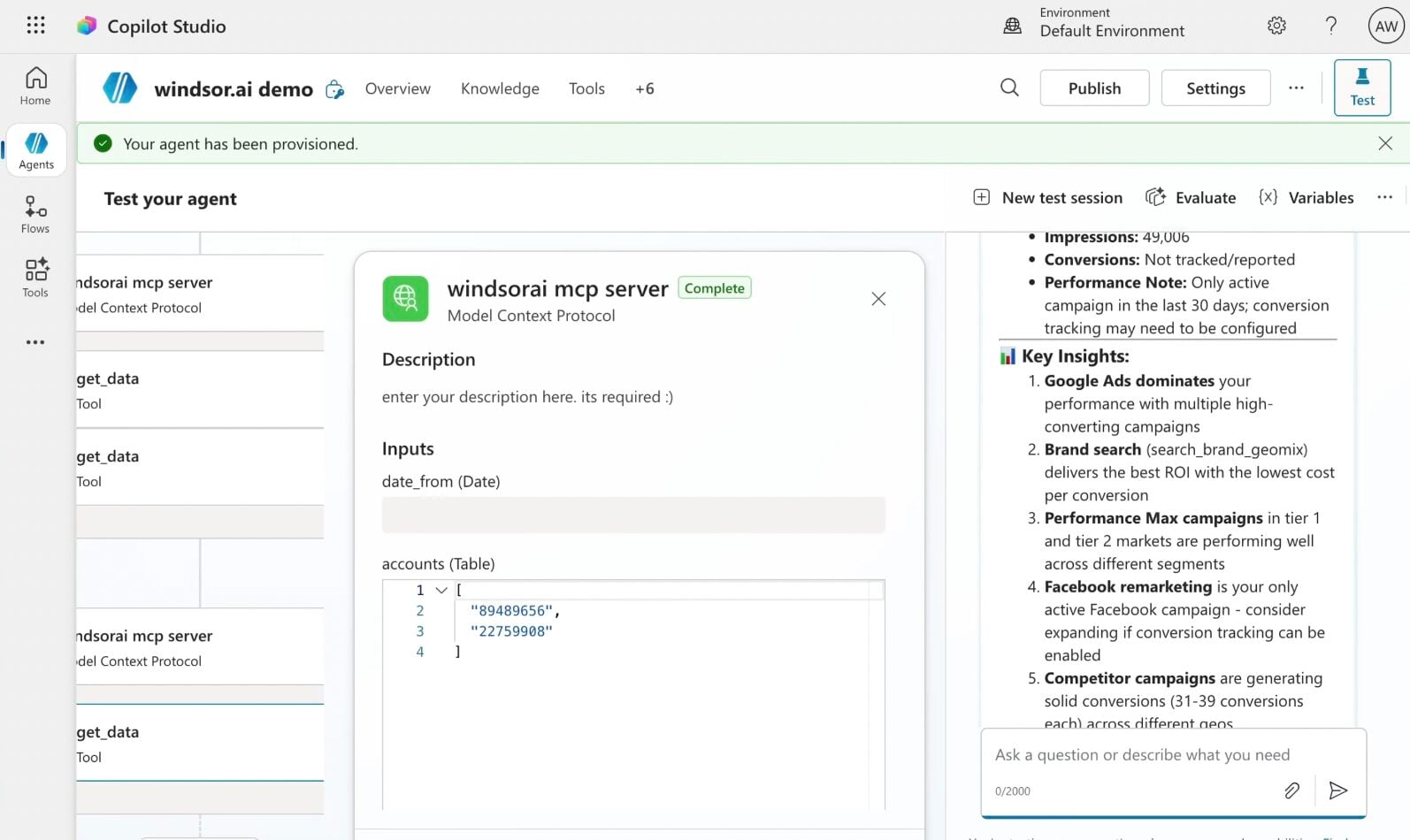
Create a new agent (Windsor MCP) in Copilot
In Microsoft Copilot Studio, create a new agent.
Click + Add tool and select + New tool -> Model Context Protocol.
- Server Name: Windsor MCP
- Server URL: https://mcp.windsor.ai
- Authentication: API Key
- Header name: Authorization

Create a new connection
On the next screen, click the dropdown under ‘Not connected’ and select Create new connection.
⚠️ Important: Enter your Windsor API key with the Bearer prefix.

Confirm credentials and start querying
Start a new chat. Copilot will prompt you to connect to Windsor MCP via the Connections manager. Click Connect -> Submit.
Return to the chat and click Retry in your agent prompt.
You can now ask questions about your integrated Windsor.ai data and act on insights directly from the chat.
FAQs
Can I analyze multiple Facebook Ad Accounts at once?
Yes. The Windsor.ai connector supports multiple ad accounts simultaneously, which is especially useful for agencies, multi-brand teams, or businesses with several accounts.
Can it compare my Facebook Ads performance against my Shopify sales?
Absolutely. By connecting both Facebook and your e-commerce data through Windsor.ai, the agent can analyze overall business performance and determine if a spike in ad spend resulted in a corresponding lift in total revenue.
Can Copilot Agent manage my Meta Ads campaigns?
Yes. Windsor MCP lets Copilot Agent act on your Meta Ads account directly in the chat, no need to open Meta Ads Manager:
- Turn campaigns, ad sets, and ads on or off.
- Adjust campaign and ad set budgets (daily or lifetime).
- Build a new campaign from scratch: set its objective, budget, and bid strategy, then add ad sets and ads underneath.
- Edit an existing campaign, ad set, or ad. Rename it, change the bid strategy, adjust targeting, swap in a new creative, or set a spend cap, no need to rebuild it.
- Update the automated greeting on a Click-to-Message ad (Messenger or Instagram), so your opening message stays current without touching Meta Ads Manager.
- Boost an existing Facebook or Instagram post into a paid ad, no new creative needed.
Every change runs only on your explicit instruction; nothing is paused, rebudgeted, edited, or created in your account on its own.
Can the Copilot Agent alert me in Microsoft Teams?
Yes. By using Copilot Agents within Microsoft Power Platform, you can automatically trigger alerts when your Facebook Ads performance crosses defined thresholds, enabling real-time, data-driven decisions.
Can the Copilot Agent help me identify wasted ad spend?
Yes. You can ask the agent to ‘Identify campaigns with spend over $100 and zero conversions in the last 7 days.’ The agent will scan your Facebook Ads data to list underperforming campaigns that should be paused or optimized.
What prompts can I use when analyzing Facebook Ads data in Copilot Agent?
Here are examples of more advanced prompts you can use to dive deep into your Facebook Ads performance:
-
Analyze the correlation between my Facebook Ads spend and my 'Direct' and 'Organic' website traffic over the last 60 days. Did spikes in Facebook spend lead to a delayed lift in non-paid traffic?
-
I want to increase my Facebook Ads budget by 30% next month. Analyze the last 90 days of data to identify which 2 campaigns have the most stable performance (lowest volatility in CPA) and are the safest candidates for this budget increase.
-
Using data from both Facebook Ads and my Shopify/CRM, identify which Facebook Campaign brought in customers with the highest Average Order Value (AOV) over the last 90 days. Is our 'highest ROAS' campaign also bringing in our 'highest value' long-term customers?
-
Analyze the relationship between 'Ad Frequency' and 'CPA' for our top 5 spending campaigns over the last 60 days. Identify the specific 'Frequency Ceiling', the exact point where CPA begins to spike by more than 20%. Create a rule-based recommendation for when we should automatically refresh the creative for these audiences.
How much does it cost to integrate Facebook Ads into Copilot using Windsor.ai?
Windsor.ai’s pricing for Microsoft Copilot data integration varies depending on the number of connected accounts and data sources. We offer absolutely transparent pricing plans for diversified business needs and budgets, including a forever-free plan.
How long does it take to connect Facebook Ads to Copilot?
With Windsor MCP, the integration process takes a few minutes. No technical expertise or coding is required; connecting data to Copilot is simple, straightforward, and accessible to everyone.
Do you have helpful links to get started with integrating Facebook Ads and Copilot Agent using Windsor.ai?
Yes, we have helpful resources to help you get started. You can explore our official documentation and tutorials for seamless Facebook Ads to Copilot Agent integration with Windsor.ai:
Tired of manual Facebook Ads data exports? Try Windsor.ai today to automate your reporting


